API Gateway Patterns for Salesforce: When MuleSoft Is Not the Answer
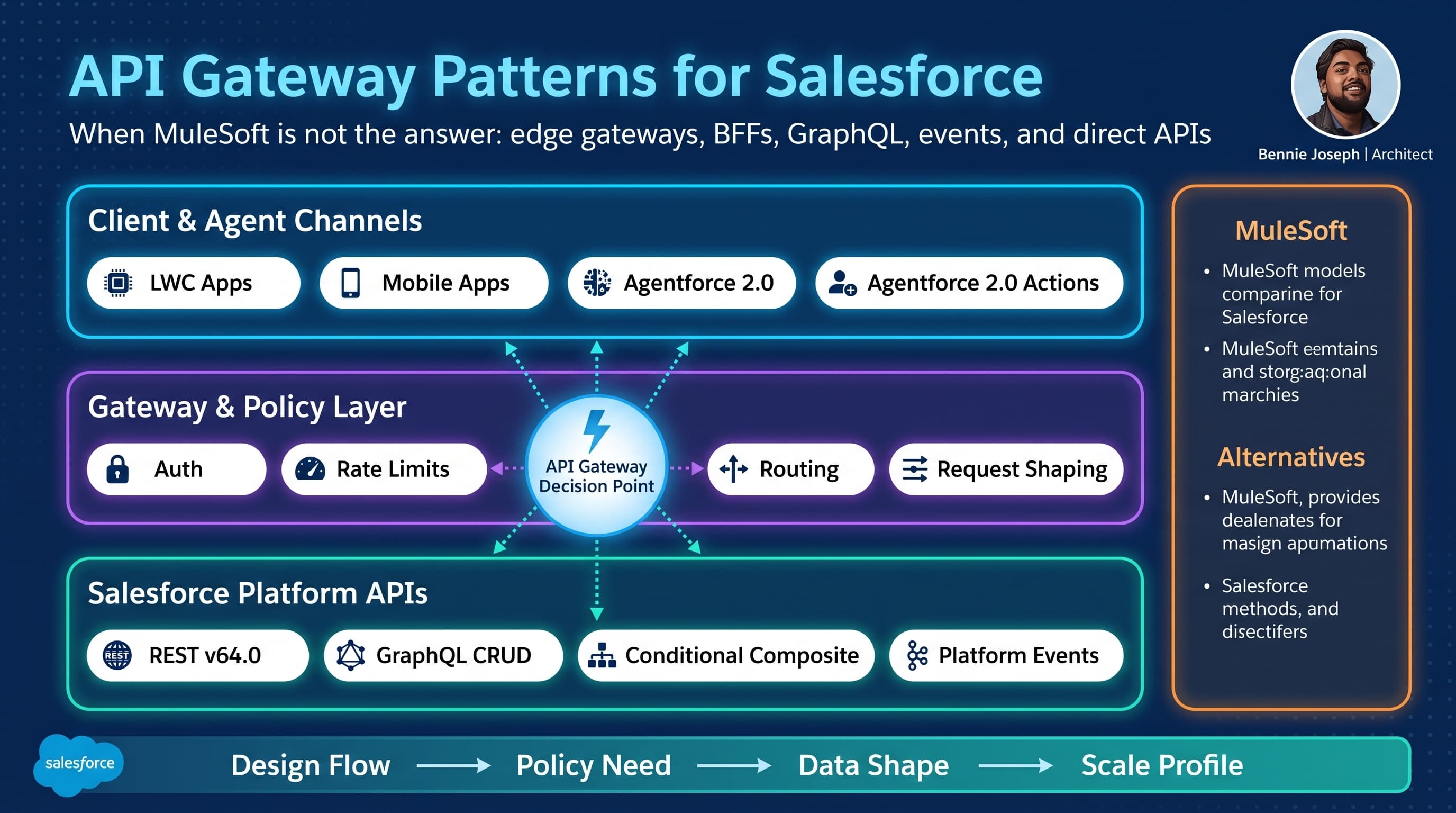
MuleSoft is excellent when the problem is API-led connectivity, system orchestration, reusable enterprise APIs, and governance across many systems.
But here’s the unpopular take: a lot of Salesforce API gateway conversations start with MuleSoft because the enterprise already owns it, not because the integration problem actually needs it.
I’ve seen teams put a full MuleSoft layer in front of Salesforce for simple read/write APIs, lightweight Experience Cloud traffic, internal LWC backends, and even one-off batch ingestion jobs. Six months later, nobody can explain why a request needs to cross four hops before it updates an Account. Latency goes up. Debugging gets worse. Release coordination becomes painful. The integration team becomes a bottleneck for every Salesforce change.
This post is my practical view of salesforce api gateway patterns mulesoft alternatives integration decisions. Not “MuleSoft bad.” That is lazy. MuleSoft solves real enterprise problems. But it is not the only gateway pattern, and it should not be the default answer for every Salesforce API surface.
I care about three things when I design this layer:
- Who owns the API contract?
- Where should policy enforcement happen?
- What breaks at 1K, 100K, and 10M records or users?
If those answers are fuzzy, the gateway becomes architecture theater.
First, separate API gateway from integration platform
People use “API gateway” and “integration layer” interchangeably. That mistake causes expensive designs.
An API gateway is primarily a policy and traffic control layer:
- Authentication and authorization enforcement
- Rate limiting and quotas
- Request validation
- Routing
- Header normalization
- Observability
- Versioning
- Caching where safe
- Payload size controls
- Threat protection
An integration platform does more than gateway work:
- Orchestration across systems
- Message transformation
- Canonical data models
- Protocol mediation
- Long-running transactions
- Error queues and replay
- API lifecycle management
- Reusable system/process/experience API layers
MuleSoft can do both. That does not mean every Salesforce API needs both.
For Salesforce specifically, the platform already gives you a lot:
- Salesforce REST API v64.0
- GraphQL API with full CRUD support in Summer ’26
- Conditional Composite API for reducing API call volume
- Named Query API for stable query contracts
- Platform Events and Change Data Capture
- External Services
- Named Credentials and External Credentials
- Data 360 federation, grounding, vector search, and Retriever API
- Agentforce 2.0 actions, multi-agent orchestration, and Atlas Reasoning Engine v2
- Salesforce MCP via
@salesforce/mcpfor tooling and agent-driven platform operations
So before I add MuleSoft, Apigee, Kong, AWS API Gateway, Azure API Management, Cloudflare, Fastly, or a custom BFF, I ask: what capability is Salesforce missing for this use case?
The gateway patterns I actually use with Salesforce
I usually see six useful patterns.
Pattern 1: Direct Salesforce API with platform-native controls
This is the simplest pattern: clients call Salesforce APIs directly using OAuth, connected apps, scopes, profiles, permission sets, user mode execution, and standard API limits.
Use it when:
- The consumer is trusted.
- The data contract is close to Salesforce’s object model.
- You do not need heavy transformation.
- You can tolerate Salesforce API semantics.
- The client can handle OAuth correctly.
- You want fewer moving parts.
I use this for internal tools, trusted enterprise apps, and admin automation.
In Summer ’26, the GraphQL API being GA with full CRUD support changes this decision. For some use cases, I would rather expose a carefully managed GraphQL operation than build a pass-through gateway that only wraps REST endpoints.
The risk is that direct API access can leak your Salesforce data model into consuming systems. Once ten external apps depend on Custom_Object__c.External_Status__c, that field becomes part of your enterprise contract whether you intended it or not.
Pattern 2: Thin edge gateway in front of Salesforce
This is my default when I need policy enforcement but not orchestration.
The gateway handles:
- JWT validation
- Client-level rate limiting
- IP allowlisting or mTLS
- Request schema validation
- Routing to Salesforce REST, GraphQL, or Composite APIs
- Correlation IDs
- Basic response normalization
- Centralized logging
It does not contain complex business logic. It does not become a second Salesforce. It does not transform every object into an enterprise canonical model unless there is a real reason.
Good fits:
- Mobile app APIs
- Partner APIs
- Public-facing Experience Cloud adjacent APIs
- Agentforce action endpoints that need additional external policy checks
- Lightweight SaaS integrations
This can be implemented with AWS API Gateway, Azure API Management, Apigee, Kong, NGINX, Cloudflare Workers, Fastly Compute, or a small Node/TypeScript service.
Pattern 3: Backend-for-frontend for Salesforce channels
A BFF is not just a gateway. It is a channel-specific backend.
I use this when an LWC, mobile app, partner portal, or agent experience needs a clean API designed around user tasks rather than Salesforce objects.
For example:
GET /customer-summary/{accountId}POST /renewal-workspace/{opportunityId}/approve-discountGET /field-service-day-view?technicianId=...
Behind the BFF, it may call Salesforce GraphQL, REST, Apex REST, Conditional Composite API, or external services.
This pattern became more attractive with LWC native state management GA in Summer ’26. Client-side state is better now, but I still do not want complex cross-system composition in the browser. LWC should manage interaction state, not become the integration layer.
Pattern 4: Event-first integration, no request gateway
A lot of teams reach for an API gateway when the actual requirement is asynchronous propagation.
If the question is “how do we tell billing that an Opportunity was Closed Won?” then a synchronous API gateway may be the wrong primitive.
Use events when:
- The consumer does not need an immediate response.
- The process tolerates eventual consistency.
- You need fan-out.
- You need replay.
- You want lower coupling.
- You expect spikes.
Salesforce Platform Events and CDC are often better than building a synchronous gateway that becomes a choke point.
For heavier event architectures, I’ve used Kafka, AWS EventBridge, Azure Event Grid, and MuleSoft Anypoint MQ depending on the enterprise stack.
Pattern 5: API composition with Salesforce Conditional Composite API
Conditional Composite API is underused in Salesforce gateway design. It can reduce API call volume significantly when the client needs dependent operations.
Instead of a gateway making five REST calls and stitching responses, you can sometimes push the dependency chain into Salesforce’s API layer.
This is useful when:
- The transaction is Salesforce-centric.
- The dependency graph is straightforward.
- You need fewer round trips.
- You want Salesforce to own transactional behavior where appropriate.
It is not a replacement for complex orchestration, but it avoids unnecessary middleware logic.
Pattern 6: MuleSoft for real enterprise mediation
I still choose MuleSoft when the integration problem needs MuleSoft.
That usually means:
- Multiple systems of record
- Reusable enterprise APIs
- Canonical data model enforcement
- Complex transformations
- Protocol mediation
- API product governance
- Centralized integration operations
- Cross-domain orchestration
- Existing enterprise integration CoE ownership
- Strong need for Anypoint policies, exchange, monitoring, and lifecycle controls
MuleSoft earns its place when it reduces enterprise complexity. It loses its place when it adds complexity to a simple Salesforce API problem.
Decision matrix: MuleSoft and alternatives
Here is the matrix I use in architecture reviews. It is intentionally blunt.
| Pattern | Best fit | Avoid when | Strengths | Tradeoffs |
|---|---|---|---|---|
| Direct Salesforce API | Trusted internal consumers, admin automation, Salesforce-shaped contracts | External clients, unstable object model, strict traffic policies | Lowest latency, lowest cost, fewer hops | Exposes platform model, harder central throttling |
| Thin edge gateway | Partner/mobile APIs, policy enforcement, simple routing | Complex orchestration or deep transformations | Strong security boundary, fast, cloud-native | Can become custom middleware if governance is weak |
| BFF | LWC, mobile, portal, agent workspaces | Many channels need identical contract | Task-based APIs, better UX performance | Channel-specific APIs can proliferate |
| Salesforce GraphQL API | Read/write UI composition, controlled data graph access | Highly procedural workflows | Fewer calls, explicit data shape, CRUD support | Needs contract discipline and query governance |
| Conditional Composite API | Salesforce-centric dependent operations | Cross-system transactions | Reduces API calls, keeps work near Salesforce | Not a general orchestration engine |
| Platform Events / CDC | Async propagation, fan-out, replay | Immediate response required | Loose coupling, scalable spikes | Eventual consistency, consumer replay design needed |
| MuleSoft | Enterprise mediation, reusable APIs, orchestration | Simple pass-through or Salesforce-only operations | Governance, transformation, lifecycle, operations | Cost, latency, delivery dependency |
| Apigee / Kong / Azure APIM / AWS API Gateway | API policy layer across cloud estates | Deep integration logic required | Strong gateway features, familiar cloud operations | Still need integration design behind it |
| Custom TypeScript gateway | Product-specific API surface, tight engineering control | Enterprise shared API platform requirement | Precise behavior, developer velocity | You own everything: security, ops, upgrades |
The important part is not the tool. The important part is knowing which problem you are solving.
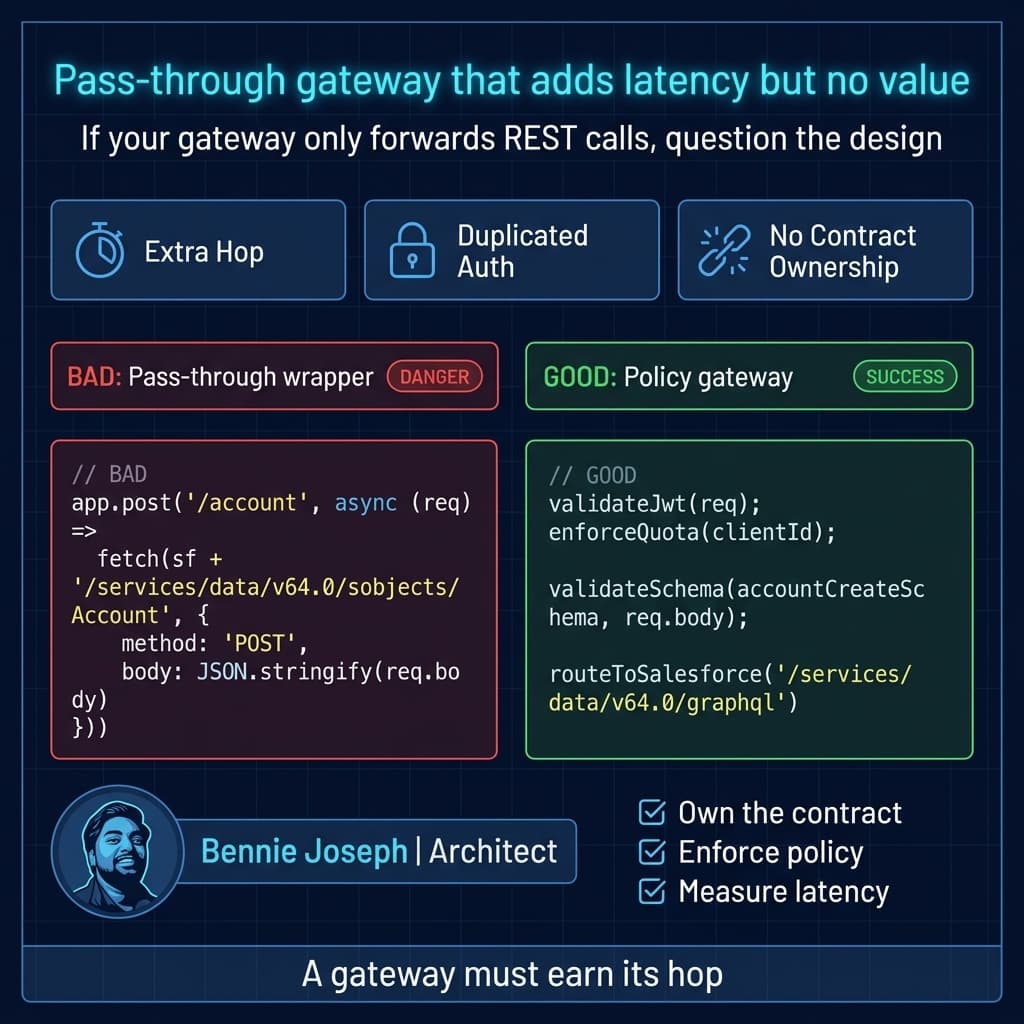
Real-world example: removing MuleSoft from a high-volume partner API
One enterprise project that shaped my view involved a partner order-status API.
The original design looked like this:
Partner app → External API gateway → MuleSoft → Salesforce Apex REST → SOQL queries → Response
MuleSoft was not transforming much. It validated a few headers, mapped three field names, called Salesforce, and returned the response. The team had added MuleSoft because “all APIs go through MuleSoft.”
The numbers were not huge at first:
- 20 partner users
- Around 1K requests per day
- One Salesforce org
- One API operation
- Simple Account and Order lookup
At 1K requests per day, nobody cared. The design worked.
Then the partner rolled it into its call-center desktop. Traffic jumped to 100K+ requests per day, with sharp spikes during regional outages. The symptoms started:
- Partner screens were slow.
- MuleSoft workers were fine, but Salesforce API calls spiked.
- Salesforce debug was painful because correlation IDs were inconsistent.
- The Apex REST endpoint ran queries based on raw request fields.
- The partner retried aggressively on timeout, causing duplicate load.
- Every schema change required coordination across three teams.
We reviewed the actual behavior. MuleSoft was not acting as an integration platform. It was acting as a thin policy gateway, but with a heavier operational model than required.
The redesigned pattern was:
Partner app → Cloud gateway → Salesforce GraphQL / Apex service boundary
We did four things:
- Moved JWT validation, quota, correlation ID, and retry controls into the cloud gateway.
- Replaced generic Apex REST reads with a controlled GraphQL query for the read-heavy path.
- Kept one Apex endpoint only for a business operation that required server-side validation.
- Added client-specific rate limits and response caching for safe reference data.
The result was not magical, but it was clean:
- Fewer hops
- Lower median latency
- Cleaner logs
- Faster releases
- Clear ownership: gateway team owned policy; Salesforce team owned business contract
- MuleSoft remained available for integrations that actually needed orchestration
That last point matters. We did not “remove MuleSoft from the enterprise.” We removed it from the wrong problem.
What belongs in the gateway?
I have a short list of things I’m comfortable putting in an API gateway for Salesforce.
Good gateway responsibilities
- Validate tokens and scopes.
- Enforce client quotas.
- Reject oversized payloads.
- Block suspicious request patterns.
- Attach correlation IDs.
- Normalize headers.
- Route to Salesforce APIs.
- Validate request schema.
- Cache safe read-only reference responses.
- Convert external error format to an agreed API error contract.
- Protect Salesforce from retry storms.
Bad gateway responsibilities
- Reimplementing Salesforce sharing logic.
- Making complex business decisions.
- Running multi-step compensation workflows without a real process model.
- Owning canonical customer truth without data governance.
- Translating every Salesforce field forever.
- Hiding bad Salesforce data modeling.
- Becoming the only place anyone understands the integration.
A gateway is a bouncer, traffic cop, and contract guard. It is not the business.
A practical TypeScript gateway example
Here is a simplified TypeScript example of a thin gateway route in front of Salesforce. This is not production-complete, but it shows the shape I like: validate policy, validate contract, call Salesforce, preserve correlation, and avoid business logic sprawl.
import Fastify, { FastifyReply, FastifyRequest } from "fastify";
import { z } from "zod";
import crypto from "node:crypto";

const app = Fastify({ logger: true });

const accountSummaryRequest = z.object({
  externalAccountNumber: z.string().min(3).max(40),
  includeOpenCases: z.boolean().default(false)
});

type AccountSummaryRequest = z.infer<typeof accountSummaryRequest>;

const SALESFORCE_BASE_URL = process.env.SALESFORCE_BASE_URL!;
const SALESFORCE_ACCESS_TOKEN = process.env.SALESFORCE_ACCESS_TOKEN!;

function getCorrelationId(req: FastifyRequest): string {
  const existing = req.headers["x-correlation-id"];
  return typeof existing === "string" && existing.length < 100
    ? existing
    : crypto.randomUUID();
}

async function enforceClientQuota(clientId: string): Promise<void> {
  // In production, use Redis, gateway-native quota policy, or cloud API management.
  // Keep the implementation centralized and observable.
  if (!clientId || clientId === "blocked-client") {
    throw new Error("Client is not allowed to call this API");
  }
}

async function callSalesforceGraphQL(
  query: string,
  variables: Record<string, unknown>,
  correlationId: string
) {
  const response = await fetch(`${SALESFORCE_BASE_URL}/services/data/v64.0/graphql`, {
    method: "POST",
    headers: {
      Authorization: `Bearer ${SALESFORCE_ACCESS_TOKEN}`,
      "Content-Type": "application/json",
      "X-Correlation-Id": correlationId
    },
    body: JSON.stringify({ query, variables })
  });

  const body = await response.json();

  if (!response.ok) {
    throw new Error(`Salesforce GraphQL failed: ${response.status} ${JSON.stringify(body)}`);
  }

  return body;
}

app.post(
  "/v1/account-summary",
  async (
    req: FastifyRequest<{ Body: AccountSummaryRequest }>,
    reply: FastifyReply
  ) => {
    const correlationId = getCorrelationId(req);
    reply.header("X-Correlation-Id", correlationId);

    const clientId = String(req.headers["x-client-id"] ?? "");
    await enforceClientQuota(clientId);

    const input = accountSummaryRequest.parse(req.body);

    const query = `
      query AccountSummary($externalAccountNumber: String!) {
        uiapi {
          query {
            Account(
              where: {
                External_Account_Number__c: { eq: $externalAccountNumber }
              }
              first: 1
            ) {
              edges {
                node {
                  Id
                  Name { value }
                  Status__c { value }
                  Owner {
                    Name { value }
                  }
                }
              }
            }
          }
        }
      }
    `;

    const sfResult = await callSalesforceGraphQL(
      query,
      { externalAccountNumber: input.externalAccountNumber },
      correlationId
    );

    const accountNode =
      sfResult?.data?.uiapi?.query?.Account?.edges?.[0]?.node ?? null;

    if (!accountNode) {
      return reply.code(404).send({
        error: "ACCOUNT_NOT_FOUND",
        correlationId
      });
    }

    return reply.send({
      correlationId,
      account: {
        id: accountNode.Id,
        name: accountNode.Name?.value,
        status: accountNode.Status__c?.value,
        ownerName: accountNode.Owner?.Name?.value
      }
    });
  }
);

app.listen({ port: 8080, host: "0.0.0.0" });
A few design choices are intentional:
- The external contract is not the Salesforce object model.
- The gateway validates input before Salesforce sees it.
- Correlation ID is mandatory.
- The gateway does not decide account eligibility, pricing, discounts, or sharing.
- The Salesforce API version is explicit:
v64.0. - The route is task-based: account summary, not generic SOQL proxy.
The worst version of this service would accept arbitrary SOQL or arbitrary GraphQL from the client. Do not build that. You are not creating an API. You are creating an attack surface.
Where Apex still belongs
Not every Salesforce-facing API should go directly to REST or GraphQL. Apex still belongs at the service boundary when Salesforce must enforce business behavior transactionally.
For example, approving a discount may require:
- Checking opportunity stage
- Verifying the user’s permission
- Applying discount thresholds
- Creating an approval record
- Updating quote fields
- Publishing an event
- Returning a domain-specific result
That is not a gateway responsibility. That belongs in Salesforce domain logic.
In Apex, I keep the API boundary small and explicit. With Salesforce API v64.0 and the v67.0 direction toward user mode defaults, I still prefer being explicit about sharing and user-mode data access in code that has integration impact.
@RestResource(urlMapping='/v1/discount-approval/*')
global with sharing class DiscountApprovalApi {
    global class ApprovalRequest {
        public Id opportunityId;
        public Decimal requestedDiscount;
        public String reason;
    }

    global class ApprovalResponse {
        public String status;
        public String message;
        public Id approvalRecordId;
    }

    @HttpPost
    global static ApprovalResponse requestApproval() {
        RestRequest req = RestContext.request;
        ApprovalRequest input = (ApprovalRequest) JSON.deserialize(
            req.requestBody.toString(),
            ApprovalRequest.class
        );

        if (input.opportunityId == null || input.requestedDiscount == null) {
            RestContext.response.statusCode = 400;
            ApprovalResponse bad = new ApprovalResponse();
            bad.status = 'REJECTED';
            bad.message = 'opportunityId and requestedDiscount are required';
            return bad;
        }

        Opportunity opp = [
            SELECT Id, StageName, Amount, OwnerId
            FROM Opportunity
            WHERE Id = :input.opportunityId
            WITH USER_MODE
            LIMIT 1
        ];

        if (opp.StageName == 'Closed Won' || opp.StageName == 'Closed Lost') {
            RestContext.response.statusCode = 409;
            ApprovalResponse conflict = new ApprovalResponse();
            conflict.status = 'REJECTED';
            conflict.message = 'Cannot request discount approval on a closed opportunity';
            return conflict;
        }

        Discount_Approval__c approval = new Discount_Approval__c(
            Opportunity__c = opp.Id,
            Requested_Discount__c = input.requestedDiscount,
            Reason__c = input.reason,
            Status__c = 'Pending'
        );

        Database.insert(approval, AccessLevel.USER_MODE);

        ApprovalResponse response = new ApprovalResponse();
        response.status = 'PENDING';
        response.message = 'Discount approval submitted';
        response.approvalRecordId = approval.Id;
        return response;
    }
}
This is the right division:
- Gateway handles request policy.
- Apex handles Salesforce business rules.
- Salesforce security remains explicit.
- The API contract stays stable even if internal fields change.
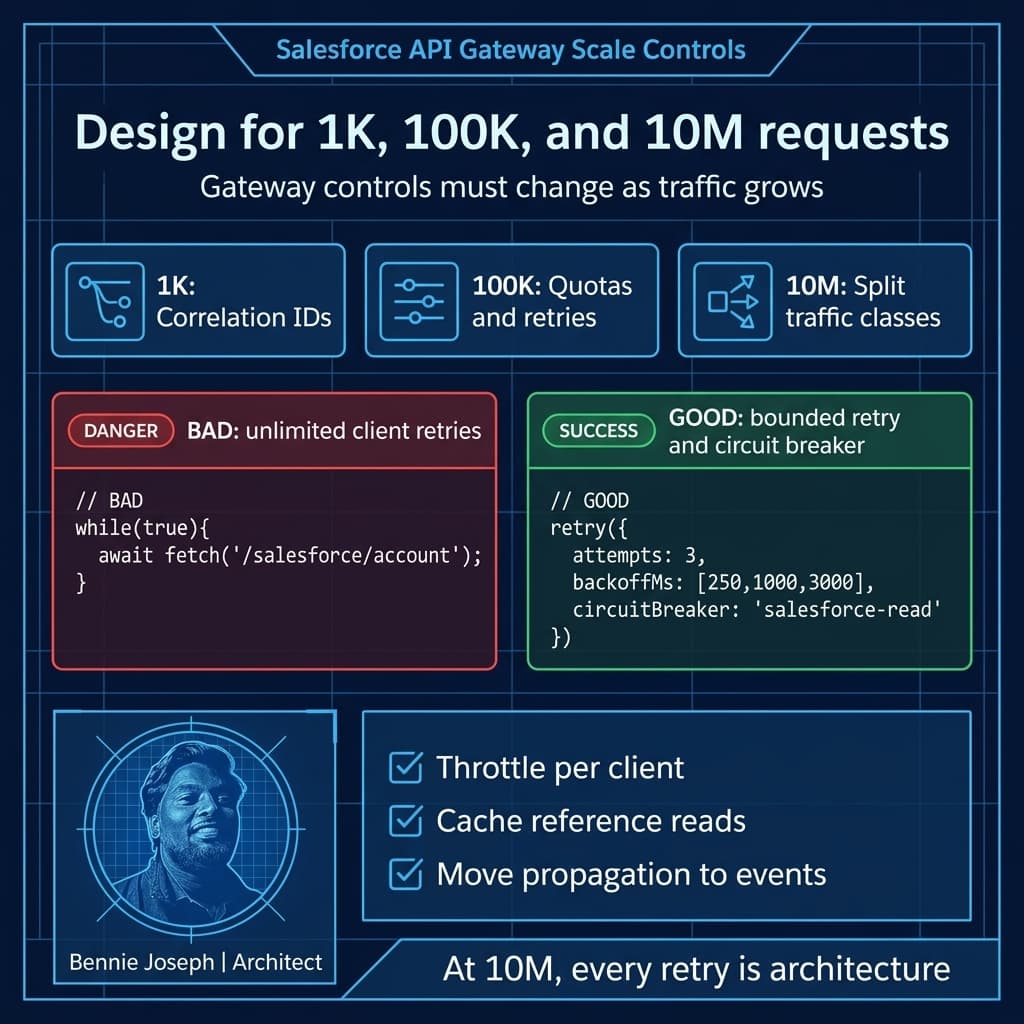
Scale: what happens at 1K, 100K, and 10M
Architecture decisions that look equivalent at 1K requests can diverge badly at 10M. I force the scale conversation early.
At 1K requests or records
Almost everything works.
A direct Salesforce REST call works. MuleSoft works. A small Lambda gateway works. Apex REST works. Nobody feels the pain.
At this scale, the biggest risk is not performance. It is premature platform commitment. Teams overbuild because the architecture diagram looks more “enterprise.”
My advice at 1K:
- Optimize for clarity.
- Avoid unnecessary hops.
- Keep contracts explicit.
- Add correlation IDs from day one.
- Do not expose arbitrary SOQL.
- Measure latency even if nobody complains.
At 100K requests or records
This is where sloppy gateway design starts showing.
Common failures:
- API limits become visible.
- Retry storms appear.
- Synchronous call chains time out.
- Payload sizes creep up.
- Batch jobs collide with interactive traffic.
- Partner clients poll too aggressively.
- Debugging across systems becomes slow.
At 100K, I care about:
- Gateway-level quotas per client.
- Backoff and retry policies.
- Circuit breakers.
- Caching safe reference data.
- Conditional Composite API for dependent Salesforce operations.
- GraphQL query governance.
- Event-driven alternatives for non-interactive work.
- Separate integration users or connected apps by consumer class.
- Observability that traces client → gateway → Salesforce transaction.
This is usually where teams realize a pass-through MuleSoft proxy did not solve the real bottleneck.
At 10M requests, records, or events
At 10M, architecture becomes operational reality.
You cannot hand-wave:
- Salesforce API limits
- Data skew
- Selective queries
- Lock contention
- Event replay windows
- Consumer lag
- Gateway throttling
- Token management
- Secrets rotation
- Regional latency
- Log volume
- Cost per million requests
- Deployment blast radius
At this scale, I usually split traffic patterns:
- UI reads through BFF or GraphQL with strict query controls
- Business commands through Apex service boundaries
- Bulk ingestion through Bulk API or staged processing
- Cross-system propagation through events
- Analytics and AI grounding through Data 360 federation or Retriever API where appropriate
- Agentforce 2.0 actions through governed tool/action boundaries, not unrestricted platform access
The key is not “one gateway for everything.” The key is different traffic classes with different controls.
Agentforce 2.0 changes the API gateway conversation
Agentforce 2.0 makes this topic more important, not less.
When agents can invoke actions, coordinate with other agents, use custom reasoning steps, and interact with enterprise tools, APIs become agent-facing surfaces. That changes the threat model.
An API that was safe for a deterministic UI may not be safe as an agent tool.
For agent-facing Salesforce APIs, I want:
- Narrow action contracts
- Explicit allowed operations
- Strong input validation
- Output filtering
- Rate limits per agent, tenant, and user context
- Auditable correlation between agent session and API request
- No generic “query anything” endpoint
- Human approval boundaries for irreversible operations
Salesforce MCP and Headless 360 are powerful because they expose platform capability through APIs, CLI, and MCP tools. That is exactly why gateway thinking matters. Headless does not mean guardless.
For internal engineering agents, I might use @salesforce/mcp with tightly scoped credentials and environment separation. For production business agents, I prefer curated actions and service APIs that enforce domain rules.
When MuleSoft is still the better answer
I do not want this to read like a cloud-gateway manifesto. MuleSoft is often the right platform.
I choose MuleSoft when the enterprise needs an integration product, not just a traffic policy layer.
Examples:
Multi-system customer onboarding
Customer onboarding touches Salesforce, ERP, identity, billing, compliance screening, document generation, and data warehouse publication.
This is not a thin gateway problem. MuleSoft can provide process APIs, orchestration, transformations, retries, and centralized monitoring.
Enterprise canonical API strategy
If the organization has committed to canonical APIs like Customer, Product, Order, Asset, and Entitlement across many systems, MuleSoft may be the right control plane.
Salesforce is one participant, not the API owner.
Legacy protocol mediation
If you need Salesforce to interact with SOAP services, mainframe interfaces, SFTP drops, custom XML formats, and old middleware, MuleSoft earns its keep.
A TypeScript gateway can do some of this. That does not mean it should.
Integration CoE operating model
Architecture is not only technology. If the enterprise has a mature integration CoE with MuleSoft deployment, monitoring, support, security review, and API governance, bypassing that model may create operational risk.
The right question is: does the operating model accelerate delivery or slow it down?
The anti-patterns I watch for
Anti-pattern 1: MuleSoft as a pass-through tax
If MuleSoft receives JSON, renames two fields, calls Salesforce, and returns JSON, I challenge the design.
Not always wrong. But it needs a reason.
Valid reasons might include enterprise policy, centralized subscription management, or future reuse. Weak reasons include “that is how we do APIs here.”
Anti-pattern 2: Custom gateway with no platform discipline
The opposite failure is a team building a custom gateway and pretending it has no lifecycle cost.
If you build it, you own:
- Patching
- Secrets
- Logging
- Alerting
- Rate limits
- Schema versioning
- Incident response
- Certificate rotation
- Load testing
- Threat modeling
- Deployment safety
A custom gateway is not free. It is only cheaper if your engineering and operations model can carry it.
Anti-pattern 3: Apex REST for every integration
Apex REST is useful, but I do not use it as my default API façade.
If the operation is basic CRUD, GraphQL, REST, Composite, or Conditional Composite may be cleaner. Apex should be used when you need Salesforce business logic, transaction control, or domain-specific behavior.
Anti-pattern 4: One integration user for everything
This still happens too often.
One integration user for partner APIs, batch jobs, middleware, agents, and admin tools is a security and observability failure.
Use separate connected apps, scopes, permission sets, and users or principals by integration class. Your future incident review will thank you.
Anti-pattern 5: No distinction between command and query
Reads and writes behave differently.
Queries often need caching, pagination, field filtering, and query selectivity.
Commands need idempotency, validation, transaction control, and auditability.
If your gateway treats every API call the same, you will eventually build a slow, fragile generic pipe.
My design checklist
When I review Salesforce gateway architecture, I ask these questions:
- Is the consumer internal, partner, public, or agentic?
- Is the API contract Salesforce-shaped or domain-shaped?
- Who owns the contract long term?
- Is the traffic synchronous, asynchronous, or mixed?
- What is the expected peak, not average?
- What happens when the consumer retries aggressively?
- Do we need orchestration or only policy enforcement?
- Can Salesforce GraphQL, REST, Composite, or Conditional Composite solve it directly?
- Does Apex add real business value here?
- Is MuleSoft providing reusable enterprise capability or just another hop?
- How are correlation IDs propagated?
- How are API limits, event limits, and bulk loads separated?
- What is the rollback strategy?
- What does the support team see at 2 AM?
- What changes at 10M?
The last question is usually where the honest architecture discussion starts.
Recommended reference architecture
For most Salesforce-heavy enterprises, I like a layered model:
Client and channel layer
- LWC apps
- Mobile apps
- Partner systems
- Agentforce 2.0 agents
- Internal admin tools
- External SaaS platforms
API policy layer
- Cloud API gateway or MuleSoft depending on need
- Authentication
- Rate limits
- Schema validation
- Threat protection
- Correlation
- Version routing
Salesforce API layer
- GraphQL API for shaped read/write data access
- REST API for standard operations
- Conditional Composite API for dependent Salesforce operations
- Apex REST for domain commands
- Platform Events and CDC for asynchronous integration
- Bulk API for high-volume ingestion
Enterprise integration layer
- MuleSoft when orchestration and mediation are required
- Event backbone for fan-out
- Data 360 for federation, grounding, and large-scale data access patterns
- ERP, billing, identity, data warehouse, and service platforms
This avoids the false binary of “MuleSoft or no MuleSoft.” The better question is where each responsibility belongs.
Final opinion
MuleSoft is not the answer when the requirement is simply “put something in front of Salesforce.”
The answer might be direct Salesforce APIs. It might be GraphQL. It might be Conditional Composite. It might be a thin gateway. It might be a BFF. It might be events. It might be Apex. And yes, sometimes it is MuleSoft.
The mistake is choosing the platform before identifying the integration shape.
I want every gateway hop to earn its place. If it does not enforce policy, simplify the contract, improve operability, reduce coupling, or enable reuse, it is probably just latency with a logo.
TL;DR
- MuleSoft is great for enterprise mediation, but overkill for many Salesforce-only API gateway needs.
- Use direct APIs, GraphQL, Conditional Composite, BFFs, thin gateways, or events when they better match the traffic pattern.
- At 10M scale, split traffic classes and design for quotas, retries, observability, and ownership from day one.