Large Data Volume Architecture: What Actually Happens at 200 Million Records
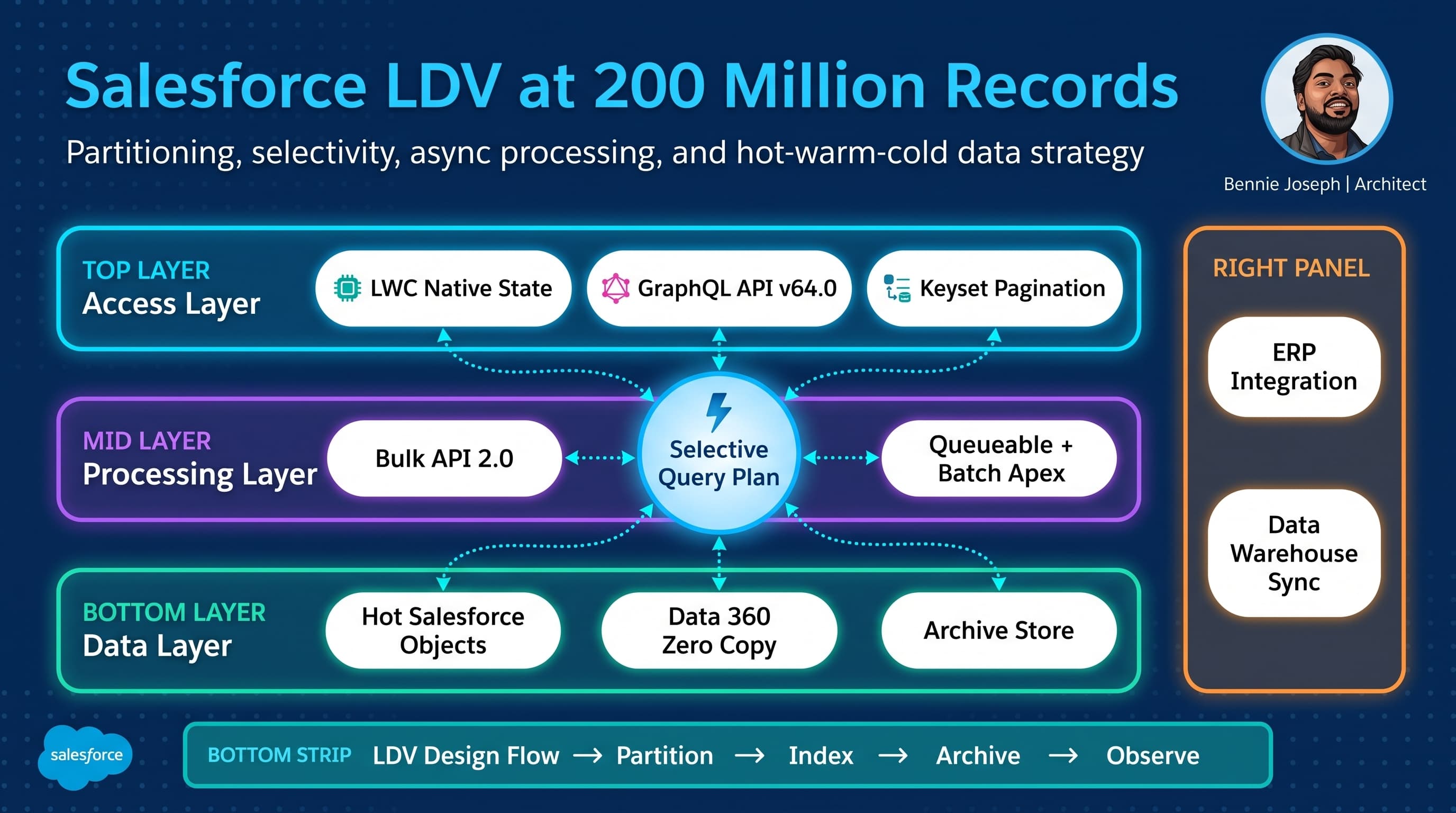
I have seen Salesforce orgs behave beautifully at 5 million records and fall apart at 50 million because the architecture depended on hope, not selectivity.
At 200 million records, Salesforce large data volume architecture is not about “can Salesforce store it?” Salesforce can store it. The real question is whether your users, integrations, automations, reports, and nightly jobs can operate without turning every transaction into a table scan.
Here’s the unpopular take: LDV failure is rarely caused by one huge object. It is usually caused by a set of small design decisions that looked harmless early:
- A lookup filter that was fine at 100K records.
- A report folder full of unbounded date filters.
- A batch job that queries “all active records.”
- A sharing model that creates millions of implicit share rows.
- A Lightning page that loads five related lists nobody questioned.
- An integration that uses
OFFSETpagination because it worked in the sandbox.
At 200 million records, the platform starts enforcing architectural truth. You either designed for selectivity, ownership, lifecycle, and asynchronous processing — or you are about to redesign in production under pressure.
This is how I approach Salesforce LDV architecture when the data volume is not theoretical.
The Real Project: 200 Million Service Ledger Records
One enterprise project that shaped my LDV opinions was a global service organization running Salesforce as the operational front door for customer support, field escalations, entitlement checks, and service analytics.
The core problem was not the standard Case object. The problem was the service ledger: a custom object capturing service state transitions, entitlement evaluations, external claim references, IoT-originated events, SLA recalculations, and downstream reconciliation markers.
The projected volume:
| Object / Dataset | Approx. Volume | Growth Pattern |
|---|---|---|
| Account | 8 million | Slow, master data |
| Contact | 35 million | Medium |
| Case | 22 million | Medium |
| Service_Ledger__c | 200 million | High append-only |
| Integration_Log__c | 500 million outside core CRM | Very high |
| Share rows across key objects | Tens of millions | Depends on ownership |
The first version of the design tried to keep too much in Salesforce core objects because “users may need it someday.” That sentence is expensive.
We reworked the architecture around a simple principle:
Salesforce should hold operationally necessary, selectively queryable data. Analytical, historical, and machine-generated data should be federated, summarized, archived, or moved through event-driven pipelines.
That does not mean “keep everything out of Salesforce.” It means understand which records are hot, which are warm, and which are cold.
What Changes at 1K, 100K, 10M, and 200M Records
LDV is not a switch that flips at a single number. The architecture pressure changes as volume grows.
| Scale | What Usually Works | What Starts Breaking | Architecture Response |
|---|---|---|---|
| 1K records | Almost anything | Nothing obvious | Keep code clean, avoid bad habits |
| 100K records | Basic filters, reports, Flow, simple Apex | Slower reports, inefficient related lists | Add indexes, remove unbounded queries |
| 10M records | Selective SOQL, async jobs, partitioned integrations | Sharing recalculation, reports, batch start queries | Formal LDV model, archival, ownership strategy |
| 200M records | Only intentional access paths | Table scans, skew, locks, reporting, full sync jobs | Hot/warm/cold architecture, event-driven processing, strict query contracts |
At 1K records, bad architecture hides.
At 100K records, it becomes mildly annoying.
At 10M records, it becomes a production risk.
At 200M records, it becomes an outage pattern.
The biggest mistake I see is treating LDV as a database tuning exercise. It is not. It is a platform architecture exercise involving data model design, user access, integration strategy, automation boundaries, and lifecycle management.
The First Design Question: Should This Data Live in Core Salesforce?
Before I talk about indexes, I ask a more basic question: should these 200 million records live in core CRM objects at all?
For operational data, yes — if users and automations need current, transactional access.
For immutable event history, probably not all of it.
For analytics, definitely not all of it.
For AI grounding, not necessarily. With Data 360, Zero Copy federation, Federated Grounding, native vector search, Unified Catalog, and the Retriever API for unstructured data, I do not need to force every historical record into core CRM just to make it available to an agent or search workflow.
With Agentforce 2.0 and Atlas Reasoning Engine v2, I am especially careful here. I do not point agents at massive raw objects and hope reasoning fixes bad data architecture. Agents need curated actions, constrained retrieval, and deterministic access paths. If an agent action queries Service_Ledger__c without a bounded customer, date, status, or partition key, that is not intelligence. That is a table scan with a friendly prompt.
Decision Matrix: LDV Storage and Access Options
For architecture decisions, I use a decision matrix like this before anyone starts building objects.
| Approach | Best For | Strengths | Weaknesses | My Default Position |
|---|---|---|---|---|
| Core Salesforce custom object | Current operational records users act on | Native security, automation, UI, reporting | Requires selective queries, sharing discipline, storage cost | Use for hot operational data only |
| Big Object-style archive pattern | Immutable historical records with narrow access | Massive retention, predictable access patterns | Limited query flexibility, not for interactive UX | Use for compliance-style history |
| Data 360 Zero Copy federation | Warehouse/lakehouse data needed in Salesforce context | Avoids duplication, supports unified view | Requires source system governance and latency clarity | Use for analytical or historical data |
| External object / API-backed access | Data owned by external system | Avoids replication, system of record stays clean | UX and latency depend on remote system | Use for reference or non-transactional data |
| Summary object in Salesforce | Fast UX, dashboards, agent grounding | Small, queryable, operationally useful | Requires pipeline and reconciliation | Use aggressively |
| Full replication into Salesforce | “Everything in one place” | Simple mental model | Expensive, slow, hard to govern | Avoid unless proven necessary |
My rule is blunt: if nobody can name the transaction that needs the raw record inside Salesforce, the raw record probably should not be there.
The Non-Negotiable: Selective Query Design
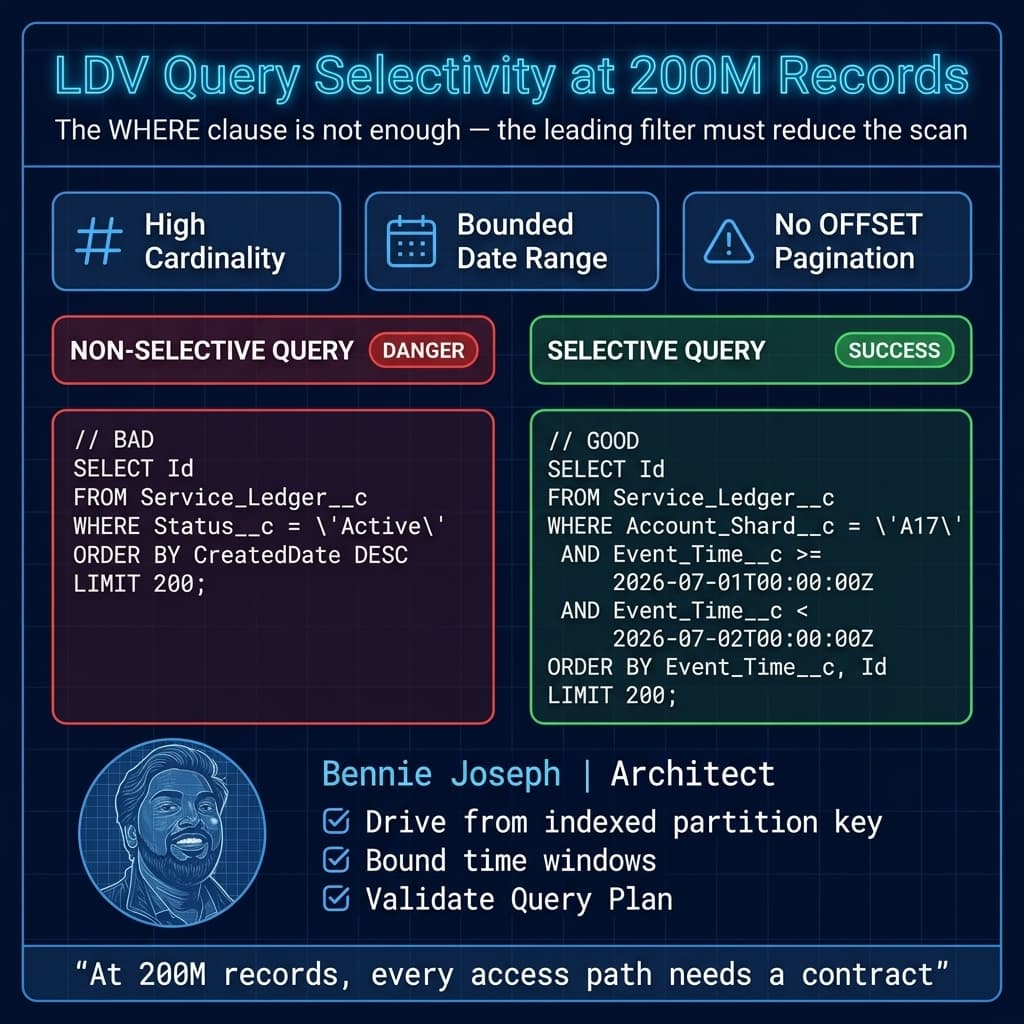
At 200 million records, query selectivity is the architecture.
I want every major access pattern documented before build:
- User opens an Account and sees recent ledger activity.
- Agentforce action checks latest entitlement state.
- Nightly reconciliation processes records changed yesterday.
- ERP integration requests unresolved service claims by region.
- Support manager views escalations for a business unit.
- Compliance user retrieves history for a specific customer and date range.
Each access pattern needs a bounded query. Not just a filter — a selective filter.
The fields I usually evaluate for indexing and partitioning include:
- Tenant or business unit key.
- Account or customer identifier.
- Record lifecycle status.
- Created date or event timestamp.
- SystemModstamp for integration sync.
- Archive bucket.
- External ID.
- Region or country, only if cardinality is high enough.
- Composite synthetic keys where the natural model is too broad.
The dangerous filters are the ones that look useful but are not selective:
Status__c = 'Active'when 80% of records are active.Region__c = 'NA'when half the business is in North America.CreatedDate = THIS_YEARwhen the object gets 100 million records per year.IsDeleted = false, which is almost always useless as a driving filter.- Broad ownership filters in skewed models.
At LDV scale, the question is not “does the query have a WHERE clause?” The question is “does the optimizer have a selective leading condition that dramatically reduces the candidate set?”
Code Pattern: Keyset Pagination for LDV
One anti-pattern I remove early is OFFSET pagination on large objects. It feels convenient. It does not age well.
For large datasets, I prefer keyset pagination with stable ordering and bounded filters. Here is a simplified Apex selector pattern using Salesforce API v64.0 behavior and explicit user-mode data access.
public with sharing class ServiceLedgerSelector {
    public class PageRequest {
        @AuraEnabled public String accountShard;
        @AuraEnabled public Datetime fromTime;
        @AuraEnabled public Datetime toTime;
        @AuraEnabled public Datetime lastEventTime;
        @AuraEnabled public Id lastSeenId;
        @AuraEnabled public Integer pageSize;
    }

    @AuraEnabled(cacheable=true)
    public static List<Service_Ledger__c> getLedgerPage(PageRequest request) {
        validateRequest(request);

        Integer safeLimit = request.pageSize == null
            ? 200
            : Math.min(Math.max(request.pageSize, 1), 500);

        Map<String, Object> binds = new Map<String, Object>{
            'accountShard' => request.accountShard,
            'fromTime' => request.fromTime,
            'toTime' => request.toTime,
            'safeLimit' => safeLimit
        };

        String soql =
            'SELECT Id, Account__c, Account_Shard__c, Event_Time__c, ' +
            '       Event_Type__c, Processing_Status__c, External_Event_Id__c ' +
            'FROM Service_Ledger__c ' +
            'WHERE Account_Shard__c = :accountShard ' +
            'AND Event_Time__c >= :fromTime ' +
            'AND Event_Time__c < :toTime ';

        if (request.lastEventTime != null && request.lastSeenId != null) {
            binds.put('lastEventTime', request.lastEventTime);
            binds.put('lastSeenId', request.lastSeenId);

            soql +=
                'AND (Event_Time__c > :lastEventTime ' +
                'OR (Event_Time__c = :lastEventTime AND Id > :lastSeenId)) ';
        }

        soql +=
            'ORDER BY Event_Time__c ASC, Id ASC ' +
            'LIMIT :safeLimit';

        return Database.queryWithBinds(soql, binds, AccessLevel.USER_MODE);
    }

    private static void validateRequest(PageRequest request) {
        if (request == null) {
            throw new AuraHandledException('Page request is required.');
        }

        if (String.isBlank(request.accountShard)) {
            throw new AuraHandledException('Account shard is required.');
        }

        if (request.fromTime == null || request.toTime == null) {
            throw new AuraHandledException('A bounded time range is required.');
        }

        Long rangeMillis = request.toTime.getTime() - request.fromTime.getTime();
        Long maxRangeMillis = 7L * 24L * 60L * 60L * 1000L;

        if (rangeMillis <= 0 || rangeMillis > maxRangeMillis) {
            throw new AuraHandledException('Time range must be between 1 millisecond and 7 days.');
        }
    }
}
This is not magic. The important parts are architectural:
- The query requires
Account_Shard__c. - The query requires a bounded time range.
- The page size is capped.
- The order is stable.
- Data access runs in user mode.
- There is no
OFFSET. - The API does not allow callers to ask for “everything.”
I also pair this with LWC native state management in Summer ’26 when building interactive ledger views. But frontend state does not fix backend selectivity. If the selector is bad, no LWC pattern saves it.
Partitioning: The Field Nobody Wants Until It Is Too Late
A partition key is one of the most useful LDV design tools, and teams often resist it because it feels artificial.
I like artificial when it keeps production alive.
For the service ledger, we used an Account_Shard__c field derived from a stable account/customer identifier. The point was not to replace Account lookup relationships. The point was to give high-volume queries a selective, evenly distributed driving filter.
A partition field should be:
- Deterministic.
- Immutable or rarely changed.
- High-cardinality enough to reduce query scope.
- Available at record creation time.
- Included in integration payloads.
- Part of documented access contracts.
Bad partitioning is worse than no partitioning. If every record lands in GLOBAL or NA, you did not partition anything. You renamed the table scan.
For 200 million records, I want to know the approximate distribution before go-live:
| Partition Strategy | Risk | Notes |
|---|---|---|
| By region | High skew risk | Often too few values |
| By business unit | Medium skew risk | Works only if volume is balanced |
| By account hash | Strong option | Good distribution, less human-readable |
| By event month only | Partial option | Helps archival, not customer access |
| By account hash + date bucket | Strongest for append-heavy ledgers | Good for customer and time-bound access |
In practice, I often use both a shard key and a date bucket. One helps operational access. The other helps lifecycle management.
Sharing and Ownership: The Silent LDV Killer
A lot of LDV conversations obsess over record count and ignore sharing row count. That is a mistake.
At 200 million records, sharing architecture can hurt more than storage.
Questions I ask early:
- Who owns these records?
- Are we creating ownership skew?
- Do records need private sharing?
- Can child records inherit access from parent context?
- Are there criteria-based sharing rules over high-volume objects?
- How often do ownership, role hierarchy, or territories change?
- Are we creating share rows for records users never open?
For high-volume transactional or ledger objects, I prefer to avoid complex per-record sharing when possible. If the object is mostly accessed from a secured parent context, I design the UI and service layer to enforce access through that context instead of creating a share explosion.
That does not mean bypassing security. It means choosing the right security boundary.
With current Apex security direction — and v67.0 next making user-mode behavior increasingly central — I explicitly decide where user-mode reads/writes are required and where system processing is appropriate. I do not rely on accidental execution context.
If a batch job needs system-level processing, I make that explicit and auditable. If a user-facing selector reads data, I use user-mode access and keep the query selective.
Async Processing at 200 Million Records
Batch Apex is useful, but I do not treat it as a broom for sweeping up bad architecture.
A batch job that starts with a non-selective query can fail before it processes a single record. At 200 million records, Database.QueryLocator is not permission to query the universe.
Here is a pattern I prefer: run batches per partition and per time window.
public with sharing class ServiceLedgerReconciliationBatch
    implements Database.Batchable<SObject>, Database.Stateful {

    private final String shardKey;
    private final Datetime fromTime;
    private final Datetime toTime;

    public Integer processedCount = 0;

    public ServiceLedgerReconciliationBatch(
        String shardKey,
        Datetime fromTime,
        Datetime toTime
    ) {
        this.shardKey = shardKey;
        this.fromTime = fromTime;
        this.toTime = toTime;
    }

    public Database.QueryLocator start(Database.BatchableContext context) {
        return Database.getQueryLocator([
            SELECT Id, Account__c, Account_Shard__c, Event_Time__c,
                   Processing_Status__c, External_Event_Id__c
            FROM Service_Ledger__c
            WHERE Account_Shard__c = :shardKey
            AND Event_Time__c >= :fromTime
            AND Event_Time__c < :toTime
            AND Processing_Status__c = 'Pending'
            WITH USER_MODE
        ]);
    }

    public void execute(Database.BatchableContext context, List<Service_Ledger__c> scope) {
        List<Service_Ledger__c> updates = new List<Service_Ledger__c>();

        for (Service_Ledger__c ledger : scope) {
            ledger.Processing_Status__c = 'Reconciled';
            updates.add(ledger);
        }

        if (!updates.isEmpty()) {
            Database.update(updates, false, AccessLevel.USER_MODE);
            processedCount += updates.size();
        }
    }

    public void finish(Database.BatchableContext context) {
        System.debug(LoggingLevel.INFO,
            'Reconciled ' + processedCount +
            ' Service_Ledger__c records for shard ' + shardKey +
            ' between ' + fromTime + ' and ' + toTime
        );
    }
}
The production version had more controls: retry tracking, error objects, platform event publication, observability metrics, and orchestration. But the core design was this:
- Do not process all records.
- Process a shard.
- Process a bounded time window.
- Make status transitions explicit.
- Keep the query aligned to indexes.
- Run multiple jobs intentionally, not accidentally.
For orchestration, I commonly use a scheduler or external orchestrator to enqueue work by shard and date bucket. For integrations, Bulk API 2.0 handles high-volume ingest and extraction better than pretending synchronous APIs are a data pipeline. Conditional Composite API is useful when reducing API call volume for dependent transactional writes, but I do not use it as a bulk migration hammer.
Reporting: Do Not Let Reports Become Production Load Tests
Reports are one of the easiest ways to destroy LDV performance because report builders do not always think like query optimizers.
For the service ledger, we did not give users open-ended reporting over 200 million raw records. That would have been irresponsible.
Instead, we separated use cases:
| Reporting Need | Architecture |
|---|---|
| Agent needs latest service state | Summary fields / latest-state object |
| Support user needs recent activity | Bounded related list with keyset pagination |
| Manager needs operational dashboard | Aggregated summary object |
| Finance needs historical analysis | Data 360 / warehouse layer |
| Compliance needs record retrieval | Specific customer + date range retrieval |
The best LDV report is often not a report on the raw object. It is a report on a maintained summary table.
This is where enterprise teams need discipline. Someone will ask for “all history, filterable by everything.” That is an analytics platform requirement, not necessarily a core Salesforce object requirement.
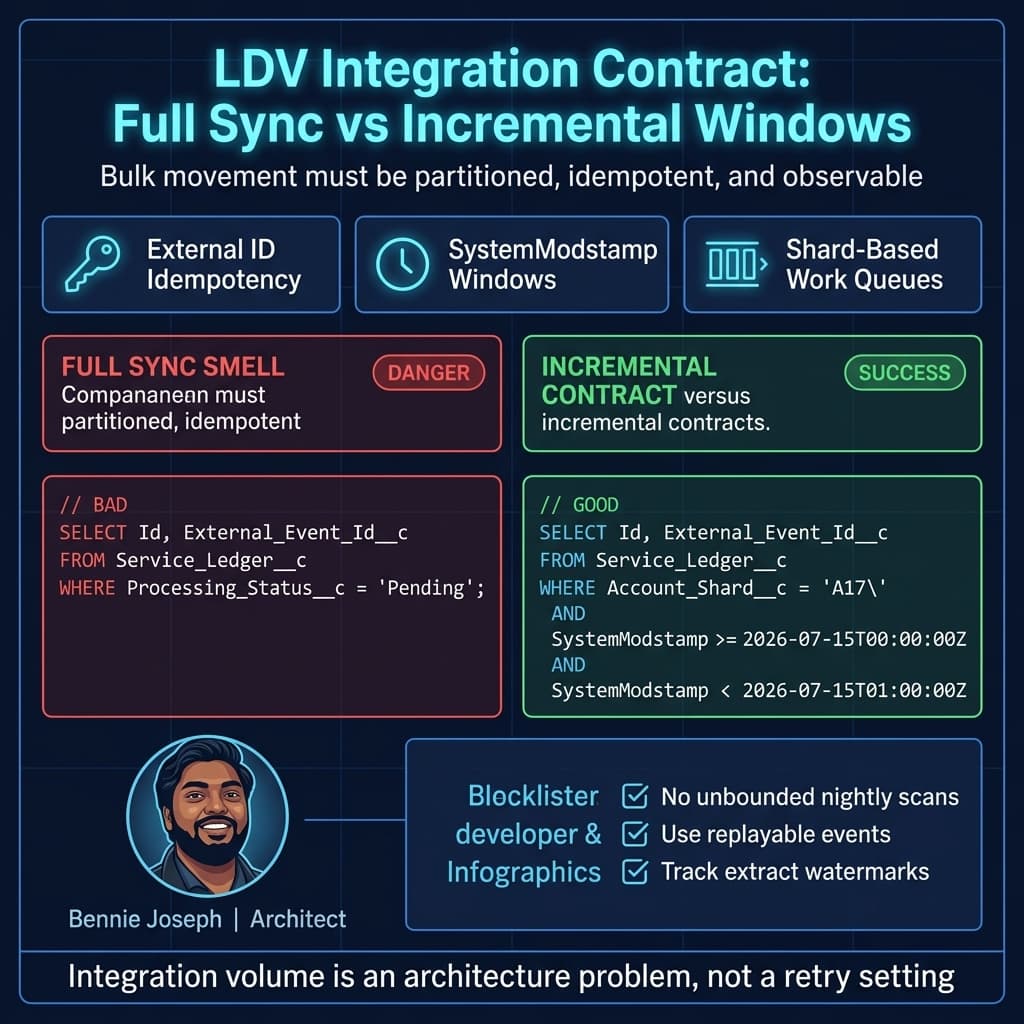
Integration Patterns: Full Sync Is the Smell
At 200 million records, I challenge any integration that says, “We will sync all records nightly.”
Full syncs are simple to describe and brutal to operate.
Better patterns:
- Change data capture where appropriate.
- Platform Events for process-level notifications.
- Bulk API 2.0 for controlled high-volume movement.
- SystemModstamp-based incremental extraction with tight windows.
- External IDs for idempotency.
- Replay and reconciliation design from day one.
- Data 360 federation where duplication is not justified.
- MuleSoft API-to-MCP only where agent/tool access needs governed API exposure.
I also avoid letting integrations query by business-friendly but non-selective values. If an ERP wants “all pending claims,” I ask pending for whom, in which partition, in which date range, and with what maximum page size?
If the answer is “all,” the integration contract is not ready.
Data Lifecycle: Hot, Warm, Cold
For 200 million records, I want lifecycle states designed before the first production load.
A useful model:
| State | Definition | Storage / Access |
|---|---|---|
| Hot | Recently created or actively used in workflows | Core Salesforce, indexed access |
| Warm | Occasionally needed by users or automations | Summary + selective detail access |
| Cold | Historical, compliance, analytics, rarely operational | Archive, Data 360, warehouse, Zero Copy federation |
For the service ledger, hot data stayed in Salesforce. Warm data had summarized account-level views and targeted retrieval. Cold data moved into the analytical layer with governed access.
The lifecycle job did not “delete old records someday.” It was a scheduled, monitored process with clear criteria:
- Age threshold.
- Processing completion status.
- Reconciliation status.
- Legal hold flags.
- Customer retention policy.
- Audit requirements.
- Archive verification.
- Deletion eligibility.
Deletion itself also needs architecture. Deleting millions of records can create locking, recycle bin, and sharing recalculation issues. I prefer controlled purge windows, chunked deletes, and clear operational dashboards.
UI Architecture: The Page Load Is a Query Contract
At LDV scale, a Lightning page is not just UI. It is a bundle of queries.
I review:
- Related lists.
- Dynamic forms visibility logic.
- Components that call Apex on load.
- Components that query child counts.
- Record pages with embedded reports.
- Agent panels or recommendations using broad retrieval.
- Unbounded search components.
- Client-side pagination pretending the server did not do work.
With LWC native state management GA in Summer ’26, building responsive large-data interfaces is easier. But I still design every component around server-side constraints.
A good LDV component asks for:
- One parent context.
- One bounded date range.
- One page size.
- One stable cursor.
- One purpose.
A bad component asks for “all related activity” and sorts it in JavaScript.
Search Architecture: SOSL Is Not a Strategy by Itself
Users often want search over massive datasets. Search is valid, but it needs guardrails.
For high-volume objects, I design search experiences around:
- Minimum input length.
- Scoped object search.
- Filter-first UX.
- Search result caps.
- Recent-first defaults.
- Indexed external IDs.
- Exact lookup paths for operational flows.
- Federated search for historical datasets.
If users search for an external event ID, that should be an indexed exact match, not a fuzzy scan across description fields.
For AI-assisted experiences, I prefer curated retrieval through Data 360 or a purpose-built index. Agentforce 2.0 can orchestrate multiple agents and custom reasoning steps, but the tool layer still needs deterministic, governed retrieval. I do not let a reasoning engine compensate for undefined data access.
Observability: LDV Needs Telemetry, Not Vibes
At 200 million records, architecture without observability is gambling.
I want telemetry for:
- Slow Apex transactions.
- Query row counts.
- Batch start failures.
- Batch throughput by shard.
- Lock failures.
- Integration extract windows.
- API consumption.
- Failed retries.
- Archive lag.
- Data skew indicators.
- Report performance hotspots.
On the service ledger project, we built an operational dashboard showing:
- Records ingested per hour.
- Pending reconciliation by shard.
- Oldest unprocessed event.
- Batch failure rate.
- Integration lag.
- Archive candidate count.
- Query timeout incidents.
- Top user-facing selectors by volume.
That dashboard changed behavior. Teams stopped arguing from anecdotes and started fixing the shards, windows, and jobs that were actually causing pain.
Common LDV Failure Modes I Watch For
These are the patterns I still see on enterprise programs.
1. The “Active Records” Trap
A team filters everything by Status__c = 'Active'. Then active becomes 90% of the table.
That is not selective. It is a label.
2. The “One Integration User Owns Everything” Trap
A single integration user owns millions of records. Ownership skew appears. Locks become mysterious. Sharing recalculation becomes painful.
Use deliberate ownership distribution where the object and sharing model require it.
3. The “Reports Will Be Fine” Trap
Reports over huge raw objects with flexible filters become production load tests. Build summaries.
4. The “Batch Apex Will Handle It” Trap
Batch Apex is not a license to query 200 million rows with weak filters. The start query still matters.
5. The “Archive Later” Trap
If you wait until storage is painful, archive becomes a rescue project. Design lifecycle from day one.
6. The “Sandbox Was Fast” Trap
Partial datasets lie. A query that runs in a 500K-record sandbox may collapse against 200 million production records. Use realistic volume testing and Query Plan analysis.
My Practical LDV Architecture Checklist
When I review an LDV design, I want clear answers to these questions:
- What are the top 10 access patterns?
- Which fields drive selectivity for each access pattern?
- Which fields need standard or custom indexes?
- What is the expected cardinality of each indexed field?
- What is the ownership model?
- What is the sharing model?
- Where can data skew occur?
- What is the hot/warm/cold lifecycle?
- What is the archive and purge strategy?
- Which integrations are incremental vs full sync?
- What is the retry and idempotency model?
- What are the reporting datasets?
- What summary objects are required?
- Which UI components query high-volume objects?
- How do agent actions retrieve data safely?
- What telemetry proves the system is healthy?
If the design cannot answer these, it is not ready for 200 million records.
What I Would Not Do
I would not put every historical event into core Salesforce just because a future report might need it.
I would not let users build unrestricted reports over massive raw transaction objects.
I would not design access around low-cardinality fields and hope indexes save me.
I would not use OFFSET pagination for large operational datasets.
I would not run nightly full syncs when event-driven or incremental patterns fit.
I would not let Agentforce actions call broad Apex methods that query unbounded objects.
I would not treat archive as a cleanup task after go-live.
And I would absolutely not accept “we tested in a sandbox with 1 million records” as proof that a 200 million record architecture works.
Final Thought: LDV Is a Contract
The best Salesforce LDV architectures I have worked on all had one thing in common: explicit contracts.
The UI had query contracts.
Integrations had extract contracts.
Batch jobs had partition contracts.
Reports had dataset contracts.
Agents had retrieval contracts.
Data lifecycle had retention contracts.
At 200 million records, flexibility without boundaries becomes instability. The architect’s job is not to say no to every requirement. The job is to shape requirements into access patterns the platform can execute repeatedly, securely, and predictably.
Salesforce can support very large data volumes. But it will not rescue vague architecture.
TL;DR
- At 200 million records, Salesforce LDV performance depends on selective access paths, partitioning, sharing discipline, and lifecycle design.
- Do not use core Salesforce as an unlimited historical data lake; use hot/warm/cold storage, summaries, Data 360 federation, and governed retrieval.
- Every UI, integration, batch, report, and agent action needs a bounded query contract.