Disaster Recovery Architecture for Salesforce: RPO, RTO, and What Nobody Tests
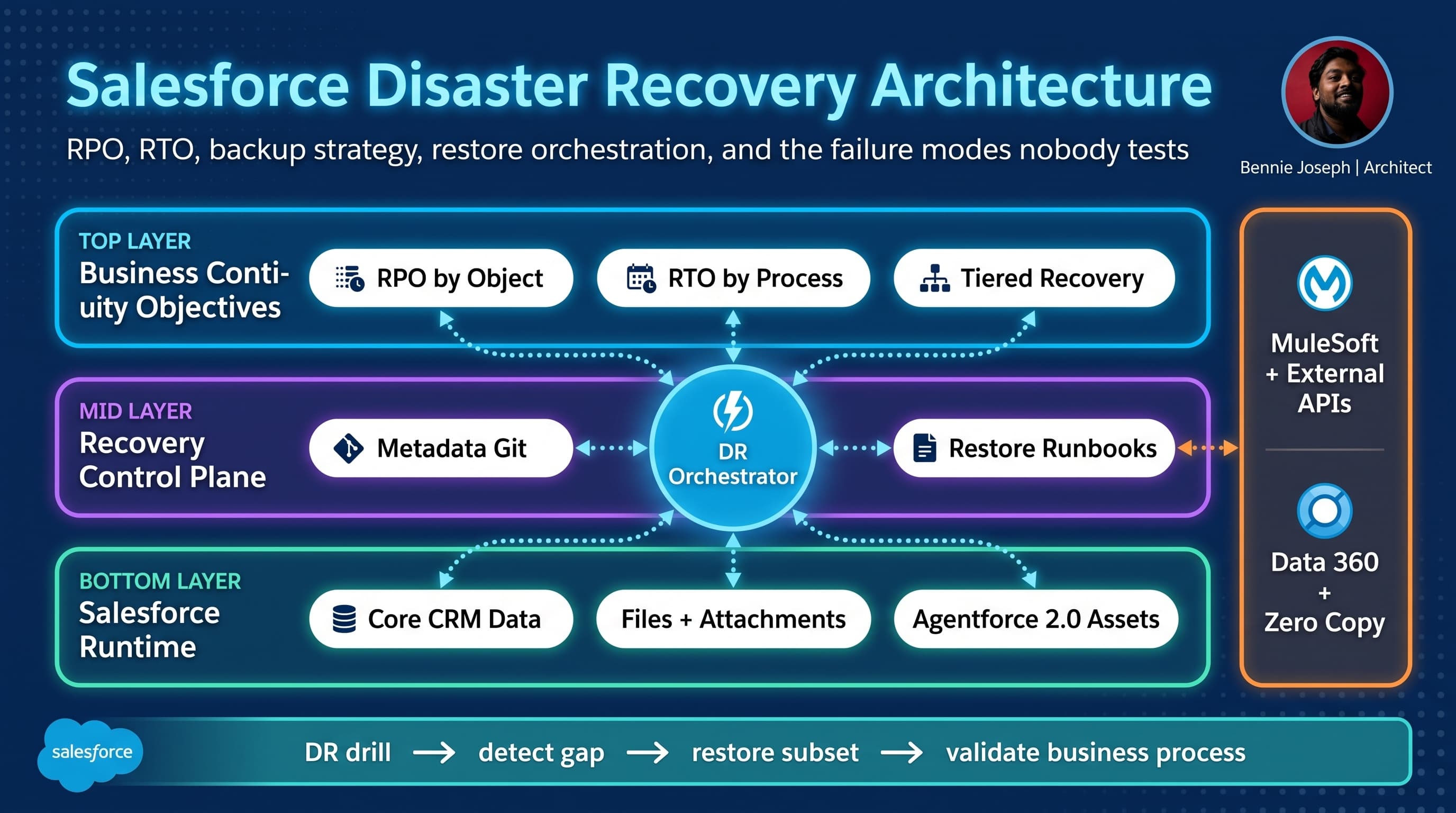
I have seen too many Salesforce disaster recovery plans that look good in a steering committee deck and fall apart the first time someone asks a simple question:
“If we lose the last four hours of Opportunity updates, can we prove exactly what is missing?”
That is the difference between a backup policy and a real salesforce disaster recovery architecture rpo rto backup strategy.
Salesforce already runs a resilient cloud platform. That does not mean your business process is recoverable. Platform availability, customer data recovery, metadata rollback, integration replay, identity restoration, encryption key handling, and downstream reconciliation are different problems.
Here’s the unpopular take: most Salesforce DR programs over-index on backup tooling and under-invest in restore choreography. Buying backup software is easy. Proving that a restored Case, its EmailMessages, Files, Entitlements, Milestones, Omni routing state, approval history, and external ERP reference still work as a business transaction is the hard part.
This is how I design Salesforce disaster recovery architecture in enterprise environments.
Start With Business Impact, Not Backup Frequency
RPO and RTO are not technical slogans.
- RPO — Recovery Point Objective: how much data loss the business can tolerate.
- RTO — Recovery Time Objective: how long the business can tolerate the process being unavailable or degraded.
The mistake is assigning one global RPO/RTO to the whole Salesforce org. That does not survive reality.
A sales activity log and a regulated consent record do not deserve the same recovery target. A marketing preference update and a high-value contract amendment should not be treated the same. A Chatter post and a payment authorization reference are not equal.
I usually push teams to classify recovery by business capability, then map that to Salesforce objects, metadata, integrations, and external dependencies.
Example:
| Business capability | Core Salesforce assets | Typical RPO | Typical RTO | Notes |
|---|---|---|---|---|
| Lead intake | Lead, CampaignMember, web-to-lead integration | 4 hours | 8 hours | Often recoverable from source systems |
| Sales pipeline | Account, Contact, Opportunity, Quote | 1 hour | 4 hours | Requires relationship-aware restore |
| Customer support | Case, EmailMessage, Entitlement, Milestone, Files | 15 minutes | 2 hours | High dependency on routing and channels |
| Consent and preferences | Individual, ContactPointConsent, custom consent objects | Near-zero | 1 hour | Regulatory impact; audit trail matters |
| Order orchestration | Order, OrderItem, integration logs, ERP refs | Near-zero | 1 hour | Usually needs event replay and reconciliation |
| Agentforce service agents | AiAuthoringBundle, .agent files, grounding config, actions | 1 hour | 4 hours | Must version prompts, tools, and authorization scopes |
The table matters because it stops generic DR theater. Nobody can build a useful restore plan from “Salesforce RPO is four hours.” Four hours for what?
Salesforce Resilience Is Not Your DR Architecture
Salesforce gives you a highly available platform. Your org runs on infrastructure with redundancy, replication, operational monitoring, and platform-level recovery processes.
That is not the same as recovering from:
- A bulk update that corrupts 3 million Contact records.
- A bad deployment that removes field-level access from a critical user population.
- A Flow or Apex defect that creates duplicate child records for every renewal.
- A compromised integration user that overwrites customer preference data.
- A failed migration that loads records with wrong external IDs.
- An Agentforce 2.0 action change that causes the wrong fulfillment process to trigger.
- A deleted custom metadata record that disables pricing logic.
- A sandbox refresh that wipes the only working copy of an integration configuration.
The platform being up does not help if your data is logically corrupted.
Logical corruption is the main Salesforce DR scenario I plan for. Full regional platform failure is not where most customers get hurt. Bad automation, bad integrations, bad permissions, bad data loads, and incomplete restore drills are where the real damage happens.
My Reference Architecture for Salesforce DR
A mature Salesforce DR architecture has five layers.
1. Recovery objectives layer
This is where RPO/RTO are defined by business capability and object group.
Do not let technical teams define this alone. The business owner must sign off on how much loss is tolerable.
For each capability, I want:
- owning executive
- process owner
- Salesforce object map
- upstream systems
- downstream systems
- legal/regulatory constraints
- maximum data loss
- maximum downtime
- degraded mode process
- restore approval path
If there is no named business owner, the RPO is fictional.
2. Backup and snapshot layer
This includes:
- Salesforce data backups
- metadata backups
- Files and ContentDocumentVersion
- Knowledge articles
- custom metadata and custom settings
- permission model snapshots
- sharing model snapshots
- Agentforce 2.0 assets, including Agent Script
.agentfiles and AiAuthoringBundle metadata - Data 360 mappings, calculated insights, and activation configuration where applicable
- integration configuration such as Named Credentials, External Credentials, connected apps, and event subscriptions
Most teams remember objects. Many forget the configuration that makes those objects usable.
For example, restoring Case records without restoring Entitlement configuration, queues, routing metadata, and support user permissions may technically succeed but operationally fail.
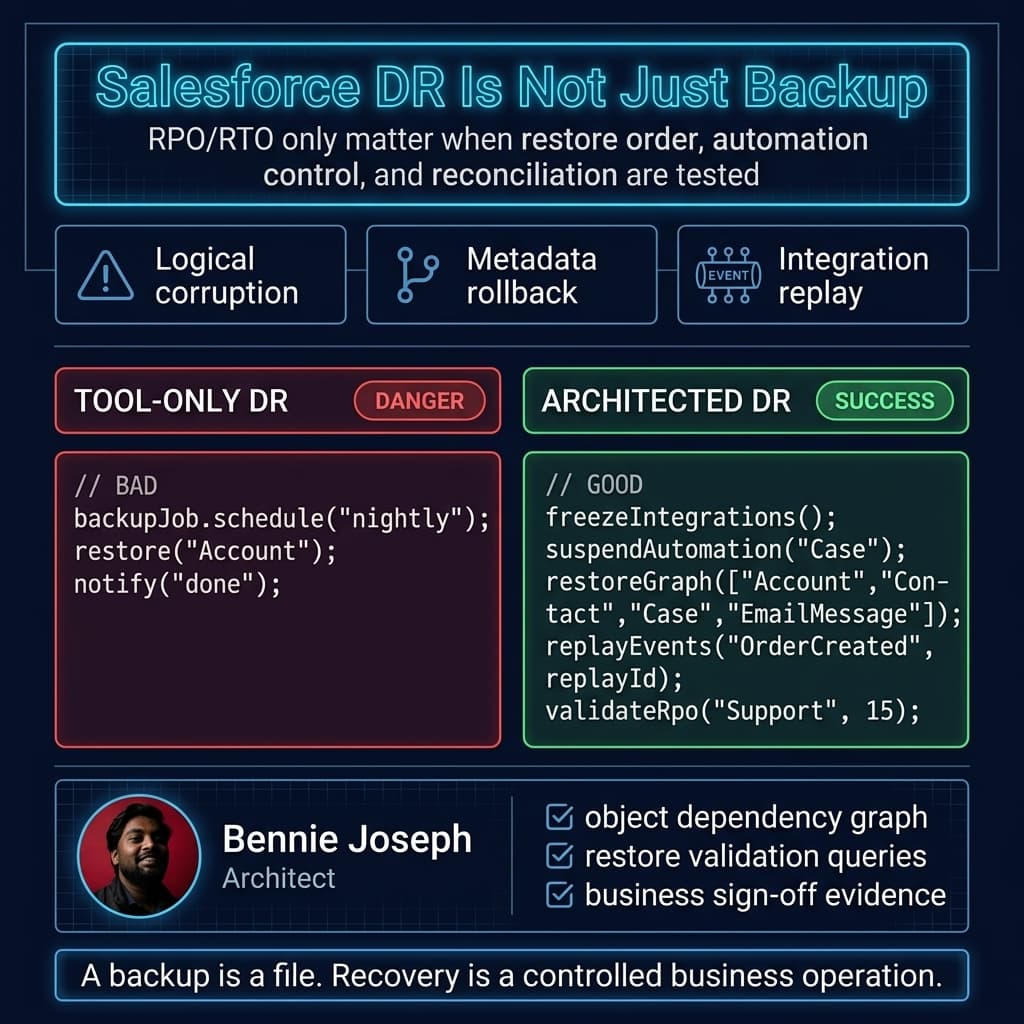
3. Restore orchestration layer
This is the layer most DR plans lack.
Restore order matters. Parent-child relationships matter. Lookup filters matter. Duplicate rules matter. Validation rules matter. Automations matter. Sharing recalculation matters. External IDs matter.
A real restore plan defines:
- freeze window and command center
- impacted object scope
- automation suspension strategy
- restore sequencing
- identity and permission checks
- integration pause/replay strategy
- validation queries
- business sign-off
- post-restore monitoring
- retrospective and control updates
If the runbook says “restore data from backup,” it is not a runbook. It is a wish.
4. Integration reconciliation layer
Salesforce rarely stands alone.
A record may be restored in Salesforce but still wrong in SAP, Oracle, NetSuite, Snowflake, BigQuery, a payment gateway, a marketing automation platform, or a customer portal.
Your DR architecture needs a reconciliation design:
- Which system is the system of record for each field?
- Which external events can be replayed?
- Which API calls are idempotent?
- Which downstream systems need compensation messages?
- Which external references must never be regenerated?
- Which failures require manual exception queues?
Conditional Composite API in Salesforce API v64.0 can reduce API call volume significantly for some recovery validations and conditional upserts, but it does not remove the need for reconciliation logic.
5. Governance and evidence layer
Auditors and executives do not want “we think backups run nightly.”
They want evidence:
- last successful backup timestamp
- backup completeness by object
- restore drill results
- RPO breach history
- RTO drill measurements
- unresolved restore defects
- access review for backup vault users
- encryption and retention policy
- legal hold handling
- proof that sensitive data is masked in lower environments
I prefer a DR dashboard that shows recovery posture by capability, not by tool job.
Decision Matrix: Salesforce DR Architecture Options
There is no single correct pattern. The right architecture depends on scale, regulatory posture, budget, and how much downtime the business can survive.
| Approach | Best fit | Strengths | Weaknesses | RPO/RTO reality | My opinion |
|---|---|---|---|---|---|
| Native export only | Small orgs, low-risk processes | Cheap, simple, easy to understand | Weak restore orchestration, limited metadata coverage, manual effort | Usually poor RTO; RPO depends on export cadence | Fine for non-critical orgs, not enterprise DR |
| Git-based metadata backup + scheduled data export | Mid-size orgs with mature DevOps | Good metadata traceability, low tooling cost | Data restore still painful; Files and relationships need work | Decent for metadata rollback, weak for complex data recovery | Minimum baseline for serious teams |
| Commercial Salesforce backup platform | Regulated or high-volume orgs | Object-level restore, relationship handling, monitoring, retention policies | Tool does not solve process ownership or integration replay | Good RPO if configured properly; RTO depends on drills | Useful, but do not confuse tool adoption with recovery maturity |
| Event-sourced recovery adjunct | High-value transactions, near-zero RPO needs | Strong replay capability, auditability, external reconciliation | More architecture complexity; requires idempotency discipline | Best for critical transaction flows | My preferred pattern for order, consent, and financial workflows |
| Active-active business continuity across platforms | Extreme availability requirements | Degraded mode can continue outside Salesforce | Very expensive; hard data consistency model | Can reduce business RTO, not necessarily Salesforce restore time | Rarely justified unless downtime cost is massive |
| Data 360 federation and lakehouse backup alignment | Analytics-heavy enterprises | Helps with historical reconstruction and cross-system lineage | Not a substitute for Salesforce operational restore | Useful for investigation; operational RTO depends on core restore path | Strong supporting layer, not the DR plan itself |
For most enterprises, I like a hybrid:
- metadata in Git
- backup platform for operational data and Files
- event log or integration journal for critical transactions
- source-system reconciliation for master data
- tested runbooks by business capability
- quarterly restore drills with measured RPO/RTO
The Object Dependency Problem Nobody Plans Deeply Enough
Salesforce data is relational, but backup conversations often treat objects as independent tables.
That is dangerous.
If you restore Opportunity records without the correct Account, ContactRole, Quote, PricebookEntry, Product2, custom pricing records, approval records, and integration references, the business process can still be broken.
The restore graph matters.
A practical dependency model includes:
- master-detail dependencies
- lookup dependencies
- polymorphic relationships
- ownership and queue dependencies
- record type dependencies
- territory and sharing dependencies
- price book dependencies
- files and content links
- email and activity history
- custom metadata dependencies
- automation dependencies
- external ID mapping dependencies
This is why I do not trust DR plans that only list “objects backed up.” I want to see restore groups.
Example restore group for support:
- Account
- Contact
- Asset
- ServiceContract
- Entitlement
- Case
- CaseComment
- EmailMessage
- ContentDocumentVersion
- ContentDocumentLink
- CaseMilestone
- custom integration log object
- custom SLA audit object
Then I want validation queries.
Not vibes. Queries.
A Practical RPO Monitor Using Salesforce API v64.0
I like having an independent recovery posture monitor. It does not replace backup tooling, but it gives architecture teams a way to detect whether backup freshness matches business commitments.
Below is a simplified TypeScript example that checks object freshness against a backup manifest. The backup manifest could come from your backup platform, object storage inventory, or internal DR control plane.
type BackupManifestEntry = {
  objectApiName: string;
  businessCapability: string;
  lastSuccessfulBackupUtc: string;
  rpoMinutes: number;
};

type RpoResult = {
  objectApiName: string;
  businessCapability: string;
  rpoMinutes: number;
  backupAgeMinutes: number;
  status: "OK" | "BREACH";
};

const SALESFORCE_API_VERSION = "v64.0";

async function salesforceQuery<T>(
  instanceUrl: string,
  accessToken: string,
  soql: string
): Promise<T[]> {
  const url = `${instanceUrl}/services/data/${SALESFORCE_API_VERSION}/query?q=${encodeURIComponent(soql)}`;

  const response = await fetch(url, {
    headers: {
      Authorization: `Bearer ${accessToken}`,
      "Content-Type": "application/json"
    }
  });

  if (!response.ok) {
    const body = await response.text();
    throw new Error(`Salesforce query failed: ${response.status} ${body}`);
  }

  const payload = await response.json();
  return payload.records as T[];
}

function evaluateRpo(manifest: BackupManifestEntry[], nowUtc = new Date()): RpoResult[] {
  return manifest.map((entry) => {
    const backupTime = new Date(entry.lastSuccessfulBackupUtc);
    const backupAgeMinutes = Math.floor(
      (nowUtc.getTime() - backupTime.getTime()) / 60000
    );

    return {
      objectApiName: entry.objectApiName,
      businessCapability: entry.businessCapability,
      rpoMinutes: entry.rpoMinutes,
      backupAgeMinutes,
      status: backupAgeMinutes <= entry.rpoMinutes ? "OK" : "BREACH"
    };
  });
}

async function validateHighRiskObjectActivity(
  instanceUrl: string,
  accessToken: string,
  objectApiName: string,
  sinceUtc: string
): Promise<number> {
  const soql = `
    SELECT COUNT(Id) total
    FROM ${objectApiName}
    WHERE LastModifiedDate >= ${sinceUtc}
  `;

  const rows = await salesforceQuery<{ total: number }>(
    instanceUrl,
    accessToken,
    soql
  );

  return rows[0]?.total ?? 0;
}

async function runRpoControl() {
  const manifest: BackupManifestEntry[] = [
    {
      objectApiName: "Case",
      businessCapability: "Customer Support",
      lastSuccessfulBackupUtc: "2026-07-13T09:45:00.000Z",
      rpoMinutes: 15
    },
    {
      objectApiName: "Opportunity",
      businessCapability: "Sales Pipeline",
      lastSuccessfulBackupUtc: "2026-07-13T09:00:00.000Z",
      rpoMinutes: 60
    },
    {
      objectApiName: "ContactPointConsent",
      businessCapability: "Consent Management",
      lastSuccessfulBackupUtc: "2026-07-13T09:58:00.000Z",
      rpoMinutes: 5
    }
  ];

  const results = evaluateRpo(manifest);

  for (const result of results) {
    if (result.status === "BREACH") {
      console.error(
        `[RPO BREACH] ${result.businessCapability} / ${result.objectApiName}: ` +
        `backup age ${result.backupAgeMinutes} min exceeds ${result.rpoMinutes} min`
      );
    } else {
      console.log(
        `[RPO OK] ${result.businessCapability} / ${result.objectApiName}: ` +
        `${result.backupAgeMinutes} min`
      );
    }
  }
}

runRpoControl().catch((error) => {
  console.error(error);
  process.exit(1);
});
This is intentionally simple. In production, I would add:
- OAuth token rotation through a secrets manager
- backup vault inventory verification
- object-level record count comparison
- anomaly detection on modification volume
- alert routing by capability owner
- evidence retention for audit
- immutable log storage
The key point: RPO is measurable. If you cannot measure it independently, you do not own it.
Apex Restore Validation Pattern
After a restore, I want validation logic close to the platform. Apex is useful for business-specific checks that generic backup tools will never understand.
Here is a simple Apex service that validates restored Case records have the minimum relationship structure required for support operations. Notice the use of user-mode SOQL. For current Salesforce releases, I avoid old security patterns and make access behavior explicit.
public with sharing class DrCaseRestoreValidator {
    public class ValidationIssue {
        @AuraEnabled public Id recordId;
        @AuraEnabled public String issueCode;
        @AuraEnabled public String message;

        public ValidationIssue(Id recordId, String issueCode, String message) {
            this.recordId = recordId;
            this.issueCode = issueCode;
            this.message = message;
        }
    }

    public static List<ValidationIssue> validateCases(Set<Id> caseIds) {
        if (caseIds == null || caseIds.isEmpty()) {
            return new List<ValidationIssue>();
        }

        List<Case> restoredCases = [
            SELECT Id, CaseNumber, AccountId, ContactId, EntitlementId,
                   Status, Origin, Priority, OwnerId
            FROM Case
            WHERE Id IN :caseIds
            WITH USER_MODE
        ];

        List<ValidationIssue> issues = new List<ValidationIssue>();

        for (Case c : restoredCases) {
            if (c.AccountId == null) {
                issues.add(new ValidationIssue(
                    c.Id,
                    'MISSING_ACCOUNT',
                    'Restored Case has no Account. Support reporting and entitlement checks may fail.'
                ));
            }

            if (c.ContactId == null) {
                issues.add(new ValidationIssue(
                    c.Id,
                    'MISSING_CONTACT',
                    'Restored Case has no Contact. Customer communication history may be incomplete.'
                ));
            }

            if (c.EntitlementId == null && c.Priority == 'High') {
                issues.add(new ValidationIssue(
                    c.Id,
                    'HIGH_PRIORITY_WITHOUT_ENTITLEMENT',
                    'High priority Case is missing Entitlement. SLA milestone calculations may be wrong.'
                ));
            }

            if (c.OwnerId == null) {
                issues.add(new ValidationIssue(
                    c.Id,
                    'MISSING_OWNER',
                    'Restored Case has no owner. Queue routing or manual assignment is required.'
                ));
            }
        }

        return issues;
    }
}
This is not meant to be a full framework. It shows the pattern: encode business recovery expectations as validation controls.
For a real implementation, I would store validation results in a custom DR_Restore_Audit__c object, attach the restore batch ID, object group, runbook version, operator, timestamps, and sign-off status.
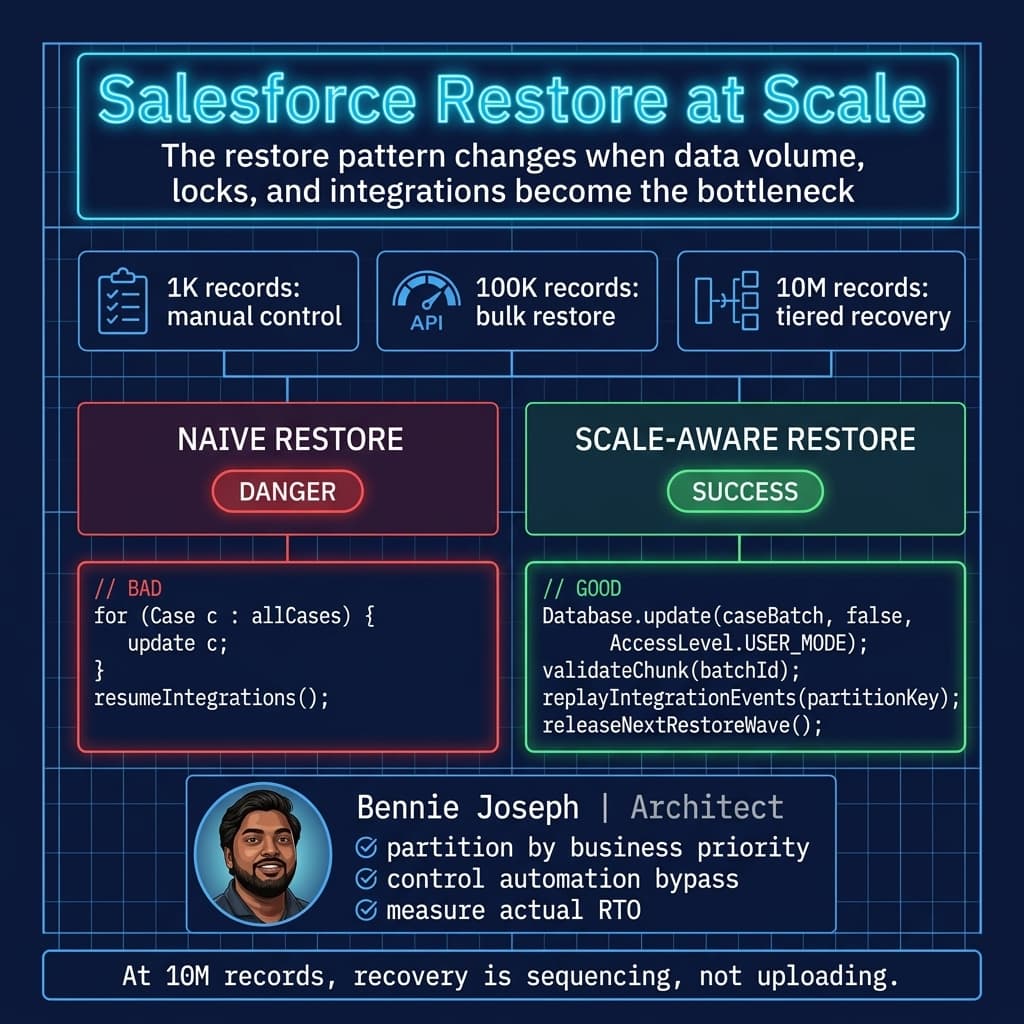
What Happens at 1K, 100K, and 10M Records
DR architecture changes as volume grows. A restore plan that works for 1,000 records can collapse at 10 million.
At 1K records
At this scale, manual recovery may be acceptable for low-risk processes.
You can often:
- identify the impacted records with reports or SOQL
- restore via Data Loader or a backup UI
- manually verify samples
- have business users inspect edge cases
The biggest risk at 1K is not platform limits. It is sloppy process. Teams skip evidence because the restore feels small.
I still recommend:
- object dependency checklist
- pre/post record counts
- automation pause checklist
- named business approver
- written rollback decision
Small incidents become big incidents when nobody owns the decision.
At 100K records
This is where manual restore starts to hurt.
You need:
- bulk-safe restore jobs
- API limit planning
- automation bypass framework
- lock contention analysis
- restore batching
- validation sampling plus targeted full checks
- integration pause and replay windows
- post-restore reconciliation reports
At 100K records, row locks become real. Sharing recalculation can become real. Duplicate rules and validation rules can turn a restore into a partial failure mess.
For this scale, I want a dry-run mode. Before writing data, simulate:
- dependency availability
- external ID resolution
- expected insert/update counts
- validation rule risk
- automation bypass state
- API consumption estimate
- estimated restore duration
At 10M records
At 10 million records, restore is an architecture problem, not an admin task.
You need to think about:
- Bulk API strategy
- parallelism versus lock contention
- parent-child sequencing at scale
- partitioning by business unit, geography, or time window
- selective indexes and query plans
- deferred sharing recalculation where appropriate
- platform event replay limits
- storage and file recovery throughput
- long-running validation jobs
- downstream system backpressure
- executive communication cadence
At this size, full restore may not be the correct first move. You may need tiered recovery:
- restore critical operational slice first
- enable degraded business operation
- reconcile high-value transactions
- restore historical context later
- run long-tail validation asynchronously
This is why RTO must be defined by capability. “Restore 10 million records in two hours” may be impossible or financially irrational. “Restore the active support queue and high-priority customer cases in two hours” is a better architectural target.
The DR Tests Nobody Runs
Most DR drills test whether a backup exists. That is table stakes.
The useful tests are uglier.
1. Restore with automation enabled by mistake
This happens in real incidents.
A team restores records, and Flows, triggers, approval processes, assignment rules, duplicate rules, and integration events fire again. Suddenly the restore creates a second incident.
Your architecture needs a controlled automation strategy:
- hierarchy custom setting or custom metadata bypass
- scoped bypass by object and runbook
- audit logging for bypass activation
- expiration timestamp
- permission-gated activation
- validation that bypass is off after restore
Do not create a global “disable everything” switch with no audit trail. That is a future outage.
2. Restore with missing Files
Salesforce Files are often forgotten because the core object record looks fine.
But in many enterprises, the important data is in:
- contracts
- signed forms
- support screenshots
- compliance evidence
- purchase orders
- customer correspondence
A restored Case without its Files may be useless. A restored Contract without the signed PDF may be a legal problem.
Your DR test should include ContentDocumentVersion and ContentDocumentLink validation.
3. Restore after metadata drift
Data restore depends on metadata compatibility.
If a field was deleted, a validation rule changed, a record type was removed, or a picklist value was restricted, yesterday’s data may not restore cleanly into today’s org.
This is why metadata backup and deployment history matter.
I want the restore runbook to answer:
- What metadata version was active when the data was backed up?
- Can we restore data into the current schema?
- Do we need a metadata rollback first?
- Which validation rules changed since the backup?
- Which fields were deleted or converted?
- Which permission changes affect restore operators?
4. Restore with identity failure
Identity is a DR dependency.
Can your admins log in if SSO is degraded? Are break-glass users configured? Are MFA and login policies documented? Are IP restrictions going to block your DR operators? Are backup vendor connections dependent on a single integration user whose password expired?
I have seen recovery delayed because nobody could authenticate through the normal path during an incident.
The minimum pattern:
- break-glass admin accounts
- monitored usage
- strong MFA
- separate emergency access procedure
- periodic login test
- named approvers
- credential rotation evidence
5. Restore with encryption and key constraints
If Shield encryption or external key management is involved, test recovery with key dependencies included.
Questions I ask:
- Are encrypted fields readable in backup?
- Are masked values recoverable?
- Are encryption keys available during incident response?
- Who can authorize key access?
- Does the backup platform store encrypted or decrypted values?
- What is the legal posture for restored sensitive data in sandboxes?
If the answer is “the security team handles that,” the DR plan is incomplete.
6. Restore Agentforce 2.0 assets
Agentforce 2.0 introduces another recovery dimension: autonomous behavior.
If an agent changes because an Agent Script file, action configuration, grounding source, or permission scope changed, the business impact can be just as serious as a broken Flow.
For agent-enabled orgs, I include:
.agentfiles in source control- AiAuthoringBundle metadata backup
- action configuration snapshots
- prompt and instruction versioning
- grounding source inventory
- tool authorization scope review
- MCP server dependency mapping, including
@salesforce/mcptools where used - test conversations for critical scenarios
- rollback plan for unsafe agent behavior
The Atlas Reasoning Engine v2 is powerful, but it does not remove governance responsibility. If an agent can create a Case, update an Order, or invoke a MuleSoft API, its configuration belongs in the DR scope.
7. Restore external integration state
Salesforce recovery without external reconciliation is half a recovery.
For every critical integration, I want an integration journal:
- request ID
- correlation ID
- Salesforce record ID
- external system ID
- operation type
- payload hash
- timestamp
- response status
- replay eligibility
- idempotency key
This lets you determine whether to replay, compensate, ignore, or manually repair.
Without this, teams guess. Guessing during DR is expensive.
Real Enterprise Example: The “Successful” Restore That Failed the Business
On one enterprise service transformation, the support org had a backup product, nightly exports, Git-based metadata, and a documented DR page. On paper, it looked mature.
Then a defect in a Case automation path updated a large segment of open Cases with the wrong priority and entitlement mapping. It was not a platform outage. It was logical corruption.
The first instinct was to restore Cases from backup.
That would have failed.
Why?
Because the Case records were only part of the transaction. The broken automation had also affected:
- CaseMilestone records
- escalation state
- assignment queues
- reporting fields used by workforce management
- integration logs sent to the contact center platform
- SLA breach dashboards
- customer notification eligibility
The backup tool could restore the Case fields. It could not decide which downstream contact center events needed compensation. It could not explain which SLA reports executives should distrust. It could not know that high-priority healthcare customers had a different recovery path from standard retail customers.
We rebuilt the recovery around business slices:
- freeze support automation for impacted record types
- identify affected Cases by automation execution window and field history
- restore priority and entitlement fields from backup
- recalculate milestone state using controlled Apex jobs
- publish compensation events to the contact center platform
- regenerate SLA exception reports
- have support operations validate sampled queues
- document RPO impact by customer segment
The backup was useful. The architecture saved the recovery.
The lesson: restoring records is not the same as restoring operations.
Metadata DR: Git Is Necessary, Not Sufficient
Every serious Salesforce program should have metadata in source control. That includes Apex, LWC, Flows, permissions, custom metadata, Agentforce configuration, and deployment scripts.
But Git alone is not enough.
You also need:
- release tags mapped to production deployment windows
- metadata snapshot of emergency changes
- destructive change tracking
- permission set and permission set group review
- environment-specific configuration strategy
- rollback scripts
- deployment validation evidence
- dependency mapping for packages
The ugly part is hotfix drift. Someone changes production directly during an incident, and the repo no longer reflects reality.
I solve this with:
- production metadata snapshot after emergency changes
- mandatory back-merge into source
- drift detection in CI
- named owner for reconciliation
- no silent admin changes to critical metadata
Salesforce Headless 360 makes no-browser operations more realistic with APIs, CLI, and MCP tooling, but the governance principle stays the same: production reality must be observable and reproducible.
Data 360 and Analytics Recovery
Data 360 is often adjacent to DR, especially in enterprises using Zero Copy federation with Snowflake or BigQuery, native vector search, Federated Grounding, and Retriever API for unstructured data.
I do not treat Data 360 as the primary operational restore mechanism for Salesforce CRM data.
I do treat it as valuable for:
- historical reconstruction
- impact analysis
- lineage across systems
- identifying corrupted data windows
- validating downstream activation state
- supporting customer communication analysis
- grounding Agentforce answers from governed datasets
If a Salesforce object is corrupted, Data 360 may help identify what changed and when. But the operational restore still needs to respect Salesforce relationships, automation, ownership, sharing, and business process state.
Security and Governance Controls I Expect
A backup vault is a sensitive system. It may contain a broad copy of customer data, employee data, contracts, notes, attachments, and regulated records.
Controls I expect:
- least-privilege access
- separate backup administrators from Salesforce administrators where possible
- immutable retention for critical backups
- encryption at rest and in transit
- key management policy
- audit logs shipped to SIEM
- quarterly access review
- legal hold process
- data residency review
- sandbox restore masking
- break-glass procedure
- vendor exit plan
The vendor exit plan is not theoretical. If your backup provider relationship ends, how do you retrieve data? In what format? How quickly? With what metadata? Can you restore without their UI?
If you cannot answer that, you have vendor dependency risk hidden inside your DR strategy.
My Minimum DR Runbook Template
For each critical business capability, I want a runbook with these sections:
Scope
- business capability
- object group
- integrations
- data classification
- RPO
- RTO
- process owner
- technical owner
Trigger conditions
- corruption threshold
- security incident trigger
- failed deployment trigger
- integration failure trigger
- data load failure trigger
Decision authority
- who can declare DR event
- who approves restore
- who approves data loss
- who communicates to business stakeholders
- who approves integration replay
Technical sequence
- freeze affected integrations
- enable automation bypass
- capture pre-restore snapshot
- restore metadata if required
- restore data by dependency group
- restore Files
- run validation jobs
- reconcile integrations
- disable bypass
- monitor business process
Validation
- record counts
- relationship integrity checks
- sample business transactions
- reports and dashboards
- integration reconciliation
- security access checks
- RPO/RTO measurements
Evidence
- timestamps
- operators
- backup source
- restored record counts
- failed record counts
- exception queue
- approvals
- sign-off
- follow-up actions
If this sounds heavy, good. DR is supposed to be disciplined.
How Often I Test
For enterprise Salesforce environments, my baseline is:
- monthly backup completion review
- monthly metadata restore test in non-production
- quarterly business capability restore drill
- quarterly break-glass login test
- semiannual integration replay drill
- annual executive tabletop exercise
- restore test after major architecture changes
Major architecture changes include:
- CPQ or billing transformation
- Service Cloud routing redesign
- large data model refactor
- identity provider change
- encryption rollout
- Agentforce 2.0 rollout
- MuleSoft integration redesign
- Data 360 activation expansion
- major package installation or replacement
The DR plan must change when the architecture changes.
Metrics That Actually Matter
I do not care that “backup jobs are green” unless that connects to recovery outcomes.
Metrics I prefer:
- RPO compliance by object group
- measured RTO from restore drills
- restore success rate by object
- unresolved restore exceptions
- relationship validation failure rate
- integration reconciliation backlog
- metadata drift count
- backup vault access exceptions
- time to declare incident
- time to freeze integrations
- time to business sign-off
The best metric is simple: when we tested the runbook, did the business process work?
Final Architecture Principles
After enough incidents, I have become opinionated about Salesforce DR.
First, treat logical corruption as the primary scenario. Platform outage planning matters, but bad data and bad metadata are more common.
Second, define recovery by business capability. Object-level backup policies are implementation details.
Third, restore order is architecture. If your dependency graph is wrong, your recovery will be wrong.
Fourth, test integrations. Salesforce may be restored while the enterprise process remains broken.
Fifth, include modern platform assets. Agentforce 2.0, Data 360, MCP tooling, Named Credentials, GraphQL API usage, and automation metadata are part of the operating model now.
Sixth, measure RPO and RTO with evidence. If you cannot prove it, do not claim it.
TL;DR
- Salesforce DR is not backup tooling; it is RPO/RTO design, restore sequencing, metadata recovery, integration reconciliation, and governance evidence.
- Test the ugly scenarios: automation firing during restore, missing Files, metadata drift, identity failure, encryption constraints, and Agentforce 2.0 configuration rollback.
- At enterprise scale, recover by business capability first, then restore records, relationships, integrations, and operational confidence in controlled waves.