Archival Strategies: Big Objects, External Objects, and the 80/20 Rule
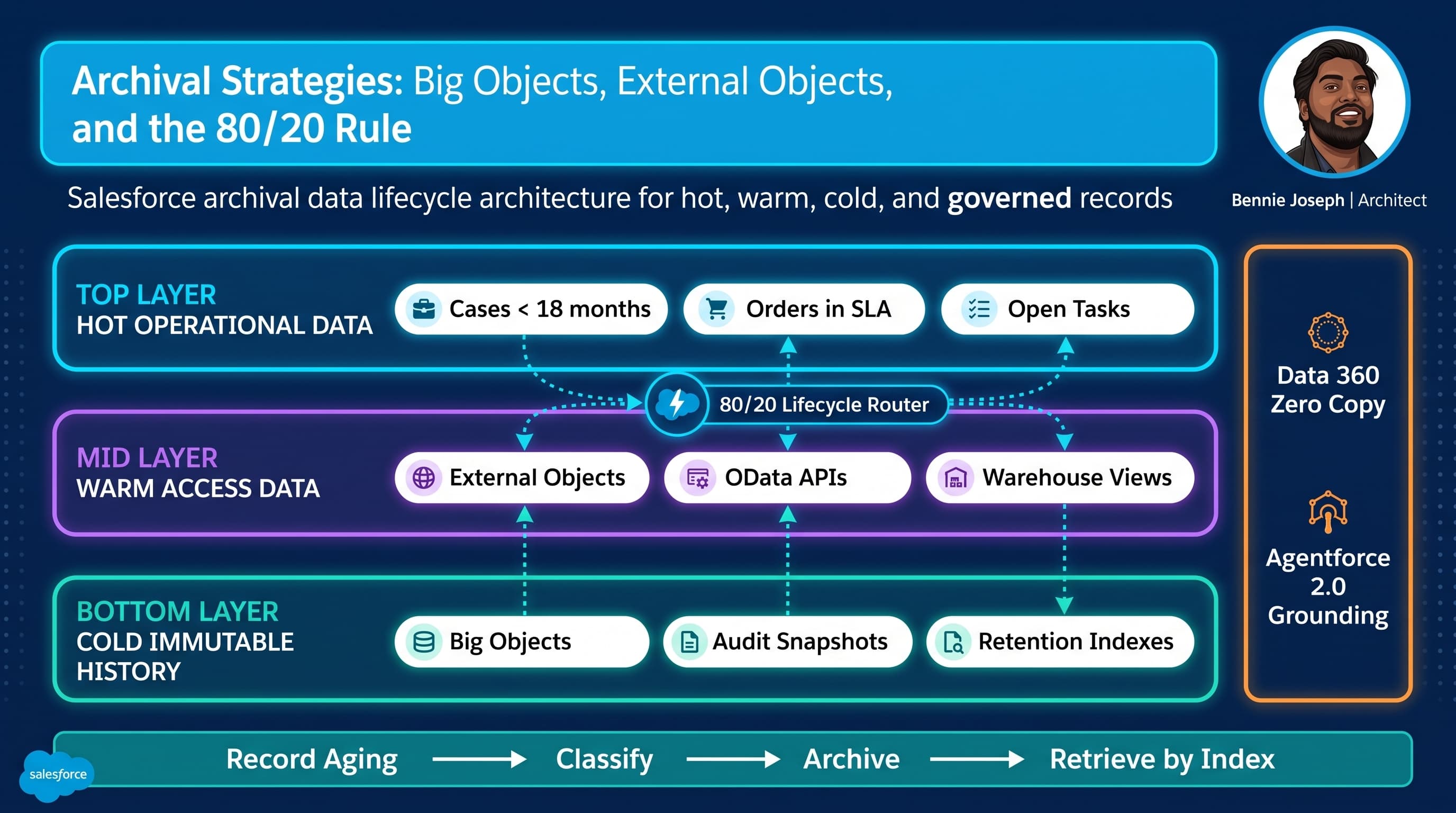
Most Salesforce archival problems start as performance problems, then become governance problems, then become budget problems.
I have seen the pattern too many times: the org starts clean, adoption grows, integrations multiply, and suddenly the “main” objects are carrying ten years of operational residue. Cases, Orders, Tasks, custom transaction objects, platform events copied into custom logs, email messages, field history, API audit records, entitlement snapshots — all sitting in the same place as the data users need to do today’s work.
That is not a data strategy. That is hoarding with a login screen.
Here’s the unpopular take: archival is not where old records go to die. Archival is a first-class part of Salesforce data lifecycle architecture. If I cannot explain how a record moves from hot to warm to cold, who owns it, how it is queried, how it is retained, how it is deleted, and how it supports reporting or AI grounding, then I do not have an architecture. I have a backlog item called “clean up data later.”
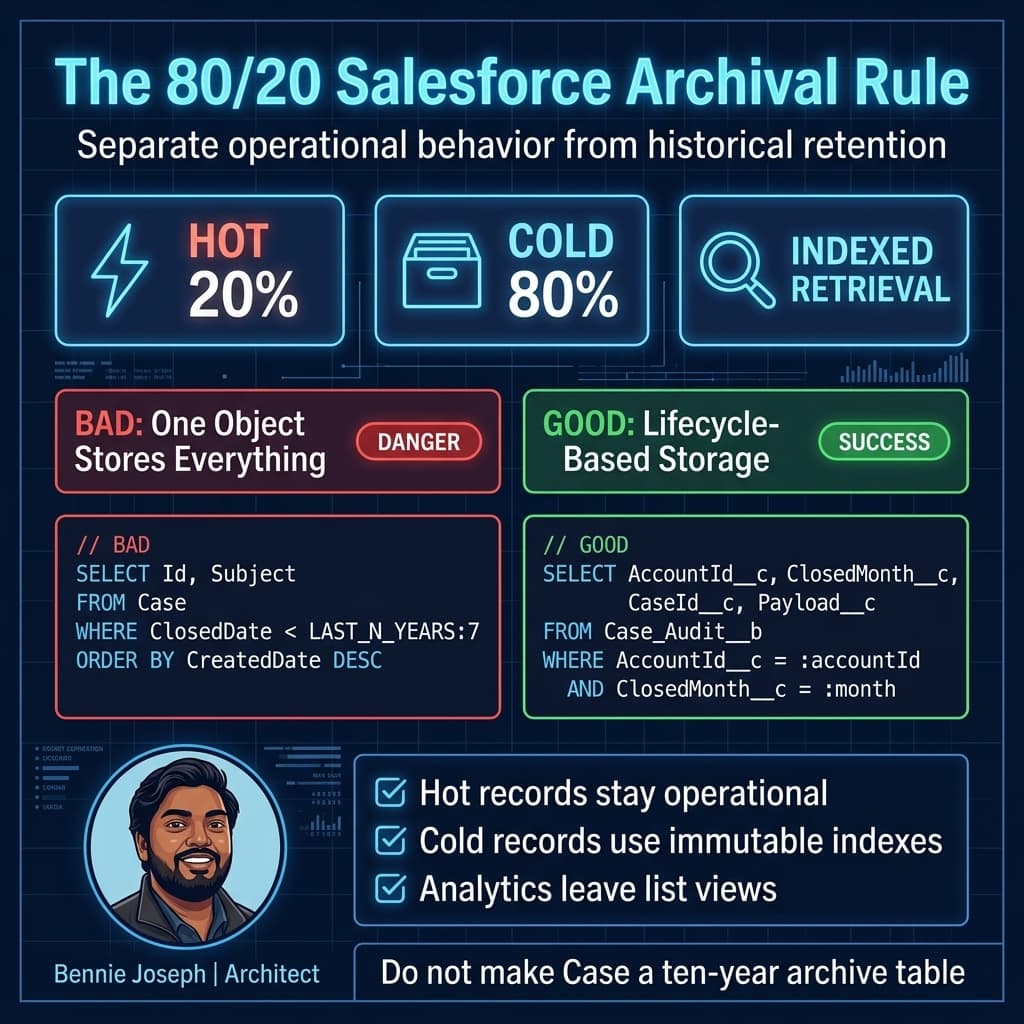
The 80/20 rule is the simplest way I have found to force the right conversation:
- 20% of records drive 80% of operational value.
- 80% of records are historical, compliance, audit, or reference data.
- The mistake is treating both groups like they need the same storage, sharing, indexing, search, automation, and UI behavior.
Salesforce gives us multiple tools for this problem: core objects, Big Objects, External Objects, Data 360, off-platform storage, and now API-first access patterns through Salesforce API v64.0, GraphQL CRUD, Named Query API, and Salesforce MCP. The hard part is not picking a tool. The hard part is admitting that one storage pattern will not serve every lifecycle phase.
The Real Problem: Operational Objects Become Accidental Archives
In one enterprise service implementation I worked on, the Case object had become the organization’s customer service brain, legal evidence store, SLA reporting layer, agent productivity dataset, integration queue, escalation history, and compliance archive.
That org had:
- Around 9 million Case records.
- More than 42 million related case event records.
- Large volumes of EmailMessage, Task, and custom audit objects.
- Service users who mainly needed the last 12–18 months.
- Legal teams who needed seven years.
- Analytics teams who wanted all history.
- Integration teams who were terrified of deletes.
- Business users who complained that reports and list views were “randomly slow.”
Nothing was random.
The platform was being asked to optimize for contradictory needs. Agents needed fast operational retrieval. Compliance needed immutable long-term retention. Analytics needed aggregate history. Integrations needed traceability. Legal needed hold management. AI initiatives needed clean, trusted grounding context for Agentforce 2.0. Those are different access patterns.
When access patterns diverge, storage patterns should diverge too.
Start With Lifecycle Classes, Not Storage Products
Before I choose Big Objects or External Objects, I classify the data.
I usually use four lifecycle classes.
Hot Data
Hot data is operational. Users act on it daily.
Examples:
- Open Cases.
- In-flight Orders.
- Active Claims.
- Current Entitlements.
- Accounts and Contacts in active service motion.
- Recent interaction summaries.
Hot data belongs in standard or custom Salesforce objects because it needs full platform behavior: sharing, validation, automation, reporting, search, UI interactions, workflow, approvals, Agentforce actions, and transaction consistency.
If users need to edit it frequently, do not archive it.
Warm Data
Warm data is rarely changed but still consulted.
Examples:
- Closed Cases from the last 18–36 months.
- Recently completed Orders.
- Previous renewal terms.
- Recent service interaction history.
- Prior year claims or applications.
Warm data may still live in core objects, but I start questioning whether it needs all platform behavior. It may be a candidate for External Objects, replicated summary objects, or a hybrid model.
Cold Data
Cold data is historical. It is primarily read for audit, trend analysis, dispute resolution, or customer history.
Examples:
- Case snapshots older than retention threshold.
- Fulfillment logs.
- Billing run details.
- Integration request/response summaries.
- Immutable event history.
- Field history beyond normal operational reporting needs.
Cold data is where Big Objects often fit well, especially when indexed retrieval is predictable.
Frozen or Regulated Data
Frozen data is not just cold. It has legal, compliance, or contractual constraints.
Examples:
- Legal hold records.
- Regulated financial transaction history.
- Healthcare-related audit trails.
- Contract evidence.
- Records under litigation review.
Frozen data usually needs explicit retention policies, restricted access, auditability, and sometimes off-platform WORM-style storage. Salesforce may still expose it, but it should not be casually mixed into operational objects.
Big Objects: Great for Immutable Scale, Bad for Ad Hoc Curiosity
Big Objects are often misunderstood. People hear “big” and assume “put all old stuff there.” That is how bad archive designs are born.
I use Big Objects when:
- The data is append-heavy and mostly immutable.
- Query patterns are predictable.
- Access is based on indexed fields.
- Users do not need normal Salesforce reporting behavior.
- I need massive scale inside the Salesforce trust boundary.
- The archived record can be represented as a denormalized snapshot.
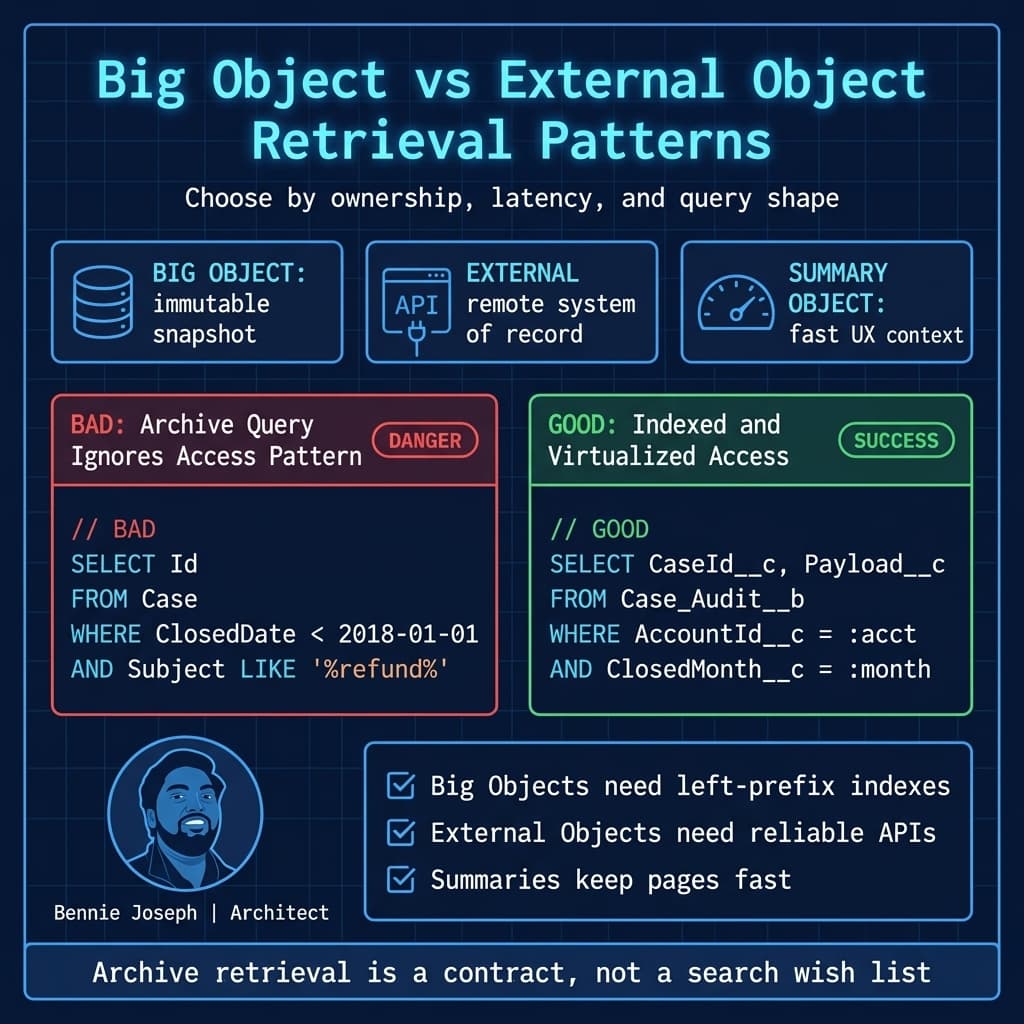
Big Objects are not a replacement for standard objects. They do not behave like normal custom objects. Querying is constrained by the index. You design the index up front, and that index becomes part of your architecture contract.
If the business says, “We might search by anything,” Big Objects are probably the wrong primary retrieval layer.
Here’s how I think about them: Big Objects are excellent for “give me the archived case history for Account X in Month Y” and terrible for “let every department invent new filters every quarter.”
Big Object Design Principle: Archive Snapshots, Not Object Graphs
A common mistake is trying to recreate the full relational model in Big Objects.
Do not blindly create:
Archived_Case__bArchived_EmailMessage__bArchived_Task__bArchived_CaseComment__bArchived_CaseMilestone__b
That usually turns retrieval into a painful reconstruction exercise.
For many service architectures, I prefer a denormalized archive snapshot:
- Account identifier.
- Source Case Id.
- Closed month.
- Case number.
- Status and reason.
- Entitlement summary.
- SLA outcome.
- Agent/team metadata.
- Important timeline events.
- A JSON payload for non-indexed details.
- Hash/checksum for integrity.
The archive should answer known questions quickly. It does not need to preserve every normalized table shape unless there is a legal or analytical reason.
External Objects: Great for Virtualization, Bad for Latency Denial
External Objects solve a different problem.
I use External Objects when:
- The system of record is outside Salesforce.
- Data should be viewed in Salesforce but not copied.
- The external source can serve queries reliably.
- Near-real-time access matters.
- The data shape maps cleanly enough for users or automation.
- Storage duplication is undesirable.
External Objects through Salesforce Connect can be excellent for exposing warehouse records, ERP transactions, claims history, policy data, or archive records stored in an external platform.
But External Objects do not magically erase distributed system tradeoffs.
You still need to care about:
- External system latency.
- API limits and throttling.
- Authentication.
- Query pushdown.
- Filter selectivity.
- Availability.
- User experience when the remote system is slow.
- Reporting limitations.
- Transaction boundaries.
If your external archive cannot respond consistently, Salesforce users will blame Salesforce. They do not care that the bottleneck is an OData endpoint behind an overloaded integration tier.
The 80/20 Rule in Practice
For enterprise Salesforce archival architecture, my default starting position is:
- Keep the hottest 20% in core Salesforce objects.
- Move predictable immutable history to Big Objects.
- Virtualize externally owned history through External Objects.
- Push analytical workloads to Data 360, warehouse, or lakehouse patterns.
- Keep only the operational summary needed for fast user decisions.
This is not a rigid percentage. It is a forcing function.
The question is not, “Can Salesforce store this?”
The question is, “Should this record participate in operational platform behavior?”
If the answer is no, I challenge why it is still in the operational object.
Decision Matrix: Big Objects vs External Objects vs Core Objects vs Off-Platform Archive
Here is the decision matrix I use when teams are debating archival options.
| Approach | Best For | Strengths | Weaknesses | My Default Use |
|---|---|---|---|---|
| Core Salesforce Objects | Hot operational records | Full platform behavior, sharing, automation, reports, UI, search | Expensive at scale if used as an archive; performance and ownership degrade | Keep active and recent records only |
| Big Objects | Immutable high-volume history with predictable access | Massive scale, Salesforce-native, indexed access, good for audit snapshots | Query constraints, limited platform behavior, index must be designed early | Archived snapshots keyed by account/date/source id |
| External Objects | Data owned outside Salesforce but visible inside Salesforce | Avoids duplication, near-real-time virtualization, good for ERP/warehouse access | Latency, dependency on external API, reporting and transaction limits | View external archive or ERP history without copying |
| Data 360 / Zero Copy | Analytics, segmentation, federation, grounding | Unifies data without unnecessary movement, supports enterprise data products | Requires data governance maturity and clear modeling | Enterprise-wide analytical and AI grounding layer |
| Off-Platform Archive | Regulated, cheap, long-retention storage | Cost control, specialized compliance, WORM options, flexible analytics | More integration work, separate access/security model | Legal archive, raw payload retention, lakehouse history |
| Summary Object in Salesforce | Fast operational context from historical data | Excellent user experience, small footprint, easy UI/reporting | Needs sync process, can drift if not governed | “Last 5 interactions,” “lifetime value,” “prior SLA failures” |
The mistake I see is picking one row and trying to force every requirement into it. Mature architectures use multiple rows deliberately.
Architecture Pattern I Prefer: Hot Core, Cold Big Object, External Analytical Access
For high-volume service, claims, orders, and transaction architectures, I often use this pattern:
- Active and recent records stay in standard/custom objects.
- A scheduled or event-driven archive process snapshots eligible records.
- The snapshot is written to a Big Object using a queryable retention index.
- Heavy analytical history is available through Data 360 or a warehouse.
- External Objects expose selected external archive views when business users need lookup access.
- A lightweight summary remains on the Account, Contact, Case, or custom parent object.
- Agentforce 2.0 grounding uses curated summaries and retrievers, not raw historical sludge.
That last point matters more now than it used to.
With Agentforce 2.0 and Atlas Reasoning Engine v2, teams are increasingly grounding agents on enterprise data. If your archive is messy, duplicated, and poorly governed, your agent does not become smarter. It becomes confidently inconsistent.
I do not want an agent reading ten versions of the same customer interaction from five archive locations. I want a governed retrieval path: current operational context, trusted summary, and specific historical lookup when needed.
Apex Example: Archiving Closed Cases Into a Big Object
Below is a simplified pattern for archiving closed Cases into a Big Object. This assumes a custom Big Object named Case_Audit__b with an index such as:
AccountId__cClosedMonth__cCaseId__c
That index supports the access pattern: “Show archived cases for this account and month.”
This is not the only valid index. It is valid only if it matches your retrieval requirement.
public with sharing class CaseArchiveBatch implements Database.Batchable<SObject>, Database.Stateful {
    private final Date cutoffDate;
    private Integer archivedCount = 0;
    private Integer failedCount = 0;

    public CaseArchiveBatch(Date cutoffDate) {
        this.cutoffDate = cutoffDate;
    }

    public Database.QueryLocator start(Database.BatchableContext context) {
        return Database.getQueryLocator([
            SELECT Id,
                   CaseNumber,
                   AccountId,
                   ContactId,
                   Subject,
                   Status,
                   Reason,
                   Origin,
                   Priority,
                   ClosedDate,
                   CreatedDate,
                   LastModifiedDate
            FROM Case
            WHERE IsClosed = true
            AND ClosedDate < :cutoffDate
            AND AccountId != null
            WITH USER_MODE
        ]);
    }

    public void execute(Database.BatchableContext context, List<Case> scope) {
        List<Case_Audit__b> archiveRows = new List<Case_Audit__b>();

        for (Case sourceCase : scope) {
            Date closedDate = Date.newInstance(
                sourceCase.ClosedDate.year(),
                sourceCase.ClosedDate.month(),
                1
            );

            Map<String, Object> payload = new Map<String, Object>{
                'caseNumber' => sourceCase.CaseNumber,
                'contactId' => sourceCase.ContactId,
                'subject' => sourceCase.Subject,
                'status' => sourceCase.Status,
                'reason' => sourceCase.Reason,
                'origin' => sourceCase.Origin,
                'priority' => sourceCase.Priority,
                'createdDate' => sourceCase.CreatedDate,
                'closedDate' => sourceCase.ClosedDate,
                'lastModifiedDate' => sourceCase.LastModifiedDate
            };

            Case_Audit__b row = new Case_Audit__b();
            row.AccountId__c = String.valueOf(sourceCase.AccountId);
            row.ClosedMonth__c = closedDate;
            row.CaseId__c = String.valueOf(sourceCase.Id);
            row.CaseNumber__c = sourceCase.CaseNumber;
            row.Payload__c = JSON.serialize(payload);

            archiveRows.add(row);
        }

        if (archiveRows.isEmpty()) {
            return;
        }

        Database.SaveResult[] results = Database.insertImmediate(archiveRows);

        for (Database.SaveResult result : results) {
            if (result.isSuccess()) {
                archivedCount++;
            } else {
                failedCount++;
                for (Database.Error error : result.getErrors()) {
                    System.debug(LoggingLevel.ERROR,
                        'Case archive failed: ' + error.getStatusCode() + ' - ' + error.getMessage()
                    );
                }
            }
        }
    }

    public void finish(Database.BatchableContext context) {
        System.debug(LoggingLevel.INFO,
            'Case archive completed. Archived=' + archivedCount + ', Failed=' + failedCount
        );
    }
}
And here is a retrieval method that respects the Big Object index shape:
public with sharing class ArchivedCaseService {
    public class ArchivedCaseResult {
        @AuraEnabled public String caseId;
        @AuraEnabled public String caseNumber;
        @AuraEnabled public Date closedMonth;
        @AuraEnabled public String payload;
    }

    @AuraEnabled(cacheable=true)
    public static List<ArchivedCaseResult> getArchivedCasesByAccountMonth(
        Id accountId,
        Date closedMonth
    ) {
        if (accountId == null || closedMonth == null) {
            return new List<ArchivedCaseResult>();
        }

        Date normalizedMonth = Date.newInstance(
            closedMonth.year(),
            closedMonth.month(),
            1
        );

        List<ArchivedCaseResult> output = new List<ArchivedCaseResult>();

        for (Case_Audit__b row : [
            SELECT AccountId__c,
                   ClosedMonth__c,
                   CaseId__c,
                   CaseNumber__c,
                   Payload__c
            FROM Case_Audit__b
            WHERE AccountId__c = :String.valueOf(accountId)
            AND ClosedMonth__c = :normalizedMonth
        ]) {
            ArchivedCaseResult item = new ArchivedCaseResult();
            item.caseId = row.CaseId__c;
            item.caseNumber = row.CaseNumber__c;
            item.closedMonth = row.ClosedMonth__c;
            item.payload = row.Payload__c;
            output.add(item);
        }

        return output;
    }
}
Notice what I did not do.
I did not query by arbitrary subject keyword. I did not promise normal report-builder flexibility. I did not pretend Big Objects are a magic substitute for a search engine.
The index is the product.
Index Design Is the Architecture
For Big Objects, index design is not a technical detail buried in implementation. It is the architecture.
If the business needs archive retrieval by account and period, index that.
If compliance needs retrieval by source record id, include that.
If service users need lookup by case number, think carefully. Case number may be unique enough, but it may not support the broader access pattern. You might need a separate lookup service, a summary object, or a search index outside Big Objects.
I ask these questions early:
- Who retrieves archived data?
- What screen or process retrieves it?
- What exact filters are available?
- Is retrieval user-driven, integration-driven, audit-driven, or AI-driven?
- Is the archive immutable?
- Is deletion required after retention expires?
- Is legal hold required?
- Is the data still subject to field-level security expectations?
- Does the archive need to preserve point-in-time values?
- Does the business need aggregate reporting or individual record lookup?
If those answers are vague, the archive design is not ready.
Scale: What Changes at 1K, 100K, and 10M Records
Archival architecture only matters when scale changes the behavior of the system. Here is how I think about it.
At 1K Records
At 1K records, almost anything works.
You can keep everything in core objects. Reports are fine. List views are fine. Users do not feel pain. Nobody wants to fund archival because there is no visible problem.
But this is the cheapest time to define lifecycle fields:
Lifecycle_Status__cArchive_Eligible_Date__cRetention_Category__cLegal_Hold__cSource_System__cArchive_Status__c
The architecture work at 1K is not building a huge archive. It is creating metadata and ownership so the system can age cleanly.
At 100K Records
At 100K records, bad patterns start to show up.
Reports with broad filters slow down. Automation touches records that should be inactive. Duplicate history appears. Users export data because they do not trust screens. Integrations scan too much. Admins add more indexes and hope.
This is where I usually introduce:
- Retention policy by object.
- Archive eligibility rules.
- Operational vs historical page layouts.
- Summary fields.
- Scheduled archive simulation.
- Query selectivity review.
- Data quality gates before archive.
At 100K, the goal is to prevent 10M pain.
At 10M Records
At 10M records, denial is expensive.
You need real lifecycle architecture:
- Partition hot and cold access.
- Move immutable snapshots out of operational objects.
- Stop using operational reports as historical analytics.
- Build indexed archive retrieval.
- Use externalized analytics where appropriate.
- Define deletion and retention enforcement.
- Monitor archive jobs like production integrations.
- Test restore and retrieval paths.
- Make legal hold explicit.
- Keep AI grounding curated.
At 10M, an archival strategy is not optional. It is a platform survival mechanism.
External Objects in the Archive Layer
I like External Objects when the archive already lives in another enterprise platform and Salesforce needs visibility, not ownership.
Example: a manufacturing company stores completed order fulfillment events in a warehouse. Service agents occasionally need to see shipment milestones from five years ago, but they do not update those milestones in Salesforce.
Copying all of that into Salesforce creates cost, sync, reconciliation, and retention problems. An External Object can expose the data in context from the Account or Order page.
But I always put guardrails around this:
- Use selective filters.
- Avoid screens that load hundreds of external rows by default.
- Cache summaries where user experience demands speed.
- Design fallback behavior for external outages.
- Make ownership clear: Salesforce displays it; the external platform owns it.
- Do not run critical synchronous save transactions against fragile external reads.
External Objects are a user experience and integration pattern, not a dumping ground.
When I Use Both Big Objects and External Objects
Big Objects and External Objects are not mutually exclusive.
A pattern I have used:
- Big Objects store Salesforce-origin immutable snapshots.
- External Objects expose warehouse-enriched historical views.
- Data 360 provides enterprise federation and segmentation.
- Core Salesforce stores current operational summaries.
- Agentforce 2.0 uses curated grounding sources, not raw archive tables.
For example, a service console might show:
- Open Cases from the Case object.
- Last three resolved case summaries from a custom summary object.
- Full archived case lookup from
Case_Audit__b. - Product ownership history from an External Object backed by ERP.
- Customer lifetime service trends from Data 360.
That is a better experience than forcing every historical detail into one overloaded Case-related list.
The Role of Summary Objects
Summary objects are underrated.
Sometimes the best archive architecture is not making old data easy to browse. It is making old data unnecessary for daily work.
For service users, I often create compact summaries:
- Last case date.
- Last escalation reason.
- Count of cases in last 12 months.
- Count of archived cases.
- Lifetime SLA breach count.
- Last complaint category.
- Last resolved product family.
- Risk score.
- Link to archive search.
These summaries stay in core Salesforce because they support fast operational decisions. They are small, indexed, reportable, and easy to expose in LWC.
With LWC native state management GA in Summer ’26, building responsive archive panels and summary-driven console experiences is cleaner than it used to be. But the UI should not hide bad data architecture. A reactive component loading poorly partitioned archive data is still a slow component.
Retention and Deletion: The Part Everyone Avoids
Archival without deletion is just relocation.
Every archival design needs a retention model:
| Retention Category | Example | Action |
|---|---|---|
| Operational | Open and recent records | Keep in core Salesforce |
| Business History | Closed records needed for service lookup | Archive after threshold |
| Compliance | Records required by regulation | Retain for required period |
| Legal Hold | Records under dispute or investigation | Exclude from deletion |
| Disposable Logs | Debug or integration traces | Delete aggressively after short period |
I want retention categories stored as data, not trapped in a Confluence page. Records should carry enough metadata for automated lifecycle decisions.
At minimum:
- Retention category.
- Archive eligibility date.
- Archive completion status.
- Legal hold flag.
- Source system.
- Retention expiration date.
- Archive location.
- Archive checksum or reference id.
If the business cannot tell me when data can be deleted, I assume the archival strategy is incomplete.
Security Does Not Disappear After Archive
A bad archive can become a security bypass.
Core Salesforce objects have sharing, field-level security, restriction rules, audit trails, and familiar access patterns. Once data is copied into Big Objects, external stores, warehouses, or object storage, you must deliberately rebuild the security model appropriate for that layer.
Questions I ask:
- Who can retrieve archived records?
- Does access follow current account ownership or historical ownership?
- Are sensitive fields masked or excluded?
- Are archive payloads encrypted?
- Are external object credentials user-context or named-principal?
- Are archive reads logged?
- Can support users access legally restricted data?
- Can AI agents retrieve this content?
- Are retention deletes auditable?
For Apex access in Salesforce API v64.0, I use explicit user-mode querying where applicable and avoid assuming system context is acceptable. Looking ahead, the v67.0 direction toward safer default user-mode behavior reinforces a principle I already follow: security should be explicit, not accidental.
Reporting: Stop Asking Operational Reports To Be a Warehouse
One of the biggest drivers of archival failure is reporting confusion.
Operational Salesforce reports are great for operational questions:
- What cases are open?
- Which accounts need follow-up?
- Which opportunities are stuck?
- Which renewals are at risk?
- Which agents breached SLA this week?
They are not always the right tool for ten years of historical trend analysis across tens of millions of records.
For large history, I prefer:
- Data 360 for governed Salesforce-centric federation and segmentation.
- Warehouse/lakehouse analytics for long-running historical analysis.
- Aggregated summary objects for operational dashboards.
- Big Objects for indexed record-level audit retrieval.
- External Objects for contextual visibility into externally owned records.
Do not make every report requirement a reason to keep dead records in core objects.
AI and Agentforce 2.0 Change the Archive Conversation
Archives used to be mostly about performance, storage, and compliance. Now they also affect AI behavior.
With Agentforce 2.0, multi-agent orchestration, custom reasoning steps, and Atlas Reasoning Engine v2, enterprise teams are connecting agents to more business data. That means archives are no longer invisible.
But AI does not need unlimited raw history. It needs trustworthy context.
For an agent handling a customer service request, I would rather provide:
- Current open cases.
- Active entitlements.
- Last three relevant service summaries.
- Lifetime risk indicators.
- A controlled archive retrieval action.
- Federated grounding through governed Data 360 sources.
I do not want the agent pulling every email, task, debug log, field history row, and obsolete case comment from the last decade.
Good archival architecture reduces noise. That improves human UX and agent reasoning.
Real-World Example: Service Archive Redesign
In the enterprise service org I mentioned earlier, we did not start by moving millions of records. We started by mapping access patterns.
We found:
- Agents needed recent cases and concise history.
- Supervisors needed trend summaries.
- Legal needed exact historical records.
- Analytics needed long-range aggregates.
- Integrations needed source identifiers and traceability.
- Executives needed dashboards, not raw records.
The solution was layered:
- Keep open and recent Cases in core Salesforce.
- Add lifecycle metadata to Case and related audit objects.
- Build an archive snapshot Big Object for closed Case history.
- Store selected immutable payloads off-platform for long-term retention.
- Expose external fulfillment history through External Objects.
- Create Account-level service summary records for console performance.
- Move long-range analytics out of operational Salesforce reports.
- Define legal hold and retention expiration processes.
- Restrict archive retrieval through dedicated services.
- Design future grounding paths for Agentforce 2.0 using summaries and governed retrieval.
The biggest win was not storage reduction. It was clarity.
Users stopped expecting the Case tab to answer every historical question. Architects stopped pretending one object model could satisfy every data lifecycle stage. Admins stopped fighting report performance symptoms that came from architectural misuse.
Common Mistakes I Avoid
Mistake 1: Archiving Too Late
If you wait until performance is already bad, every option feels risky. Build lifecycle fields early.
Mistake 2: Using Big Objects Without Query Design
A Big Object without a clear index access pattern is a future incident.
Mistake 3: Treating External Objects Like Local Objects
Remote data has remote failure modes. Design for latency and outages.
Mistake 4: Keeping Raw History When Summaries Would Do
Users often need the answer, not the entire archive.
Mistake 5: Ignoring Legal Hold
Retention automation without legal hold logic is dangerous.
Mistake 6: Letting AI Read Everything
More context is not always better context. Curate what agents can retrieve.
My Practical Architecture Checklist
When I review archival design, I look for these answers:
- What is the hot/warm/cold/frozen classification?
- What percentage of data is operationally active?
- What records are archive eligible?
- What blocks archive eligibility?
- What are the top five retrieval patterns?
- What fields form the archive index?
- What data must remain reportable in Salesforce?
- What belongs in analytics instead?
- What is virtualized through External Objects?
- What is stored as immutable snapshots?
- What summaries remain in core objects?
- What is the retention period?
- What is the deletion process?
- What is the legal hold process?
- What security model applies after archive?
- What monitoring exists for archive jobs?
- What happens when archive retrieval fails?
- What data can Agentforce retrieve?
- What data should Agentforce never retrieve?
If a team cannot answer these, I do not trust the archive design yet.
Final Opinion: Archive By Behavior, Not Age Alone
Age matters, but behavior matters more.
A five-year-old record that drives active litigation is not just “old.” A two-year-old record that nobody reads and has no compliance value may be disposable. A seven-year-old transaction may be perfect for warehouse analytics but terrible for Salesforce list views. A three-year-old customer complaint may be useful only as a summary signal.
The right question is:
“What does this data need to do now?”
If it needs workflow, ownership, editing, sharing, and operational reporting, keep it hot.
If it needs immutable lookup at massive scale, consider Big Objects.
If it belongs to another system but must be visible in Salesforce, consider External Objects.
If it supports analytics, segmentation, or governed AI grounding, use the right data platform pattern.
If it has no business, legal, analytical, or operational value, delete it according to policy.
That is the heart of Salesforce archival Big Objects External Objects data lifecycle architecture: stop treating storage as the architecture. The lifecycle is the architecture.
TL;DR
- Use the 80/20 rule: keep operational data hot, move predictable immutable history to Big Objects, and virtualize externally owned data through External Objects.
- Big Objects succeed only when the index matches real retrieval patterns; External Objects succeed only when the remote system is reliable and selective.
- Archival is a lifecycle architecture decision covering performance, retention, security, analytics, and Agentforce 2.0 grounding — not just old-record storage.