Release Architecture: Managing 50 Developers in a Single Salesforce Org
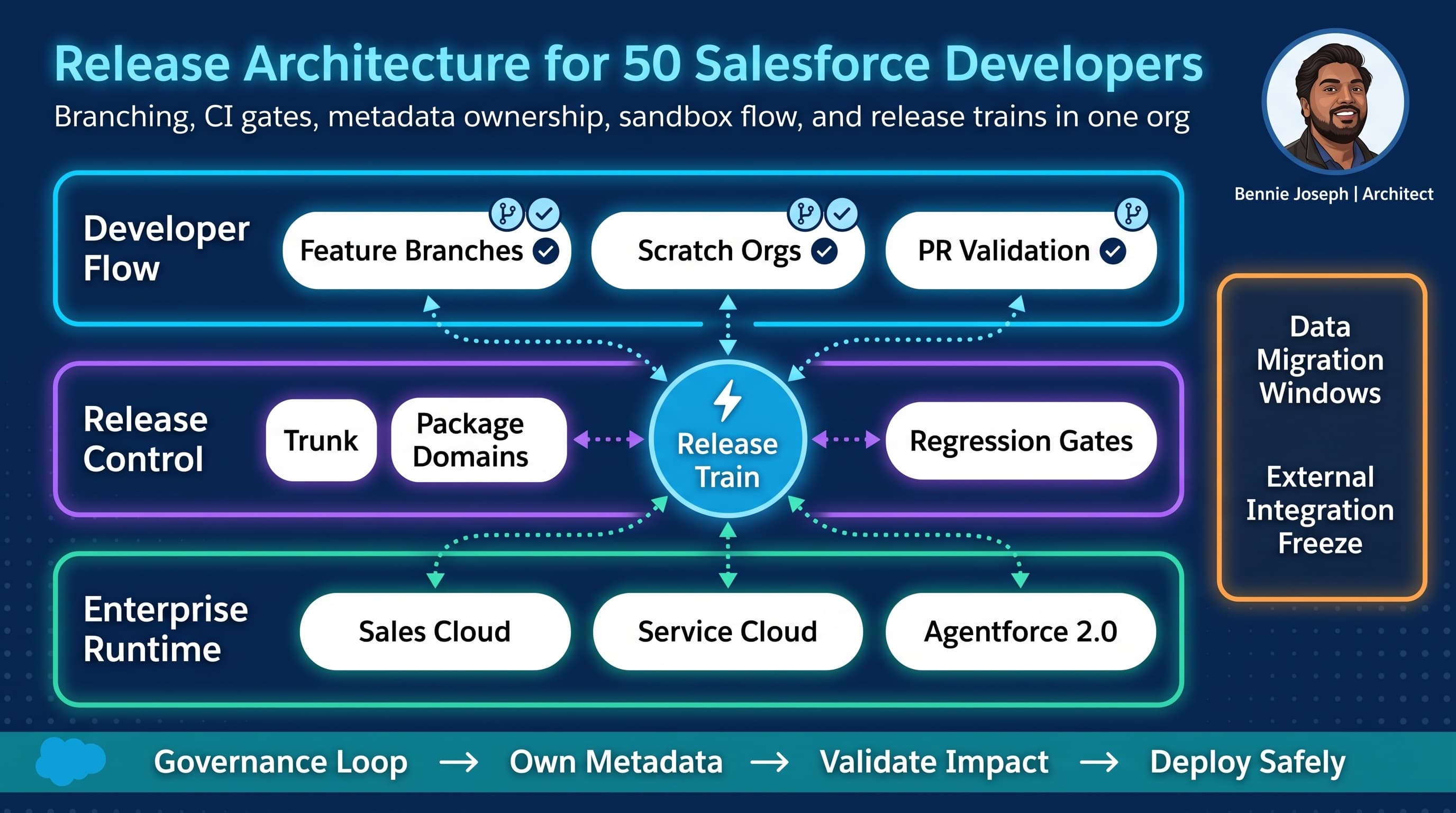
I have never seen a 50-developer Salesforce org fail because the team lacked smart people.
I have seen it fail because the release architecture assumed 8 developers, 2 admins, and a weekly deployment window.
A large Salesforce team creates a different class of problem. The bottleneck is no longer whether Apex compiles or whether a Flow can be activated. The bottleneck is coordination cost: overlapping metadata, brittle tests, unclear ownership, sandbox drift, emergency hotfixes, packaged versus unpackaged boundaries, data migrations, integration contracts, and business teams who still expect “just one small field” to go live by Friday.
Here’s the unpopular take: a large-team Salesforce release model is not a Git branching problem. Branching is only one part. The real architecture is the operating system around change.
For 50 developers in a single enterprise org, I design release architecture around five principles:
- Metadata ownership is explicit.
- Main stays deployable.
- Validation happens before merge, not after build-up.
- Releases are trains, hotfixes are controlled exceptions.
- The org is treated as a shared production system, not a dumping ground for tickets.
This post is how I structure it in real enterprise projects using Salesforce API v64.0, modern sf CLI flows, package-based boundaries where they actually help, and governance that does not require a committee meeting for every pull request.
The real problem: 50 developers create metadata collision, not just code collision
In Java or TypeScript projects, two developers changing different files usually stay out of each other’s way. Salesforce is different.
A single business capability can touch:
- Custom fields
- Permission sets
- Record types
- Validation rules
- Flows
- Apex classes
- Lightning Web Components
- FlexiPages
- Custom metadata
- Agentforce 2.0 agent definitions
- Omni-channel routing
- Experience Cloud metadata
- Named credentials
- Data 360 integrations
- Platform events
- External services
- Reports and dashboards
The collision pattern is brutal because Salesforce metadata is often wide and declarative. One FlexiPage, one Flow, one permission set, or one object XML file can become a high-conflict artifact.
In one enterprise program I worked on, 50+ delivery engineers were split across sales operations, service transformation, integration, digital portal, and platform enablement workstreams. Everyone touched Account, Case, permission sets, and at least one shared utility Apex class. The team had Git. They had CI. They had sandboxes. They still spent the last week of every release untangling overwritten page layouts and failed regression tests.
The issue was not tooling. It was release architecture.
My baseline architecture for a 50-developer org
For this size, I use a release train model with trunk-based discipline and domain ownership.
The high-level flow looks like this:
- Developers branch from
main. - Developers work in scratch orgs or assigned development sandboxes depending on metadata type.
- Pull requests validate changed metadata against a clean integration org.
- Ownership gates block changes to metadata outside the team’s domain.
- Successful PRs merge to
main. mainauto-deploys to an integration environment.- Release branches are cut on a schedule.
- Release candidates promote through UAT, staging, and production.
- Hotfixes branch from production tag and merge back into
main.
I prefer short-lived branches. Long-lived feature branches are where Salesforce metadata goes to rot.
For a large team, the architecture has to separate development flow from release flow:
- Development flow optimizes for fast feedback.
- Release flow optimizes for stability and auditability.
Trying to make one branch strategy serve both equally is how teams end up with “release/dev/integration/final-final-v2” branches nobody trusts.
Decision matrix: branching and release options
For 50 developers, I rarely accept a pure GitFlow model. It creates too many integration cliffs. But I also do not blindly force trunk-based development without guardrails.
| Approach | How it works | Strengths | Failure modes | When I use it |
|---|---|---|---|---|
| Pure GitFlow | Long-lived develop, release branches, feature branches | Familiar, easy mental model for traditional teams | Late integration, painful Salesforce metadata merges, stale environments | Small teams or orgs with slow release cadence |
| Pure trunk-based | Everyone merges small changes to main; releases cut from trunk | Fast integration, fewer merge bombs, main is always close to deployable | Requires excellent test automation and feature flags | Mature teams with strong CI and modular metadata |
| Release train + short-lived feature branches | Feature branches merge to main; scheduled release branches promote | Balances speed and control, predictable business releases | Needs strict ownership and release discipline | My default for 50-developer enterprise orgs |
| Package-per-team | Teams own unlocked packages or managed packages | Clear boundaries, versioning, dependency control | Not all Salesforce metadata packages cleanly; cross-package dependencies get messy | Stable platform domains, reusable services, shared libraries |
| Org-based changesets/manual deployment | Changes assembled from sandboxes manually | Easy for admins initially | No scalable audit trail, high drift, fragile rollback | Almost never for large delivery teams |
| Environment branch model | Branches map to sandboxes like dev, qa, uat | Simple to explain | Git becomes a mirror of environments instead of source of truth | Legacy teams during transition only |
My default is:
mainis the source of truth.release/YYYY.MM.Nis cut frommain.hotfix/INC-12345-descriptionbranches from the production tag.- Feature branches live for days, not weeks.
- Packages are used for stable domains, not every random change.
- Metadata ownership is enforced automatically.
Repository structure: organize by ownership, not by Salesforce metadata type
A common mistake is to organize everything around Salesforce’s default source format and call it architecture.
Salesforce source format is a storage format. It is not an ownership model.
A large-team repository needs domain boundaries. I usually start with this shape:
force-app/
  main/
    default/
      objects/
      classes/
      lwc/
      flows/
      permissionsets/
  domains/
    service/
      objects/
      classes/
      flows/
      lwc/
    sales/
      objects/
      classes/
      flows/
      lwc/
    integration/
      classes/
      externalServices/
      namedCredentials/
      platformEventChannels/
    agentforce/
      agents/
      actions/
      topics/
      scripts/
    platform/
      classes/
      customMetadata/
      permissionsets/
config/
  ownership.json
  release-policy.json
scripts/
  validate-ownership.ts
  changed-metadata.ts
  destructive-check.ts
Does this fight the default layout a little? Yes.
Is it worth it? Also yes.
The point is not aesthetic. The point is to make ownership visible in pull requests. If the service team changes a sales-owned validation rule, I want the pipeline to flag it before humans miss it.
With Salesforce API v64.0, I also keep project configuration explicit. I do not want random CLI defaults driving enterprise release behavior.
{
  "packageDirectories": [
    {
      "path": "force-app/main/default",
      "default": true
    },
    {
      "path": "force-app/domains/service"
    },
    {
      "path": "force-app/domains/sales"
    },
    {
      "path": "force-app/domains/integration"
    },
    {
      "path": "force-app/domains/agentforce"
    },
    {
      "path": "force-app/domains/platform"
    }
  ],
  "name": "enterprise-core",
  "namespace": "",
  "sourceApiVersion": "64.0"
}
I do not split domains just because I can. I split when the ownership boundary reduces conflict.
Good boundaries:
- Service case management
- Sales pipeline automation
- Integration platform
- Shared Apex framework
- Agentforce 2.0 configuration and actions
- Experience Cloud portal
- Data 360 activation and retrieval patterns
Bad boundaries:
- “All Apex”
- “All Flows”
- “All objects”
- “Stuff Team A built last year”
Ownership should follow business capability and runtime blast radius.
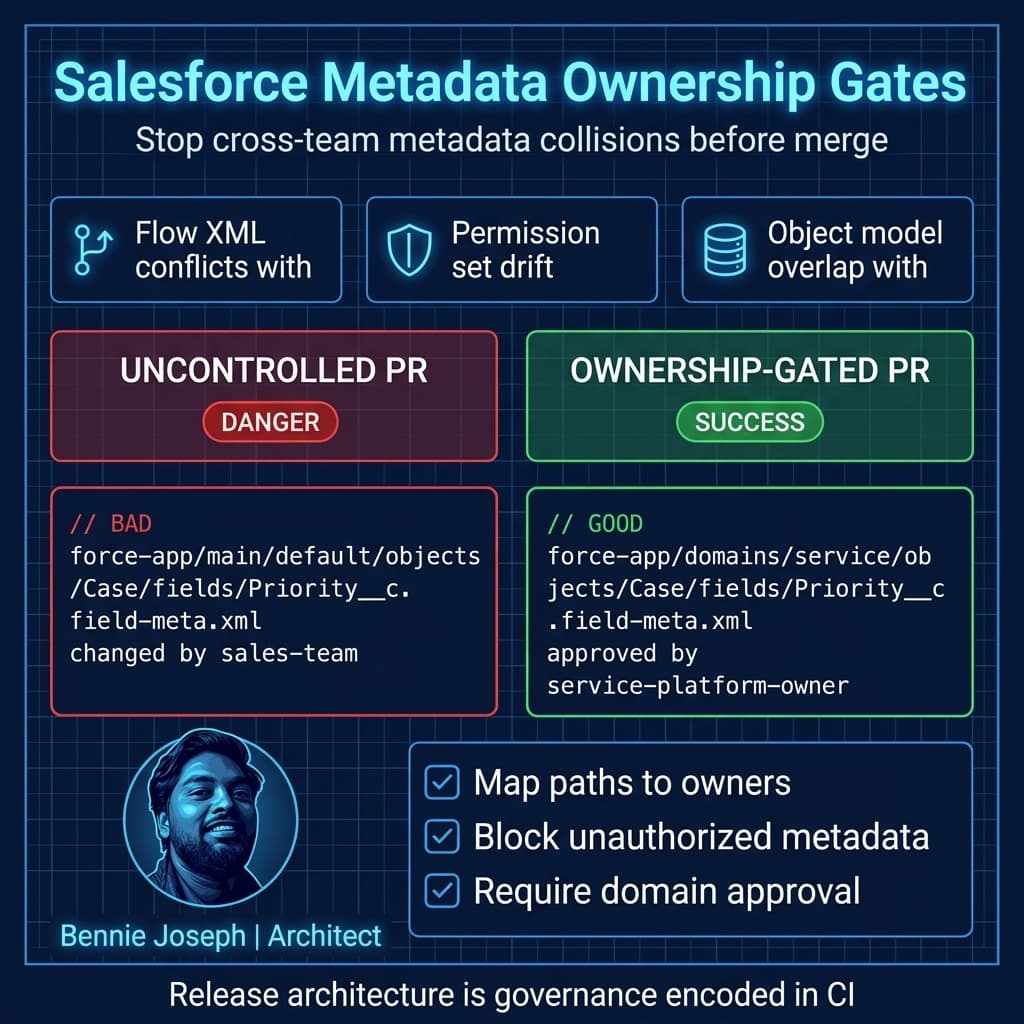
The ownership gate I actually enforce
I do not rely only on CODEOWNERS because Salesforce metadata ownership is more nuanced than file paths.
One team might own Case fields, another owns service Flows, and the platform team owns permission set strategy. Sometimes one object has multiple domain owners by metadata subtype.
So I use a small ownership policy file and a CI script.
Example config/ownership.json:
{
  "rules": [
    {
      "pattern": "force-app/domains/service/**",
      "owners": ["service-platform"],
      "requiredApproval": true
    },
    {
      "pattern": "**/objects/Case/**",
      "owners": ["service-platform"],
      "requiredApproval": true
    },
    {
      "pattern": "**/objects/Opportunity/**",
      "owners": ["sales-platform"],
      "requiredApproval": true
    },
    {
      "pattern": "**/permissionsets/**",
      "owners": ["security-governance"],
      "requiredApproval": true
    },
    {
      "pattern": "**/classes/*Integration*.cls",
      "owners": ["integration-platform"],
      "requiredApproval": true
    },
    {
      "pattern": "force-app/domains/agentforce/**",
      "owners": ["agent-platform"],
      "requiredApproval": true
    }
  ]
}
And here is a simplified TypeScript validator I have used as the base for CI ownership enforcement. In production, I wire this into GitHub, GitLab, Azure DevOps, or Bitbucket APIs to compare PR approvals against owning groups.
import fs from "node:fs";
import path from "node:path";
import minimatch from "minimatch";

type OwnershipRule = {
  pattern: string;
  owners: string[];
  requiredApproval: boolean;
};

type OwnershipConfig = {
  rules: OwnershipRule[];
};

type Violation = {
  file: string;
  pattern: string;
  owners: string[];
};

function readChangedFiles(filePath: string): string[] {
  return fs
    .readFileSync(filePath, "utf8")
    .split("\n")
    .map((line) => line.trim())
    .filter(Boolean);
}

function readOwnershipConfig(configPath: string): OwnershipConfig {
  return JSON.parse(fs.readFileSync(configPath, "utf8")) as OwnershipConfig;
}

function findMatchingRules(file: string, rules: OwnershipRule[]): OwnershipRule[] {
  return rules.filter((rule) =>
    minimatch(file, rule.pattern, {
      dot: true,
      nocase: false,
      matchBase: false
    })
  );
}

function validateOwnership(
  changedFiles: string[],
  config: OwnershipConfig,
  approvedGroups: string[]
): Violation[] {
  const violations: Violation[] = [];

  for (const file of changedFiles) {
    const matchingRules = findMatchingRules(file, config.rules);

    for (const rule of matchingRules) {
      if (!rule.requiredApproval) {
        continue;
      }

      const hasOwnerApproval = rule.owners.some((owner) =>
        approvedGroups.includes(owner)
      );

      if (!hasOwnerApproval) {
        violations.push({
          file,
          pattern: rule.pattern,
          owners: rule.owners
        });
      }
    }
  }

  return violations;
}

const changedFilesPath = process.argv[2] ?? "changed-files.txt";
const approvedGroups = (process.env.APPROVED_GROUPS ?? "")
  .split(",")
  .map((group) => group.trim())
  .filter(Boolean);

const changedFiles = readChangedFiles(changedFilesPath);
const config = readOwnershipConfig(path.join("config", "ownership.json"));
const violations = validateOwnership(changedFiles, config, approvedGroups);

if (violations.length > 0) {
  console.error("Metadata ownership validation failed.");

  for (const violation of violations) {
    console.error(
      `- ${violation.file} matches ${violation.pattern}. Required approval from: ${violation.owners.join(", ")}`
    );
  }

  process.exit(1);
}

console.log("Metadata ownership validation passed.");
This kind of gate changes team behavior quickly.
Without it, architecture conversations become subjective:
“Why did your team change our Flow?”
With it, the system says:
“This PR changes service-owned metadata and requires service-platform approval.”
That is better governance because it is immediate, consistent, and auditable.
Branching strategy: short branches, release branches, production tags
For 50 developers, my branching structure is intentionally boring.
main
feature/WORK-10293-case-priority-routing
feature/WORK-10344-opportunity-score-lwc
release/2026.09.1
hotfix/INC-88421-case-assignment-null-pointer
Main branch
main must be deployable. Not perfect. Deployable.
Every merge to main should pass:
- Source format validation
- Metadata ownership gate
- Static analysis
- Apex tests relevant to changed domains
- LWC tests where applicable
- Deployment validation to integration org
- Destructive changes policy check
- Permission impact check
- Agentforce script linting for
.agentfiles where used - API version policy check
With Agentforce Builder now centered around Agent Script language and AiAuthoringBundle metadata, I treat agent changes like code. They go through the same PR review and promotion path as Apex and Flow. I do not let teams “click-configure” production behavior in parallel with Git.
Feature branches
Feature branches should be small. If a feature needs six weeks, split it behind feature flags, custom metadata switches, inactive Flows, or staged permissions.
A healthy feature branch changes a narrow surface area:
- One capability
- One domain
- One release train
- One clear owner
An unhealthy branch changes everything:
- Object model
- Flow automation
- Apex services
- LWC components
- Permission sets
- Reports
- Agentforce actions
- Integration contracts
That is not a branch. That is a release pretending to be a branch.
Release branches
A release branch is cut from main at code freeze.
Example:
release/2026.09.1After the cut:
- Only stabilization fixes go into the release branch.
- New feature work continues merging to
main. - Every release branch fix is cherry-picked or merged back to
main. - The release branch is tagged when deployed to production.
Tags matter. If production has no immutable tag, hotfixes become archaeology.
prod/2026.09.1
prod/2026.09.1-hotfix.1
Hotfix branches
Hotfixes branch from the production tag, not from main.
git checkout prod/2026.09.1
git checkout -b hotfix/INC-88421-case-assignment-null-pointer
Then:
- Fix the defect.
- Validate against hotfix sandbox or staging.
- Deploy to production.
- Tag production.
- Merge the fix back to
main. - Merge it to any active release branch.
If step 5 is skipped, the defect returns in the next release. I have seen that happen too many times.
Environment architecture: stop pretending all sandboxes are equal
A 50-developer team needs environment tiers with clear purpose.
| Environment | Purpose | Reset cadence | Who uses it | Deployment source |
|---|---|---|---|---|
| Scratch org | Isolated development and fast validation | Daily/weekly | Developers | Feature branch |
| Developer sandbox | Metadata requiring persistent setup | Monthly | Domain teams | Feature branch/domain branch |
| Integration sandbox | Continuous merge validation | Weekly/monthly | CI and integration leads | main |
| QA sandbox | Functional testing | Per release | QA teams | Release branch |
| UAT sandbox | Business acceptance | Per release | Business users | Release branch |
| Staging/full copy | Production rehearsal, performance, data migration | Per release | Release team | Release candidate |
| Production | Runtime | Never casually | Everyone indirectly | Tagged release |
The biggest smell is using UAT as development overflow. Once developers start “just fixing it in UAT,” Git has already lost authority.
I enforce a simple rule:
If it matters, it starts in Git. If it was changed manually, it must be reconciled to Git before promotion.
There are exceptions for emergency production operations, but exceptions need a reconciliation ticket and audit trail.
CI/CD gates for Salesforce API v64.0
Salesforce release pipelines should be layered. I do not run every expensive validation on every keystroke. I use progressive gates.
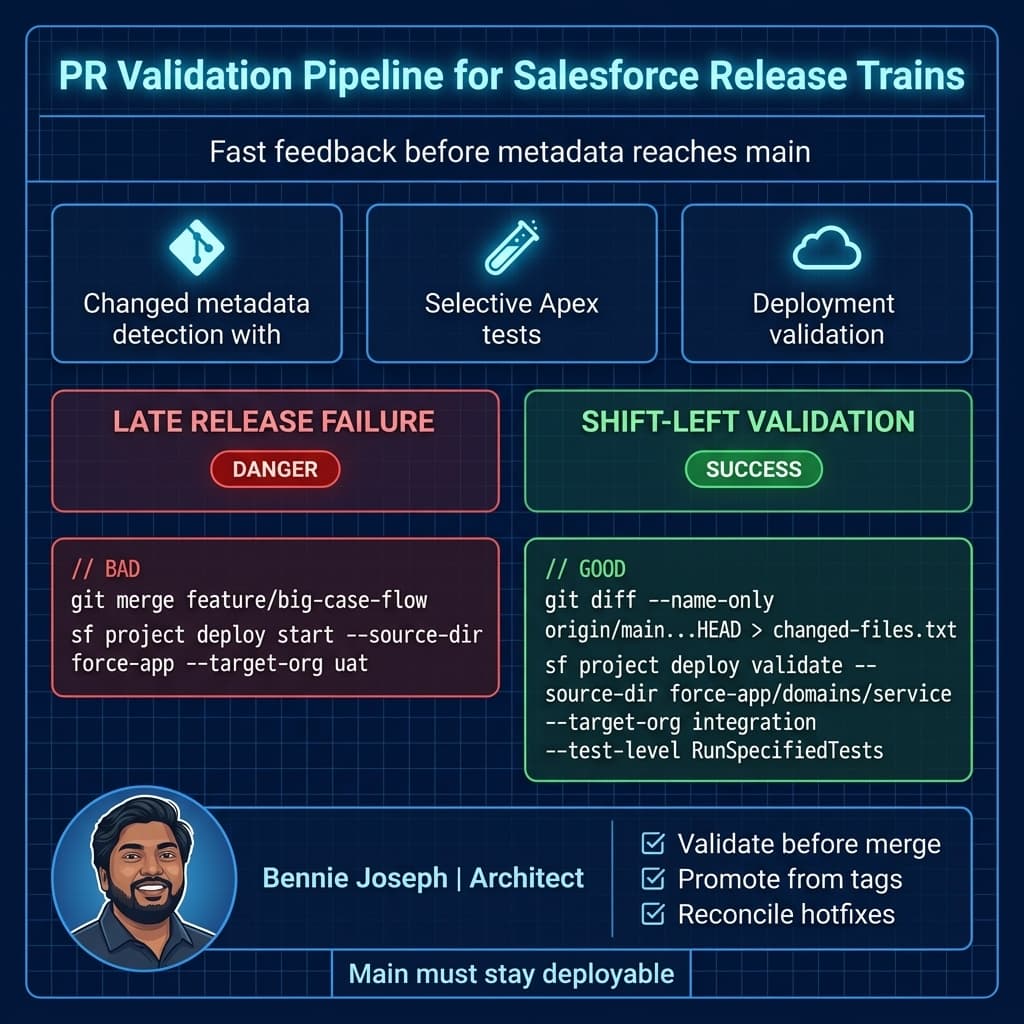
Pull request gate
Fast feedback:
- Changed file detection
- Ownership validation
- Formatting/linting
- PMD or Code Analyzer
- LWC unit tests
- Apex tests for changed classes/domains
- Metadata deploy validation for changed source
- Agent Script linting for Agentforce 2.0 assets
Main branch gate
Broader validation:
- Deploy to integration
- Run domain-level Apex tests
- Validate permission set changes
- Run integration smoke tests
- Validate Named Credentials and External Services references
- Check metadata API compatibility with
sourceApiVersion: "64.0"
Release candidate gate
Full confidence:
- Full regression Apex suite
- UI smoke automation
- Flow activation checks
- Data migration dry run
- Integration contract tests
- Performance checks for bulk data paths
- Security review for permission and sharing changes
- Production deployment validation
The sf CLI credential security overhaul matters here. Pipelines that used to print or scrape credential outputs need to be updated. I design pipelines assuming credentials are redacted by default and secrets are pulled from the CI secret store, not from CLI output tricks.
Here is a simplified GitHub Actions-style flow. I am including it not because YAML is architecture, but because architecture that cannot be automated is just a diagram.
name: validate-salesforce-pr

on:
  pull_request:
    branches:
      - main

jobs:
  validate:
    runs-on: ubuntu-latest

    steps:
      - name: Checkout source
        uses: actions/checkout@v4
        with:
          fetch-depth: 0

      - name: Use Node.js
        uses: actions/setup-node@v4
        with:
          node-version: 22

      - name: Install Salesforce CLI
        run: npm install --global @salesforce/cli

      - name: Install project dependencies
        run: npm ci

      - name: Calculate changed files
        run: |
          git diff --name-only origin/main...HEAD > changed-files.txt
          cat changed-files.txt

      - name: Validate metadata ownership
        env:
          APPROVED_GROUPS: ${{ vars.APPROVED_GROUPS }}
        run: npx ts-node scripts/validate-ownership.ts changed-files.txt

      - name: Authenticate integration org
        run: |
          echo "${{ secrets.SF_INTEGRATION_AUTH_URL }}" > ./auth-url.txt
          sf org login sfdx-url --sfdx-url-file ./auth-url.txt --alias integration --set-default

      - name: Validate source deployment
        run: |
          sf project deploy validate \
            --source-dir force-app \
            --target-org integration \
            --test-level RunLocalTests \
            --wait 60
For very large orgs, I do not always run RunLocalTests on every PR. That becomes too slow. I use selective tests for PRs and full regression at main/release candidate gates.
But selective testing has to be honest. If the dependency map is weak, run broader tests.
Apex patterns that reduce release collisions
Release architecture is not only Git and CI. Code design can either reduce or increase collisions.
For shared Apex services, I avoid “god utility classes” because every team ends up modifying the same file. Instead, I use domain-level services and stable interfaces.
Example: a service routing feature should not require five teams to edit CaseTriggerHandler.cls.
Apex entry point:
public with sharing class CaseRoutingTriggerHandler {
    public static void afterInsert(List<Case> newCases) {
        CaseRoutingService service = new CaseRoutingService(
            new CaseRoutingRuleRepository()
        );

        service.routeNewCases(newCases);
    }
}
Service class:
public with sharing class CaseRoutingService {
    private final CaseRoutingRuleRepository ruleRepository;

    public CaseRoutingService(CaseRoutingRuleRepository ruleRepository) {
        this.ruleRepository = ruleRepository;
    }

    public void routeNewCases(List<Case> newCases) {
        if (newCases == null || newCases.isEmpty()) {
            return;
        }

        Set<String> priorities = new Set<String>();

        for (Case caseRecord : newCases) {
            if (String.isNotBlank(caseRecord.Priority)) {
                priorities.add(caseRecord.Priority);
            }
        }

        Map<String, Case_Routing_Rule__mdt> rulesByPriority =
            ruleRepository.getRulesByPriority(priorities);

        for (Case caseRecord : newCases) {
            Case_Routing_Rule__mdt rule = rulesByPriority.get(caseRecord.Priority);

            if (rule == null || String.isBlank(rule.Queue_Id__c)) {
                continue;
            }

            caseRecord.OwnerId = (Id) rule.Queue_Id__c;
        }
    }
}
Repository class using current security posture:
public with sharing class CaseRoutingRuleRepository {
    public Map<String, Case_Routing_Rule__mdt> getRulesByPriority(Set<String> priorities) {
        Map<String, Case_Routing_Rule__mdt> rulesByPriority =
            new Map<String, Case_Routing_Rule__mdt>();

        if (priorities == null || priorities.isEmpty()) {
            return rulesByPriority;
        }

        for (Case_Routing_Rule__mdt rule : [
            SELECT DeveloperName, Priority__c, Queue_Id__c
            FROM Case_Routing_Rule__mdt
            WHERE Priority__c IN :priorities
            WITH USER_MODE
        ]) {
            rulesByPriority.put(rule.Priority__c, rule);
        }

        return rulesByPriority;
    }
}
A few important points:
- The trigger handler is thin.
- Routing logic is isolated.
- Rules are custom metadata, not hardcoded branching logic.
- The class declares sharing explicitly.
- SOQL uses
WITH USER_MODE.
As Salesforce moves toward v67 behavior where SOQL, DML, and Database methods default more heavily to user mode and classes without explicit sharing default to with sharing, I still prefer being explicit in enterprise code. Explicit security posture avoids surprises during API upgrades.
This design also reduces release collisions. Teams can add routing rules through custom metadata without editing shared Apex every sprint.
Handling Flows at 50-developer scale
Flows are powerful. Flows are also one of the worst collision points in a large Salesforce program.
I apply these rules:
- One Flow should not own an entire business universe.
- Record-triggered Flows need domain ownership.
- Subflows are better than copy-pasted decision trees.
- Flow activation is release-controlled.
- Critical Flows get automated tests or Apex-level coverage around side effects.
I do not let five teams modify the same record-triggered Flow in the same release unless there is a named Flow owner coordinating the merge.
For high-change areas, I prefer a Flow orchestration pattern:
- Thin record-triggered Flow
- Domain subflows
- Custom metadata switches
- Apex invocable actions for complex logic
- Clear naming convention
Example:
Case_After_Save_Router
  → Case_Assignment_Subflow
  → Case_Entitlement_Subflow
  → Case_Notification_Subflow
  → Case_Agentforce_Context_Subflow
That gives teams smaller metadata files to own.
For Agentforce 2.0, I apply the same rule to agent topics, actions, and scripts. Agent behavior is production behavior. It needs ownership, review, and promotion.
LWC and front-end release boundaries
LWC native state management being GA in Summer ’26 is useful, but it does not remove the need for front-end ownership boundaries.
For large teams, I structure LWC ownership around application surfaces:
- Console productivity components
- Sales workspace components
- Portal components
- Admin configuration components
- Shared design system components
The most dangerous component is the “shared helper” that every team imports and edits weekly.
I prefer a stable shared module with versioned behavior and domain-specific wrappers.
Bad:
export function normalizeRecord(record: any): any {
  // 900 lines of every team's assumptions
  return record;
}
Better:
export type CaseSummary = {
  id: string;
  caseNumber: string;
  priority: "Low" | "Medium" | "High" | "Critical";
  status: string;
};

export function toCaseSummary(record: Record<string, unknown>): CaseSummary {
  return {
    id: String(record.Id),
    caseNumber: String(record.CaseNumber),
    priority: String(record.Priority) as CaseSummary["priority"],
    status: String(record.Status)
  };
}
The second pattern is boring, typed, and specific. That is exactly why it scales.
Data changes are releases too
Many Salesforce release failures are not metadata failures. They are data failures.
Examples:
- Backfilling a new required field
- Migrating ownership
- Updating entitlement rules
- Reparenting accounts
- Creating custom metadata records
- Loading routing configuration
- Changing Data 360 identity resolution inputs
- Updating external IDs used by integrations
I put data changes into the release plan as first-class deployment units.
For each data change, I require:
- Idempotent script or load plan
- Rollback strategy
- Estimated record count
- Runtime estimate
- Locking risk
- Integration impact
- Business validation owner
At 1K records, a manual data loader operation might work.
At 100K records, locking and partial failures become real.
At 10M records, you need batching, monitoring, retry behavior, and probably a dedicated migration window.
The architecture must name this explicitly.
Scale model: what changes at 1K, 100K, and 10M
Salesforce release architecture must be honest about scale. The strategy that works for a department org breaks in a global enterprise org.
At 1K records or users
You can get away with:
- Simple release checklist
- Small CI suite
- Manual smoke testing
- Basic branch protections
- Small sandbox footprint
- Minimal data migration automation
The risk is mostly human coordination.
At 100K records or users
You need stronger controls:
- Selective test strategy with dependency mapping
- Release train calendar
- Integration contract testing
- Ownership gates
- Data load rehearsals
- Permission impact review
- Environment refresh strategy
- Monitoring and rollback plan
The risk becomes cross-domain impact. One team’s validation rule can break another team’s integration.
At 10M records or high-volume enterprise usage
You need industrial-grade release architecture:
- Deployment windows aligned to transaction patterns
- Async migration framework
- Bulk-safe Apex and Flow design
- Query selectivity review
- Large data volume testing in full/staging
- Event-driven backfill patterns
- Observability dashboards
- Release freeze around critical business periods
- Integration throttling and replay strategy
- Dedicated release command center
At this scale, “deploy and see” is negligence.
I have worked in orgs where a small sharing rule or automation change looked harmless in a sandbox and then caused severe production degradation because the data distribution was completely different. The fix was not “write better release notes.” The fix was staging with representative data and mandatory performance review for high-blast-radius metadata.
Governance model: lightweight but non-negotiable
For 50 developers, governance cannot mean a weekly board where architects manually approve every field.
That does not scale.
I use a tiered governance model.
Low-risk changes
Examples:
- LWC copy changes
- Custom labels
- Isolated custom metadata
- Non-critical report updates
- Tests only
Required:
- Team review
- CI pass
- Ownership pass
Medium-risk changes
Examples:
- New fields
- Flow changes
- Apex service changes
- Permission set changes
- Agentforce action updates
- External service metadata
Required:
- Domain owner approval
- CI pass
- Integration validation
- Test evidence
High-risk changes
Examples:
- Sharing model changes
- Role hierarchy changes
- Major object model changes
- High-volume automation
- Authentication changes
- Named Credential changes
- Data migrations over 100K records
- Production Agentforce behavior affecting regulated workflows
Required:
- Architecture review
- Security review
- Release manager approval
- Backout plan
- Business validation
- Staging rehearsal
The key is that risk tiering is encoded in policy, not reinvented per ticket.
Real-world example: consolidating three release streams into one train
On one enterprise Salesforce program, the team had roughly this setup:
- 50+ developers and admins
- Multiple system integrators
- One production org
- Sales and Service workstreams
- Experience Cloud portal team
- Integration team
- AI enablement team beginning Agentforce work
- Two-week sprint cadence
- Monthly production release
- Frequent emergency fixes
Before redesign, each workstream had its own deployment rhythm. They merged late into a shared UAT sandbox. Conflicts showed up during regression. Nobody fully owned shared metadata. Permission sets were constantly overwritten. Hotfixes were patched directly in production and sometimes lost in the next release.
The release redesign changed four things.
First, we moved to a single release train. Teams could still build independently, but production promotion happened through one controlled path.
Second, we introduced metadata ownership. Case automation, Opportunity automation, shared permission sets, integration metadata, and portal components had named owners.
Third, we changed branch discipline. Feature branches merged to main after validation. Release branches were cut from main. Hotfix branches came from production tags.
Fourth, we made UAT boring. UAT stopped being the first integration point. Integration happened continuously before release cut.
The outcome was not magic. The team still had defects. Releases still required planning. But the last week of the release stopped being a metadata knife fight.
That is the goal: not perfection, but predictable failure modes.
Package strategy: use packages where boundaries are real
Unlocked packages can help, but packaging everything in a large Salesforce org can become another tax.
I use packages for:
- Shared Apex frameworks
- Integration libraries
- Stable domain services
- Reusable LWC libraries
- Common custom metadata frameworks
- Cross-org assets
I avoid packages for:
- Highly volatile object configuration
- Constantly changing Flows
- Metadata with messy dependencies
- Workstream-specific experiments
- Anything the team does not understand how to version
A package boundary should represent a product boundary or platform capability. If it only exists because someone said “DevOps best practice,” I question it.
Good package candidate:
enterprise-integration-core
  - Http client abstraction
  - Named credential conventions
  - Retry policy
  - Platform event publisher
  - Integration logging
Bad package candidate:
misc-salesforce-stuff
  - 14 unrelated Apex classes
  - 3 Flows
  - half a permission set strategy
  - old experiments nobody owns
Packages give you dependency control. They also force dependency discipline. If the org culture is not ready, start with ownership boundaries first.
The release calendar matters more than teams admit
A good release architecture has a calendar.
Example monthly train:
| Day | Activity |
|---|---|
| 1-10 | Feature development, PR validation, continuous merge to main |
| 11 | Release branch cut |
| 12-15 | QA validation and defect fixes |
| 16-20 | UAT and data migration rehearsal |
| 21 | Release candidate freeze |
| 22 | Production deployment validation |
| 23 | Production release |
| 24-25 | Hypercare |
| 26+ | Next train continues |
This does not mean all teams move slowly. It means production moves predictably.
If a feature misses the train, it goes to the next train. That sounds harsh until you compare it to destabilizing an enterprise release for one late story.
Backout strategy: be honest about what can roll back
Salesforce rollback is not the same as redeploying the previous commit.
Some metadata can roll back cleanly:
- Apex classes
- LWC bundles
- Custom labels
- Custom metadata
- Some Flow versions
Some changes are harder:
- Field deletions
- Data migrations
- Sharing recalculations
- Permission model changes
- Record type restructuring
- Activated automation with side effects
- External integration contract changes
For every high-risk change, I require one of these:
- Technical rollback
- Forward fix plan
- Feature toggle
- Operational workaround
If none exists, the change needs a higher release bar.
Feature toggles in Salesforce are often custom metadata. Simple is fine.
public with sharing class FeatureToggleService {
    public static Boolean isEnabled(String featureName) {
        if (String.isBlank(featureName)) {
            return false;
        }

        List<Feature_Toggle__mdt> toggles = [
            SELECT DeveloperName, Enabled__c
            FROM Feature_Toggle__mdt
            WHERE DeveloperName = :featureName
            LIMIT 1
            WITH USER_MODE
        ];

        return !toggles.isEmpty() && toggles[0].Enabled__c;
    }
}
Then gate risky logic:
if (FeatureToggleService.isEnabled('Enable_Case_AI_Summary')) {
    CaseSummaryOrchestrator.enqueue(caseIds);
}
This pattern is especially useful for Agentforce-enabled workflows, AI summaries, and integration changes where the metadata deployment and business activation should not always happen at the same moment.
Metrics I track
If you do not measure release health, opinions dominate.
I track:
- PR cycle time
- Failed deployment validation rate
- Metadata conflict rate
- Hotfix count per release
- Escaped defects
- Test runtime
- Flaky test count
- Manual production changes
- Rollback or forward-fix events
- Number of changes bypassing ownership gates
- UAT defects caused by missed integration
The metric I care about most is not deployment frequency. It is release predictability.
Can the business trust the train?
If yes, the architecture is working.
My final position
For 50 developers in a single Salesforce org, the winning move is not to invent a complicated branching model.
The winning move is to make change ownership explicit, keep branches short, validate before merge, promote from known tags, and treat metadata, data, security, and Agentforce behavior as one release system.
A large Salesforce org is not just an application. It is an enterprise operating platform. Your release architecture needs to respect that.
TL;DR
- For a large Salesforce team, release architecture is ownership, validation, environments, data, and governance — not just branching.
- My default is short-lived feature branches, deployable
main, scheduled release branches, production tags, and controlled hotfix flow. - At 50 developers and enterprise scale, metadata ownership gates and release trains prevent chaos better than heroic release management.