Compliance Architecture on Salesforce: HIPAA, SOX, and PCI Patterns
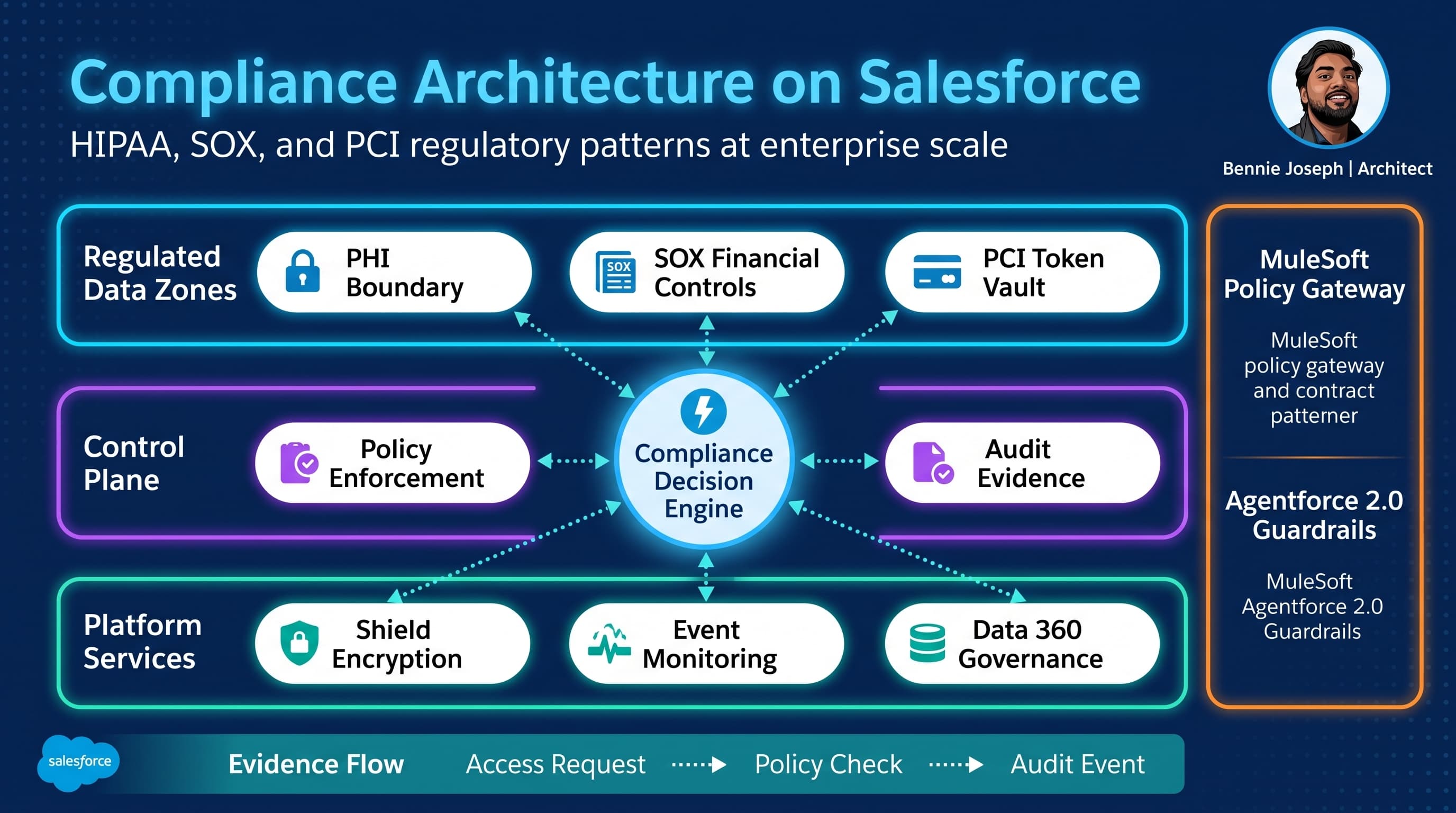
I’ve seen compliance fail in Salesforce for one boring reason: teams treat HIPAA, SOX, and PCI as documentation exercises instead of architecture constraints.
That always catches up.
A healthcare cloud migration starts with “we just need to protect PHI.” Then claims operations asks for service agents to see diagnosis notes. Analytics wants population reporting. The contact center wants Agentforce to summarize cases. Legal wants a seven-year retention rule. Security wants field encryption. Finance wants SOX evidence. Payments wants to avoid storing card numbers. Suddenly “protect PHI” becomes a platform design problem.
The same thing happens with SOX. Teams say “only finance users can approve journal-impacting changes,” then build a Flow that updates a revenue field, an integration user that bypasses validation, and a deployment process where the same person can build, approve, and release.
PCI is even less forgiving. If raw cardholder data enters Salesforce accidentally through a case email, chat transcript, file upload, debug log, prompt, or integration payload, your compliance boundary just expanded. Nobody wants to discover that during an audit.
Here’s the unpopular take: compliance architecture is not about adding more permission sets. It is about deliberately constraining where regulated data can exist, who can act on it, how every access is explained later, and which parts of the platform are kept out of scope entirely.
This is how I design Salesforce compliance architecture for HIPAA, SOX, and PCI regulatory patterns in real enterprise programs.
Start With Compliance Zones, Not Objects
Most teams start by asking:
- Which objects contain PHI?
- Which fields are SOX-relevant?
- Which payment fields need PCI controls?
That matters, but it is not the starting point.
I start with zones.
A compliance zone is a deliberate boundary with its own access model, encryption policy, integration rules, retention policy, audit evidence, and operational owner.
On Salesforce, I normally model four zones:
| Zone | Purpose | Typical Salesforce footprint | Main risk |
|---|---|---|---|
| Public business zone | Non-sensitive operational data | Accounts, products, general tasks | Over-permissioning |
| Confidential business zone | Internal but non-regulated data | Contracts, forecasts, internal notes | Excessive sharing |
| Regulated zone | PHI, SOX-controlled financial data, sensitive identity data | Cases, claims, approvals, financial transactions | Unauthorized access or mutation |
| Excluded/tokenized zone | Data Salesforce should not store | Raw PAN, CVV, certain medical source docs | Scope explosion |
The architecture decision is not “can Salesforce store this?” It often can.
The better question is: “Should Salesforce be the system of record, a workflow surface, a token holder, or completely out of scope?”
For HIPAA, Salesforce may hold PHI if the right contractual, technical, and operational safeguards exist. For SOX, Salesforce can absolutely participate in controlled financial workflows if change management, approvals, access reviews, and evidence collection are designed properly. For PCI, I avoid raw cardholder data in Salesforce unless there is a very specific, reviewed, and justified reason. Tokenization through a payment provider is usually the better pattern.
The Three Control Planes I Always Separate
A mature compliance architecture has three separate control planes:
- Preventive controls — stop unauthorized access or mutation.
- Detective controls — prove what happened after the fact.
- Corrective controls — recover, revoke, remediate, and preserve evidence.
Most weak Salesforce compliance designs over-invest in preventive controls and under-invest in detective controls.
That sounds responsible until an auditor asks: “Show me who accessed this patient record, from where, through which mechanism, and why.”
If the answer is “we have profiles and permission sets,” that is not enough.
For regulated architectures, I want:
- Field-level classification and ownership.
- Least privilege using permission sets, permission set groups, restriction rules, and sharing.
- Shield Platform Encryption where appropriate.
- Event Monitoring for access evidence.
- Field Audit Trail for long-retention field history.
- Transaction Security policies for high-risk behavior.
- Integration logs with correlation IDs.
- Approval evidence for SOX-impacting changes.
- Tokenization boundaries for PCI.
- Explicit prompt and tool controls for Agentforce 2.0.
The control plane must cover humans, automations, integrations, analytics, AI agents, and administrators. Admin activity is still activity.
HIPAA Pattern: PHI Boundary With Purpose-Based Access
The biggest HIPAA mistake I see is treating PHI access as a static role question.
Real healthcare operations are purpose-based. A nurse, claims adjuster, billing specialist, call center agent, care coordinator, and supervisor may all need access to the same patient, but not for the same reason and not to the same fields.
In Salesforce, I typically combine:
- Data classification metadata.
- Record-level sharing based on care team, assignment, facility, or payer relationship.
- Restriction rules to reduce broad visibility.
- Field-level security for PHI categories.
- Shield Platform Encryption for selected fields.
- Event Monitoring for access.
- A custom “access reason” pattern for sensitive record views.
- Masking or redaction in LWC components where possible.
- Data 360 governance for federated and analytical use cases.
The subtle part is the difference between “can query” and “should display.”
For example, a service user may have access to a Case because they are assigned to a queue. That does not mean the UI should show diagnosis codes unless the current interaction requires it. I often build PHI panels as explicit reveal components: the user must choose a business reason, the reveal is logged, and sensitive fields stay collapsed by default.
At 1K patient records, manual sharing and simple role hierarchy might be manageable.
At 100K records, care team sharing, territory overlays, and queue assignment rules need automation and monitoring.
At 10M records, you need to think about data skew, archival, async sharing recalculation, query selectivity, and whether historical PHI belongs in Salesforce at all. In several programs, I kept longitudinal clinical history in a healthcare platform or lakehouse and exposed summarized, governed data into Salesforce through APIs or Data 360 federation instead of copying everything.
That decision reduced audit scope and improved performance.
SOX Pattern: Controlled Financial Mutation
SOX architecture on Salesforce is usually less about hiding data and more about controlling change.
The core SOX question is: can someone make or influence a financially material change without appropriate authorization, evidence, and segregation of duties?
In Salesforce, SOX-relevant data can appear in:
- Opportunities used for revenue forecasting.
- Orders and contracts.
- CPQ pricing and discount approvals.
- Billing triggers.
- Revenue recognition handoffs.
- Finance case management.
- Integration mappings into ERP.
- Custom objects that feed general ledger processes.
The platform pattern I use is controlled mutation:
- Identify SOX-relevant fields and objects.
- Prevent direct edits outside approved pathways.
- Route changes through approval, validation, or controlled service layer.
- Capture before/after values.
- Publish immutable audit events.
- Reconcile Salesforce changes against downstream ERP outcomes.
The implementation can be Flow, Apex, approval processes, platform events, or external workflow. The architecture requirement is the same: no silent mutation.
I do not like putting SOX logic only in page layouts or screen flows. That protects one user path and leaves APIs, imports, integrations, inline edits, and automation exposed.
For SOX-controlled fields, I prefer server-side enforcement: validation rules, Apex service methods, record-triggered automation with bypass governance, and integration policies.
PCI Pattern: Tokenize, Segment, and Keep Salesforce Out of Scope
PCI is where I am most aggressive.
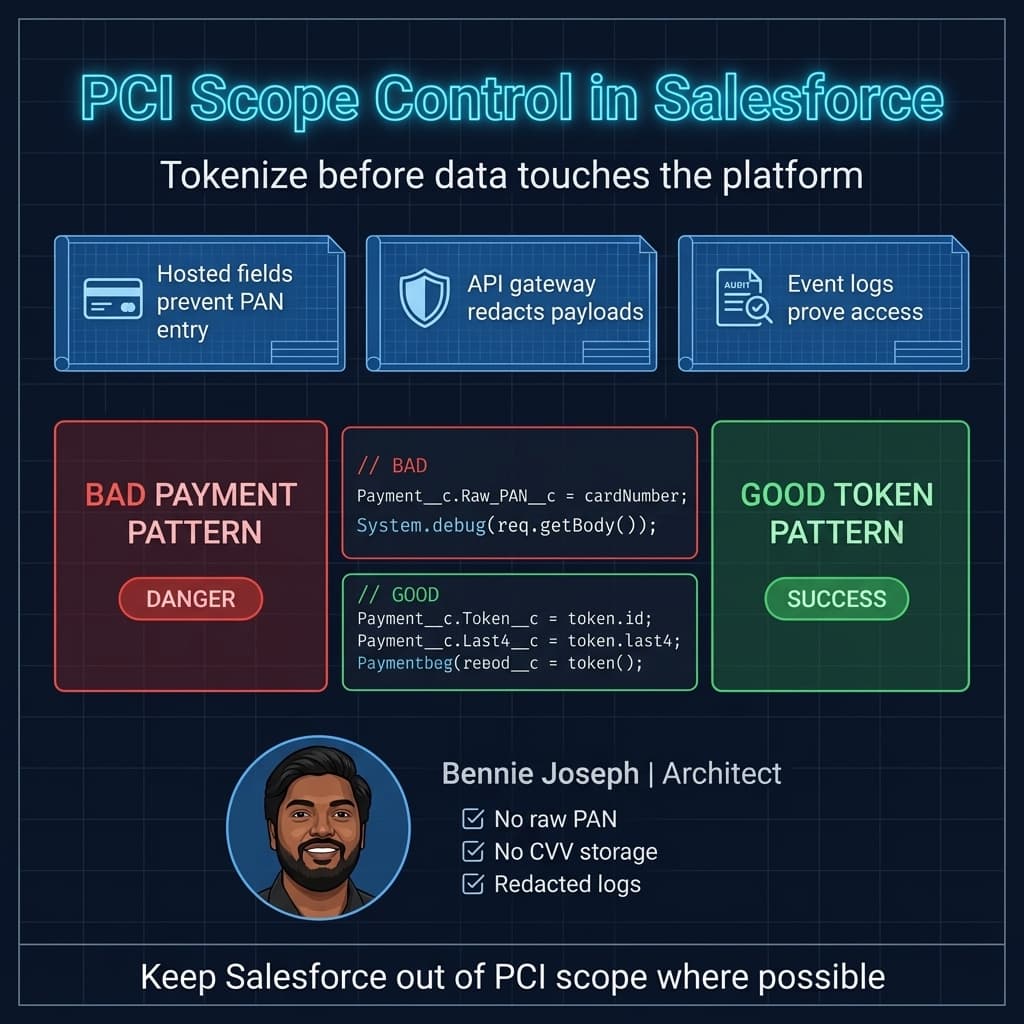
If the business says “we need to take payments in Salesforce,” I translate that into: “we need a payment interaction embedded in Salesforce without Salesforce storing raw cardholder data.”
That usually means:
- Hosted payment fields from a PCI-compliant provider.
- Tokenization before data reaches Salesforce.
- No PAN or CVV stored in Salesforce fields, files, emails, logs, tasks, transcripts, or prompts.
- Payment token, last four, brand, expiration month/year, and payment status stored if approved.
- MuleSoft or an API gateway enforcing payload redaction.
- Transaction IDs for reconciliation.
- Strict logging rules.
- Data loss prevention scanning on inbound emails and files.
- Agentforce tool restrictions so agents cannot request or process raw card data.
The hardest PCI problem is not the custom payment component. It is accidental ingestion.
A customer pastes a card number into chat. A support rep uploads a screenshot. An integration logs a raw payload. A developer writes a debug statement. An AI summarization action includes sensitive text.
That is why PCI architecture needs both technical design and operational runbooks.
Decision Matrix: Choosing the Right Compliance Pattern
Architecture is tradeoff management. Here is the matrix I use when choosing patterns across HIPAA, SOX, and PCI.
| Pattern | Best for | Strengths | Weaknesses | Use at scale when |
|---|---|---|---|---|
| Native Salesforce security only | Low-risk internal data | Fast, declarative, maintainable | Insufficient alone for regulated evidence | Data is not highly regulated and audit needs are light |
| Shield Platform Encryption + Event Monitoring | PHI, sensitive business data | Strong encryption and access evidence | Requires careful field selection and operational maturity | You need protected fields plus auditable access patterns |
| Purpose-based reveal components | HIPAA PHI access | Captures reason and reduces casual exposure | Requires custom UX and training | Sensitive fields are not needed for every interaction |
| Approval-driven mutation | SOX financial changes | Strong authorization evidence | Can slow operations if overused | Changes are financially material or audit-sensitive |
| Service-layer enforcement in Apex | SOX and complex HIPAA rules | Consistent across UI/API/automation | Requires disciplined engineering | Rules must apply across every channel |
| Tokenization through payment provider | PCI payments | Minimizes Salesforce PCI scope | Depends on provider and integration design | Raw card data should never enter Salesforce |
| External regulated data store + Salesforce reference | Large PHI/PCI datasets | Reduces platform scope and storage pressure | More integration complexity | 10M+ records or highly sensitive source data |
| Data 360 federation and governance | Analytics, segmentation, grounding | Avoids unnecessary replication | Requires governance and query controls | Business needs insight, not full operational copies |
| Agentforce 2.0 guarded tools | AI-assisted regulated workflows | Controlled agent actions and reasoning steps | Needs prompt/tool governance and testing | Agents can read or act on regulated records |
My bias: keep Salesforce excellent at workflow, relationship context, controlled actions, and evidence. Do not turn it into the dumping ground for every regulated byte just because it has flexible objects.
Reference Architecture
A compliance-ready Salesforce architecture has five layers.
1. Identity and Access Layer
This includes SSO, MFA, session policies, login IP ranges where appropriate, permission sets, permission set groups, role hierarchy, sharing rules, restriction rules, delegated administration, and privileged access reviews.
For regulated environments, I do not want “admin forever” access. I want just-in-time elevation or at least a reviewed admin access model. Production administrator actions should be visible and explainable.
Access reviews should not be spreadsheets exported once per quarter and forgotten. They should be tied to permission set assignments, business roles, and ownership.
2. Data Protection Layer
This is where data classification becomes real.
For each sensitive field, I want to know:
- Regulatory category: PHI, SOX, PCI, PII, confidential.
- Business owner.
- System of record.
- Encryption requirement.
- Masking requirement.
- Retention requirement.
- Integration exposure.
- AI grounding eligibility.
- Reporting eligibility.
Shield Platform Encryption is powerful, but it is not magic. Encryption can affect search, filters, integrations, deterministic matching, and reporting patterns. Use it deliberately.
For PCI, I normally avoid encryption debates by not storing raw PAN in the first place.
3. Process Control Layer
This is where SOX usually lives.
Any financially material process should have controlled entry points. If a discount approval, contract amendment, payment adjustment, or revenue-impacting status change can happen through five different automations, you have a control problem.
I prefer a small number of approved mutation paths:
- Controlled Lightning action.
- Apex service method.
- Approval process.
- Integration endpoint with policy enforcement.
- Agentforce action with explicit guardrails.
Everything else should fail closed.
4. Integration and Boundary Layer
This is where many compliance architectures break.
An integration user with “Modify All Data” is not an architecture. It is a liability.
For integrations, I want:
- Named credentials and external credentials.
- Least-privilege integration users.
- Field-level payload contracts.
- Correlation IDs.
- Redaction policies.
- Retry and dead-letter handling.
- Conditional Composite API where it reduces unnecessary API traffic.
- Salesforce API v64.0 contracts pinned and versioned.
- MuleSoft policies for threat protection, schema validation, and tokenization.
- No sensitive data in logs.
At high volume, I also want clear async patterns: Platform Events, Change Data Capture where appropriate, Bulk API, and idempotent consumers.
5. Evidence and Monitoring Layer
This is not optional.
Compliance evidence should be generated as a byproduct of the architecture, not assembled manually before an audit.
Evidence includes:
- Login history.
- Event Monitoring logs.
- Field history or Field Audit Trail.
- Approval history.
- Deployment history.
- Permission set assignment changes.
- Integration transaction logs.
- Agent action logs.
- Data access reason logs.
- Exception and policy violation events.
I like publishing custom audit platform events for business-specific regulated actions. Native logs tell you a lot, but they do not always capture business intent.
Apex Pattern: Enforce Access and Emit Evidence
Below is a simplified Apex service pattern I’ve used variations of in regulated Salesforce orgs.
The point is not that every architecture needs this exact class. The point is that sensitive access should be centralized, permission-aware, and auditable. UI components, integrations, and agent actions should not all invent their own PHI access logic.
public with sharing class RegulatedRecordAccessService {
    public class AccessRequest {
        @AuraEnabled public Id caseId;
        @AuraEnabled public String accessReason;
    }

    public class PhiCaseSummary {
        @AuraEnabled public Id caseId;
        @AuraEnabled public String caseNumber;
        @AuraEnabled public String subject;
        @AuraEnabled public String diagnosisCode;
        @AuraEnabled public String treatmentSummary;
    }

    @AuraEnabled
    public static PhiCaseSummary revealPhiCaseSummary(AccessRequest request) {
        if (request == null || request.caseId == null) {
            throw new AuraHandledException('A case id is required.');
        }

        if (String.isBlank(request.accessReason) || request.accessReason.length() < 12) {
            throw new AuraHandledException('A meaningful access reason is required.');
        }

        if (!FeatureManagement.checkPermission('Reveal_PHI')) {
            publishDeniedEvent(request.caseId, request.accessReason, 'Missing Reveal_PHI permission');
            throw new AuraHandledException('You are not authorized to reveal PHI.');
        }

        Case c = [
            SELECT Id, CaseNumber, Subject, Diagnosis_Code__c, Treatment_Summary__c
            FROM Case
            WHERE Id = :request.caseId
            WITH USER_MODE
            LIMIT 1
        ];

        Phi_Access_Log__c log = new Phi_Access_Log__c(
            Case__c = c.Id,
            Access_Reason__c = request.accessReason,
            Accessed_By__c = UserInfo.getUserId(),
            Accessed_At__c = System.now(),
            Source__c = 'LWC_REVEAL_PANEL'
        );

        insert as user log;

        Phi_Access_Event__e event = new Phi_Access_Event__e(
            Case_Id__c = String.valueOf(c.Id),
            Access_Reason__c = request.accessReason,
            Accessed_By__c = UserInfo.getUserId(),
            Source__c = 'LWC_REVEAL_PANEL',
            Outcome__c = 'ALLOWED'
        );
        EventBus.publish(event);

        PhiCaseSummary summary = new PhiCaseSummary();
        summary.caseId = c.Id;
        summary.caseNumber = c.CaseNumber;
        summary.subject = c.Subject;
        summary.diagnosisCode = c.Diagnosis_Code__c;
        summary.treatmentSummary = c.Treatment_Summary__c;

        return summary;
    }

    private static void publishDeniedEvent(Id caseId, String reason, String denialReason) {
        Phi_Access_Event__e event = new Phi_Access_Event__e(
            Case_Id__c = String.valueOf(caseId),
            Access_Reason__c = reason,
            Accessed_By__c = UserInfo.getUserId(),
            Source__c = 'LWC_REVEAL_PANEL',
            Outcome__c = 'DENIED',
            Denial_Reason__c = denialReason
        );
        EventBus.publish(event);
    }
}
A few details matter here:
- The class uses
with sharing. - The query uses
WITH USER_MODE. - The method checks an explicit custom permission.
- The user must provide a business reason.
- The access is written to a custom object for reporting.
- A platform event is published for downstream monitoring.
- Denied access is logged too.
Denied attempts are compliance evidence. Do not throw them away.
In Summer ’26 projects using Salesforce API v64.0, I still explicitly design for user-aware access even where platform behavior is becoming stricter across releases. I do not want future security defaults to be the thing that makes my architecture safe. The architecture should be safe by intent.
Agentforce 2.0 and Regulated Actions
AI agents make compliance architecture more interesting because the user is no longer always clicking a button directly.
Agentforce 2.0, Atlas Reasoning Engine v2, custom reasoning steps, and Agent Script give architects more control, but they also force a sharper governance model.
For regulated use cases, I separate agent capabilities into three categories:
| Agent capability | Example | Pattern |
|---|---|---|
| Read-only assist | Summarize a case without PHI fields | Allow with grounding filters and response redaction |
| Sensitive read | Reveal PHI or financial details | Require explicit tool, permission, purpose, and audit |
| Regulated mutation | Change billing status, approve adjustment, update payment token | Require deterministic service action and approval policy |
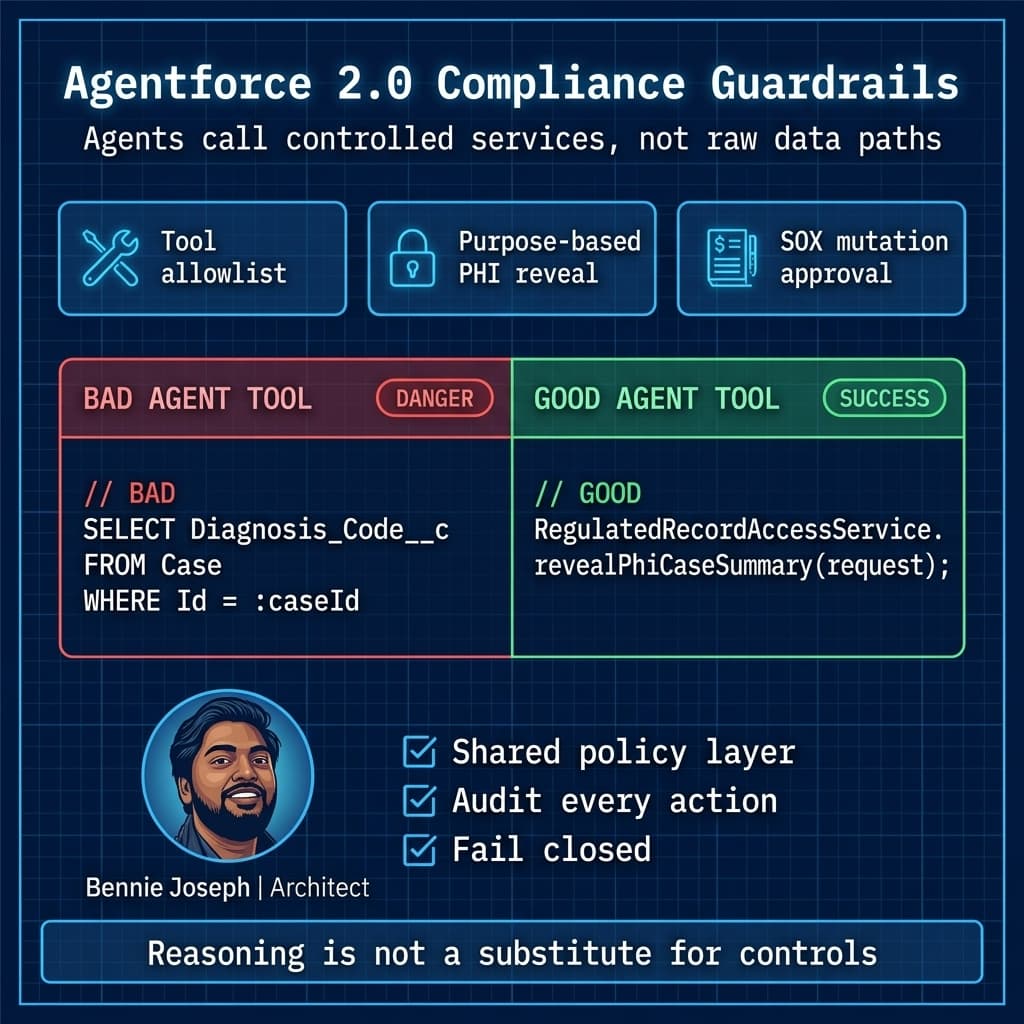
I do not let an agent “figure out” compliance-sensitive behavior from a prompt. The prompt can guide reasoning, but the control belongs in tool permissions, Apex services, validation rules, and policy checks.
For example, an Agentforce action that retrieves PHI should call the same RegulatedRecordAccessService pattern as the LWC reveal panel. That gives me one enforcement point and one evidence model.
For PCI, I would explicitly prevent agents from requesting card numbers. If a user provides one anyway, the conversation should be redacted, flagged, and routed through the approved payment provider flow.
For SOX, I do not allow an agent to directly mutate financially material fields unless the action invokes the same controlled mutation service used by the UI and integrations. If approval is required, the agent creates the request. It does not become the approver.
Real Enterprise Example: Healthcare Payments and Finance Controls
One enterprise program I worked on combined healthcare service operations, patient billing, payment plans, and finance reconciliation.
The initial design had three problems:
- PHI lived directly on service cases with broad queue-based visibility.
- Payment processing stored too much payment detail in Salesforce.
- Finance-impacting adjustments could be made by support users and corrected later in ERP.
That design would have been painful to defend.
We redesigned around zones.
PHI fields were classified and moved behind a purpose-based reveal pattern. Service agents saw the operational case by default, but clinical details required explicit reveal and logging. Supervisors got dashboards showing unusual PHI access patterns, such as high-volume reveals or access outside assigned facilities.
Payments moved to a hosted payment provider. Salesforce stored only token, last four, brand, payment status, and reconciliation IDs. MuleSoft handled the payment provider integration and redacted payloads before logs were written.
Finance adjustments were moved behind a controlled mutation process. Support could request an adjustment, but material changes required approval based on amount, category, and customer risk. The approved adjustment generated an event consumed by ERP. Salesforce stored approval evidence and reconciliation status.
We also separated integration users by function. The payment integration user could not update PHI. The PHI integration user could not touch payment tokens. The ERP integration user could not bypass adjustment approval. That sounds obvious, but I have seen many orgs use one super integration user for everything.
The audit outcome was much better because the architecture could answer specific questions:
- Who revealed PHI?
- Why did they reveal it?
- Which payment data entered Salesforce?
- Could support users see raw card data?
- Who approved the adjustment?
- Did the approved Salesforce adjustment match ERP?
- Which integration performed each update?
- Were denied access attempts recorded?
That is the difference between “we believe we are compliant” and “here is the evidence.”
Scale Behavior: 1K, 100K, and 10M
Compliance patterns behave differently at scale.
At 1K Records
At small scale, you can get away with simpler controls:
- Manual access reviews.
- Basic sharing rules.
- Standard approval processes.
- Declarative field history.
- A few dashboards for audit visibility.
The danger at 1K is over-engineering. Do not build a massive policy engine if a small controlled process will work.
But still classify data early. Retrofitting classification after sensitive data has spread across fields, files, emails, and integrations is expensive.
At 100K Records
At mid-scale, cracks appear:
- Sharing recalculation starts to matter.
- Reports expose more than expected.
- Integration users accumulate permissions.
- Field history volume grows.
- Approval queues become operational bottlenecks.
- Event logs need structured review.
- Data exports become riskier.
This is where I introduce automated evidence collection, periodic permission set reviews, policy dashboards, and stronger integration segmentation.
For HIPAA, I watch PHI access outliers.
For SOX, I monitor changes to controlled fields and approval bypass attempts.
For PCI, I scan inbound text channels and files for accidental card data.
At 10M Records
At enterprise scale, compliance architecture becomes data architecture.
You need to decide:
- What stays hot in Salesforce?
- What is archived?
- What is federated through Data 360?
- What is tokenized externally?
- What is summarized rather than copied?
- Which logs move to a SIEM?
- Which audit records need long-term retention?
- Which access checks must be cached?
- Which policies must run asynchronously?
At 10M records, “just add sharing rules” can create performance and maintenance pain. You need selective queries, indexed filters, archival strategies, async processing, and careful ownership models.
For regulated data, I also avoid unbounded replication into sandboxes. Data masking, synthetic test data, and controlled refresh processes matter. A full sandbox with raw PHI or payment artifacts is still a compliance environment.
Reporting and Analytics Without Scope Explosion
Executives want analytics. Compliance teams want minimization. Both are right.
The compromise is not “copy everything into Salesforce and lock it down later.”
For regulated analytics, I use patterns like:
- Aggregated operational metrics instead of raw sensitive detail.
- Data 360 federation for governed access to external datasets.
- De-identified or limited datasets for broad reporting.
- Role-based dashboards.
- Separate analytical permission model.
- No PHI or payment data in exported CSVs unless explicitly approved.
- Audit trails for report exports.
For AI grounding, the same principle applies. Ground agents and copilots on the minimum necessary data. Federated Grounding and Retriever API patterns are useful, but they still need classification, access filters, and response controls.
A model like gpt-5.5, claude-sonnet-4-7, or Gemini gemini-3.1-pro may be capable, but model capability is not a compliance control. Data boundary, consent, logging, retention, and tool policy are the controls.
Common Failure Modes
These are the patterns I still see too often.
“Compliance by Profile”
Profiles and permission sets matter, but they are not the full architecture. If sensitive data is exposed through reports, APIs, debug logs, exports, files, email templates, or agent actions, profile design alone will not save you.
One Integration User for Everything
This is convenient and dangerous. Segment integration identities by domain and function. A payment integration should not update clinical data. An analytics integration should not mutate financial approvals.
Raw Sensitive Data in Logs
Debug logs, middleware logs, failed payloads, platform event payloads, and monitoring tools can accidentally become regulated data stores. Redaction is architecture, not cleanup.
Approval Processes Without Enforcement
An approval process is not a control if users or integrations can update the controlled field another way. Server-side validation matters.
AI Without Tool Boundaries
Prompt instructions are not enough. Agentforce actions need permission checks, deterministic service methods, audit events, and redaction policies.
Sandbox Neglect
Non-production environments are often the weakest link. If developers, testers, and vendors can access copied PHI or payment artifacts in sandboxes, your architecture has a major gap.
My Practical Checklist
When I review a Salesforce compliance architecture, I ask these questions:
- Which data is regulated, and where can it physically exist?
- Which systems are authoritative for each regulated data element?
- Which users can access it, through which channels, and for what purpose?
- Which automations or integrations can mutate it?
- Which controls prevent unauthorized access or mutation?
- Which logs prove access, denial, approval, and change?
- Which data is encrypted, tokenized, masked, archived, or excluded?
- Which reports, exports, APIs, and AI tools can expose it?
- Which admin actions are reviewed?
- Which evidence can be produced without manual reconstruction?
If the team cannot answer those clearly, the architecture is not ready.
Final Thought
HIPAA, SOX, and PCI are different regulatory worlds, but on Salesforce they converge into the same architectural discipline: define boundaries, minimize sensitive data, enforce controlled actions, and produce evidence automatically.
The best compliance architecture is not the one with the most controls. It is the one where controls match risk, scale with the business, and are hard to bypass accidentally.
I do not want compliance living in a binder. I want it embedded in the platform design.
TL;DR
- Treat HIPAA, SOX, and PCI as architecture boundaries: classify, minimize, tokenize, and control mutation paths.
- Build evidence into the system with Event Monitoring, audit objects, approval history, integration logs, and agent action logs.
- At enterprise scale, compliance becomes data architecture: archive, federate through Data 360, segment integrations, and keep raw PCI data out of Salesforce.