Data Migration Architecture: Moving 500M Records Without Downtime
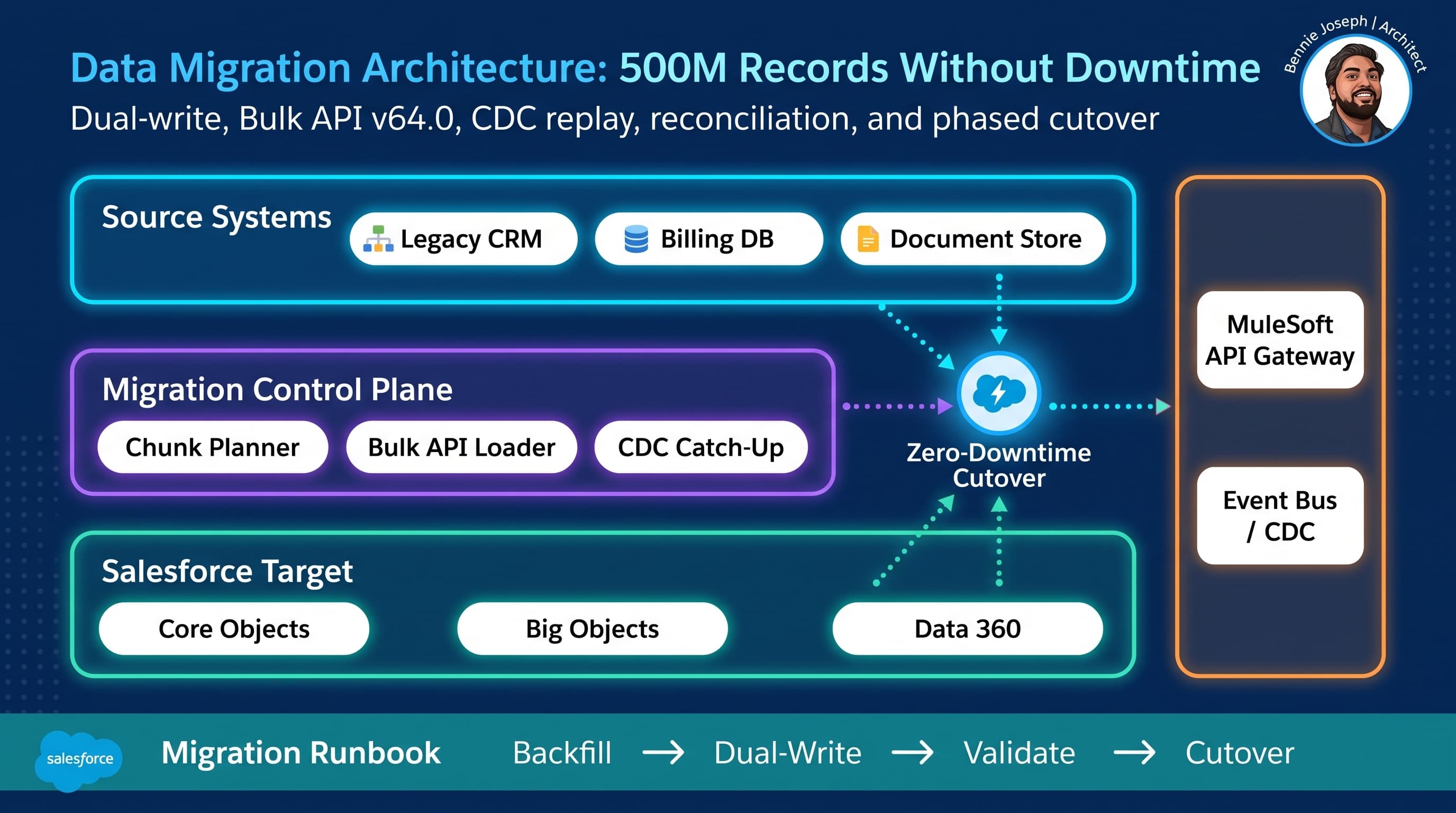
Moving 500M records into Salesforce is not a data loading exercise. It is a distributed systems problem with business users sitting inside the blast radius.
The biggest mistake I see is treating large-volume migration as a weekend batch job with a bigger CSV file. That works when the source system can freeze, users can wait, integrations can pause, and nobody cares about stale data. At 500M records, none of that is true.
A real salesforce data migration architecture large volume zero downtime strategy needs five things:
- A stable identity model before a single row is loaded.
- A load path that respects Salesforce limits and sharing recalculation.
- A change capture strategy while the historical load runs.
- Reconciliation that proves business correctness, not just row counts.
- A cutover plan that can fail safely.
Here’s the unpopular take: the migration tool is rarely the hard part. Bulk API, MuleSoft, Informatica, Talend, custom Python, Snowflake tasks, Heroku workers — they can all move bytes. The hard part is designing the migration so every record has an owner, every failure is replayable, every integration knows which system is authoritative, and the business does not notice the switch.
I’ll break down the architecture I use for large Salesforce migrations where downtime is not acceptable.
The Real Shape of a 500M Record Migration
On paper, “500M records” sounds like one big number.
In practice, it is usually a mix like this:
| Domain | Example Volume | Migration Behavior |
|---|---|---|
| Accounts / households | 5M | High dependency, heavy sharing impact |
| Contacts | 25M | Parent-dependent, dedupe-sensitive |
| Transactions / orders | 150M | Often read-heavy, append-mostly |
| Activities / interactions | 200M | High volume, low update frequency |
| Cases / service history | 40M | Compliance-sensitive |
| Preferences / consent | 10M | Must be accurate before go-live |
| Attachments / files metadata | 70M | Usually staged separately |
The architecture changes depending on object type.
I do not treat customer master, transaction history, audit records, and operational work items the same way. If you do, you either overload Salesforce with unnecessary live data or you bury users under unusable page layouts.
For very large history, I usually split target storage:
- Operational records go into Salesforce core objects.
- Historical analytics go into Data 360, external objects, or warehouse-backed federation.
- Searchable unstructured records use Data 360 Retriever API or a dedicated document/search layer.
- Audit trails may stay in immutable storage and surface through UI integration.
Zero downtime does not mean “everything moves into core Salesforce objects.” It means the business capability remains available while the system of record changes.
My Reference Architecture
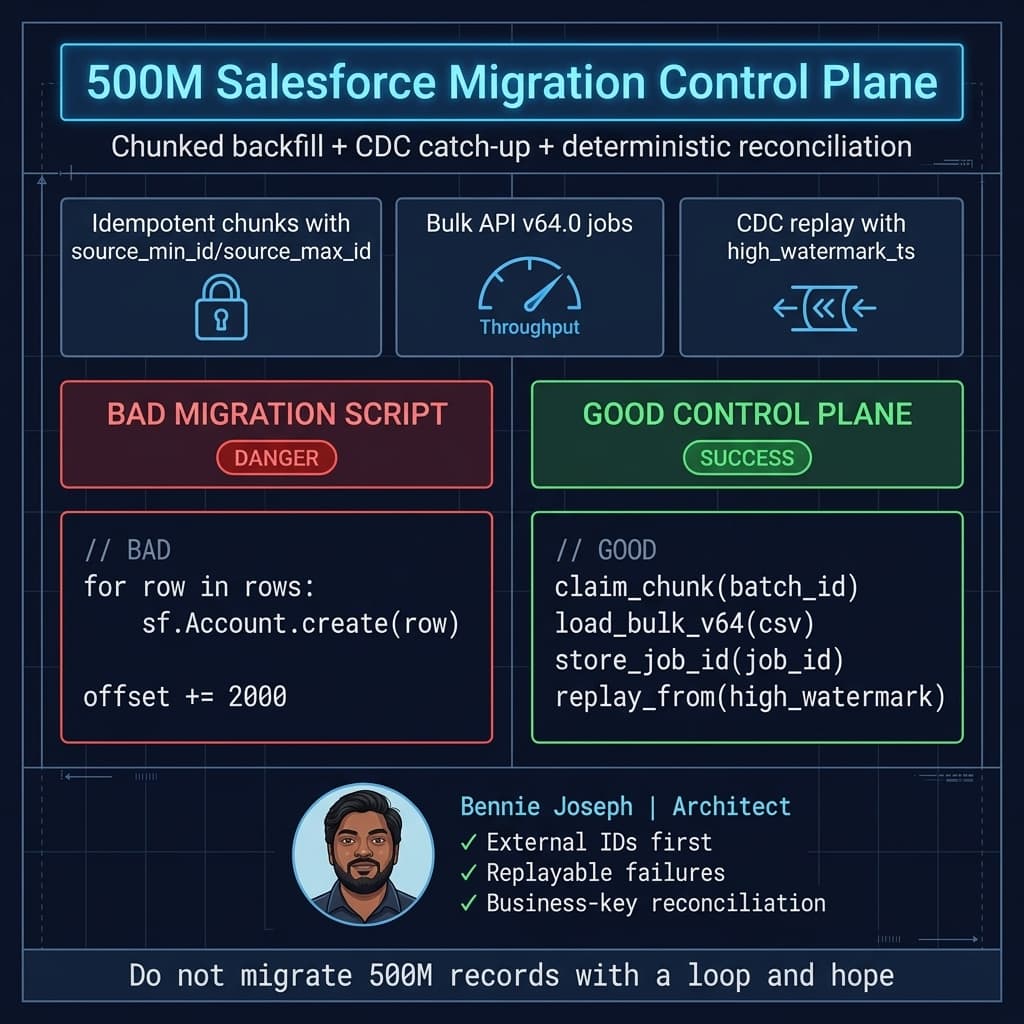
For 500M records, I use a control-plane architecture instead of a single migration script.
The core components are:
-
Migration Control DB
Tracks chunks, source high-water marks, Salesforce job IDs, retry counts, checksums, and reconciliation status. -
Source Extract Layer
Pulls records from the legacy platform using deterministic chunks. I prefer primary key ranges or time windows. Offset pagination is a trap at scale. -
Transform Layer
Converts source data into Salesforce-ready payloads. This is where external IDs, picklist normalization, owner mapping, currency handling, and consent rules are applied. -
Salesforce Load Layer
Uses Bulk API 2.0 on Salesforce API v64.0 for large ingestion. Uses REST/Composite/GraphQL selectively for smaller dependency-sensitive mutations. -
Change Capture Layer
Captures changes from the source while backfill runs. Depending on the legacy stack, this may be database CDC, event logs, message queues, or timestamp polling. -
Reconciliation Layer
Compares source and target by business keys, counts, aggregate hashes, and sampled field-level checks. -
Cutover Router
Routes reads and writes during phased cutover. This may live in MuleSoft, an API gateway, the source application, or middleware. -
Operational Console
Gives business and technical teams visibility. In Salesforce, I’ve built this as an LWC migration command center using native state management GA in Summer ’26, backed by custom metadata and migration status objects.
The important part: every component is restartable. If a pod dies, a Bulk API job fails, a parent load has bad data, or a sharing recalculation slows down the org, the system does not lose its place.
Decision Matrix: Choosing the Migration Pattern
Architecture is tradeoff management. Here’s how I decide which migration pattern to use.
| Pattern | Best For | Strengths | Weaknesses | My Recommendation |
|---|---|---|---|---|
| Big-bang weekend load | Small/simple orgs, low data volume | Simple mental model | Downtime, high failure risk, painful rollback | Avoid for 500M records |
| Phased object migration | Domains can move independently | Lower risk, easier validation | Requires integration routing by domain | Good when business processes are separable |
| Backfill + CDC catch-up | Large datasets with active source system | Enables near-zero downtime | Needs reliable change capture and replay | My default for 500M records |
| Dual-write period | Critical systems during transition | Keeps systems aligned | Consistency bugs, conflict resolution required | Use selectively and briefly |
| Federation instead of migration | Historical/read-only data | Lower Salesforce storage pressure | Search, security, latency complexity | Strong option for history |
| Event-sourced rebuild | Systems with durable event logs | Clean replay model | Rare in legacy enterprise systems | Great when available |
| API façade cutover | Multiple consumers/integrations | Hides migration from callers | Requires mature API gateway discipline | Best for integration-heavy enterprises |
For a 500M record migration, my default is:
Historical backfill + source CDC + short dual-write window + phased API cutover.
Not because it is elegant. Because it fails in controllable ways.
Identity Comes First
Before loading data, I want the identity model locked.
That means:
- Every source record has a stable source system key.
- Every Salesforce target object has an external ID field.
- Parent-child relationships are resolved through external IDs, not temporary Salesforce IDs in spreadsheets.
- Merge and dedupe rules are explicit.
- Ownership and territory assignments are mapped before load.
- Consent and preference records have deterministic precedence rules.
For example:
public with sharing class MigrationIdentityService {
    public class AccountMatchRequest {
        @AuraEnabled public String sourceSystem;
        @AuraEnabled public String sourceAccountId;
        @AuraEnabled public String normalizedTaxId;
        @AuraEnabled public String normalizedEmailDomain;
    }

    public class AccountMatchResult {
        @AuraEnabled public Id accountId;
        @AuraEnabled public String matchStrategy;
        @AuraEnabled public Boolean isAmbiguous;
    }

    @AuraEnabled
    public static AccountMatchResult findAccount(AccountMatchRequest request) {
        if (String.isBlank(request.sourceSystem) || String.isBlank(request.sourceAccountId)) {
            throw new AuraHandledException('Source identity is required.');
        }

        String externalKey = request.sourceSystem + ':' + request.sourceAccountId;

        List<Account> exactMatches = [
            SELECT Id, Migration_External_Key__c
            FROM Account
            WHERE Migration_External_Key__c = :externalKey
            WITH USER_MODE
            LIMIT 2
        ];

        AccountMatchResult result = new AccountMatchResult();

        if (exactMatches.size() == 1) {
            result.accountId = exactMatches[0].Id;
            result.matchStrategy = 'EXTERNAL_ID';
            result.isAmbiguous = false;
            return result;
        }

        if (exactMatches.size() > 1) {
            result.matchStrategy = 'EXTERNAL_ID_DUPLICATE';
            result.isAmbiguous = true;
            return result;
        }

        List<Account> fuzzyMatches = [
            SELECT Id, Normalized_Tax_Id__c, Normalized_Email_Domain__c
            FROM Account
            WHERE Normalized_Tax_Id__c = :request.normalizedTaxId
               OR Normalized_Email_Domain__c = :request.normalizedEmailDomain
            WITH USER_MODE
            LIMIT 2
        ];

        if (fuzzyMatches.size() == 1) {
            result.accountId = fuzzyMatches[0].Id;
            result.matchStrategy = 'NORMALIZED_BUSINESS_KEY';
            result.isAmbiguous = false;
        } else {
            result.matchStrategy = fuzzyMatches.isEmpty() ? 'NO_MATCH' : 'AMBIGUOUS_BUSINESS_KEY';
            result.isAmbiguous = fuzzyMatches.size() > 1;
        }

        return result;
    }
}
This is not the full dedupe engine. It is the kind of deterministic service I want exposed to migration tooling, data stewards, and exception queues.
Two rules I enforce:
- Never use Salesforce record IDs as the migration source of truth.
- Never let fuzzy matching silently create or merge records.
Fuzzy matching should create a queue for human or rules-based resolution. Silent merges during migration are how you create legal, billing, and service nightmares.
Chunking Strategy: How I Avoid the Monster Job
At 500M records, chunking is architecture.
Bad chunking creates hot spots, lock contention, failed jobs, and impossible reconciliation. Good chunking gives you controlled parallelism.
I usually chunk by one of these:
- Source primary key ranges.
- Created date windows.
- Tenant/account partitions.
- Geography/market.
- Object dependency group.
- Hash modulo buckets.
My preference is deterministic chunk records stored in a migration control database:
| Field | Purpose |
|---|---|
| object_name | Account, Contact, Order, Interaction |
| source_min_key / source_max_key | Defines extract range |
| source_high_watermark | Last known change timestamp |
| status | Planned, Extracting, Loading, Validating, Complete, Failed |
| bulk_job_id | Salesforce Bulk API job ID |
| retry_count | Controls poison chunks |
| source_count | Expected source row count |
| target_count | Loaded Salesforce row count |
| checksum | Aggregate validation hash |
| error_uri | Pointer to failure file |
If I cannot answer “which records are in flight right now?” in under five seconds, the architecture is not ready.
Here is a simplified Python loader using Salesforce Bulk API 2.0 with API v64.0. In production, I wrap this with queue workers, secrets management, structured logs, and a control DB transaction around every state change.
import csv
import json
import time
import requests
from pathlib import Path

SALESFORCE_INSTANCE = "https://my-domain.my.salesforce.com"
API_VERSION = "v64.0"

class BulkLoadError(Exception):
    pass

def create_bulk_job(access_token: str, object_name: str, operation: str = "upsert",
                    external_id_field: str = "Migration_External_Key__c") -> str:
    url = f"{SALESFORCE_INSTANCE}/services/data/{API_VERSION}/jobs/ingest"
    payload = {
        "object": object_name,
        "operation": operation,
        "externalIdFieldName": external_id_field,
        "contentType": "CSV",
        "lineEnding": "LF",
        "columnDelimiter": "COMMA"
    }

    response = requests.post(
        url,
        headers={
            "Authorization": f"Bearer {access_token}",
            "Content-Type": "application/json"
        },
        data=json.dumps(payload),
        timeout=30
    )
    response.raise_for_status()
    return response.json()["id"]

def upload_csv(access_token: str, job_id: str, csv_path: Path) -> None:
    url = f"{SALESFORCE_INSTANCE}/services/data/{API_VERSION}/jobs/ingest/{job_id}/batches"

    with csv_path.open("rb") as file_handle:
        response = requests.put(
            url,
            headers={
                "Authorization": f"Bearer {access_token}",
                "Content-Type": "text/csv"
            },
            data=file_handle,
            timeout=300
        )

    response.raise_for_status()

def close_job(access_token: str, job_id: str) -> None:
    url = f"{SALESFORCE_INSTANCE}/services/data/{API_VERSION}/jobs/ingest/{job_id}"
    response = requests.patch(
        url,
        headers={
            "Authorization": f"Bearer {access_token}",
            "Content-Type": "application/json"
        },
        data=json.dumps({"state": "UploadComplete"}),
        timeout=30
    )
    response.raise_for_status()

def wait_for_job(access_token: str, job_id: str, poll_seconds: int = 15) -> dict:
    url = f"{SALESFORCE_INSTANCE}/services/data/{API_VERSION}/jobs/ingest/{job_id}"

    while True:
        response = requests.get(
            url,
            headers={"Authorization": f"Bearer {access_token}"},
            timeout=30
        )
        response.raise_for_status()
        job = response.json()

        if job["state"] in ["JobComplete", "Failed", "Aborted"]:
            return job

        time.sleep(poll_seconds)

def load_chunk(access_token: str, object_name: str, csv_path: Path, chunk_id: str) -> dict:
    job_id = create_bulk_job(access_token, object_name)

    # In production, persist this immediately:
    # UPDATE migration_chunk SET bulk_job_id = :job_id, status = 'LOADING'
    print(f"chunk={chunk_id} job={job_id} status=created")

    upload_csv(access_token, job_id, csv_path)
    close_job(access_token, job_id)

    result = wait_for_job(access_token, job_id)

    if result["state"] != "JobComplete":
        raise BulkLoadError(
            f"Bulk job failed: chunk={chunk_id}, job={job_id}, result={json.dumps(result)}"
        )

    print(
        f"chunk={chunk_id} job={job_id} processed={result.get('numberRecordsProcessed')} "
        f"failed={result.get('numberRecordsFailed')}"
    )

    return result
The code is intentionally boring. That is what I want in migration infrastructure. Boring code, strong state management, aggressive observability.
The control plane around this code matters more than the HTTP calls.
Parent-Child Ordering Without Killing Throughput
Salesforce migrations often fail because teams load child records before parent identity is stable.
My ordering usually looks like this:
- Reference data: users, queues, products, price books, record types, mappings.
- Master data: accounts, households, contacts.
- Operational records: opportunities, cases, contracts, subscriptions.
- Transactional history: orders, invoices, interactions.
- Files and unstructured metadata.
- Derived/search records.
- Sharing recalculation and validation.
For parent-child loads, I use external ID references instead of pre-querying Salesforce IDs into a giant mapping file where possible.
Example CSV structure for Contact upsert:
Migration_External_Key__c,LastName,Email,Account:Migration_External_Key__c,Source_Last_Modified__c
LEGACY:CONTACT:10001,Nguyen,mai.nguyen@example.com,LEGACY:ACCOUNT:9001,2026-07-21T10:00:00Z
LEGACY:CONTACT:10002,Patel,arjun.patel@example.com,LEGACY:ACCOUNT:9002,2026-07-21T10:01:00Z
This keeps the migration idempotent. If a chunk fails, I can replay it. If Salesforce generated IDs change between environments, I do not care.
Handling Writes During Backfill
Zero downtime means users keep changing data while the historical load runs.
There are four common approaches:
1. Read-only freeze
Simple, but not zero downtime. I only use this for tiny domains or internal admin-only records.
2. Timestamp polling
Works if the source has reliable last_modified fields and no hard deletes. It is easy to implement but can miss changes if timestamps are inconsistent or updated by batch jobs.
3. Database or application CDC
My preferred option. Capture inserts, updates, deletes, and sequence numbers from the source system. Replay them after the historical chunk loads.
4. Dual-write
Useful during the final cutover window, but dangerous if it lasts too long. Every dual-write implementation becomes a conflict-resolution engine eventually.
My practical pattern:
- Start historical backfill from a snapshot marker.
- Capture all source changes after that marker into a durable stream.
- Load historical chunks.
- Replay CDC changes in order.
- Enter a short dual-write window.
- Switch authoritative writes to Salesforce.
- Keep source as read-only fallback for a defined period.
The key is sequence. If CDC replay is not ordered per business entity, you can apply stale updates over newer data.
Real Enterprise Example: Service Migration Across Regions
On one enterprise program, we moved a service operation from a legacy CRM into Salesforce while the contact center stayed open.
The migration included:
- Customer profiles across multiple regions.
- Service cases and interaction history.
- Entitlements.
- Consent preferences.
- Open work items.
- Knowledge references.
- Integration traffic from IVR, web, mobile, and billing.
The total logical volume was just under 500M rows when history and interactions were included.
The business constraint was brutal: no contact center downtime, no loss of open cases, and no agent confusion during regional rollout.
We solved it by splitting the migration into four lanes:
-
Customer master lane
Accounts, contacts, household relationships, dedupe exceptions. -
Operational service lane
Open cases, entitlements, queues, routing, SLAs. -
Historical lane
Closed cases, interactions, documents, audit references. -
Integration lane
API façade changes, event routing, source-to-target write ownership.
We did not load all history into core Salesforce objects. Recent service history went into Salesforce. Deep interaction history stayed federated and searchable through a custom component. That saved storage, reduced sharing recalculation impact, and gave agents the timeline they actually needed.
Cutover happened region by region. For each region:
- Historical records were preloaded.
- CDC replay ran until lag was under five minutes.
- Open cases were validated against source.
- IVR and web APIs were switched through MuleSoft routing.
- Agents started in Salesforce while legacy remained read-only.
- Exceptions were triaged from a migration console.
The most important lesson: the successful cutover was not because the load jobs were fast. It succeeded because the failure modes were known before go-live.
Reconciliation: Counts Are Not Enough
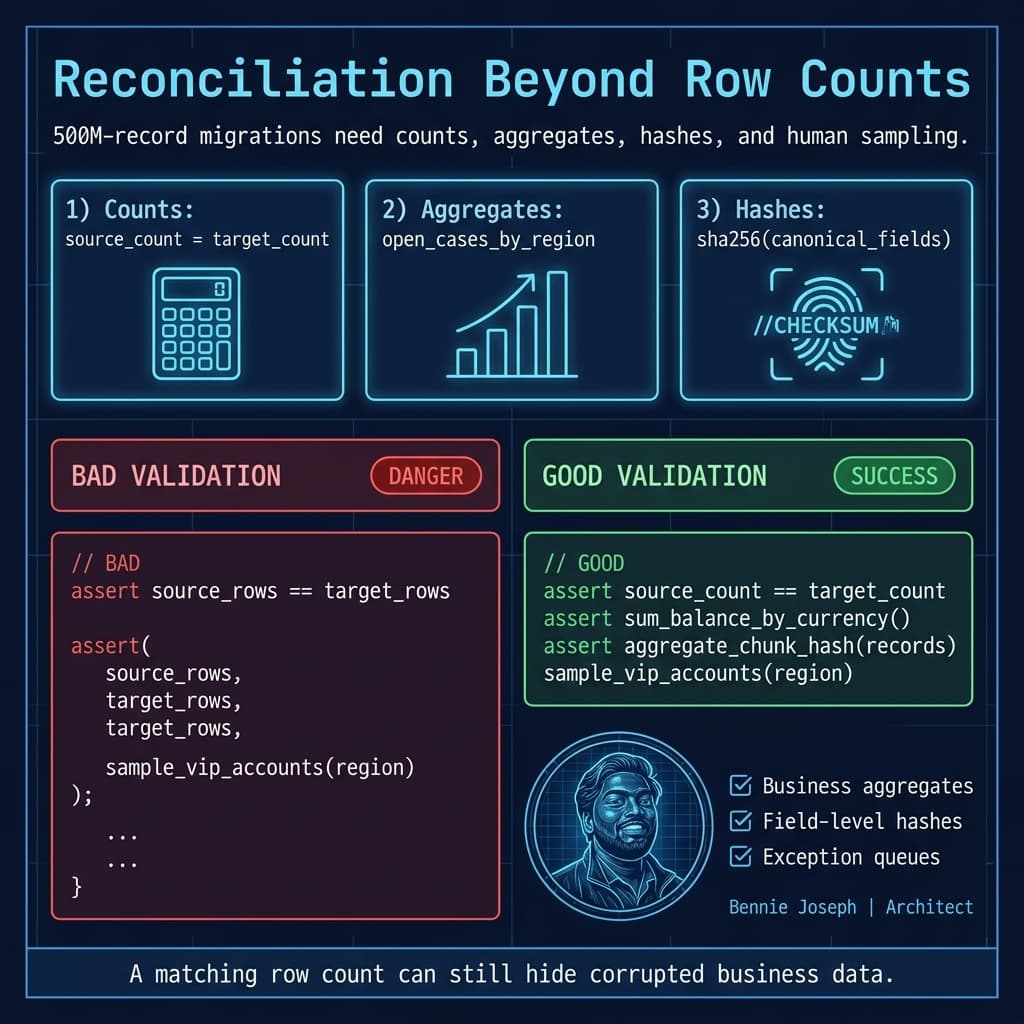
If someone tells me reconciliation passed because “source count equals target count,” I get nervous.
Counts are table stakes. They do not prove correctness.
I use layered reconciliation:
Level 1: Technical counts
- Rows extracted.
- Rows loaded.
- Rows failed.
- Rows skipped.
- Rows replayed from CDC.
Level 2: Business aggregates
Examples:
- Total open case count by region.
- Total active contracts by product.
- Total account balances by currency.
- Consent opt-out counts by channel.
- Orders by month and status.
Level 3: Hash-based validation
Generate deterministic hashes for important fields.
For example:
import hashlib
import json

IMPORTANT_FIELDS = [
    "Migration_External_Key__c",
    "Status",
    "Priority",
    "Owner_External_Key__c",
    "Source_Last_Modified__c"
]

def canonical_record_hash(record: dict) -> str:
    canonical = {
        field: "" if record.get(field) is None else str(record.get(field)).strip()
        for field in IMPORTANT_FIELDS
    }

    payload = json.dumps(canonical, sort_keys=True, separators=(",", ":"))
    return hashlib.sha256(payload.encode("utf-8")).hexdigest()

def aggregate_chunk_hash(records: list[dict]) -> str:
    row_hashes = sorted(canonical_record_hash(record) for record in records)
    return hashlib.sha256("|".join(row_hashes).encode("utf-8")).hexdigest()
Level 4: Business sampling
I still want humans involved for high-risk domains.
For example:
- Ten VIP customers per region.
- Twenty open escalations.
- Recent closed cases with attachments.
- Accounts with complex hierarchies.
- Customers with privacy restrictions.
Automated reconciliation proves scale. Human sampling proves usability.
Scale Behavior: 1K, 100K, 10M, 500M
A migration design that works for 100K records can collapse at 10M. I think about scale explicitly.
At 1K records
You can load manually. Dependencies are visible. Failures are obvious. A spreadsheet plus Data Loader may be fine.
But this stage is still useful. I use 1K record pilots to validate mappings, required fields, automations, record types, and ownership logic.
At 100K records
Automation starts to matter.
You need:
- Repeatable extracts.
- External IDs.
- Sandbox rehearsal.
- Error files.
- Basic reconciliation.
- Automation bypass rules where appropriate.
At this scale, bad triggers and flows reveal themselves quickly.
At 10M records
This is where architecture begins.
You need:
- Chunking.
- Parallel load strategy.
- Lock analysis.
- Sharing and ownership planning.
- Async automation controls.
- Bulk API monitoring.
- Partial replay.
- CDC strategy if the source remains active.
You should also test realistic data skew. A sandbox with evenly distributed fake data tells you almost nothing about production behavior.
At 500M records
Everything is operational engineering.
You need:
- A migration control plane.
- Durable state.
- Replayable chunks.
- Observability.
- Runbooks.
- Release coordination.
- Integration routing.
- Business reconciliation.
- Data retention decisions.
- Rollback and fallback patterns.
At this scale, you do not “run the migration.” You operate it.
Salesforce-Specific Design Concerns
Salesforce is powerful, but it is not a dumb database. Migration architecture has to respect the platform.
Sharing recalculation
Large ownership changes can trigger heavy sharing work.
I try to:
- Load with final owners where possible.
- Avoid unnecessary ownership flips.
- Use public read/write only if it is truly part of the security model, not as a migration shortcut.
- Coordinate territory and role hierarchy changes separately.
- Stage high-volume history away from objects with expensive sharing where possible.
Automation control
Flows, triggers, validation rules, assignment rules, duplicate rules, and platform events can destroy throughput if left unmanaged.
I do not blindly disable everything. Some automation enforces business invariants.
Instead, I classify automation:
| Automation Type | Migration Behavior |
|---|---|
| Required data integrity | Keep enabled |
| Notification/email | Disable or suppress |
| Assignment/routing | Usually bypass during historical load |
| Rollups/derived fields | Recompute after load if possible |
| External callouts | Disable during backfill |
| Consent/compliance enforcement | Keep or replace with deterministic migration rule |
Use a migration context flag only if it is governed. A global “bypass everything” switch is dangerous.
API selection
For 500M records:
- Use Bulk API 2.0 for high-volume inserts/upserts.
- Use REST/Composite for small dependency-sensitive operations.
- Use Conditional Composite API where request branching reduces integration chatter.
- Use GraphQL API for targeted CRUD orchestration where shape and relationship traversal matter.
- Use Data 360 Zero Copy federation when moving the data is worse than referencing it.
Salesforce API v64.0 is the baseline I would use for this design today.
Security model
Do not postpone security to after migration.
If users can see the wrong migrated records on day one, the migration failed.
I validate:
- Owner mapping.
- Role hierarchy.
- Territory rules.
- Restriction rules.
- Permission sets.
- Field-level security.
- Data classification.
- Shield encryption behavior if used.
- Consent and privacy rules.
For Apex utilities, I now write queries with explicit user-mode behavior where appropriate and avoid old security patterns that have been removed from the platform roadmap.
Cutover Architecture
Cutover is not one event. It is a sequence.
My cutover runbook usually has these stages:
Stage 1: Backfill complete
All historical chunks are loaded or intentionally excluded by policy. Reconciliation passes at agreed thresholds.
Stage 2: CDC lag reduced
Change replay lag drops below a defined threshold. For operational objects, I usually want minutes, not hours.
Stage 3: Source write restriction
Legacy writes are restricted by domain, region, or user group. This may be logical, not physical.
Stage 4: Dual-write
For a short window, writes go to both systems. Every dual-write failure creates an exception event.
Stage 5: Salesforce authoritative
Salesforce becomes the system of record for selected domains. API routing changes. Integrations stop writing to legacy.
Stage 6: Read-only fallback
Legacy remains available for read-only verification for a defined period.
Stage 7: Decommission
After audit, retention, and business signoff, old paths are removed.
The riskiest cutovers are the ones where nobody owns routing. If integrations call source and target directly with no façade, every consumer becomes its own migration project.
I prefer an API façade through MuleSoft or another gateway so cutover can be controlled centrally.
Rollback Is Not “Restore the Database”
At 500M records, rollback is rarely a full restore. It is a business routing decision.
Rollback options include:
- Keep legacy authoritative and discard Salesforce writes.
- Replay Salesforce writes back to legacy.
- Roll back one region or product line.
- Freeze writes while exceptions are repaired.
- Continue Salesforce for new work but reference legacy for old work.
- Disable specific integration routes.
You need to decide this before cutover.
The rollback plan should answer:
- What is the rollback trigger?
- Who can call it?
- How long can the business tolerate dual operation?
- Which system owns writes after rollback?
- What happens to records created in Salesforce during the failed window?
- How do users know which system to use?
A vague rollback plan is just optimism in a Confluence page.
Observability and Operations
My migration dashboard usually shows:
- Chunk status by object and region.
- Bulk API job status.
- Rows processed per hour.
- Failure rate by error category.
- CDC lag.
- Reconciliation pass/fail.
- API error rates.
- Salesforce async backlog.
- Lock errors.
- Storage growth.
- Sharing recalculation indicators.
- Top poison chunks.
In 2026, I also use AI carefully for operations, not as the source of truth. For example, Agentforce 2.0 with Atlas Reasoning Engine v2 can summarize migration exceptions and suggest runbook steps if it is grounded on approved operational data. I would not let an agent decide to retry, skip, or merge migration records without deterministic guardrails.
The same applies if I use claude-sonnet-4-7 or gpt-5.5 in an internal engineering assistant. Great for log summarization, runbook lookup, and anomaly explanation. Not acceptable as an ungoverned decision-maker for customer data.
Data Retention: Do Not Move Garbage Faster
A 500M record migration is a perfect moment to ask uncomfortable questions:
- Do users need this data operationally?
- Is it required for legal retention?
- Is it better stored in Data 360 or warehouse federation?
- Can it be aggregated?
- Can it be archived?
- Does it contain sensitive data we should not replicate?
- Does it need to be searchable or merely retrievable?
Enterprises often migrate too much because nobody wants to make a retention decision. That cowardice becomes platform cost, performance drag, and compliance exposure.
I push for a data disposition matrix:
| Data Category | Example | Target |
|---|---|---|
| Active operational | Open cases, active contracts | Salesforce core |
| Recent history | Last 24 months service records | Salesforce or indexed history object |
| Deep history | 10-year interaction archive | Data 360 / warehouse federation |
| Legal archive | Immutable audit records | WORM storage / compliance archive |
| Searchable documents | PDFs, transcripts | Document store + Retriever API |
| Aggregates | Lifetime value, monthly spend | Salesforce summary fields / Data 360 |
The best migration is often the one that moves less.
Performance Tactics That Actually Matter
The tactics I trust:
- Upsert with indexed external IDs.
- Keep batches object-specific and dependency-aware.
- Avoid ownership churn.
- Pre-create reference data.
- Normalize picklists before load.
- Keep transformations outside Salesforce when possible.
- Suppress nonessential automation.
- Separate historical loads from operational loads.
- Use deterministic retries.
- Validate in production-shaped sandboxes.
- Monitor lock errors and skew continuously.
- Do not load files and core records in the same critical path.
The tactics I distrust:
- “We’ll fix bad data after go-live.”
- “We can just increase batch size.”
- “Let’s disable all validation.”
- “The tool will handle relationships.”
- “We don’t need CDC; the load is fast.”
- “Users can tolerate stale data for a few days.”
That last one is how you lose trust before the new platform even launches.
The Architecture I Would Ship
For a 500M record Salesforce migration with no downtime, I would ship this:
-
Pre-migration foundation
- External IDs on every migrated object.
- Data quality rules.
- Retention policy.
- Automation classification.
- Security model validated.
- API façade designed.
-
Control plane
- Migration chunk table.
- Worker orchestration.
- Bulk API v64.0 loader.
- Retry and poison chunk handling.
- Structured logs and metrics.
-
Backfill
- Load reference data.
- Load master data.
- Load operational data.
- Load/federate historical data.
- Keep CDC stream running.
-
Catch-up
- Replay CDC.
- Monitor lag.
- Resolve conflicts.
- Reconcile by business domain.
-
Cutover
- Short dual-write.
- API routing switch.
- Salesforce authoritative writes.
- Legacy read-only fallback.
-
Stabilization
- Exception queues.
- Business sampling.
- Performance tuning.
- Decommission plan.
The architecture is not glamorous. It is disciplined.
And for large migrations, discipline beats heroics every time.
TL;DR
- A zero-downtime 500M record Salesforce migration needs a control plane, CDC replay, reconciliation, and phased cutover — not a giant batch job.
- Use external IDs, deterministic chunks, Bulk API v64.0, selective federation, and business-level validation to keep the migration replayable and safe.
- At 500M records, migration is operations engineering: plan ownership, automation, security, rollback, observability, and data retention before loading.