Governor Limit Architecture: Designing Systems That Never Hit Limits
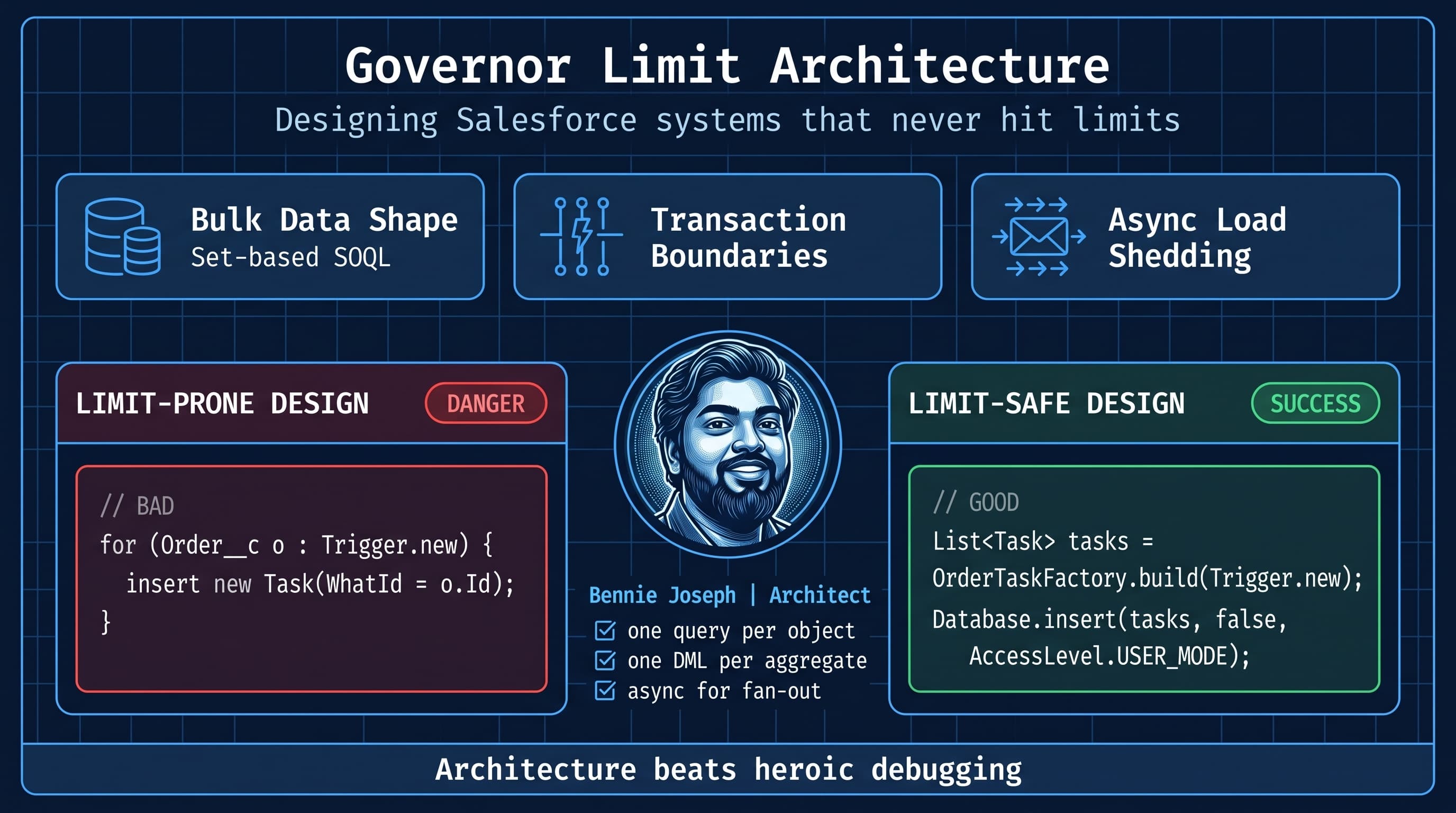
Governor limits are not a Salesforce inconvenience. They are the shape of the platform.
I have seen teams treat limits like exceptions to be handled after QA finds them. That mindset is expensive. By the time a system hits SOQL 101, CPU timeout, heap failure, row lock contention, or async saturation in production, the architecture has already lost.
The right question is not, “How do I fix this governor limit error?”
The right question is, “Why did my design allow this transaction to become unbounded?”
This post is my practical model for salesforce governor limits architecture design patterns bulkification — not as a trigger hygiene checklist, but as an enterprise architecture discipline. Bulkification matters, but it is only one layer. Systems that never hit limits are designed around bounded work, predictable data shapes, clean transaction boundaries, asynchronous pressure release, and measurable failure modes.
I am going to be direct: most governor limit problems are not Apex problems. They are architecture problems that happen to throw Apex errors.
The Mental Model: Every Transaction Needs a Budget
A Salesforce transaction is a budget envelope.
Inside that envelope, you spend:
- SOQL queries
- DML statements
- queried rows
- DML rows
- CPU time
- heap
- callouts
- queueable depth
- platform event publishing
- record locks
- automation side effects
- managed package side effects
- Agentforce action side effects
- Flow side effects
Most teams only budget queries and DML. That is why they still fail.
In real enterprise orgs, a single save can involve:
- LWC form save.
- Record-triggered Flow.
- Apex trigger framework.
- Duplicate rules.
- Assignment rules.
- Territory logic.
- Managed package automation.
- Platform event publishing.
- Integration user updates.
- Agentforce 2.0 action invocation through a custom Apex action.
- Data 360 profile updates downstream.
- External API calls via middleware.
If your design assumes “my trigger only uses 12 queries,” you are already undercounting.
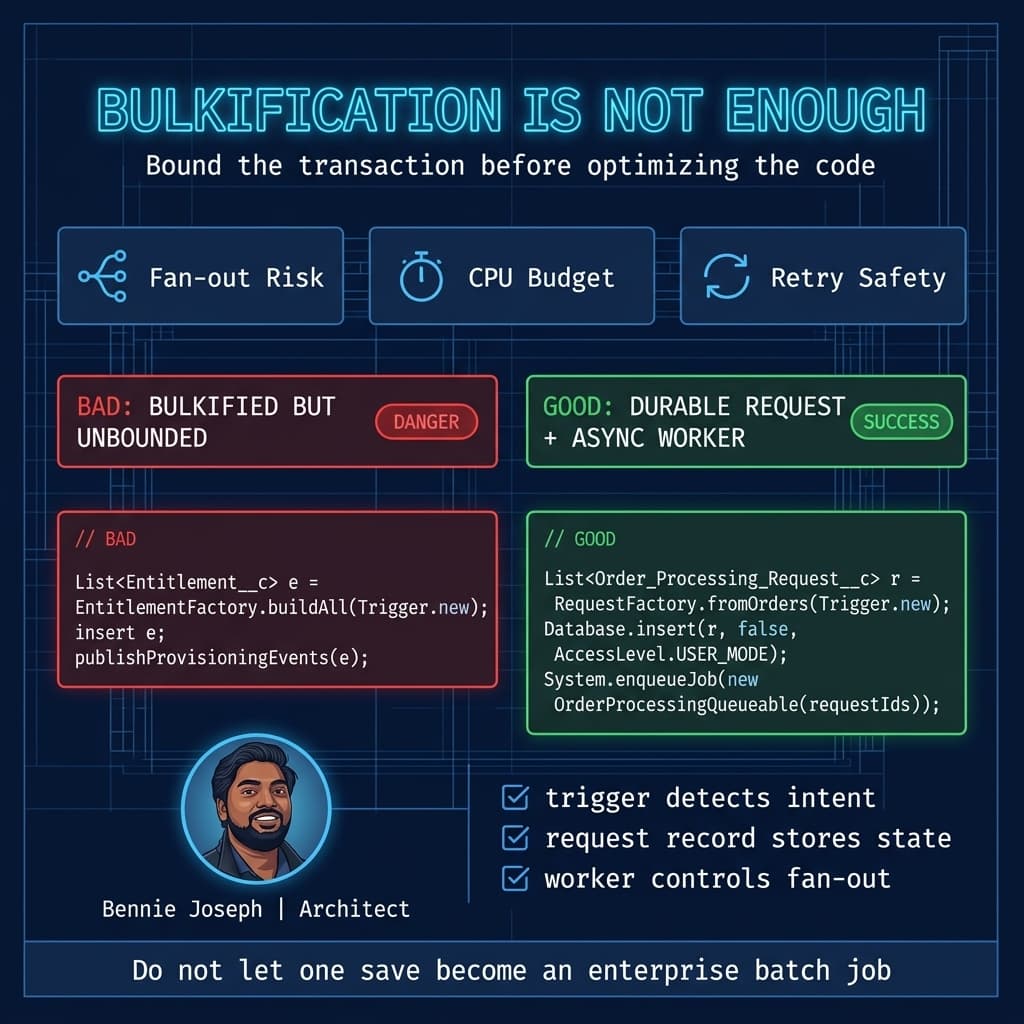
Here’s the unpopular take: bulkification is table stakes, not architecture. Bulkification prevents obvious limit failures. Architecture prevents unbounded work from entering the transaction in the first place.
The Five-Layer Governor Limit Architecture
When I design a Salesforce implementation that has to survive enterprise volume, I use five layers.
1. Data Shape Layer
This layer answers: How many records can enter this transaction, and how wide are they?
Bad designs accept any payload shape and hope Apex survives.
Good designs control:
- batch size
- field count
- child record fan-out
- relationship traversal depth
- duplicate work
- reprocessing behavior
- query selectivity
- ordering requirements
Example: if an ERP sends 500 Accounts, each with 200 child Entitlements, that is not “500 records.” That is a 100,500-record processing shape when you include parent updates, child inserts, share recalculation, rollups, and automation.
I want that shape identified before code is written.
2. Transaction Boundary Layer
This layer answers: What must be committed together, and what can be deferred?
Not everything belongs in the same transaction.
A customer-facing checkout may need to synchronously commit:
- Order
- Order Lines
- Payment authorization reference
- basic status
It probably does not need to synchronously commit:
- entitlement provisioning
- analytics snapshots
- fulfillment routing
- renewal forecast recalculation
- downstream ERP sync
- Slack notification
- AI-generated summary
- Data 360 unstructured grounding update
If you put all of that in one transaction, you are not building “real-time architecture.” You are building a limit grenade.
3. Execution Mode Layer
This layer answers: Should this run sync, queueable, batch, scheduled, platform event, external worker, or API composition?
Synchronous Apex is the most constrained execution mode and should be treated like the premium lane. Use it for things the user is waiting on.
For everything else, choose an execution mode intentionally.
4. Idempotency and Retry Layer
This layer answers: If this work runs twice, do we corrupt data?
Limit-safe systems assume retries.
Queueables fail. Callouts timeout. Middleware resends. Platform event subscribers can replay. Users double-click. Agentforce actions may be re-invoked if orchestration recovers from a failed step.
If retrying causes duplicate child records, duplicate external calls, or contradictory status transitions, the architecture is brittle.
5. Observability Layer
This layer answers: Can I see limit pressure before users feel it?
I want logs that show:
- transaction type
- record count
- query count
- DML count
- CPU consumed
- heap consumed
- async job id
- correlation id
- source system
- retry count
- skipped/deferred work
If you only know about limits after an exception email, you are operating blind.
A Real Enterprise Example: Entitlement Provisioning at Scale
One of the cleaner examples from enterprise work was a B2B implementation where Salesforce received orders from an ERP. Each order could create:
- one Account update
- one Contract
- 10 to 2,000 Entitlement records
- renewal forecast records
- implementation tasks
- downstream provisioning messages
- service team notifications
The first version looked “bulkified” on paper. The trigger handled lists. SOQL was outside loops. DML was grouped.
It still failed.
Why?
Because the transaction boundary was wrong.
The system tried to do entitlement generation, forecast updates, task creation, and outbound integration publishing inside the same transaction that accepted the ERP order. At low volume, it passed. During quarter-end, the ERP sent large batches. Salesforce hit CPU limits and row lock contention on Account and Contract-related rollups.
The fix was architectural:
- Synchronously accept the order and write a lightweight processing request.
- Generate entitlements asynchronously in shards.
- Use idempotency keys per source order line.
- Publish provisioning events only after entitlement commit.
- Move forecast recalculation to scheduled batch windows.
- Add dead-letter records for failed shards.
- Expose processing state back to service users in LWC.
- Use Salesforce API v64.0 integrations with explicit user-mode behavior in Apex where permissions mattered.
- Use Conditional Composite API for upstream payloads where dependent request reduction helped keep API pressure down.
The trigger did less. The system did more reliably.
That is the pattern.
The Pattern: Limit-Safe Trigger to Service Boundary
I like trigger frameworks, but I do not worship them. A framework that routes unbounded work into one transaction is still a bad design.
My baseline rule:
Triggers should detect intent, collect identifiers, enforce immediate invariants, and delegate bounded work. They should not become orchestration engines.
Here is a simplified version of a pattern I use for high-volume trigger entry points.
public with sharing class OrderTriggerHandler {
    public static void afterInsert(List<Order__c> newOrders) {
        OrderProcessingRequestService.enqueueRequests(newOrders);
    }
}

public with sharing class OrderProcessingRequestService {
    public static void enqueueRequests(List<Order__c> orders) {
        if (orders == null || orders.isEmpty()) {
            return;
        }

        Set<String> sourceOrderKeys = new Set<String>();
        for (Order__c orderRecord : orders) {
            if (String.isNotBlank(orderRecord.External_Order_Key__c)) {
                sourceOrderKeys.add(orderRecord.External_Order_Key__c);
            }
        }

        Map<String, Order_Processing_Request__c> existingByKey = new Map<String, Order_Processing_Request__c>();

        for (Order_Processing_Request__c request : [
            SELECT Id, External_Order_Key__c, Status__c
            FROM Order_Processing_Request__c
            WHERE External_Order_Key__c IN :sourceOrderKeys
            WITH USER_MODE
        ]) {
            existingByKey.put(request.External_Order_Key__c, request);
        }

        List<Order_Processing_Request__c> requestsToInsert = new List<Order_Processing_Request__c>();

        for (Order__c orderRecord : orders) {
            if (String.isBlank(orderRecord.External_Order_Key__c)) {
                continue;
            }

            if (existingByKey.containsKey(orderRecord.External_Order_Key__c)) {
                continue;
            }

            requestsToInsert.add(new Order_Processing_Request__c(
                Order__c = orderRecord.Id,
                External_Order_Key__c = orderRecord.External_Order_Key__c,
                Status__c = 'Pending',
                Retry_Count__c = 0
            ));
        }

        if (!requestsToInsert.isEmpty()) {
            Database.insert(requestsToInsert, false, AccessLevel.USER_MODE);
        }

        if (!requestsToInsert.isEmpty() && Limits.getQueueableJobs() < Limits.getLimitQueueableJobs()) {
            System.enqueueJob(new OrderProcessingQueueable(
                new List<Id>(new Map<Id, Order_Processing_Request__c>(requestsToInsert).keySet())
            ));
        }
    }
}

public with sharing class OrderProcessingQueueable implements Queueable {
    private final List<Id> requestIds;

    public OrderProcessingQueueable(List<Id> requestIds) {
        this.requestIds = requestIds == null ? new List<Id>() : requestIds.deepClone();
    }

    public void execute(QueueableContext context) {
        List<Order_Processing_Request__c> requests = [
            SELECT Id, Order__c, External_Order_Key__c, Status__c, Retry_Count__c
            FROM Order_Processing_Request__c
            WHERE Id IN :requestIds
            AND Status__c = 'Pending'
            WITH USER_MODE
            FOR UPDATE
        ];

        if (requests.isEmpty()) {
            return;
        }

        Set<Id> orderIds = new Set<Id>();
        for (Order_Processing_Request__c request : requests) {
            orderIds.add(request.Order__c);
        }

        Map<Id, Order__c> ordersById = new Map<Id, Order__c>([
            SELECT Id, Account__c, External_Order_Key__c, Effective_Date__c
            FROM Order__c
            WHERE Id IN :orderIds
            WITH USER_MODE
        ]);

        List<Entitlement__c> entitlementsToInsert = new List<Entitlement__c>();

        for (Order_Processing_Request__c request : requests) {
            Order__c orderRecord = ordersById.get(request.Order__c);
            if (orderRecord == null) {
                request.Status__c = 'Failed';
                request.Error_Message__c = 'Order not found or not accessible.';
                continue;
            }

            entitlementsToInsert.add(new Entitlement__c(
                Account__c = orderRecord.Account__c,
                Order__c = orderRecord.Id,
                External_Key__c = request.External_Order_Key__c + ':BASE',
                Start_Date__c = orderRecord.Effective_Date__c,
                Status__c = 'Active'
            ));

            request.Status__c = 'Processing';
        }

        if (!entitlementsToInsert.isEmpty()) {
            Database.UpsertResult[] results = Database.upsert(
                entitlementsToInsert,
                Entitlement__c.Fields.External_Key__c,
                false,
                AccessLevel.USER_MODE
            );

            for (Integer i = 0; i < results.size(); i++) {
                if (!results[i].isSuccess()) {
                    System.debug(LoggingLevel.ERROR, results[i].getErrors()[0].getMessage());
                }
            }
        }

        for (Order_Processing_Request__c request : requests) {
            if (request.Status__c == 'Processing') {
                request.Status__c = 'Completed';
            }
        }

        Database.update(requests, false, AccessLevel.USER_MODE);
    }
}
This is not meant to be copy-paste production code. I would add logging, dead-letter handling, platform events, retry policy, and configurable shard sizing.
The important architecture choices are:
- The trigger does not generate entitlements.
- The request record creates a durable boundary.
- The external key provides idempotency.
WITH USER_MODEand user-mode DML make access behavior explicit.- Queueable work is only used after durable state exists.
FOR UPDATEprevents multiple workers from processing the same request.- Work can be retried without duplicating entitlement records.
In Salesforce API v64.0 projects, I still prefer being explicit with user-mode behavior in security-sensitive code. With the platform moving further toward safer defaults in newer API behavior, explicit access decisions are still easier to review during architecture and code reviews.
Decision Matrix: Choosing the Right Limit Architecture Pattern
Architecture gets real when tradeoffs are visible. Here is the decision matrix I use when teams ask, “Should this be trigger, queueable, batch, event-driven, or external?”
| Approach | Best For | Limit Strength | Main Tradeoff | Use When | Avoid When |
|---|---|---|---|---|---|
| Pure synchronous trigger/service | Immediate validation, small derived updates, required same-transaction invariants | Low to Medium | Tightest CPU and automation coupling | User must see result immediately and record count is controlled | Child fan-out, callouts, complex recalculation, large payloads |
| Bulkified trigger + durable request | Capturing intent safely before async work | High | Requires extra object/state model | You need reliable processing, retries, and user-visible status | The work truly must commit atomically with parent save |
| Queueable Apex | Medium async work, callouts, post-commit processing | Medium to High | Chaining and concurrency need control | Work can finish soon, payload is bounded, retry count is small | Millions of records, large fan-out, long-running transforms |
| Batch Apex | Large record sweeps, recalculation, backfills, scheduled processing | High | Not real-time; operational scheduling matters | Processing 100K+ records with predictable scopes | User-facing immediate completion requirements |
| Platform Event + subscriber | Decoupled post-commit integration and internal eventing | High | Replay, ordering, and idempotency must be designed | Multiple consumers need to react independently | Strict synchronous transaction requirements |
| External worker via MuleSoft/Heroku | Heavy transformation, long callout chains, non-Salesforce compute | Very High | More moving parts and observability requirements | CPU-heavy enrichment, large file processing, cross-system orchestration | Simple in-org CRUD logic |
| Conditional Composite API | API call reduction for dependent external writes | Medium | Request design complexity | External clients need fewer round trips and conditional branching | Internal business logic is too complex for API composition |
| GraphQL API CRUD | Client-shaped data access with fewer overfetching patterns | Medium | Requires disciplined schema/query governance | LWC or external apps need precise data shapes | Server-side transaction orchestration is required |
Here’s the key: no pattern is universally “best.” The best pattern is the one that bounds the transaction and makes failure recoverable.
Designing for 1K, 100K, and 10M
A design that works at 1K records can be reckless at 100K and unusable at 10M. I force scale conversations early because scale changes the architecture, not just the batch size.
At 1K Records
At 1K records, most reasonably bulkified Apex survives.
You can often get away with:
- synchronous trigger logic for small derivations
- a few queueables
- simple parent-child queries
- minimal retry infrastructure
- basic debug logs
- manual reprocessing by admins
But even at 1K, I still care about data shape. If each of those 1K records creates 500 children, this is not a 1K-record problem.
At this scale, my architecture goal is discipline:
- no SOQL in loops
- no DML in loops
- no unbounded child creation
- no hidden callouts from trigger paths
- one service boundary per business capability
- selective SOQL
- explicit integration ownership
At 100K Records
At 100K records, architecture starts exposing lies.
This is where quarter-end imports, territory realignments, product catalog refreshes, renewal generation, and ERP sync jobs start breaking systems that looked fine in demos.
At this scale, I usually introduce:
- durable processing objects
- batch Apex for large sweeps
- queueable workers for bounded near-real-time work
- platform events for decoupled side effects
- idempotency keys everywhere external systems are involved
- explicit lock ordering
- custom metadata for scope sizes and feature toggles
- operational dashboards for failed processing records
- structured logs with correlation ids
I also separate “acceptance” from “completion.”
For example, if an external system sends 100K subscription changes, Salesforce can accept the payload and return a processing reference. It does not need to finish every entitlement, notification, and forecast update before acknowledging receipt.
At 10M Records
At 10M records, Salesforce is not your only compute plane.
That does not mean Salesforce cannot participate. It means you stop pretending every transformation belongs in Apex.
At this scale, I look hard at:
- Data 360 Zero Copy federation for avoiding unnecessary replication
- Data 360 native vector search and Retriever API when unstructured retrieval is part of the workload
- MuleSoft for orchestration and API mediation
- Heroku or external workers for CPU-heavy processing
- Bulk API patterns for ingestion
- Async SOQL-style thinking for analytical workloads
- Platform Events or CDC for change propagation
- partitioning by Account, region, business unit, or source system
- archive strategy
- query selectivity and skinny data access paths
- record ownership and sharing recalculation pressure
For 10M-record designs, the question is rarely “Can Apex loop through this?”
The question is:
What is the smallest state transition Salesforce must own, and what can be computed somewhere else?
I have seen teams move a 10M-row entitlement eligibility calculation out of Apex, compute eligibility externally, then send Salesforce only the final delta set. That change removed CPU pressure, reduced locks, and made failures easier to replay.
Salesforce remained the system of engagement and workflow. It did not need to be the spreadsheet engine for the enterprise.
The Governor Limits People Forget
SOQL 101 gets the memes. CPU gets the angry Slack messages. But the nasty production failures usually come from the limits people forget.
CPU Time
CPU is the silent killer because “bulkified” code can still burn CPU.
Common causes:
- nested loops across large lists
- repeated JSON serialization
- complex formula field evaluation
- excessive Flow execution
- recursive automation
- large trigger frameworks doing metadata reflection
- managed package automation
- record sharing recalculation
- poorly bounded validation logic
Apex CPU failures are architecture symptoms. If one transaction is doing too many business capabilities, CPU is the first place I look.
Heap Size
Heap issues usually show up when teams query too many fields or hold too many records in memory.
I avoid:
SELECT *thinking- loading full parent and child graphs
- storing massive maps across multiple processing phases
- serializing huge queueable payloads
- passing full records to async jobs instead of ids
The rule is simple: pass identifiers, re-query intentionally.
Row Locks
Row locks are not solved by “retry three times” alone.
They are usually caused by competing updates to the same parent or shared aggregate record. Classic examples:
- thousands of child records updating one Account
- rollups on hot parent records
- parallel batches touching the same ownership hierarchy
- territory changes during data loads
- integrations updating Account while users update related records
My lock strategy usually includes:
- deterministic processing order
- parent-based sharding
- smaller batch scopes for hot parents
- async deferral of rollups
- avoiding unnecessary parent updates
- using status records instead of constantly touching the business parent
Async Saturation
Queueables are not magic. If every trigger enqueues work without backpressure, you have just moved the limit failure to another lane.
I want async load shedding:
- do not enqueue if durable work already exists
- merge similar pending work
- cap per-transaction enqueues
- schedule sweep jobs for overflow
- use status objects to resume
- monitor queue backlog
Agentforce 2.0 makes this more important, not less. When agent actions invoke Apex, Flow, or integrations, they are still operating inside platform boundaries. Multi-agent orchestration does not exempt the underlying work from governor reality. I design agent actions as thin intent layers that call bounded services, not as hidden mega-transactions.
Data Access Patterns That Reduce Limit Pressure
Most limit-safe architecture starts with data access.
Query by Sets, Not Records
Bad:
for (Invoice__c invoice : invoices) {
    Account account = [
        SELECT Id, Credit_Status__c
        FROM Account
        WHERE Id = :invoice.Account__c
        WITH USER_MODE
    ];
}
Good:
Set<Id> accountIds = new Set<Id>();

for (Invoice__c invoice : invoices) {
    if (invoice.Account__c != null) {
        accountIds.add(invoice.Account__c);
    }
}

Map<Id, Account> accountsById = new Map<Id, Account>([
    SELECT Id, Credit_Status__c
    FROM Account
    WHERE Id IN :accountIds
    WITH USER_MODE
]);
This is basic. It is also still violated in enterprise orgs more often than people admit.
Query Only the Fields You Need
I do not query fields “just in case.” Every field has cost:
- heap
- serialization
- field-level security evaluation
- developer confusion
- test setup complexity
For LWC, Salesforce’s native state management GA in Summer ’26 helps reduce unnecessary client-side complexity, but it does not excuse sloppy server data shape. Send the UI exactly what it needs. If a component needs five fields, do not send a full object graph.
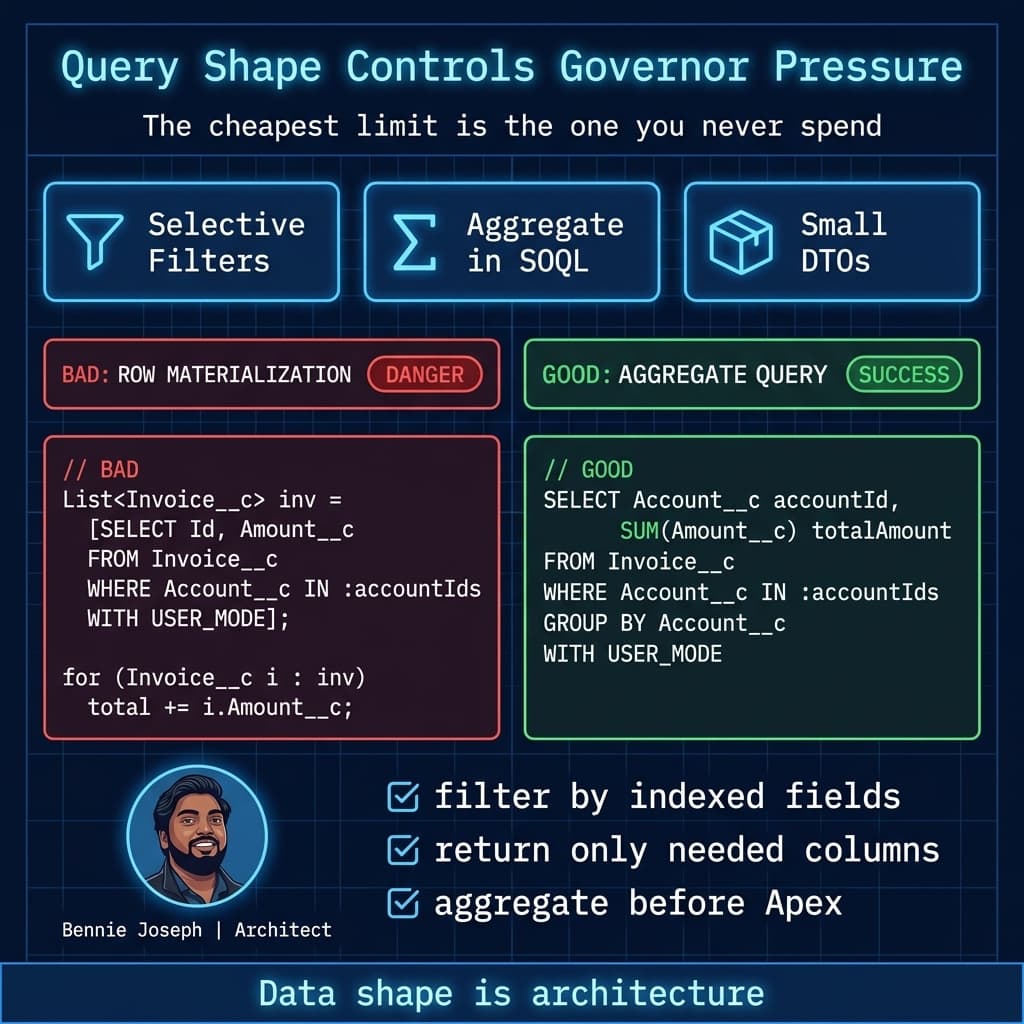
Prefer Aggregation Over Materializing Rows
If you need counts or sums, do not query thousands of rows to count them in Apex.
List<AggregateResult> totals = [
    SELECT Account__c accountId, SUM(Amount__c) totalAmount
    FROM Invoice__c
    WHERE Account__c IN :accountIds
    GROUP BY Account__c
    WITH USER_MODE
];

Map<Id, Decimal> totalsByAccount = new Map<Id, Decimal>();

for (AggregateResult result : totals) {
    totalsByAccount.put(
        (Id) result.get('accountId'),
        (Decimal) result.get('totalAmount')
    );
}
The database is better at aggregation than your Apex loop.
Use API Composition Where It Belongs
For external clients, do not force five API calls when one composed request will do. Conditional Composite API can reduce API call volume significantly when clients need dependent reads/writes. But I do not put complex business orchestration into API composition just to avoid Apex. Use it for request efficiency, not as a replacement for domain logic.
GraphQL API with CRUD support is useful for precise client-shaped reads and writes, especially when external apps or LWCs need controlled data graphs. But again: data shaping is not the same thing as transaction orchestration.
Transaction Boundaries: The Most Important Design Decision
If I could review only one thing in a Salesforce architecture, I would review transaction boundaries.
The wrong boundary creates every other problem:
- too many queries
- too many DML rows
- CPU spikes
- lock contention
- impossible retries
- mixed ownership of failures
- confused user experience
I classify work into four categories.
Must Be Synchronous
Examples:
- validation required before save
- required field derivation
- security enforcement
- duplicate prevention
- immediate status transition
- simple same-record updates
Keep this small.
Should Be Post-Commit
Examples:
- notifications
- integration messages
- search indexing requests
- non-critical tasks
- audit enrichment
- AI summarization
Platform events, queueables, or scheduled workers usually fit.
Should Be Batch
Examples:
- nightly recalculation
- renewal generation
- large ownership reassignment cleanup
- historical backfill
- data quality scoring
- archive tagging
Do not pretend these are user transactions.
Should Be External
Examples:
- large file parsing
- ML inference at scale
- heavy document processing
- cross-system orchestration
- transformations involving millions of records
- long-running callout chains
Salesforce should receive the result or state transition, not necessarily perform every computation.
Bulkification Beyond Apex
Bulkification is not only an Apex concept. It applies across the architecture.
Bulkified Integration
A bad integration sends one request per record and causes one transaction per row.
A better integration sends batches with correlation ids, idempotency keys, and clear failure handling.
For large imports, I care about:
- batch size
- ordering
- retry granularity
- duplicate prevention
- partial success handling
- API quota consumption
- downstream automation impact
Bulkified LWC
A bad LWC fires server calls for every row edit.
A better LWC stages edits in native state, validates locally where appropriate, and sends one intentional payload.
import { LightningElement, track } from 'lwc';
import saveLineItems from '@salesforce/apex/LineItemController.saveLineItems';

type DraftLineItem = {
    id?: string;
    productId: string;
    quantity: number;
    unitPrice: number;
};

export default class BulkLineItemEditor extends LightningElement {
    @track private drafts: DraftLineItem[] = [];
    private isSaving = false;

    handleDraftChange(event: CustomEvent<DraftLineItem>) {
        const changed = event.detail;

        this.drafts = [
            ...this.drafts.filter((item) => item.id !== changed.id),
            changed
        ];
    }

    async handleSave() {
        if (this.isSaving || this.drafts.length === 0) {
            return;
        }

        this.isSaving = true;

        try {
            await saveLineItems({
                draftJson: JSON.stringify(this.drafts)
            });

            this.drafts = [];
        } finally {
            this.isSaving = false;
        }
    }
}
The UI is part of governor limit architecture. If the client creates chatty save patterns, the server pays for it.
Bulkified Agent Actions
With Agentforce 2.0, I do not let agent actions perform row-by-row mutations through vague instructions. I expose intentional actions:
CreateOrderProcessingRequestSummarizeCaseTimelineFindEligibleKnowledgeArticlesSubmitRenewalReview
Each action has bounded input, bounded output, and clear side effects.
An agent should not “update all related records” without a service enforcing scope.
Observability: Design the Limit Dashboard Before the Incident
I like lightweight limit telemetry in critical services. Not everywhere. Not noisy. But on high-volume entry points, I want a structured record of pressure.
public with sharing class LimitTelemetry {
    public static Limit_Log__c snapshot(String capability, String correlationId, Integer inputSize) {
        return new Limit_Log__c(
            Capability__c = capability,
            Correlation_Id__c = correlationId,
            Input_Size__c = inputSize,
            Queries_Used__c = Limits.getQueries(),
            Query_Limit__c = Limits.getLimitQueries(),
            Dml_Used__c = Limits.getDmlStatements(),
            Dml_Limit__c = Limits.getLimitDmlStatements(),
            Cpu_Used_Ms__c = Limits.getCpuTime(),
            Cpu_Limit_Ms__c = Limits.getLimitCpuTime(),
            Heap_Used_Bytes__c = Limits.getHeapSize(),
            Heap_Limit_Bytes__c = Limits.getLimitHeapSize(),
            Queueables_Used__c = Limits.getQueueableJobs(),
            Queueables_Limit__c = Limits.getLimitQueueableJobs()
        );
    }
}
In production, I usually do not insert telemetry synchronously on every transaction. That can create its own DML pressure. I either sample, publish a platform event, or log only failure/threshold breaches.
The point is not to collect vanity metrics. The point is to answer:
- Which capability is approaching CPU limits?
- Which integration source sends oversized batches?
- Which automation path consumes unexpected queries?
- Which async worker has retry storms?
- Which parent records are hot spots?
Without this, every governor issue becomes detective work.
Testing for Limits Like an Architect
Most unit tests prove correctness at tiny volume. That is not enough.
For critical services, I write tests that prove:
- query count does not grow linearly per record
- DML statements are bounded
- duplicate requests are ignored
- retry does not duplicate child records
- partial failures are captured
- async boundary receives ids, not huge serialized objects
- large input behaves predictably
Example:
@IsTest
private class OrderProcessingRequestServiceTest {
    @IsTest
    static void createsOneRequestPerExternalOrderKey() {
        Account accountRecord = new Account(Name = 'Enterprise Customer');
        insert accountRecord;

        List<Order__c> orders = new List<Order__c>();

        for (Integer i = 0; i < 200; i++) {
            orders.add(new Order__c(
                Name = 'ERP Order ' + i,
                Account__c = accountRecord.Id,
                External_Order_Key__c = 'ERP-' + i,
                Effective_Date__c = Date.today()
            ));
        }

        insert orders;

        Test.startTest();
        Integer queriesBefore = Limits.getQueries();

        OrderProcessingRequestService.enqueueRequests(orders);

        Integer queriesAfter = Limits.getQueries();
        Test.stopTest();

        List<Order_Processing_Request__c> requests = [
            SELECT Id, External_Order_Key__c
            FROM Order_Processing_Request__c
            WITH USER_MODE
        ];

        System.assertEquals(200, requests.size(), 'Each unique ERP order should create one request.');
        System.assert(
            queriesAfter - queriesBefore <= 2,
            'Request creation should use bounded query count, not per-record SOQL.'
        );
    }
}
Tests like this protect architecture decisions. They stop future developers from accidentally turning a set-based service into row-by-row logic.
My Rules for Systems That Never Hit Limits
These are the rules I use in design reviews.
Rule 1: No Unbounded Fan-Out in Synchronous Transactions
If one record can create an unknown number of children, that work does not belong directly in the trigger.
Rule 2: Every External Message Needs an Idempotency Key
If the source system cannot provide one, create one from stable business fields. If you cannot create one, your retry design is incomplete.
Rule 3: Async Work Must Have Durable State
Do not enqueue a job and hope that is your system of record. Store processing intent first.
Rule 4: Never Hide Large Work Behind “After Save”
Record-triggered automation is powerful, but “after save” is not an architecture strategy. If the work is large, visible, or retryable, model it.
Rule 5: Design for Partial Success
Enterprise data is messy. Some records will fail. A good architecture completes the valid work, isolates failures, and gives operations a repair path.
Rule 6: Treat CPU as a Shared Enterprise Resource
Your code is not alone in the transaction. Flows, managed packages, sharing, formulas, duplicate rules, and agent actions all spend from the same envelope.
Rule 7: Prefer Small State Transitions
At scale, the best Salesforce transaction is often a small, meaningful state change that triggers controlled downstream processing.
Final Thought
Governor limits are not the enemy. They are the contract that lets Salesforce run multi-tenant enterprise workloads predictably.
When teams fight the limits, they build fragile systems.
When teams design with the limits, they build systems that scale.
The difference is architectural maturity. Bulkified Apex is necessary, but it is not enough. The real work is shaping data, bounding transactions, choosing the right execution mode, making retries safe, and observing pressure before production users become your monitoring system.
TL;DR
- Governor limit failures are usually architecture failures: unbounded transactions, bad fan-out, weak retries, and poor data shape.
- Bulkification is the baseline; durable requests, async boundaries, idempotency, and observability are what make systems scale.
- Design differently at 1K, 100K, and 10M records — Salesforce should own the right state transitions, not every computation.