Real-Time vs Near-Real-Time vs Batch: The Integration Decision Tree
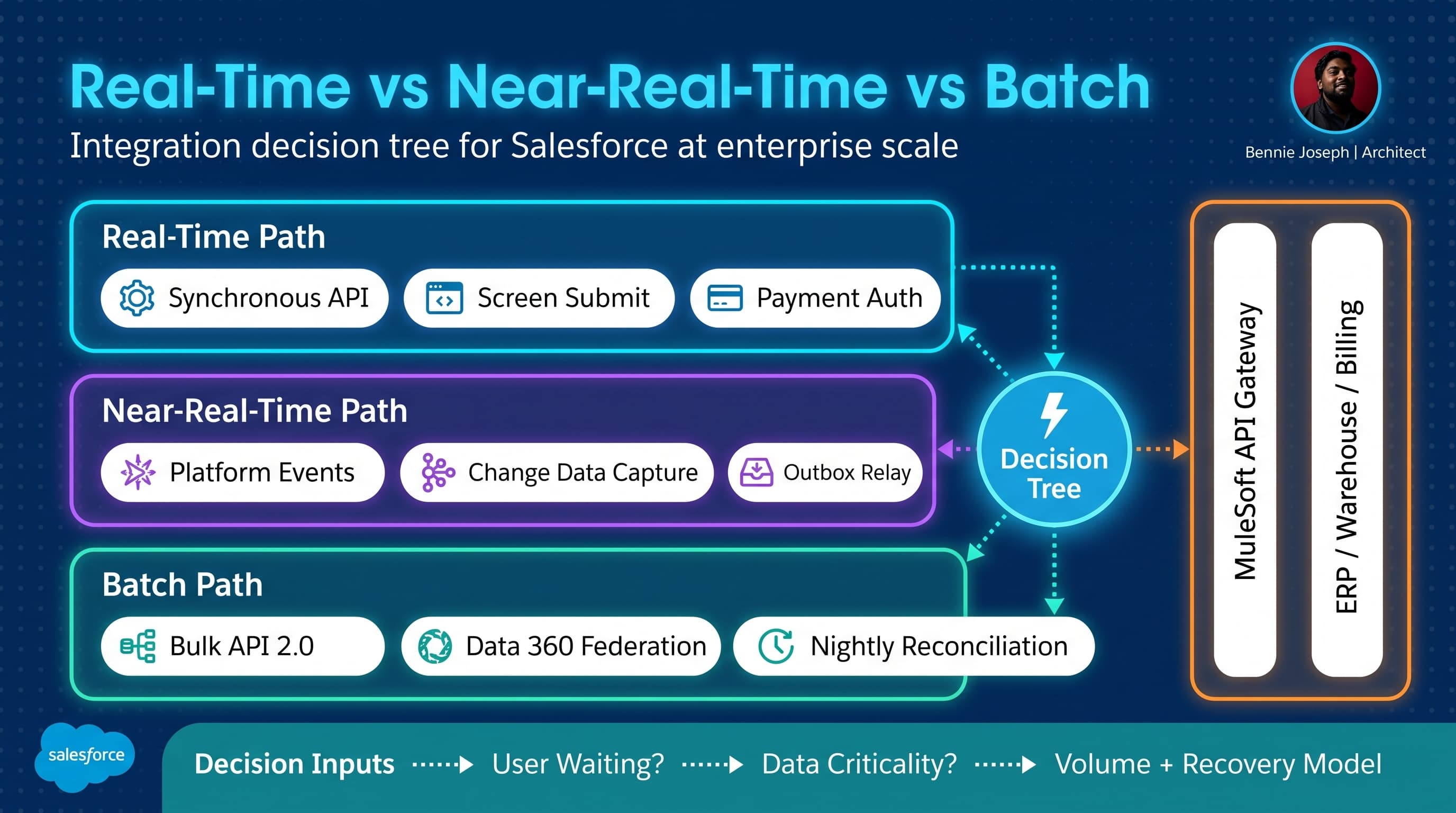
Here’s the unpopular take: most “real-time” integration requirements are not real-time requirements.
They are anxiety requirements.
Someone got burned by stale data once, so now every integration gets labeled “real-time” in a workshop. Then six months later the architecture has synchronous callouts everywhere, users are staring at spinners, retry behavior is undefined, API limits are noisy, and every downstream outage becomes a Salesforce incident.
I have seen this pattern in banking, manufacturing, healthcare, and subscription businesses. The technology changes, but the mistake is the same: teams choose the integration mechanism before they define the business tolerance for delay, failure, and reconciliation.
This is my practical decision tree for choosing between real-time, near-real-time, and batch integration patterns in Salesforce. If you came here for the keyword version, this is a Salesforce integration patterns real time near real time batch decision guide written from actual delivery scars, not a whiteboard fantasy.
The Three Timing Models I Actually Use
Before choosing a pattern, I force the team to define timing in business terms.
Not “real-time.”
Not “fast.”
Not “as soon as possible.”
Those phrases are architecture debt disguised as requirements.
Real-time means the user or transaction is blocked
Real-time integration means Salesforce cannot complete the current user action or system transaction without an immediate response from another system.
Examples:
- Payment authorization before confirming an order
- Address validation during checkout
- Eligibility check before creating a claim
- Credit hold validation before releasing a shipment
- Duplicate customer lookup before account creation
The key test is simple:
If the external system is down, should the Salesforce transaction stop?
If yes, real-time may be justified.
If no, do not make it synchronous just because someone wants the data quickly.
Near-real-time means seconds to minutes are acceptable
Near-real-time integration means Salesforce should communicate changes quickly, but the user does not need to wait for downstream completion.
Examples:
- Publishing order-created events to ERP
- Sending account changes to a master data platform
- Updating a customer portal after case status changes
- Triggering fulfillment after opportunity close
- Sending service interaction data to analytics
The key test:
Can Salesforce accept the transaction now and let downstream systems catch up with retry and monitoring?
If yes, near-real-time is usually the better enterprise pattern.
Batch means completeness beats immediacy
Batch integration means the business wants reliable movement of larger data sets on a schedule.
Examples:
- Nightly product catalog sync
- Daily invoice status reconciliation
- Monthly entitlement recalculation
- Historical migration loads
- Data warehouse extracts
- Large-scale enrichment jobs
The key test:
Is it more important to process all records consistently than to process each one immediately?
If yes, batch is not “old school.” Batch is the correct design.
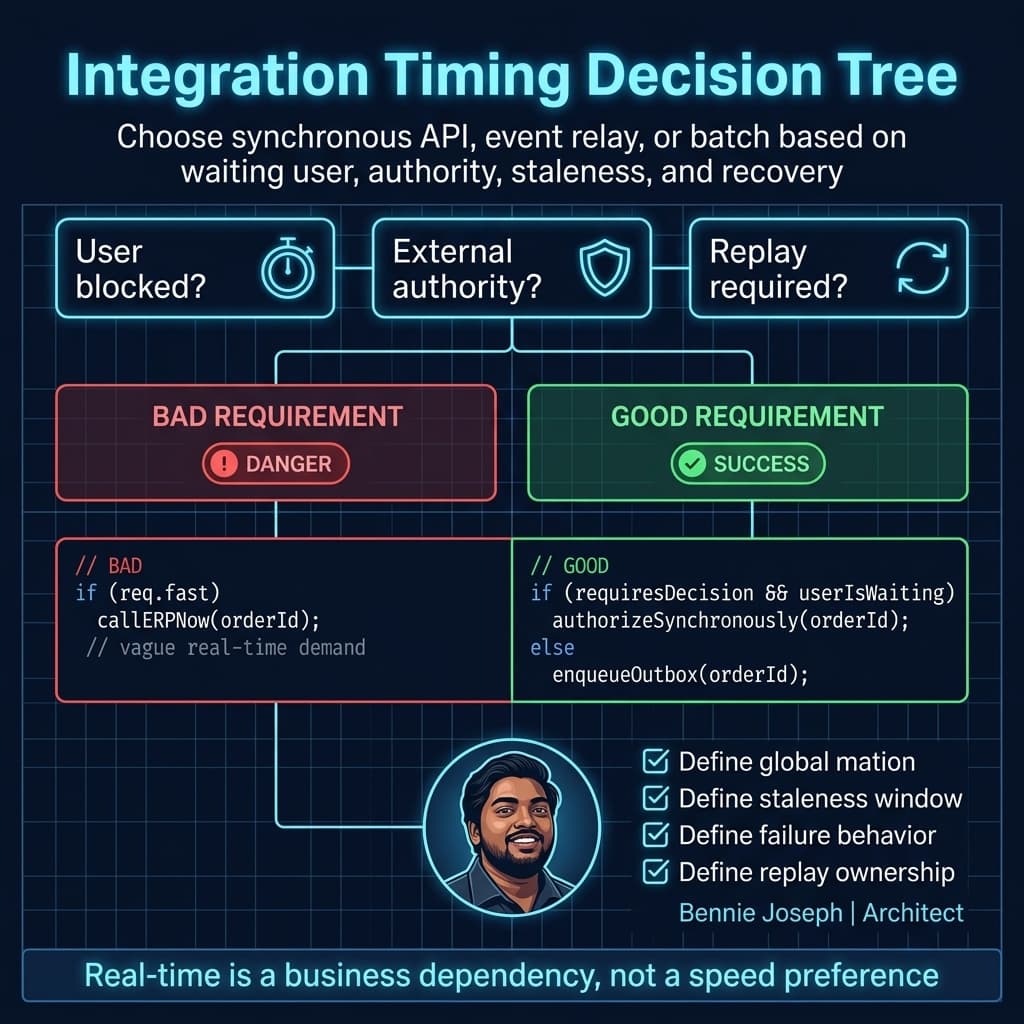
My Integration Decision Tree
When I run integration design sessions, I use this sequence.
Question 1: Is a human waiting?
If a human is staring at a Salesforce screen and cannot continue without the response, real-time is on the table.
But even then, I push back.
Can we show “pending validation” and complete the process later? Can we capture the request and notify the user asynchronously? Can we let the business proceed under a controlled risk threshold?
For example, I once worked on a B2B order management implementation where sales reps insisted credit validation had to be real-time before order submission. After digging into the policy, only high-value orders and blocked accounts needed immediate validation. Everything else could be accepted and reviewed asynchronously.
That one policy clarification removed thousands of daily synchronous ERP calls.
Question 2: Is the external system authoritative?
If Salesforce is asking another system for a decision, synchronous integration may be reasonable.
If Salesforce is simply notifying another system that something happened, use an event, CDC, or an outbox pattern.
Authoritative examples:
- Tax calculation engine
- Payment gateway
- Identity provider
- Inventory availability system
- Regulatory eligibility service
Notification examples:
- Account updated
- Case closed
- Contract activated
- Asset installed
- Opportunity won
The mistake is treating notifications like decisions.
Question 3: What is the allowed staleness window?
I ask stakeholders to pick a number:
- 0–2 seconds
- 2–30 seconds
- 1–5 minutes
- 15–60 minutes
- Overnight
- End of month
This changes everything.
A pricing call during quote generation may need sub-second behavior. A customer profile update to a downstream marketing platform may tolerate five minutes. A revenue reconciliation process may tolerate overnight, but it cannot tolerate missing records.
Question 4: What happens when the target is down?
This is where weak designs expose themselves.
If the answer is “the integration should retry,” I ask:
- Retry where?
- How many times?
- With what backoff?
- Who can see failed records?
- Can a user replay them?
- Is the operation idempotent?
- What happens if the downstream system processed the request but Salesforce timed out?
Real-time integrations fail loudly. Near-real-time and batch integrations fail operationally. You need different controls for each.
Question 5: What volume are we designing for?
A pattern that works at 1,000 records can collapse at 100,000. A pattern that survives 100,000 can become a cost and observability problem at 10 million.
Volume changes the architecture more than most teams admit.
Decision Matrix: Real-Time vs Near-Real-Time vs Batch
| Dimension | Real-Time | Near-Real-Time | Batch |
|---|---|---|---|
| Typical Salesforce pattern | Synchronous REST/SOAP callout, External Services, GraphQL API call, MuleSoft API gateway | Platform Events, Change Data Capture, outbox relay, event bus, queue worker | Bulk API 2.0, scheduled Apex, ETL/ELT, MuleSoft batch, Data 360 federation |
| User experience | User waits for response | User continues; status updates later | No immediate user expectation |
| Latency target | Milliseconds to seconds | Seconds to minutes | Minutes to hours |
| Best for | Decisions required before commit | Notifications and workflow propagation | Large data movement and reconciliation |
| Failure behavior | Immediate error or degraded path | Retry, dead-letter, replay, operational queue | Restart, checkpoint, partial retry, reconciliation |
| Coupling | High | Medium | Low to medium |
| Complexity hidden cost | Timeout handling, partial commits, downstream dependency | Idempotency, ordering, replay, monitoring | Window management, locking, data drift |
| Scale ceiling | Limited by callout latency, concurrency, API limits, downstream capacity | Strong if partitioned and replayable | Strongest for volume, weakest for freshness |
| What I watch closely | Transaction boundaries and user trust | Duplicate processing and replay gaps | Record locking, batch duration, and reconciliation accuracy |
| My default bias | Use only when business process must block | Use for most enterprise operational integrations | Use for high-volume, completeness-first movement |
The matrix looks obvious until you are in a room with five system owners, a program manager, and an executive sponsor who wants everything “real-time.” That is when the decision tree matters.
Pattern 1: Real-Time Integration
Real-time integration is the sharpest tool. It is also the easiest one to cut yourself with.
In Salesforce, real-time usually means a synchronous callout from Apex, LWC through an Apex controller, an integration user calling Salesforce API v64.0, or Salesforce calling through MuleSoft/API gateway to another system.
Real-time is appropriate when:
- The user must receive a decision immediately
- The downstream system is the source of truth for that decision
- The operation can complete within acceptable timeout limits
- The failure mode is clear and acceptable
- The downstream service has capacity for peak Salesforce traffic
I do not use real-time just because data is important. Important data can move asynchronously. Real-time is about blocking dependency.
Real-time anti-patterns I see too often
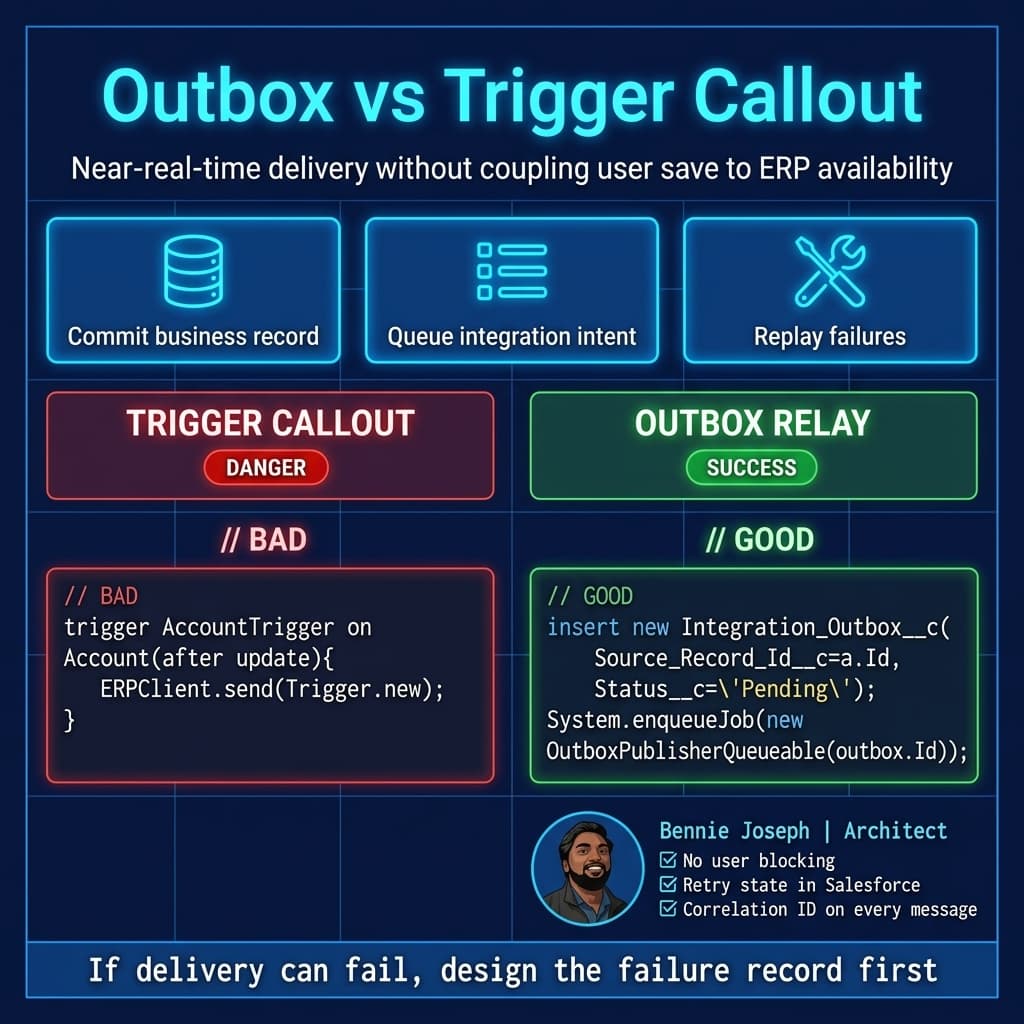
The worst one: making an ERP call from an account trigger because “ERP needs to know immediately.”
No user needs that trigger to wait for ERP. The account save should complete. The ERP update should be queued, published, retried, and monitored.
Another bad one: calling a pricing service once per line item from Apex.
At small volume, it passes testing. At enterprise volume, it becomes a timeout machine. If pricing must be synchronous, call the pricing service once with the full cart or quote payload. Make the external API bulk-aware.
Real-time checklist
Before I approve synchronous integration, I want answers to these:
- What is the timeout?
- What is the fallback?
- Is the request idempotent?
- Is there a correlation ID?
- Can the external service handle peak load?
- Are we logging request and response metadata without exposing sensitive data?
- What happens if Salesforce commits but the external system times out, or vice versa?
Real-time is not just an integration pattern. It is an operational contract.
Pattern 2: Near-Real-Time Integration
Near-real-time is my default for enterprise Salesforce integration.
It gives the business fast propagation without making every downstream system part of the user transaction.
In Salesforce, near-real-time patterns include:
- Platform Events
- Change Data Capture
- Outbox custom object plus relay
- Queueable Apex workers
- MuleSoft event consumers
- External consumers using Streaming API
- Agentforce 2.0 actions triggered from trusted event state, not from unstable in-transaction assumptions
Platform Events and CDC are powerful, but I still like the outbox pattern when I need explicit replay, business-level status, and operational ownership inside Salesforce.
Why I like the outbox pattern
The outbox pattern separates business commit from integration delivery.
Salesforce saves the business record. In the same transaction, Salesforce writes an outbox record describing what needs to be sent. A worker publishes an event or calls a downstream API later. If delivery fails, the outbox record tracks status, retry count, and error detail.
This is not theoretical. On a manufacturing program, we used an outbox object for order release from Salesforce to SAP. Sales reps could submit orders even when SAP had a maintenance window. The integration team had a retry console. Operations had visibility into stuck orders. We avoided the classic “Salesforce is broken because SAP is down” argument.
Here is a simplified Apex version of the pattern using Salesforce API v64.0-style explicit user-mode data access.
public with sharing class OrderReleaseService {
    public class ReleaseRequest {
        @AuraEnabled public Id orderId;
        @AuraEnabled public String requestedByChannel;
    }

    @AuraEnabled
    public static Id requestRelease(ReleaseRequest request) {
        if (request == null || request.orderId == null) {
            throw new AuraHandledException('Order Id is required.');
        }

        Order__c orderRecord = [
            SELECT Id, Name, Status__c, Account__c, Total_Amount__c
            FROM Order__c
            WHERE Id = :request.orderId
            WITH USER_MODE
            LIMIT 1
        ];

        if (orderRecord.Status__c != 'Approved') {
            throw new AuraHandledException('Only approved orders can be released.');
        }

        Integration_Outbox__c outbox = new Integration_Outbox__c(
            Source_Record_Id__c = orderRecord.Id,
            Source_Object__c = 'Order__c',
            Event_Type__c = 'OrderReleaseRequested',
            Status__c = 'Pending',
            Retry_Count__c = 0,
            Correlation_Id__c = CryptoUtil.newCorrelationId(),
            Payload__c = JSON.serialize(new Map<String, Object>{
                'orderId' => orderRecord.Id,
                'orderNumber' => orderRecord.Name,
                'accountId' => orderRecord.Account__c,
                'totalAmount' => orderRecord.Total_Amount__c,
                'requestedByChannel' => request.requestedByChannel
            })
        );

        Database.SaveResult result = Database.insert(outbox, AccessLevel.USER_MODE);

        if (!result.isSuccess()) {
            throw new AuraHandledException(result.getErrors()[0].getMessage());
        }

        System.enqueueJob(new OutboxPublisherQueueable(result.getId()));

        return result.getId();
    }
}

public with sharing class OutboxPublisherQueueable implements Queueable, Database.AllowsCallouts {
    private final Id outboxId;

    public OutboxPublisherQueueable(Id outboxId) {
        this.outboxId = outboxId;
    }

    public void execute(QueueableContext context) {
        Integration_Outbox__c outbox = [
            SELECT Id, Event_Type__c, Payload__c, Correlation_Id__c, Retry_Count__c, Status__c
            FROM Integration_Outbox__c
            WHERE Id = :outboxId
            WITH USER_MODE
            LIMIT 1
        ];

        if (outbox.Status__c == 'Published') {
            return;
        }

        Order_Release_Requested__e eventRecord = new Order_Release_Requested__e(
            Correlation_Id__c = outbox.Correlation_Id__c,
            Payload__c = outbox.Payload__c,
            Event_Type__c = outbox.Event_Type__c
        );

        Database.SaveResult publishResult = EventBus.publish(eventRecord);

        if (publishResult.isSuccess()) {
            outbox.Status__c = 'Published';
            outbox.Published_At__c = System.now();
            Database.update(outbox, AccessLevel.USER_MODE);
            return;
        }

        outbox.Status__c = 'Failed';
        outbox.Retry_Count__c = outbox.Retry_Count__c + 1;
        outbox.Last_Error__c = publishResult.getErrors()[0].getMessage();
        Database.update(outbox, AccessLevel.USER_MODE);
    }
}

public class CryptoUtil {
    public static String newCorrelationId() {
        Blob randomBytes = Crypto.generateAesKey(128);
        return EncodingUtil.convertToHex(randomBytes) + '-' + String.valueOf(DateTime.now().getTime());
    }
}
This example is intentionally simple. In production, I usually add:
- A unique external idempotency key
- Exponential retry scheduling
- Dead-letter status
- Platform Event publish callbacks where appropriate
- A replay UI for integration operators
- Field-level payload filtering
- Shield/Event Monitoring alignment for sensitive industries
- MuleSoft or worker-side duplicate detection
The point is not that every integration needs a custom outbox object. The point is that near-real-time requires state. If your architecture cannot explain where retry state lives, you do not have an integration architecture. You have hope.
Pattern 3: Batch Integration
Batch is not a failure of imagination. Batch is often the cleanest design.
I use batch when:
- Volume is high
- Completeness matters more than freshness
- The downstream system wants files or bulk payloads
- Reconciliation is required
- Processing can be checkpointed
- There is a defined business window
Salesforce gives you several options here: Bulk API 2.0, scheduled Apex, batch Apex, external ETL, MuleSoft batch jobs, Data 360 federation, and warehouse-native processing. With GraphQL API GA supporting full CRUD in Summer ’26, I also see more teams using named integration shapes for targeted data operations, but I still would not use GraphQL as a replacement for bulk movement.
Use the right tool.
If you need to move 8 million invoice status records, do not loop callouts from Apex. Use bulk-oriented integration. If you need to reconcile Salesforce assets against a subscription platform every night, design for checkpointing and exception reporting.
Batch anti-patterns
The classic batch anti-pattern is “near-real-time batch.”
That is when a team schedules a job every five minutes because they avoided event architecture but still want event-like latency. Now they have all the complexity of batch and none of the clarity of asynchronous messaging.
A five-minute poller can be valid. But only if you explicitly accept:
- Repeated scans
- Race conditions around modified timestamps
- Duplicate detection
- Overlap prevention
- Backlog behavior
- API consumption
Another anti-pattern is using batch as a dumping ground for bad data ownership. If nobody knows whether Salesforce or the external system owns a field, a nightly sync will not save you. It will just overwrite mistakes on a schedule.
Scale: What Changes at 1K, 100K, and 10M
Most integration designs are reviewed at happy-path volume. That is not enough.
I ask teams to describe the design at three levels.
At 1K records
At 1,000 records per day, almost anything works.
Synchronous calls may not hurt. A simple scheduled job may pass. A single Platform Event subscriber may be enough. Manual replay may be acceptable.
This is where teams make dangerous assumptions because the system feels simple.
At this scale, I still insist on:
- Correlation IDs
- Idempotency strategy
- Basic monitoring
- Clear source of truth
- Named integration user
- Least-privilege access
- Field-level data minimization
Small volume does not excuse sloppy contracts.
At 100K records
At 100,000 records per day, weak designs start showing cracks.
Real-time integrations can create concurrency pressure. If each Salesforce save waits on an external API, downstream latency becomes Salesforce latency. User experience becomes unpredictable.
Near-real-time designs need partitioning decisions. Can subscribers process events fast enough? What is the replay window? Are messages ordered per entity, per account, or not ordered at all? Can downstream consumers handle duplicates?
Batch designs need checkpoints. A single failed record should not poison the whole run. You need exception tables, restart points, and reconciliation reports.
At this scale, I care about:
- API limit consumption
- Event throughput
- Queue depth
- Retry storms
- Lock contention
- Dead-letter volume
- Operational dashboards
- Alert thresholds that do not page people for noise
This is also where Conditional Composite API can help reduce API call volume for conditional write patterns. I have seen 40–60% reductions in call count when teams stop doing read-then-write loops from middleware and use conditional composition carefully.
At 10M records
At 10 million records, integration becomes data engineering and operations engineering.
Real-time should be rare and tightly bounded. If someone proposes synchronous processing for millions of daily changes, I want to see capacity tests, downstream SLAs, circuit breakers, and a clear business reason.
Near-real-time requires serious architecture:
- Partitioned consumers
- Backpressure handling
- Dead-letter queues
- Replay tooling
- Idempotency stores
- Payload versioning
- Schema evolution policy
- Observability across Salesforce, middleware, and target systems
Batch at 10 million records needs bulk-native design:
- Bulk API 2.0
- External staging
- Incremental extraction
- Hash-based change detection
- Warehouse-side joins
- Data 360 Zero Copy federation where appropriate
- Reconciliation by counts, sums, and business keys
- Archive and retention strategy
At this scale, the question is not “can Salesforce send the data?” It usually can. The better question is:
Can the enterprise operate the integration when it is delayed, duplicated, partially failed, or replayed?
That is the architecture test.
A Real Project Example: Order Release to ERP
One enterprise project that shaped my thinking was a global manufacturing rollout.
Salesforce handled sales agreements, opportunities, quoting, order capture, approvals, and account data. SAP handled fulfillment, inventory allocation, invoicing, and financial controls. There was also a customer portal, a warehouse platform, and an analytics estate.
The first requirement draft said:
“All order data must sync to SAP in real time.”
That sounded simple. It was wrong.
When we decomposed the process, we found three separate timing needs.
Credit and block validation was real-time for specific orders
If an order exceeded a threshold, belonged to a blocked account, or had export-control risk, the user needed an immediate decision. Salesforce called an API through MuleSoft. If SAP or the risk service did not respond, the user got a controlled “manual review required” path.
That was real-time because the business decision had to block the release.
Order release notification was near-real-time
Once an approved order was released, Salesforce did not need to wait for SAP to create the sales order number during the same transaction. We used an outbox record and event-based relay. SAP processed the message and returned status asynchronously.
Users saw “Release Pending,” then “Released to ERP,” then the SAP order number when available.
This removed a huge amount of coupling.
Invoice and fulfillment updates were batch plus event hybrid
Some fulfillment statuses came back near-real-time because customer service needed visibility quickly. Invoice reconciliation, tax details, and financial status ran in scheduled bulk processes because accuracy mattered more than second-level freshness.
The final design was not one integration pattern. It was a portfolio of patterns.
That is the real lesson: enterprise integration architecture is not choosing one answer. It is assigning the right timing model to each business moment.
Security and Governance Are Part of the Decision
Timing is not only a performance decision. It affects security and governance.
Real-time integrations often require broad runtime access because the transaction must complete immediately. If you are not careful, the integration user becomes a privileged backdoor.
Near-real-time integrations force you to decide what goes into the payload. Do not publish every field because it is convenient. Publish the minimum event contract. For sensitive data, publish identifiers and let authorized consumers retrieve details through governed APIs.
Batch integrations create data exposure risk because large extracts move across boundaries. This is where retention, encryption, masking, and auditability matter.
In Salesforce API v64.0 projects, I prefer explicit access modes in Apex and clear integration permission sets. Looking ahead to the v67.0 behavior where SOQL, DML, and Database methods default more strongly toward user mode and classes without explicit sharing declarations default to with sharing, the direction is clear: implicit elevated access is being squeezed out. I like that. Enterprise systems need fewer magic privileges.
My baseline governance rules:
- Every integration gets a named owner
- Every payload gets a documented schema
- Every write operation gets an idempotency key
- Every external call gets a correlation ID
- Every async process gets replay or reconciliation
- Every integration user has least privilege
- Every failure mode has an operational runbook
If that sounds heavy, wait until an executive asks why 40,000 orders duplicated downstream.
The Practical Decision Tree
Here is the condensed version I use in design reviews.
Choose real-time when all are true
- A user or upstream transaction is blocked
- The external system is authoritative for the decision
- The response is needed now
- The external dependency has an SLA that matches the user experience
- There is a defined fallback path
- The operation is idempotent or safely recoverable
If any of those are false, challenge real-time.
Choose near-real-time when most are true
- Salesforce can commit before downstream completion
- The business wants updates in seconds or minutes
- Failures need retry and visibility
- The process is event-like
- The consumer can handle duplicates
- Ordering requirements are understood
This is where Platform Events, CDC, and outbox patterns earn their keep.
Choose batch when most are true
- The data set is large
- The business accepts a schedule
- Completeness matters more than immediacy
- Reconciliation is required
- The target prefers bulk operations
- Processing needs checkpoints
Batch is the right answer more often than teams admit.
Where AI Agents Fit
Agentforce 2.0 changes how many teams think about action orchestration, especially with multi-agent coordination and Atlas Reasoning Engine v2. But agents do not remove integration fundamentals.
If an agent checks order status, the same timing question applies. Is it reading current state from Salesforce? Is it calling ERP live? Is it working from a near-real-time replicated status? Is stale data acceptable in the conversation?
For agent-facing enterprise processes, I prefer grounding agents on stable, governed state rather than letting them trigger fragile synchronous chains. If an Agentforce action needs to start fulfillment, I want it to write an intent, publish an event, and track status. Agents should not become a new place to hide integration coupling.
The same applies if you are building custom AI agents with gpt-5.5, claude-sonnet-4-7, or Gemini models. The model can reason about the next action, but your architecture still owns transactionality, retry, authorization, and audit.
AI changes the interface. It does not repeal distributed systems.
My Final Rule
When someone says “real-time,” I ask:
Real-time for whom, and what breaks if it is not?
That question usually reveals the architecture.
If the user cannot proceed, consider real-time.
If another system needs to know soon, choose near-real-time.
If the enterprise needs all records correct, choose batch.
The mature architecture is rarely the fastest possible integration. It is the integration whose timing, failure behavior, and operating model match the business process.
TL;DR
- Real-time is for blocking decisions, near-real-time is for fast propagation, and batch is for high-volume completeness.
- Decide based on user waiting, source of authority, staleness tolerance, failure recovery, and scale.
- At enterprise scale, the winning pattern is usually a portfolio: synchronous where necessary, event-driven where possible, batch where appropriate.