Technical Debt Remediation: How to Refactor a 500-Object Org
I’ve seen 500-object Salesforce orgs that were not designed so much as sedimented. Every acquisition, every urgent executive dashboard, every “temporary” integration, every abandoned managed package, and every admin workaround left another layer behind.
The hard part of salesforce technical debt remediation refactor large org architecture is not finding ugly metadata. That part is easy. The hard part is deciding what can safely change while the business is still selling, billing, servicing, reporting, auditing, and integrating every day.
Here’s the unpopular take: a 500-object org is not refactored by “cleaning up objects.” It is refactored by rebuilding decision rights around the platform. Metadata cleanup without governance is gardening during a flood.
In one enterprise program I worked on, the org had roughly 540 custom objects, 8,000+ custom fields, 270 active flows, 90 Apex triggers, multiple integration styles, and years of reporting dependencies nobody fully trusted. The business wanted faster releases. Engineering wanted fewer regressions. Security wanted consistent access controls. Operations wanted no downtime.
The answer was not a rebuild. The answer was a controlled remediation architecture.
What Technical Debt Looks Like in a 500-Object Org
Large Salesforce org debt rarely comes from one bad decision. It comes from thousands of locally reasonable decisions that were never reconciled globally.
The patterns I usually find:
- Multiple objects representing the same business concept
- Fields with identical meanings and different names
- Record types used as pseudo-object models
- Flows, triggers, Process Builder leftovers, and scheduled jobs all modifying the same records
- Integrations writing directly into internal objects instead of stable API contracts
- Reports depending on fields marked “deprecated” three years ago
- Permission sets granting broad access because nobody knows which fields are still used
- Validation rules encoding old operating models
- Lookup relationships created for UI convenience that now block deletes and archiving
- Managed package objects abandoned after vendor replacement
- Data volumes that make “just run a report” impossible
The mistake is treating all of this as one backlog. It is not one backlog. It is five overlapping remediation streams:
- Metadata debt — objects, fields, layouts, record types, validation rules
- Automation debt — flows, triggers, jobs, orchestration logic
- Data debt — duplicates, stale records, ownership gaps, archival gaps
- Security debt — profiles, permission sets, sharing exceptions, field access drift
- Integration debt — point-to-point dependencies, brittle payloads, undocumented consumers
A 500-object org requires architecture because every change has blast radius.
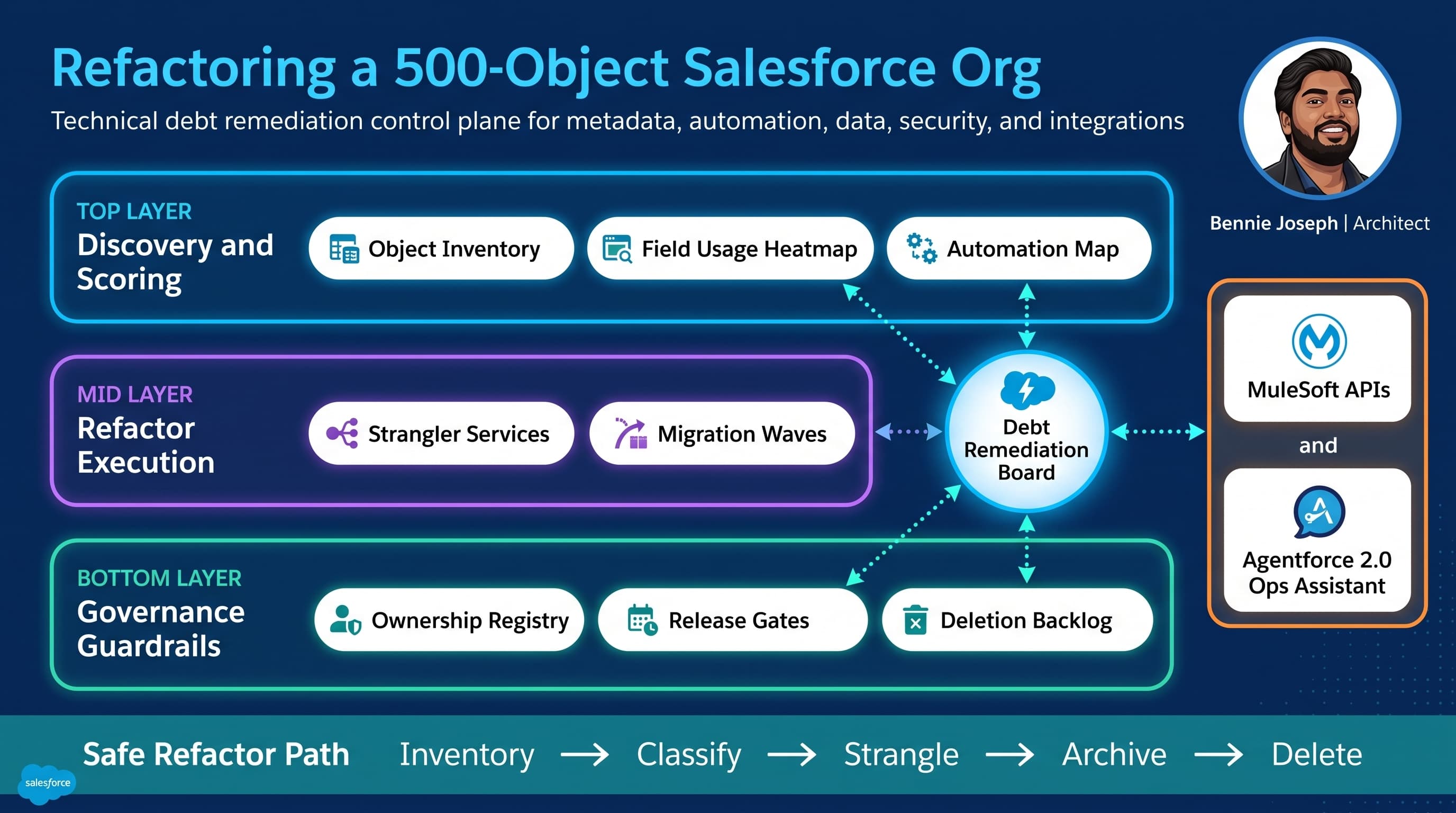
Start With a Debt Control Plane, Not a Cleanup Spreadsheet
Spreadsheets are useful for early inventory. They are not a remediation operating model.
For large-org refactoring, I build a control plane with four basic capabilities:
- Inventory — what exists?
- Ownership — who is accountable?
- Usage — what is actually used?
- Decision state — keep, merge, strangle, archive, delete
This can start as custom objects inside Salesforce, a governed repository, or a metadata catalog. I usually prefer keeping the decision registry in Salesforce because business owners, admins, architects, and release teams already live there.
A simple model works:
Architecture_Domain__cMetadata_Asset__cTechnical_Debt_Finding__cRemediation_Decision__cIntegration_Dependency__cData_Retention_Policy__c
Do not over-engineer it. The goal is not to model every metadata relationship perfectly. The goal is to make remediation decisions visible, owned, reviewable, and release-managed.
For one manufacturing client, we created an “Object Disposition Board.” Every custom object had one of these statuses:
- Strategic
- Tolerated
- Contained
- Migrating
- Read-only
- Archived
- Delete candidate
- Deleted
That language mattered. “Deprecated” was too vague. “Contained” meant no new references. “Migrating” meant active movement to a target model. “Read-only” meant integrations and UI creation were blocked. “Delete candidate” meant no runtime dependency had been observed for an agreed window.
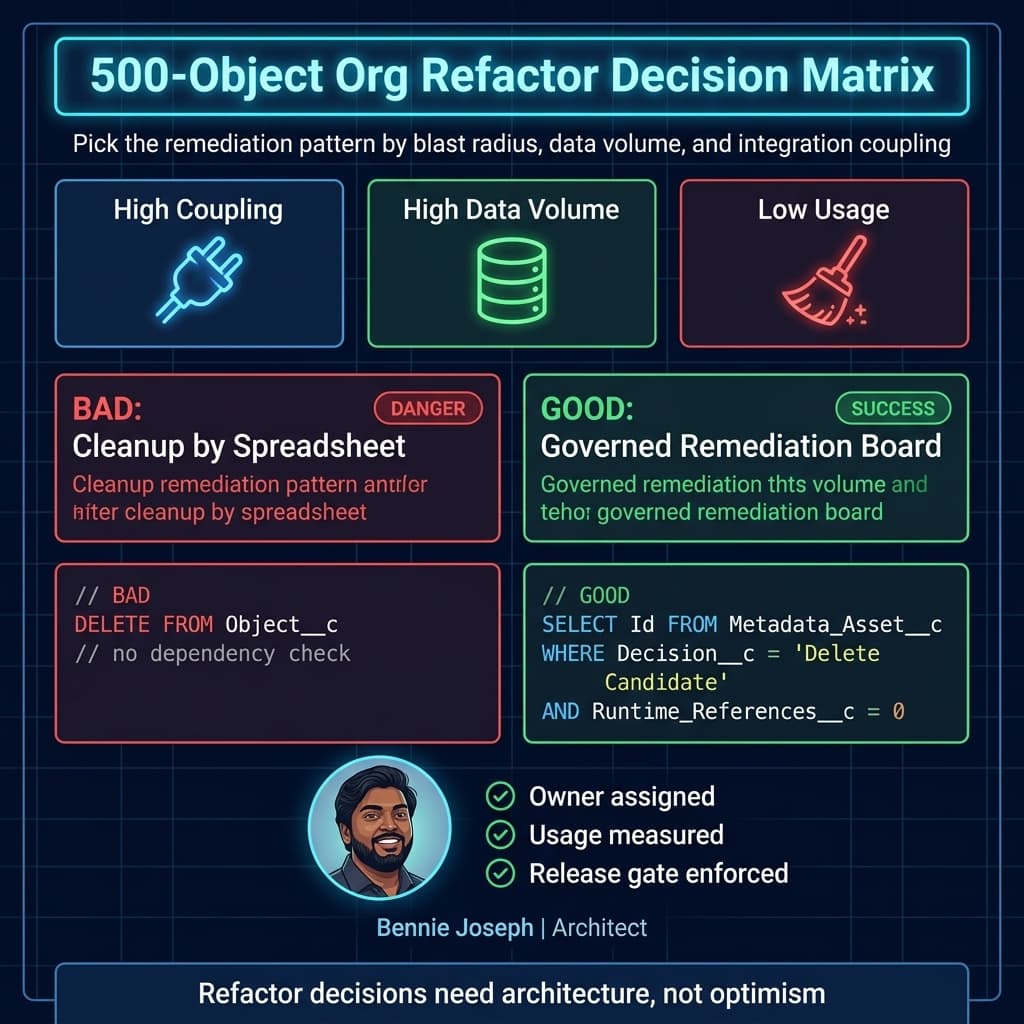
The Decision Matrix I Use
Architecture remediation needs explicit tradeoffs. Otherwise, the loudest stakeholder wins.
| Approach | When I Use It | Benefits | Risks | Best Fit |
|---|---|---|---|---|
| Big-bang rebuild | Almost never; only when the business model is changing completely | Clean model, no legacy compromises | High migration risk, long freeze, integration disruption | Carve-outs, divestitures, greenfield replacement |
| Object-by-object cleanup | When debt is isolated and ownership is clear | Easy to explain, incremental | Misses cross-object dependencies | Small domains with low integration volume |
| Strangler pattern | When legacy objects are heavily used but must be replaced | Low-risk migration, preserves uptime | Requires disciplined routing and dual-read strategy | Core objects, integrations, high-volume processes |
| Data archive first | When performance and storage are blocking change | Reduces query cost, simplifies testing | Can hide metadata problems if done alone | High-volume transactional objects |
| Governance first | When new debt is created faster than old debt is removed | Stops the bleeding | Stakeholders may perceive slow progress | Any org above 200 custom objects |
| API contract layer | When external systems write directly to internal objects | Decouples integrations from object model | Requires versioning and platform discipline | Enterprise integration-heavy orgs |
| Domain consolidation | When many objects represent one business concept | Simplifies reporting and automation | Requires hard semantic decisions | Acquired orgs, regional variations |
My default for a 500-object org is a combination: governance first, strangler pattern for core domains, archive first for high-volume objects, API contracts for integrations, and object-by-object cleanup only for the edges.
Phase 1: Build the Inventory From Metadata and Runtime Signals
Do not rely only on Setup screens. Do not rely only on interviews. Do not rely only on static metadata.
You need at least three evidence sources:
Metadata Evidence
This tells you what exists.
- Objects
- Fields
- Record types
- Validation rules
- Flows
- Apex classes
- Apex triggers
- Permission sets
- Profiles
- Sharing rules
- Layouts
- Lightning pages
- Named Credentials
- External Services
- Custom Metadata
- Custom Settings
Salesforce API v64.0 is enough to automate a meaningful inventory. I use the CLI, Metadata API, Tooling API, and SOQL against metadata objects. With Salesforce Headless 360, this kind of work is increasingly no-browser: API, CLI, and MCP-driven inspection become part of the architecture workflow.
Runtime Evidence
This tells you what is actually being used.
- Login history
- Report usage
- Field history where enabled
- Event Monitoring
- Integration user activity
- API call patterns
- Apex exception logs
- Flow interviews and faults
- Record creation and modification dates
- Async job history
Runtime evidence prevents emotional debates. A field that “everybody needs” but has not been populated in 18 months moves into a different conversation.
Business Evidence
This tells you what must survive.
- Regulatory retention
- Revenue processes
- Contractual reporting
- Partner obligations
- Customer support workflows
- Audit needs
- Regional operating differences
This is where architects earn their keep. Metadata can tell you that Legacy_Program__c has no recent records. It cannot tell you whether legal needs the records retained for seven years.
A Practical Inventory Script
I like to generate a debt baseline regularly, not once. Here’s a TypeScript script pattern I’ve used as a starting point. It connects to Salesforce, uses API v64.0, pulls object and field metadata, and produces a crude object score.
This is not the whole remediation engine. It is the first flashlight in a dark basement.
import { AuthInfo, Connection } from "@salesforce/core";
import fs from "node:fs/promises";

type EntityDefinition = {
  DurableId: string;
  QualifiedApiName: string;
  Label: string;
  IsCustomSetting: boolean;
  IsDeprecatedAndHidden: boolean;
};

type FieldDefinition = {
  EntityDefinition: {
    QualifiedApiName: string;
  };
  QualifiedApiName: string;
  DataType: string;
  IsNillable: boolean;
  IsCalculated: boolean;
};

type ObjectDebtScore = {
  objectApiName: string;
  label: string;
  customFieldCount: number;
  formulaFieldCount: number;
  requiredFieldCount: number;
  debtScore: number;
  initialDisposition: "Review" | "Likely Strategic" | "Likely Cleanup Candidate";
};

async function queryAll<T>(conn: Connection, soql: string): Promise<T[]> {
  const results: T[] = [];
  let response = await conn.query<T>(soql);

  results.push(...response.records);

  while (!response.done && response.nextRecordsUrl) {
    response = await conn.queryMore<T>(response.nextRecordsUrl);
    results.push(...response.records);
  }

  return results;
}

function scoreObject(
  entity: EntityDefinition,
  fields: FieldDefinition[]
): ObjectDebtScore {
  const customFields = fields.filter((field) =>
    field.QualifiedApiName.endsWith("__c")
  );

  const formulaFields = customFields.filter((field) => field.IsCalculated);
  const requiredFields = customFields.filter((field) => !field.IsNillable);

  let debtScore = 0;

  debtScore += Math.min(customFields.length, 100);
  debtScore += formulaFields.length * 3;
  debtScore += requiredFields.length * 2;

  if (entity.QualifiedApiName.includes("Legacy")) {
    debtScore += 25;
  }

  const initialDisposition =
    debtScore >= 120
      ? "Review"
      : debtScore <= 10
        ? "Likely Cleanup Candidate"
        : "Likely Strategic";

  return {
    objectApiName: entity.QualifiedApiName,
    label: entity.Label,
    customFieldCount: customFields.length,
    formulaFieldCount: formulaFields.length,
    requiredFieldCount: requiredFields.length,
    debtScore,
    initialDisposition
  };
}

async function main() {
  const username = process.env.SF_USERNAME;

  if (!username) {
    throw new Error("Set SF_USERNAME to an authenticated Salesforce username.");
  }

  const authInfo = await AuthInfo.create({ username });
  const conn = await Connection.create({ authInfo });

  conn.setApiVersion("64.0");

  const entities = await queryAll<EntityDefinition>(
    conn,
    `
      SELECT DurableId, QualifiedApiName, Label, IsCustomSetting, IsDeprecatedAndHidden
      FROM EntityDefinition
      WHERE IsCustomSetting = false
      AND IsDeprecatedAndHidden = false
      ORDER BY QualifiedApiName
    `
  );

  const customEntities = entities.filter((entity) =>
    entity.QualifiedApiName.endsWith("__c")
  );

  const scores: ObjectDebtScore[] = [];

  for (const entity of customEntities) {
    const fields = await queryAll<FieldDefinition>(
      conn,
      `
        SELECT EntityDefinition.QualifiedApiName,
               QualifiedApiName,
               DataType,
               IsNillable,
               IsCalculated
        FROM FieldDefinition
        WHERE EntityDefinition.QualifiedApiName = '${entity.QualifiedApiName}'
      `
    );

    scores.push(scoreObject(entity, fields));
  }

  scores.sort((a, b) => b.debtScore - a.debtScore);

  await fs.writeFile(
    "object-debt-baseline.json",
    JSON.stringify(
      {
        generatedAt: new Date().toISOString(),
        apiVersion: "64.0",
        objectCount: scores.length,
        scores
      },
      null,
      2
    )
  );

  console.log(`Generated debt baseline for ${scores.length} custom objects.`);
}

main().catch((error) => {
  console.error(error);
  process.exit(1);
});
I usually extend this with:
- Object record counts
- Last modified record date
- Last report reference
- Integration user references
- Flow and Apex references
- Permission set exposure
- Shield/Event Monitoring signals where licensed
- Data classification and compliance tags
- Data 360 federation or retention dependencies where applicable
Do not pretend the score is truth. The score is a triage tool. It helps architects decide where to inspect first.
Phase 2: Classify the Object Portfolio
Once inventory exists, I classify objects by business capability.
This is where many teams fail. They classify by app, package, namespace, or owner. Those are useful metadata dimensions, but they do not expose domain duplication.
For a 500-object org, I want to know:
- Which objects represent customers?
- Which represent products?
- Which represent contracts?
- Which represent entitlements?
- Which represent assets?
- Which represent service interactions?
- Which represent financial obligations?
- Which represent partner relationships?
- Which are pure junctions?
- Which are technical logs?
- Which are integration staging tables?
- Which are obsolete UI support objects?
On one program, we found six custom objects representing versions of “customer program enrollment.” They came from different regions and acquisitions. Each had slightly different status values, ownership logic, and reporting fields.
The wrong move would have been picking one and migrating everything immediately.
The right move was:
- Define the canonical business concept.
- Create a target domain model.
- Build a compatibility API.
- Freeze new direct dependencies on the old objects.
- Migrate one region at a time.
- Archive historical records separately from active operating records.
- Delete only after runtime observation proved references were gone.
That took longer than a cleanup sprint. It also avoided breaking revenue operations.
Phase 3: Stop New Debt Before Removing Old Debt
If new teams can still create objects and fields freely, remediation becomes theater.
I enforce these governance rules early:
Every Object Needs a Named Owner
Not a team alias. A real accountable owner.
For each object:
- Business owner
- Technical owner
- Data steward
- Integration owner if externally touched
- Retention owner if regulated
Objects without owners move toward containment.
Every New Object Needs an Architecture Decision
I am not against custom objects. I am against invisible custom objects.
A new object request should answer:
- What business capability does this support?
- Why can’t an existing object support it?
- What is the data lifecycle?
- What is the security model?
- What automation owns writes?
- Which integrations will consume or publish it?
- What is the reporting strategy?
- What is the deletion/archive strategy?
If that feels heavy, good. Creating durable data structures in an enterprise platform should not be casual.
Every Deprecated Asset Needs a Removal Plan
“Do not use” is not a plan.
A deprecated field or object needs:
- Replacement asset
- Migration approach
- Consumer notification
- Read-only date
- Archive date
- Deletion eligibility date
- Validation method
Without a deletion path, “deprecated” means “forever.”
Phase 4: Use the Strangler Pattern for Core Objects
Core domains are hard to refactor because everything touches them.
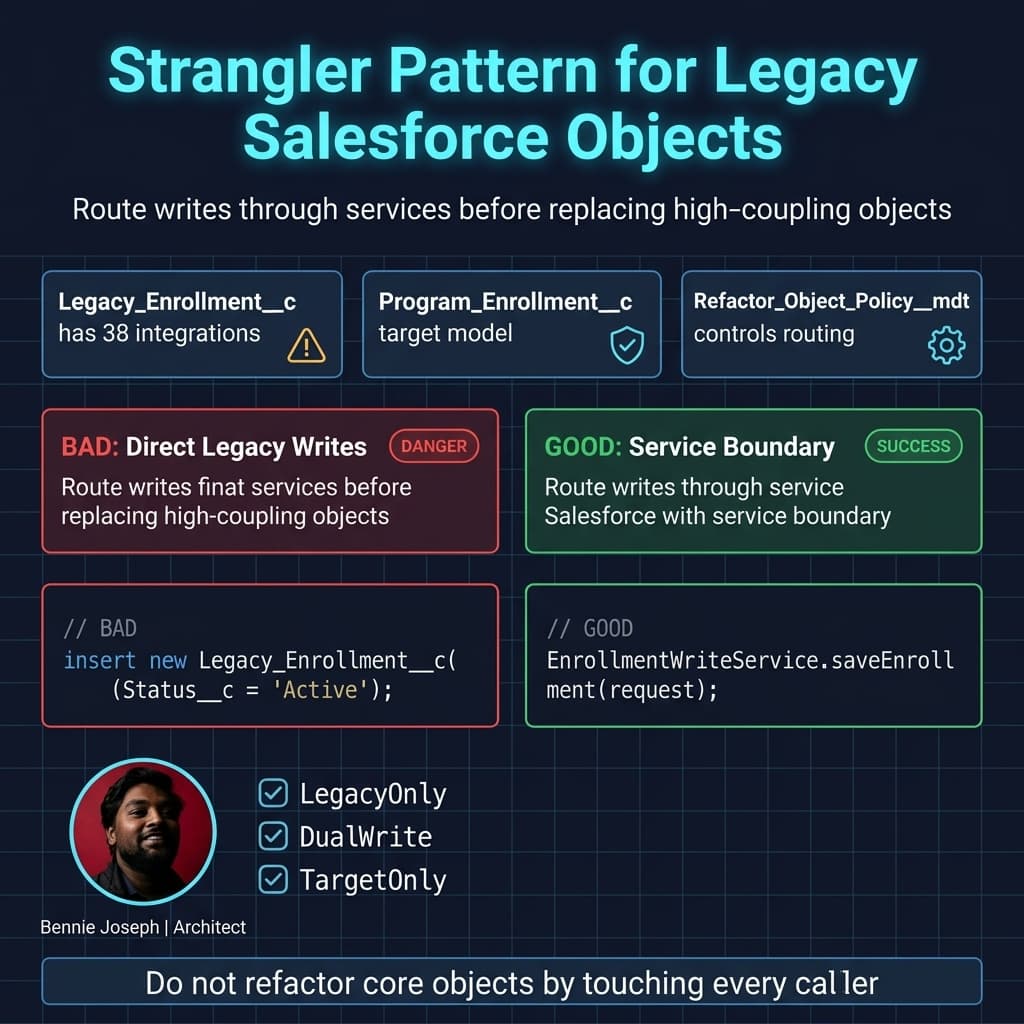
For high-coupling objects, I avoid direct replacement. I introduce a service boundary and gradually route consumers through it.
In Salesforce, that boundary might be:
- Apex service classes
- Flow actions
- GraphQL API wrappers
- MuleSoft APIs
- Platform Events
- External Services
- Named Query API contracts
- Agentforce 2.0 actions for guided operations
The point is simple: stop consumers from depending on the legacy object shape.
Here’s a simplified Apex pattern I’ve used when migrating writes from a legacy enrollment object to a target model. The service checks a custom metadata policy and routes writes without making every caller understand the migration.
public with sharing class EnrollmentWriteService {
    public class EnrollmentRequest {
        @AuraEnabled public String externalEnrollmentId;
        @AuraEnabled public Id accountId;
        @AuraEnabled public String programCode;
        @AuraEnabled public String status;
        @AuraEnabled public Date effectiveDate;
    }

    public class EnrollmentResponse {
        @AuraEnabled public Id recordId;
        @AuraEnabled public String objectApiName;
        @AuraEnabled public String writeMode;
    }

    @AuraEnabled
    public static EnrollmentResponse saveEnrollment(EnrollmentRequest request) {
        if (request == null || String.isBlank(request.externalEnrollmentId)) {
            throw new AuraHandledException('externalEnrollmentId is required.');
        }

        Refactor_Object_Policy__mdt policy = [
            SELECT DeveloperName,
                   Source_Object__c,
                   Target_Object__c,
                   Write_Mode__c
            FROM Refactor_Object_Policy__mdt
            WHERE DeveloperName = 'Program_Enrollment'
            LIMIT 1
        ];

        if (policy.Write_Mode__c == 'TargetOnly') {
            return writeTargetEnrollment(request, policy);
        }

        if (policy.Write_Mode__c == 'DualWrite') {
            EnrollmentResponse targetResponse = writeTargetEnrollment(request, policy);
            writeLegacyEnrollment(request);
            targetResponse.writeMode = 'DualWrite';
            return targetResponse;
        }

        return writeLegacyEnrollment(request);
    }

    private static EnrollmentResponse writeTargetEnrollment(
        EnrollmentRequest request,
        Refactor_Object_Policy__mdt policy
    ) {
        Program_Enrollment__c enrollment = new Program_Enrollment__c(
            External_Enrollment_Id__c = request.externalEnrollmentId,
            Account__c = request.accountId,
            Program_Code__c = request.programCode,
            Status__c = request.status,
            Effective_Date__c = request.effectiveDate
        );

        Database.UpsertResult result = Database.upsert(
            enrollment,
            Program_Enrollment__c.External_Enrollment_Id__c,
            AccessLevel.USER_MODE
        );

        if (!result.isSuccess()) {
            throw new AuraHandledException(result.getErrors()[0].getMessage());
        }

        EnrollmentResponse response = new EnrollmentResponse();
        response.recordId = result.getId();
        response.objectApiName = policy.Target_Object__c;
        response.writeMode = policy.Write_Mode__c;
        return response;
    }

    private static EnrollmentResponse writeLegacyEnrollment(EnrollmentRequest request) {
        Legacy_Enrollment__c enrollment = new Legacy_Enrollment__c(
            External_Id__c = request.externalEnrollmentId,
            Account__c = request.accountId,
            Program__c = request.programCode,
            Enrollment_Status__c = request.status,
            Start_Date__c = request.effectiveDate
        );

        Database.UpsertResult result = Database.upsert(
            enrollment,
            Legacy_Enrollment__c.External_Id__c,
            AccessLevel.USER_MODE
        );

        if (!result.isSuccess()) {
            throw new AuraHandledException(result.getErrors()[0].getMessage());
        }

        EnrollmentResponse response = new EnrollmentResponse();
        response.recordId = result.getId();
        response.objectApiName = 'Legacy_Enrollment__c';
        response.writeMode = 'LegacyOnly';
        return response;
    }
}
A few details matter:
- The class is explicitly
with sharing. - DML uses
AccessLevel.USER_MODE. - The write mode is controlled by custom metadata, not redeployment.
- Callers get a stable service method while the underlying model changes.
- Dual-write is temporary and must have reconciliation monitoring.
With Salesforce API v64.0, I still make security mode explicit in service code. The platform continues moving toward safer defaults, but architecture should not depend on developers remembering implicit behavior across API upgrades.
Phase 5: Separate Active Migration From Historical Retention
A common mistake is migrating every historical record into the new model.
That is expensive, risky, and often unnecessary.
I split records into three categories:
Active Operating Data
This is data the business needs to transact.
Migrate carefully. Validate heavily. Make the target model own future writes.
Reporting History
This is data needed for analytics, trend reporting, or audit views.
Sometimes it belongs in Salesforce. Sometimes it belongs in Data 360, a warehouse, or a governed archive. With Data 360 Zero Copy federation and native vector search available in the current platform landscape, I am much less interested in forcing every historical row into core CRM objects.
Legal Retention Data
This is data retained because policy requires it.
Do not let developers make retention decisions casually. Legal, compliance, and records management must define the rules.
For one enterprise service org, the team assumed 40 million legacy service interaction records needed to be migrated into the new object model. After retention review, only 2.8 million active or near-active records needed operational migration. The rest moved to an immutable archive pattern with searchable access for compliance and analytics.
That changed the program from impossible to boring. Boring is good.
Phase 6: Untangle Automation by Ownership
In old orgs, the worst bugs usually come from automation collisions.
You update an opportunity. A before-save flow changes a field. An Apex trigger recalculates something else. A record-triggered flow updates a parent. A scheduled job later overwrites the same value. A managed package trigger fires in between. Nobody owns the final state.
My rule: every important field needs a system of record for writes.
That does not always mean one automation artifact. It means one owned path.
For each domain object, I create an automation map:
| Field / Process | Current Writers | Target Writer | Disposition |
|---|---|---|---|
| Enrollment status | Flow, trigger, integration | Enrollment service | Consolidate |
| Renewal date | Scheduled Apex, admin flow | Renewal engine | Keep scheduled path |
| Risk score | Formula, nightly job | Data pipeline | Replace formula |
| Region owner | Assignment flow, trigger | Territory service | Consolidate |
| Legacy sync flag | Integration only | None | Remove after cutover |
Then I sequence automation remediation:
- Disable dead automation.
- Consolidate duplicate field writes.
- Move orchestration out of triggers where possible.
- Keep triggers thin when Apex is still needed.
- Use invocable actions for shared logic across Flow and code.
- Add observability before changing core automation.
- Test data volume, not just happy paths.
LWC native state management, now generally available in Summer ’26, helps reduce front-end state hacks, but it does not fix server-side domain confusion. Do not confuse UI modernization with domain remediation.
Phase 7: Fix Security While You Refactor, Not After
Security debt gets worse when objects multiply.
In a 500-object org, I usually find:
- Profiles still acting as permission containers
- Permission sets created per project instead of per job function
- Field-level security copied forward without review
- Sharing rules for abandoned teams
- Public groups nobody owns
- Integration users with broad access
- Reports exposing fields the UI hides
- Apex running in system context where user intent was expected
Refactoring is the best time to correct this because object ownership and usage are already under review.
My baseline approach:
- Move toward permission set groups aligned to job functions
- Remove access from contained and read-only objects
- Make user-mode data operations explicit in Apex
- Review integration user permissions per contract
- Separate admin, integration, automation, and human user access
- Add field classification for sensitive data
- Confirm reporting access, not just object access
- Include security review in every object disposition decision
If an object is “delete candidate” but still exposed to broad users, that is a finding. If an object is strategic but nobody can explain its sharing model, that is also a finding.
Phase 8: Refactor Integrations Around Contracts
The biggest blocker in large-org cleanup is usually external dependency.
A report can be rebuilt. A page layout can be changed. A field can be hidden.
But if five external systems POST directly into Legacy_Order__c, you do not own that object anymore. The ecosystem does.
The remediation pattern is contract-first integration:
- Create stable API contracts around business capabilities
- Stop exposing internal object names as enterprise contracts
- Version payloads
- Use idempotency keys
- Publish deprecation timelines
- Monitor consumers
- Move integration users away from direct object access
- Use MuleSoft, External Services, Platform Events, or custom APIs based on the use case
Conditional Composite API can reduce API call volume significantly when refactoring chatty integrations, especially where external systems currently perform read-check-write sequences. GraphQL API with full CRUD support is also useful when client applications need shaped data access without binding themselves to every internal page layout assumption.
The architectural principle is simple: the Salesforce object model is not your enterprise API.
Scale: What Changes at 1K, 100K, and 10M Records
Refactoring strategy changes dramatically with scale.
At 1K Records
You can inspect manually. You can export, review, and migrate with simple scripts. Deployment risk is more about user workflow than data processing.
At this scale:
- Object cleanup can be direct
- Data migration can happen in one release window
- Manual validation may be acceptable
- Report rebuilds are manageable
- Rollback can be simple
But do not build sloppy habits. Small objects become large objects quietly.
At 100K Records
You need repeatable migration jobs, reconciliation reports, and partial rollback planning.
At this scale:
- Batch Apex or Bulk API patterns matter
- Locking must be tested
- Sharing recalculation can become visible
- Flow performance must be reviewed
- Indexing and selectivity matter
- Sandboxes need representative data
- Cutover timing needs business approval
This is where teams start discovering that “simple field migration” is not simple when automation fires on every update.
At 10M Records
You are no longer doing cleanup. You are running a data and platform migration program.
At this scale:
- Archive strategy comes before migration strategy
- Async processing design is mandatory
- Query selectivity determines feasibility
- Parent-child skew can dominate runtime
- Sharing model changes can become dangerous
- Backfills need throttling
- Monitoring must be real-time enough to stop bad jobs
- Reconciliation must be automated
- Rollback may mean forward-fix, not restore
For 10M+ record objects, I insist on:
- Dry runs with production-like volumes
- Query plans for major operations
- Chunking strategy
- Idempotent migration jobs
- Immutable migration logs
- Error quarantine objects
- Business reconciliation dashboards
- Cutover playbooks
- Explicit archive and retention decisions
The larger the data volume, the more I bias toward strangle, archive, and gradually migrate active slices instead of mass conversion.
Scale: What Changes at 1K, 100K, and 10M Users
Most Salesforce orgs will not have 10M internal users, but Experience Cloud, partner ecosystems, consumer identity patterns, and API consumers can push architecture into user-scale concerns.
At 1K Users
Communication and training are the main concerns. Permission cleanup is manageable. Support tickets reveal broken assumptions quickly.
At 100K Users
You need segmented rollout. Permission changes, page changes, login flows, and data visibility must be tested by cohort. Support volume can bury the program if cutover is not staged.
At 10M Users
You need platform interaction design at population scale:
- API limits and traffic shaping
- Caching strategy
- Login and identity flows
- External sharing model performance
- Data partitioning
- Async request patterns
- Observability across channels
- Feature flags
- Backward-compatible contracts
At this point, refactoring is not a Salesforce admin effort. It is enterprise architecture.
Where Agentforce 2.0 Fits
I would not let an AI agent autonomously delete metadata in a large production org. That is reckless.
But Agentforce 2.0 can be useful in the remediation operating model when constrained properly:
- Summarizing object inventory for owners
- Drafting dependency review notes
- Explaining field usage patterns
- Generating first-pass migration test scenarios
- Helping support teams answer “what changed?” questions
- Guiding admins through approved remediation playbooks
- Reviewing release notes against object disposition decisions
With Atlas Reasoning Engine v2 and custom reasoning steps, the useful pattern is not “agent fixes org.” The useful pattern is “agent assists governed decisions with evidence, approvals, and traceability.”
I would connect Agentforce only to curated data sources: metadata inventory, approved decision records, release plans, and dependency evidence. Not raw unrestricted org control.
Release Management for Refactoring Work
Technical debt remediation fails when it is treated as side work.
I prefer a dedicated release lane with its own controls:
- Refactor epics tied to business domains
- Architecture review for every object disposition change
- Automated metadata diff checks
- Automated dependency scans
- Regression packs by capability
- Data migration rehearsals
- Rollback or forward-fix plans
- Business owner signoff
- Security signoff
- Integration consumer signoff
The current sf CLI credential security overhaul is relevant here. Pipelines that print or depend on credential output patterns need review. Refactoring programs usually add scripts, scanners, and deployment automation; do not introduce pipeline security debt while removing platform debt.
My Operating Cadence
For a 500-object org, I run remediation like a portfolio.
Weekly
- Review new object and field requests
- Review active remediation blockers
- Check dependency scan deltas
- Review failed migration jobs
- Confirm upcoming release impacts
Monthly
- Object disposition board
- Security exposure review
- Integration dependency review
- Archive/delete candidate review
- Debt burn-down by domain
Quarterly
- Capability model review
- Platform roadmap alignment
- Data retention review
- Major domain consolidation decisions
- Governance policy updates
The cadence matters because the work is never “done.” The goal is not a perfect org. The goal is an org where architectural entropy is managed instead of ignored.
Real-World Refactor Sequence That Worked
The best large-org remediation I’ve seen followed this sequence:
- Create metadata inventory.
- Assign object owners.
- Freeze unmanaged object creation outside review.
- Classify objects by domain.
- Identify the top 20 high-coupling objects.
- Identify the top 20 zero/low-usage objects.
- Archive high-volume stale records.
- Delete obvious unused metadata at the edge.
- Introduce service boundaries around core legacy objects.
- Move integrations behind contracts.
- Migrate active operating data by domain.
- Convert legacy objects to read-only.
- Observe runtime dependencies.
- Delete only after evidence-based approval.
That program did not remove hundreds of objects in the first quarter. It removed a smaller number safely, stopped new unmanaged growth, and created the machinery to keep going.
By the second and third quarters, velocity improved because teams trusted the process. They could see what was strategic, what was tolerated, and what was on the way out.
The Metrics I Care About
Vanity metrics are dangerous. “We deleted 40 objects” means nothing if the org is still impossible to change.
I track:
- Percentage of objects with named owners
- Percentage of objects with disposition status
- Number of objects in contained/read-only/delete-candidate states
- Number of direct integration dependencies on internal objects
- Number of fields with no owner and broad access
- Number of automations writing to the same field
- Median deployment failure rate
- Regression defect rate by domain
- API usage by integration contract
- High-volume object archive progress
- Number of new metadata exceptions approved or rejected
- Time from change request to safe release
The north star is changeability. A cleaner org that still cannot change safely is not remediated.
Final Opinion: Refactoring Is Governance With a Deployment Plan
A 500-object Salesforce org does not become healthy because architects draw a better target model. It becomes healthy when the organization changes how it makes platform decisions.
Yes, delete unused fields. Yes, consolidate objects. Yes, archive stale data. Yes, rewrite dangerous automation.
But do it inside a remediation architecture:
- Inventory
- Ownership
- Evidence
- Disposition
- Service boundaries
- Integration contracts
- Security review
- Release discipline
- Ongoing governance
That is how you refactor without stopping the business.
TL;DR
- A 500-object org needs a remediation control plane, not a cleanup spreadsheet.
- Use governance, strangler patterns, archive strategy, and API contracts to reduce blast radius.
- Measure success by safer change velocity, not by how many objects you delete.