Salesforce-to-Salesforce Integration: What the Docs Do Not Tell You
Most Salesforce-to-Salesforce integration failures I have seen were not caused by bad APIs.
They were caused by bad ownership decisions.
The docs will tell you how to connect two orgs, expose objects, subscribe to events, call REST APIs, configure Named Credentials, or use middleware. That is useful. It is not enough.
The hard part of a salesforce to salesforce integration patterns org connect s2s architecture is answering the questions nobody wants to answer early:
- Which org owns the record?
- Which org owns the lifecycle?
- Which org wins during conflict?
- Which ID is stable across orgs?
- Which automation is allowed to fire downstream?
- Which users are allowed to see replicated data?
- Which failures are safe to retry?
- Which data should not be replicated at all?
I have built multi-org Salesforce landscapes where a customer existed in five orgs, opportunities were split by region, service cases lived in a support org, partner data came from a community org, and leadership still expected one revenue number on Monday morning.
Here is the unpopular take: Salesforce-to-Salesforce integration is not one pattern. It is a portfolio of patterns. If you treat every cross-org use case as “sync the object,” you will eventually create a distributed data swamp with triggers.
The First Decision: Are You Integrating Data, Process, or Experience?
Before I choose technology, I classify the integration.
Data integration
This is record movement.
Examples:
- Sync Account from master commercial org to regional sales orgs.
- Replicate Product catalog to multiple selling orgs.
- Push entitlement records from service org to commerce org.
- Consolidate case history back to a customer 360 org.
Data integration sounds simple until update ownership appears. If Org A creates Account and Org B enriches Account, both orgs now believe they own Account. That is where the architecture gets messy.
Process integration
This is workflow coordination.
Examples:
- Opportunity closed in one org creates implementation project in another.
- Case escalated in support org triggers renewal risk process in sales org.
- Quote approved in CPQ org notifies finance org.
- Partner registration in external org creates internal review task.
Process integration usually needs events, command semantics, correlation IDs, and replay behavior. It should not be modeled as blind object replication.
Experience integration
This is when the user or agent needs a cross-org view, but the data does not necessarily need to move.
Examples:
- A service rep needs sales context from another org.
- Agentforce 2.0 needs grounded account data across several orgs.
- An executive dashboard needs federated metrics.
- An LWC screen needs to show target-org status without copying the target object.
This is where people over-replicate. Sometimes the right answer is API composition, GraphQL API, Data 360 federation, or a read-through service, not another sync table.
Pattern 1: Native Salesforce-to-Salesforce Sharing
The old-school Salesforce-to-Salesforce feature still appears in enterprise estates. I usually see it in older orgs where teams wanted point-and-click record sharing between partner-like orgs.
It can work for narrow, stable, low-volume scenarios.
I do not use it as the backbone for strategic enterprise architecture.
Why?
Because it encourages object-level thinking instead of domain-level thinking. It is easy to say “publish Account and Opportunity.” It is harder to manage schema drift, ownership rules, downstream automation, retry visibility, and observability.
Native S2S is acceptable when:
- Both orgs have stable object models.
- Data volume is modest.
- Ownership is clearly one-way.
- Business can tolerate limited transformation.
- Admin teams are aligned and changes are slow.
It becomes painful when:
- You need complex transformations.
- You need a canonical model.
- You need replay and dead-letter handling.
- You have five or more orgs.
- You need enterprise-grade monitoring.
- Each org has different validation rules and required fields.
The docs explain the setup. They do not explain the operational blast radius.
Pattern 2: API-Led Sync Using Named Credentials and Composite API
For most controlled org-to-org synchronization, I prefer explicit API-led integration.
The source org publishes a command or performs a callout to the target org using a Named Credential. The target org exposes an Apex REST endpoint or uses standard REST/Composite API. For bulk operations, I prefer Bulk API 2.0 or a middleware orchestration layer.
With Salesforce API v64.0, Composite API is still one of the most practical tools for transactional-ish record bundles. It is not a distributed transaction manager. Do not pretend it is.
A typical pattern:
- Source org detects meaningful domain change.
- Source creates an integration message with correlation ID.
- Queueable Apex or middleware sends payload.
- Target upserts using external ID.
- Target returns mapped Salesforce ID and status.
- Source stores sync state and replay metadata.
Here is a simplified Apex queueable from a source org that sends Account changes to a target org through a Named Credential. The important parts are not the HTTP syntax. The important parts are idempotency, external IDs, and explicit user-mode querying.
public with sharing class AccountOrgSyncJob implements Queueable, Database.AllowsCallouts {
    private final Set<Id> accountIds;
    private final String correlationId;

    public AccountOrgSyncJob(Set<Id> accountIds, String correlationId) {
        this.accountIds = accountIds == null ? new Set<Id>() : accountIds.deepClone();
        this.correlationId = String.isBlank(correlationId)
            ? Crypto.getRandomUUID()
            : correlationId;
    }

    public void execute(QueueableContext context) {
        if (accountIds.isEmpty()) {
            return;
        }

        List<Account> accounts = [
            SELECT Id, Name, Industry, BillingCountry, Global_Account_Key__c, LastModifiedDate
            FROM Account
            WHERE Id IN :accountIds
            WITH USER_MODE
        ];

        List<Object> compositeRequests = new List<Object>();
        Integer index = 0;

        for (Account acc : accounts) {
            if (String.isBlank(acc.Global_Account_Key__c)) {
                Sync_Log__c logRow = new Sync_Log__c(
                    Source_Record_Id__c = acc.Id,
                    Correlation_Id__c = correlationId,
                    Status__c = 'Rejected',
                    Message__c = 'Missing Global_Account_Key__c'
                );
                Database.insert(logRow, AccessLevel.USER_MODE);
                continue;
            }

            Map<String, Object> body = new Map<String, Object>{
                'Name' => acc.Name,
                'Industry' => acc.Industry,
                'BillingCountry' => acc.BillingCountry,
                'Global_Account_Key__c' => acc.Global_Account_Key__c,
                'Source_Last_Modified__c' => String.valueOf(acc.LastModifiedDate),
                'Source_Correlation_Id__c' => correlationId
            };

            compositeRequests.add(new Map<String, Object>{
                'method' => 'PATCH',
                'url' => '/services/data/v64.0/sobjects/Account/Global_Account_Key__c/' +
                    EncodingUtil.urlEncode(acc.Global_Account_Key__c, 'UTF-8'),
                'referenceId' => 'Account_' + index,
                'body' => body
            });

            index++;
        }

        if (compositeRequests.isEmpty()) {
            return;
        }

        HttpRequest req = new HttpRequest();
        req.setEndpoint('callout:Target_Salesforce_Org/services/data/v64.0/composite');
        req.setMethod('POST');
        req.setHeader('Content-Type', 'application/json');
        req.setHeader('Sforce-Call-Options', 'client=account-org-sync');
        req.setBody(JSON.serialize(new Map<String, Object>{
            'allOrNone' => false,
            'compositeRequest' => compositeRequests
        }));
        req.setTimeout(120000);

        HttpResponse res = new Http().send(req);

        Sync_Log__c logRow = new Sync_Log__c(
            Correlation_Id__c = correlationId,
            Status__c = res.getStatusCode() >= 200 && res.getStatusCode() < 300 ? 'Sent' : 'Failed',
            Message__c = res.getBody().left(32768)
        );
        Database.insert(logRow, AccessLevel.USER_MODE);

        if (res.getStatusCode() >= 500) {
            throw new OrgSyncRetryableException('Target org unavailable: ' + res.getStatus());
        }
    }

    public class OrgSyncRetryableException extends Exception {}
}
There are a few practitioner rules embedded here:
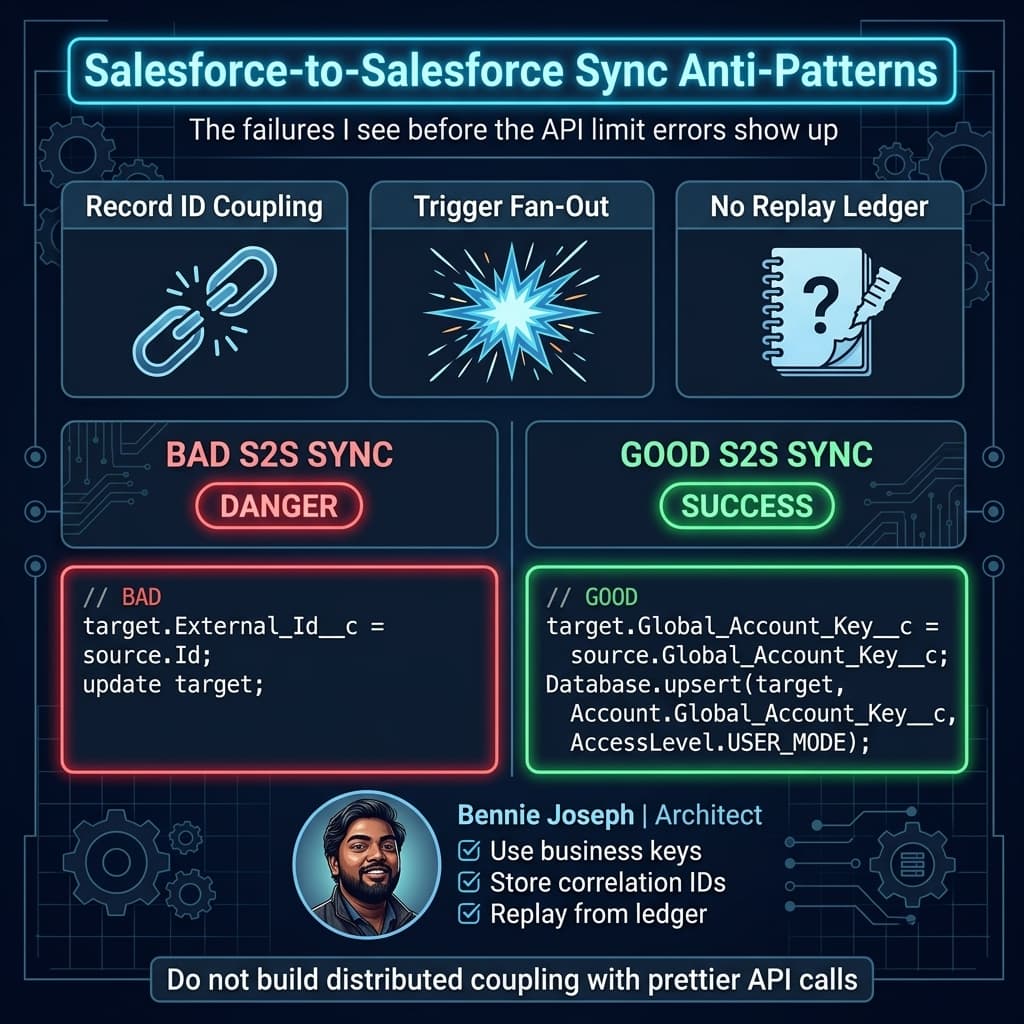
- Never integrate using Salesforce record IDs as the business key.
- Always carry a correlation ID.
- Always persist sync state outside debug logs.
- Use
WITH USER_MODEand user-mode DML intentionally. - Treat 4xx and 5xx responses differently.
- Never assume target automation will behave like source automation.
This pattern is boring. Boring is good. Boring systems get operated at 2 a.m.
Pattern 3: Event-Driven Integration with Platform Events and Change Data Capture
For process coordination, I prefer events.
Platform Events are useful when the source org needs to announce that something happened. Change Data Capture is useful when consumers need record-level change streams.
Do not confuse the two.
A Platform Event should express a business fact:
OpportunityClosedWon__eCaseEscalated__ePartnerOnboardingRequested__e
CDC expresses data mutation:
- Account updated
- Case deleted
- Contact email changed
If you use CDC as your enterprise domain event model, your consumers inherit your database design. I have seen this create tight coupling across orgs where every field rename becomes an integration incident.
For multi-org Salesforce architecture, I usually use:
- Platform Events for business events.
- CDC for data replication into analytics, audit, or sync processors.
- Middleware for fan-out, transformation, and dead-letter queues.
- Replay IDs and correlation IDs for recovery.
- A custom integration ledger for business-level traceability.
Decision Matrix: Choosing the Right S2S Pattern
Here is the matrix I use when architecture discussions get vague.
| Pattern | Best For | Strengths | Weaknesses | My Recommendation |
|---|---|---|---|---|
| Native Salesforce-to-Salesforce sharing | Simple one-way record sharing between stable orgs | Low-code setup, fast initial delivery | Limited control, weak observability, schema coupling | Use only for narrow, low-volume, stable scenarios |
| Direct REST/Composite API | Controlled object sync and command-style writes | Explicit ownership, good error handling, supports external IDs | Requires engineering discipline and retry design | My default for critical record synchronization |
| Platform Events | Business process coordination | Decoupled, scalable, replayable, good for async workflows | Not a query layer, needs subscriber governance | Use for domain events, not blind object mirroring |
| Change Data Capture | Record change streams | Great for downstream sync, audit, lake ingestion | Field-level coupling, noisy events, delete handling complexity | Use behind a processor, not directly as business contract |
| Middleware / iPaaS | Multi-org routing, transformation, orchestration | Central governance, monitoring, retries, fan-out | Cost, platform dependency, team skill required | Best for enterprise multi-org landscapes |
| Data 360 federation / Zero Copy | Cross-org or external read models and analytics | Avoids unnecessary replication, supports unified catalog and grounding | Not for every transactional write path | Use when experience needs data, not ownership |
| GraphQL API / Named Query API | Read composition for UI or service layer | Efficient shape-specific reads, better UX contracts | Write-side architecture still needed | Strong for experience integration |
| Agentforce 2.0 tool/MCP layer | Agent-driven cross-org action and retrieval | Governed actions, Atlas Reasoning Engine v2, multi-agent orchestration | Needs strict tool permissions and audit boundaries | Use for agent workflows, not as a hidden sync engine |
If your integration pattern is not on this table, it is probably a variation of one of these with different packaging.
Real Enterprise Example: The Five-Org Customer Problem
One project burned this lesson into me.
The company had five Salesforce orgs:
- North America Sales
- EMEA Sales
- Global Service
- Partner Management
- Executive Reporting
Each org had an Account object. Each org had a different definition of “customer.”
North America treated Account as a selling entity. EMEA modeled legal entities. Service modeled support entitlements. Partner Management modeled channel relationships. Reporting wanted a clean global customer hierarchy.
The first design proposal was “sync Account everywhere.”
That would have failed.
We split Account into domains:
- Global Customer Profile: centrally mastered.
- Selling Account: owned by regional sales orgs.
- Legal Entity: enriched from finance.
- Support Account: owned by service.
- Partner Relationship: owned by partner org.
Then we introduced a global key: Global_Account_Key__c.
Not Salesforce ID. Not DUNS alone. Not tax ID alone. A governed enterprise key assigned by the master customer process.
The integration architecture looked like this:
- Regional sales orgs could create candidate accounts.
- Mastering process assigned or matched
Global_Account_Key__c. - Global profile updates flowed outward.
- Regional sales attributes stayed local.
- Support entitlements flowed from service to sales read models.
- Reporting consumed events and curated dimensions.
- No org could overwrite another org’s owned fields.
The biggest win was not technical. It was political clarity encoded into architecture.
When people asked, “Why can’t my org update that field?” the answer was not “because integration is hard.” The answer was “because your org does not own that business capability.”
Ownership Rules Beat Field Mappings
Field mappings are easy to produce and hard to govern.
For every object in a Salesforce-to-Salesforce architecture, I want an ownership table.
Example for Account:
| Field Group | Owning Org | Consuming Orgs | Update Direction | Conflict Rule |
|---|---|---|---|---|
| Global identity | Customer master org | All orgs | Master → consumers | Master always wins |
| Regional sales fields | Regional sales org | Reporting, Service | Region → consumers | Region wins within territory |
| Entitlement status | Service org | Sales, Partner | Service → consumers | Service wins |
| Partner tier | Partner org | Sales, Service | Partner → consumers | Partner wins |
| Reporting classification | Reporting org | Dashboards only | No operational writeback | No writeback allowed |
This table prevents months of integration argument.
Without it, teams start using “last modified wins.” Last modified wins is not a business rule. It is an admission that nobody made a decision.
Identity: The Part Everyone Underestimates
Identity is where Salesforce-to-Salesforce integrations become fragile.
You need different identities for different purposes:
- Salesforce record ID: local physical ID.
- External ID: cross-org matching key.
- Correlation ID: message/request trace key.
- Business natural key: tax ID, email, SKU, contract number.
- Master data key: governed enterprise identity.
- User identity: who initiated the change.
- System identity: which integration principal performed the write.
Never use one key for all of these.
For Contacts, email is not identity. People change emails. Families share emails. B2B contacts use aliases. Support contacts may be created from inbound messages before matching occurs.
For Products, SKU might be identity in one business unit but not globally. For Assets, serial number may not be unique if refurbishing or component swaps exist.
For Cases, the source case number is not enough if multiple orgs can create case number 00012345.
My usual cross-org key format is domain-scoped:
CUSTOMER:GLOBAL:8f3a9e22
ACCOUNT:NA:001-889120
CASE:SERVICE-EU:500-441902
PRODUCT:GLOBAL:SKU-AX-900
Ugly? Maybe.
Operationally clear? Absolutely.
Automation Containment: The Hidden Blast Radius
The docs rarely spend enough time on downstream automation.
When Org A writes into Org B, Org B may execute:
- Record-triggered Flows
- Apex triggers
- Assignment rules
- Duplicate rules
- Validation rules
- Roll-up logic
- Approval automation
- Entitlement processes
- Agentforce actions
- Platform Event publications
- CDC emissions
That means one sync can create a second sync, which creates a third sync, which updates the first org again.
Congratulations, you built a loop.
I usually require an integration context field or header strategy. In Salesforce, you cannot magically pass headers into every automation path, so I often persist integration metadata on the record or in a companion ledger.
Examples:
Last_Source_Org__cLast_Source_Correlation_Id__cIntegration_Update_Mode__cSuppress_Downstream_Sync__cLast_Synced_At__c
Use these carefully. Do not build a backdoor that bypasses business controls. The goal is loop prevention and traceability, not cheating validation.
Scale: 1K, 100K, and 10M Records
Architecture that works at 1K records can collapse at 100K. Architecture that works at 100K can become a governance problem at 10M.
At 1K records
You can survive with:
- Scheduled jobs.
- Composite API.
- Basic retry logging.
- Admin-visible sync status.
- Simple external IDs.
- Manual replay from failed logs.
The danger at this scale is false confidence. Everything works in testing because volume is forgiving.
At 100K records
You need discipline:
- Batchable or queue-based processing.
- Bulk API 2.0 for large backfills.
- Event replay strategy.
- Dead-letter queue.
- Sync ledger indexed by correlation ID and external ID.
- Backpressure handling.
- Per-object throughput limits.
- Separate initial load from delta sync.
- Monitoring dashboards.
At this level, trigger side effects become expensive. One Account sync that recalculates 500 child records can destroy throughput.
At 10M records
You are no longer doing “an integration.” You are operating a distributed data platform.
You need:
- Partitioning strategy.
- Domain ownership model.
- Bulk ingestion windows.
- Archival rules.
- Data retention strategy.
- Event bus capacity planning.
- API concurrency governance.
- Async job monitoring.
- Circuit breakers.
- Schema versioning.
- Dedicated integration operations runbooks.
- Reconciliation jobs.
- Data quality scoring.
- Security review per data domain.
At 10M records, you should question replication itself. Can the consuming org read through an API? Can Data 360 provide a federated read model? Can GraphQL API serve the UI without copying the object? Can Agentforce 2.0 retrieve grounded data through governed tools instead of relying on stale replicated fields?
Copying everything everywhere is not architecture. It is surrender.
Security and Sharing: Do Not Sync Your Way Around Access Control
Cross-org sync is often used to bypass access problems.
A team says, “Users in Org B need to see data from Org A, so let’s copy the data.”
Maybe. But now Org B has its own sharing model, profiles, permission sets, reports, exports, sandboxes, downstream integrations, and backups. You did not grant access. You created another regulated data surface.
I ask these questions before approving replication:
- Does the target org have a legitimate business reason to store this data?
- Are field-level security requirements equivalent?
- Does data residency allow copying?
- Are retention policies aligned?
- Can users export the replicated data?
- Will sandbox refreshes duplicate sensitive data?
- Does the target org have Shield encryption requirements?
- Who audits access after replication?
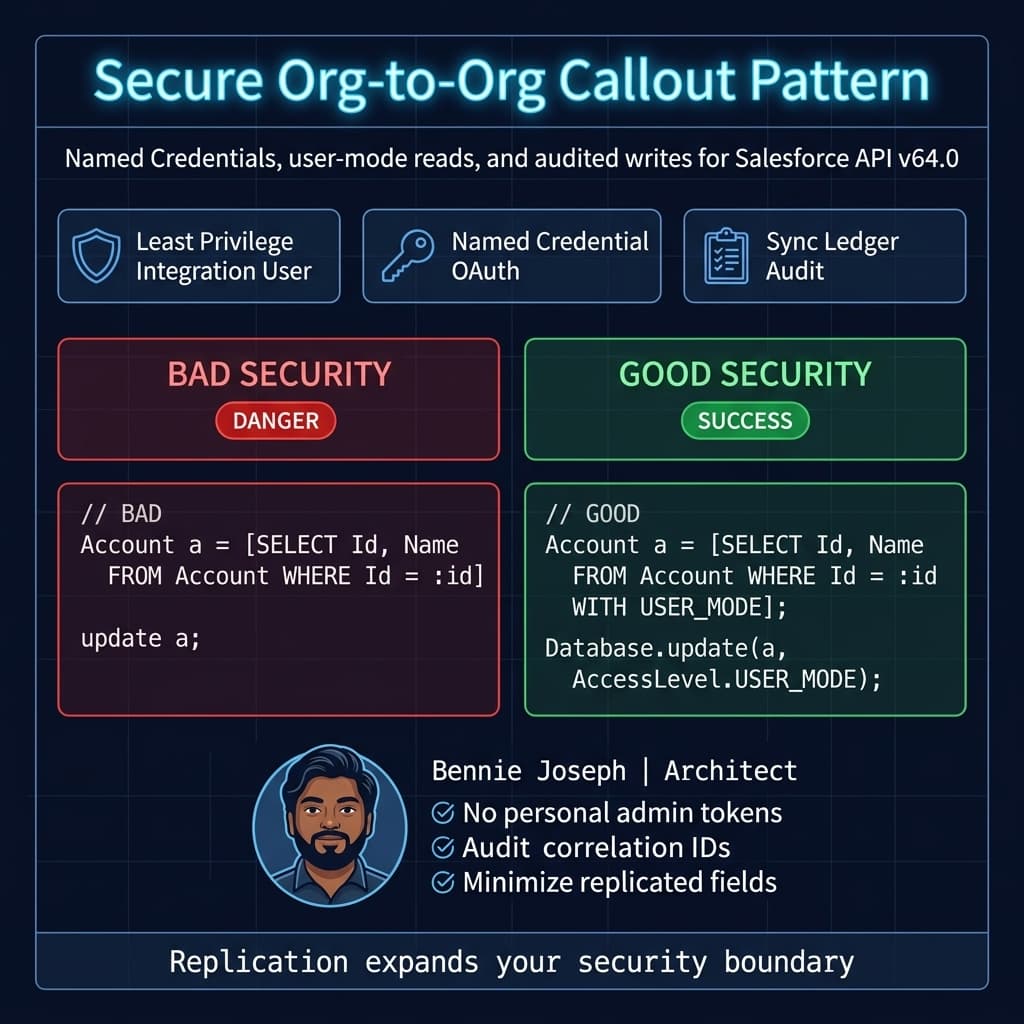
In Salesforce API v64.0 code, I still prefer explicit security posture. Query with WITH USER_MODE where user-context behavior matters. Use system context only when the integration design explicitly requires it and has compensating controls.
For machine-to-machine sync, use dedicated integration users, least privilege permission sets, Named Credentials, and clear connected app policies. Do not use a sysadmin personal account. I still see that in enterprise orgs, and it is indefensible.
Observability: If You Cannot Replay It, You Do Not Own It
Debug logs are not observability.
For every serious S2S integration, I want an integration ledger. It can be a custom object, external store, middleware log, or event archive. The implementation can vary. The capability cannot.
A useful ledger records:
- Correlation ID
- Source org
- Target org
- Source object
- Source record ID
- External business key
- Payload version
- Operation type
- Attempt count
- Last status
- Last error category
- Last response body summary
- Next retry time
- Created by process
- Replayed by user/process
Do not store sensitive payloads blindly. Store enough to operate safely.
I also want reconciliation jobs. Event-driven systems drift. API-led systems drift. Human data fixes drift. Backfills drift. If your design has no reconciliation process, your data quality plan is hope.
Typical reconciliation checks:
- Source records missing in target.
- Target records missing source key.
- Modified timestamps diverging beyond threshold.
- Owned fields overwritten by non-owning org.
- Deleted records not reflected.
- Failed messages older than SLA.
- Duplicate external IDs.
- Records stuck in pending sync state.
Schema Versioning: The Quiet Enterprise Killer
In a two-org demo, field mappings are static.
In a real enterprise, each org has release trains. One org adds required fields. Another org renames picklist values. Another org installs a managed package. Another org changes validation logic before quarter-end.
That is why I prefer versioned payload contracts for events and APIs.
Example:
{
  "schemaVersion": "account-profile.v3",
  "correlationId": "2e9c5d0b-88f2-43c2-b6f6-69d49e88d390",
  "sourceOrg": "NA_SALES",
  "eventType": "GlobalAccountProfileChanged",
  "globalAccountKey": "CUSTOMER:GLOBAL:8f3a9e22",
  "changedAt": "2026-08-03T10:15:00Z",
  "profile": {
    "name": "Acme Industrial Holdings",
    "industry": "Manufacturing",
    "billingCountry": "US"
  }
}
Version the contract, not just the Apex class.
Consumers should know what they are receiving. Producers should know what they are allowed to change. Middleware should validate payloads before poison messages reach Salesforce automation.
Where Agentforce 2.0 Fits
Agentforce 2.0 changes the integration conversation because agents can act across systems, not just read from them.
But I am careful here.
I do not let agents become hidden integration middleware.
If an Agentforce 2.0 agent needs to retrieve data across orgs, I prefer governed tools, MCP-based access where appropriate, and clear permission boundaries. With the Einstein 1 Platform, Agentforce 2.0, multi-agent orchestration, and Atlas Reasoning Engine v2, it is tempting to let an agent “figure out” the process.
Do not do that for system-of-record writes.
Agent actions should call governed APIs that already enforce:
- Ownership rules
- Validation
- Audit logging
- Idempotency
- Authorization
- Human approval where needed
For cross-org service scenarios, I like this pattern:
- Agent retrieves customer context from Data 360 or target org APIs.
- Agent summarizes and recommends action.
- Human confirms.
- Agent calls a governed command API.
- Command API writes to the owning org.
- Integration ledger records the action and correlation ID.
Agents are excellent experience orchestration layers. They are not a replacement for integration architecture.
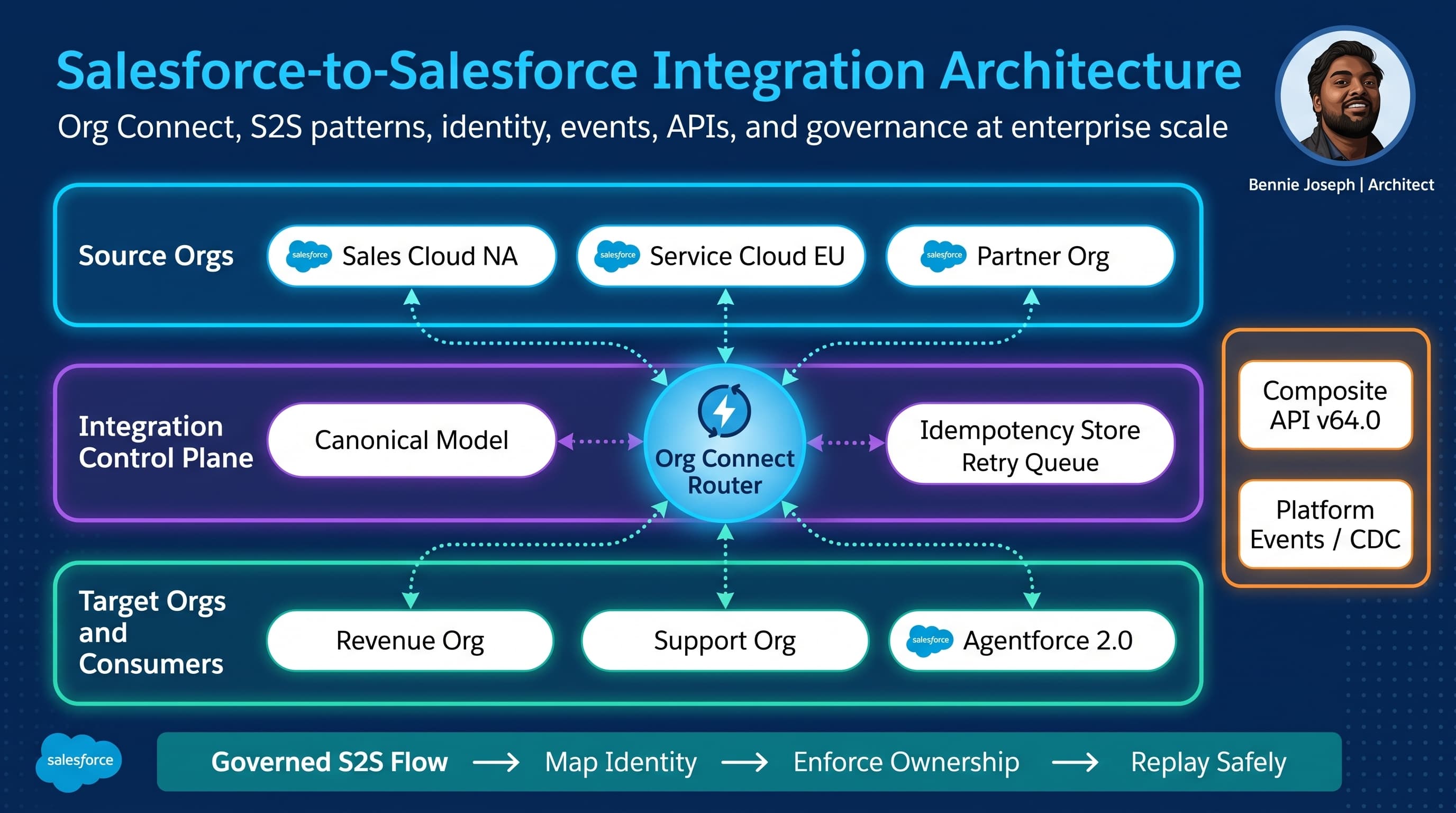
Org Connect Architecture: Hub, Mesh, or Domain-Aligned?
When several Salesforce orgs need to talk, topology matters.
Point-to-point mesh
Every org integrates with every other org.
This is how chaos starts.
It feels fast at first. Then each new org adds exponential integration paths. Field semantics diverge. Monitoring fragments. Nobody knows where a value came from.
I avoid mesh unless the landscape is tiny and temporary.
Central hub
All orgs integrate through a hub: middleware, integration org, event broker, or data platform.
This improves governance, observability, and transformation. It can also become a bottleneck if the hub team is slow or the architecture is too generic.
The hub should not become a dumping ground for every business rule. It should route, transform, validate contracts, monitor, and enforce integration policy.
Domain-aligned integration
This is my preferred enterprise model.
Each business domain owns its APIs/events. A central platform provides standards, tooling, monitoring, and shared infrastructure. Orgs do not publish random object changes. They publish domain contracts.
For example:
- Customer domain publishes
GlobalAccountProfileChanged. - Sales domain publishes
OpportunityClosedWon. - Service domain publishes
EntitlementChanged. - Partner domain publishes
PartnerTierChanged.
This scales better politically and technically because ownership is explicit.
Testing Multi-Org Integration Without Lying to Yourself
Single-org unit tests are not enough.
You need several test layers:
- Apex unit tests for payload construction.
- Contract tests for event/API schema.
- Mock target org responses.
- Full sandbox-to-sandbox integration tests.
- Backfill dry runs.
- Retry and replay tests.
- Negative tests for validation failures.
- Permission tests with real integration users.
- Volume tests using realistic automation.
The most important tests are ugly:
- Target org returns duplicate external ID.
- Target org validation rule changes.
- Target org times out after partial success.
- Source sends stale update after target changed.
- Event replay sends the same message twice.
- Integration user loses field permission.
- Downstream trigger republishes an event back to source.
Happy-path tests prove almost nothing in S2S architecture.
My Practical Rules for Salesforce-to-Salesforce Integration
I use these rules because I have paid for the alternatives.
Rule 1: Define ownership before mapping fields
If nobody owns the field, nobody should sync it.
Rule 2: Use external business keys
Salesforce IDs are local implementation details. They are not enterprise identity.
Rule 3: Separate initial load from delta sync
Backfill architecture and real-time architecture have different failure modes.
Rule 4: Make retries idempotent
If the same message runs twice, the second execution should not corrupt data.
Rule 5: Store sync state
If support cannot answer “what happened to this record,” the integration is not production-ready.
Rule 6: Avoid bidirectional writes unless business rules are crystal clear
Bidirectional sync is where vague ownership becomes data corruption.
Rule 7: Prefer events for process, APIs for commands, federation for views
Do not use one tool for every problem.
Rule 8: Design for operations, not demos
A working demo is not an architecture. Monitoring, replay, reconciliation, and security are part of the system.
The Part the Docs Really Do Not Tell You
The hardest Salesforce-to-Salesforce integrations are not technical integrations.
They are governance integrations.
You are connecting orgs that usually have different teams, histories, automations, data definitions, deployment schedules, and political incentives. The API call is just the visible part.
If I had to summarize my architecture stance:
- Sync less data.
- Own data more clearly.
- Use stronger contracts.
- Make failure visible.
- Replay safely.
- Treat every replicated field as a liability.
The best S2S architecture is not the one with the most elegant diagram. It is the one where, six months later, when a VP asks why customer status is different in two orgs, your team can answer with evidence instead of archaeology.
TL;DR
- Salesforce-to-Salesforce integration succeeds or fails on ownership, identity, replay, and governance — not API setup.
- Use APIs for controlled writes, events for business processes, and federation/read models when copying data is unnecessary.
- At enterprise scale, build ledgers, reconciliation, schema versioning, and domain-aligned contracts before adding more sync paths.