Shield Platform Encryption: Architecture Decisions That Cannot Be Reversed
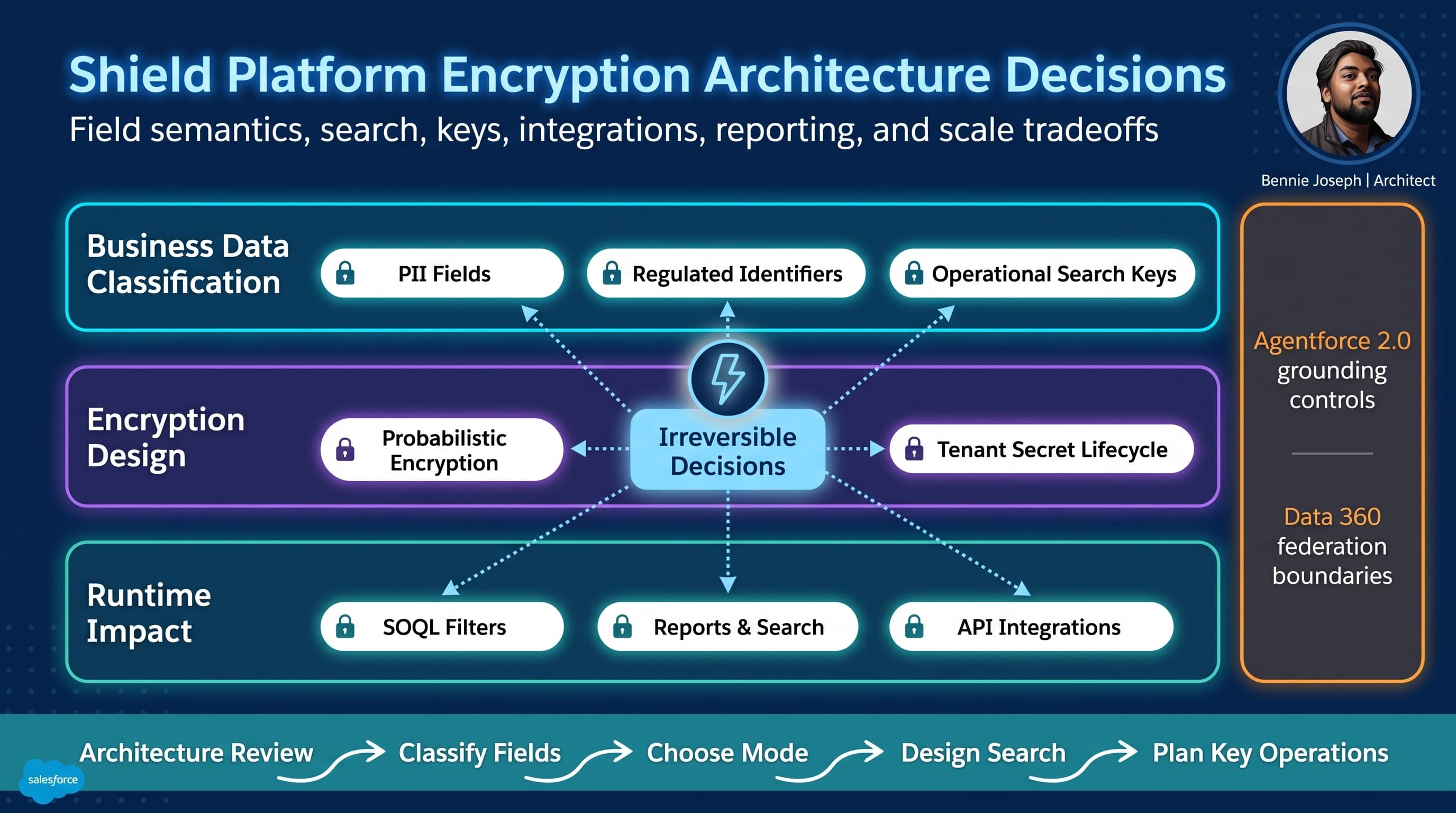
Shield Platform Encryption is one of those Salesforce features that looks simple in a slide deck and becomes brutally architectural in production.
Turn it on. Select fields. Encrypt data at rest. Done.
That is the dangerous version.
In real enterprise orgs, Shield Platform Encryption changes the behavior of data. It changes query patterns, reporting, duplicate management, search, integrations, support operations, analytics, and sometimes even the way humans work a case. The encryption checkbox is not the hard part. The hard part is choosing which compromises your business can live with for the next five years.
Here’s the unpopular take: encryption decisions are data architecture decisions. Treat them like field-level compliance settings and you will create outages that look like “random Salesforce limitations” but are actually design mistakes.
I’ve seen this happen on enterprise programs where the security requirement was valid, the implementation was technically correct, and the business still lost critical capabilities because nobody mapped the operational blast radius before encrypting fields.
This post is about the Salesforce Shield Platform Encryption architecture decisions tradeoffs I force into the design conversation before anyone encrypts a production field.
Encryption Is Not Access Control
The first mistake I see is teams using Shield Platform Encryption to solve the wrong problem.
Shield Platform Encryption protects data at rest inside Salesforce. It reduces risk if storage, backups, logs, or lower-level infrastructure are compromised. It is a compliance and data protection control.
It does not replace:
- CRUD and field-level security
- Record-level sharing
- Transaction Security policies
- Event Monitoring
- Data minimization
- Secure integration design
- Proper secrets management
- Permission design for “View Encrypted Data”
If a user has permission to see a field, Shield is not meant to hide that field from them in the UI. If an integration user can query a field through Salesforce API v64.0, encryption does not magically make that API response safe to dump into a downstream lake, log aggregator, or AI workflow.
That distinction matters even more now that Salesforce environments commonly include Agentforce 2.0, Data 360 federation, GraphQL APIs, Named Query API, MCP tools, and external automation layers. Encryption is one control in the architecture. It is not the whole security model.
When I review an encryption design, I start with a simple question:
Are we protecting stored data, reducing user visibility, limiting API exposure, or satisfying regulatory requirements?
Those are different problems. Shield helps with the first and supports the fourth. It does not automatically solve the second or third.
The Decisions That Become Expensive To Undo
I don’t like calling architecture decisions “irreversible” unless they really are. With enough money, downtime, migration scripts, executive air cover, and cleanup windows, many things can be reversed.
But in practice, several Shield decisions become operationally irreversible once reporting, integrations, user workflows, and historical data depend on them.
Decision 1: Which Fields Are Actually Sensitive
Do not encrypt objects. Encrypt fields.
That sounds obvious until a compliance spreadsheet says, “Encrypt all customer data.”
“All customer data” is not an architecture requirement. It is a panic response.
You need field-level classification:
| Classification | Example | Likely Treatment |
|---|---|---|
| Public operational data | Company name, industry | Do not encrypt unless policy requires it |
| Internal business data | Account tier, renewal date | Usually access control, not encryption |
| Regulated personal data | National ID, health identifier, bank account | Strong candidate for encryption |
| Secrets or credentials | API keys, passwords | Should not be stored as normal Salesforce fields |
| Search-critical identifiers | Email, phone, account number | Requires special design before encryption |
The last category is where teams get burned.
Fields like email, phone, national identifier, claim number, bank account suffix, or member ID are often both sensitive and operationally important. Users search by them. Integrations match on them. Duplicate rules compare them. Reports group by them. Service agents use them to verify identity.
Encrypting those fields without redesigning access patterns is how you break the business while passing a security review.
On one healthcare implementation I worked on, the initial ask was to encrypt every patient identifier on Contact and Case. The list included fields used by call center agents to find records during live calls. If we had encrypted all of them with probabilistic encryption, exact-match workflows, duplicate checks, and operational reports would have degraded overnight. The final design split identifiers into three groups: display-only encrypted fields, deterministic-match fields, and non-sensitive surrogate search keys.
That classification work took longer than enabling Shield. It also saved the program.
Decision 2: Probabilistic vs Deterministic Encryption
This is the decision most teams underestimate.
Probabilistic encryption produces different ciphertext for the same plaintext value. It is stronger from a confidentiality perspective because repeated values do not look the same after encryption.
Deterministic encryption produces the same ciphertext for the same plaintext value. It enables specific equality-based operations, but it leaks patterns. If the same value appears in 10,000 records, the encrypted representation can still reveal that repetition.
The architecture tradeoff is simple:
- Probabilistic encryption is better for confidentiality.
- Deterministic encryption is better for exact-match behavior.
- Neither gives you the same behavior as plain text.
You choose based on access patterns, not vibes.
For example:
- A national ID field used only for display to a restricted team: probabilistic.
- A member ID used for inbound exact-match lookup: deterministic or a surrogate search key.
- An email field used for fuzzy search, duplicate matching, domain grouping, and marketing segmentation: do not encrypt blindly. Redesign the model.
Here is the decision I usually push for: if the field is highly sensitive and also heavily queried, create a separate non-reversible search artifact rather than forcing deterministic encryption to carry every use case.
That usually means:
- Store the sensitive raw value in an encrypted field.
- Store a normalized HMAC/search key in a separate field.
- Use the search key for exact lookup.
- Never display the search key.
- Never treat the search key as harmless just because it is hashed.
This pattern is not free. It adds key management, backfill, trigger logic, and operational complexity. But it makes the tradeoff explicit.
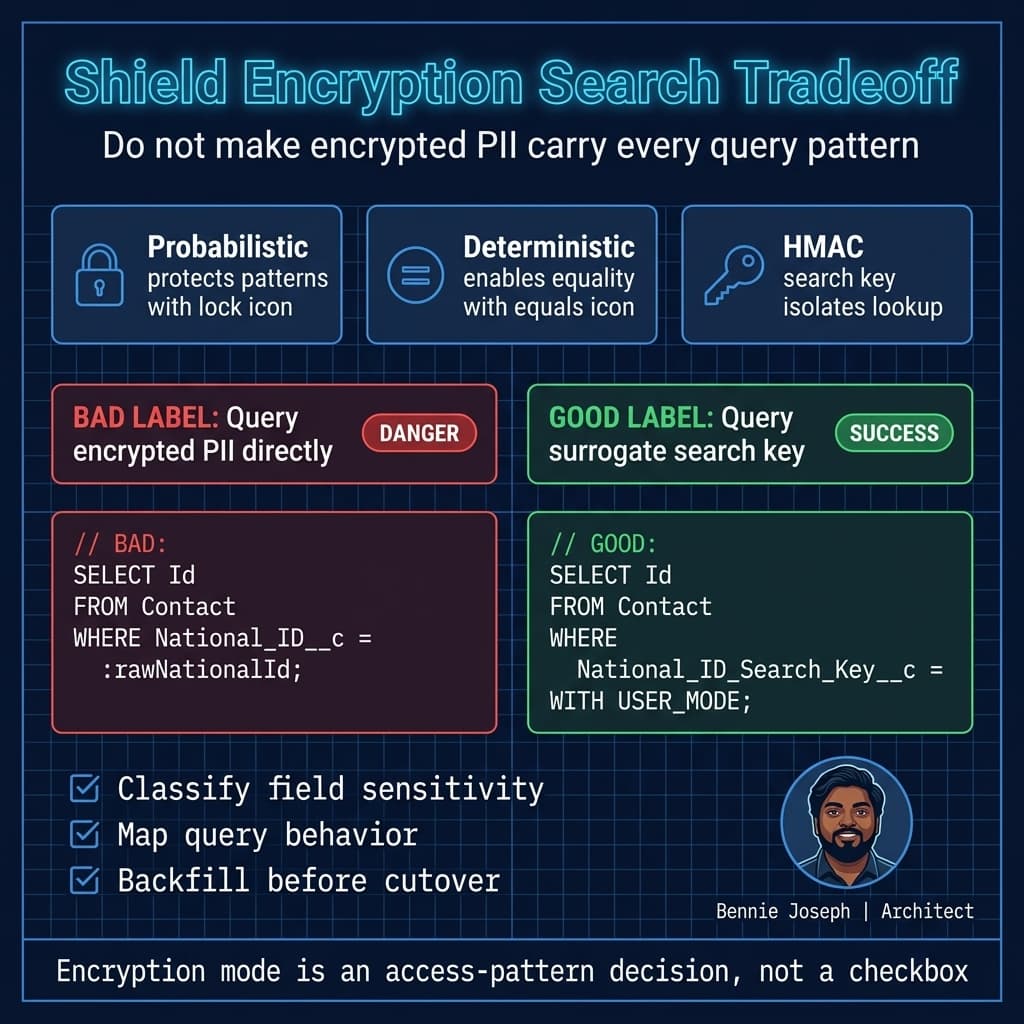
Decision 3: Whether Users Need Search, Sort, Filter, or Grouping
The most dangerous phrase in Shield design sessions is:
“Users only need to see the value.”
That is rarely true.
Users may need to:
- Search by the value
- Filter list views
- Sort results
- Use global search
- Run duplicate checks
- Build reports
- Export data
- Match inbound records
- Trigger automation
- Use the value in approval criteria
- Use it in Agentforce actions or grounding flows
Each operation has different encryption implications.
If a field participates in filtering, matching, or reporting, you need to validate the exact behavior before production encryption. Not all field types and operations behave the same way under encryption. Some functionality works only under deterministic encryption. Some does not work the way users expect. Some works technically but performs poorly at scale.
This is where I stop architecture discussions and ask for a field usage inventory.
At minimum, I want to see:
| Field | Object | Sensitivity | Current Usage | Search Required | Report Required | Integration Required | Proposed Pattern |
|---|---|---|---|---|---|---|---|
| National_ID__c | Contact | High | Display + identity verification | Exact only | No | Yes | Probabilistic + HMAC search key |
| Contact | Medium/High | Login, matching, marketing | Yes | Yes | Yes | Avoid encryption or redesign identity model | |
| Bank_Account__c | Payment_Profile__c | High | Display last four only | No | No | Token vault | Do not store full value |
| Claim_Number__c | Case | Medium | Search and case routing | Exact | Yes | Yes | Deterministic or surrogate key |
I do not approve encryption designs from field lists alone. I want usage maps.
Decision 4: Whether Salesforce Should Store the Value At All
Sometimes the best Shield architecture decision is not to encrypt the field. It is to stop storing the value.
This is especially true for credentials, payment data, full bank accounts, government identifiers, and medical details that Salesforce only needs for transient verification.
Architectural alternatives include:
- Store the value in a dedicated external vault and keep only a token in Salesforce.
- Store only the last four characters for human verification.
- Store a non-reversible hash for matching.
- Use an external service through Named Credentials for real-time verification.
- Use Data 360 federation or zero-copy access for analytics instead of duplicating sensitive data.
- Use MuleSoft API-to-MCP or a controlled service layer instead of exposing raw values to every integration.
This is where security architecture and enterprise integration architecture overlap.
If Salesforce is the system of engagement, it does not always need to become the system of record for the most sensitive value. Storing less data beats encrypting more data.
Decision Matrix: Shield Encryption Architecture Options
Architecture is tradeoffs. Here is the matrix I use when teams argue over encryption patterns.
| Approach | Best For | Strengths | Tradeoffs | Reversal Cost |
|---|---|---|---|---|
| No encryption, strict access control | Low/medium sensitivity operational fields | Preserves full Salesforce behavior | Does not protect data at rest beyond platform baseline | Low |
| Probabilistic Shield encryption | High-sensitivity display fields | Stronger confidentiality, hides value repetition patterns | Search/filter/report limitations, operational redesign required | Medium to High |
| Deterministic Shield encryption | Sensitive fields requiring exact match | Supports some equality patterns | Pattern leakage, limited query behavior, careful field eligibility review | High |
| Encrypted raw field + HMAC search key | Sensitive values requiring exact lookup | Separates display confidentiality from lookup behavior | Additional field, key lifecycle, backfill, duplicate handling | High |
| External vault + Salesforce token | Highly regulated identifiers, payment-like data | Minimizes Salesforce data exposure | Integration dependency, latency, operational complexity | Very High |
| Store only derived value | Last four, masked display, eligibility flags | Lowest data risk, simpler compliance story | Cannot recover full value from Salesforce | Intentionally irreversible |
| Data 360 federation / zero-copy | Analytics over sensitive enterprise data | Avoids copying data into Salesforce storage | Requires governance, entitlement mapping, grounding controls | Medium |
| Agent/service-mediated access | Agentforce 2.0 or custom app workflows needing controlled retrieval | Centralized policy and audit | Requires robust action design, permissions, prompt/response controls | Medium to High |
My default bias: encrypt only what you must, avoid storing what you do not need, and design search separately from display.
A Real Enterprise Example: Case Intake With Regulated Identifiers
On a large service transformation program, the business had millions of customer records and a high-volume case intake process. Agents received calls from customers, verified identity, and opened cases tied to customer profiles.
The sensitive field was a government-issued identifier. It appeared in legacy CRM, middleware logs, document systems, and a downstream claims platform. The security team wanted the field encrypted in Salesforce. Reasonable request.
The first proposal was straightforward:
- Add the identifier to Contact.
- Enable Shield Platform Encryption.
- Use deterministic encryption so agents and integrations could find records.
- Let case intake continue as-is.
That design looked efficient. It was wrong.
The field was used in more places than anyone had documented:
- IVR lookup before the agent answered
- Middleware identity resolution
- Agent search
- Duplicate contact detection
- Case routing exceptions
- Fraud review reports
- Data quality dashboards
- Historical migration reconciliation
- Nightly outbound sync
- Audit exports
- Support troubleshooting
If we had encrypted the field directly and called it done, multiple teams would have discovered the impact one defect at a time.
The final architecture was more deliberate:
- The raw identifier was stored in a probabilistically encrypted field.
- A normalized HMAC search key was stored in a separate indexed field.
- The call center searched by the HMAC key, not by the encrypted raw field.
- Only a restricted permission set could view the decrypted raw value.
- Integrations were split:
- Matching integrations used the search key.
- Systems requiring the raw value went through a controlled service.
- Reports used derived flags and counts, not raw identifiers.
- Historical backfill was run in batches with strict audit logging.
- Support teams received a separate troubleshooting flow that never exposed the full identifier.
The implementation was more work than checking the Shield box. It was also the difference between secure architecture and secure chaos.
Apex Pattern: Encrypted Field Plus Search Key
Here is a simplified Apex pattern for an exact-match search key. This is not a complete key management implementation. In production, I do not hardcode HMAC secrets in Apex. I source key material from an approved enterprise key service or protected configuration pattern, rotate it deliberately, and treat search keys as sensitive derived data.
The point is the architecture: encrypted display value and non-reversible lookup artifact are separate concerns.
public with sharing class SensitiveIdentifierSearch {
    public class SearchRequest {
        @AuraEnabled public String rawIdentifier;
    }

    public class SearchResult {
        @AuraEnabled public Id contactId;
        @AuraEnabled public String displayName;

        public SearchResult(Contact c) {
            this.contactId = c.Id;
            this.displayName = c.Name;
        }
    }

    @AuraEnabled(cacheable=true)
    public static List<SearchResult> findContactByIdentifier(String rawIdentifier) {
        if (String.isBlank(rawIdentifier)) {
            return new List<SearchResult>();
        }

        String searchKey = DeterministicSearchKey.forNationalIdentifier(rawIdentifier);

        List<Contact> contacts = [
            SELECT Id, Name
            FROM Contact
            WHERE National_ID_Search_Key__c = :searchKey
            WITH USER_MODE
            LIMIT 10
        ];

        List<SearchResult> results = new List<SearchResult>();
        for (Contact c : contacts) {
            results.add(new SearchResult(c));
        }
        return results;
    }
}

public with sharing class DeterministicSearchKey {
    public static String forNationalIdentifier(String rawValue) {
        String normalized = normalizeNationalIdentifier(rawValue);
        Blob key = SearchKeyMaterial.activeHmacKey();

        Blob mac = Crypto.generateMac(
            'HmacSHA256',
            Blob.valueOf('national-id:v1:' + normalized),
            key
        );

        return EncodingUtil.convertToHex(mac).toLowerCase();
    }

    private static String normalizeNationalIdentifier(String rawValue) {
        return rawValue
            .trim()
            .replaceAll('[^0-9A-Za-z]', '')
            .toUpperCase();
    }
}

public with sharing class SearchKeyMaterial {
    public static Blob activeHmacKey() {
        /*
         * Production note:
         * Do not hardcode this value.
         * Retrieve key material through an approved enterprise pattern:
         * - external key management service behind a Named Credential,
         * - protected managed package configuration,
         * - or a security-reviewed rotation mechanism.
         *
         * This placeholder keeps the sample focused on the data architecture.
         */
        return Blob.valueOf('example-only-replace-with-approved-key-material');
    }
}
There are several design points hidden in this small snippet:
- The SOQL query uses
WITH USER_MODE, which is the direction Salesforce platform security is moving toward as v67.0 defaults more database operations into user mode behavior. - The query does not filter on the encrypted raw identifier.
- The normalization function is explicit. If middleware normalizes differently, matching will fail.
- The purpose prefix
national-id:v1:allows future key or algorithm versioning. - The HMAC key is not the Shield tenant secret. Do not mix platform encryption key management with application-level derived-key patterns casually.
- The search key field should have its own access model. It should not be visible on page layouts or casually exposed through APIs.
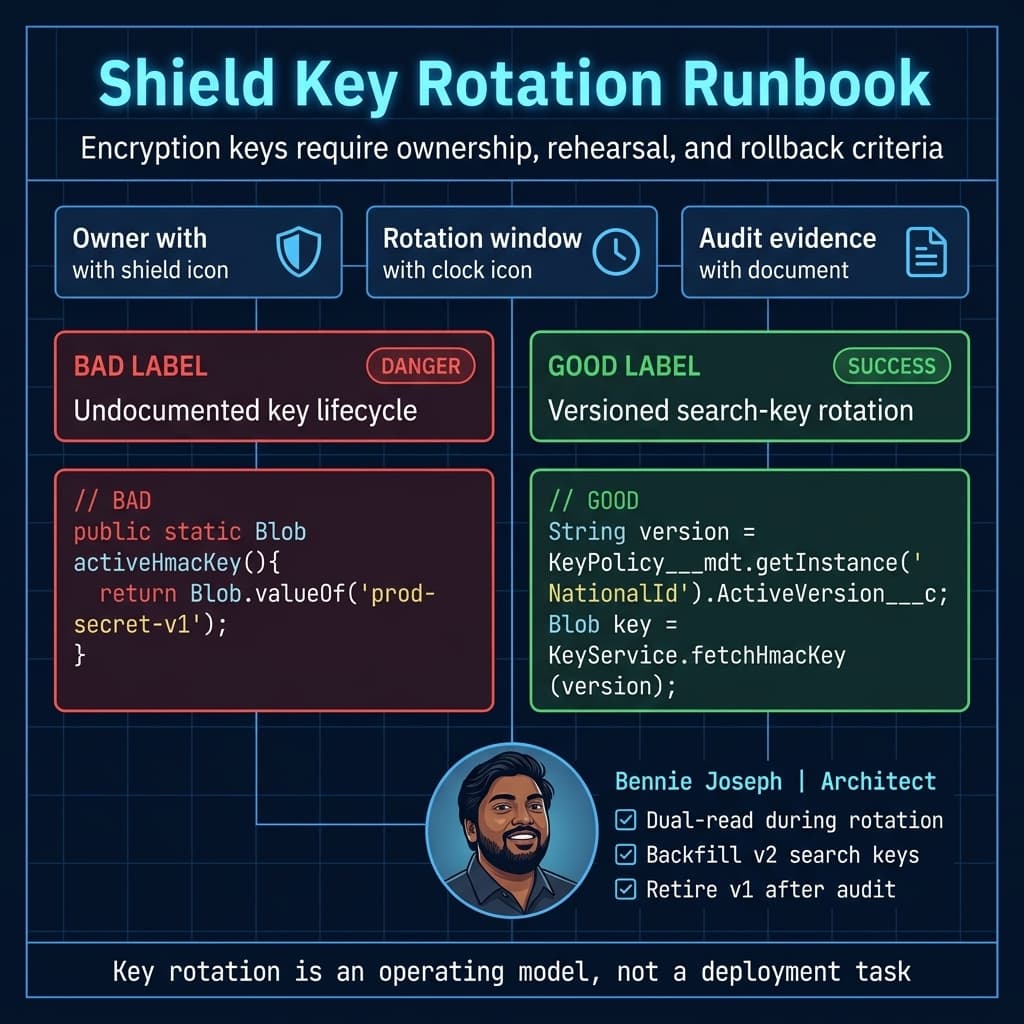
If you build this pattern, also design rotation. A v1 key eventually becomes v2. That means dual-write, dual-read, backfill, cutover, and retirement. If nobody wants to fund that lifecycle, they are not ready for the pattern.
Key Management Is An Operating Model, Not A Setup Step
Shield Platform Encryption introduces key lifecycle decisions that many project plans compress into a single line item.
That is a mistake.
You need answers for:
- Who owns tenant secret lifecycle?
- Who can rotate keys?
- What is the rotation schedule?
- What happens during suspected compromise?
- Which environments use production-like encryption?
- How are sandboxes handled?
- How are integrations tested against encrypted data?
- How are backups, exports, and downstream replicas governed?
- What is the break-glass process?
- Who audits “View Encrypted Data” permission assignments?
Key rotation is not just a security task. It is a business continuity task.
When you rotate keys, the platform has to maintain access to historical encrypted data. Depending on configuration and data volume, re-encryption and operational validation need planning. For large orgs, you do not discover rotation behavior during an incident. You rehearse it.
I also separate these concerns:
| Concern | Owner |
|---|---|
| Field classification | Data governance + business owner |
| Encryption configuration | Salesforce platform team |
| Key lifecycle policy | Security architecture |
| Integration impact | Enterprise integration team |
| Operational runbooks | Platform operations |
| Audit evidence | Compliance / risk |
| User permission review | Salesforce admin + IAM team |
If all of those are assigned to “the Salesforce team,” the design is already weak.
Integrations: The Place Encryption Designs Usually Leak
Integrations are where encryption architecture gets exposed.
A user interface can mask a field. A permission set can hide a value. But an integration user with broad access can quietly extract everything at scale.
Before encrypting fields, I inventory every integration by access intent:
| Integration Type | Encryption Concern |
|---|---|
| ETL exports | May replicate decrypted data into less secure stores |
| Middleware matching | May require deterministic lookup or search key |
| Real-time APIs | Need clear rules on raw vs derived values |
| Analytics pipelines | Should use minimized or federated data where possible |
| AI/agent workflows | Must avoid grounding on unnecessary sensitive fields |
| Support tools | Often over-permissioned for troubleshooting |
| Legacy sync jobs | Usually assume plain-text filters and joins |
For Agentforce 2.0 specifically, I’m careful with grounding and actions. Agentforce respects permissions and platform controls, but architecture still matters. If you give an agent action access to raw decrypted identifiers, you have expanded the operational surface area of that data.
My rule: agents should receive the minimum data needed to complete the task. If a service workflow only needs to confirm that a customer passed identity verification, the agent does not need the full identifier. It needs a verification status, timestamp, and policy outcome.
Same logic applies to custom AI agents using current models like claude-sonnet-4-7, gpt-5.5, or gemini-3.1-pro. Do not send decrypted regulated fields into model prompts unless the legal, security, retention, and vendor controls are explicitly approved. Encryption at rest inside Salesforce does not protect data once you place it in an external inference request.
Reporting And Analytics: Design Derived Facts
Reporting teams often discover encryption impact late because they are not always in the security design meetings.
If a sensitive field is used for grouping, filtering, bucketing, trending, or exception reporting, encryption can break or degrade the report design.
The answer is rarely, “Give analysts decrypted access.”
Better patterns:
- Store derived flags:
Has_Verified_Identifier__c - Store non-sensitive categories:
Identifier_Country__c - Store masked values:
Identifier_Last4__c - Store quality signals:
Identifier_Format_Status__c - Store event facts:
Identity_Verified_Date__c - Use aggregate objects for operational reporting
- Use Data 360 governance for federated analytics where appropriate
This is classic data architecture. Reports should not depend on raw secrets when derived facts will do.
On the healthcare case intake program, fraud operations originally wanted reports showing full identifiers for exception review. After walking through actual decision needs, they only required:
- Whether identifier existed
- Whether it matched the external verification service
- Whether multiple Contacts shared the same search key
- Whether the value was updated in the last 30 days
- Which user performed the change
None of that required exposing the raw identifier in reports.
Scale: 1K, 100K, 10M Records
Shield decisions feel different at different scale points.
At 1K Records
At 1K records, almost any design looks fine.
Manual backfills work. Report issues are manageable. Search complaints are isolated. Admins can fix bad data by hand. Integration failures show up quickly and are easy to trace.
This is where teams get false confidence.
A deterministic encrypted field may perform acceptably. A missing search key may not matter. A manual export may be tolerable. A one-off permission exception may seem harmless.
Do not let small data volumes validate an architecture that will fail later.
At 100K Records
At 100K records, operational patterns start to matter.
Backfills need batching. Duplicate detection gaps become visible. List views and reports show performance differences. Integration jobs may need redesign. Sandboxes need realistic encryption testing. Users notice if search behavior changes.
This is where I expect:
- A tested backfill plan
- Reconciliation reports
- Search-key indexes where appropriate
- Documented exception handling
- Permission set audits
- Integration contract updates
- UAT scripts that include encrypted-field behavior
At this scale, encryption is no longer a configuration task. It is a release program.
At 10M Records
At 10M records, bad encryption decisions become platform events in the human sense: everyone hears about them.
You cannot casually backfill 10M records through synchronous tooling. You cannot rely on users to validate edge cases. You cannot let every downstream consumer discover schema behavior at cutover. You cannot rotate derived keys without a migration strategy. You cannot query inefficiently and hope governor limits forgive you.
At this scale, I design for:
- Batch and queueable processing with restartability
- Idempotent backfill jobs
- Dual-read and dual-write windows
- Dedicated reconciliation objects
- Async monitoring
- Strict API contracts
- Bulk-safe automation
- Runbooks for support and rollback
- Lower-environment rehearsals with production-like data shape
- Data retention decisions before encryption
The most common 10M-record failure is not encryption itself. It is forgetting that encrypted data still participates in enterprise data movement.
Architecture Review Checklist Before Encrypting A Field
Before I approve a Shield encryption change, I want answers to these questions.
Data Classification
- What regulation or policy requires protection?
- Is the field actually required in Salesforce?
- Can we store a token, last four, flag, or derived value instead?
- Who is the business owner of this field?
Runtime Behavior
- Is the field searched?
- Is it filtered in SOQL, GraphQL, list views, or reports?
- Is it sorted, grouped, or bucketed?
- Is it used in duplicate rules or matching logic?
- Is it referenced by Flow, Apex, validation rules, formulas, or approval processes?
Integration Surface
- Which API clients read it?
- Which systems write it?
- Which systems need raw value vs derived value?
- Does any middleware log the value?
- Does any batch export include it?
- Does any agent or AI workflow receive it?
Security Operations
- Who can view decrypted data?
- Who approves access?
- How often is access reviewed?
- What is the key rotation plan?
- What is the incident response plan?
- How is audit evidence produced?
Migration
- How is historical data encrypted or transformed?
- Is a search key required?
- How will search keys be backfilled?
- What is the reconciliation process?
- What happens if backfill fails halfway?
- How will downstream consumers be notified?
If these answers are vague, the design is not ready.
What I Would Not Do
A few hard-earned opinions:
I would not encrypt every field just because it contains “customer data.” That usually destroys usability without materially improving the risk posture.
I would not use deterministic encryption as the default. It is a targeted compromise, not a blanket standard.
I would not expose decrypted fields to integration users unless the downstream system has equal or stronger controls.
I would not let reporting requirements force raw sensitive data into analytics. Build derived facts.
I would not let AI or agent workflows consume encrypted-field plaintext casually. If Agentforce 2.0 or a custom agent only needs an outcome, provide the outcome.
I would not start with Shield setup screens. I start with data classification, access patterns, and integration contracts.
The Architecture Principle
Shield Platform Encryption is powerful when it is part of a broader data protection architecture.
It becomes dangerous when teams treat it as a compliance checkbox.
The core principle is this:
Encrypt fields based on sensitivity, but design data access based on behavior.
Sensitivity tells you whether the field needs protection. Behavior tells you what architecture pattern will survive production.
That is the difference between a secure system and a system that is secure only until users try to do their jobs.
TL;DR
- Shield Platform Encryption changes data behavior, especially search, reporting, integrations, and AI/agent access patterns.
- The hardest decisions are field classification, probabilistic vs deterministic encryption, search-key design, and key operations.
- At enterprise scale, encryption is a data architecture program, not a setup task.