Agentforce Custom Actions: A Builder Playbook
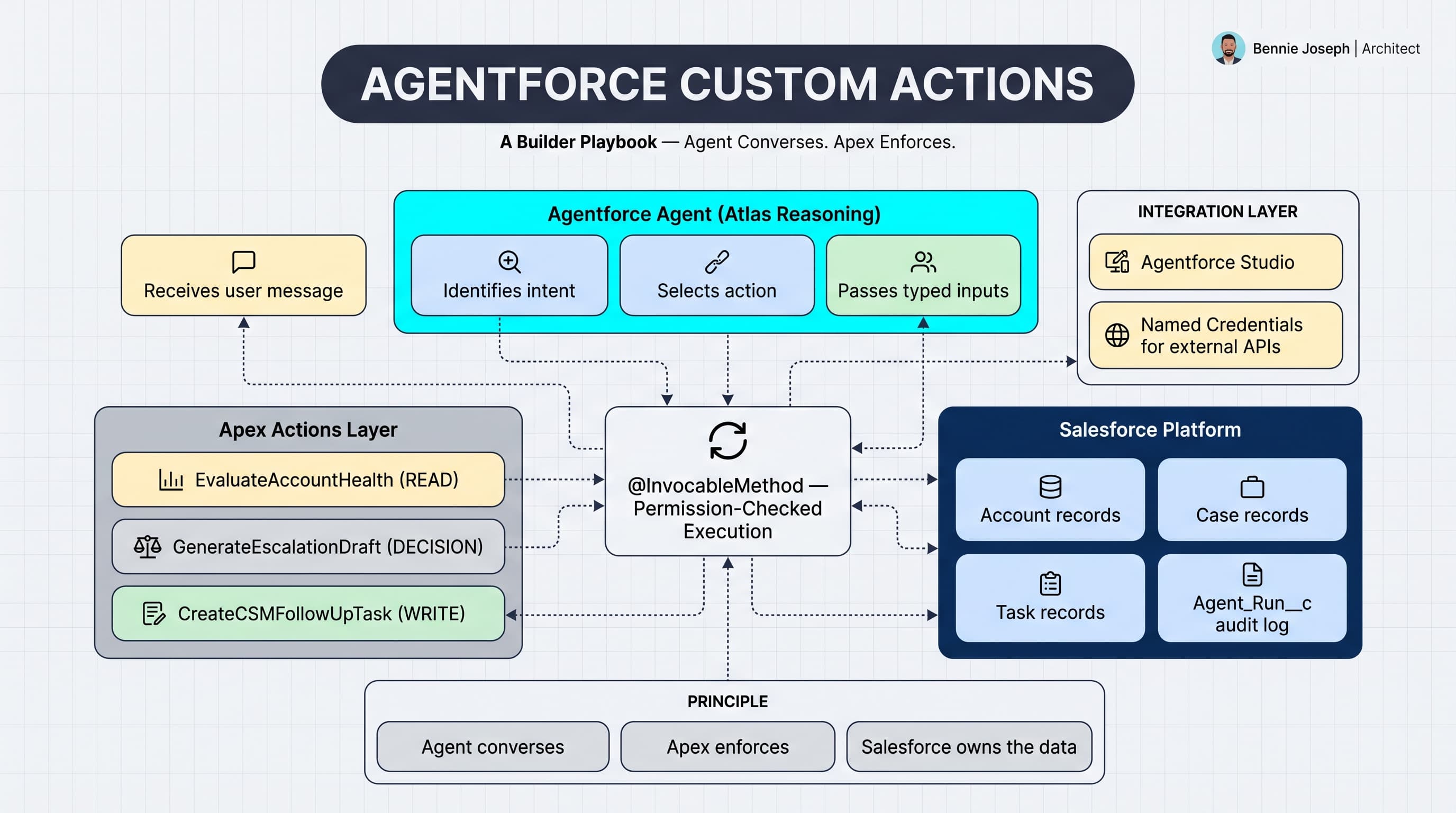
Agentforce is not magic. It is orchestration.
The agent can reason, route, summarize, and respond, but the useful work still happens through actions: Apex, Flow, prompt templates, APIs, and the Salesforce platform services you already trust.
This is my builder playbook for custom actions. Not a slideware overview. This is how I approach Agentforce custom actions when the business actually expects the agent to touch revenue workflows, support processes, and customer data without creating chaos.
Here’s the unpopular take: most bad Agentforce implementations are not bad because the model is weak. They are bad because the actions are vague, unsafe, non-deterministic, and impossible to debug.
If you want an agentforce custom actions tutorial that holds up in an enterprise org, start with action design before you touch the builder UI.
What a custom action really is
An Agentforce custom action is a tool the agent can call when natural language is not enough.
That tool might:
- Retrieve customer context from Salesforce
- Create a Case, Task, Lead, or Opportunity
- Update a status field
- Call an external pricing API
- Run eligibility logic
- Generate a structured recommendation
- Invoke a Flow or Apex class
The important part is this: the agent should not be “figuring out” your business rules. It should be deciding when to call a deterministic action that already knows the rules.
I usually split actions into three categories.
Read actions
These fetch data and return structured context.
Example:
- “Get account health”
- “Find open escalations”
- “Retrieve active subscription products”
- “Check renewal risk”
These are the safest place to start. Read actions help the agent answer with grounded Salesforce data.
Decision actions
These run business logic and return a recommendation.
Example:
- “Calculate discount eligibility”
- “Determine support entitlement”
- “Classify lead routing tier”
- “Evaluate cancellation save offer”
These should be deterministic. Same input, same output.
Write actions
These mutate data.
Example:
- “Create renewal follow-up task”
- “Update case priority”
- “Submit approval request”
- “Create draft quote”
Write actions need the strongest guardrails. I rarely let an early-stage agent update high-value records directly without confirmation, audit fields, and idempotency.
The architecture I use
For enterprise Salesforce projects, I prefer this pattern:
- Agent receives user request.
- Agent identifies intent.
- Agent calls a custom action with explicit inputs.
- Apex validates permissions and data shape.
- Apex executes deterministic logic.
- Apex returns structured output.
- Agent explains the result in human language.
That sounds boring. Good. Boring is what you want near CRM data.
On one enterprise implementation, we built an internal revenue assistant for customer success managers. The ask was simple: “Tell me which accounts are at risk before renewal.”
The first version used prompt-only reasoning over account notes. It sounded confident and was wrong too often.
The better version used Agentforce custom actions:
- One action retrieved open support escalations.
- One action calculated renewal proximity.
- One action checked unpaid invoices from an integration object.
- One action returned a risk score and recommended next step.
The agent still handled conversation, but Apex handled truth.
Start with the action contract
Before I build Apex, I write the action contract.
For example:
Action name: Evaluate Account Health
Purpose: Given an Account Id, return a risk level and recommended next step.
Inputs: Account Id, optional business context
Outputs: Risk level, summary, recommended next step
Side effects: None
User confirmation required: No
Failure behavior: Return safe error message; do not expose stack trace
That contract matters because Agentforce needs clear instructions. Apex also needs clear boundaries.
Bad action:
“Analyze the customer.”
Good action:
“Evaluate account health using open cases, open pipeline, renewal date, and escalation count. Return risk level as Low, Medium, or High.”
Ambiguous actions cause ambiguous agent behavior. If the action name, description, and inputs are fuzzy, the agent will call it at the wrong time or pass garbage into it.
Build the Apex action
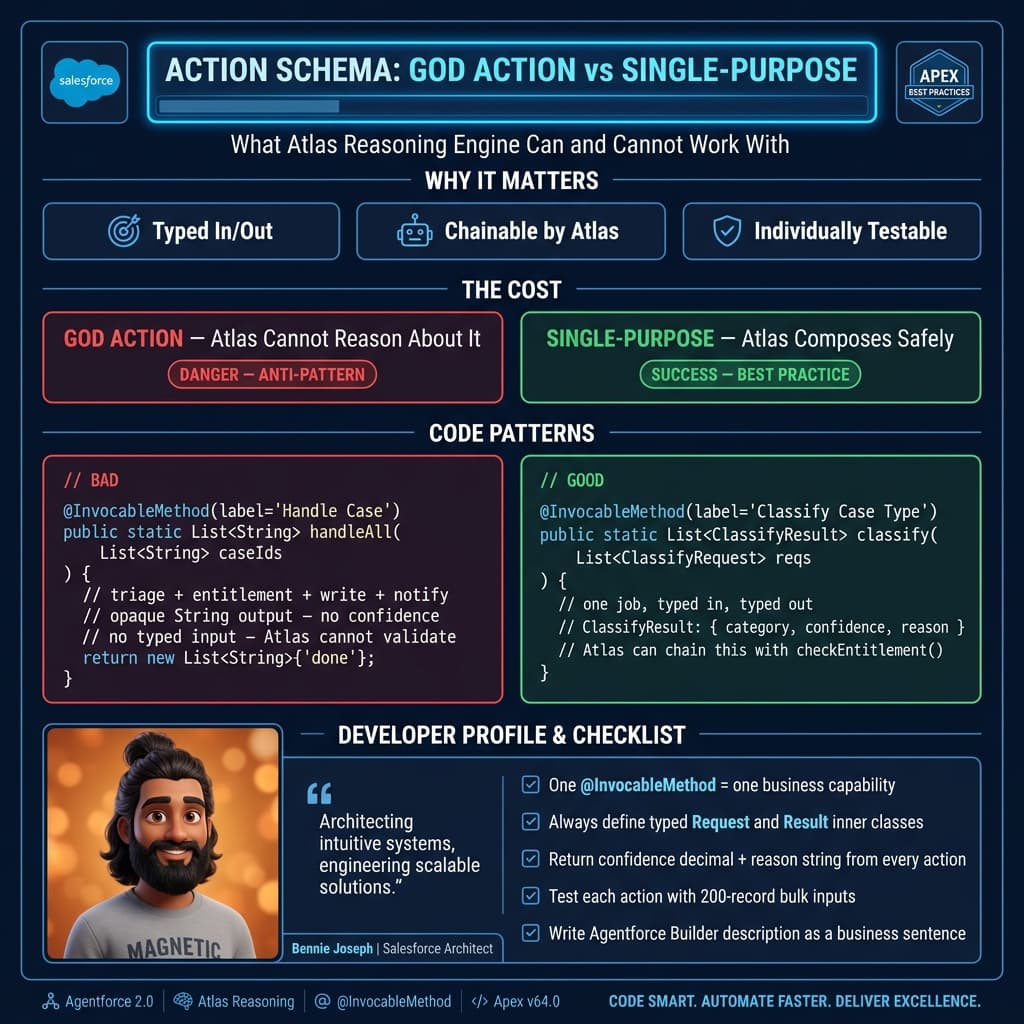
For Agentforce, Apex custom actions are commonly exposed through @InvocableMethod. The shape matters. Use a request wrapper and response wrapper. Keep outputs plain and predictable.
Here is a simplified Apex action I would actually start with.
public with sharing class AgentforceAccountHealthAction {
    public class Request {
        @InvocableVariable(required=true)
        public Id accountId;

        @InvocableVariable(required=false)
        public String businessContext;
    }

    public class Response {
        @InvocableVariable
        public Id accountId;

        @InvocableVariable
        public String riskLevel;

        @InvocableVariable
        public String summary;

        @InvocableVariable
        public String recommendedNextStep;

        @InvocableVariable
        public Boolean success;

        @InvocableVariable
        public String errorMessage;
    }

    @InvocableMethod(
        label='Evaluate Account Health'
        description='Evaluates account health using open cases and open opportunity pipeline. Returns a risk level and recommended next step.'
    )
    public static List<Response> evaluate(List<Request> requests) {
        List<Response> results = new List<Response>();

        if (requests == null || requests.isEmpty()) {
            return results;
        }

        Set<Id> accountIds = new Set<Id>();
        for (Request req : requests) {
            if (req != null && req.accountId != null) {
                accountIds.add(req.accountId);
            }
        }

        Map<Id, Account> accounts = new Map<Id, Account>([
            SELECT Id, Name, Industry, Type
            FROM Account
            WHERE Id IN :accountIds
            WITH SECURITY_ENFORCED
        ]);

        Map<Id, Integer> openCaseCountsByAccount = new Map<Id, Integer>();
        for (AggregateResult ar : [
            SELECT AccountId accountId, COUNT(Id) caseCount
            FROM Case
            WHERE AccountId IN :accountIds
            AND IsClosed = false
            GROUP BY AccountId
        ]) {
            openCaseCountsByAccount.put(
                (Id) ar.get('accountId'),
                (Integer) ar.get('caseCount')
            );
        }

        Map<Id, Decimal> openPipelineByAccount = new Map<Id, Decimal>();
        for (AggregateResult ar : [
            SELECT AccountId accountId, SUM(Amount) totalAmount
            FROM Opportunity
            WHERE AccountId IN :accountIds
            AND IsClosed = false
            GROUP BY AccountId
        ]) {
            openPipelineByAccount.put(
                (Id) ar.get('accountId'),
                (Decimal) ar.get('totalAmount')
            );
        }

        for (Request req : requests) {
            Response res = new Response();
            res.accountId = req == null ? null : req.accountId;

            try {
                if (req == null || req.accountId == null) {
                    throw new AgentforceActionException('Account Id is required.');
                }

                if (!accounts.containsKey(req.accountId)) {
                    throw new AgentforceActionException('Account was not found or is not accessible.');
                }

                Account acct = accounts.get(req.accountId);
                Integer openCases = openCaseCountsByAccount.containsKey(req.accountId)
                    ? openCaseCountsByAccount.get(req.accountId)
                    : 0;

                Decimal openPipeline = openPipelineByAccount.containsKey(req.accountId)
                    ? openPipelineByAccount.get(req.accountId)
                    : 0;

                if (openCases >= 5) {
                    res.riskLevel = 'High';
                    res.recommendedNextStep = 'Escalate to the account owner and create an executive review plan.';
                } else if (openCases >= 2 || openPipeline == 0) {
                    res.riskLevel = 'Medium';
                    res.recommendedNextStep = 'Schedule a customer health check and review open support issues.';
                } else {
                    res.riskLevel = 'Low';
                    res.recommendedNextStep = 'Continue standard engagement cadence.';
                }

                res.summary =
                    'Account ' + acct.Name +
                    ' has ' + String.valueOf(openCases) + ' open case(s) and ' +
                    String.valueOf(openPipeline) + ' in open pipeline.';

                res.success = true;
            } catch (Exception ex) {
                res.success = false;
                res.riskLevel = 'Unknown';
                res.summary = 'Unable to evaluate account health.';
                res.recommendedNextStep = 'Ask a Salesforce admin to review the action configuration.';
                res.errorMessage = ex.getMessage();
            }

            results.add(res);
        }

        return results;
    }

    public class AgentforceActionException extends Exception {}
}
There are a few decisions here that are intentional.
First, the action is bulkified. Agentforce may call it for one record most of the time, but Apex should not be lazy. Bulk-safe code is table stakes.
Second, the output is structured. I do not return one giant paragraph unless I have no choice. Structured outputs make the action easier to test, log, and reuse.
Third, I use with sharing and WITH SECURITY_ENFORCED. Agent actions should not become a permission bypass. If the user cannot access the data, the action should not casually hand it to the agent.
Fourth, the action returns a safe failure response. The user does not need a stack trace. The admin does.
Configure the action in Agentforce Builder
Once the Apex is deployed, the builder work is straightforward but still important.
In Agentforce Builder, create or edit your agent and add a custom action backed by the invocable Apex method.
I keep the action instructions direct.
Example action instruction:
Use this action when the user asks about customer health, renewal risk, account risk, customer escalation status, or whether an account needs attention. Provide a valid Salesforce Account Id. Do not call this action for general sales coaching questions.
The last sentence matters. You are not just telling the agent when to use the action. You are telling it when not to use the action.
For the input mapping, the Account Id can come from:
- The current record context
- A previous action result
- A user-provided account reference resolved by another action
- A screen or embedded Salesforce page context
For the output, I usually instruct the agent to summarize the fields without inventing extra facts.
Example response instruction:
Use
riskLevel,summary, andrecommendedNextStepto answer the user. Ifsuccessis false, apologize briefly and providerecommendedNextStep. Do not invent case details that were not returned by the action.
This is where a lot of teams get sloppy. They build solid Apex, then give the agent vague instructions like “answer helpfully.” That is how hallucinated details sneak into business workflows.
Add tests like this will run in production
I write Apex tests for custom actions the same way I write tests for service-layer logic. I care about outputs, failures, and access assumptions.
@IsTest
private class AgentforceAccountHealthActionTest {
    @IsTest
    static void returnsHighRiskWhenAccountHasManyOpenCases() {
        Account acct = new Account(Name = 'Acme Enterprise');
        insert acct;

        List<Case> cases = new List<Case>();
        for (Integer i = 0; i < 5; i++) {
            cases.add(new Case(
                AccountId = acct.Id,
                Status = 'New',
                Origin = 'Web',
                Subject = 'Escalation ' + i
            ));
        }
        insert cases;

        AgentforceAccountHealthAction.Request req =
            new AgentforceAccountHealthAction.Request();
        req.accountId = acct.Id;

        Test.startTest();
        List<AgentforceAccountHealthAction.Response> responses =
            AgentforceAccountHealthAction.evaluate(
                new List<AgentforceAccountHealthAction.Request>{ req }
            );
        Test.stopTest();

        System.assertEquals(1, responses.size());
        System.assertEquals(true, responses[0].success);
        System.assertEquals('High', responses[0].riskLevel);
        System.assert(
            responses[0].recommendedNextStep.contains('Escalate'),
            'Expected escalation recommendation.'
        );
    }

    @IsTest
    static void returnsSafeFailureWhenAccountIdMissing() {
        AgentforceAccountHealthAction.Request req =
            new AgentforceAccountHealthAction.Request();

        List<AgentforceAccountHealthAction.Response> responses =
            AgentforceAccountHealthAction.evaluate(
                new List<AgentforceAccountHealthAction.Request>{ req }
            );

        System.assertEquals(false, responses[0].success);
        System.assertEquals('Unknown', responses[0].riskLevel);
        System.assertNotEquals(null, responses[0].errorMessage);
    }
}
This test is not fancy. It proves the behavior the agent depends on.
Here’s my rule: if the agent action can influence a customer conversation, revenue motion, or operational decision, it deserves real tests.
The enterprise pattern: separate read, decide, and write
In the customer success project I mentioned earlier, the business wanted the agent to do this:
“If an account is high risk, create a task for the CSM and draft an escalation note.”
The naive design is one giant action called Handle At Risk Account.
I pushed back.
We split it into three actions:
Evaluate Account HealthGenerate Escalation DraftCreate CSM Follow-Up Task
That gave us control.
The read/decision action could run freely. The draft action could generate recommended language. The write action required explicit confirmation before creating a Task.
That separation saved us during UAT. The agent was good at identifying risk, but users wanted to edit escalation wording before creating tasks. Because we separated the actions, we did not have to unwind a giant black box.
Guardrails I do not skip
Agentforce custom actions need guardrails at multiple layers. Do not dump all responsibility on the prompt.
Validate inputs in Apex
The agent can pass incomplete inputs. Users can type ambiguous requests. Context can be missing.
Apex must validate required fields, record accessibility, picklist values, and business constraints.
Do not assume the builder configuration protects you.
Make write actions idempotent
If a write action creates records, protect against duplicates.
For example, if the agent creates a follow-up Task for a high-risk account, I do not want five duplicate tasks because the user rephrased the same request.
A simple pattern is to use a deterministic key.
public with sharing class AgentforceTaskAction {
    public class Request {
        @InvocableVariable(required=true)
        public Id accountId;

        @InvocableVariable(required=true)
        public String reason;
    }

    public class Response {
        @InvocableVariable
        public Boolean success;

        @InvocableVariable
        public Id taskId;

        @InvocableVariable
        public String message;
    }

    @InvocableMethod(
        label='Create CSM Follow-Up Task'
        description='Creates one follow-up task for a customer success manager when an account needs attention.'
    )
    public static List<Response> createTasks(List<Request> requests) {
        List<Response> responses = new List<Response>();

        for (Request req : requests) {
            Response res = new Response();

            try {
                if (req == null || req.accountId == null) {
                    throw new ActionException('Account Id is required.');
                }

                String token = 'Agentforce-CSM-Followup-' + String.valueOf(req.accountId);

                List<Task> existing = [
                    SELECT Id
                    FROM Task
                    WHERE WhatId = :req.accountId
                    AND Subject = :token
                    AND IsClosed = false
                    LIMIT 1
                ];

                if (!existing.isEmpty()) {
                    res.success = true;
                    res.taskId = existing[0].Id;
                    res.message = 'An open follow-up task already exists.';
                    responses.add(res);
                    continue;
                }

                Task t = new Task(
                    WhatId = req.accountId,
                    Subject = token,
                    ActivityDate = Date.today().addDays(2),
                    Priority = 'High',
                    Status = 'Not Started',
                    Description = 'Created by Agentforce. Reason: ' + req.reason
                );

                insert t;

                res.success = true;
                res.taskId = t.Id;
                res.message = 'Follow-up task created.';
            } catch (Exception ex) {
                res.success = false;
                res.message = 'Unable to create follow-up task: ' + ex.getMessage();
            }

            responses.add(res);
        }

        return responses;
    }

    public class ActionException extends Exception {}
}
In a production version, I would usually avoid putting the idempotency token directly in the Subject. I might use a custom field, a platform event correlation id, or a dedicated automation log object. But the principle is the same: repeated calls should not create duplicate business noise.
Require confirmation for meaningful writes
If the action updates a record, submits approval, sends an email, creates a quote, or changes customer-facing data, I want explicit confirmation.
A good agent interaction looks like this:
“I found 5 open cases and no open renewal opportunity. This account is high risk. Do you want me to create a CSM follow-up task?”
Only after the user confirms should the write action run.
Log action calls
For enterprise teams, observability is not optional. I want to know:
- Which action ran
- Who triggered it
- What record was touched
- Whether it succeeded
- What error happened
- What correlation id ties the conversation to the action
Sometimes platform logs are enough. Often I create a custom Agent_Action_Log__c object for business auditability.
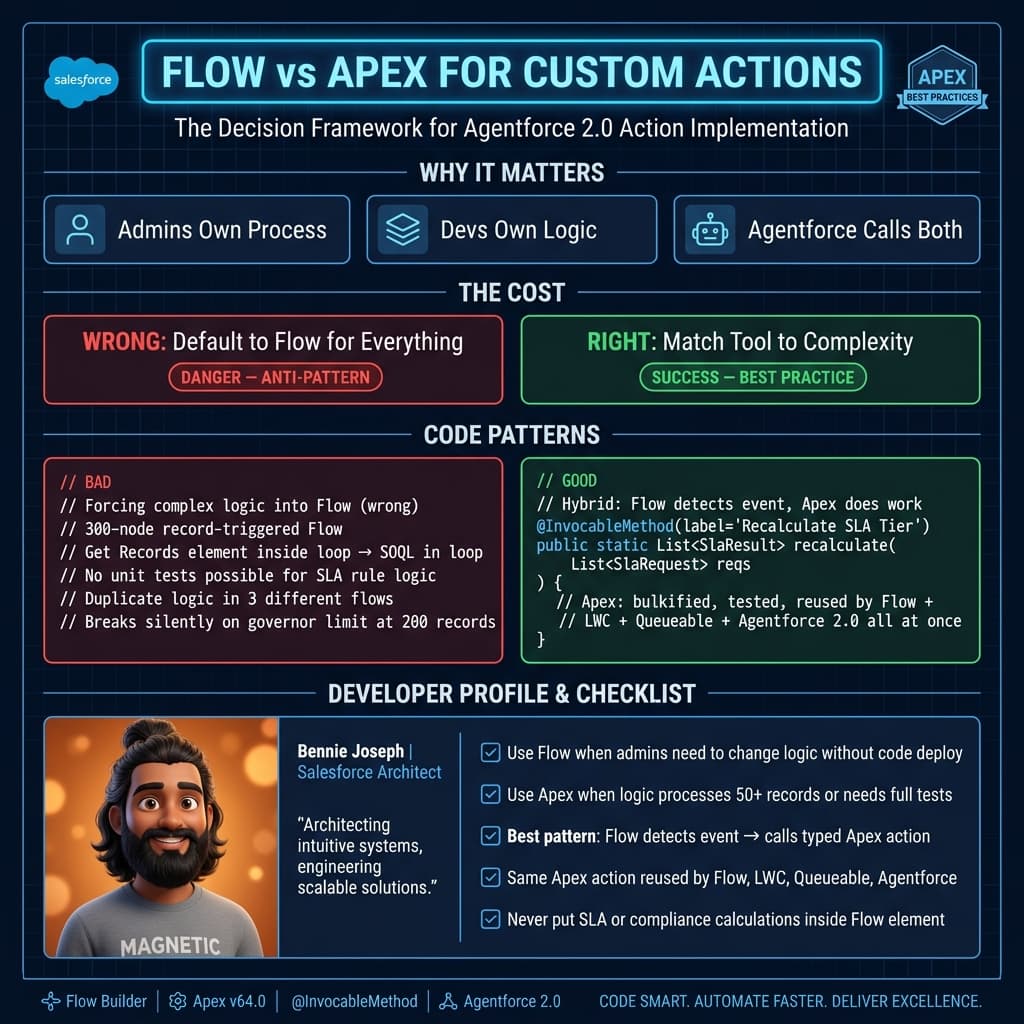
Flow vs Apex for custom actions: which to use
This comes up on every Agentforce project. Here's how I decide:
| Factor | Use Flow | Use Apex |
|---|---|---|
| Who builds it | Admin or consultant | Developer |
| Business logic complexity | Simple conditional, field update, create record | Complex validation, bulkification, calculations |
| External callout needed | No (Flow HTTP callout is limited) | Yes — HTTP callouts are well-tested in Apex |
| Error handling control | Limited (Fault paths only) | Full — try/catch, custom exceptions, graceful error structs |
| Bulk agent interactions | Avoid — Flow bulk limits are easy to hit | Safe with bulkification patterns |
| Test coverage | Challenging for complex logic | Proper Apex test classes, assertion-rich |
| Auditability | Flow debug logs | Custom Agent_Action_Log__c records |
| Performance | Slower governor limit consumption for complex logic | Faster, inline processing |
| When to start with Flow | Prototyping, simple lookups, basic record creates | Any action that risks production data |
My actual rule: start with Flow to prove the business logic works, then migrate to Apex when the action needs error handling, external callouts, or bulk safety. Never put complex business rules in a Flow you expect to survive 2 years of schema changes.
External REST actions: when Agentforce needs to leave Salesforce
Not every action lives inside Salesforce. Some of the most valuable patterns call external APIs:
- Pricing engine callout
- Credit check from a financial system
- ERP inventory lookup
- External knowledge base or vector search
- Third-party identity verification
Here's the Apex pattern I use for a safe external action:
public with sharing class ExternalPricingAction {
    private static final String NAMED_CREDENTIAL = 'callout:PricingEngine';
    private static final Integer TIMEOUT_MS = 10000;

    public class Request {
        @InvocableVariable(required=true) public String productCode;
        @InvocableVariable(required=true) public Integer quantity;
        @InvocableVariable(required=false) public String accountTier;
    }

    public class Response {
        @InvocableVariable public Boolean success;
        @InvocableVariable public Decimal listPrice;
        @InvocableVariable public Decimal discountedPrice;
        @InvocableVariable public String currency_x; // 'currency' is reserved
        @InvocableVariable public String errorMessage;
    }

    @InvocableMethod(
        label='Get Product Pricing'
        description='Returns list and discounted price for a product. Use when user asks about pricing, quotes, or cost.'
    )
    public static List<Response> getPrice(List<Request> requests) {
        List<Response> results = new List<Response>();

        for (Request req : requests) {
            Response res = new Response();
            try {
                HttpRequest httpReq = new HttpRequest();
                httpReq.setEndpoint(NAMED_CREDENTIAL + '/v1/price');
                httpReq.setMethod('POST');
                httpReq.setHeader('Content-Type', 'application/json');
                httpReq.setTimeout(TIMEOUT_MS);
                httpReq.setBody(JSON.serialize(new Map<String, Object>{
                    'product_code' => req.productCode,
                    'quantity' => req.quantity,
                    'account_tier' => req.accountTier ?? 'Standard'
                }));

                Http http = new Http();
                HttpResponse httpRes = http.send(httpReq);

                if (httpRes.getStatusCode() != 200) {
                    res.success = false;
                    res.errorMessage = 'Pricing service unavailable. Please try again or contact sales.';
                    results.add(res);
                    continue;
                }

                Map<String, Object> body = (Map<String, Object>) JSON.deserializeUntyped(httpRes.getBody());
                res.success = true;
                res.listPrice = (Decimal) body.get('list_price');
                res.discountedPrice = (Decimal) body.get('discounted_price');
                res.currency_x = (String) body.get('currency');

            } catch (CalloutException ex) {
                res.success = false;
                res.errorMessage = 'Pricing service timeout. Please try again shortly.';
            }

            results.add(res);
        }

        return results;
    }
}
Key things to notice:
- Named Credential hides the endpoint and auth — the agent never sees a URL or API key
- Timeout is explicit — no action should wait indefinitely
- Error messages are user-friendly, not stack traces
- The response has a
successflag so the agent knows whether to use the data or apologize
Design the action descriptions like APIs
The agent reads action metadata. Treat descriptions like API documentation.
Weak description:
Creates a task.
Better description:
Creates a single open follow-up Task on an Account for the customer success manager. Use only after the user confirms task creation. Do not use for Cases, Opportunities, or general reminders.
That extra specificity prevents misuse.
I also like narrow names:
EvaluateAccountHealthCreateRenewalFollowUpTaskCheckSupportEntitlementFindOpenEscalationCases
I dislike vague names:
DoAccountStuffCustomerHelperGetDataRunAutomation
Agents do better with clear tools. Developers do too.
Common mistakes I see
The first mistake is building actions that are too broad. A custom action should do one job well. If it reads, decides, writes, emails, and escalates in one transaction, you built a liability.
The second mistake is returning unstructured blobs. If your Apex returns a paragraph, the agent has to parse meaning from prose. Return fields.
The third mistake is skipping permission design. “The agent needs access” is not a security model. Use sharing, field-level security, and explicit checks.
The fourth mistake is letting the agent invent missing inputs. If there is no Account Id, use an account lookup action or ask the user a clarifying question.
The fifth mistake is not testing the full conversation. Apex tests prove code behavior. Agent testing proves orchestration behavior. You need both.
My build checklist
When I build Agentforce custom actions, I use this checklist:
- Is the action name specific?
- Is the action description explicit about when to use it?
- Are inputs required only when truly required?
- Does Apex validate everything important?
- Is the action bulk-safe?
- Does it respect sharing and security?
- Are outputs structured?
- Does it fail safely?
- Does it avoid unintended writes?
- Are write actions idempotent?
- Is user confirmation required where appropriate?
- Is there logging or auditability?
- Are there Apex tests?
- Has the agent conversation been tested with realistic prompts?
That last point is where enterprise projects get real. Do not test only happy paths like:
“Evaluate account health for Acme.”
Test messy prompts:
“Is Acme going sideways?”
“Should I be worried about Burlington before renewal?”
“Create whatever follow-up is needed for that customer we discussed earlier.”
“Why is this account red?”
Users do not speak in object names and field labels. Your actions still need clean inputs.
Final thought
Agentforce custom actions are where AI becomes useful inside Salesforce. But they are also where bad design can do real damage.
My bias is simple: let the agent converse and orchestrate. Let Apex enforce rules. Let Salesforce own permissions, transactions, and auditability.
If you build actions this way, you get the best version of Agentforce: natural language on the front end, deterministic enterprise automation on the back end.
TL;DR
- Build narrow Agentforce custom actions with explicit inputs, structured outputs, and deterministic Apex.
- Separate read, decision, and write actions; require confirmation for meaningful data changes.
- Treat action descriptions, tests, permissions, idempotency, and logging as production requirements.