Agentforce Multi-Agent Orchestration: Real Patterns from Production
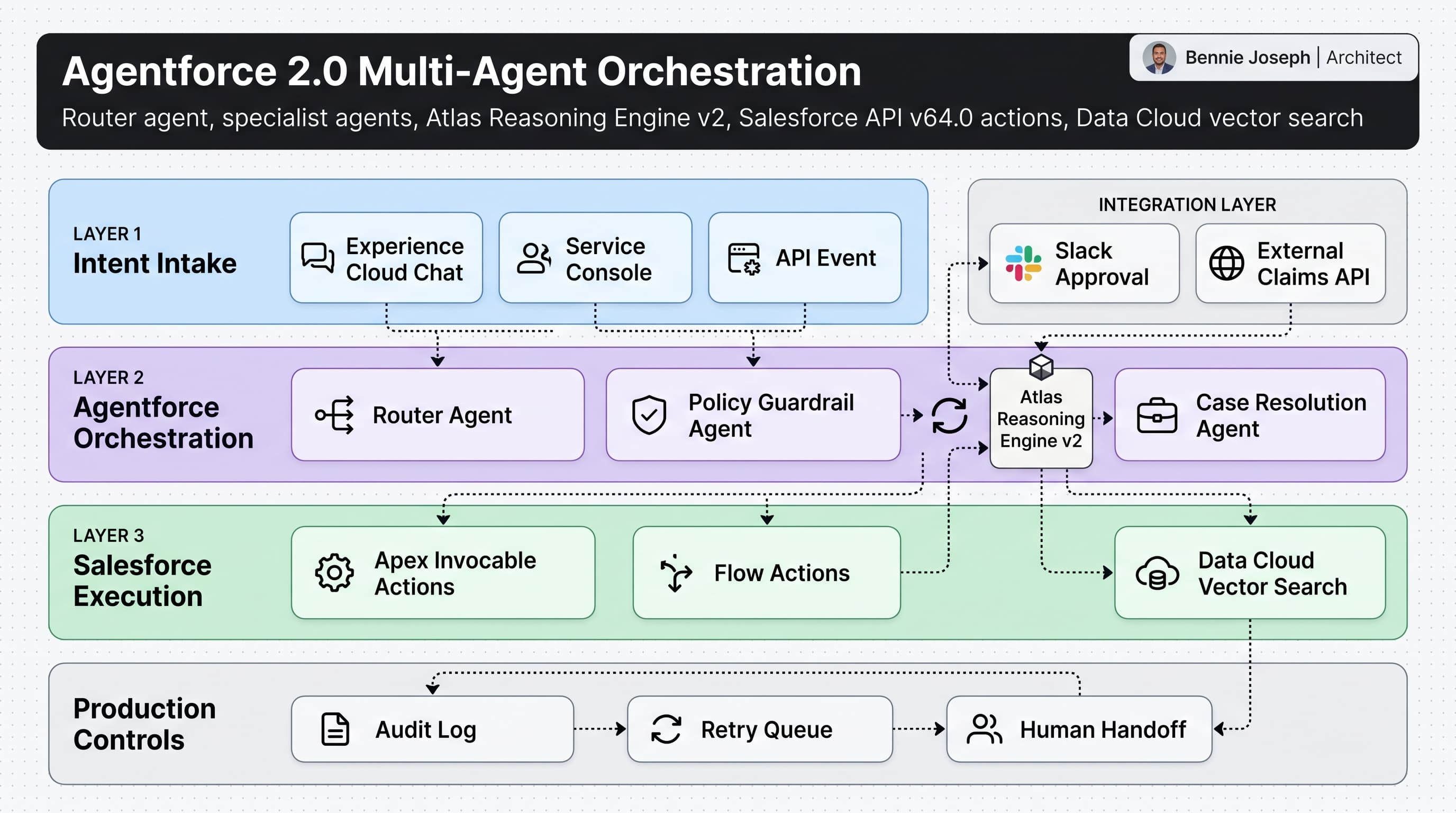
Most Agentforce demos are too clean. One agent answers a question, updates a record, and everyone claps.
Production does not work like that.
In real enterprise orgs, the hard part is not “can an AI agent call an Apex action?” The hard part is deciding which agent owns the next step, how much context it gets, when it should stop, and how you prove later that it did the right thing.
That is why I care about agentforce multi agent orchestration patterns. Agentforce 2.0, released in Winter ’26, finally gives Salesforce teams a serious foundation for multi-agent orchestration: Atlas Reasoning Engine v2, multi-agent handoffs, custom reasoning steps, native Data Cloud vector search, and tighter execution controls across the Einstein 1 Platform.
But tooling does not replace architecture. If you wire five agents together with vague instructions and shared access to every action, you built a liability.
Here are the production patterns I use.
Pattern 1: Use a Router Agent, Not a Mega-Agent
Here’s the unpopular take: the “one agent to do everything” model is usually a governance shortcut pretending to be architecture.
A mega-agent starts simple:
- Answer customer questions
- Summarize cases
- Update entitlement fields
- Create work orders
- Escalate to specialists
- Pull policy documents
- Draft customer emails
Then three months later, nobody knows why it changed a status, skipped a warranty rule, or sent a bad recommendation.
In Agentforce 2.0, I prefer a router agent that does almost no business execution. Its job is to classify intent, select the right specialist agent, pass a constrained payload, and enforce a return contract.
A clean router usually decides between agents like this:
- Case Triage Agent — classify and prioritize inbound cases
- Entitlement Agent — validate contract, SLA, support tier, warranty
- Resolution Agent — recommend troubleshooting steps
- Order Agent — handle order status, replacements, and RMAs
- Human Handoff Agent — package context for a service rep
The router should not update ten objects. It should not decide refunds. It should not improvise policy.
It should route.
In one manufacturing client project, we replaced a broad “support agent” with a router plus four specialist agents. The measurable improvement was not just answer quality. It was operational clarity. When a wrong recommendation happened, we could identify whether the failure was intent classification, entitlement lookup, retrieval quality, or execution.
That is the difference between debugging an architecture and arguing with a black box.
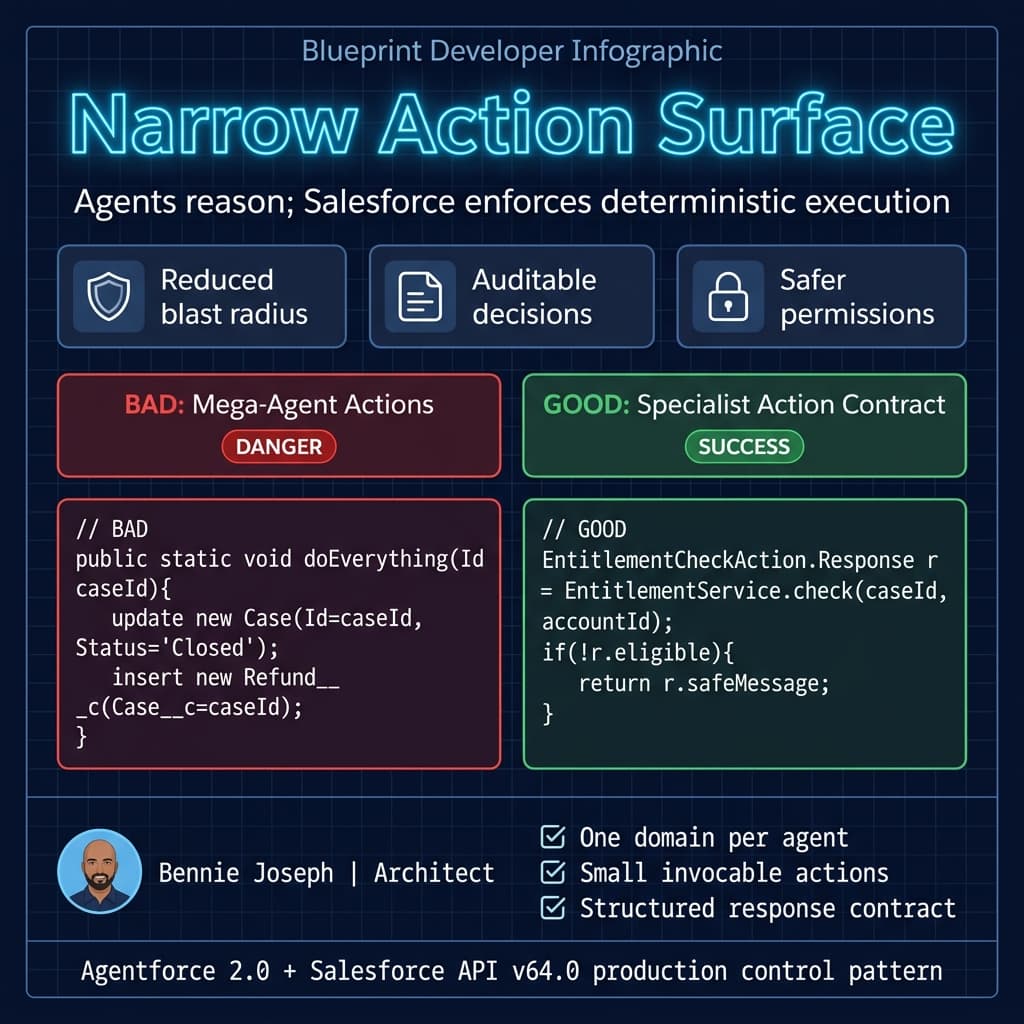
Pattern 2: Give Every Agent a Narrow Action Surface
Agent autonomy sounds great until an agent has access to twenty actions and chooses the wrong one confidently.
My production rule is simple: an agent should only see actions it can safely use inside its domain.
For example, an Entitlement Agent can read contract data, validate coverage, and return eligibility. It should not create refunds. A Resolution Agent can recommend knowledge steps, but it should not close a case unless the workflow explicitly allows it.
I usually expose Salesforce execution through small Apex invocable actions with explicit request and response contracts. Even with Flow actions available, I still use Apex when I need deterministic validation, structured logging, bulk behavior, or stricter error handling.
Here is a simplified Apex action I would expose to an Agentforce specialist agent in Salesforce API v64.0.
public with sharing class EntitlementCheckAction {
    public class Request {
        @InvocableVariable(required=true)
        public Id caseId;

        @InvocableVariable(required=true)
        public Id accountId;

        @InvocableVariable(required=false)
        public String productSku;
    }

    public class Response {
        @InvocableVariable
        public Boolean eligible;

        @InvocableVariable
        public String supportTier;

        @InvocableVariable
        public String reasonCode;

        @InvocableVariable
        public String safeMessage;
    }

    @InvocableMethod(
        label='Check Customer Entitlement'
        description='Validates whether a customer is eligible for support on a case.'
    )
    public static List<Response> checkEntitlement(List<Request> requests) {
        Set<Id> accountIds = new Set<Id>();
        Set<Id> caseIds = new Set<Id>();

        for (Request req : requests) {
            if (req.accountId != null) accountIds.add(req.accountId);
            if (req.caseId != null) caseIds.add(req.caseId);
        }

        Map<Id, Account> accounts = new Map<Id, Account>([
            SELECT Id, Support_Tier__c, Support_Status__c
            FROM Account
            WHERE Id IN :accountIds
        ]);

        Map<Id, Case> cases = new Map<Id, Case>([
            SELECT Id, AccountId, Status, Priority
            FROM Case
            WHERE Id IN :caseIds
        ]);

        List<Response> responses = new List<Response>();

        for (Request req : requests) {
            Response res = new Response();
            Account acct = accounts.get(req.accountId);
            Case c = cases.get(req.caseId);

            if (acct == null || c == null) {
                res.eligible = false;
                res.reasonCode = 'MISSING_CONTEXT';
                res.safeMessage = 'I could not validate entitlement because required Salesforce records were missing.';
            } else if (acct.Support_Status__c != 'Active') {
                res.eligible = false;
                res.supportTier = acct.Support_Tier__c;
                res.reasonCode = 'INACTIVE_SUPPORT';
                res.safeMessage = 'The customer does not currently have active support coverage.';
            } else {
                res.eligible = true;
                res.supportTier = acct.Support_Tier__c;
                res.reasonCode = 'ELIGIBLE';
                res.safeMessage = 'The customer has active support coverage.';
            }

            responses.add(res);
        }

        return responses;
    }
}
Notice what this action does not do.
It does not ask the model to infer support rules from random case comments. It does not return raw contract clauses. It does not expose fields the agent does not need. It gives the agent a constrained business result: eligible, tier, reason code, safe message.
That is the pattern.
Agents reason. Salesforce enforces.
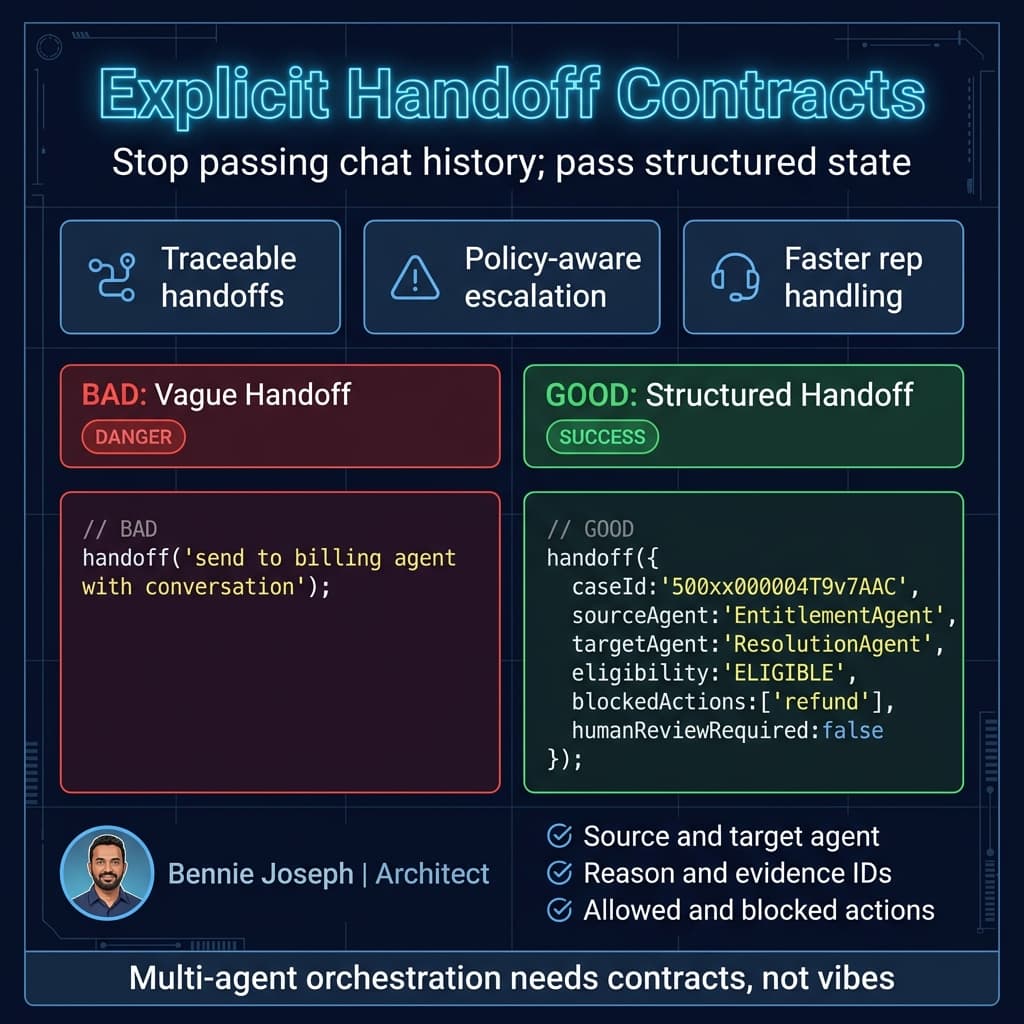
Pattern 3: Make Handoffs Explicit Contracts
A bad handoff sounds like this:
“Send this to the billing agent.”
A good handoff sounds like this:
{
  "handoffType": "ENTITLEMENT_TO_RESOLUTION",
  "caseId": "500xx000004T9v7AAC",
  "accountId": "001xx000003DGbYAAW",
  "eligibility": "ELIGIBLE",
  "supportTier": "Premier",
  "blockedActions": ["refund", "contract_change"],
  "recommendedNextAgent": "ResolutionAgent",
  "humanReviewRequired": false
}
Multi-agent orchestration fails when agents pass blobs of conversation history instead of structured state.
Conversation history is useful context. It is not a contract.
In Agentforce 2.0, I use custom reasoning steps and structured handoff instructions so each specialist agent knows:
- What decision has already been made
- What evidence supports that decision
- What it is allowed to do next
- What it must not do
- When to escalate
For regulated industries, this matters even more. In a financial services implementation, we had an AI-assisted servicing flow where the first agent classified the customer request, the second validated product eligibility, and the third drafted a next-best action for the advisor.
The compliance team did not want “the AI thought it was fine.” They wanted a decision chain.
So we logged every handoff with:
- Source agent
- Target agent
- Reason for handoff
- Salesforce record IDs
- Policy version
- Retrieval document IDs
- Action candidates considered
- Final action selected
- Human approval status
That audit trail saved the project. Not because everything was perfect, but because exceptions were explainable.
Pattern 4: Separate Retrieval Agents from Execution Agents
Data Cloud now gives us native vector search and real-time unification, which is a big deal for Salesforce-heavy architectures. But retrieval still needs boundaries.
I do not like execution agents doing their own broad retrieval and then taking action. That mixes evidence gathering and business execution in a way that is hard to test.
Instead, I split the responsibilities:
- Retrieval Agent gets relevant policy, knowledge, case history, product manuals, or customer context.
- Reasoning Agent interprets retrieved evidence against the user’s request.
- Execution Agent performs the approved Salesforce action.
This sounds slower, but in enterprise systems it is usually faster to operate because failures are isolated.
If the answer is bad, I can ask:
- Did vector search retrieve the wrong article?
- Did the reasoning agent misread the article?
- Did the execution agent call the wrong action?
- Did Salesforce validation reject the change?
That beats staring at a giant prompt and guessing.
Here is a lightweight TypeScript example of an orchestration service that calls an external model for evaluation after Agentforce returns an execution recommendation. I use this kind of sidecar evaluator for high-risk workflows, not for every chat turn.
type AgentRecommendation = {
  caseId: string;
  recommendedAction: 'CLOSE_CASE' | 'ESCALATE' | 'REQUEST_MORE_INFO';
  reasoningSummary: string;
  evidenceIds: string[];
};

type EvaluationResult = {
  approved: boolean;
  riskLevel: 'LOW' | 'MEDIUM' | 'HIGH';
  reason: string;
};

export async function evaluateAgentRecommendation(
  recommendation: AgentRecommendation
): Promise<EvaluationResult> {
  const response = await fetch('https://api.anthropic.com/v1/messages', {
    method: 'POST',
    headers: {
      'content-type': 'application/json',
      'x-api-key': process.env.ANTHROPIC_API_KEY!,
      'anthropic-version': '2026-01-01'
    },
    body: JSON.stringify({
      model: 'claude-sonnet-4-7',
      max_tokens: 700,
      system:
        'You are a strict enterprise AI control evaluator. Approve only if the recommendation is supported by evidence and low operational risk.',
      messages: [
        {
          role: 'user',
          content: JSON.stringify({
            policy: {
              closeCaseRequiresEvidence: true,
              highRiskActions: ['CLOSE_CASE'],
              escalationRequiredForMissingEvidence: true
            },
            recommendation
          })
        }
      ]
    })
  });

  if (!response.ok) {
    throw new Error(`Evaluator request failed: ${response.status}`);
  }

  const data = await response.json();
  const text = data.content?.[0]?.text ?? '';

  return JSON.parse(text) as EvaluationResult;
}
Could you use gpt-5.5 or o3 for this evaluator instead? Yes. I’ve used both depending on latency, reasoning depth, and procurement constraints. The point is not that Claude is magic. The point is that high-risk agent orchestration should have an independent control layer when the business impact justifies it.
For lower-risk scenarios, Agentforce guardrails and Salesforce validation may be enough.
Pattern 5: Use Human Handoff as a First-Class Agent
Too many teams treat human handoff as failure.
I treat it as a designed outcome.
A Human Handoff Agent should not just say, “I need a person.” It should prepare a clean package for the service rep:
- Customer intent
- Records reviewed
- Eligibility result
- Suggested next steps
- Blocked actions
- Missing data
- Conversation summary
- Confidence and risk level
In Service Cloud, this makes the difference between a rep spending 90 seconds getting oriented and a rep spending 12 minutes rereading the entire conversation.
One enterprise support team I worked with had complex B2B warranty workflows. The agent could resolve simple eligibility questions, but anything involving disputed install dates, reseller exceptions, or partial replacements had to go to a human.
The handoff package became the highest-value artifact in the system. Reps trusted the agent more because it did not pretend to be certain when the case was messy.
That trust matters. Adoption dies when users feel the agent is bluffing.
Pattern 6: Keep State Outside the Prompt
A prompt is not a database.
For Agentforce multi-agent orchestration patterns to survive production load, shared state needs to live in durable systems:
- Salesforce records
- Platform Events
- Custom objects
- Data Cloud profiles
- External orchestration logs
- Case comments or timeline entries where appropriate
Do not rely on each agent remembering what happened because it saw a long conversation transcript. Long context helps, but state still needs ownership.
For one healthcare operations workflow, we created a custom Agent_Orchestration_Log__c object. Each step wrote a compact record:
Session_Id__cSource_Agent__cTarget_Agent__cRecord_Id__cDecision__cReason_Code__cEvidence_References__cRisk_Level__cElapsed_Ms__c
That object became useful beyond AI governance. Operations used it to find broken processes. Architects used it to identify slow actions. Compliance used it for review sampling.
Good orchestration telemetry pays for itself.
Pattern 7: Design for Failure Paths Before Success Paths
Most demo flows optimize the happy path:
- User asks question
- Agent finds data
- Agent takes action
- User is happy
Production has different paths:
- Required field is missing
- User intent is ambiguous
- Customer is not eligible
- Data Cloud returns conflicting profiles
- Knowledge article is outdated
- External API times out
- Human approval is required
- Salesforce validation rule blocks the update
- The agent has low confidence
I define failure states directly in the agent design.
For example:
INSUFFICIENT_CONTEXTPOLICY_CONFLICTACTION_NOT_ALLOWEDRETRIEVAL_UNCERTAINSYSTEM_TIMEOUTHUMAN_REVIEW_REQUIRED
Each state should have a user-safe message and an internal diagnostic message. Do not expose raw technical errors to customers. Also do not hide useful diagnostics from admins.
This is where Salesforce is strong. You can combine Agentforce with Flow, Apex, Platform Events, and standard case management patterns to make AI failures operationally boring.
That is the goal. Boring failure handling.
Pattern 8: Use LWC Native State for Agent Control Panels
With Summer ’26, LWC native state management gives Salesforce teams a cleaner way to build internal control panels for orchestration visibility. I like creating admin-facing components that show active sessions, agent transitions, risk levels, and failed actions.
This is not just “nice UX.” It gives support leads and admins a way to intervene without digging through debug logs.
A simplified LWC state model might look like this:
import { LightningElement } from 'lwc';

type AgentStep = {
  id: string;
  sourceAgent: string;
  targetAgent: string;
  decision: string;
  riskLevel: 'LOW' | 'MEDIUM' | 'HIGH';
  elapsedMs: number;
};

export default class AgentOrchestrationMonitor extends LightningElement {
  state = {
    selectedSessionId: '',
    steps: [] as AgentStep[],
    highRiskOnly: false
  };

  get visibleSteps(): AgentStep[] {
    if (!this.state.highRiskOnly) {
      return this.state.steps;
    }

    return this.state.steps.filter((step) => step.riskLevel === 'HIGH');
  }

  handleRiskFilterChange(event: CustomEvent): void {
    this.state.highRiskOnly = Boolean(event.detail.checked);
  }

  handleSessionSelected(event: CustomEvent): void {
    this.state.selectedSessionId = event.detail.sessionId;
    this.loadSessionSteps();
  }

  async loadSessionSteps(): Promise<void> {
    const response = await fetch(
      `/services/data/v64.0/query?q=${encodeURIComponent(
        `SELECT Id, Source_Agent__c, Target_Agent__c, Decision__c, Risk_Level__c, Elapsed_Ms__c
         FROM Agent_Orchestration_Log__c
         WHERE Session_Id__c = '${this.state.selectedSessionId}'
         ORDER BY CreatedDate ASC`
      )}`
    );

    const data = await response.json();

    this.state.steps = data.records.map((record: any) => ({
      id: record.Id,
      sourceAgent: record.Source_Agent__c,
      targetAgent: record.Target_Agent__c,
      decision: record.Decision__c,
      riskLevel: record.Risk_Level__c,
      elapsedMs: record.Elapsed_Ms__c
    }));
  }
}
In a real implementation, I would not build the SOQL string directly from client input like this. I’d call an Apex controller, enforce sharing, validate the session ID, and return a typed DTO. But for illustrating the monitoring pattern, the important part is this: orchestration needs visibility.
If admins cannot see what agents are doing, they will eventually turn them off.
My Production Checklist
When I review an Agentforce 2.0 multi-agent design, I ask these questions:
- Does each agent have one clear job?
- Is there a router agent, or is one agent doing everything?
- Are handoffs structured?
- Are Salesforce actions narrow and permissioned?
- Is state stored outside the prompt?
- Are retrieval and execution separated?
- Are high-risk actions independently evaluated?
- Is human handoff designed, not bolted on?
- Are failure states explicit?
- Can admins inspect the orchestration path?
If the answer is no to more than two of those, the system is not ready for production.
Agentforce 2.0 gives us better primitives than we had before: multi-agent orchestration, Atlas Reasoning Engine v2, custom reasoning steps, native Data Cloud vector search, and deeper Salesforce execution hooks.
But the architecture still matters.
The best implementations I have seen are not the flashiest. They are boring in the right places. Narrow agents. Explicit contracts. Logged decisions. Deterministic Salesforce actions. Clear escalation paths.
That is how you move from AI demo to enterprise system.
TL;DR
- Use router and specialist agents; avoid mega-agents with broad action access.
- Treat handoffs, state, logging, and failure paths as first-class architecture.
- Agentforce 2.0 is powerful, but production success comes from boundaries and auditability.