Apex API v67: User Mode Is Now the Default — What Breaks and What to Fix
API v67 is going to expose a lot of Apex that was only “secure” because nobody had tested it as a real user.
Here’s the unpopular take: the v67 default is not the problem. The problem is years of Apex that silently depended on system mode, over-wide selectors, admin-only tests, and vague sharing declarations.
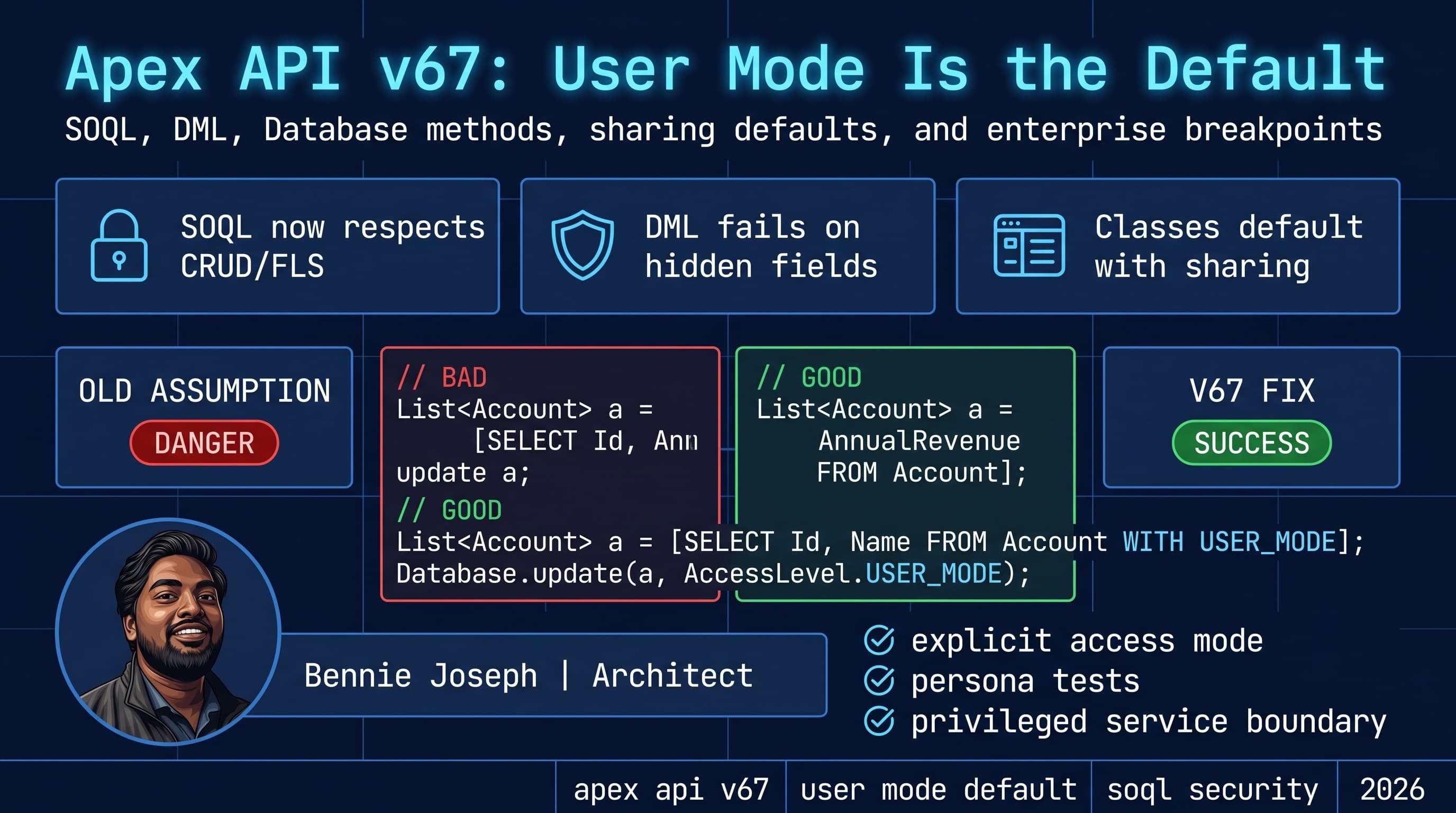
As of Summer ’26, Salesforce API v64.0 is current, and v67.0 is next. The important Apex security change in v67 is simple but disruptive: SOQL, DML, and Database methods default to user mode, and classes without an explicit sharing declaration default to with sharing.
That means the runtime starts enforcing what users can actually see and modify unless you intentionally choose otherwise.
This post is my practical migration guide for apex api v67 user mode default soql security 2026: what breaks, what I expect to fix first, and the code patterns I’m using in enterprise Salesforce orgs.
The short version of the v67 behavior change
In older Apex, most code ran in system context unless you opted into user-mode behavior. That made Apex powerful, but it also made it easy to bypass CRUD, FLS, sharing, restriction rules, and scoping rules by accident.
In v67, the defaults move toward least privilege:
- SOQL defaults to user mode.
- DML defaults to user mode.
Database.insert,Database.update,Database.upsert,Database.delete, and similar methods default to user mode.- Apex classes without explicit sharing now default to
with sharing. WITH SECURITY_ENFORCEDis gone; useWITH USER_MODE.- If you need privileged behavior, you must make it explicit and defensible.
The biggest mental model shift: security is no longer an afterthought bolted onto selectors and service classes. It becomes part of the method contract.
This is the type of code that used to “work” because Apex had enough privilege:
public class AccountRevenueService {
    public static List<Account> getStrategicAccounts() {
        return [
            SELECT Id, Name, AnnualRevenue, Strategic_Tier__c
            FROM Account
            WHERE Strategic_Tier__c != null
            ORDER BY AnnualRevenue DESC
            LIMIT 50
        ];
    }

    public static void updateTier(Id accountId, String tier) {
        Account accountToUpdate = new Account(
            Id = accountId,
            Strategic_Tier__c = tier
        );

        update accountToUpdate;
    }
}
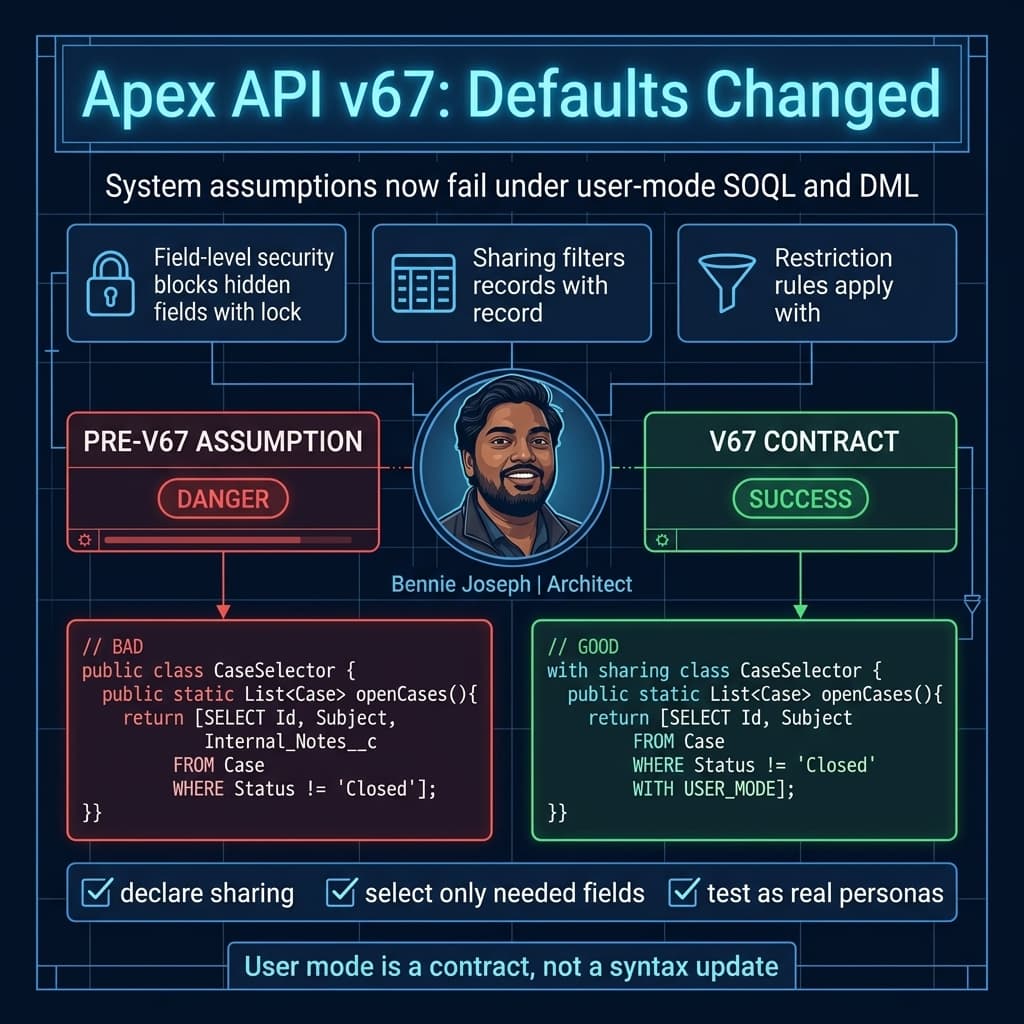
In v67, this can break for a standard sales user if:
- They cannot read
AnnualRevenue. - They cannot read or edit
Strategic_Tier__c. - They do not have access to the Account record.
- A restriction rule filters the record out.
- The class had no sharing declaration and previously behaved more permissively than expected.
The fixed version is not “sprinkle security keywords everywhere and pray.” The fixed version is explicit about intent:
with sharing class AccountRevenueService {
    public static List<Account> getStrategicAccountsForCurrentUser() {
        return [
            SELECT Id, Name, Strategic_Tier__c
            FROM Account
            WHERE Strategic_Tier__c != null
            ORDER BY Name ASC
            LIMIT 50
            WITH USER_MODE
        ];
    }

    public static void updateTierAsCurrentUser(Id accountId, String tier) {
        Account accountToUpdate = new Account(
            Id = accountId,
            Strategic_Tier__c = tier
        );

        Database.update(accountToUpdate, AccessLevel.USER_MODE);
    }
}
Notice what changed:
- I declared
with sharing. - I removed
AnnualRevenuebecause the UI did not need it. - I used
WITH USER_MODEto make the SOQL contract obvious. - I used
AccessLevel.USER_MODEfor DML so future readers don’t have to know the class API version to understand behavior.
Even when v67 makes user mode the default, I still prefer explicit access mode in important code. Defaults are convenient. Explicit contracts are maintainable.
What breaks first
1. Fat selector classes
The first thing I inspect is selector code.
A lot of enterprise Apex selectors are written like this:
public class ContactSelector {
    public static List<Contact> getByAccountIds(Set<Id> accountIds) {
        return [
            SELECT Id,
                   FirstName,
                   LastName,
                   Email,
                   Phone,
                   Birthdate,
                   Salary_Band__c,
                   Executive_Notes__c,
                   AccountId,
                   Account.OwnerId
            FROM Contact
            WHERE AccountId IN :accountIds
        ];
    }
}
This pattern is common because teams build “reusable” selectors that return every field any caller might ever need.
That design gets punished in v67.
If one caller only needs Id, Name, and Email, but the selector also queries Salary_Band__c, the entire query can fail for a user who lacks access to that field.
My fix is to stop treating selectors like data dumpsters. I split selectors by use case and persona.
with sharing class ContactSelector {
    public static List<Contact> getForAccountTimeline(Set<Id> accountIds) {
        return [
            SELECT Id, Name, Email, Phone, AccountId
            FROM Contact
            WHERE AccountId IN :accountIds
            WITH USER_MODE
        ];
    }

    public static List<Contact> getForHrReview(Set<Id> accountIds) {
        return [
            SELECT Id, Name, Email, Salary_Band__c, AccountId
            FROM Contact
            WHERE AccountId IN :accountIds
            WITH USER_MODE
        ];
    }
}
If HR users have access to Salary_Band__c, that method works for them. If sales users don’t, they should not be calling it.
This is not duplication. This is honest API design.
2. DML that writes fields the user cannot edit
The next common break is service-layer DML.
public class OpportunityAutomationService {
    public static void markReviewed(Set<Id> opportunityIds) {
        List<Opportunity> updates = new List<Opportunity>();

        for (Id opportunityId : opportunityIds) {
            updates.add(new Opportunity(
                Id = opportunityId,
                Reviewed_By_Automation__c = true,
                Review_Timestamp__c = System.now()
            ));
        }

        update updates;
    }
}
In v67, if the running user cannot edit Reviewed_By_Automation__c or Review_Timestamp__c, this fails.
Sometimes that is exactly what should happen. Other times, this field is operational metadata that should be written by a controlled automation boundary.
Do not solve this by making everything system mode. That is how you rebuild the same security problem with newer syntax.
Instead, decide whether the operation is user-owned or platform-owned.
User-owned update:
with sharing class OpportunityUserReviewService {
    public static void markReviewedByCurrentUser(Set<Id> opportunityIds) {
        List<Opportunity> updates = new List<Opportunity>();

        for (Id opportunityId : opportunityIds) {
            updates.add(new Opportunity(
                Id = opportunityId,
                User_Reviewed__c = true
            ));
        }

        Database.update(updates, AccessLevel.USER_MODE);
    }
}
Platform-owned update with explicit boundary:
without sharing class OpportunityAutomationBoundary {
    public static void stampAutomationReview(Set<Id> opportunityIds) {
        if (!FeatureManagement.checkPermission('Run_Opportunity_Automation_Boundary')) {
            throw new SecurityException('Missing permission to run automation boundary.');
        }

        List<Opportunity> updates = new List<Opportunity>();

        for (Id opportunityId : opportunityIds) {
            updates.add(new Opportunity(
                Id = opportunityId,
                Reviewed_By_Automation__c = true,
                Review_Timestamp__c = System.now()
            ));
        }

        Database.update(updates, AccessLevel.SYSTEM_MODE);
    }
}
I’m fine with system mode when it is intentional, small, named clearly, guarded, logged, and tested. I’m not fine with accidental system mode buried in a generic service class.
3. Tests that only pass as invisible admin fiction
Apex tests often lie.
They create records as the test-running system context, skip permission assignment, skip realistic sharing, and then assert happy paths.
v67 makes those tests less useful. If production code runs in user mode, tests need real user personas.
Here is a pattern I use:
@IsTest
private class AccountRevenueServiceTest {
    @TestSetup
    static void setupData() {
        Account account = new Account(
            Name = 'Acme Enterprise',
            Strategic_Tier__c = 'Tier 1'
        );
        insert account;
    }

    @IsTest
    static void salesUserCanReadStrategicAccounts() {
        User salesUser = TestUserFactory.createUser('Standard User');

        PermissionSet ps = [
            SELECT Id
            FROM PermissionSet
            WHERE Name = 'Strategic_Account_Read'
            LIMIT 1
        ];

        insert new PermissionSetAssignment(
            AssigneeId = salesUser.Id,
            PermissionSetId = ps.Id
        );

        System.runAs(salesUser) {
            Test.startTest();
            List<Account> results = AccountRevenueService.getStrategicAccountsForCurrentUser();
            Test.stopTest();

            System.assertEquals(1, results.size(), 'Sales user should see accessible strategic accounts.');
            System.assertEquals('Acme Enterprise', results[0].Name);
        }
    }

    @IsTest
    static void userWithoutPermissionGetsQueryFailure() {
        User basicUser = TestUserFactory.createUser('Standard User');

        System.runAs(basicUser) {
            try {
                AccountRevenueService.getStrategicAccountsForCurrentUser();
                System.assert(false, 'Expected security exception for missing field access.');
            } catch (QueryException expected) {
                System.assert(
                    expected.getMessage().contains('Strategic_Tier__c'),
                    'Failure should point to inaccessible field.'
                );
            }
        }
    }
}
The second test may feel harsh. Good. Security failure paths deserve tests too.
4. Invocable Apex used by Flow and Agentforce actions
This one is going to hit a lot of teams.
Agentforce 2.0 with Atlas Reasoning Engine v2 makes custom actions more useful, especially when actions call Apex. Same with Flow invoking Apex for complex rules. But once user mode is the default, invocable methods that query broad fields or update hidden fields will fail for normal users.
Bad invocable pattern:
public class AgentAccountAction {
    public class Request {
        @InvocableVariable(required=true)
        public Id accountId;
    }

    public class Response {
        @InvocableVariable
        public String summary;
    }

    @InvocableMethod(label='Get Account Risk Summary')
    public static List<Response> summarizeRisk(List<Request> requests) {
        Account account = [
            SELECT Id, Name, AnnualRevenue, Credit_Risk__c, Internal_Risk_Notes__c
            FROM Account
            WHERE Id = :requests[0].accountId
            LIMIT 1
        ];

        Response response = new Response();
        response.summary = account.Name + ': ' + account.Internal_Risk_Notes__c;
        return new List<Response>{ response };
    }
}
If this is exposed to Agentforce, you now have two problems:
- It may fail when the user lacks access.
- It may leak internal notes into an agent response if somebody later changes execution context.
Better:
with sharing class AgentAccountAction {
    public class Request {
        @InvocableVariable(required=true)
        public Id accountId;
    }

    public class Response {
        @InvocableVariable
        public String summary;
    }

    @InvocableMethod(label='Get Account Risk Summary')
    public static List<Response> summarizeRisk(List<Request> requests) {
        Account account = [
            SELECT Id, Name, Credit_Risk__c
            FROM Account
            WHERE Id = :requests[0].accountId
            LIMIT 1
            WITH USER_MODE
        ];

        Response response = new Response();
        response.summary = account.Name + ' has risk rating: ' + account.Credit_Risk__c;
        return new List<Response>{ response };
    }
}
Agent actions should be boringly secure. The agent can reason with the data it is allowed to receive. It should not become a loophole around FLS.
Real enterprise example: revenue operations broke in the right place
On one enterprise project, we had a global manufacturing Salesforce org with Sales Cloud, Service Cloud, Experience Cloud, and a heavy revenue operations layer. Around 18,000 internal users. Multiple integrations. Strict regional access rules. A growing Agentforce 2.0 pilot for account research and renewal prep.
The risk was not theoretical.
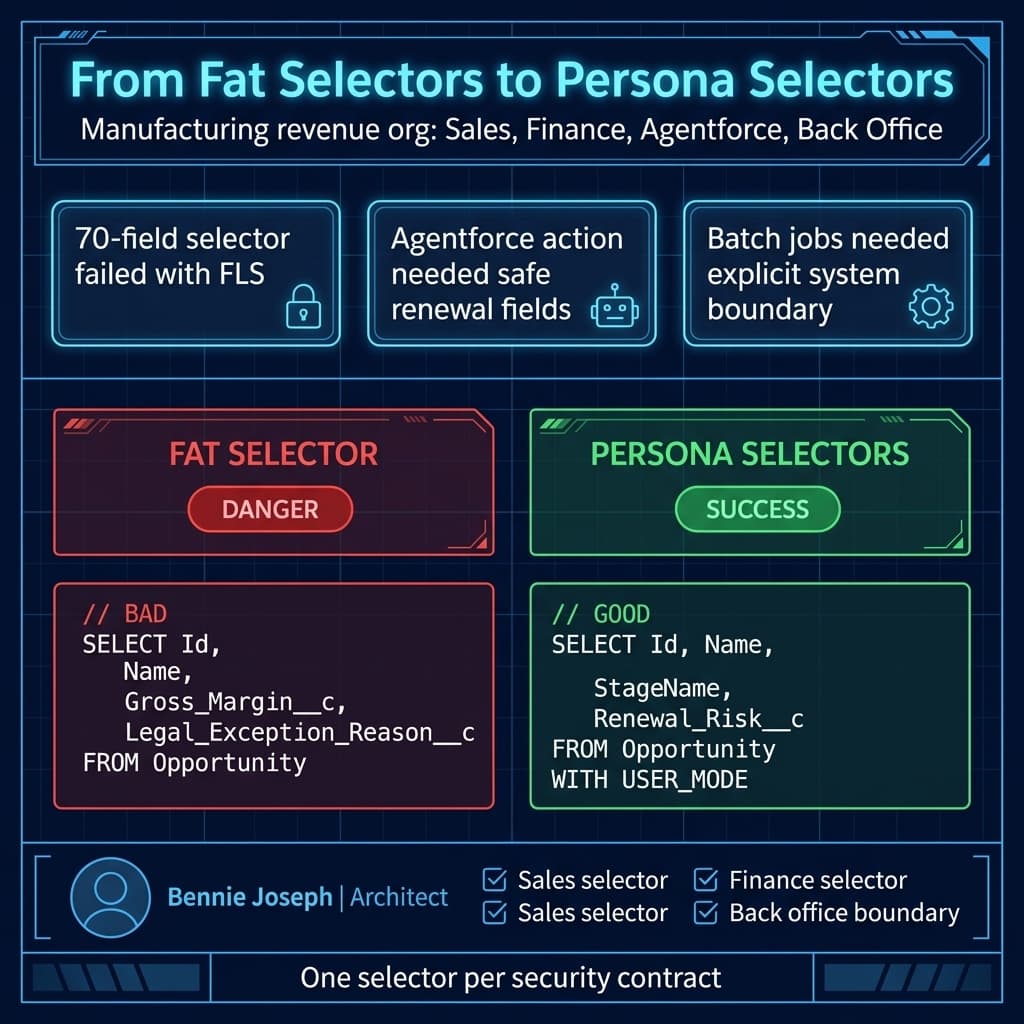
The org had a shared OpportunitySelector that returned nearly 70 fields. Sales reps used it indirectly from Lightning Web Components. RevOps managers used it from batch jobs. The Agentforce prototype used it through an invocable Apex action.
The selector queried fields like:
Gross_Margin__cPartner_Discount__cRenewal_Risk_Notes__cFinance_Approval_Status__cLegal_Exception_Reason__c
Standard sales reps did not have access to several of those fields. They didn’t need them. But because the selector returned everything, the v67-style user-mode query failed.
The bad part: several UI features broke.
The good part: the org was finally forced to separate user-facing data from privileged operational data.
We refactored into three selector families:
with sharing class OpportunityReadSelector {
    public static List<Opportunity> forSalesWorkspace(Set<Id> opportunityIds) {
        return [
            SELECT Id, Name, StageName, CloseDate, Amount, AccountId
            FROM Opportunity
            WHERE Id IN :opportunityIds
            WITH USER_MODE
        ];
    }

    public static List<Opportunity> forRenewalAgent(Set<Id> opportunityIds) {
        return [
            SELECT Id, Name, StageName, CloseDate, Amount, Renewal_Risk__c
            FROM Opportunity
            WHERE Id IN :opportunityIds
            WITH USER_MODE
        ];
    }
}

with sharing class OpportunityFinanceSelector {
    public static List<Opportunity> forFinanceReview(Set<Id> opportunityIds) {
        return [
            SELECT Id, Name, Amount, Gross_Margin__c, Finance_Approval_Status__c
            FROM Opportunity
            WHERE Id IN :opportunityIds
            WITH USER_MODE
        ];
    }
}

without sharing class OpportunityBackOfficeSelector {
    public static List<Opportunity> forControlledBatch(Set<Id> opportunityIds) {
        if (!FeatureManagement.checkPermission('Run_Back_Office_Revenue_Jobs')) {
            throw new SecurityException('Missing back office batch permission.');
        }

        return [
            SELECT Id, Name, Amount, Gross_Margin__c, Partner_Discount__c, Legal_Exception_Reason__c
            FROM Opportunity
            WHERE Id IN :opportunityIds
            WITH SYSTEM_MODE
        ];
    }
}
The result was cleaner than the original architecture:
- LWC screens stopped depending on finance-only fields.
- Agentforce actions received safer data.
- Batch jobs had explicit privileged boundaries.
- Tests became persona-driven.
- Security review conversations became much easier because every privileged path had a name.
That is the architectural upside of this change. It makes lazy boundaries expensive.
My v67 migration checklist
Step 1: Make sharing declarations explicit
I do not leave sharing behavior implicit anymore.
Use one of these deliberately:
with sharing class CaseWorkspaceController {
    // User-facing controller logic.
}

without sharing class CaseEscalationSystemBoundary {
    // Small privileged automation boundary.
}

inherited sharing class CaseDomainService {
    // Used by callers that own the sharing contract.
}
My default:
with sharingfor controllers, LWC Apex, invocable actions, GraphQL helper services, and user-facing selectors.inherited sharingfor domain services called by multiple entry points.without sharingonly for narrow system boundaries with permission checks and audit logging.
Step 2: Search for broad SOQL
I look for selectors that query fields not used by the immediate caller.
A simple scan catches a lot:
const riskyPatterns = [
  'SELECT Id, Name,',
  'SELECT Id,',
  'AnnualRevenue',
  'Gross_Margin__c',
  'Internal_Notes__c',
  'Salary_Band__c',
  'WITH SYSTEM_MODE'
];

for (const pattern of riskyPatterns) {
  console.log(`Review Apex for pattern: ${pattern}`);
}
In real projects, I run this through repository search, PMD rules, and code review checklists. If you use Salesforce MCP through @salesforce/mcp, this is also a good candidate for a custom repository analysis workflow. I still want a human architect reviewing the result. AI can find smells; it cannot own your security model.
Step 3: Put access mode in code even when defaulted
Yes, v67 defaults to user mode. I still write this:
List<Case> cases = [
    SELECT Id, Subject, Status
    FROM Case
    WHERE OwnerId = :UserInfo.getUserId()
    WITH USER_MODE
];

Database.update(casesToUpdate, AccessLevel.USER_MODE);
Why? Because code survives version bumps, package moves, refactors, and tired developers. Explicit access mode prevents guessing.
Step 4: Split user actions from platform actions
This is the pattern I recommend:
with sharing class CaseUserService {
    public static void updateCustomerVisibleStatus(Id caseId, String status) {
        Case caseUpdate = new Case(
            Id = caseId,
            Status = status
        );

        Database.update(caseUpdate, AccessLevel.USER_MODE);
    }
}

without sharing class CaseSystemBoundary {
    public static void stampSlaBreach(Id caseId) {
        if (!FeatureManagement.checkPermission('Run_Case_SLA_System_Boundary')) {
            throw new SecurityException('Missing SLA boundary permission.');
        }

        Case caseUpdate = new Case(
            Id = caseId,
            Sla_Breached__c = true,
            Sla_Breach_Timestamp__c = System.now()
        );

        Database.update(caseUpdate, AccessLevel.SYSTEM_MODE);
    }
}
If a method name doesn’t tell me whether it acts as the user or as the platform, I rename it.
Step 5: Fix tests by persona, not by permission sprawl
The lazy fix is to give test users massive permission sets until tests pass.
Don’t do that.
Create test users that represent actual personas:
- Sales rep
- Sales manager
- Service agent
- Finance reviewer
- Integration operator
- Agentforce action user
- Experience Cloud user
Then test the security contract.
@IsTest
private class CaseUserServiceTest {
    @IsTest
    static void serviceAgentCanUpdateStatus() {
        User serviceAgent = TestUserFactory.createUser('Standard User');
        TestPermission.assign(serviceAgent.Id, 'Service_Case_Edit');

        Case c = new Case(
            Subject = 'Broken device',
            Status = 'New',
            Origin = 'Phone'
        );
        insert c;

        System.runAs(serviceAgent) {
            Test.startTest();
            CaseUserService.updateCustomerVisibleStatus(c.Id, 'Working');
            Test.stopTest();
        }

        Case reloaded = [
            SELECT Id, Status
            FROM Case
            WHERE Id = :c.Id
            WITH SYSTEM_MODE
        ];

        System.assertEquals('Working', reloaded.Status);
    }

    @IsTest
    static void userWithoutFieldAccessCannotStampSla() {
        User serviceAgent = TestUserFactory.createUser('Standard User');

        Case c = new Case(
            Subject = 'Late shipment',
            Status = 'New',
            Origin = 'Web'
        );
        insert c;

        System.runAs(serviceAgent) {
            try {
                CaseSystemBoundary.stampSlaBreach(c.Id);
                System.assert(false, 'Expected boundary permission failure.');
            } catch (SecurityException expected) {
                System.assert(expected.getMessage().contains('Missing SLA boundary permission'));
            }
        }
    }
}
I use WITH SYSTEM_MODE in the assertion query because the test is verifying the final database state, not the current user’s read access. That is a legitimate use of system mode in tests.
What I would not do
I would not mass-convert everything to system mode
That defeats the point. It also creates a worse security review story.
If your migration PR contains hundreds of AccessLevel.SYSTEM_MODE changes, you are not migrating. You are suppressing symptoms.
I would not keep monster selectors
Large “one query for all callers” selectors are an anti-pattern under user mode. They were already an anti-pattern for performance and maintainability. v67 just makes the failure visible.
I would not rely on LWC to hide fields
LWC native state management is GA in Summer ’26 and it makes client-side state cleaner, but it does not replace server-side security.
If your Apex returns a field, assume it can be exposed. Hide UI elements for usability. Enforce access in Apex for security.
I would not let Agentforce actions use privileged selectors casually
Agentforce 2.0 is powerful, especially with multi-agent orchestration and custom reasoning steps. That increases the blast radius of sloppy Apex actions.
Every invocable Apex method exposed to an agent should have:
- A narrow input schema.
- A narrow output schema.
with sharing.- User-mode SOQL.
- User-mode DML unless a system boundary is explicitly required.
- Tests for allowed and denied personas.
The migration order I use
If I’m leading this migration, I do it in this order:
- LWC Apex controllers and
@AuraEnabledmethods. - Invocable Apex used by Flow and Agentforce.
- Selector classes.
- DML-heavy services.
- Async Apex and scheduled jobs.
- Integration services.
- Managed package extension points.
- Test factories and persona permission utilities.
Why this order? Because user-facing paths fail loudly and politically. If the sales workspace, service console, or Agentforce renewal assistant breaks, nobody cares that your nightly batch job still works.
Start where humans feel the failure.
Final opinion
Apex API v67 user mode defaults are not a punishment. They are Salesforce forcing Apex to match the security posture enterprise customers already claim to have.
The orgs that will struggle are the ones where “service layer” means “God mode with nice method names.”
The orgs that will move cleanly are the ones with:
- Explicit sharing.
- Small selectors.
- Persona-based tests.
- Privileged boundaries with names.
- No fear of deleting unnecessary fields from queries.
That is the work.
TL;DR
- v67 makes user mode the Apex default for SOQL, DML, and
Databasemethods; make access mode explicit anyway. - Fix fat selectors, vague sharing, admin-only tests, and accidental privileged DML before upgrading code.
- Use system mode only inside small, named, permission-guarded boundaries.