Designing a Multi-Cloud Salesforce Architecture: Sales + Service + Experience + Data 360
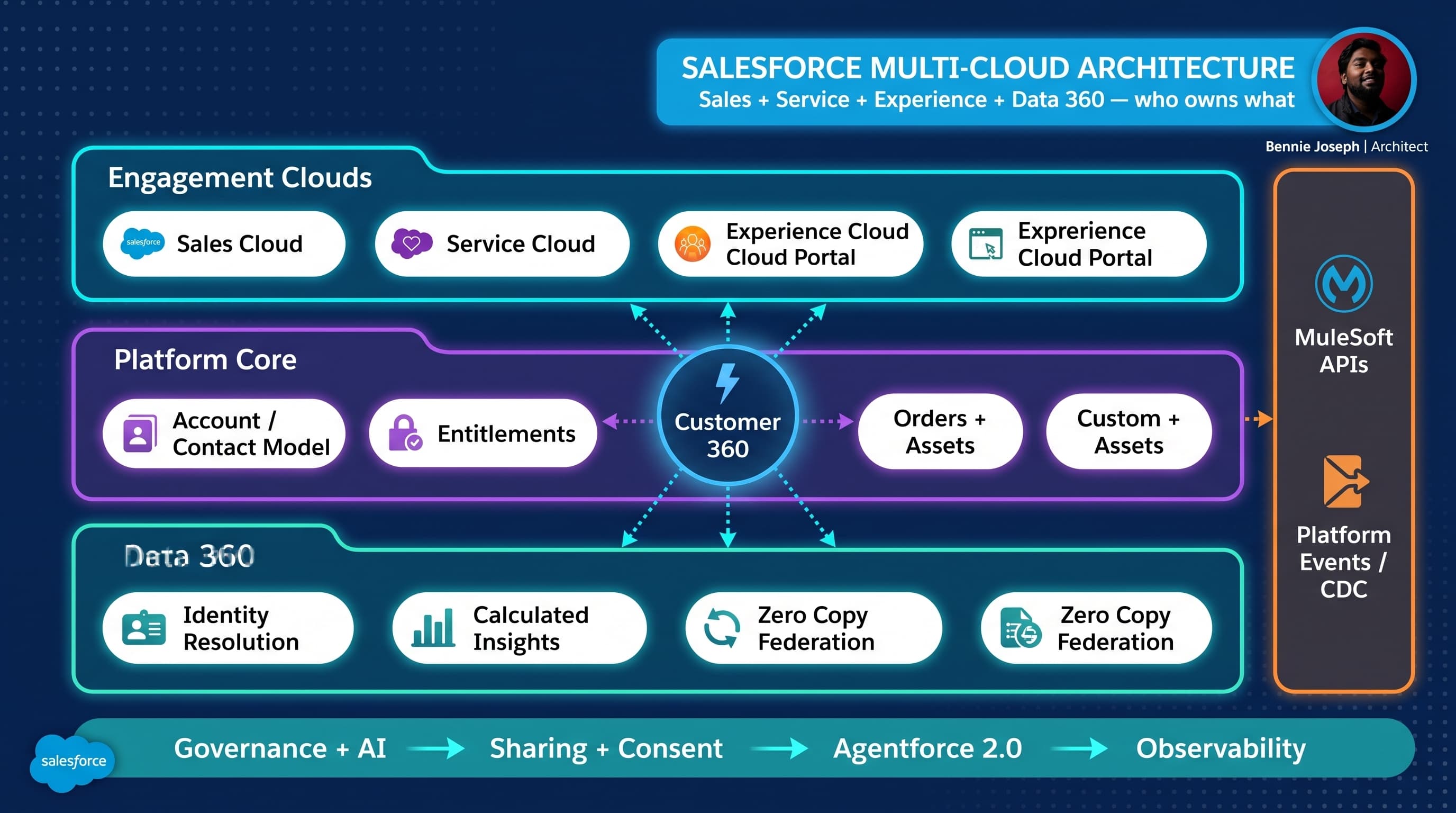
Multi-cloud Salesforce architecture is where diagrams start looking clean and projects start getting messy.
Sales Cloud wants pipeline speed. Service Cloud wants entitlement accuracy. Experience Cloud wants low-friction self-service. Data 360 wants unified, governed, activated customer data. Integration teams want APIs that do not break every sprint. Security wants least privilege. Executives want “Customer 360” by the next steering committee.
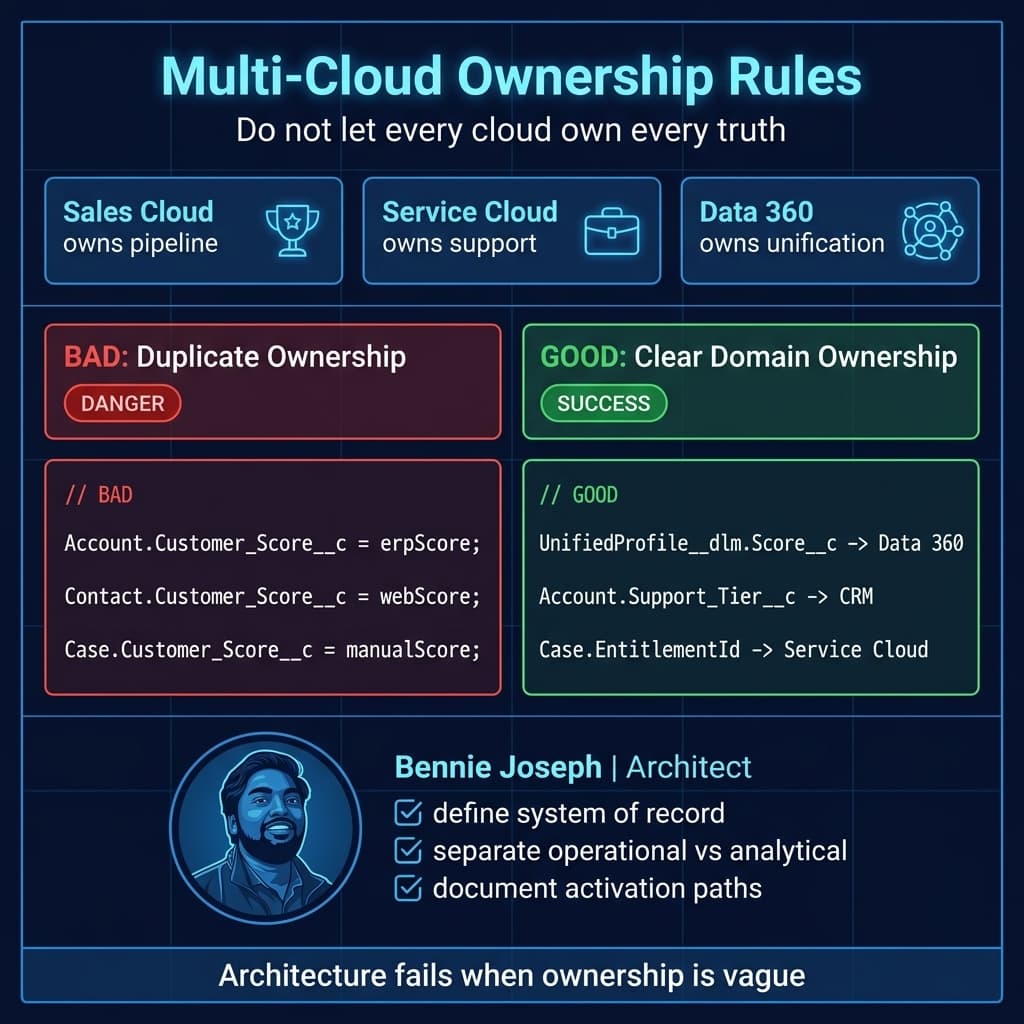
Here’s the unpopular take: the hard part is not connecting Sales, Service, Experience, and Data 360. The hard part is deciding which cloud owns which business truth.
After nine years of enterprise Salesforce implementations, multi-cloud design is where I keep coming back: System Design, Data Lifecycle, Integration, and Identity/Access. Every large org I have worked on has fought the same ownership battles. The platform changes, the fights do not.
This is my practitioner blueprint for designing a salesforce multi cloud architecture with Sales, Service, Experience, and Data 360 in 2026, using Salesforce API v64.0, Agentforce 2.0, and modern governance patterns.
The real architecture question
When an enterprise says, “We need Sales Cloud, Service Cloud, Experience Cloud, and Data 360,” I translate that into five questions:
- Who owns the customer master?
- Where does transactional truth live?
- Which interactions are real-time vs eventually consistent?
- How does external identity map to CRM identity?
- What data is allowed to ground AI responses?
If those questions are not answered early, the implementation turns into a pile of sync jobs, duplicate objects, overloaded Account records, and Experience Cloud pages that leak too much data or show too little.
A good multi-cloud architecture does not mean every cloud gets a copy of everything.
It means each cloud has a clear responsibility:
| Cloud / Layer | Primary Responsibility | What It Should Not Own |
|---|---|---|
| Sales Cloud | Lead-to-cash relationship and pipeline process | High-volume behavioral event history |
| Service Cloud | Case, entitlement, support interaction, knowledge | Master customer identity resolution |
| Experience Cloud | Authenticated customer, partner, or employee interaction layer | Complex enterprise data mastering |
| Data 360 | Unified profile, identity resolution, segmentation, activation, grounding | Operational transaction processing |
| MuleSoft / Integration | API mediation, orchestration, external system contracts | Business ownership of CRM data |
| Agentforce 2.0 | Task automation, reasoning, guided service/sales actions | Ungoverned access to enterprise data |
That split matters because scale punishes ambiguity.
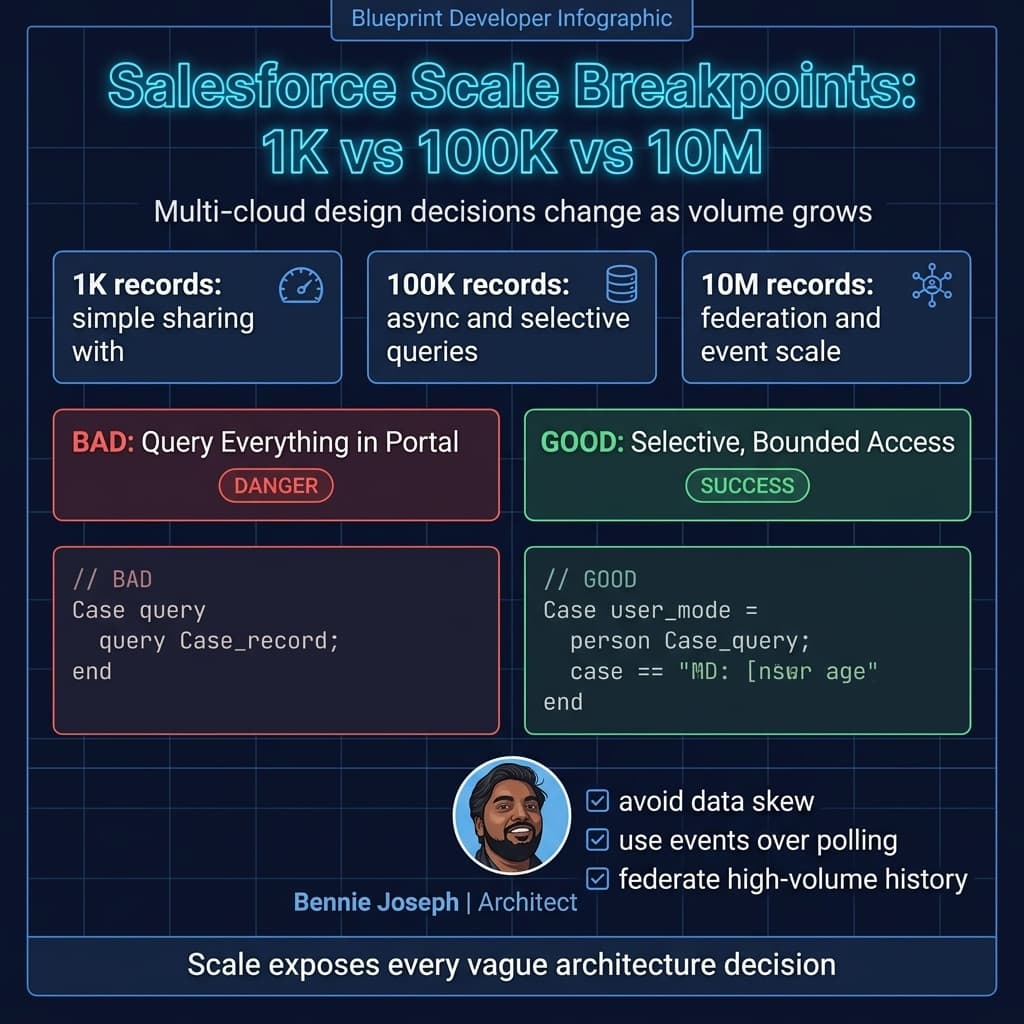
At 1K accounts, users can manually clean up records.
At 100K accounts, bad ownership creates operational drag.
At 10M customer profiles, unclear ownership becomes a platform stability and compliance problem.
Reference architecture
For a typical enterprise, I like to split the architecture into six layers.
1. Engagement layer
This is where users interact:
- Sales reps in Sales Cloud
- Service agents in Service Console
- Customers or partners in Experience Cloud
- Agents and supervisors using Agentforce 2.0
- External apps using GraphQL API, REST, or Conditional Composite API
Experience Cloud is not just “a website on Salesforce.” It is an access boundary. That means record visibility, sharing sets, external user licensing, login flows, MFA, consent, and session policy are part of the architecture — not post-build security cleanup.
2. Operational CRM layer
This is Salesforce core:
- Account
- Contact
- Lead
- Opportunity
- Case
- Asset
- Entitlement
- Contract
- Order
- Knowledge
- Custom domain objects
The mistake I see often: teams push all unified customer attributes directly onto Account and Contact because “that’s where users look.”
Some of that is fine. But if you hydrate Account with every calculated metric, behavioral score, web event, product usage aggregate, risk flag, and consent indicator, you create a bloated operational model that becomes hard to secure, report, index, and govern.
My rule: put operational attributes in core CRM. Put unified and analytical attributes in Data 360 unless they are required for real-time transaction execution.
3. Data 360 layer
Data 360 is the unification layer:
- Identity resolution
- Data model objects
- Zero Copy federation with Snowflake or BigQuery
- Federated Grounding for AI
- Native vector search
- Unified Catalog
- Retriever API for unstructured data
- Calculated insights
- Segmentation and activation
Data 360 should not become a dumping ground. It still needs lifecycle rules, retention policies, data classification, consent alignment, and source-of-truth mapping.
The architecture decision is not “sync everything to Data 360.”
The better decision is: “Which signals need to be unified, calculated, activated, or grounded?”
4. Integration layer
In 2026, I would usually combine several patterns:
- MuleSoft APIs for enterprise contract-based integration
- Platform Events for event-driven workflows
- Change Data Capture for outbound data changes
- Conditional Composite API to reduce API call volume
- GraphQL API for UI and app-specific data shapes
- Named Query API for governed query reuse
- Bulk API for large-volume movement
- Salesforce MCP tools for AI-assisted admin/dev workflows where appropriate
Do not force one integration pattern to solve every use case.
Real-time pricing checks are not the same as nightly customer profile unification. Portal case creation is not the same as ERP order fulfillment. AI grounding is not the same as system-to-system replication.
5. Identity and access layer
This is usually the underestimated layer.
You need to model:
- Internal users
- External Experience Cloud users
- Partner users
- Service agents
- API clients
- Agentforce actions
- Data 360 access
- External identity provider groups
- Consent and purpose-based processing
Identity is not just login. It determines what data the user, system, and AI agent can see.
For Experience Cloud, I prefer starting with least privilege and expanding. Retrofitting least privilege later is painful.
6. AI and automation layer
Agentforce 2.0 changes the architecture conversation because agents can orchestrate work across flows, Apex, APIs, data, and reasoning steps.
But I still treat AI as a consumer of governed capabilities, not a privileged shortcut around the architecture.
Agentforce 2.0 with Atlas Reasoning Engine v2 should call approved actions, retrieve approved grounded data, and obey the same access model as the user or process context. If an AI agent can answer a customer question using Data 360, Knowledge, and Case history, the grounding path needs to be reviewed like any other integration path.
Decision matrix: core design choices
This is the kind of matrix I use during architecture workshops. It is not theoretical. It forces tradeoffs into the open.
| Decision Area | Option A | Option B | Option C | My Default Recommendation |
|---|---|---|---|---|
| Customer master | Salesforce Account/Contact | External MDM | Data 360 unified profile | Use Salesforce for operational CRM identity, external MDM or Data 360 for enterprise identity depending on existing landscape |
| Portal data access | Direct object access via sharing | API-mediated access | Hybrid | Use direct access for simple CRM records, API mediation for sensitive or cross-system data |
| Data movement | Batch ETL | Event-driven | Zero Copy federation | Use Zero Copy for analytical access, events for operational changes, batch only where latency allows |
| Service case creation | Experience Cloud form directly creates Case | Middleware creates Case | Agent-assisted creation | Direct Case creation works if sharing and validation are clear; middleware if cross-system orchestration is required |
| AI grounding | CRM only | Data 360 + Knowledge | External RAG only | Use Data 360 Federated Grounding + Knowledge first; external RAG only when corpus/data ownership requires it |
| Integration ownership | Point-to-point Salesforce integrations | MuleSoft-led API layer | Mixed team-owned APIs | Use MuleSoft for enterprise capabilities; avoid random point-to-point for critical processes |
| Reporting | Salesforce reports | Data 360 insights | Enterprise BI | Operational reporting in Salesforce, unified analytics in Data 360/BI |
| External identity | Salesforce native login | Enterprise IdP SSO | B2B/B2C hybrid | Enterprise IdP for scale; map identity claims carefully to Contact/Account/permissions |
| High-volume events | Custom objects | Platform Events / CDC | External event lake | Use events/event lake for high volume; do not store every clickstream event as a CRM record |
Data model: do not start with objects
A lot of Salesforce design sessions start too low:
“Should this be a custom object?” “Should we add a lookup?” “Can we reuse Account?” “Can we just create a field?”
Those are implementation questions. For multi-cloud architecture, I start with business domains:
- Customer
- Relationship
- Product ownership
- Sales motion
- Support entitlement
- Interaction
- Consent
- Identity
- Segment
- Recommendation
- Case resolution
Then I map each domain to an owning system.
Example:
| Business Concept | Operational Object / Location | Unified / Analytical Location | Notes |
|---|---|---|---|
| Customer organization | Account | Data 360 Account DMO / unified profile | CRM owns operational account structure |
| Individual customer | Contact / Individual | Data 360 Individual DMO | Consent must be tied to identity |
| Support request | Case | Data 360 interaction history if needed | Service Cloud owns lifecycle |
| Purchased product | Asset / Order | Data 360 product ownership view | ERP may own fulfillment truth |
| Portal login | User + Contact | Identity graph | External IdP may own credential |
| Engagement score | Usually not CRM core | Data 360 calculated insight | Activate to CRM only if operationally needed |
| Next best action | Agentforce / Flow / Apex | Data 360 insight + AI grounding | Must be explainable and permission-aware |
The big design principle: CRM objects should support operations. Data 360 should support unification, insight, and activation.
If a sales rep needs a renewal risk score on Account to prioritize calls, activate that score into Salesforce. But do not replicate every signal used to calculate the score.
Real-world example: manufacturer with dealers, service centers, and customers
One enterprise project I worked around had a familiar pattern: a manufacturer selling through dealers, supporting products through authorized service centers, and exposing customer self-service through a portal.
The initial ask sounded simple:
- Sales Cloud for dealer pipeline
- Service Cloud for warranty and repair cases
- Experience Cloud for dealer and customer portals
- Data 360 for unified customer and product ownership
- ERP integration for orders, invoices, and warranty eligibility
- Marketing and analytics teams needing customer segments
The messy part: “customer” meant different things.
For Sales, the customer was the dealer account.
For Service, the customer was the end consumer who owned the product.
For Finance, the customer was the billing account in ERP.
For Data 360, the customer profile needed to reconcile all three without pretending they were the same entity.
The correct design was not one giant Account model. We separated:
- Dealer Account as B2B relationship
- End customer Contact / Individual as support relationship
- ERP billing account as external financial reference
- Asset as the bridge between end customer, product, dealer, and warranty
- Data 360 unified profile to resolve identity and product ownership signals
- Experience Cloud roles for dealers vs end customers
- Service entitlement based on Asset and warranty rules, not just Account tier
That separation saved the project from a common trap: forcing B2B sales hierarchy and B2C service identity into the same record semantics.
Example Apex: portal case creation with user-mode access
For Experience Cloud, I do not like controller code that silently runs around the access model. The portal user should only create cases against assets and accounts they are allowed to access.
Here is a simplified Apex service using user-mode SOQL and DML patterns. This is the kind of boundary I prefer: validate access, create the operational record, and publish an event for downstream integration.
public with sharing class PortalCaseService {
    public class CreateCaseRequest {
        @AuraEnabled public Id assetId;
        @AuraEnabled public String subject;
        @AuraEnabled public String description;
        @AuraEnabled public String origin;
    }

    public class CreateCaseResponse {
        @AuraEnabled public Id caseId;
        @AuraEnabled public String caseNumber;
    }

    @AuraEnabled
    public static CreateCaseResponse createSupportCase(CreateCaseRequest request) {
        if (request == null || request.assetId == null || String.isBlank(request.subject)) {
            throw new AuraHandledException('Asset and subject are required.');
        }

        Asset customerAsset = [
            SELECT Id, AccountId, ContactId, SerialNumber, Product2Id
            FROM Asset
            WHERE Id = :request.assetId
            WITH USER_MODE
            LIMIT 1
        ];

        Case supportCase = new Case(
            AccountId = customerAsset.AccountId,
            ContactId = customerAsset.ContactId,
            AssetId = customerAsset.Id,
            Subject = request.subject.left(255),
            Description = request.description,
            Origin = String.isBlank(request.origin) ? 'Customer Portal' : request.origin,
            Status = 'New',
            Priority = 'Medium'
        );

        Database.SaveResult result = Database.insert(
            supportCase,
            AccessLevel.USER_MODE
        );

        if (!result.isSuccess()) {
            throw new AuraHandledException(result.getErrors()[0].getMessage());
        }

        Case insertedCase = [
            SELECT Id, CaseNumber
            FROM Case
            WHERE Id = :supportCase.Id
            WITH USER_MODE
            LIMIT 1
        ];

        Support_Case_Created__e eventPayload = new Support_Case_Created__e(
            CaseId__c = insertedCase.Id,
            AssetId__c = customerAsset.Id,
            Source__c = 'Experience Cloud'
        );

        EventBus.publish(eventPayload);

        CreateCaseResponse response = new CreateCaseResponse();
        response.caseId = insertedCase.Id;
        response.caseNumber = insertedCase.CaseNumber;
        return response;
    }
}
This is intentionally not doing ten things.
It does not call ERP directly. It does not calculate warranty inline. It does not enrich the customer profile. It creates the case and emits a clean event.
That event can trigger MuleSoft, Flow, Data 360 activation, or downstream observability. The portal transaction stays fast and bounded.
Integration architecture: choose the pattern by business latency
Multi-cloud architecture lives or dies by integration choices.
I classify integrations by latency and ownership.
Real-time synchronous
Use for:
- Warranty eligibility check during case creation
- Pricing or quote validation
- Payment authorization
- Inventory availability
- Identity validation
Patterns:
- Apex callout to named credential-backed API
- MuleSoft system/process APIs
- GraphQL API for frontend reads
- Conditional Composite API for multi-step Salesforce writes
- External Services where declarative consumption makes sense
Risk: synchronous integrations increase user-facing failure points.
My rule: if the user cannot proceed without the answer, synchronous is acceptable. If they can proceed and be notified later, use async.
Near-real-time event-driven
Use for:
- Case created
- Opportunity stage changed
- Asset registered
- Account merged
- Entitlement updated
- Customer profile activated
Patterns:
- Platform Events
- Change Data Capture
- Event relay
- MuleSoft event processing
- Data 360 ingestion or activation path
Risk: eventual consistency must be explained to users and operations teams.
Batch and federation
Use for:
- Historical load
- Large segmentation datasets
- ERP transaction history
- Product usage aggregates
- Analytical datasets
Patterns:
- Bulk API
- Data 360 batch ingestion
- Zero Copy federation with Snowflake or BigQuery
- Enterprise data lake/lakehouse integration
Risk: teams overuse batch because it is familiar, then complain that the architecture is not real-time.
API composition
Salesforce API v64.0 gives architects better options than old “just call REST for everything” designs.
For example:
- Use GraphQL API when the client needs a shaped data graph.
- Use Conditional Composite API when you need dependent calls and want to reduce API volume.
- Use Named Query API when query governance matters.
- Use Bulk API for large-volume import/export.
- Use Pub/Sub API for event consumption.
The integration layer should look boring. Boring is good. Boring means contracts are stable, observability exists, and teams know where to add change.
Scale: what changes at 1K, 100K, and 10M
Architecture that only works in the demo is not architecture.
At 1K records or users
Almost anything works.
You can get away with:
- Basic sharing
- Simple flows
- Direct object access in Experience Cloud
- A few sync jobs
- Manual dedupe
- Reports on operational objects
- Simple Data 360 ingestion
The danger at this stage is false confidence. Small data volumes hide ownership problems.
At 100K records or users
You start seeing friction:
- Sharing recalculation matters
- External user access patterns need review
- Case and Account data skew can hurt performance
- Duplicate identity becomes visible
- Reports slow down if objects are overloaded
- Sync failures become operational incidents
- API limits become a design constraint
- Portal page performance becomes measurable
At this scale, I care about:
- Selective queries
- Skinny operational payloads
- Async where possible
- Platform Events / CDC instead of polling
- Clear archival strategy
- Data 360 identity rules
- Explicit API ownership
- Experience Cloud sharing model validation
At 10M records, profiles, or interactions
This is where poor architecture becomes expensive.
You need to think about:
- High-volume external users
- Account and ownership data skew
- Partitioning and archival
- Search strategy
- Async processing limits
- Event volume
- Data retention
- Consent and privacy automation
- Data 360 ingestion strategy
- Zero Copy federation instead of unnecessary replication
- Observability across Salesforce, MuleSoft, Data 360, and external systems
- AI grounding scope and retrieval cost
At 10M, I would not store every customer interaction as a custom object in core Salesforce. I would not make every portal page run multiple dynamic SOQL calls. I would not duplicate full ERP history into CRM just because a stakeholder asked for “one view.”
Instead, I would design summarized operational views in Salesforce, unified and historical views in Data 360, and detailed transactional retrieval through governed APIs.
Experience Cloud design: access before pages
Experience Cloud projects often start with wireframes. I prefer starting with access scenarios.
For example:
- Can a dealer see all assets they sold?
- Can a dealer see cases opened by end customers?
- Can an end customer see warranty details?
- Can a partner create cases for multiple child accounts?
- Can a service contractor update repair status but not customer PII?
- Can a customer download invoices from ERP?
- Can an AI agent answer questions using portal-visible data only?
Those questions determine:
- External user type
- Sharing sets
- Sharing rules
- Account relationships
- Role hierarchy strategy
- Permission sets
- Login flows
- Object model
- API mediation boundaries
Experience Cloud performance also needs discipline. I do not want portal pages making uncontrolled calls to Apex, external APIs, and Data 360 every time a user refreshes.
Use LWC native state management where it makes sense, cache stable reference data, and design the page around task completion instead of internal object structure.
Data 360 activation strategy
Data 360 is powerful, but activation is where architecture gets real.
I think about three activation patterns.
1. Operational activation
Example: send a churn risk score to Account so sales reps can prioritize renewals.
Good use case if:
- The score affects day-to-day action
- Users need it in list views or record pages
- Refresh latency is acceptable
- The field has clear ownership
Bad use case if:
- The score changes constantly
- No one knows how it is calculated
- It creates compliance exposure
- It is copied into five places
2. Personalization activation
Example: show Experience Cloud customers relevant knowledge articles or product recommendations.
Good use case if:
- Data 360 segments are governed
- Consent is respected
- The recommendation is explainable enough
- The portal can degrade gracefully if activation is delayed
3. AI grounding
Example: Agentforce 2.0 helps a service agent summarize customer history using Case data, Knowledge, product ownership, and Data 360 profile insights.
Good use case if:
- Grounding sources are approved
- Retrieval respects permissions
- Responses cite or trace source context
- Sensitive data is filtered
- Human escalation exists
Do not ground AI on everything just because you can. The best AI architecture is boringly governed.
If I compare model usage in an enterprise Salesforce architecture today, I would frame it like this: Agentforce 2.0 should be the Salesforce-native orchestration layer; external models like claude-sonnet-4-7, claude-opus-4-8, gpt-5.5, o3, or gemini-3.1-pro may have roles in external workloads, but Salesforce data access still needs contract, consent, and audit. Model capability does not override enterprise governance.
Agentforce 2.0 in the multi-cloud architecture
Agentforce 2.0 with Atlas Reasoning Engine v2 is relevant in this architecture because agents can cross the boundaries users used to cross manually:
- Find customer context
- Summarize case history
- Recommend next action
- Create follow-up tasks
- Draft emails
- Retrieve Knowledge
- Trigger flows
- Call approved Apex actions
- Use Data 360 grounded insights
That is useful. It is also risky if the architecture is sloppy.
My design rules:
- Agent actions should be narrow and explicit.
- Grounding sources should be approved by data owners.
- Agent access should align with user access or defined service context.
- High-risk actions need confirmation.
- Every agent interaction needs observability.
With Agentforce Builder GA and Agent Script language in .agent files, I also want agent definitions treated like metadata and source-controlled like the rest of the platform. AI behavior should not be a mystery configured only in a browser.
Salesforce Headless 360, Salesforce MCP, and Agentforce DX make this direction more realistic: more architecture can be described, tested, inspected, and automated without clicking through setup screens.
Governance: the part everyone wants to skip
Multi-cloud governance is not a weekly meeting where people argue about field names.
Good governance answers:
- Who approves new shared fields?
- Who owns identity match rules?
- Who approves Data 360 activation?
- Who owns external API contracts?
- Who reviews Experience Cloud access changes?
- Who signs off on AI grounding sources?
- Who monitors integration failures?
- Who owns retention and archival?
- Who can create custom objects?
- What is the deprecation policy?
I like having a lightweight architecture decision record for major choices.
Example ADR topics:
- Account model strategy
- External identity provider mapping
- Dealer vs end-customer portal access
- Data 360 identity resolution rules
- Case creation integration pattern
- ERP order history display strategy
- AI grounding source approval
- High-volume event retention
- Archival and purge model
This helps when the project gets political. Architecture decisions should not live only in Slack threads and meeting memories.
Common anti-patterns
These are the patterns I actively push back on.
Anti-pattern 1: Account becomes everything
Account stores operational details, identity resolution outputs, ERP financials, marketing scores, support aggregates, consent flags, product usage, and AI summaries.
It feels convenient. Then it becomes ungovernable.
Anti-pattern 2: Experience Cloud exposes internal complexity
Portal pages mirror internal object relationships instead of customer tasks.
Customers do not care about your object model. They care about registering a product, opening a case, checking status, and finding answers.
Anti-pattern 3: Data 360 becomes a replication project
Teams ingest everything before defining activation.
That creates cost, complexity, and governance overhead without business value.
Anti-pattern 4: Every integration is synchronous
Users wait while Salesforce calls ERP, billing, inventory, warranty, and profile services.
One slow system makes the whole experience slow.
Anti-pattern 5: AI bypasses architecture
An AI agent gets broad access because “it needs context.”
No. AI needs governed context.
My architecture checklist
When I review a Sales + Service + Experience + Data 360 design, I ask:
- Is the customer master clearly defined?
- Are operational and analytical attributes separated?
- Is external identity mapped to CRM identity?
- Are Experience Cloud sharing rules tested with real personas?
- Are integration patterns matched to latency needs?
- Are high-volume datasets federated instead of blindly replicated?
- Are Data 360 activation paths documented?
- Are AI grounding sources approved?
- Are API limits and event volumes modeled?
- Is archival part of the design?
- Is observability included?
- Are architecture decisions documented?
If the answer is “we’ll figure it out later” for more than two of those, the design is not ready.
Final thought
A strong Salesforce multi-cloud architecture is not about using every feature.
It is about making explicit decisions:
- Sales Cloud owns sales execution.
- Service Cloud owns support execution.
- Experience Cloud owns external engagement.
- Data 360 owns unification, insight, and activation.
- Integration owns reliable contracts.
- Identity owns access.
- Governance owns change.
- Agentforce 2.0 consumes approved capabilities, not raw chaos.
That is the architecture mindset I keep coming back to on every enterprise project. The platform keeps evolving — Salesforce API v64.0, GraphQL CRUD, Conditional Composite API, Data 360 federation, Agentforce 2.0, MCP tooling, LWC native state — but the fundamentals do not change.
Define ownership. Design for scale. Govern the boundaries.
TL;DR
- Multi-cloud Salesforce architecture fails when Sales, Service, Experience, and Data 360 all try to own the same customer truth.
- Use Salesforce core for operational CRM, Data 360 for unification/insight/activation, and integration patterns based on latency and ownership.
- At 10M-scale, federation, events, identity governance, access control, and AI grounding discipline matter more than clean diagrams.