Salesforce GraphQL API Is GA: When to Use It Over REST
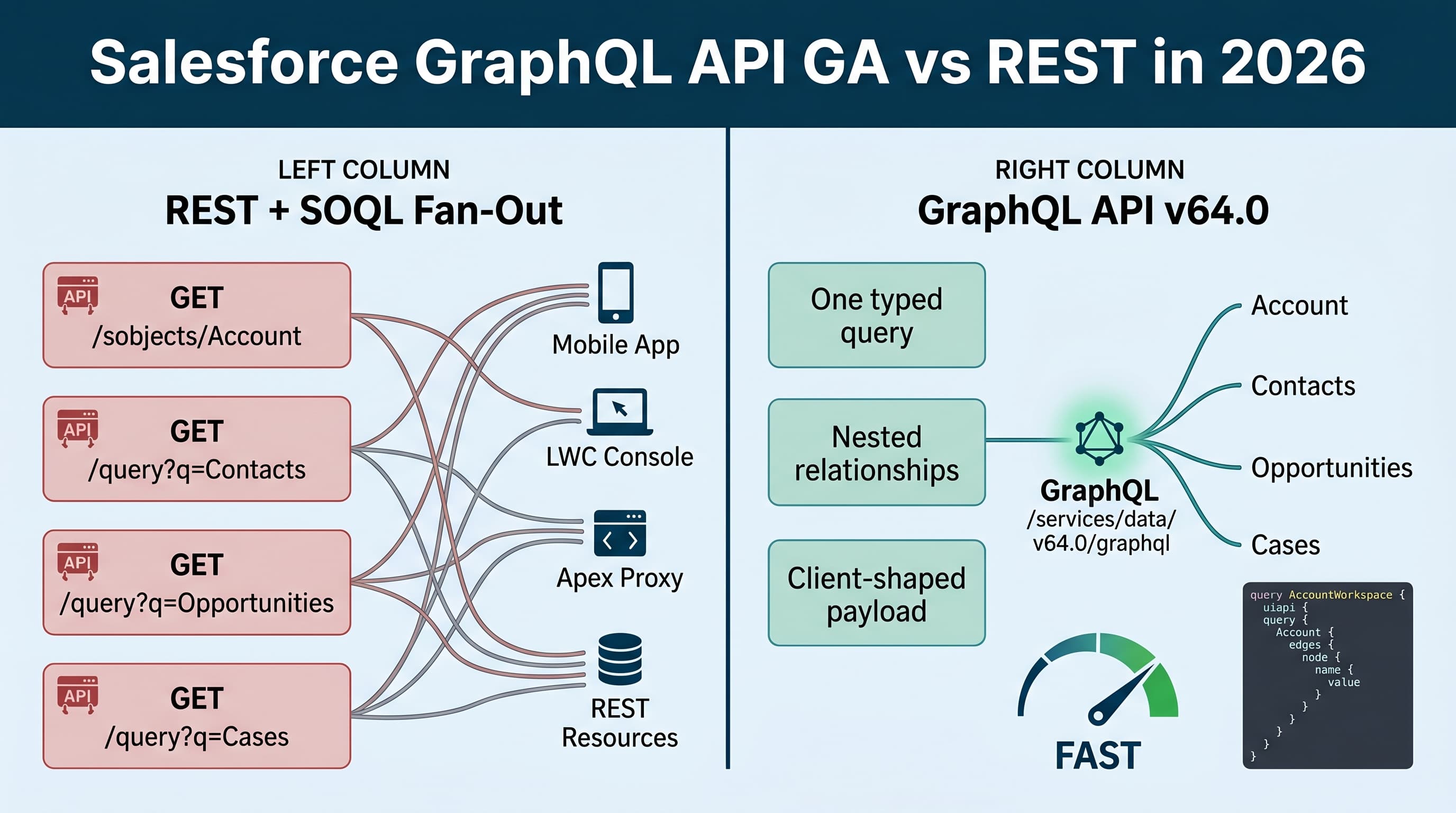
Salesforce GraphQL API is GA, and the practical question is not “Is GraphQL better than REST?”
That question is too vague.
The real question is: when does Salesforce GraphQL API GA vs REST SOQL 2026 actually matter in an enterprise org?
My answer: I use GraphQL when the client needs a shaped read model across related Salesforce data and I want to reduce network fan-out. I still use REST, Composite, Bulk API, Apex REST, and plain SOQL where they fit better.
GraphQL is not a replacement for SOQL. It is not a replacement for every REST integration. It is a client-facing API pattern that lets consumers ask for the exact Salesforce data shape they need.
That distinction matters.
In enterprise Salesforce builds, most API pain does not come from one bad endpoint. It comes from 8 “reasonable” endpoints chained together by a web app, mobile app, middleware service, or portal page. That is where GraphQL earns its keep.
What Changed in Summer '26
As of Salesforce API v64.0, GraphQL API is GA with full CRUD support. That means I no longer treat it like an experimental read-only convenience for narrow UI use cases.
The important 2026 context:
- Salesforce API v64.0 is the current Summer '26 API version.
- GraphQL API is GA with full CRUD support.
- Named Query API is GA.
- Conditional Composite API is available when REST orchestration is still the better fit.
- LWC native state management is GA, which makes client-shaped API responses easier to manage without unnecessary client-side reshaping.
- Agentforce 2.0 and Atlas Reasoning Engine v2 make API design more important because agents need predictable, bounded data access patterns.
Here’s the unpopular take: GraphQL becoming GA does not mean your org should expose every object relationship through GraphQL and call it architecture.
GraphQL gives consumers power. In Salesforce, consumer power has to be balanced against limits, security, data model complexity, and operational control.
The REST Fan-Out Problem
This is the pattern I see constantly in enterprise Salesforce projects.
A service console page opens an Account workspace. The UI needs:
- Account header fields
- Owner details
- Top 5 Contacts
- Open Opportunities
- Recent Cases
- Entitlement information
- A few calculated display values
The old REST approach usually becomes a sequence like this:
const apiVersion = "v64.0";

async function loadAccountWorkspace(instanceUrl: string, accessToken: string, accountId: string) {
  const headers = {
    Authorization: `Bearer ${accessToken}`,
    "Content-Type": "application/json"
  };

  const accountRes = await fetch(
    `${instanceUrl}/services/data/${apiVersion}/sobjects/Account/${accountId}`,
    { headers }
  );
  const account = await accountRes.json();

  const contactsRes = await fetch(
    `${instanceUrl}/services/data/${apiVersion}/query?q=${encodeURIComponent(
      `SELECT Id, Name, Email, Phone FROM Contact WHERE AccountId = '${accountId}' ORDER BY LastName LIMIT 5`
    )}`,
    { headers }
  );
  const contacts = await contactsRes.json();

  const oppsRes = await fetch(
    `${instanceUrl}/services/data/${apiVersion}/query?q=${encodeURIComponent(
      `SELECT Id, Name, StageName, Amount, CloseDate FROM Opportunity WHERE AccountId = '${accountId}' AND IsClosed = false ORDER BY CloseDate ASC LIMIT 5`
    )}`,
    { headers }
  );
  const opportunities = await oppsRes.json();

  const casesRes = await fetch(
    `${instanceUrl}/services/data/${apiVersion}/query?q=${encodeURIComponent(
      `SELECT Id, CaseNumber, Subject, Status, Priority FROM Case WHERE AccountId = '${accountId}' ORDER BY CreatedDate DESC LIMIT 5`
    )}`,
    { headers }
  );
  const cases = await casesRes.json();

  return {
    account,
    contacts: contacts.records,
    opportunities: opportunities.records,
    cases: cases.records
  };
}
This code is not “bad.” It is normal. That is the problem.
At small scale, it works. At enterprise scale, this pattern creates:
- More API calls
- More latency
- More retry paths
- More client-side joining
- More duplicated SOQL strings
- More subtle field-level security assumptions
- More production incidents when one child call fails
Conditional Composite API can reduce some of this. Apex REST can hide it behind one endpoint. But both approaches usually move the orchestration somewhere else.
GraphQL solves a different problem: let the client ask Salesforce for the exact graph it needs in one request.
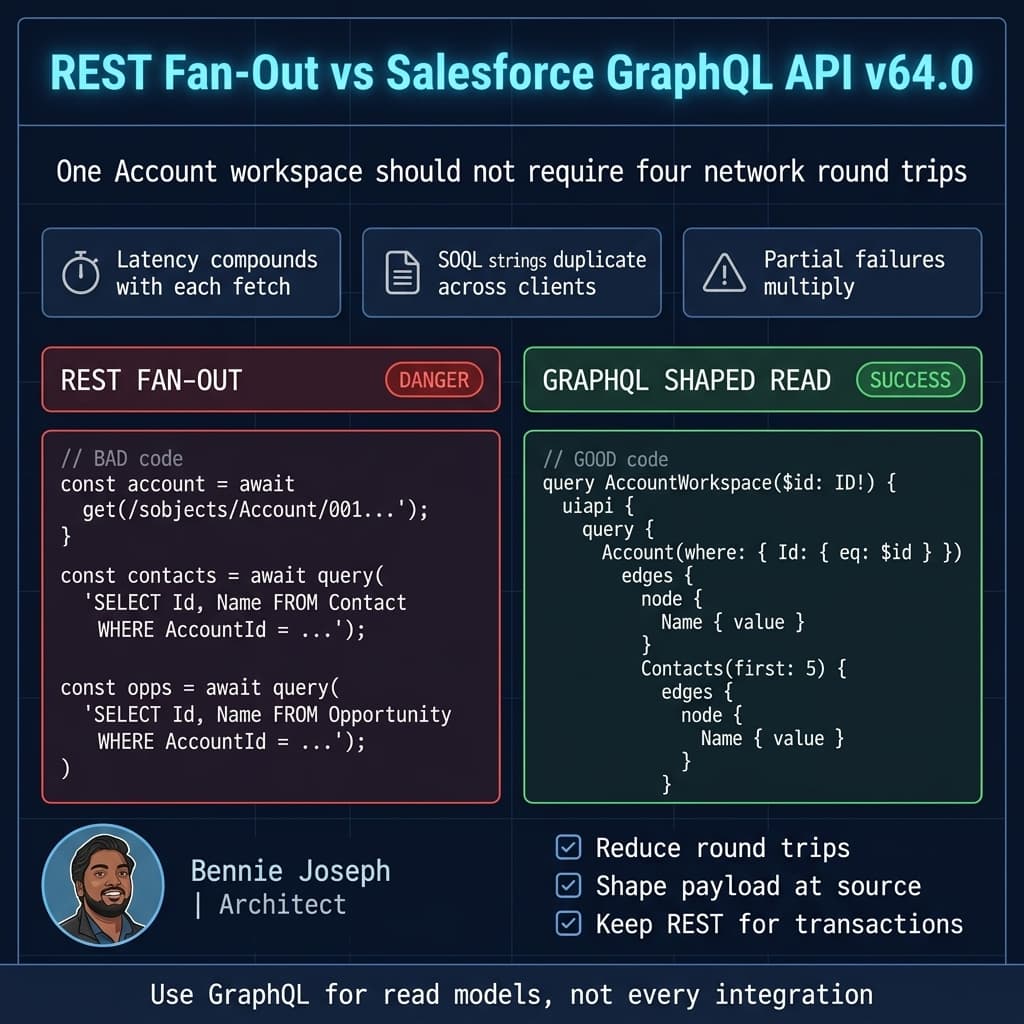
The Same Use Case With GraphQL
Here is the same Account workspace as a Salesforce GraphQL request.
const apiVersion = "v64.0";

type GraphQLResponse<T> = {
  data?: T;
  errors?: Array<{
    message: string;
    path?: Array<string | number>;
    extensions?: Record<string, unknown>;
  }>;
};

const accountWorkspaceQuery = `
query AccountWorkspace($accountId: ID!) {
  uiapi {
    query {
      Account(where: { Id: { eq: $accountId } }, first: 1) {
        edges {
          node {
            Id
            Name { value }
            Industry { value }
            Rating { value }
            Owner {
              Name { value }
              Email { value }
            }
            Contacts(first: 5, orderBy: { LastName: { order: ASC } }) {
              edges {
                node {
                  Id
                  Name { value }
                  Email { value }
                  Phone { value }
                }
              }
            }
            Opportunities(
              first: 5,
              where: { IsClosed: { eq: false } },
              orderBy: { CloseDate: { order: ASC } }
            ) {
              edges {
                node {
                  Id
                  Name { value }
                  StageName { value }
                  Amount { value }
                  CloseDate { value }
                }
              }
            }
            Cases(first: 5, orderBy: { CreatedDate: { order: DESC } }) {
              edges {
                node {
                  Id
                  CaseNumber { value }
                  Subject { value }
                  Status { value }
                  Priority { value }
                }
              }
            }
          }
        }
      }
    }
  }
}
`;

export async function loadAccountWorkspaceGraphQL(
  instanceUrl: string,
  accessToken: string,
  accountId: string
) {
  const response = await fetch(`${instanceUrl}/services/data/${apiVersion}/graphql`, {
    method: "POST",
    headers: {
      Authorization: `Bearer ${accessToken}`,
      "Content-Type": "application/json"
    },
    body: JSON.stringify({
      query: accountWorkspaceQuery,
      variables: { accountId }
    })
  });

  const payload = (await response.json()) as GraphQLResponse<unknown>;

  if (!response.ok || payload.errors?.length) {
    throw new Error(
      `GraphQL AccountWorkspace failed: ${JSON.stringify(payload.errors ?? payload)}`
    );
  }

  return payload.data;
}
This is where GraphQL is strong.
The client describes the payload shape. Salesforce returns the graph. The client does not need to stitch four REST responses into one view model.
In a 2026 LWC architecture, this pairs nicely with native state management because I can store a stable page-level read model instead of managing five separate wire/adaptor states and reconciliation rules.
When I Use GraphQL Over REST
I use Salesforce GraphQL API when at least three of these are true.
1. The UI Needs Multiple Related Records
GraphQL is a natural fit for console pages, partner portals, mobile dashboards, and account/customer 360 views.
Examples:
- Account with Contacts, Cases, Opportunities
- Contact with household members, policies, and tasks
- Product with pricing, entitlements, and related assets
- Service appointment with work order, asset, contact, and location
If the page is naturally a graph, GraphQL usually beats REST fan-out.
2. The Client Needs Only a Subset of Fields
REST /sobjects responses are often too broad, while SOQL query endpoints require clients to manage query strings.
GraphQL gives the consumer an explicit contract:
const minimalCaseCardQuery = `
query CaseCards($accountId: ID!) {
  uiapi {
    query {
      Case(
        where: { AccountId: { eq: $accountId } },
        first: 10,
        orderBy: { CreatedDate: { order: DESC } }
      ) {
        edges {
          node {
            Id
            CaseNumber { value }
            Subject { value }
            Status { value }
            Priority { value }
          }
        }
      }
    }
  }
}
`;
I like this for frontend teams because the query documents become self-documenting API contracts.
3. The Consumer Is a Modern Web or Mobile App
GraphQL shines when a consumer is capable of owning query documents, variable binding, caching, and error rendering.
That usually means:
- LWC app with a backend-for-frontend pattern
- Experience Cloud site
- Mobile app
- React/Vue/Angular app calling Salesforce through an approved API gateway
- Internal desktop app used by operations teams
I do not automatically expose raw GraphQL to every third-party vendor. For vendor integrations, I still prefer bounded REST endpoints, Named Query API, or event-driven integration unless the vendor has a mature GraphQL client and the use case is read-heavy.
4. The Read Model Changes Often
If product owners constantly change what appears on a workspace page, GraphQL reduces backend churn.
Instead of creating a new Apex DTO every sprint, I can let the client query additional allowed fields. That said, I still review query complexity and security. Freedom without governance becomes a production tax.
When I Still Use REST
REST is not dead. Anyone saying that is selling a migration project.
I still use REST for simple, stable, resource-oriented operations.
Simple Record CRUD
If an external system needs to update one Account field, REST is clear and boring.
Boring is good.
const apiVersion = "v64.0";

export async function updateAccountExternalReference(
  instanceUrl: string,
  accessToken: string,
  accountId: string,
  externalReference: string
) {
  const response = await fetch(
    `${instanceUrl}/services/data/${apiVersion}/sobjects/Account/${accountId}`,
    {
      method: "PATCH",
      headers: {
        Authorization: `Bearer ${accessToken}`,
        "Content-Type": "application/json"
      },
      body: JSON.stringify({
        External_Reference__c: externalReference
      })
    }
  );

  if (!response.ok) {
    throw new Error(`Account update failed with status ${response.status}`);
  }
}
I do not need GraphQL for that.
Transaction Orchestration
If I need conditional operations, dependent requests, or transactional behavior across REST resources, I look at Composite API or Conditional Composite API before GraphQL.
GraphQL CRUD is GA, but enterprise writes are rarely “just write this object.” They involve validation, sequencing, idempotency, audit requirements, and rollback expectations.
For complex business writes, I usually prefer:
- Apex service layer
- REST endpoint backed by Apex
- Composite or Conditional Composite API
- Platform Events for asynchronous workflows
- MuleSoft for integration orchestration
Bulk Data Movement
For bulk loads, exports, nightly syncs, or data lake jobs, I do not use GraphQL.
Use Bulk API, CDC, Pub/Sub API, Data 360 federation, Zero Copy patterns, or appropriate ETL tooling.
GraphQL is a terrible hammer for a million-record nail.
Stable Third-Party Contracts
If a partner integration expects a stable contract for five years, a versioned REST API is often easier to govern.
GraphQL can be stable, but it gives consumers more flexibility than some enterprise contracts should allow.
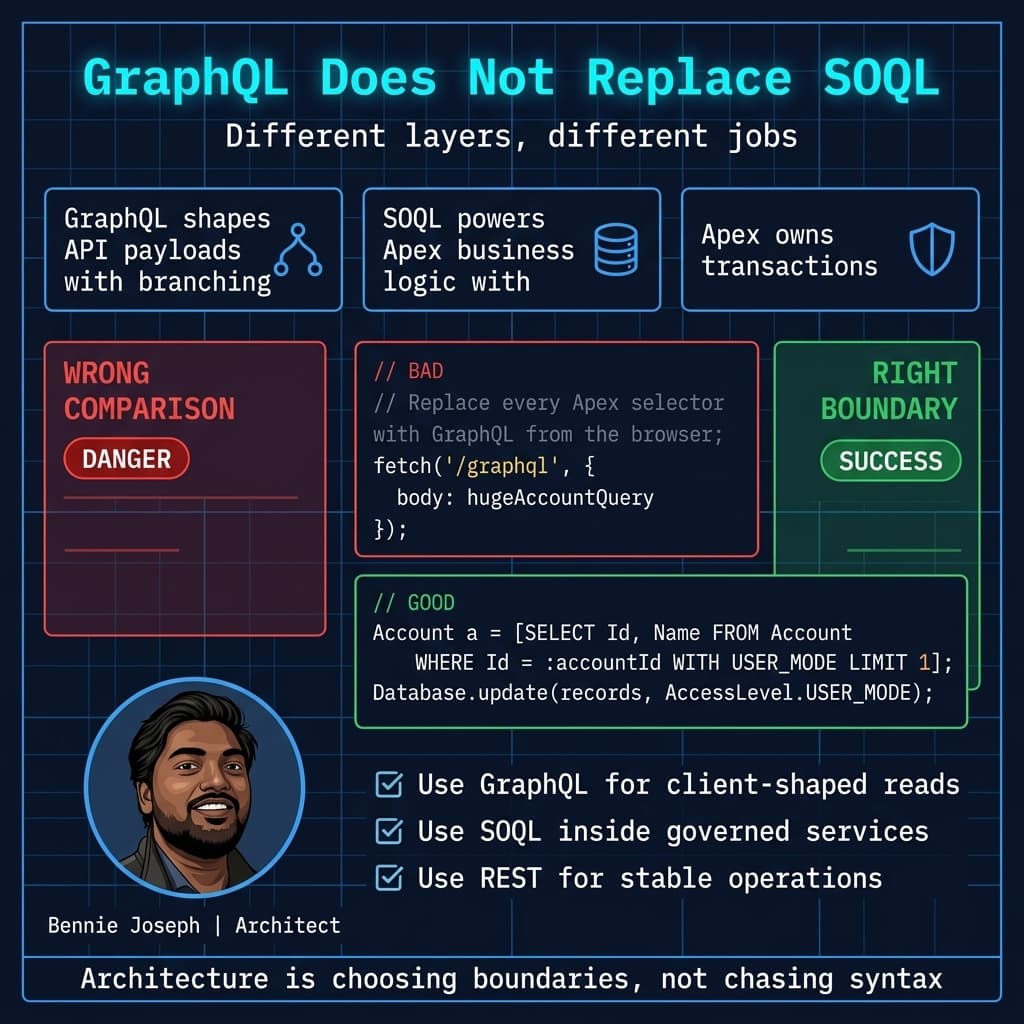
GraphQL vs SOQL: Stop Comparing Them Incorrectly
SOQL is a query language for Salesforce data.
GraphQL is an API query language and runtime contract.
They overlap, but they are not the same layer.
I still write SOQL constantly in Apex services, triggers, batch jobs, queueables, schedulables, and Agentforce custom actions. GraphQL does not replace server-side data access patterns.
For example, if I am implementing a controlled Apex endpoint, I want explicit security and business logic:
public with sharing class AccountWorkspaceService {
    public class AccountSummary {
        @AuraEnabled public Id accountId;
        @AuraEnabled public String accountName;
        @AuraEnabled public Integer openOpportunityCount;
        @AuraEnabled public Decimal openPipeline;
    }

    @AuraEnabled(cacheable=true)
    public static AccountSummary getSummary(Id accountId) {
        Account accountRecord = [
            SELECT Id, Name
            FROM Account
            WHERE Id = :accountId
            WITH USER_MODE
            LIMIT 1
        ];

        AggregateResult pipeline = [
            SELECT COUNT(Id) opportunityCount, SUM(Amount) pipelineAmount
            FROM Opportunity
            WHERE AccountId = :accountId
            AND IsClosed = false
            WITH USER_MODE
        ];

        AccountSummary summary = new AccountSummary();
        summary.accountId = accountRecord.Id;
        summary.accountName = accountRecord.Name;
        summary.openOpportunityCount = (Integer) pipeline.get('opportunityCount');
        summary.openPipeline = (Decimal) pipeline.get('pipelineAmount');

        return summary;
    }
}
That Apex is not obsolete because GraphQL exists.
I use Apex when I need business rules, aggregation, calculated responses, controlled caching, or a strict service boundary.
GraphQL is better when the consumer needs flexible record graph traversal. Apex is better when the platform needs to own the behavior.
Security and Governance
GraphQL does not remove the need for security design.
The good news: Salesforce GraphQL through UI API semantics respects the platform security model, including object permissions, field access, and sharing behavior.
The bad news: security is not only CRUD and FLS.
I still govern:
- Which clients can call GraphQL
- Which queries are approved for high-volume apps
- How query documents are stored and reviewed
- Maximum page sizes
- Nested relationship depth
- Error logging
- API gateway throttling
- Tenant-specific data exposure rules
- Whether external consumers get direct GraphQL access at all
In API v64.0 projects, I am explicit in Apex with WITH USER_MODE and user-mode DML where Apex is involved. The upcoming v67.0 direction makes user mode defaults stronger, but I still like explicit code because security reviews should not require tribal knowledge.
public with sharing class ContactPreferenceWriter {
    @AuraEnabled
    public static void updateEmailOptOut(Id contactId, Boolean hasOptedOut) {
        Contact contactToUpdate = [
            SELECT Id, HasOptedOutOfEmail
            FROM Contact
            WHERE Id = :contactId
            WITH USER_MODE
            LIMIT 1
        ];

        contactToUpdate.HasOptedOutOfEmail = hasOptedOut;

        Database.update(contactToUpdate, AccessLevel.USER_MODE);
    }
}
If GraphQL is being used by an Experience Cloud site or external app, I want monitoring. Not someday. Day one.
Real Enterprise Example: Insurance Service Console
On an insurance transformation project, we had a service console workspace that opened thousands of times per day. The page needed policyholder information from Salesforce, related cases, contacts, opportunities, assets, and a few entitlement indicators.
The original architecture used a mix of REST calls and Apex methods. Nothing looked insane in isolation. But the page load involved multiple chained calls, and each team owned a different slice of the response.
The symptoms were predictable:
- Agents saw skeleton loaders for too long.
- Failed child calls created incomplete panels.
- The frontend had too much joining logic.
- API call volume spiked during call center peaks.
- Adding one new card required changes in multiple places.
We moved the read-heavy workspace data to a GraphQL-shaped API pattern. Not every call. Just the page-level read model.
The result:
- API round trips dropped from several calls to one primary request.
- The page model became easier for the LWC team to reason about.
- Backend changes slowed down because the client could request allowed fields directly.
- Error handling became centralized around one request.
- We kept Apex services for writes and policy-specific business rules.
That last point matters. We did not “go GraphQL.” We used GraphQL where it was better and kept Apex/REST where they were better.
That is how enterprise architecture actually works.
Where Agentforce 2.0 Changes the Conversation
Agentforce 2.0 makes API shape more important, not less.
When building Agentforce actions, custom reasoning steps, or tools exposed through Salesforce MCP, I do not want agents randomly exploring broad data surfaces. I want bounded, predictable data contracts.
For agent-facing reads, GraphQL can be useful when the agent needs a compact context bundle:
- Account summary
- Latest open cases
- Recent opportunities
- Key contacts
- Entitlement status
But I usually do not let an agent generate arbitrary GraphQL in production. That is too much freedom.
My preferred pattern is:
- Define approved GraphQL query documents or Named Queries.
- Wrap them in a controlled action/tool.
- Add input validation.
- Log every invocation.
- Keep writes behind Apex services or approved platform actions.
If I am building an AI assistant with claude-sonnet-4-7, gpt-5.5, or Agentforce 2.0, I care less about the model being clever and more about the tool contract being safe.
Clever models plus vague APIs create expensive incidents.
My Decision Framework
Here is the practical version.
Use GraphQL when:
- The consumer needs multiple related records.
- The response shape is UI-specific.
- You want fewer round trips.
- The client team can manage query documents responsibly.
- The use case is read-heavy or controlled CRUD.
- You need a page-level data graph.
Use REST when:
- The operation is simple and resource-based.
- The integration contract must be stable and narrow.
- The client does not need graph traversal.
- A third-party system expects conventional REST.
- You are doing simple record create/update/delete.
Use Composite or Conditional Composite API when:
- You need dependent requests.
- You need orchestration across REST resources.
- You want to reduce API calls without adopting GraphQL.
- The request flow is procedural rather than graph-shaped.
Use Apex when:
- Business rules matter.
- Aggregation logic matters.
- You need strict transaction control.
- You need a hardened service boundary.
- You want to hide Salesforce data model complexity.
Use Bulk/API/event patterns when:
- Volume is high.
- The process is asynchronous.
- You are syncing systems.
- You are feeding Data 360, a warehouse, or downstream analytics.
A Simple Rule I Use
If the consumer says:
“I need this record and these related records, but only these fields, and the layout may evolve.”
I consider GraphQL.
If the consumer says:
“I need to perform this business operation.”
I reach for Apex, REST, Composite, or events.
That one distinction prevents a lot of bad architecture.
GraphQL is a read-model accelerator. It can do CRUD now, but I still treat complex writes with suspicion until I understand transaction boundaries, validation ownership, and operational failure modes.
Final Opinion
Salesforce GraphQL API being GA in 2026 is a big deal because it gives architects a cleaner way to serve modern UIs and intelligent tools without building endless custom DTO endpoints.
But do not turn it into another platform religion.
REST is still useful. SOQL is still fundamental. Apex is still where serious business logic belongs. Composite still solves orchestration problems. Bulk API still handles volume.
GraphQL earns its place when the shape of the data matters more than the shape of the resource.
That is the line I use in real projects.
TL;DR
- Use Salesforce GraphQL API for client-shaped, relationship-heavy read models where REST causes fan-out.
- Keep REST, Composite, Apex, and Bulk API for stable contracts, transactions, business logic, and high-volume work.
- GraphQL is GA in Salesforce API v64.0, but governance still decides whether it succeeds in production.