Salesforce CI/CD Security Overhaul 2026: What Breaks and How to Fix It
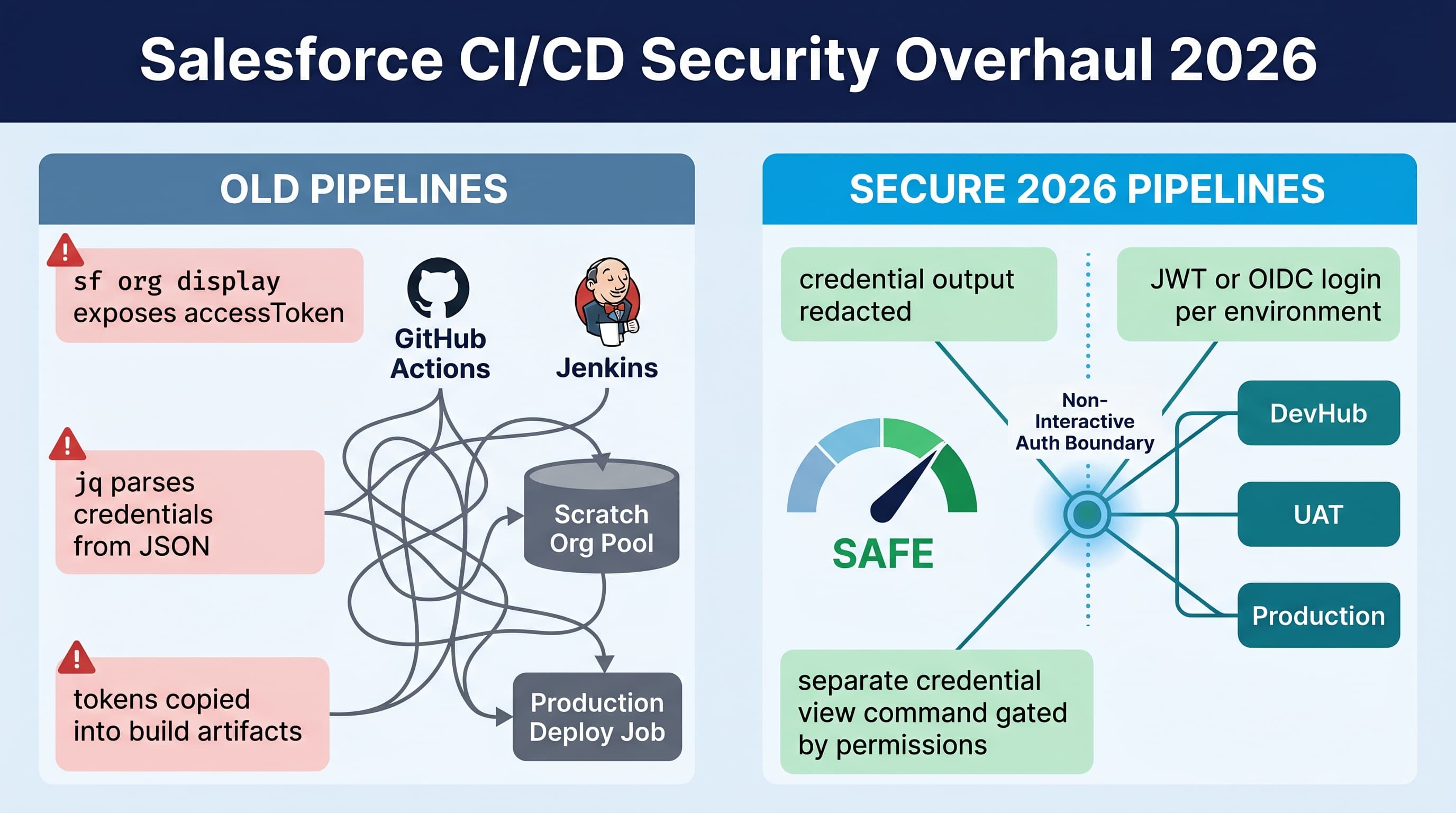
The salesforce cicd sf cli security credential update 2026 is not a cosmetic CLI change. It breaks pipelines that treated Salesforce CLI output as a credential vending machine.
Good.
I have seen too many enterprise Salesforce pipelines pass access tokens between jobs by scraping sf org display --json, writing auth URLs into artifacts, or echoing debug output into CI logs. That was always fragile. In 2026, it is also much harder to get away with.
The sf CLI credential security overhaul redacts credentials from normal command output. Credentials are no longer casually emitted by commands that were originally intended for humans and automation diagnostics. If you need to view credentials, you now use separate credential-focused commands with tighter intent, auditability, and safer output handling.
That means some pipelines fail immediately. Others keep deploying but silently skip steps because a token variable is now [REDACTED]. The dangerous ones fall back to insecure workarounds.
Here is how I would fix it.
What changed in the 2026 sf CLI credential overhaul
The important behavior change is simple:
- Standard CLI output redacts sensitive credentials.
- JSON output is no longer a loophole for token extraction.
- Commands that display org metadata do not behave like secret export commands.
- Credential viewing is separated into explicit credential commands.
- CI logs are safer by default because secrets are redacted before they hit stdout.
- Existing scripts that parse access tokens, refresh tokens, auth URLs, or local credential files can break.
This matters because Salesforce pipelines often grew organically.
A typical enterprise DevOps setup has:
- GitHub Actions, GitLab CI, Azure DevOps, Jenkins, or Copado invoking
sf - A DevHub auth step
- Scratch org creation
- Package version creation
- Validation deployments to UAT
- Quick deploy to production
- Apex tests
- Static analysis
- Agentforce 2.0 metadata validation for Agent Script
.agentfiles andAiAuthoringBundle - LWC deployments, including Summer '26 native state components
- API calls against Salesforce API v64.0
If one job used CLI output to pass credentials to another job, that job is now suspect.
Here’s the unpopular take: if your deployment pipeline needs to read a Salesforce access token from CLI stdout, your pipeline design is wrong. The 2026 update is forcing the cleanup that should have happened earlier.
What breaks first
The breakages are predictable.
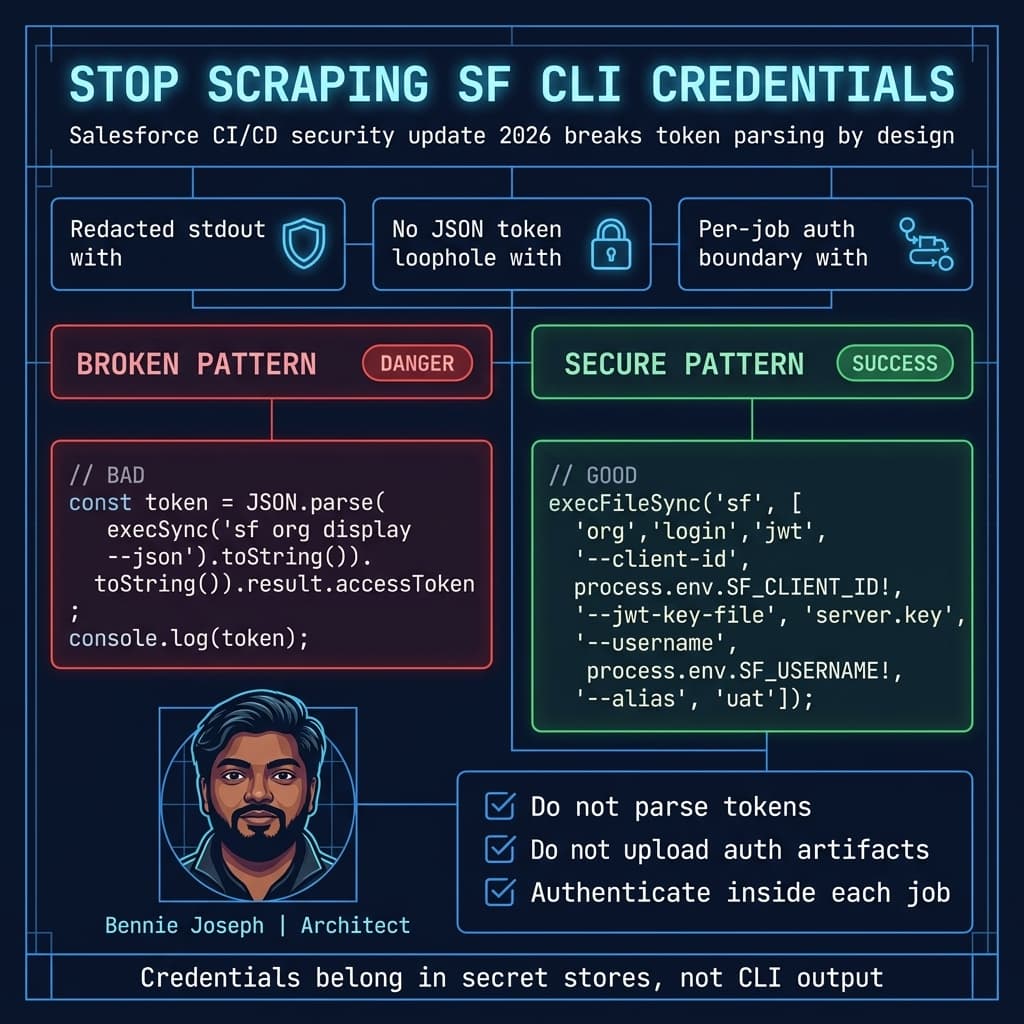
1. Scripts parsing access tokens from CLI JSON
This is the classic bad pattern:
import { execSync } from 'node:child_process';

const output = execSync('sf org display --target-org uat --verbose --json', {
  encoding: 'utf8'
});

const parsed = JSON.parse(output);
const accessToken = parsed.result.accessToken;

if (!accessToken || accessToken === '[REDACTED]') {
  throw new Error('Could not read Salesforce access token from sf org display');
}

console.log(`Token for downstream job: ${accessToken}`);
That script deserves to fail.
Before the overhaul, this kind of script often worked because verbose org display output exposed enough credential material to let another tool make raw REST calls. After the overhaul, accessToken is redacted or absent from general-purpose output.
The fix is not to find a new command to scrape. The fix is to stop passing access tokens around.
2. Jobs passing credentials between pipeline stages
I often see this pattern:
- Authenticate to DevHub in job A.
- Export an auth URL or access token.
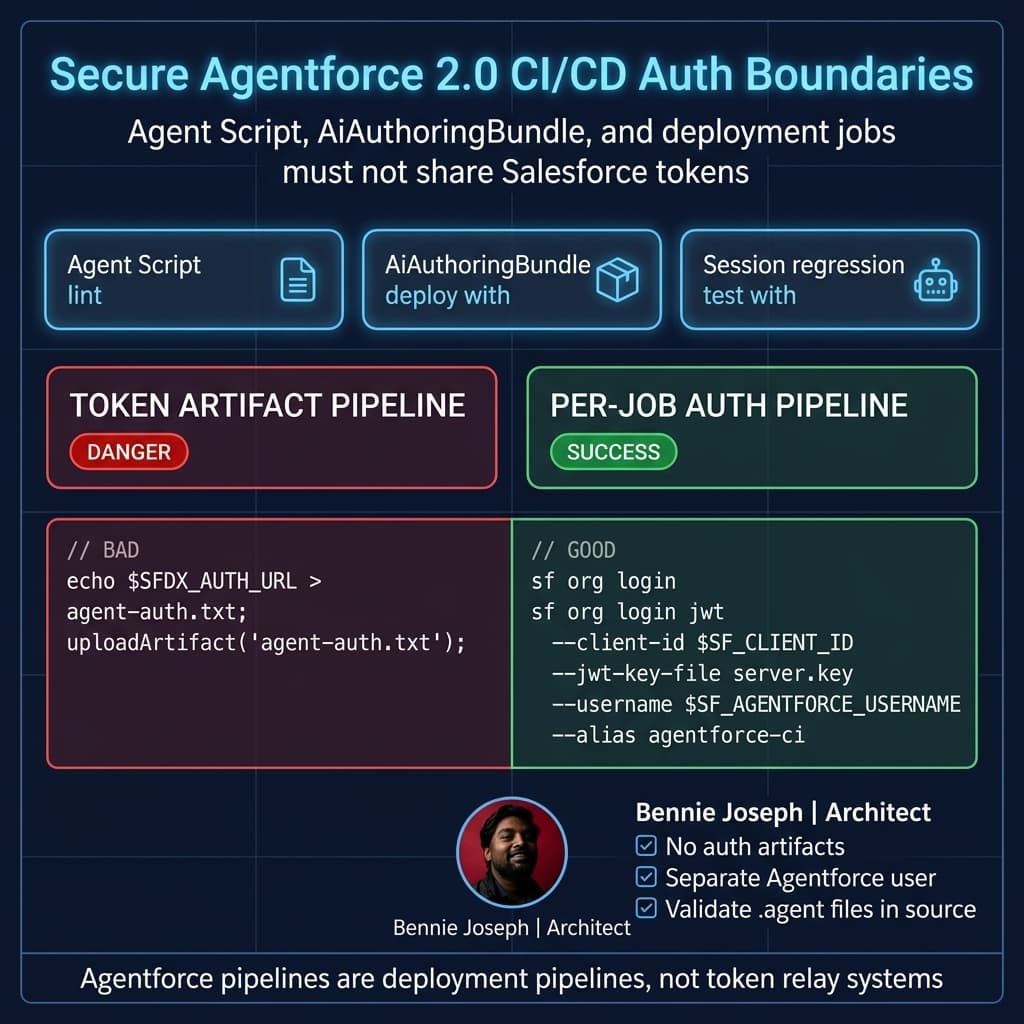
- Upload it as a CI artifact.
- Download it in job B.
- Rehydrate the org.
- Deploy.
That pattern is convenient and terrible.
Artifacts have a different lifecycle than secrets. They are often downloadable by more users. They are retained longer than expected. They are copied during reruns. They end up in support bundles.
The 2026 CLI update does not only protect Salesforce. It protects your CI system from becoming an accidental credential warehouse.
3. Scratch org pool automation relying on local CLI internals
Some scratch org pool scripts read local CLI state directly. They inspect files under the CLI config directories, infer usernames, reuse auth URLs, or assume token fields exist in a local JSON shape.
That is brittle. Salesforce CLI is not a database contract.
Use CLI commands as the interface. Use JSON output for non-sensitive metadata like org ID, username, instance URL, status, expiration date, and alias. Do not treat local credential storage as an integration API.
4. Debug pipelines that printed everything
A lot of teams have a “debug deploy” workflow that runs with verbose logging and dumps environment variables, CLI config, org display output, and JSON payloads.
After the 2026 update, those logs are less dangerous because credentials are redacted. But they may also break assertions that expected literal values.
If your debug step says “verify token length > 100”, delete that check. It is checking the wrong thing.
The new baseline: authenticate per trust boundary
My rule is simple: authenticate inside the job that needs Salesforce access.
Do not pass Salesforce credentials from one job to another unless you are using your CI platform’s secret manager or identity federation mechanism.
For enterprise pipelines, I prefer one of these patterns:
- JWT bearer auth using a Connected App and environment-specific integration user
- OIDC-based federation where supported by the CI platform and Salesforce identity configuration
- Secret manager injection from Vault, AWS Secrets Manager, Azure Key Vault, Google Secret Manager, or the CI native secret store
- Short-lived environment-specific authentication, never shared through build artifacts
The job that validates UAT should authenticate to UAT. The job that deploys production should authenticate to production. The job that creates scratch orgs should authenticate to DevHub.
That sounds obvious. Many pipelines do not do it.
A safer TypeScript wrapper for CI auth
I usually put a thin wrapper around Salesforce CLI calls. Not because the CLI is hard, but because every enterprise pipeline eventually needs consistent logging, retries, and redaction.
This wrapper authenticates using JWT, verifies the org identity, and returns only non-sensitive metadata.
import { execFileSync } from 'node:child_process';

type SfOrgDisplayResult = {
  result: {
    id: string;
    username: string;
    orgId: string;
    instanceUrl: string;
    accessToken?: string;
  };
};

function runSf(args: string[], env: NodeJS.ProcessEnv = process.env): string {
  return execFileSync('sf', args, {
    encoding: 'utf8',
    stdio: ['ignore', 'pipe', 'pipe'],
    env
  });
}

function requireEnv(name: string): string {
  const value = process.env[name];

  if (!value) {
    throw new Error(`Missing required environment variable: ${name}`);
  }

  return value;
}

function assertNoCredentialLeak(rawJson: string): void {
  const blockedPatterns = [
    /00D[a-zA-Z0-9]{12,}/,
    /[a-zA-Z0-9._-]{80,}/,
    /refresh_token/i,
    /access_token/i
  ];

  for (const pattern of blockedPatterns) {
    if (pattern.test(rawJson) && !rawJson.includes('[REDACTED]')) {
      throw new Error(`Potential credential leak detected in sf output: ${pattern}`);
    }
  }
}

export function authenticateSalesforceOrg(alias: string): SfOrgDisplayResult['result'] {
  const clientId = requireEnv('SF_CLIENT_ID');
  const username = requireEnv('SF_USERNAME');
  const keyFile = requireEnv('SF_JWT_KEY_FILE');

  runSf([
    'org',
    'login',
    'jwt',
    '--client-id',
    clientId,
    '--jwt-key-file',
    keyFile,
    '--username',
    username,
    '--alias',
    alias,
    '--set-default'
  ]);

  const displayJson = runSf([
    'org',
    'display',
    '--target-org',
    alias,
    '--json'
  ]);

  assertNoCredentialLeak(displayJson);

  const parsed = JSON.parse(displayJson) as SfOrgDisplayResult;

  if (!parsed.result.orgId || !parsed.result.instanceUrl || !parsed.result.username) {
    throw new Error(`Authenticated org ${alias}, but org display returned incomplete metadata`);
  }

  if (parsed.result.accessToken && parsed.result.accessToken !== '[REDACTED]') {
    throw new Error('Unexpected unredacted access token in org display output');
  }

  return {
    id: parsed.result.id,
    orgId: parsed.result.orgId,
    username: parsed.result.username,
    instanceUrl: parsed.result.instanceUrl
  };
}

const org = authenticateSalesforceOrg(process.env.SF_ALIAS ?? 'uat');
console.log(`Authenticated ${org.username} against ${org.orgId} at ${org.instanceUrl}`);
This is intentionally boring.
It does not return a token. It does not write an auth URL. It does not print credentials. It treats unredacted credential output as a failure.
That last part matters. I want pipelines to fail loudly if a plugin, wrapper, or rogue command starts leaking secrets again.
The right replacement for token handoff
If you currently pass access tokens between jobs, replace that with one of these patterns.
Pattern A: repeated JWT auth per job
Use this when your CI platform stores secrets safely and your deployment jobs are isolated.
Each job receives:
SF_CLIENT_IDSF_USERNAMESF_JWT_KEY_FILEor a mounted private key- Environment-specific alias, like
devhub,uat, orprod
Then each job logs in independently.
That gives you clean boundaries. If the UAT validation job is compromised, it does not automatically expose production auth.
Pattern B: OIDC federation
For organizations that have standardized on workload identity, OIDC is cleaner than storing long-lived keys in CI.
The CI runner proves its identity to the identity provider. Salesforce trusts the configured identity path. The pipeline receives scoped access without manually copying private keys through the CI configuration.
I like this pattern for regulated enterprises because it improves rotation, revocation, and auditability.
Pattern C: service account per environment
Do not use one all-powerful deployment user everywhere.
Use separate integration users:
sf-devhub-ci@company.comsf-uat-deploy@company.comsf-prod-deploy@company.comsf-agentforce-ci@company.com
Give each one only the permissions needed.
For production deployment, that usually means metadata deployment permissions, Apex test execution, package install permissions if applicable, and access to relevant setup metadata. It does not mean “System Administrator because the pipeline was failing at 11 PM.”
Fixing a real enterprise pipeline
On one enterprise program, the pipeline had six stages:
- Static analysis
- Scratch org build
- Package version creation
- UAT validation
- Production quick deploy
- Post-deploy smoke tests
The old setup authenticated once to DevHub, scraped an auth URL from CLI output, uploaded it as a build artifact, and reused it downstream. The production deployment job also parsed accessToken from sf org display --verbose --json because a custom Node script called the Metadata API directly.
It worked until the CLI security update made the token parsing step return redacted output.
The immediate failure looked like this:
const token = parsed.result.accessToken;

if (token === '[REDACTED]') {
  throw new Error('Metadata API client received redacted Salesforce access token');
}
That failure was useful. It exposed a design flaw.
We fixed it by splitting authentication by environment:
- DevHub JWT auth only in scratch org and package jobs
- UAT JWT auth only in validation jobs
- Production JWT auth only in quick deploy jobs
- No auth artifacts between jobs
- No CLI local config copied between runners
- Custom Metadata API script replaced with
sf project deploy validateandsf project deploy quick - Post-deploy smoke tests authenticated independently using the production smoke-test user
- Logs scanned for credential-shaped strings before artifact retention
We also added a hard rule: pipeline jobs can output org ID, username, instance URL, deployment ID, test run ID, and package version ID. They cannot output tokens, auth URLs, refresh tokens, private keys, or credential file contents.
That one rule made security reviews much easier.
Update your deploy commands, not just your auth commands
Many teams focus only on login. The better move is to reduce the number of places that need direct API credentials.
For normal metadata deployments against Salesforce API v64.0, use the CLI deployment commands instead of building your own REST client unless you have a strong reason.
A secure validation job can look like this conceptually:
import { execFileSync } from 'node:child_process';

function sf(args: string[]): string {
  return execFileSync('sf', args, {
    encoding: 'utf8',
    stdio: ['ignore', 'pipe', 'pipe']
  });
}

function validateSource(targetOrg: string): string {
  const output = sf([
    'project',
    'deploy',
    'validate',
    '--target-org',
    targetOrg,
    '--source-dir',
    'force-app',
    '--test-level',
    'RunLocalTests',
    '--json'
  ]);

  const parsed = JSON.parse(output);
  const deployId = parsed.result?.id;

  if (!deployId) {
    throw new Error(`Validation did not return a deployment id: ${output}`);
  }

  console.log(`Validation deployment id: ${deployId}`);
  return deployId;
}

function quickDeploy(targetOrg: string, validatedDeployId: string): void {
  sf([
    'project',
    'deploy',
    'quick',
    '--target-org',
    targetOrg,
    '--job-id',
    validatedDeployId,
    '--json'
  ]);

  console.log(`Quick deploy submitted for validation id: ${validatedDeployId}`);
}

const deployId = validateSource('uat');
console.log(`Store deploy id safely in CI variable, not as a credential: ${deployId}`);
A deployment ID is not a credential. Treating it separately from secrets keeps your pipeline design clean.
Agentforce 2.0 and metadata validation
This security update also matters for Agentforce 2.0 projects.
With Agentforce Builder GA and Agent Script .agent files represented through AiAuthoringBundle metadata, more teams are deploying AI agent configuration through source control. That is the right direction. Browser-clicked agent changes do not scale.
But agent deployment pipelines often include extra steps:
- Lint Agent Script files
- Generate agent specs with
sf agentCLI commands - Preview agent behavior in a sandbox
- Run sessions for regression testing
- Deploy
AiAuthoringBundlemetadata - Validate custom reasoning steps against Apex, Flow, MuleSoft, or external actions
Do not let those extra steps become credential shortcuts.
If an Agentforce regression test needs Salesforce access, authenticate that test job directly. If it needs an external API, use an External Credential or CI secret store. Do not export the Salesforce session token from a previous deploy step because “the agent test runner needs it.”
That shortcut will break, and it should.
LWC native state and front-end CI jobs
Summer '26 LWC native state management does not require a new credential model by itself. But it changes the shape of some front-end pipelines.
I am seeing more Salesforce teams run heavier JavaScript checks before metadata deployment:
- LWC unit tests
- Type checks
- Component contract tests
- State transition tests
- UI snapshot tests
- Static dependency checks
Most of those jobs do not need Salesforce org authentication at all.
That is worth saying plainly: do not authenticate jobs that do not need an org.
A lint job does not need a production token. A TypeScript test job does not need DevHub access. A formatting job does not need a connected app secret.
The cheapest credential is the one you never issue.
APEX tests and user-mode security checks in the pipeline
The 2026 pipeline conversation should not stop at CLI credentials. Salesforce API v64.0 is current, and v67.0 is next with a major security direction: SOQL, DML, and Database methods defaulting to user mode, and classes without explicit sharing declarations defaulting to with sharing.
I already want CI pipelines to surface security assumptions early. For Apex, that means tests should be explicit about user context, permissions, and data access.
Here is a small Apex example I would include as a canary-style test when refactoring pipeline users and permission sets:
@IsTest
private class DeploymentUserSecurityCanaryTest {
    @IsTest
    static void standardUserCannotUpdateRestrictedAccountField() {
        Profile standardProfile = [
            SELECT Id
            FROM Profile
            WHERE Name = 'Standard User'
            LIMIT 1
        ];

        User limitedUser = new User(
            FirstName = 'CI',
            LastName = 'SecurityCanary',
            Email = 'ci.security.canary@example.com',
            Username = 'ci.security.canary.' + System.currentTimeMillis() + '@example.com',
            Alias = 'cican',
            TimeZoneSidKey = 'America/New_York',
            LocaleSidKey = 'en_US',
            EmailEncodingKey = 'UTF-8',
            LanguageLocaleKey = 'en_US',
            ProfileId = standardProfile.Id
        );

        insert limitedUser;

        Account accountRecord = new Account(Name = 'Pipeline Security Test');
        insert as user accountRecord;

        System.runAs(limitedUser) {
            Account attemptedUpdate = new Account(
                Id = accountRecord.Id,
                Name = 'Updated By Limited User'
            );

            Database.SaveResult result = Database.update(attemptedUpdate, false, AccessLevel.USER_MODE);

            System.assertEquals(
                false,
                result.isSuccess(),
                'Limited user should not update Account without explicit access'
            );
        }
    }
}
The exact object and permission model will vary, but the principle does not: your CI pipeline should prove security-critical assumptions instead of assuming the deployment user can do everything.
Concrete migration checklist
Here is the migration checklist I use.
Inventory credential extraction
Search your repositories for:
accessTokenrefreshTokenSFDX_AUTH_URLsf org displaysfdx force:org:display--verbose --json.sfdx.sfauthUrlinstanceUrlplus raw REST callsAuthorization: Bearer
Do not only search the main repo. Search shared pipeline templates, internal npm packages, Jenkins shared libraries, GitHub composite actions, and release scripts.
Replace token passing with job-local login
Every job that needs org access should log in directly.
That may feel slower. In practice, the security gain is worth it, and the runtime cost is usually noise compared to Apex tests and deployment validation.
Separate deployment users
Use different users and connected apps for:
- DevHub automation
- Sandbox validation
- Production deployment
- Agentforce 2.0 test automation
- Post-deployment smoke testing
The production deploy user should not create scratch orgs. The scratch org user should not deploy production. The smoke-test user should not modify metadata.
Harden logs
Set CI log masking for:
- Client IDs where required by policy
- Usernames if your organization treats them as sensitive
- JWT private key content
- Auth URLs
- Bearer tokens
- Connected app secrets
- External service secrets
Even with CLI redaction, your own scripts can still leak values.
Remove credential artifacts
Delete any artifact upload or cache step that contains:
- CLI config directories
- Auth URL files
- Private keys
.envfiles- JSON command outputs that may contain credentials
- Debug bundles with environment dumps
Cache dependencies. Do not cache auth.
Pin and test CLI versions deliberately
Do not let production deployments float blindly on a new CLI release.
I prefer controlled updates:
- Pin a known-good sf CLI version for production deploy jobs.
- Run a scheduled pipeline against the next CLI version in a sandbox.
- Promote CLI updates deliberately.
- Read breaking changes before updating shared runners.
The 2026 credential overhaul is exactly why this matters.
What I would not do
I would not disable redaction.
I would not patch scripts to call the separate credential-view command unless the job has a legitimate, isolated reason to retrieve credentials.
I would not pipe credential output into jq, upload it, and call that “secure because the artifact is private.”
I would not give the pipeline System Administrator because a permission error appeared after separating users.
I would not use an LLM agent, whether powered by claude-sonnet-4-7, gpt-5.5, or Agentforce 2.0, to inspect raw CI logs that may contain secrets. If I use AI for pipeline analysis, I sanitize logs first and keep secrets out of prompts. That includes internal SaaS agents I build myself.
Final opinion
The sf CLI credential security update is a breaking change, but it is a healthy one.
Salesforce CI/CD has matured. We are deploying more than Apex and Custom Objects now. We deploy Agentforce 2.0 assets, Data 360 integrations, LWC native state components, permission models, API integrations, and business-critical automation. The credential model has to mature with it.
If your pipeline breaks because credentials are redacted, do not fight the redaction. Fix the trust boundary.
TL;DR
- The 2026 sf CLI update redacts credentials from normal output, so pipelines scraping tokens from
sf org display --jsonwill break. - Fix it by authenticating per job with JWT or OIDC, separating deployment users, and removing credential artifacts.
- Treat deployment IDs, org IDs, and instance URLs as metadata; treat tokens, auth URLs, keys, and refresh tokens as secrets that never belong in logs.