Claude Tool-Use API for Salesforce: No Abstraction Layers
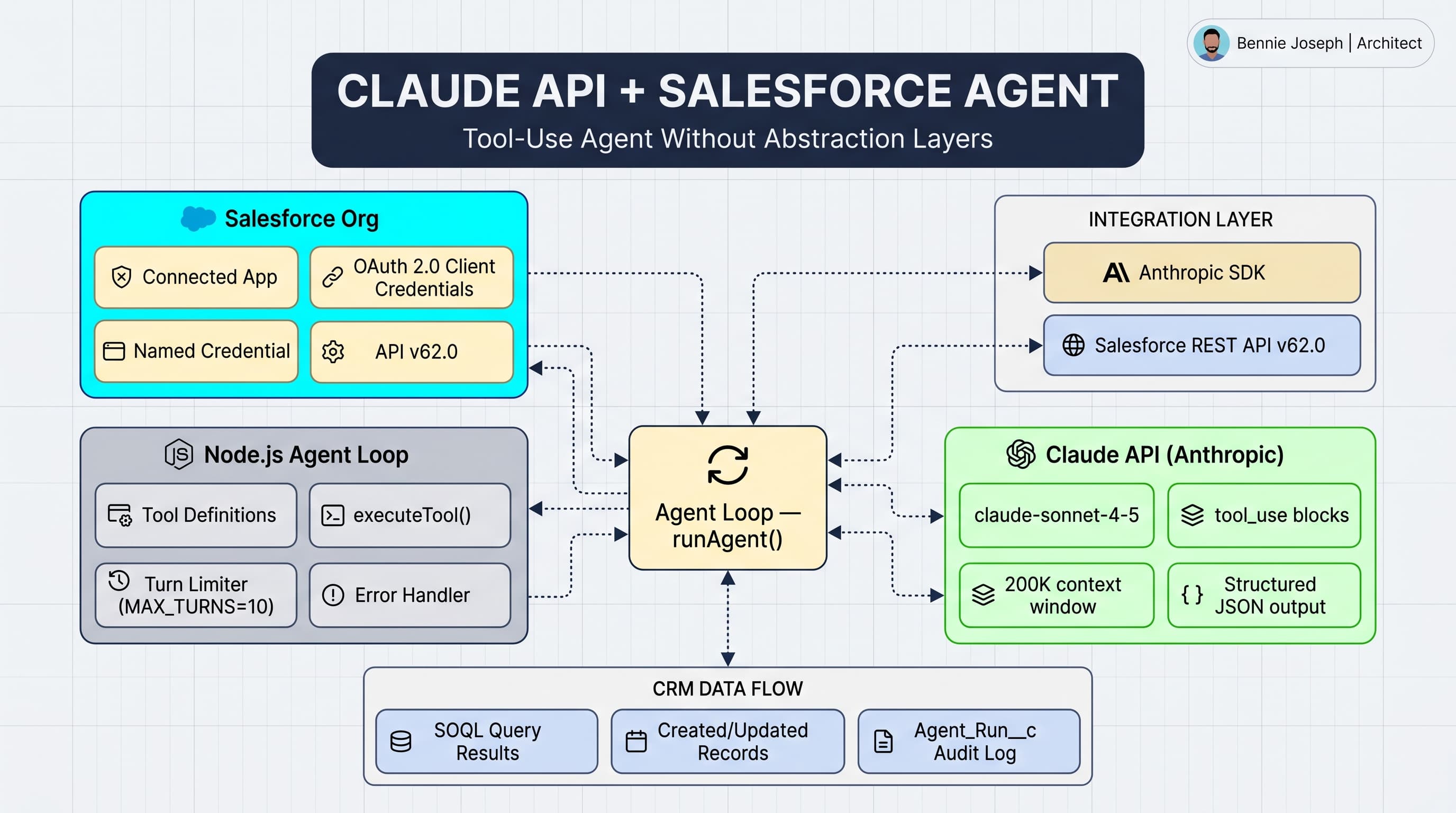
I've built Salesforce integrations with OpenAI, Azure OpenAI, and now Anthropic's Claude API. Of these, Claude's tool-use API is the one I'd reach for first for agentic workflows — mostly because the reasoning is more reliable when action sequences get complex.
This post walks through a real pattern: a Node.js agent that uses Claude to handle natural-language queries against Salesforce data. No LangChain, no abstraction layers — just the raw API so you understand what's actually happening.
Claude vs OpenAI for Salesforce agents: my practical comparison
Before diving into code, here's where I actually see the difference:
| Factor | Claude (Anthropic) | GPT-4o / GPT-4.1 (OpenAI) |
|---|---|---|
| Tool use reliability | Excellent on complex multi-step sequences | Very good; slightly more unpredictable on nested calls |
| Context window | 200K tokens (Claude 3 Opus/Sonnet) | 128K tokens (GPT-4o) |
| SOQL generation | Careful, lower hallucination rate | Good but needs stronger schema grounding |
| JSON output fidelity | Highly reliable | Reliable with response_format: json_object |
| Cost (per 1M input tokens) | Claude Sonnet 4: ~$3 | GPT-4o: ~$2.50 |
| Streaming support | Yes | Yes |
| Function calling syntax | tools array + tool_use blocks | tools array + tool_calls in message |
| When to pick Claude | Complex reasoning chains, large context | When OpenAI ecosystem tools matter (Assistants, Vector Stores) |
For a Salesforce agent specifically, Claude's larger context window matters when you're loading record history, related list data, and knowledge articles into a single call. I've hit GPT-4o's 128K limit on Case triage when loading 50+ email threads. Claude handles that gracefully.
What We're Building
A lightweight agent that can:
- Answer questions about Salesforce records ("What's the status of Acme's renewal opportunity?")
- Create and update records via natural language
- Chain multiple Salesforce operations when needed
Prerequisites
- Salesforce Connected App (OAuth 2.0 Client Credentials flow)
- Anthropic API key
- Node.js 18+
Step 1: Salesforce Authentication
We're using the Client Credentials flow — no user interaction, clean for server-side agents.
// lib/salesforce.ts
import axios from 'axios'

interface SalesforceAuth {
  accessToken: string
  instanceUrl: string
}

export async function getSalesforceToken(): Promise<SalesforceAuth> {
  const params = new URLSearchParams({
    grant_type: 'client_credentials',
    client_id: process.env.SF_CLIENT_ID!,
    client_secret: process.env.SF_CLIENT_SECRET!,
  })

  const res = await axios.post(
    `${process.env.SF_LOGIN_URL}/services/oauth2/token`,
    params.toString(),
    { headers: { 'Content-Type': 'application/x-www-form-urlencoded' } }
  )

  return {
    accessToken: res.data.access_token,
    instanceUrl: res.data.instance_url,
  }
}

export async function querySalesforce(soql: string, auth: SalesforceAuth) {
  const res = await axios.get(
    `${auth.instanceUrl}/services/data/v64.0/query`,
    {
      params: { q: soql },
      headers: { Authorization: `Bearer ${auth.accessToken}` },
    }
  )
  return res.data
}

export async function createRecord(
  objectType: string,
  fields: Record<string, unknown>,
  auth: SalesforceAuth
) {
  const res = await axios.post(
    `${auth.instanceUrl}/services/data/v64.0/sobjects/${objectType}`,
    fields,
    { headers: { Authorization: `Bearer ${auth.accessToken}`, 'Content-Type': 'application/json' } }
  )
  return res.data
}
Step 2: Define Claude Tools
Claude's tool-use API lets you define functions the model can call. The key is writing descriptions that are specific enough for Claude to pick the right tool without ambiguity.
// lib/agent-tools.ts
import Anthropic from '@anthropic-ai/sdk'

export const salesforceTools: Anthropic.Tool[] = [
  {
    name: 'query_salesforce',
    description: `Execute a SOQL query against Salesforce and return the results.
Use this when the user asks about existing records, relationships, or data in Salesforce.
Always use SELECT with specific fields — never SELECT *.
Limit results to 50 unless the user asks for more.`,
    input_schema: {
      type: 'object',
      properties: {
        soql: {
          type: 'string',
          description: 'The SOQL query to execute. Must be valid SOQL syntax.',
        },
      },
      required: ['soql'],
    },
  },
  {
    name: 'create_record',
    description: `Create a new record in Salesforce.
Use this only when the user explicitly asks to create something.
Confirm the object type and required fields before calling.`,
    input_schema: {
      type: 'object',
      properties: {
        object_type: {
          type: 'string',
          description: 'Salesforce object API name (e.g., Account, Opportunity, Contact)',
        },
        fields: {
          type: 'object',
          description: 'Key-value pairs of field API names and their values',
        },
      },
      required: ['object_type', 'fields'],
    },
  },
  {
    name: 'describe_object',
    description: `Get the field list and metadata for a Salesforce object.
Use this when you need to know what fields are available on an object before querying or creating records.`,
    input_schema: {
      type: 'object',
      properties: {
        object_name: { type: 'string', description: 'API name of the Salesforce object' },
      },
      required: ['object_name'],
    },
  },
]
Step 3: The Agent Loop
This is the core of the agent — the loop that keeps running until Claude stops requesting tool calls.
// lib/agent.ts
import Anthropic from '@anthropic-ai/sdk'
import { getSalesforceToken, querySalesforce, createRecord } from './salesforce'
import { salesforceTools } from './agent-tools'
import axios from 'axios'

const client = new Anthropic()

async function executeTool(
  toolName: string,
  toolInput: Record<string, unknown>,
  auth: Awaited<ReturnType<typeof getSalesforceToken>>
): Promise<string> {
  if (toolName === 'query_salesforce') {
    const result = await querySalesforce(toolInput.soql as string, auth)
    return JSON.stringify(result.records ?? result, null, 2)
  }

  if (toolName === 'create_record') {
    const result = await createRecord(
      toolInput.object_type as string,
      toolInput.fields as Record<string, unknown>,
      auth
    )
    return JSON.stringify(result, null, 2)
  }

  if (toolName === 'describe_object') {
    const res = await axios.get(
      `${auth.instanceUrl}/services/data/v64.0/sobjects/${toolInput.object_name}/describe`,
      { headers: { Authorization: `Bearer ${auth.accessToken}` } }
    )
    // Return just field names + types to keep context lean
    const fields = res.data.fields.map((f: { name: string; type: string; label: string }) => ({
      name: f.name,
      type: f.type,
      label: f.label,
    }))
    return JSON.stringify(fields, null, 2)
  }

  return 'Unknown tool'
}

export async function runAgent(userMessage: string): Promise<string> {
  const auth = await getSalesforceToken()
  const messages: Anthropic.MessageParam[] = [
    { role: 'user', content: userMessage }
  ]

  const systemPrompt = `You are a Salesforce assistant with read and write access to the org.
When answering questions about records, always query Salesforce — never make up data.
When creating records, confirm what you're about to create before doing it.
Be concise. Format numbers and dates in a human-readable way.`

  while (true) {
    const response = await client.messages.create({
      model: 'claude-sonnet-4-7',
      max_tokens: 4096,
      system: systemPrompt,
      tools: salesforceTools,
      messages,
    })

    // Add assistant's response to message history
    messages.push({ role: 'assistant', content: response.content })

    // If no more tool calls, return the final text response
    if (response.stop_reason === 'end_turn') {
      const textBlock = response.content.find((b) => b.type === 'text')
      return textBlock?.type === 'text' ? textBlock.text : 'Done.'
    }

    // Process all tool calls in this response
    const toolResults: Anthropic.ToolResultBlockParam[] = []

    for (const block of response.content) {
      if (block.type !== 'tool_use') continue

      console.log(`→ Tool call: ${block.name}`, block.input)
      const result = await executeTool(block.name, block.input as Record<string, unknown>, auth)
      console.log(`← Result preview:`, result.slice(0, 200))

      toolResults.push({
        type: 'tool_result',
        tool_use_id: block.id,
        content: result,
      })
    }

    messages.push({ role: 'user', content: toolResults })
  }
}
Step 4: Wire It Up
// index.ts
import { runAgent } from './lib/agent'

async function main() {
  const queries = [
    "What are the 5 most recent opportunities closing this quarter?",
    "How many open cases does Acme Corp have right now?",
    "Create a task for John Smith to follow up on the Q3 renewal, due next Friday.",
  ]

  for (const query of queries) {
    console.log(`\nUser: ${query}`)
    const result = await runAgent(query)
    console.log(`Agent: ${result}`)
  }
}

main().catch(console.error)
What I Learned the Hard Way
SOQL hallucination is real. Claude will occasionally generate SOQL with field names that don't exist on the object. Fix: add a describe_object call at the start of any query session, or include the field list in your system prompt.
Token bloat from query results. If your SOQL returns 200 records and you dump them all into the context, you'll hit limits fast. Always LIMIT results and summarize in the tool execution layer before returning to Claude.
Tool descriptions are prompts. Spend as much time on your tool descriptions as on your prompts. Vague descriptions ("query Salesforce") lead to bad decisions. Specific descriptions ("use this when the user asks about existing records") lead to reliable routing.
Production error handling: the part nobody shows you
The tutorial above is clean, but production Salesforce integrations hit rate limits, network timeouts, and context overflows. Here's the retry and error-handling layer I add before shipping:
// lib/agent-production.ts
const MAX_TURNS = 10
const MAX_RETRIES = 3
const RETRY_DELAY_MS = 1000

async function withRetry<T>(fn: () => Promise<T>, retries = MAX_RETRIES): Promise<T> {
  for (let attempt = 0; attempt < retries; attempt++) {
    try {
      return await fn()
    } catch (err: unknown) {
      const isRateLimit = err instanceof Error && err.message.includes('rate_limit')
      const isLast = attempt === retries - 1
      if (isLast || !isRateLimit) throw err
      const backoff = RETRY_DELAY_MS * Math.pow(2, attempt)
      console.warn(`Rate limited — retrying in ${backoff}ms (attempt ${attempt + 1}/${retries})`)
      await new Promise(r => setTimeout(r, backoff))
    }
  }
  throw new Error('Max retries exceeded')
}

export async function runAgentSafe(userMessage: string): Promise<string> {
  const auth = await getSalesforceToken()
  const messages: Anthropic.MessageParam[] = [{ role: 'user', content: userMessage }]
  let turns = 0

  while (turns < MAX_TURNS) {
    turns++

    const response = await withRetry(() =>
      client.messages.create({
        model: 'claude-sonnet-4-7',
        max_tokens: 4096,
        system: systemPrompt,
        tools: salesforceTools,
        messages,
      })
    )

    messages.push({ role: 'assistant', content: response.content })

    if (response.stop_reason === 'end_turn') {
      const textBlock = response.content.find((b) => b.type === 'text')
      return textBlock?.type === 'text' ? textBlock.text : 'Done.'
    }

    if (response.stop_reason === 'max_tokens') {
      return 'Agent response was truncated — try a more specific question or reduce result set.'
    }

    const toolResults: Anthropic.ToolResultBlockParam[] = []

    for (const block of response.content) {
      if (block.type !== 'tool_use') continue

      let result: string
      try {
        result = await executeTool(block.name, block.input as Record<string, unknown>, auth)
      } catch (err: unknown) {
        // Return the error as a tool result — Claude can reason over failures
        result = JSON.stringify({
          error: true,
          message: err instanceof Error ? err.message : String(err),
        })
      }

      toolResults.push({ type: 'tool_result', tool_use_id: block.id, content: result })
    }

    messages.push({ role: 'user', content: toolResults })
  }

  return 'Agent exceeded maximum turns — possible loop detected. Check tool definitions.'
}
Key additions: turn limit to prevent infinite loops, exponential backoff on rate limits, error wrapping in tool results so Claude can gracefully report back rather than crashing the loop.
Context management: keeping token costs sane
Every Salesforce query result that comes back into the Claude context costs tokens. Here's the pattern I use to keep a production agent under control:
// In executeTool, before returning to Claude:
function summarizeQueryResult(result: Record<string, unknown>): string {
  const records = (result.records ?? []) as Record<string, unknown>[]

  if (records.length === 0) return 'No records found.'

  // Return count + first 5 records only
  const preview = records.slice(0, 5)
  const summary = `Found ${records.length} record(s). Showing first ${preview.length}:\n`
  return summary + JSON.stringify(preview, null, 2)
}
Rule of thumb: never return more than 5 records verbatim unless the user asked for a specific list. For counts, aggregates, and analytics queries, parse in the tool layer and return a one-line string. A typical session with 10 tool calls will cost ~$0.05–0.15 with Claude Sonnet if you do this right.
Production readiness checklist
Before shipping a Claude + Salesforce agent to real users:
- Salesforce Connected App uses Client Credentials flow (no user sessions)
- API key stored as encrypted env var, not in code or Salesforce custom metadata
- All SOQL queries use
WITH USER_MODEor explicit sharing model - Tool results are trimmed to 5–10 records max before returning to Claude
- Turn limit implemented (
MAX_TURNS = 10or similar) - Rate-limit retry with exponential backoff
- Tool errors caught and returned as structured error results (not thrown)
- All agent runs logged with request/response for debugging
-
describe_objectpre-called for any object Claude might query - System prompt explicitly states objects and fields Claude is allowed to query
- Kill switch: feature flag to disable agent without deployment
TL;DR
- Claude's tool-use API + Salesforce Connected App = a surprisingly capable agent in under 200 lines.
- The agent loop is simple: call Claude → execute tool → feed result back → repeat until
end_turn. - In production: add turn limits, retry logic on rate limits, and always summarize tool results before returning them to Claude — context costs compound fast.