Building AI Agents with OpenAI and Salesforce
Most Salesforce AI demos are chat boxes glued to CRM data. That is not an agent.
An agent needs three things: context, tools, and a control loop. Salesforce is excellent at context because it owns the customer record, entitlement history, activity timeline, approvals, and audit trail. OpenAI is excellent at reasoning over messy instructions and deciding what should happen next. The integration only works in production if Salesforce remains the system of control.
That is the line I do not cross.
When I build an openai api salesforce integration agent, I do not let the model freely query Salesforce, generate SOQL, or update records directly. I expose a small set of approved tools through Apex. The model can request a tool. Apex decides whether the request is valid, authorized, auditable, and safe.
Here is the unpopular take: the best Salesforce AI agent architecture is boring. Named Credentials, Apex services, permission checks, platform events, logging objects, retry queues, and clear transaction boundaries. The magic is not the model. The magic is the control plane around the model.
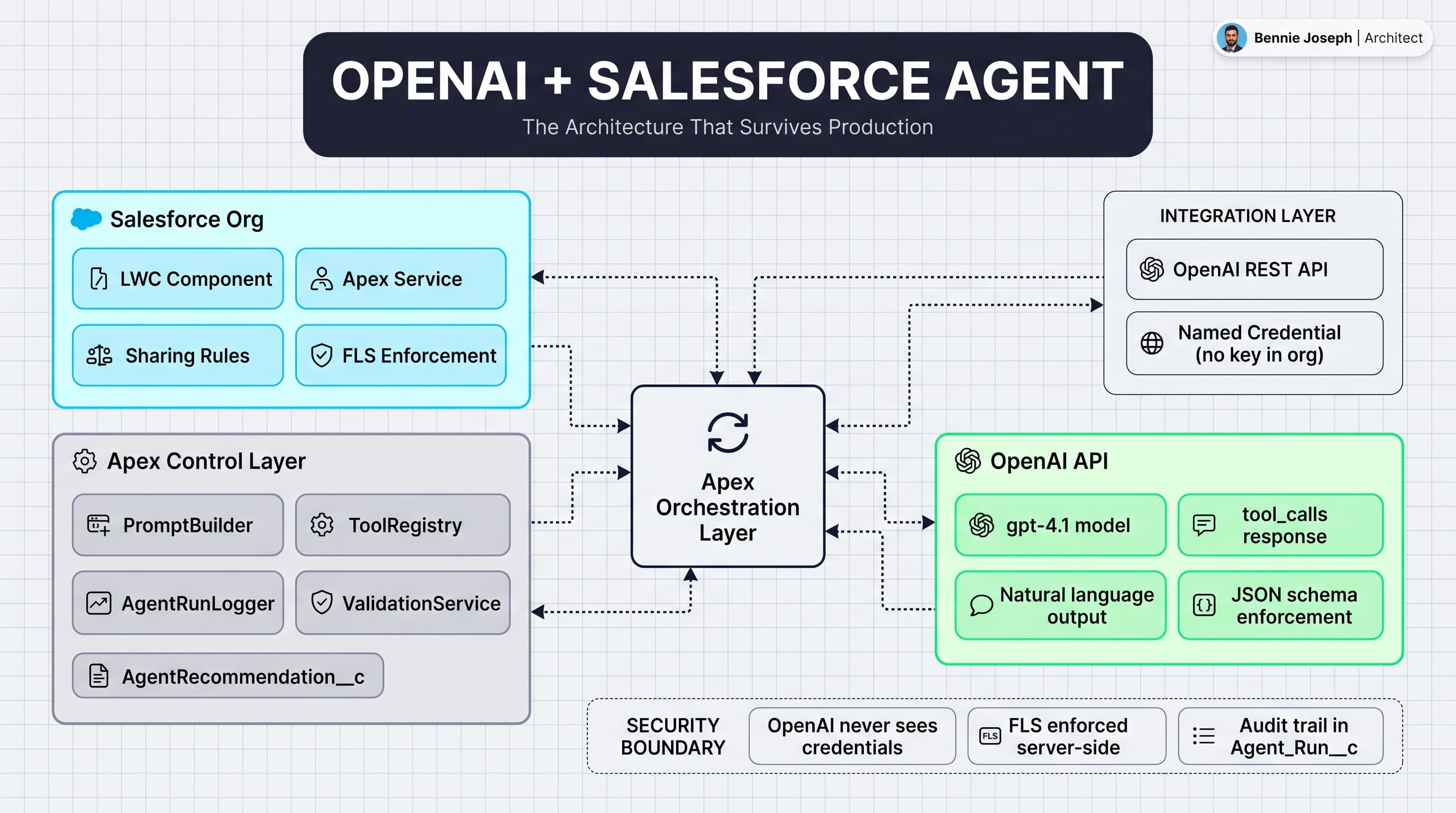
The architecture I actually use
My default architecture looks like this:
- A user starts from Salesforce: Lightning Web Component, Flow, Omni-Channel, Slack action, or Agentforce-style UI.
- Apex loads trusted CRM context using normal sharing rules.
- Apex sends a compact prompt and approved tool definitions to OpenAI.
- OpenAI responds with either a natural language answer or a tool call request.
- Apex validates the tool request against a registry.
- Apex executes the tool using normal Salesforce services.
- Every model request, tool request, response, and mutation is logged.
The key decision: OpenAI never gets database credentials. OpenAI never gets a session ID. OpenAI never directly calls Salesforce APIs. OpenAI sees only the data I choose to send and can ask only for tools I choose to expose.
That matters in enterprise Salesforce orgs because your data model is not clean. You have validation rules written in 2018, triggers owned by three teams, managed packages, duplicate Account hierarchies, restricted picklists, sharing recalculations, and compliance rules that live in people’s heads. If an agent bypasses that mess, it will break production.
A safe agent respects the org.
Use tools, not free-form instructions
I see teams start with prompts like this:
“You are a Salesforce assistant. Update the Case if needed.”
That is a production incident waiting to happen.
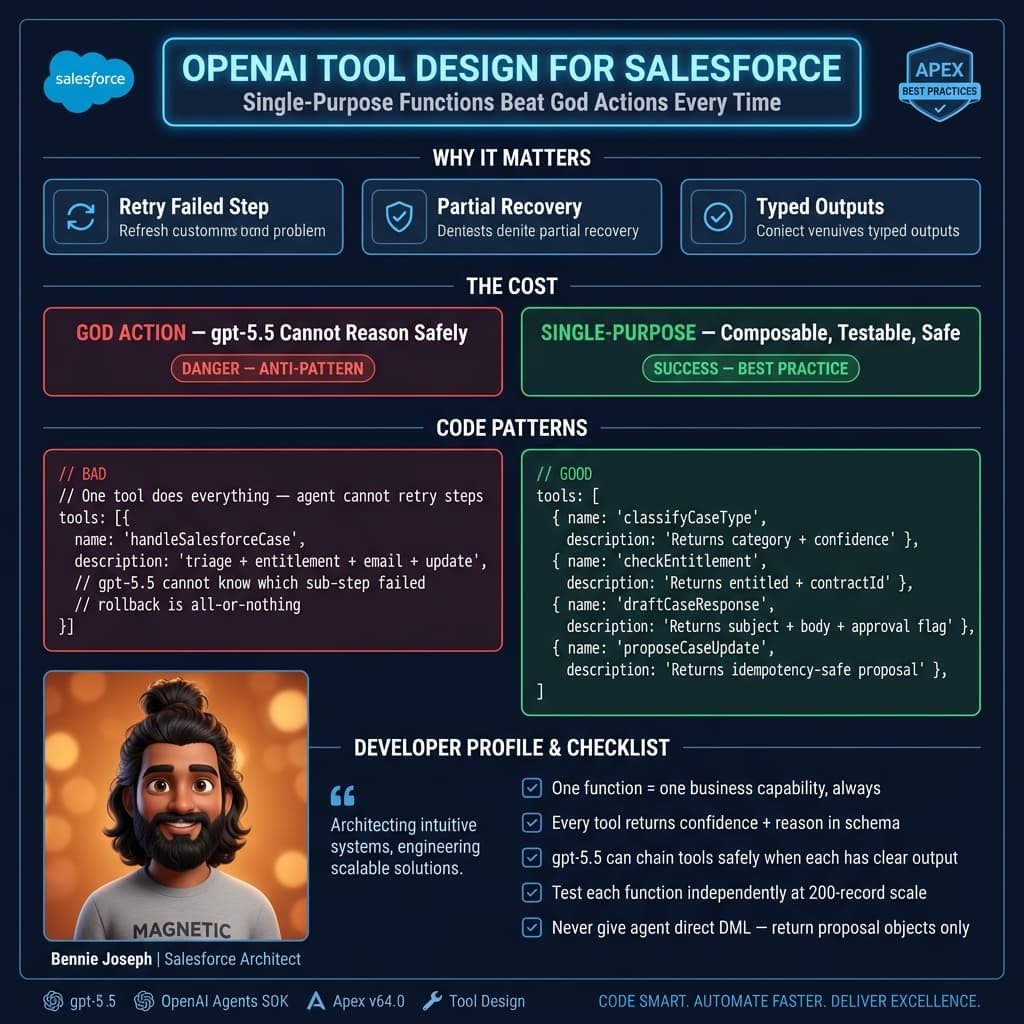
Instead, I expose tools like:
summarize_casecheck_entitlementdraft_case_commentrecommend_prioritycreate_escalation_requestsearch_knowledge_articles
Notice the difference. These are business capabilities, not database operations. The agent should not know whether escalation is a Case update, a custom object insert, a Platform Event, or an approval submission. That implementation belongs in Apex.
This is the same principle I use when designing enterprise Salesforce APIs. Do not expose tables. Expose business actions.
If the model says, “Set Case Priority to High,” I treat that as a recommendation unless the tool is explicitly allowed to mutate data. For most enterprise workflows, I prefer a draft-and-approve pattern:
- Agent drafts a recommendation.
- User reviews it.
- Salesforce applies it through existing automation.
- Audit log records who approved it and what the model suggested.
Autonomous writes are possible, but they should be earned. Start with read-only. Then draft-only. Then limited writes on low-risk objects. Then maybe autonomous actions for well-bounded operational tasks.
Apex implementation: OpenAI callout from Salesforce
Below is a stripped-down Apex service I would actually use as a starting point. It calls OpenAI through a Named Credential, sends Case context, defines one approved tool, and extracts the model response.
In production, I would split this into more classes: PromptBuilder, OpenAiClient, ToolRegistry, AgentRunLogger, and domain services. I am keeping it compact here so the pattern is visible.
public with sharing class OpenAiCaseAgent {
    private static final String MODEL = 'gpt-5.5';

    @AuraEnabled
    public static AgentResponse analyzeCase(Id caseId) {
        if (caseId == null || caseId.getSObjectType() != Case.SObjectType) {
            throw new AuraHandledException('A valid Case Id is required.');
        }

        Case c = [
            SELECT Id, CaseNumber, Subject, Description, Status, Priority,
                   Origin, Account.Name, Contact.Email, CreatedDate
            FROM Case
            WHERE Id = :caseId
            WITH USER_MODE
            LIMIT 1
        ];

        Map<String, Object> payload = new Map<String, Object>{
            'model' => MODEL,
            'input' => new List<Object>{
                new Map<String, Object>{
                    'role' => 'system',
                    'content' =>
                        'You are an enterprise Salesforce support agent. ' +
                        'Use only the provided CRM context. Do not invent facts. ' +
                        'If an update is needed, return a recommendation only.'
                },
                new Map<String, Object>{
                    'role' => 'user',
                    'content' => JSON.serialize(new Map<String, Object>{
                        'task' => 'Analyze the case and recommend next action.',
                        'case' => new Map<String, Object>{
                            'id' => c.Id,
                            'caseNumber' => c.CaseNumber,
                            'subject' => c.Subject,
                            'description' => c.Description,
                            'status' => c.Status,
                            'priority' => c.Priority,
                            'origin' => c.Origin,
                            'accountName' => c.Account == null ? null : c.Account.Name,
                            'contactEmail' => c.Contact == null ? null : c.Contact.Email,
                            'createdDate' => String.valueOf(c.CreatedDate)
                        }
                    })
                }
            },
            'tools' => new List<Object>{
                new Map<String, Object>{
                    'type' => 'function',
                    'name' => 'recommend_case_update',
                    'description' => 'Recommend a safe Case update for human review. Does not modify Salesforce.',
                    'parameters' => new Map<String, Object>{
                        'type' => 'object',
                        'additionalProperties' => false,
                        'properties' => new Map<String, Object>{
                            'priority' => new Map<String, Object>{
                                'type' => 'string',
                                'enum' => new List<String>{ 'Low', 'Medium', 'High' }
                            },
                            'reason' => new Map<String, Object>{
                                'type' => 'string',
                                'maxLength' => 1000
                            },
                            'next_action' => new Map<String, Object>{
                                'type' => 'string',
                                'maxLength' => 1000
                            }
                        },
                        'required' => new List<String>{ 'priority', 'reason', 'next_action' }
                    }
                }
            }
        };

        HttpRequest req = new HttpRequest();
        req.setEndpoint('callout:OpenAI/v1/responses');
        req.setMethod('POST');
        req.setHeader('Content-Type', 'application/json');
        req.setTimeout(30000);
        req.setBody(JSON.serialize(payload));

        Http http = new Http();
        HttpResponse res = http.send(req);

        if (res.getStatusCode() < 200 || res.getStatusCode() >= 300) {
            throw new CalloutException(
                'OpenAI request failed: ' + res.getStatusCode() + ' ' + res.getBody()
            );
        }

        String answer = extractOutputText(res.getBody());

        AgentResponse response = new AgentResponse();
        response.caseId = c.Id;
        response.summary = answer;
        response.rawResponse = res.getBody();

        // In production, insert Agent_Run__c here with request/response metadata.
        return response;
    }

    private static String extractOutputText(String responseBody) {
        Map<String, Object> root =
            (Map<String, Object>) JSON.deserializeUntyped(responseBody);

        List<Object> output = (List<Object>) root.get('output');
        if (output == null) {
            return 'No output returned by model.';
        }

        List<String> chunks = new List<String>();

        for (Object itemObj : output) {
            Map<String, Object> item = (Map<String, Object>) itemObj;
            List<Object> content = (List<Object>) item.get('content');

            if (content == null) {
                continue;
            }

            for (Object contentObj : content) {
                Map<String, Object> contentItem = (Map<String, Object>) contentObj;
                if ((String) contentItem.get('type') == 'output_text') {
                    chunks.add((String) contentItem.get('text'));
                }
            }
        }

        return chunks.isEmpty() ? 'No text output returned by model.' : String.join(chunks, '\n');
    }

    public class AgentResponse {
        @AuraEnabled public Id caseId;
        @AuraEnabled public String summary;
        @AuraEnabled public String rawResponse;
    }
}
A few practical notes about this code:
- Use a Salesforce Named Credential for OpenAI. Do not put API keys in custom metadata, custom settings, labels, or Apex.
- Use
WITH USER_MODEwhere appropriate so the query respects user permissions. - Do not send every field. Send the minimum context required for the task.
- Log the model response, but be careful with PII. Some orgs need masking or redaction before persistence.
- Keep the first version read-only. You will learn a lot from real user behavior before allowing writes.
The real enterprise example: support escalation triage
One enterprise project that shaped my opinion was a global B2B support operation. The org had millions of Cases, multiple entitlement models, several support tiers, and regional queues. Escalation quality was inconsistent. Some agents escalated everything. Others waited too long because they were buried in entitlement checks, asset history, and old email threads.
The business did not need a cute chatbot. They needed faster triage.
We built an agent that worked from the Case record. It loaded:
- Case details
- Account tier
- active entitlement
- related Asset
- recent Work Orders
- last five email messages
- similar closed Cases
- internal Knowledge matches
The agent returned:
- risk score
- escalation recommendation
- missing information
- draft customer response
- suggested internal next step
We did not let it update the Case directly in version one. The output was written to a custom Agent_Recommendation__c object and rendered in a Lightning component. A support lead could approve, edit, or reject it. Approved recommendations triggered existing Salesforce automation.
That design made adoption much easier. Compliance liked the audit trail. Support leads liked that humans stayed in the loop. Engineers liked that the model could not randomly mutate core records. Agents liked that they got a strong first draft in seconds.
The measurable win was not “AI transformation.” It was reduced time spent reading history and fewer bad escalations. That is the kind of AI project that survives procurement, security review, and production traffic.
The tool registry pattern
Once you move beyond one tool, hardcoding tool behavior inside one Apex class gets messy. I use a tool registry pattern.
The concept is simple:
- A tool has a name.
- A tool has a JSON schema.
- A tool has an Apex handler.
- A tool has authorization rules.
- A tool has logging requirements.
- A tool may be read-only, draft-only, or write-enabled.
The model sees the schema. Apex owns the handler.
I usually represent the registry in code first. If the tool list needs admin configuration, I move metadata into Custom Metadata Types, but I still keep execution in Apex. I do not let admins define arbitrary SOQL or arbitrary field updates unless there is a very strong governance model around it.
Here is the decision rule I use: if a bad tool call can create customer-facing damage, it needs Apex code review.
Guardrails that actually matter
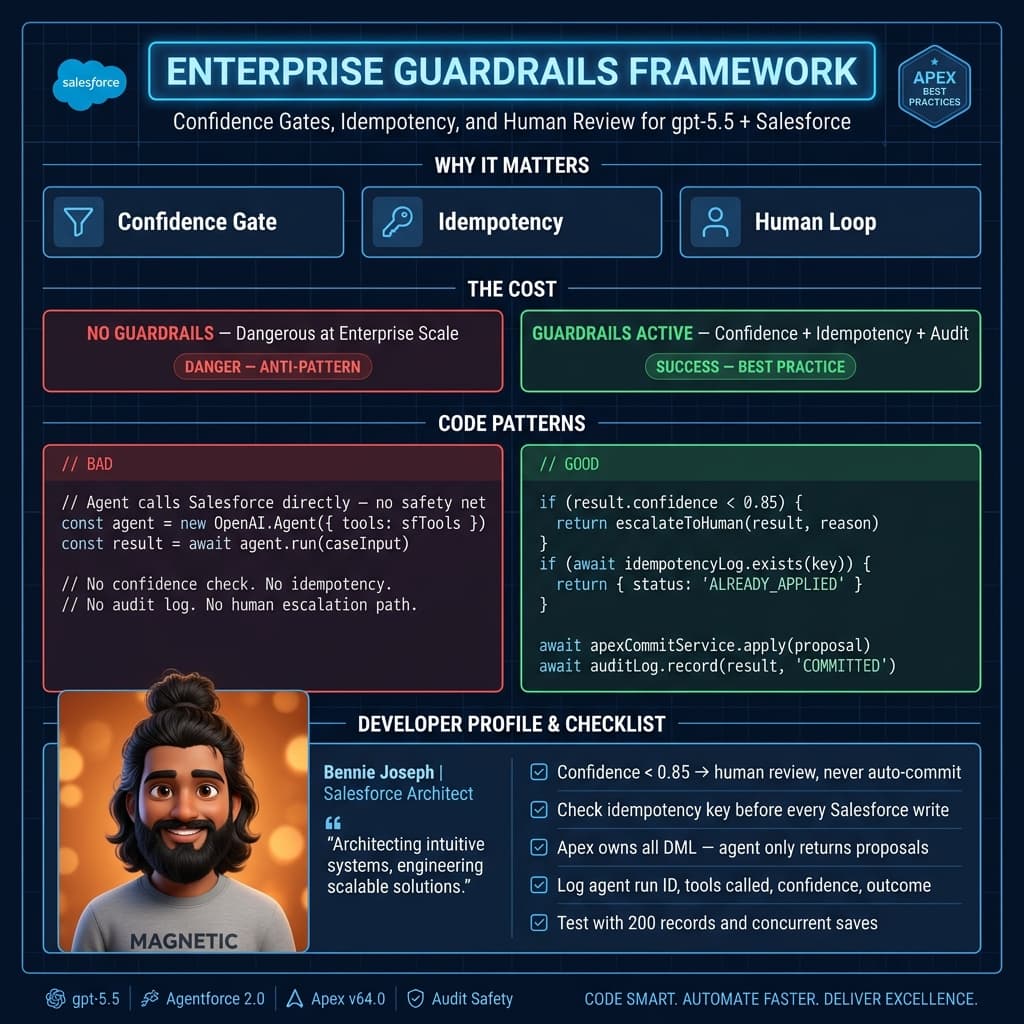
Most AI guardrail conversations are too abstract. In Salesforce, I care about these specific controls.
1. Permission enforcement
If the running user cannot see the Case, the agent should not see the Case. If the user cannot update Priority, the agent should not update Priority on their behalf.
Use user-mode queries, stripInaccessible, sharing classes, and domain service checks. Do not build an AI side door around your security model.
2. Field minimization
Do not send the whole record. I have seen teams serialize massive SObjects into prompts because it was convenient. That leaks irrelevant data, increases cost, and makes reasoning worse.
For a Case triage agent, the model probably needs subject, description, status, priority, entitlement status, and recent activity summary. It probably does not need every integration ID and billing field.
3. Deterministic tool execution
The model can recommend. Apex decides.
For example, if a model requests create_escalation_request, Apex should verify:
- Case is open.
- User has permission.
- Account tier qualifies.
- Duplicate escalation does not already exist.
- Required fields are present.
- Business hours and regional routing rules are respected.
The model should not be trusted to remember your escalation policy. Your code should enforce it.
4. Auditability
Every agent run should have an ID. Every tool call should be tied to that run. Every human approval should be stored. Every mutation should be traceable.
I normally create objects like:
Agent_Run__cAgent_Message__cAgent_Tool_Call__cAgent_Recommendation__c
You do not need all of them on day one, but you need a logging strategy before go-live.
5. Failure behavior
Models fail. APIs timeout. JSON parsing breaks. Users paste weird data. Salesforce transactions hit limits.
Do not build agents that fail silently. Return a clear message, log the failure, and make retry behavior explicit. For long-running tasks, use Queueable Apex and Platform Events instead of making the user stare at a spinner.
Prompt design for Salesforce agents
Prompting is not a substitute for architecture, but it still matters.
I keep prompts short and operational. I do not write long roleplay instructions. I include:
- the task
- the allowed scope
- the data source
- the output contract
- what to do when uncertain
A good system instruction looks like:
You are analyzing Salesforce Case data for support triage. Use only the provided CRM context. Do not invent facts. If data is missing, say what is missing. Return a concise recommendation for a support lead.
That is enough. The rest belongs in tools and schemas.
For output, I prefer structured JSON when the response feeds automation. Natural language is fine for a UI summary, but automation needs contracts. If you are parsing paragraphs to decide whether to update a record, you are building technical debt.
Where I would use this pattern
This architecture works well for:
- Case triage and escalation recommendations
- sales account research summaries
- renewal risk analysis
- opportunity next-step drafting
- field service work order summarization
- internal knowledge search
- compliance review preparation
- data quality recommendations
I would be more cautious with:
- pricing approvals
- legal commitments
- medical or financial advice
- high-volume autonomous record updates
- anything that emails customers without review
Again, the issue is not whether the model is smart. The issue is blast radius.
Cost, latency, and limits
Salesforce developers need to think like platform engineers here.
OpenAI calls add latency. Large prompts add cost. Salesforce has callout limits, heap limits, transaction limits, and user expectations. If the interaction needs multiple model turns and multiple Salesforce reads, do not cram everything into one synchronous Apex method.
For small record-level analysis, synchronous Apex can be fine. For deeper agents, I prefer this flow:
- User starts agent run.
- Salesforce inserts
Agent_Run__c. - Queueable Apex performs context gathering and OpenAI calls.
- Tool calls are executed through service classes.
- Platform Event notifies the UI when the result is ready.
That pattern scales better and gives you a clean recovery path.
My production checklist
Before I would ship an OpenAI and Salesforce agent, I want these answered:
- Where is the API key stored?
- What Salesforce data is sent to OpenAI?
- Which tools are available?
- Which tools can write data?
- How are permissions enforced?
- How are requests logged?
- How is PII handled?
- What happens on timeout?
- Who reviews recommendations?
- How do we disable the agent quickly?
That last one matters. Add a kill switch. A Custom Metadata flag is enough. If the model vendor has an outage, security raises a concern, or a tool behaves badly, you need to turn the system off without a deployment.
Final opinion
The winning pattern is not “OpenAI replaces Salesforce logic.” The winning pattern is “OpenAI reasons over Salesforce context and asks Salesforce to perform approved business actions.”
That distinction is everything.
Salesforce should remain the source of truth, permission boundary, workflow engine, and audit layer. OpenAI should be the reasoning layer. Apex should be the contract between them.
If you build it that way, you can deliver agents that help users move faster without handing production control to a probabilistic system.
TL;DR
- Build your openai api salesforce integration agent around approved Apex tools, not direct database access.
- Start read-only or draft-only, then add write actions with strict permission checks and audit logs.
- Salesforce owns context, security, workflow, and audit; OpenAI owns reasoning.