Building with @salesforce/mcp: Connect AI Agents to Your Org Without Code
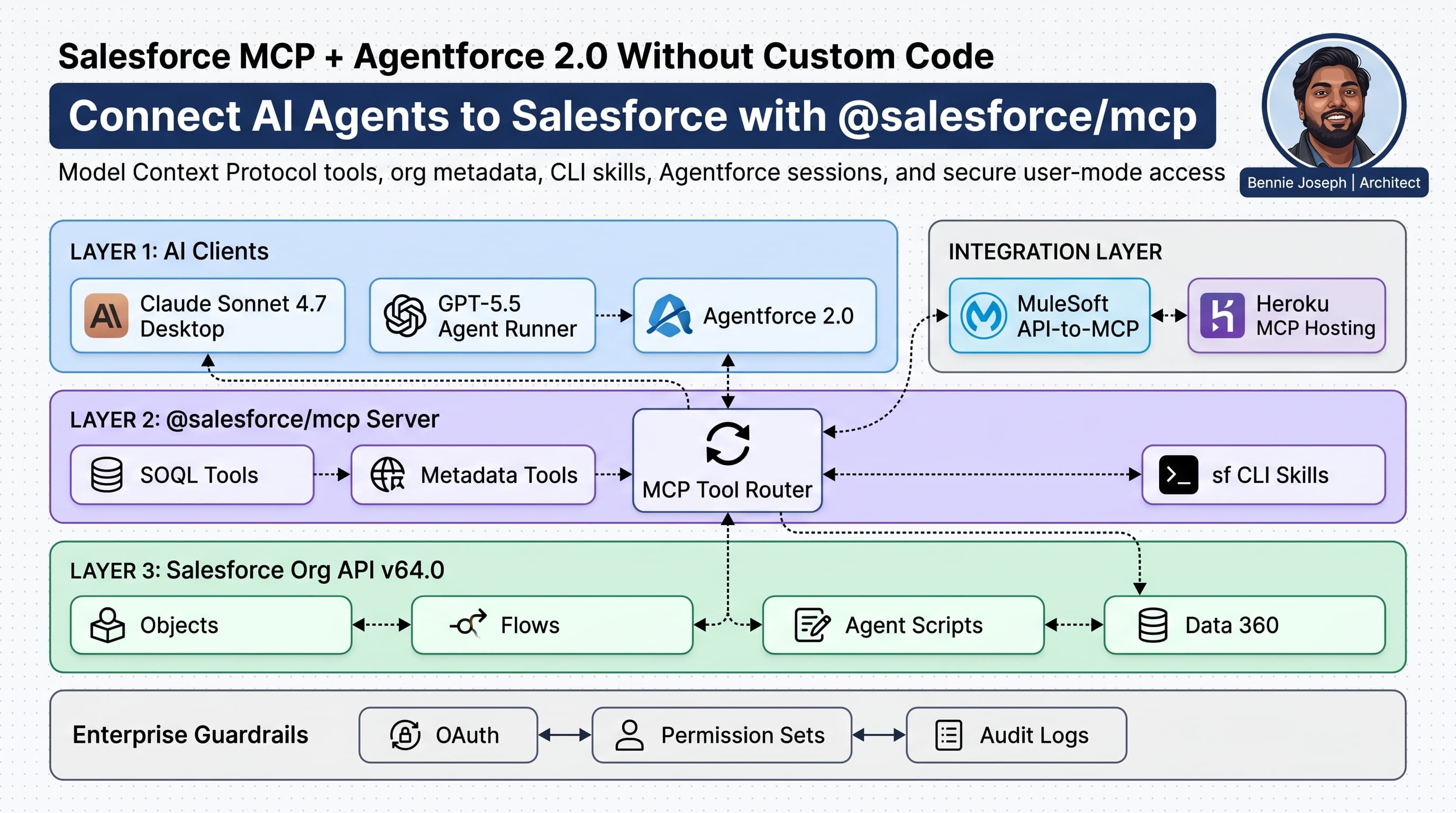
If you are building agents against Salesforce in 2026, learn this stack: salesforce mcp model context protocol agentforce.
I’m not saying MCP replaces Apex, Flow, MuleSoft, or Agentforce. It does not. I’m saying MCP changes the boring but expensive part of agent development: connecting an AI agent to real org context without writing one-off glue code for every object, metadata query, CLI command, or admin workflow.
The old pattern was predictable. Someone wanted an AI assistant that could inspect Salesforce metadata, answer “why did this flow fail?”, check object permissions, generate test data, or summarize a deployment. A developer built custom REST wrappers. Then another wrapper. Then a Slack bot. Then a Lambda. Then a security review. Then six months later nobody wanted to maintain it.
@salesforce/mcp gives me a cleaner option. It exposes Salesforce capabilities as Model Context Protocol tools that agent clients can call. With Agentforce 2.0, Salesforce Headless 360, Salesforce API v64.0, and the sf agent CLI, I can connect agents to orgs, metadata, sessions, and platform actions with far less custom code.
Here’s the unpopular take: most enterprise AI agent projects do not fail because the model is weak. They fail because the agent cannot safely reach the systems where the work happens.
MCP attacks that exact problem.
What MCP Actually Solves
Model Context Protocol is a standard interface between an AI client and external tools. Instead of hardcoding every integration directly into your agent, you expose tools through an MCP server. The AI client asks, “What tools are available?” The server responds with a list. The client invokes a tool with structured input. The server returns structured output.
For Salesforce, @salesforce/mcp matters because it gives agents access to Salesforce-specific capabilities:
- Org metadata inspection
- SOQL and object discovery
- Salesforce CLI workflows
- Agentforce development workflows
- Apex, LWC, Flow, and metadata context
- Headless 360 operations through CLI, API, and MCP tools
- Coding skills for Salesforce implementation work
This is not “AI magic.” It is a tool contract.
That distinction matters. I do not want a model guessing my org schema. I want it calling a tool that retrieves the real schema. I do not want an agent hallucinating deployment commands. I want it invoking an MCP tool backed by the Salesforce CLI.
In an enterprise org, context is not optional. It is the product.
Where Agentforce 2.0 Fits
Agentforce 2.0 is the Salesforce-native agent runtime. It gives me Atlas Reasoning Engine v2, multi-agent orchestration, custom reasoning steps, and the new Agentforce Builder with Agent Script .agent files backed by the AiAuthoringBundle metadata type.
@salesforce/mcp sits nicely beside that.
I use Agentforce when I want production-grade Salesforce-native agents that operate inside the platform boundary: service agents, sales agents, employee agents, industry workflows, and governed CRM actions.
I use MCP when I want external AI clients, developer tools, IDEs, command-line agents, or enterprise orchestration systems to interact with Salesforce safely and consistently.
The two are not competitors.
A practical setup looks like this:
- Agentforce 2.0 handles the customer-facing or employee-facing agent experience.
@salesforce/mcpgives developer agents and enterprise automation agents access to Salesforce tools.- Data 360 provides grounding, federation, vector search, Retriever API access, and unified enterprise context.
- MuleSoft API-to-MCP exposes non-Salesforce APIs as MCP tools.
- Heroku hosts custom MCP servers when the standard toolset is not enough.
That is the architecture I prefer because it avoids stuffing every integration into one overgrown agent.
The Fastest Local Setup
The exact install pattern depends on your client, but the shape is simple. You authenticate to Salesforce with the sf CLI, then register the Salesforce MCP server with an MCP-compatible client.
A typical MCP client configuration looks like this:
// mcp-client-config.ts
// Example configuration object for an MCP-compatible agent client.
// The agent launches @salesforce/mcp and discovers available Salesforce tools.

export const mcpServers = {
  salesforce: {
    command: "npx",
    args: ["-y", "@salesforce/mcp"],
    env: {
      SF_TARGET_ORG: "enterprise-prod-sandbox",
      SF_API_VERSION: "64.0",
      SF_USE_GENERIC_UNIX_KEYCHAIN: "true"
    }
  }
};

export const agentRuntime = {
  model: "gpt-5.5",
  tools: ["salesforce"],
  guardrails: {
    requireApprovalFor: [
      "deploy_metadata",
      "delete_records",
      "run_anonymous_apex",
      "modify_permission_sets"
    ],
    readOnlyByDefault: true
  }
};
This is the part I like: the agent client does not need to know Salesforce internals. It needs to know how to talk MCP. The Salesforce MCP server handles the Salesforce-specific capabilities.
For Claude-based workflows, I use claude-sonnet-4-7 for daily development and claude-opus-4-8 when I need deeper reasoning across metadata, tests, and architecture tradeoffs. For OpenAI workflows, I use gpt-5.5 for flagship agent work and gpt-5.5-mini where cost and speed matter more than depth. The model is not the architecture. The tool boundary is.
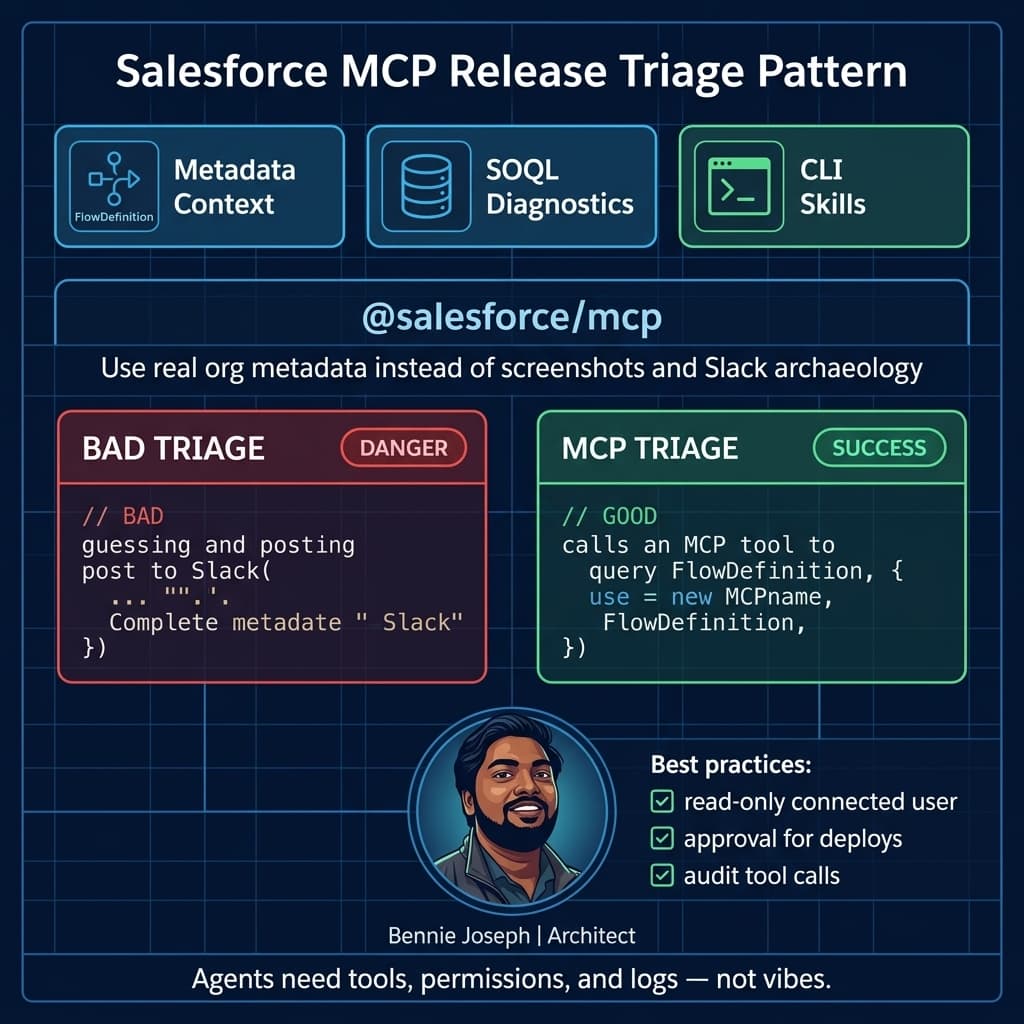
The Enterprise Example: Reducing Release Triage From Hours to Minutes
One project that made MCP click for me was a large service cloud implementation with multiple teams shipping Flow, Apex, Omni-channel routing, and integration metadata across several sandboxes.
The recurring pain was release triage.
Every release window had the same questions:
- Which flows changed?
- Did this profile or permission set update break access?
- Why did this validation rule start blocking case creation?
- Did the deployment include all dependent metadata?
- Are we testing against the correct object model?
- Which failing Apex tests are real failures versus stale setup data?
Before MCP, the team bounced between Setup, VS Code, Salesforce CLI, deployment logs, spreadsheets, and Slack. Senior engineers became human routers. That does not scale.
With @salesforce/mcp, we configured an internal agent client that could inspect org metadata, query setup objects, summarize deployment diffs, and call Salesforce CLI-backed tools. We did not give it production write access. Read-only first. Human approval for anything destructive. Permission sets controlled what the connected user could see.
The best outcome was not “the AI fixed everything.” That is vendor-demo nonsense.
The real outcome was better triage:
- The agent could identify the changed Flow versions.
- It could compare object fields and validation rule metadata.
- It could summarize failing test classes with likely dependency areas.
- It could point engineers to the correct metadata files.
- It reduced context-switching during release windows.
That saved time because the agent had real org context, not because the model was smarter than the team.
The Security Model I Actually Trust
I do not connect an agent to a Salesforce org with admin credentials and hope for the best. That is malpractice.
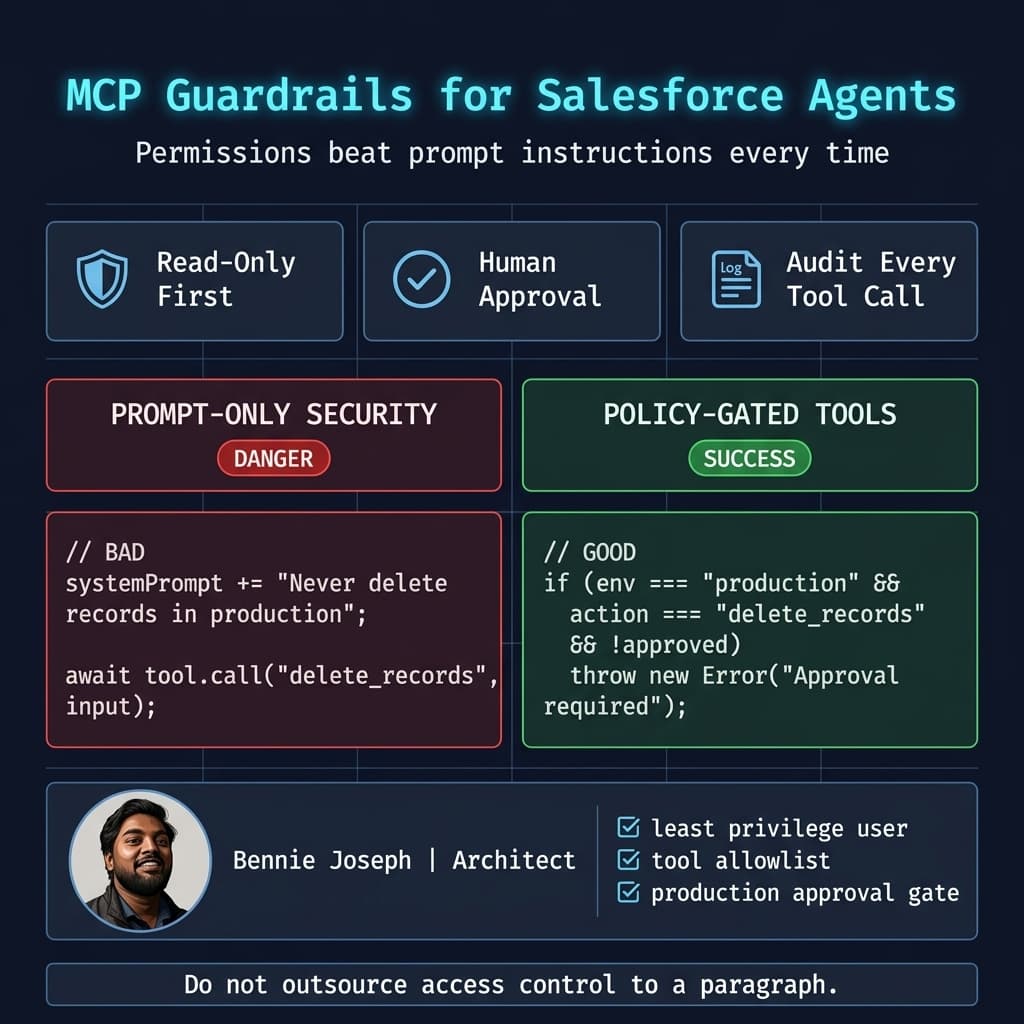
My baseline MCP security posture is:
- Use a dedicated integration user or named human user based on audit requirements.
- Assign minimum permission sets.
- Start read-only.
- Require human approval for mutation tools.
- Log every tool call.
- Separate sandboxes from production.
- Use Salesforce API v64.0 behavior intentionally.
- Prefer user-mode access semantics for data-facing operations.
- Never let a general-purpose agent run anonymous Apex in production.
- Treat metadata deployment as a gated release action.
The upcoming API direction matters here. Salesforce is moving harder toward user-mode defaults for SOQL, DML, and database methods in v67.0. I already design like that. I want security enforced at the platform boundary, not buried in prompt instructions.
If you build custom tools around MCP, enforce access in code. Prompt text is not a permission model.
Here is a simple TypeScript wrapper pattern I use when exposing custom Salesforce-related MCP tools. The important part is not the library. It is the policy check before tool execution.
// guarded-salesforce-tool.ts
// A practical guardrail wrapper for custom MCP tools that touch Salesforce.

type ToolAction =
  | "query_metadata"
  | "query_records"
  | "deploy_metadata"
  | "delete_records"
  | "run_anonymous_apex";

type ToolContext = {
  userId: string;
  orgAlias: string;
  environment: "sandbox" | "production";
  approved: boolean;
  permissions: string[];
};

type ToolRequest = {
  action: ToolAction;
  payload: Record<string, unknown>;
};

function assertAllowed(context: ToolContext, request: ToolRequest): void {
  const destructiveActions: ToolAction[] = [
    "deploy_metadata",
    "delete_records",
    "run_anonymous_apex"
  ];

  if (context.environment === "production" && destructiveActions.includes(request.action)) {
    if (!context.approved) {
      throw new Error(
        `Blocked ${request.action}: production mutation requires explicit human approval.`
      );
    }
  }

  if (
    request.action === "run_anonymous_apex" &&
    !context.permissions.includes("MCP_Run_Apex")
  ) {
    throw new Error("Blocked run_anonymous_apex: missing MCP_Run_Apex permission.");
  }

  if (
    request.action === "query_records" &&
    !context.permissions.includes("MCP_Read_CRM_Data")
  ) {
    throw new Error("Blocked query_records: missing MCP_Read_CRM_Data permission.");
  }
}

export async function executeSalesforceTool(
  context: ToolContext,
  request: ToolRequest
): Promise<Record<string, unknown>> {
  assertAllowed(context, request);

  console.log(
    JSON.stringify({
      event: "mcp_tool_call",
      userId: context.userId,
      orgAlias: context.orgAlias,
      environment: context.environment,
      action: request.action,
      approved: context.approved,
      timestamp: new Date().toISOString()
    })
  );

  // Delegate to @salesforce/mcp tool execution or your custom MCP adapter here.
  return {
    status: "accepted",
    action: request.action,
    orgAlias: context.orgAlias
  };
}
That wrapper is boring. Good. Security code should be boring.
“Without Code” Does Not Mean “Without Architecture”
The phrase “without code” gets abused. I am not interested in pretending that enterprise AI agents are drag-and-drop toys.
When I say @salesforce/mcp lets you connect AI agents to your org without code, I mean you can avoid writing custom integration code for common Salesforce access patterns. You still need architecture.
You need to decide:
- Which orgs can the MCP server access?
- Which users authenticate the tools?
- Which tools are enabled?
- Which actions require approval?
- Which logs are retained?
- Which data should never leave Salesforce?
- Which agents are allowed to use Salesforce context?
- Which actions belong in Agentforce versus external MCP clients?
That last question is important.
If the workflow is a native CRM process, I lean toward Agentforce 2.0. If it needs multi-agent Salesforce-native execution, custom reasoning steps, Agent Script metadata, and governed CRM actions, Agentforce is the center.
If the workflow is developer productivity, release automation, org inspection, admin assistance, or cross-platform orchestration, MCP is often the better integration layer.
Agentforce Builder, Agent Script, and MCP
The new Agentforce Builder is GA with Agent Script language and .agent files. The old builder is deprecated in July 2026, so I would not start new work there.
This changes source control for agents. I can now treat agent behavior more like metadata. That matters for teams that already have DevOps discipline.
A simple Agent Script-style workflow might define how an internal release assistant reasons through deployment triage, while MCP supplies external tool access from a developer workstation or CI environment.
Conceptually:
// release-assistant-policy.ts
// Companion policy used by an external MCP-enabled release assistant.
// Agentforce behavior can live in .agent metadata, while this policy gates external tool use.

export const releaseAssistantPolicy = {
  name: "ReleaseAssistant",
  salesforceApiVersion: "64.0",
  allowedReadTools: [
    "salesforce.describeObject",
    "salesforce.query",
    "salesforce.retrieveMetadata",
    "salesforce.listMetadata"
  ],
  approvalRequiredTools: [
    "salesforce.deployMetadata",
    "salesforce.assignPermissionSet",
    "salesforce.runApexTests"
  ],
  blockedInProduction: [
    "salesforce.runAnonymousApex",
    "salesforce.deleteRecords"
  ],
  modelRouting: {
    default: "gpt-5.5",
    deepReview: "claude-opus-4-8",
    fastSummaries: "claude-haiku-4-7"
  }
};
Do not overcomplicate this. The strongest agent architectures I’ve built use plain policies, narrow tools, and obvious approval gates.
The weak ones use giant prompts and unrestricted tool access.
Data 360 and Grounding
Salesforce org metadata is only one kind of context. Most enterprises also need customer documents, product usage data, billing data, warehouse records, knowledge articles, and case attachments.
That is where Data 360 matters.
With Zero Copy federation into Snowflake or BigQuery, Federated Grounding, native vector search, Unified Catalog, and Retriever API for unstructured data, I can ground agents on enterprise context without copying everything into a random vector database.
MCP can expose tool access. Data 360 can provide governed context. Agentforce can execute the native CRM workflow.
That combination is much stronger than “upload a CSV to a chatbot.”
A pattern I like:
- Agentforce receives the user request.
- Atlas Reasoning Engine v2 determines the task path.
- Data 360 retrieves governed context.
- MCP tools inspect org metadata or external systems.
- Human approval is requested for high-risk actions.
- Salesforce executes the transaction with platform security.
That is a serious architecture. It is not a demo.
Practical Use Cases I’d Build First
If your team is new to @salesforce/mcp, do not start with an autonomous production agent that updates opportunities. Start with low-risk, high-context workflows.
1. Org Explorer Agent
This agent answers questions like:
- Which objects relate to Case?
- Which flows update Entitlement?
- Which permission sets grant access to Refund__c?
- Which Apex classes reference a deprecated field?
This is a great first use case because it is mostly read-only and immediately useful.
2. Release Triage Agent
This agent helps during deployments:
- Summarizes changed metadata
- Reviews failed tests
- Checks dependencies
- Explains likely causes of deployment errors
- Generates rollback notes
I have seen this pay off quickly because release windows are expensive.
3. Admin Assistant for Sandbox Work
Let the agent help admins inspect layouts, permission sets, Flow versions, and object configuration in sandboxes. Keep mutations approval-gated.
4. Developer Pairing Agent
Connect your IDE agent to Salesforce metadata and CLI tools. Let it inspect actual org shape before generating Apex or LWC. With LWC native state management GA in Summer ’26, I especially want agents to understand the current component patterns instead of generating stale client-side state code.
5. API Discovery Agent
With Salesforce Headless 360 pushing the platform through API, MCP, and CLI access, agents can help discover the right API path faster. For integration teams, this is a real productivity gain.
Where MCP Can Go Wrong
MCP is powerful, but it is not automatically safe.
The failure modes are obvious:
- Too many tools exposed
- Admin credentials used for convenience
- No environment separation
- No audit logs
- Prompt-only security
- Agents allowed to mutate production without approvals
- No data classification
- No ownership model
- No CI/CD policy updates after the sf CLI credential security changes
That last point is easy to miss. The Salesforce CLI credential security overhaul redacts credentials in outputs and separates commands to view credentials. If your pipelines scrape CLI output, fix that now. Do not wait until release week.
MCP also does not remove the need for Salesforce engineering judgment. If an agent suggests a bad sharing model, it is still your architecture. If it generates an inefficient query, it is still your governor limit problem. If it deploys metadata without tests, it is still your incident.
My Default Implementation Checklist
When I roll this into an enterprise Salesforce environment, I use this checklist:
- Create a dedicated sandbox first.
- Authenticate through
sfCLI using approved org aliases. - Register
@salesforce/mcpwith the agent client. - Start with read-only Salesforce tools.
- Create a tool allowlist.
- Create a production blocklist.
- Add human approval for deployment and data mutation.
- Log tool calls centrally.
- Map tools to permission sets.
- Validate API version assumptions against Salesforce API v64.0.
- Keep Agentforce 2.0 workflows source-controlled through Agent Script and
AiAuthoringBundle. - Use Data 360 for governed retrieval instead of random document dumping.
- Review every generated Apex, Flow, and metadata change like any other code.
Here is the key point: MCP should make access easier, not governance weaker.
Final Opinion
@salesforce/mcp is one of the most practical pieces of the Salesforce AI stack because it deals with the unsexy problem: tool access.
Agent demos are easy. Enterprise agents are hard because they need permissions, context, observability, and system boundaries. MCP gives me a cleaner way to expose Salesforce capabilities to AI agents without building a pile of custom wrappers.
Used well, it makes Agentforce stronger. It lets external agents inspect, reason, and assist around the Salesforce platform while Agentforce 2.0 handles native CRM execution.
Used badly, it is just another way to give a chatbot too much access.
I’ll take the first version.
TL;DR
@salesforce/mcpconnects AI agents to Salesforce tools, metadata, CLI skills, and org context without custom wrapper code.- Use Agentforce 2.0 for native CRM agent execution; use MCP for secure external tool access and developer/admin automation.
- Start read-only, enforce permissions outside prompts, require approval for production mutations, and log every tool call.