Building Your First AI Agent with Claude API and Salesforce
If you want to build an AI agent in Salesforce, do not start with a chatbot.
Start with a narrow job where the agent can read CRM context, make a recommendation, and take one controlled action. That is where a claude api salesforce integration becomes useful instead of becoming another expensive demo.
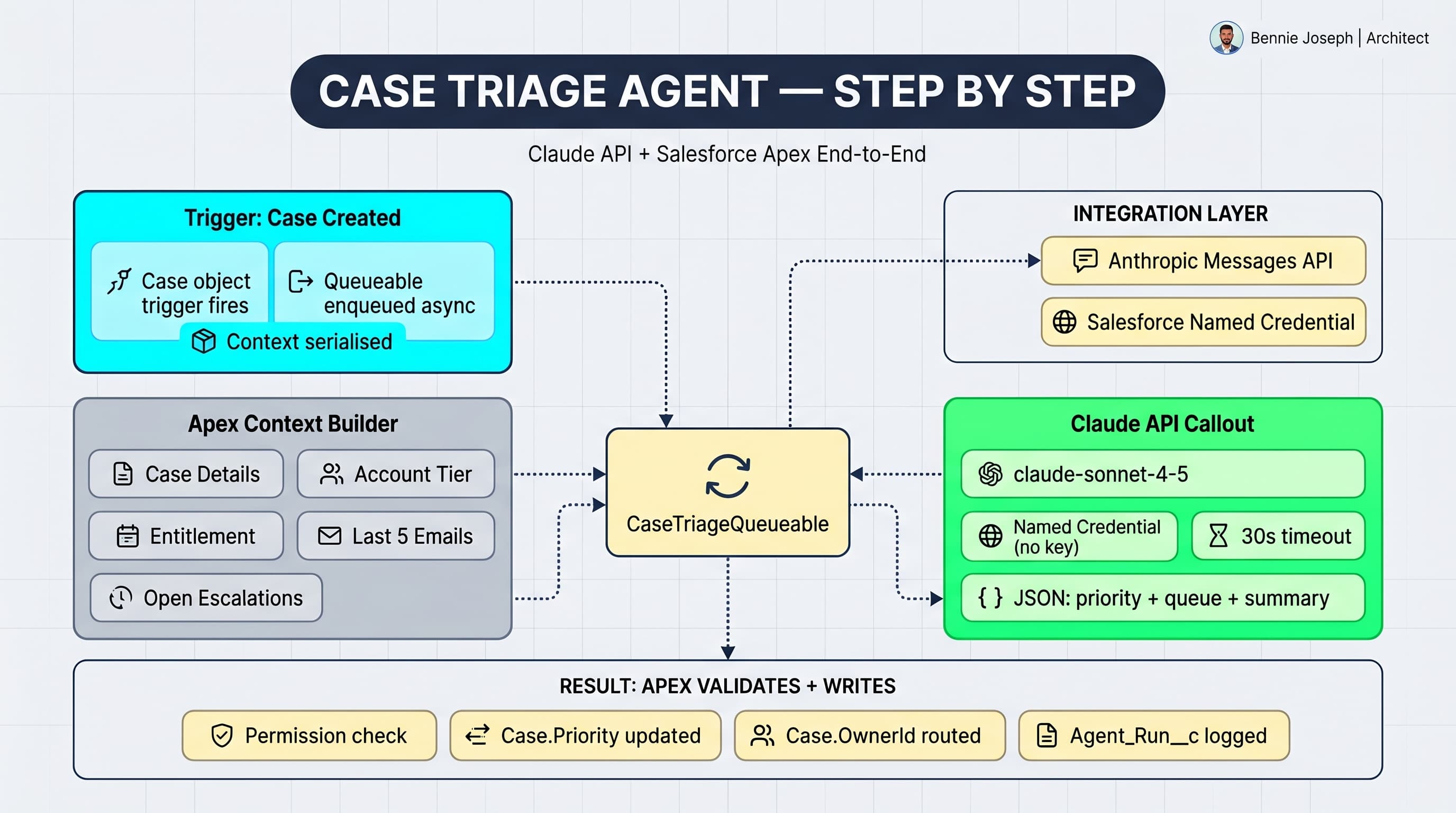
In this post, I’ll build a first-pass agent that handles a common enterprise workflow: case triage. The agent reads a Salesforce Case, Account, Entitlements, and recent interactions, sends a structured prompt to Claude, receives a structured decision, validates it, and updates Salesforce.
The key word is controlled. I do not let the model freely mutate records. I let it propose an action in JSON, then Apex enforces the rules.
Here’s the unpopular take: most “AI agent” projects fail because teams give the model too much freedom too early. Your first agent should be boring, auditable, and constrained.
What We Are Building
The agent will do four things:
- Load a Case and related Salesforce context.
- Send that context to Claude through the Anthropic Messages API.
- Ask Claude to return a strict JSON decision.
- Validate and apply the decision in Salesforce.
The workflow looks like this:
- A support case is created or escalated.
- Apex invokes the agent asynchronously.
- Claude classifies urgency, summarizes the issue, recommends a next action, and proposes an owner queue.
- Salesforce validates the response.
- The case is updated with an AI summary, priority recommendation, and routing decision.
This is not magic. It is orchestration.
The model is not your system of record. Salesforce is.
Why Claude Works Well for Salesforce Agent Use Cases
Claude is strong at long-context reasoning, structured analysis, and following instruction-heavy prompts. That matters in Salesforce because enterprise CRM records are messy.
A real Case rarely contains one clean sentence. It has:
- A vague subject.
- A long description pasted from an email thread.
- Account tier and SLA metadata.
- Prior escalations.
- Entitlements.
- Internal comments.
- Product fields.
- Maybe five different ways to describe the same issue.
In one enterprise support transformation I worked on for a global B2B manufacturer, the team had thousands of high-value customers submitting cases through email-to-case. Priority assignment was inconsistent because different regions interpreted severity differently. A “machine down” issue in North America was P1, while the same issue in EMEA sometimes landed as P3 because the customer used softer language.
The fix was not “add AI.”
The fix was to codify the routing policy, feed Claude the right CRM context, and force Claude to explain its decision in structured output. Then Salesforce applied the result only if it passed validation.
That is the pattern I recommend.
Architecture for a Safe Salesforce Agent
A simple architecture is enough for your first version:
- Salesforce Apex handles orchestration.
- Named Credential stores the Claude API endpoint and authentication.
- Queueable Apex performs the callout asynchronously.
- Claude API performs reasoning and returns structured JSON.
- Apex validation decides what gets written back.
Do not call Claude directly from LWC for this use case. You do not want API keys in the browser, and you do not want client-side code deciding what gets updated in Salesforce.
Step 1: Configure the Salesforce Named Credential
Create a Named Credential called:
Claude_APIPoint it to:
https://api.anthropic.comUse an External Credential or secure custom header setup to send your Anthropic API key as:
x-api-key: YOUR_API_KEYIn Apex, I still set:
anthropic-version: 2026-01-01
content-type: application/json
For production, I prefer Named Credentials over Custom Metadata for secrets. Custom Metadata is great for non-secret configuration. API keys are not configuration. They are secrets.
If your enterprise uses a middleware layer like MuleSoft, Apigee, AWS API Gateway, or Azure API Management, route through that. It gives security teams centralized rate limiting, logging, and key rotation. But for your first controlled implementation, Named Credential is fine.
Step 2: Design the Agent Contract
Before writing Apex, define the contract.
The agent receives CRM context and returns JSON like this:
{
  "summary": "Customer reports production outage after firmware update.",
  "recommendedPriority": "High",
  "recommendedQueue": "Tier_2_Hardware_Support",
  "customerRisk": "High",
  "reasoning": "Gold account with active SLA reports production equipment down.",
  "nextBestAction": "Assign to Tier 2 Hardware Support and request device logs."
}
This contract matters because Apex can validate it.
Never ask for a vague response like:
What should we do with this case?Ask for a constrained response:
Return only valid JSON matching this schema...Models are much easier to use safely when they are boxed into a small decision space.
Step 3: Apex Service for Claude API
Below is a practical Apex implementation. It loads Case context, calls Claude, parses the response, validates allowed values, and updates the Case.
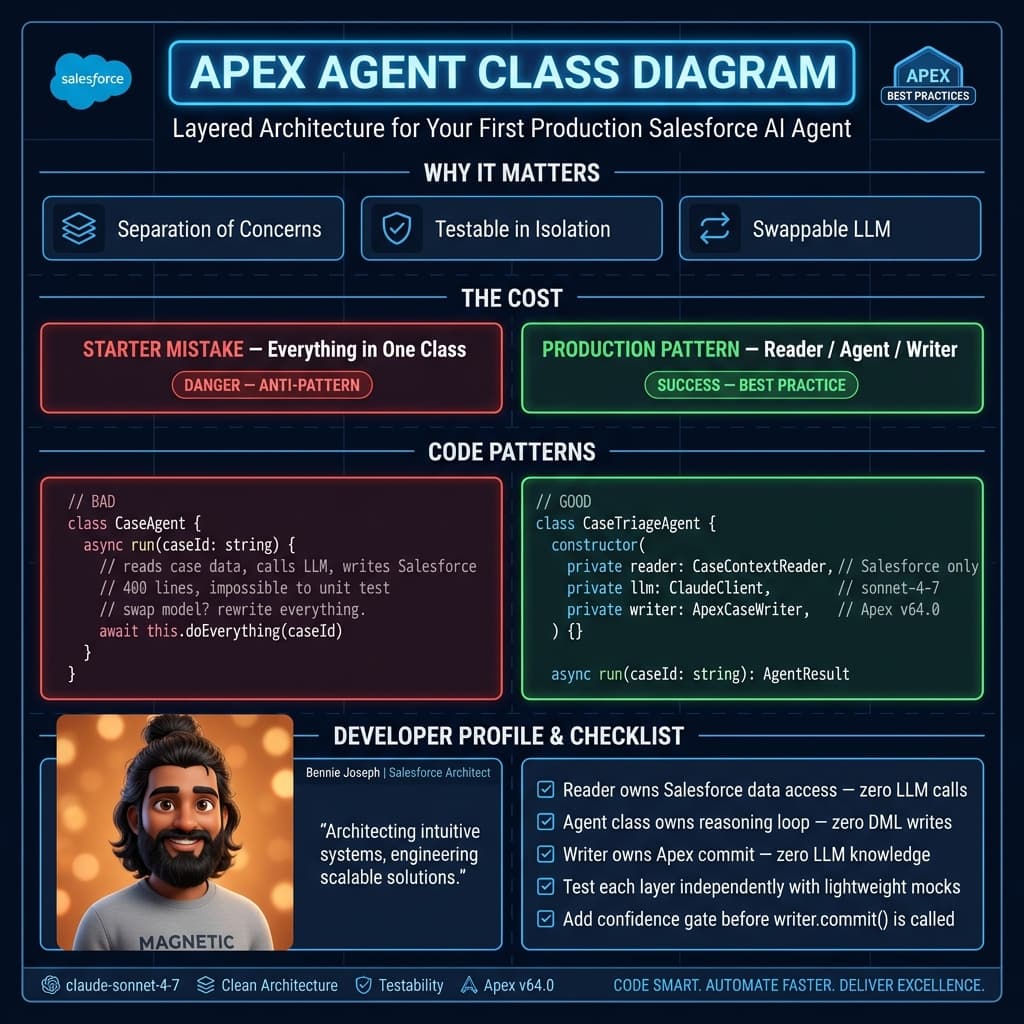
This is intentionally not a generic “AI utility.” Generic AI utility classes usually become dumping grounds. I prefer use-case-specific services until the second or third agent proves the abstraction.
public with sharing class ClaudeCaseTriageAgent implements Queueable, Database.AllowsCallouts {
    private Id caseId;

    public ClaudeCaseTriageAgent(Id caseId) {
        this.caseId = caseId;
    }

    public void execute(QueueableContext context) {
        Case c = [
            SELECT Id, Subject, Description, Priority, Status, Origin,
                   AccountId, Account.Name, Account.Type,
                   Account.SLA__c, Account.Customer_Tier__c,
                   Product__c, AI_Summary__c, AI_Reasoning__c
            FROM Case
            WHERE Id = :caseId
            LIMIT 1
        ];

        String prompt = buildPrompt(c);
        ClaudeDecision decision = callClaude(prompt);

        validateDecision(decision);

        c.AI_Summary__c = decision.summary;
        c.AI_Reasoning__c = decision.reasoning;
        c.Next_Best_Action__c = decision.nextBestAction;

        if (decision.recommendedPriority != null) {
            c.Priority = decision.recommendedPriority;
        }

        if (decision.recommendedQueue != null) {
            Id queueId = findQueueId(decision.recommendedQueue);
            if (queueId != null) {
                c.OwnerId = queueId;
            }
        }

        update c;
    }

    private static String buildPrompt(Case c) {
        Map<String, Object> payload = new Map<String, Object>{
            'case' => new Map<String, Object>{
                'subject' => c.Subject,
                'description' => c.Description,
                'currentPriority' => c.Priority,
                'status' => c.Status,
                'origin' => c.Origin,
                'product' => c.Product__c
            },
            'account' => new Map<String, Object>{
                'name' => c.Account != null ? c.Account.Name : null,
                'type' => c.Account != null ? c.Account.Type : null,
                'sla' => c.Account != null ? c.Account.SLA__c : null,
                'tier' => c.Account != null ? c.Account.Customer_Tier__c : null
            },
            'allowedPriorities' => new List<String>{ 'Low', 'Medium', 'High' },
            'allowedQueues' => new List<String>{
                'Tier_1_Support',
                'Tier_2_Hardware_Support',
                'Enterprise_Escalations'
            }
        };

        return 'You are a Salesforce case triage agent. ' +
            'Analyze the CRM context and return only valid JSON. ' +
            'Do not include markdown. Do not include commentary outside JSON. ' +
            'Use only allowed priorities and allowed queues. ' +
            'JSON schema: {' +
            '"summary": string, ' +
            '"recommendedPriority": "Low|Medium|High", ' +
            '"recommendedQueue": "Tier_1_Support|Tier_2_Hardware_Support|Enterprise_Escalations", ' +
            '"customerRisk": "Low|Medium|High", ' +
            '"reasoning": string, ' +
            '"nextBestAction": string' +
            '}. CRM context: ' + JSON.serialize(payload);
    }

    private static ClaudeDecision callClaude(String prompt) {
        HttpRequest req = new HttpRequest();
        req.setEndpoint('callout:Claude_API/v1/messages');
        req.setMethod('POST');
        req.setHeader('Content-Type', 'application/json');
        req.setHeader('anthropic-version', '2026-01-01');
        req.setTimeout(120000);

        Map<String, Object> body = new Map<String, Object>{
            'model' => 'claude-sonnet-4-7',
            'max_tokens' => 800,
            'temperature' => 0,
            'messages' => new List<Object>{
                new Map<String, Object>{
                    'role' => 'user',
                    'content' => prompt
                }
            }
        };

        req.setBody(JSON.serialize(body));

        Http http = new Http();
        HttpResponse res = http.send(req);

        if (res.getStatusCode() < 200 || res.getStatusCode() >= 300) {
            throw new CalloutException(
                'Claude API failed. Status=' + res.getStatusCode() +
                ', Body=' + res.getBody()
            );
        }

        Map<String, Object> response =
            (Map<String, Object>) JSON.deserializeUntyped(res.getBody());

        List<Object> content = (List<Object>) response.get('content');
        if (content == null || content.isEmpty()) {
            throw new CalloutException('Claude API returned no content.');
        }

        Map<String, Object> firstBlock = (Map<String, Object>) content[0];
        String text = (String) firstBlock.get('text');

        return (ClaudeDecision) JSON.deserialize(text, ClaudeDecision.class);
    }

    private static void validateDecision(ClaudeDecision decision) {
        if (decision == null) {
            throw new AgentValidationException('Decision is null.');
        }

        Set<String> allowedPriorities = new Set<String>{ 'Low', 'Medium', 'High' };
        Set<String> allowedQueues = new Set<String>{
            'Tier_1_Support',
            'Tier_2_Hardware_Support',
            'Enterprise_Escalations'
        };

        if (!allowedPriorities.contains(decision.recommendedPriority)) {
            throw new AgentValidationException(
                'Invalid priority: ' + decision.recommendedPriority
            );
        }

        if (!allowedQueues.contains(decision.recommendedQueue)) {
            throw new AgentValidationException(
                'Invalid queue: ' + decision.recommendedQueue
            );
        }

        if (String.isBlank(decision.summary) || decision.summary.length() > 500) {
            throw new AgentValidationException('Summary is required and must be <= 500 chars.');
        }

        if (String.isBlank(decision.nextBestAction)) {
            throw new AgentValidationException('Next best action is required.');
        }
    }

    private static Id findQueueId(String developerName) {
        List<Group> queues = [
            SELECT Id
            FROM Group
            WHERE Type = 'Queue'
            AND DeveloperName = :developerName
            LIMIT 1
        ];

        return queues.isEmpty() ? null : queues[0].Id;
    }

    public class ClaudeDecision {
        public String summary;
        public String recommendedPriority;
        public String recommendedQueue;
        public String customerRisk;
        public String reasoning;
        public String nextBestAction;
    }

    public class AgentValidationException extends Exception {}
}
You can enqueue it from a trigger, Flow Apex action, platform event subscriber, or a button.
For a first implementation, I usually start with Flow calling an invocable Apex wrapper. Business teams can decide when the agent runs, and engineering still owns the callout, validation, and writeback.
Step 4: Add a Small Invocable Wrapper
Here is a minimal invocable class that lets Flow call the agent.
public with sharing class ClaudeCaseTriageInvoker {
    public class Request {
        @InvocableVariable(required=true)
        public Id caseId;
    }

    @InvocableMethod(label='Run Claude Case Triage Agent')
    public static void run(List<Request> requests) {
        for (Request req : requests) {
            if (req.caseId != null) {
                System.enqueueJob(new ClaudeCaseTriageAgent(req.caseId));
            }
        }
    }
}
That is enough to wire this into a Case-created flow or an escalation flow.
My recommendation: do not run this on every single case at first. Run it on a subset:
- Enterprise accounts.
- Email-to-case.
- Cases with blank priority.
- Cases from specific products.
- Cases where subject or description contains outage language.
AI cost is not the only issue. Operational noise is more expensive than tokens.
Step 5: Prompting Like an Architect, Not a Poet
A Salesforce agent prompt should include four things:
- Role.
- CRM context.
- Policy constraints.
- Output schema.
The policy constraints are where enterprise value lives.
For example, in the manufacturer project, the routing policy looked roughly like this:
- Gold or Platinum customers with production-down language cannot be Low priority.
- Cases mentioning safety risk must route to Enterprise Escalations.
- Hardware firmware failures route to Tier 2 Hardware Support.
- Missing information should not block triage, but the next action must ask for it.
- AI cannot close a case.
- AI cannot downgrade priority for an already escalated case.
Those rules should not live only in the prompt. Put them in Apex validation too.
The prompt guides the model. Apex enforces the system.
Step 6: Handle Failures Like They Will Happen
Claude API callouts can fail. JSON can be malformed. Salesforce updates can fail. Queue ownership can be misconfigured. Rate limits can happen.
Do not pretend otherwise.
At minimum, add:
- A custom object for agent runs.
- Request hash or correlation ID.
- Status: Pending, Success, Failed, Skipped.
- Error message.
- Raw model response, if your compliance policy allows it.
- Token usage from the Claude response.
- Case lookup.
I usually create an AI_Agent_Run__c object for production implementations. It gives admins and support leaders visibility without checking debug logs.
Also consider whether you are allowed to store model outputs. In regulated environments, you may need retention controls, field-level security, encryption, or redaction.
A basic logging pattern looks like this:
private static void logAgentRun(Id caseId, String status, String message) {
    AI_Agent_Run__c run = new AI_Agent_Run__c();
    run.Related_Record_Id__c = String.valueOf(caseId);
    run.Agent_Name__c = 'Claude Case Triage';
    run.Status__c = status;
    run.Message__c = message != null && message.length() > 32000
        ? message.substring(0, 32000)
        : message;
    insert run;
}
In real enterprise systems, I also emit platform events for failures so observability tools can pick them up.
Step 7: Security and Data Boundaries
This is where teams get sloppy.
Before sending Salesforce data to Claude, decide what is allowed to leave your org boundary. Do not send everything just because you can query it.
For case triage, I usually avoid:
- Full contact email unless needed.
- Phone numbers.
- Billing addresses.
- Payment data.
- Sensitive attachments.
- Internal HR notes.
- Anything unrelated to the decision.
Use data minimization. The model does not need the entire customer record to route a case.
You should also review:
- Your Anthropic data usage settings.
- Regional data requirements.
- Contractual obligations with customers.
- Salesforce Shield encryption impact.
- Audit requirements.
- Whether human approval is required before writeback.
For the first version, I like human-in-the-loop. Let the agent populate recommended fields and a summary, but require an agent or supervisor to accept the recommendation. Once accuracy is proven, automate lower-risk actions.
Step 8: Testing the Agent
Testing AI integrations is different from testing deterministic Apex, but you still need proper Apex tests.
Mock the HTTP callout. Validate that the Case updates only when Claude returns allowed values.
@IsTest
private class ClaudeCaseTriageAgentTest {
    private class ClaudeMock implements HttpCalloutMock {
        public HTTPResponse respond(HTTPRequest req) {
            HttpResponse res = new HttpResponse();
            res.setStatusCode(200);
            res.setHeader('Content-Type', 'application/json');

            String decision = JSON.serialize(new Map<String, Object>{
                'summary' => 'Customer reports production outage after firmware update.',
                'recommendedPriority' => 'High',
                'recommendedQueue' => 'Tier_2_Hardware_Support',
                'customerRisk' => 'High',
                'reasoning' => 'Gold SLA account with production-down language.',
                'nextBestAction' => 'Assign to Tier 2 and request device logs.'
            });

            res.setBody(JSON.serialize(new Map<String, Object>{
                'id' => 'msg_test',
                'type' => 'message',
                'role' => 'assistant',
                'content' => new List<Object>{
                    new Map<String, Object>{
                        'type' => 'text',
                        'text' => decision
                    }
                },
                'model' => 'claude-sonnet-4-7',
                'stop_reason' => 'end_turn'
            }));

            return res;
        }
    }

    @IsTest
    static void triagesCase() {
        Group q = new Group(
            Name = 'Tier 2 Hardware Support',
            DeveloperName = 'Tier_2_Hardware_Support',
            Type = 'Queue'
        );
        insert q;

        Account a = new Account(
            Name = 'Acme Industrial',
            Customer_Tier__c = 'Gold',
            SLA__c = '24x7'
        );
        insert a;

        Case c = new Case(
            Subject = 'Production machine down after firmware update',
            Description = 'Line 4 is down. Firmware update failed overnight.',
            Origin = 'Email',
            Status = 'New',
            Priority = 'Medium',
            AccountId = a.Id
        );
        insert c;

        Test.setMock(HttpCalloutMock.class, new ClaudeMock());

        Test.startTest();
        System.enqueueJob(new ClaudeCaseTriageAgent(c.Id));
        Test.stopTest();

        Case updated = [
            SELECT Priority, AI_Summary__c, Next_Best_Action__c
            FROM Case
            WHERE Id = :c.Id
        ];

        System.assertEquals('High', updated.Priority);
        System.assertNotEquals(null, updated.AI_Summary__c);
        System.assert(updated.Next_Best_Action__c.contains('Tier 2'));
    }
}
One warning: do not confuse mocked Apex test coverage with model quality. They are separate.
For model quality, build an evaluation set. Take 100 historical cases, anonymize if needed, run them through the agent, and compare decisions against what your best support leads would have done.
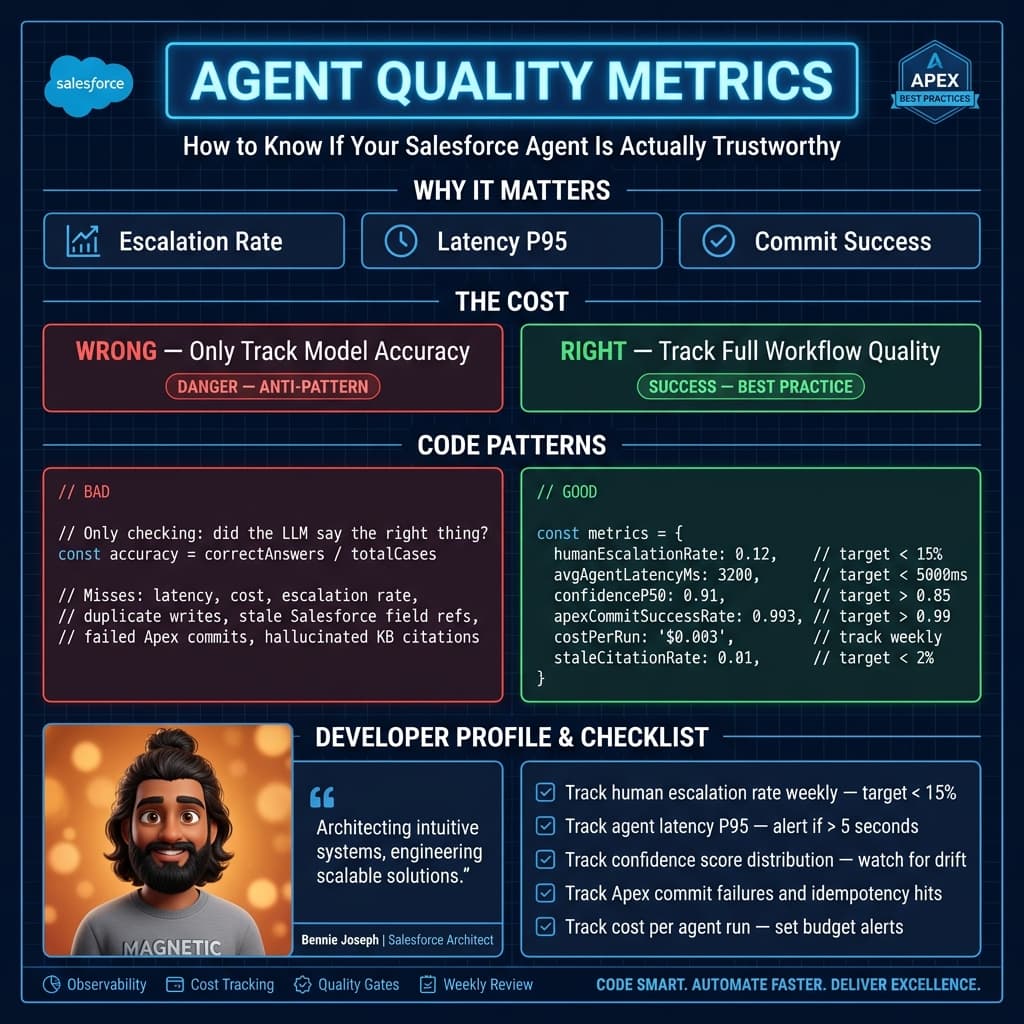
Track:
- Priority accuracy.
- Queue accuracy.
- Escalation misses.
- Unsafe recommendations.
- Average handling time reduction.
- Human override rate.
That last metric matters. If humans override the agent 60% of the time, you do not have an automation. You have a distraction.
Where This Goes Next
Once this first agent works, you can expand carefully.
Good next steps:
- Add tool use for retrieving related knowledge articles.
- Let Claude draft customer responses but require approval.
- Add semantic search over resolved cases.
- Route based on product telemetry from an external system.
- Create follow-up tasks for account managers on high-risk cases.
Bad next steps:
- Let the agent close cases.
- Let the agent issue refunds.
- Let the agent modify entitlements.
- Let the agent email customers without review.
- Let every team create their own prompt in production.
Agents should earn trust through narrow wins.
In enterprise Salesforce work, I have seen the best AI adoption come from boring, measurable use cases: triage, summarization, deduplication, next-best-action, renewal risk notes, and knowledge suggestions. Nobody gets promoted because a chatbot gave a cute answer. Teams get budget when handle time drops, SLA misses decrease, and audit teams stay calm.
Production Checklist
Before shipping a Claude API Salesforce integration to production, I want these boxes checked:
- Named Credential or gateway-based secret management.
- Async callouts with retry strategy.
- Strict JSON output contract.
- Apex-side validation.
- Logging object for agent runs.
- Failure visibility for admins.
- Data minimization review.
- Human approval for risky actions.
- Evaluation set with historical records.
- Cost monitoring.
- Permission model for AI-generated fields.
If that sounds like more work than a demo, good. Production AI is production software.
The model is only one part of the system. The real engineering is in the boundaries around it.
TL;DR
- Build your first Claude agent around a narrow Salesforce workflow like Case triage, not a generic chatbot.
- Use Claude for reasoning, but let Apex validate and control every Salesforce write.
- A production-ready claude api salesforce integration needs logging, security review, evaluation data, and human-in-the-loop controls.