Conditional Composite API: Cut Your Salesforce API Calls by 40%
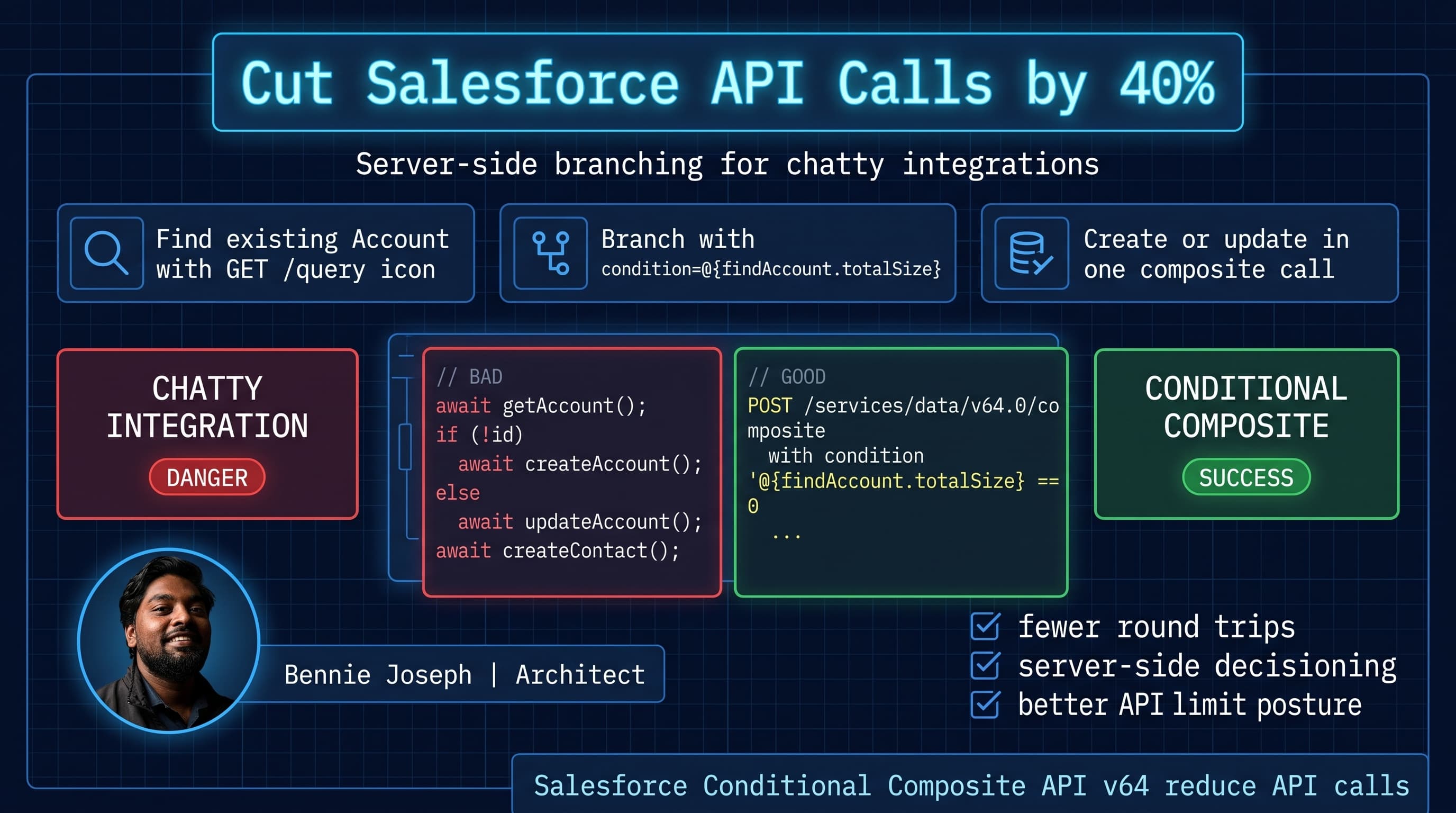
The fastest Salesforce API call is the one you never make.
That is why I’m paying attention to Salesforce Conditional Composite API v64. If you are trying to reduce API calls from middleware, SaaS backends, mobile apps, Agentforce 2.0 actions, or customer portals, this is one of the most practical Summer ’26 integration improvements.
Here’s the unpopular take: a lot of Salesforce integrations are not slow because Salesforce is slow. They are slow because we design them like nervous junior developers.
We do this:
- Query for a record.
- Wait.
- Decide if it exists.
- Create or update.
- Wait.
- Query related records.
- Create missing child records.
- Wait.
- Patch status.
- Log something.
That pattern works at 1,000 records. It becomes expensive at 100,000. At 10 million, it becomes a system design problem, not a coding problem.
Conditional Composite API gives us a cleaner option: send a bundle of dependent requests to Salesforce and let Salesforce evaluate conditions server-side.
I’m not saying “wrap everything in Composite and call it architecture.” That is lazy. But for integration flows with predictable branching, Conditional Composite can cut API calls by 40% or more without introducing a new middleware layer.
The integration smell: client-side branching
Most enterprise integrations I see have the same shape:
const account = await findAccountByExternalId(externalCustomerId);

if (account) {
  await updateAccount(account.Id, payload);
} else {
  await createAccount(payload);
}

const contact = await findContactByEmail(email);

if (!contact) {
  await createContact(accountId, contactPayload);
}

await createIntegrationLog("SUCCESS", externalCustomerId);
This is easy to read. It is also chatty.
Every await is a network boundary. Every branch is another Salesforce API call. Every retry needs idempotency. Every failure creates an awkward recovery state.
For one customer, no problem.
For a nightly sync of 250,000 dealer records from an ERP? Now the integration is spending more time negotiating HTTP than moving business data.
In CTA study terms, this sits right at the intersection of Integration Architecture, Data Lifecycle, and System Design. I’m studying these patterns deeply because this is where enterprise Salesforce programs either scale cleanly or start collecting brittle middleware scripts.
What Conditional Composite API changes
The standard Composite API already lets you group multiple REST requests into one HTTP call.
Conditional Composite API in Salesforce API v64.0 adds the missing piece: conditional execution of subrequests based on prior subrequest results.
That means you can express logic like:
- Query Account by external ID.
- If found, update it.
- If not found, create it.
- If a Contact is missing, create it.
- If the Account is active, create a Case.
- If a prior request failed, skip downstream work.
The key shift is this:
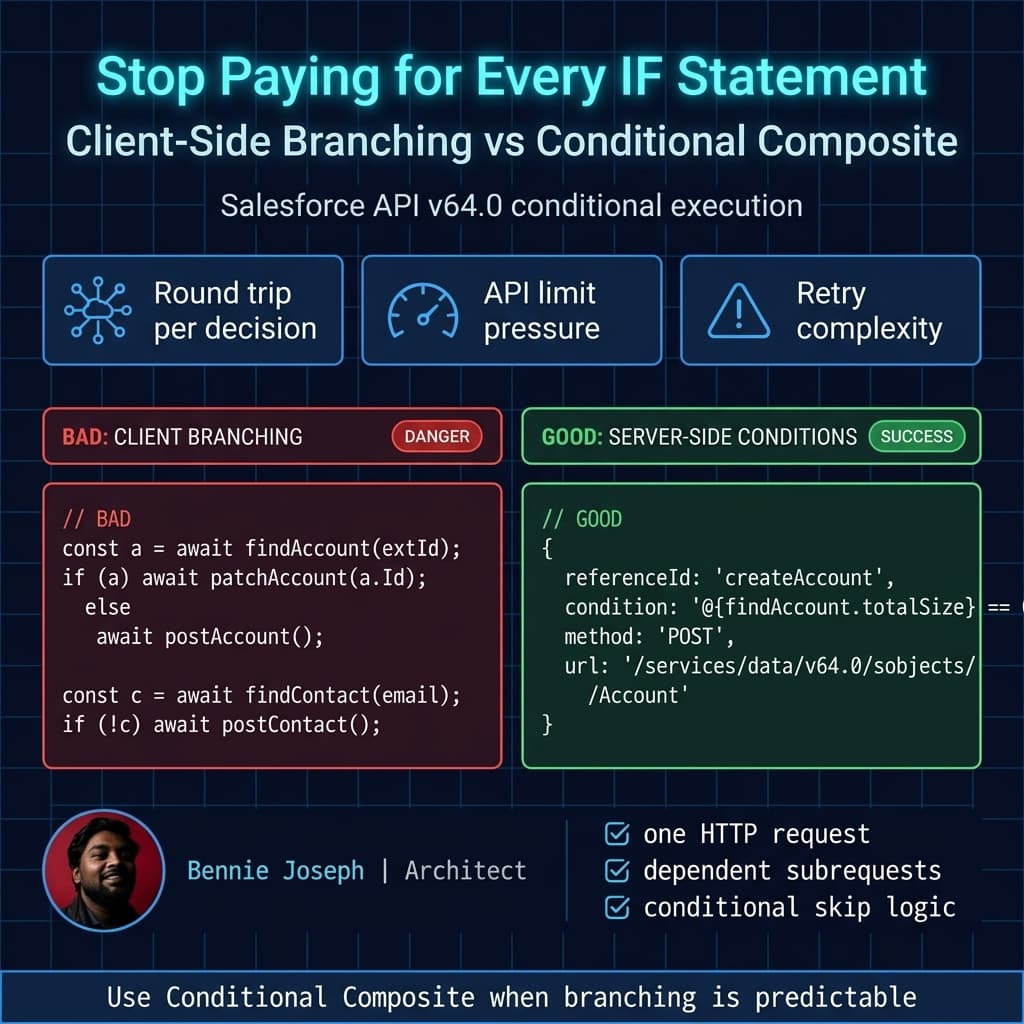
The client submits the decision tree. Salesforce evaluates the branches.
That does not eliminate all complexity. It relocates simple orchestration from your integration client into the API request itself.
Here is the difference visually:
A realistic enterprise example
I worked on a pattern similar to this for a manufacturing company with a dealer network.
The ERP was the system of record for dealer onboarding. Salesforce handled sales operations, partner support, and warranty case routing.
The nightly sync had to do this for each dealer:
- Find Account by ERP Dealer ID.
- Create Account if missing.
- Update Account if present.
- Find primary Contact by email.
- Create Contact if missing.
- Create a Case only when the dealer had an active warranty escalation.
- Write an integration audit record.
The first implementation was clean but chatty. Depending on the branch, each dealer consumed 4–7 REST API calls.
At 5,000 dealers, nobody cared.
At 150,000 dealers, people cared.
At 1 million dealer-location combinations, the integration window started to matter. API usage also became a governance discussion because other systems were using the same org limits: mobile apps, partner portal traffic, analytics jobs, and Agentforce actions.
Conditional Composite is exactly the kind of feature I want in that situation.
Not because it replaces Bulk API. It does not.
Not because it replaces event-driven architecture. It does not.
But because it handles transaction-shaped API workflows better than client-side branching.
The bad version: chatty TypeScript integration
Here is a simplified version of the old pattern.
type DealerPayload = {
  dealerId: string;
  dealerName: string;
  status: "Active" | "Inactive";
  primaryEmail: string;
  warrantyEscalation: boolean;
};

type SalesforceRecord<T> = T & { Id: string };

const apiVersion = "v64.0";

async function salesforceRequest<T>(
  accessToken: string,
  instanceUrl: string,
  path: string,
  init: RequestInit = {}
): Promise<T> {
  const response = await fetch(`${instanceUrl}/services/data/${apiVersion}${path}`, {
    ...init,
    headers: {
      Authorization: `Bearer ${accessToken}`,
      "Content-Type": "application/json",
      ...(init.headers ?? {})
    }
  });

  if (!response.ok) {
    const body = await response.text();
    throw new Error(`Salesforce request failed: ${response.status} ${body}`);
  }

  return response.json() as Promise<T>;
}

async function syncDealerChatty(
  accessToken: string,
  instanceUrl: string,
  dealer: DealerPayload
): Promise<void> {
  const accountQuery = encodeURIComponent(
    `SELECT Id FROM Account WHERE ERP_Dealer_Id__c = '${dealer.dealerId}' LIMIT 1`
  );

  const accountResult = await salesforceRequest<{
    totalSize: number;
    records: Array<SalesforceRecord<{ Id: string }>>;
  }>(accessToken, instanceUrl, `/query/?q=${accountQuery}`);

  let accountId: string;

  if (accountResult.totalSize > 0) {
    accountId = accountResult.records[0].Id;

    await salesforceRequest(accessToken, instanceUrl, `/sobjects/Account/${accountId}`, {
      method: "PATCH",
      body: JSON.stringify({
        Name: dealer.dealerName,
        Status__c: dealer.status
      })
    });
  } else {
    const created = await salesforceRequest<{ id: string }>(
      accessToken,
      instanceUrl,
      `/sobjects/Account`,
      {
        method: "POST",
        body: JSON.stringify({
          Name: dealer.dealerName,
          ERP_Dealer_Id__c: dealer.dealerId,
          Status__c: dealer.status
        })
      }
    );

    accountId = created.id;
  }

  const contactQuery = encodeURIComponent(
    `SELECT Id FROM Contact WHERE Email = '${dealer.primaryEmail}' LIMIT 1`
  );

  const contactResult = await salesforceRequest<{
    totalSize: number;
    records: Array<SalesforceRecord<{ Id: string }>>;
  }>(accessToken, instanceUrl, `/query/?q=${contactQuery}`);

  if (contactResult.totalSize === 0) {
    await salesforceRequest(accessToken, instanceUrl, `/sobjects/Contact`, {
      method: "POST",
      body: JSON.stringify({
        AccountId: accountId,
        LastName: dealer.dealerName,
        Email: dealer.primaryEmail
      })
    });
  }

  if (dealer.warrantyEscalation && dealer.status === "Active") {
    await salesforceRequest(accessToken, instanceUrl, `/sobjects/Case`, {
      method: "POST",
      body: JSON.stringify({
        AccountId: accountId,
        Subject: `Warranty escalation for ${dealer.dealerName}`,
        Origin: "ERP Sync",
        Status: "New"
      })
    });
  }
}
This code is understandable. That is the trap.
It hides the operational cost:
- One record can consume 4–6 API calls.
- Latency compounds because calls are sequential.
- Retry handling is complicated because partial work may already exist.
- The client owns branching logic that Salesforce can evaluate.
If I multiply this across 100,000 dealer records, I am not optimizing JavaScript anymore. I am managing an integration architecture problem.
The better version: Conditional Composite API v64.0
Now let’s move the decision tree into one Composite request.
The exact shape below is intentionally verbose because I want the pattern to be clear.
type CompositeSubrequest = {
  method: "GET" | "POST" | "PATCH";
  url: string;
  referenceId: string;
  condition?: string;
  body?: Record<string, unknown>;
};

type CompositeRequest = {
  allOrNone: boolean;
  compositeRequest: CompositeSubrequest[];
};

function buildDealerConditionalComposite(dealer: DealerPayload): CompositeRequest {
  const dealerId = dealer.dealerId.replaceAll("'", "\\'");
  const email = dealer.primaryEmail.replaceAll("'", "\\'");

  const accountQuery = encodeURIComponent(
    `SELECT Id FROM Account WHERE ERP_Dealer_Id__c = '${dealerId}' LIMIT 1`
  );

  const contactQuery = encodeURIComponent(
    `SELECT Id FROM Contact WHERE Email = '${email}' LIMIT 1`
  );

  return {
    allOrNone: false,
    compositeRequest: [
      {
        method: "GET",
        url: `/services/data/v64.0/query/?q=${accountQuery}`,
        referenceId: "findAccount"
      },
      {
        method: "POST",
        url: "/services/data/v64.0/sobjects/Account",
        referenceId: "createAccount",
        condition: "@{findAccount.totalSize} == 0",
        body: {
          Name: dealer.dealerName,
          ERP_Dealer_Id__c: dealer.dealerId,
          Status__c: dealer.status
        }
      },
      {
        method: "PATCH",
        url: "/services/data/v64.0/sobjects/Account/@{findAccount.records[0].Id}",
        referenceId: "updateAccount",
        condition: "@{findAccount.totalSize} > 0",
        body: {
          Name: dealer.dealerName,
          Status__c: dealer.status
        }
      },
      {
        method: "GET",
        url: `/services/data/v64.0/query/?q=${contactQuery}`,
        referenceId: "findContact"
      },
      {
        method: "POST",
        url: "/services/data/v64.0/sobjects/Contact",
        referenceId: "createContact",
        condition: "@{findContact.totalSize} == 0",
        body: {
          AccountId:
            "@{findAccount.totalSize > 0 ? findAccount.records[0].Id : createAccount.id}",
          LastName: dealer.dealerName,
          Email: dealer.primaryEmail
        }
      },
      {
        method: "POST",
        url: "/services/data/v64.0/sobjects/Case",
        referenceId: "createWarrantyCase",
        condition:
          `@{findAccount.totalSize > 0 || createAccount.success} && ` +
          `${dealer.warrantyEscalation === true} && '${dealer.status}' == 'Active'`,
        body: {
          AccountId:
            "@{findAccount.totalSize > 0 ? findAccount.records[0].Id : createAccount.id}",
          Subject: `Warranty escalation for ${dealer.dealerName}`,
          Origin: "ERP Sync",
          Status: "New"
        }
      }
    ]
  };
}

async function syncDealerWithConditionalComposite(
  accessToken: string,
  instanceUrl: string,
  dealer: DealerPayload
): Promise<void> {
  const response = await fetch(`${instanceUrl}/services/data/v64.0/composite`, {
    method: "POST",
    headers: {
      Authorization: `Bearer ${accessToken}`,
      "Content-Type": "application/json"
    },
    body: JSON.stringify(buildDealerConditionalComposite(dealer))
  });

  const body = await response.json();

  if (!response.ok) {
    throw new Error(`Composite request failed: ${response.status} ${JSON.stringify(body)}`);
  }

  const failedSubrequests = body.compositeResponse?.filter(
    (item: { httpStatusCode: number }) => item.httpStatusCode >= 400
  );

  if (failedSubrequests?.length) {
    throw new Error(`Composite subrequest failure: ${JSON.stringify(failedSubrequests)}`);
  }
}
The important part is not the syntax. The important part is the design move.
The client no longer says:
“Let me ask Salesforce what happened, then I’ll decide the next API call.”
The client says:
“Here is the workflow. Salesforce, evaluate these conditions and execute only the relevant subrequests.”
That is where the API call reduction comes from.
Where the 40% reduction usually appears
I do not like fake benchmark numbers, so here is how I think about it.
For the dealer sync pattern:
| Step | Chatty API Calls | Conditional Composite API Calls |
|---|---|---|
| Find Account | 1 | Included in 1 composite call |
| Create or update Account | 1 | Included |
| Find Contact | 1 | Included |
| Create Contact if missing | 0–1 | Included conditionally |
| Create warranty Case if eligible | 0–1 | Included conditionally |
| Total per dealer | 3–5 | 1 |
If every dealer needs all branches, you can reduce 5 calls to 1. That is an 80% call count reduction.
But enterprise data is messy. Some records fail validation. Some branches are skipped. Some operations still need Bulk API. Some audit logging may go through Platform Events or an external observability stack.
In a real mixed workload, I would expect something closer to 40–60% fewer API calls for transaction-style integrations.
That is still a big deal.
If your org has multiple integrations fighting for daily API capacity, this can defer a limit problem without buying your way out of bad design.
Decision matrix: when I would use it
Conditional Composite API is not the answer to every integration problem. Here is how I would decide.
| Approach | Best for | Strengths | Weaknesses | My default opinion |
|---|---|---|---|---|
| Conditional Composite API v64.0 | Small transaction workflows with dependent branches | Reduces round trips, keeps logic close to data, simpler client orchestration | Still bound by composite limits, not ideal for massive bulk loads | Use when one business transaction has 3–10 dependent REST operations |
| Bulk API 2.0 | Large-volume inserts, updates, deletes | Handles volume, async processing, better for 100K+ flat operations | Weak for per-record branching and dependent child creation | Use for data movement, not decision trees |
| Platform Events | Event-driven async integration | Decouples systems, resilient, good for downstream fanout | Eventual consistency, replay/error handling required | Use when the source system should not wait |
| GraphQL API v64.0 | UI/data aggregation and precise CRUD payloads | Efficient shape for client-driven data needs | Not a replacement for transaction orchestration | Use for app experiences and API aggregation |
| Apex REST | Custom server-side business service | Full control, validations, custom transaction boundaries | More code ownership, testing, versioning | Use when Composite conditions become unreadable |
| MuleSoft orchestration | Cross-system enterprise process | Central governance, transformations, retries, multiple backends | More platform overhead for simple Salesforce-only branching | Use when Salesforce is one participant, not the whole workflow |
Here’s the rule I use:
If the workflow is Salesforce-centric and has predictable branches, try Conditional Composite before writing custom Apex REST.
But if the composite payload starts looking like a programming language, stop. That is usually the point where Apex, MuleSoft, or an event-driven design becomes cleaner.
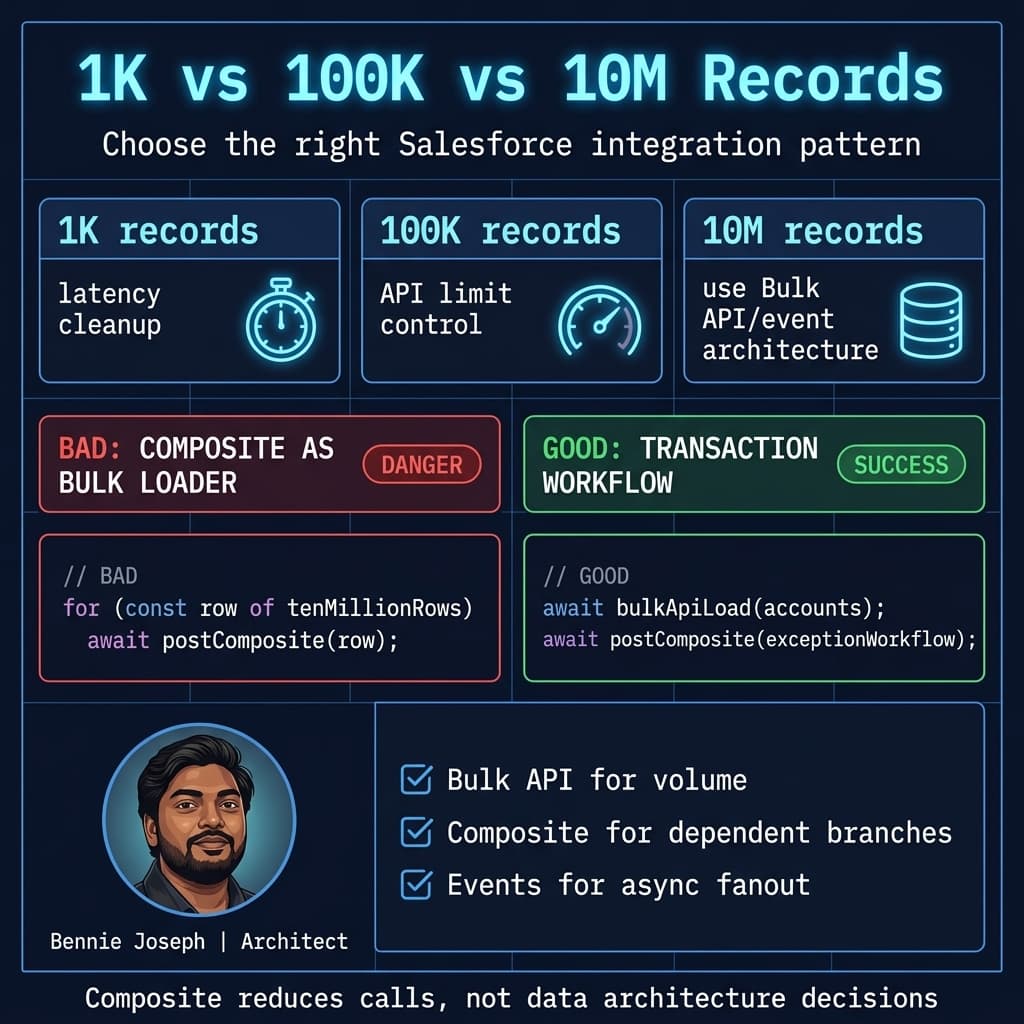
Scale: 1K, 100K, 10M
This is where integration patterns get real.
At 1K records
Almost anything works.
A chatty integration may finish fast enough. Nobody notices the wasted API calls. The only visible problem might be occasional latency spikes.
At this scale, Conditional Composite is mostly about clean design and reducing unnecessary round trips.
At 100K records
The math starts to hurt.
If each record averages 4 API calls, that is 400,000 API calls.
If Conditional Composite brings that to 1 call per record, that is 100,000 API calls.
That is a 300,000-call difference before we even talk about retries, monitoring, or concurrent jobs.
At this scale, I would also look at:
- Composite request sizing.
- Parallelism limits.
- Lock contention on parent records.
- Validation rule failures.
- Duplicate rules.
- External ID strategy.
- Retry idempotency.
Conditional Composite reduces HTTP call volume. It does not magically remove Salesforce transaction costs.
At 10M records
Do not pretend Composite API is your bulk migration strategy.
At 10 million records, I am thinking in batches, async processing, Bulk API 2.0, event streams, staging objects, reconciliation jobs, and data ownership boundaries.
Conditional Composite still has a place, but not as the primary loader.
Good use cases at this scale:
- Exception handling workflows.
- Record-level remediation.
- Post-load enrichment for a subset of records.
- Transactional updates from external apps.
- Agentforce 2.0 actions that need multiple dependent Salesforce operations behind one tool call.
Bad use case:
- “Let’s load 10 million accounts through Composite because it has fewer API calls.”
No. That is how you create a slow, fragile migration and then blame Salesforce.
Security and governance notes
API call reduction is not the only design concern.
A few things I would validate before pushing this pattern into production.
Use an integration user with least privilege
Do not give the integration user “Modify All Data” because the composite payload is annoying to debug.
Salesforce API v64.0 gives us mature options for scoped access. Use permission sets, OAuth scopes, connected app policies, and proper object/field access.
If the integration is invoked from Salesforce-side Apex in newer API versions, be explicit about user-mode behavior. Salesforce API v67.0 is moving SOQL/DML/Database methods to user mode by default, and classes without explicit sharing declarations default to with sharing. I like that direction because it makes security posture less accidental.
For direct REST integrations, the running user still matters. Composite does not bypass CRUD/FLS.
Design for idempotency
Every create operation should have a natural key or external ID strategy.
For the dealer example:
Account.ERP_Dealer_Id__cshould be unique.- Contact matching should be deterministic.
- Cases may need an external escalation ID to avoid duplicate creation.
- Integration audit records should include correlation IDs.
Conditional execution reduces calls. It does not remove retry scenarios.
If the client times out after Salesforce processes the composite request, your retry needs to be safe.
Keep conditions readable
This matters more than people admit.
A simple condition is fine:
condition: "@{findAccount.totalSize} == 0"A condition like this is a smell:
condition:
  "@{findAccount.totalSize == 0 && findContact.totalSize == 0 && " +
  "createAccount.success && someOtherRequest.records[0].Status__c != 'Blocked' && " +
  "yetAnotherRequest.records[0].Region__c == 'EMEA'}"
That belongs in a service layer.
I want Composite conditions to describe orchestration, not encode business policy spaghetti.
Observability: do not lose subrequest visibility
One concern with Composite APIs is that teams celebrate “one API call” and then lose visibility into what happened inside the call.
Do not do that.
Log the composite response by referenceId.
For example:
type CompositeResponseItem = {
  body: unknown;
  httpHeaders: Record<string, string>;
  httpStatusCode: number;
  referenceId: string;
};

function summarizeCompositeResponse(items: CompositeResponseItem[]) {
  return items.map((item) => ({
    referenceId: item.referenceId,
    status: item.httpStatusCode,
    success: item.httpStatusCode >= 200 && item.httpStatusCode < 300
  }));
}

function findFailedSubrequests(items: CompositeResponseItem[]) {
  return items.filter((item) => item.httpStatusCode >= 400);
}

const summary = summarizeCompositeResponse([
  {
    referenceId: "findAccount",
    httpStatusCode: 200,
    httpHeaders: {},
    body: { totalSize: 1 }
  },
  {
    referenceId: "updateAccount",
    httpStatusCode: 204,
    httpHeaders: {},
    body: null
  }
]);

console.log(summary);
In production, I want this summary attached to a correlation ID that traces the transaction from source system to Salesforce and back.
If you are using MuleSoft, Heroku, or a custom Node/Python service, emit structured logs. If the workflow is triggered by Agentforce 2.0 as an action, make sure the action response does not hide partial failures behind a generic “tool failed” message.
How this fits with Agentforce 2.0
Agentforce 2.0 and Atlas Reasoning Engine v2 make multi-step agent workflows more realistic, but agents still need deterministic tools.
This is where Conditional Composite API is useful.
If an agent action needs to:
- Check customer entitlement.
- Create a Case.
- Update Contact preference.
- Add a task.
- Return the Case number.
You do not want the agent making five independent Salesforce REST calls if the workflow is deterministic.
I would rather expose one well-designed tool backed by Conditional Composite or Apex REST.
That keeps the agent focused on reasoning and the API focused on execution.
Same idea applies to SaaS products built on Salesforce data. The UI can use LWC native state management for client responsiveness, but server mutations should still be efficient. Do not make your beautiful LWC experience wait on five avoidable network round trips.
Practical implementation checklist
Before using Conditional Composite API in production, I would walk through this checklist:
- Map the workflow first. Write down every branch and dependency.
- Count current calls. Do not optimize based on vibes.
- Identify deterministic branches. Those are good Composite candidates.
- Use external IDs. Especially for retry-safe create/update flows.
- Keep conditions simple. Complex business rules belong in Apex or middleware.
- Decide
allOrNoneintentionally. All-or-nothing is not always correct. - Log every
referenceId. One HTTP call does not mean one business operation. - Load test with real data shapes. Happy-path samples lie.
- Watch locking and validation failures. Fewer API calls can still create hot records.
- Document the contract. Composite payloads are integration contracts, not throwaway JSON.
My default design stance
I like Conditional Composite API because it attacks a boring but expensive problem: chatty integrations.
It is not flashy. It is not an AI feature. It will not get the same attention as Agentforce 2.0 or Data 360 announcements.
But in enterprise Salesforce, boring performance improvements matter.
A 40% API call reduction can mean:
- Fewer limit escalations.
- Shorter integration windows.
- Less middleware complexity.
- Better customer-facing latency.
- Cleaner transaction boundaries.
The mistake would be treating Conditional Composite as a universal hammer.
I would use it for Salesforce-centric transaction workflows with clear dependencies. I would not use it for massive data loads, complex cross-system orchestration, or business rules that deserve a real service layer.
That is the architecture lesson I keep coming back to: the tool is less important than the boundary.
Put branching where it belongs.
For predictable Salesforce branches, v64.0 Conditional Composite API gives us a better boundary than five separate client-side calls.
TL;DR
- Conditional Composite API v64.0 can reduce chatty Salesforce REST integrations by 40–60% by moving predictable branching server-side.
- Use it for transaction-shaped workflows, not bulk migrations or complex business policy engines.
- Log every subrequest, design for idempotency, and choose Bulk API, events, Apex REST, or MuleSoft when the workload demands it.