Data 360 Zero Copy: How to Connect Snowflake and BigQuery Without ETL
Zero Copy is one of those phrases that sounds like marketing until you have lived through a bad warehouse-to-CRM ETL program.
I have seen teams spend months copying Snowflake or BigQuery data into Salesforce-adjacent storage, only to create three new problems:
- The copied data is stale.
- The access model is weaker than the source system.
- Nobody agrees which copy is the system of truth.
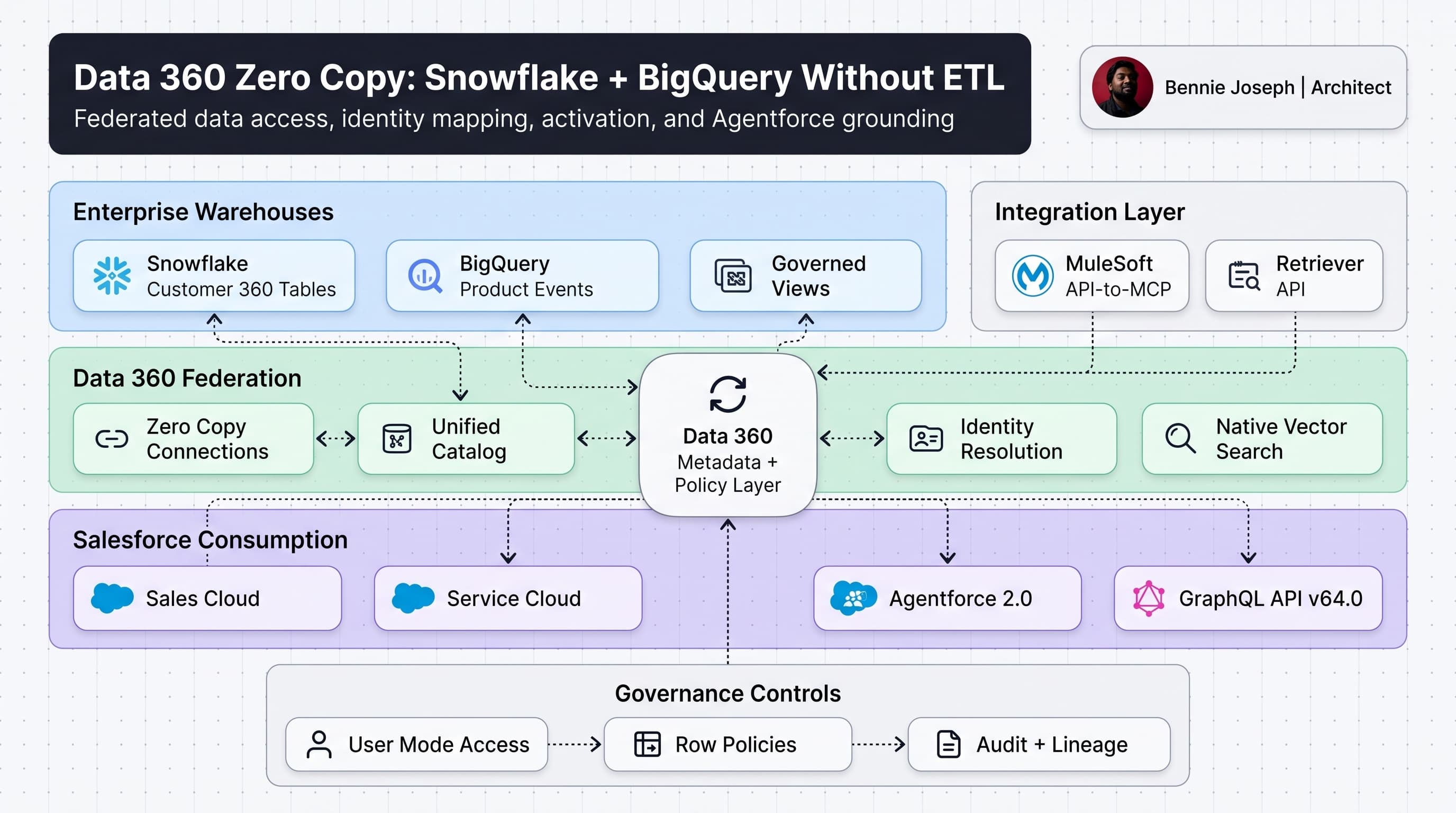
Data 360 Zero Copy changes the default architecture. Instead of moving warehouse data into Salesforce first, Data 360 can federate access to Snowflake and BigQuery, map that data into a governed customer model, and make it available for segmentation, analytics, activation, and Agentforce grounding without traditional ETL copies.
That does not mean “no architecture.”
Here’s the unpopular take: Zero Copy removes a lot of pipelines, but it increases the importance of data contracts, identity design, query patterns, access control, and lifecycle ownership.
This post is my practitioner view of salesforce data 360 zero copy snowflake bigquery federation: where it fits, where it fails, and how I would design it for an enterprise Salesforce org in 2026.
What Zero Copy Actually Means
Zero Copy does not mean Salesforce magically ignores physics.
It means Data 360 can reference and query data that remains in platforms like Snowflake or BigQuery, instead of forcing every table through a batch ingestion pipeline.
The high-level pattern looks like this:
- Snowflake remains the source for governed customer, transaction, or finance tables.
- BigQuery remains the source for high-volume digital events, product usage, or analytics tables.
- Data 360 creates metadata, mappings, relationships, and activation-ready objects.
- Salesforce apps, automation, analytics, and Agentforce 2.0 can consume governed views of that data.
- Data 360 handles federation, policy, identity resolution, and cataloging.
The keyword is federation.
In a traditional ETL design, the data physically lands in another store. In a federated design, the consuming platform asks the source for data when needed, subject to caching, pushdown, policies, and connector behavior.
That distinction matters when you design for scale.
The Architecture Pattern I Use
I think about Zero Copy in five layers:
- Source data layer — Snowflake, BigQuery, lakehouse, operational systems.
- Governed view layer — source-owned views designed for consumption.
- Data 360 federation layer — Zero Copy connections, Unified Catalog, mappings, identity.
- Salesforce consumption layer — CRM, automation, analytics, Agentforce, APIs.
- Governance layer — access, lineage, monitoring, retention, audit.
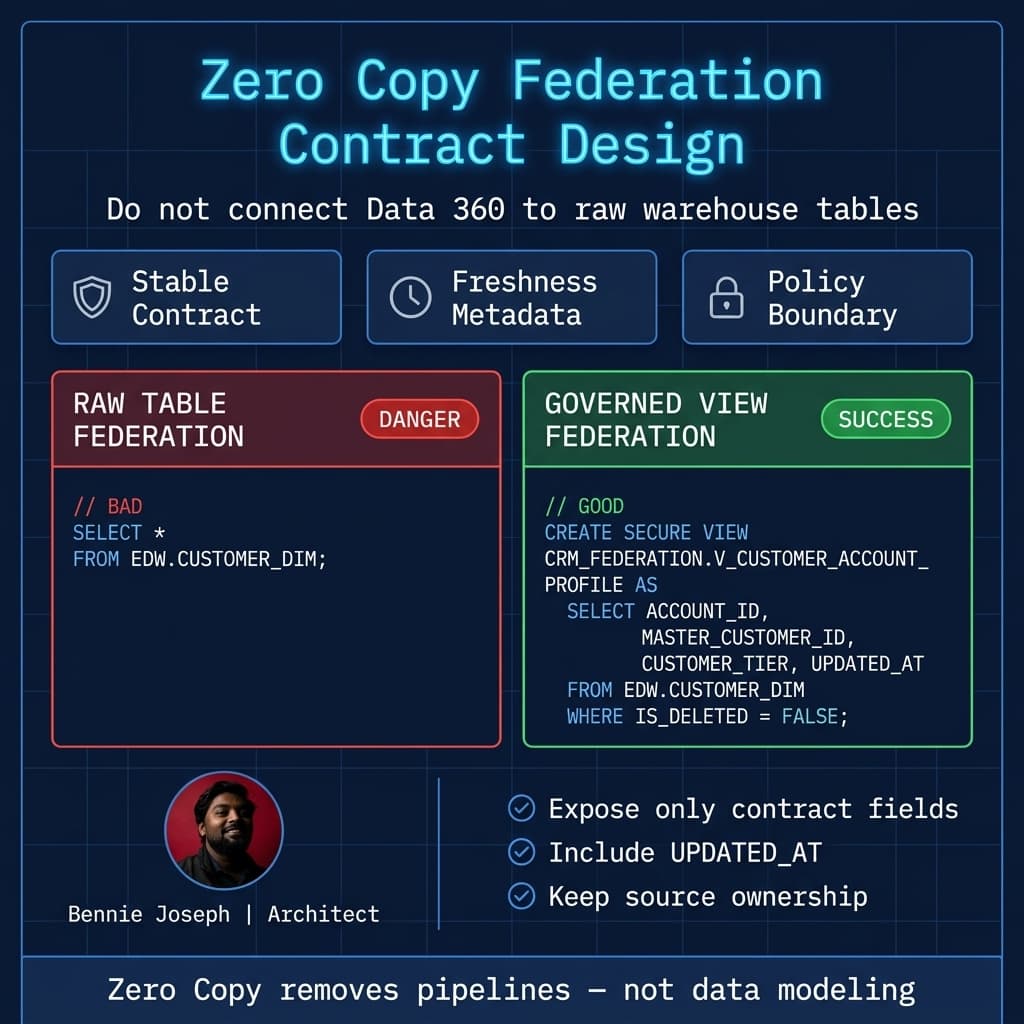
The mistake I see is connecting Data 360 directly to raw warehouse tables.
Don’t do that.
Raw tables are optimized for ingestion, transformation, or analytical workloads. They are usually not designed as enterprise contracts. Column names change. Null semantics are unclear. PII handling is inconsistent. Business definitions are scattered across dbt docs, Confluence pages, and Slack threads.
For Zero Copy, I prefer source-owned views.
Example:
-- Snowflake governed view for Data 360 federation
CREATE OR REPLACE SECURE VIEW CRM_FEDERATION.V_CUSTOMER_ACCOUNT_PROFILE AS
SELECT
    ACCOUNT_ID,
    MASTER_CUSTOMER_ID,
    LEGAL_NAME,
    BILLING_COUNTRY,
    INDUSTRY_CODE,
    CUSTOMER_TIER,
    ANNUAL_REVENUE_USD,
    CONSENT_EMAIL_MARKETING,
    UPDATED_AT
FROM EDW.CUSTOMER_DIM
WHERE IS_DELETED = FALSE;
For BigQuery, I would do the same thing:
-- BigQuery governed view for product usage federation
CREATE OR REPLACE VIEW `enterprise_federation.v_customer_product_usage_30d` AS
SELECT
  customer_id,
  account_id,
  COUNTIF(event_name = 'login') AS login_count_30d,
  COUNTIF(event_name = 'export_report') AS report_exports_30d,
  MAX(event_timestamp) AS last_activity_at
FROM `product_analytics.events`
WHERE event_timestamp >= TIMESTAMP_SUB(CURRENT_TIMESTAMP(), INTERVAL 30 DAY)
GROUP BY customer_id, account_id;
These views become the contract.
Data 360 should federate against these curated surfaces, not whatever happens to exist in the warehouse this sprint.
Real-World Example: B2B SaaS Customer Health
On one enterprise project, the sales and customer success teams wanted customer health inside Salesforce.
The data existed, but it was scattered:
- Account master and ARR in Snowflake.
- Product usage events in BigQuery.
- Support history in Salesforce.
- Renewal opportunities in Sales Cloud.
- NPS survey data in a third-party platform.
The original proposal was classic ETL:
- Copy Snowflake account metrics into Salesforce nightly.
- Copy BigQuery usage aggregates into Salesforce nightly.
- Create custom objects for health scores.
- Build reports and automation on copied records.
It looked simple on paper. It was not.
The problems showed up immediately:
- Product usage changed hourly, but CRM showed yesterday’s version.
- Sales wanted historical trends, but Salesforce storage cost became a concern.
- Data engineering owned the warehouse logic, but Salesforce admins owned the copied objects.
- Consent and regional policies were applied inconsistently across copies.
The better pattern was:
- Keep ARR, account tier, and customer hierarchy in Snowflake.
- Keep high-volume product telemetry in BigQuery.
- Expose curated secure views for Data 360.
- Use Data 360 identity resolution to connect account, contact, usage, and engagement data.
- Surface summarized health insights in Salesforce.
- Use Agentforce 2.0 for guided account research, grounded on governed Data 360 data.
That architecture reduced copy-heavy pipelines and clarified ownership.
Salesforce did not become the warehouse. The warehouse did not become the CRM. Data 360 became the governed federation and activation layer between them.
Step-by-Step: Connecting Snowflake and BigQuery Without ETL
The exact screens change over releases, and Salesforce is moving quickly with Headless 360, APIs, CLI, and MCP tooling. But the architecture flow is stable.
Step 1: Create Governed Source Views
Before touching Data 360, define the contract in the source.
For Snowflake:
- Use secure views for sensitive data.
- Avoid exposing raw PII unless there is a clear use case.
- Normalize identifiers used by Salesforce.
- Include
UPDATED_ATor equivalent freshness metadata. - Align data types with Data 360 mappings.
For BigQuery:
- Pre-aggregate high-volume events.
- Partition and cluster source tables.
- Use authorized views when needed.
- Avoid unbounded event-level federation unless the use case really needs it.
Zero Copy is not an excuse to federate a trillion-row clickstream table into every CRM page.
Step 2: Register the Source in Data 360
In Data 360, you create the connection to Snowflake or BigQuery using the supported connector pattern for federation.
The design decision here is not just “can Salesforce connect?”
It is:
- Which service account or identity is used?
- Which schemas are exposed?
- Are policies enforced in the source, Data 360, or both?
- Who owns the connection?
- How is access audited?
- What is the fallback if the warehouse is unavailable?
For enterprise work, I want the source platform team involved early. Salesforce teams should not independently connect to every warehouse table they can find.
Step 3: Map Federated Objects to the Data Model
Data 360 needs to understand what the data means.
That means mapping source fields into usable entities:
- Account
- Contact
- Individual
- Engagement
- Product Usage
- Subscription
- Consent
- Case
- Opportunity
- Custom business entities
The hard part is not clicking through mappings. The hard part is agreeing that MASTER_CUSTOMER_ID, GLOBAL_ACCOUNT_ID, and Salesforce Account.Id are not the same thing.
This is where CTA-level Data Lifecycle and System Design study becomes useful. I am studying those architecture domains deeply because they expose the exact tradeoffs that show up in projects like this.
Identity is architecture, not admin setup.
Step 4: Define Identity Resolution Rules
For Snowflake and BigQuery federation, I usually see at least three identity layers:
| Layer | Example | Purpose |
|---|---|---|
| Salesforce record ID | 001... Account Id | CRM ownership and transactions |
| Enterprise customer ID | MC-928811 | Cross-system master identity |
| Digital/user ID | user_7839 or hashed email | Product analytics and engagement |
Data 360 identity resolution should connect these intentionally.
If you map everything to email, you will regret it. Emails change, shared inboxes exist, and B2B account hierarchies make person-level matching messy.
My preference:
- Use enterprise master IDs where available.
- Use Salesforce IDs for CRM-native activation.
- Use hashed email only as a secondary match key.
- Track match confidence.
- Treat unresolved identities as first-class exceptions.
Apex Example: Using Federated Insights Safely in Salesforce
A common pattern is to surface a federated insight in Salesforce without copying all source rows into custom objects.
For example, an account page might show a customer health snapshot retrieved from a Data 360-backed service. The exact API surface depends on your org setup, but the Apex design principles are consistent:
- Use a Named Credential.
- Do not hardcode tokens.
- Query Salesforce records in user mode.
- Handle source latency.
- Cache only what you are allowed to cache.
- Store small operational summaries only when there is a business reason.
Here is a simplified Apex service pattern using Salesforce API v64.0 assumptions and explicit user-mode querying.
public with sharing class CustomerHealthFederationService {
    public class HealthSnapshot {
        @AuraEnabled public String accountId;
        @AuraEnabled public String customerTier;
        @AuraEnabled public Decimal arrUsd;
        @AuraEnabled public Integer loginCount30d;
        @AuraEnabled public Integer reportExports30d;
        @AuraEnabled public Datetime lastActivityAt;
        @AuraEnabled public Datetime sourceUpdatedAt;
    }

    public class FederationException extends Exception {}

    @AuraEnabled(cacheable=true)
    public static HealthSnapshot getHealthSnapshot(Id accountId) {
        Account accountRecord = [
            SELECT Id, External_Customer_Id__c
            FROM Account
            WHERE Id = :accountId
            WITH USER_MODE
            LIMIT 1
        ];

        if (String.isBlank(accountRecord.External_Customer_Id__c)) {
            throw new FederationException('Account is missing External Customer Id.');
        }

        HttpRequest request = new HttpRequest();
        request.setEndpoint(
            'callout:Data360Federation/customer-health'
            + '?masterCustomerId='
            + EncodingUtil.urlEncode(accountRecord.External_Customer_Id__c, 'UTF-8')
        );
        request.setMethod('GET');
        request.setHeader('Accept', 'application/json');
        request.setTimeout(10000);

        HttpResponse response = new Http().send(request);

        if (response.getStatusCode() == 404) {
            throw new FederationException('No federated health snapshot found.');
        }

        if (response.getStatusCode() >= 300) {
            throw new FederationException(
                'Data 360 federation call failed: ' + response.getStatus()
            );
        }

        Map<String, Object> payload =
            (Map<String, Object>) JSON.deserializeUntyped(response.getBody());

        HealthSnapshot snapshot = new HealthSnapshot();
        snapshot.accountId = (String) payload.get('accountId');
        snapshot.customerTier = (String) payload.get('customerTier');
        snapshot.arrUsd = Decimal.valueOf(String.valueOf(payload.get('arrUsd')));
        snapshot.loginCount30d = Integer.valueOf(payload.get('loginCount30d'));
        snapshot.reportExports30d = Integer.valueOf(payload.get('reportExports30d'));
        snapshot.lastActivityAt = parseDatetime(payload.get('lastActivityAt'));
        snapshot.sourceUpdatedAt = parseDatetime(payload.get('sourceUpdatedAt'));

        return snapshot;
    }

    private static Datetime parseDatetime(Object value) {
        if (value == null) {
            return null;
        }
        return Datetime.valueOfGmt(
            String.valueOf(value).replace('T', ' ').replace('Z', '')
        );
    }
}
This is not meant to be a universal Data 360 API wrapper. It is the shape I like:
- Salesforce validates the user can access the CRM account.
- Federation happens through a controlled endpoint.
- The UI gets a small snapshot.
- The warehouse remains the source of detailed metrics.
If you are on Salesforce API v67.0 when you read this, remember that SOQL, DML, and Database methods default to user mode. I still like being explicit in architecture examples because security assumptions should be visible in code reviews.
LWC Example: Rendering the Snapshot
With LWC native state management GA in Summer ’26, I would keep the component simple and avoid pulling warehouse-shaped complexity into the UI.
import { LightningElement, api, wire } from 'lwc';
import getHealthSnapshot from '@salesforce/apex/CustomerHealthFederationService.getHealthSnapshot';

type HealthSnapshot = {
  accountId: string;
  customerTier: string;
  arrUsd: number;
  loginCount30d: number;
  reportExports30d: number;
  lastActivityAt: string;
  sourceUpdatedAt: string;
};

export default class CustomerHealthPanel extends LightningElement {
  @api recordId!: string;

  snapshot?: HealthSnapshot;
  errorMessage?: string;
  isLoading = true;

  @wire(getHealthSnapshot, { accountId: '$recordId' })
  wiredSnapshot({ data, error }: { data?: HealthSnapshot; error?: unknown }) {
    this.isLoading = false;

    if (data) {
      this.snapshot = data;
      this.errorMessage = undefined;
      return;
    }

    if (error) {
      this.snapshot = undefined;
      this.errorMessage = 'Customer health is unavailable right now.';
      // In production, publish structured telemetry instead of console-only logging.
      // eslint-disable-next-line no-console
      console.error('Federated health snapshot error', JSON.stringify(error));
    }
  }

  get hasSnapshot(): boolean {
    return Boolean(this.snapshot);
  }

  get formattedArr(): string {
    const arr = this.snapshot?.arrUsd ?? 0;
    return new Intl.NumberFormat('en-US', {
      style: 'currency',
      currency: 'USD',
      maximumFractionDigits: 0
    }).format(arr);
  }
}
The UI should not know whether ARR came from Snowflake, usage came from BigQuery, or support data came from Salesforce.
That abstraction belongs in the architecture, not the component.
Where Agentforce 2.0 Fits
Agentforce 2.0 makes this more interesting because agents need grounded enterprise context.
A sales agent that says “this customer is at risk” needs to explain why:
- ARR dropped 20%.
- Admin logins decreased.
- Support escalations increased.
- Renewal is within 90 days.
- Consent allows the next-best-action outreach.
That context may live across Salesforce, Snowflake, BigQuery, and unstructured files.
Data 360 gives Agentforce a governed grounding layer. With Agentforce 2.0, Atlas Reasoning Engine v2, custom reasoning steps, and multi-agent orchestration, I would rather ground agents on Data 360 governed entities than let them call warehouse APIs directly.
Direct warehouse access from agents is tempting. It is also a governance trap.
My preferred pattern:
- Agentforce receives the user intent.
- Custom reasoning step identifies needed customer context.
- Data 360 provides federated, governed grounding.
- Agent explains answer with source freshness and confidence.
- Any action back into Salesforce uses CRM permissions and user-mode behavior.
If I am using external LLMs in a non-Salesforce workflow, I would evaluate current models like claude-sonnet-4-7, claude-opus-4-8, gpt-5.5, or gemini-3.1-pro depending on cost, latency, and reasoning needs. But for Salesforce-native agent workflows, Agentforce 2.0 plus Data 360 grounding is the first architecture I would test because governance is already close to the data and CRM permissions.
Decision Matrix: ETL vs Zero Copy vs Hybrid
Architecture is tradeoffs. Zero Copy is not automatically better.
| Approach | Best For | Strengths | Weaknesses | My Take |
|---|---|---|---|---|
| Traditional ETL into Salesforce | Small, operational datasets that need CRM automation | Fast CRM reads, works with standard reporting, simpler admin experience | Data duplication, storage cost, stale data, pipeline ownership | Use for operational records that Salesforce truly owns |
| ETL into Data 360 | Data that needs activation, identity resolution, and performance at scale | Good for segmentation, calculated insights, historical analysis | Still creates copies, requires ingestion management | Good when repeated access justifies managed ingestion |
| Zero Copy federation | Governed warehouse data that should remain in Snowflake or BigQuery | Less duplication, source-of-truth clarity, better warehouse ownership | Query latency, source dependency, connector limits, design discipline required | Best default for high-value enterprise warehouse data |
| Hybrid | Most real enterprise landscapes | Balances performance, governance, and ownership | More architecture decisions, more documentation needed | This is what I usually recommend |
In practice, I rarely choose pure Zero Copy or pure ETL.
I choose hybrid:
- Zero Copy for high-volume warehouse facts and governed customer attributes.
- Ingestion for data needed repeatedly in segmentation or activation.
- Salesforce storage for operational records that require CRM transactions.
- Summaries for UI performance.
- Data 360 identity resolution across all of it.
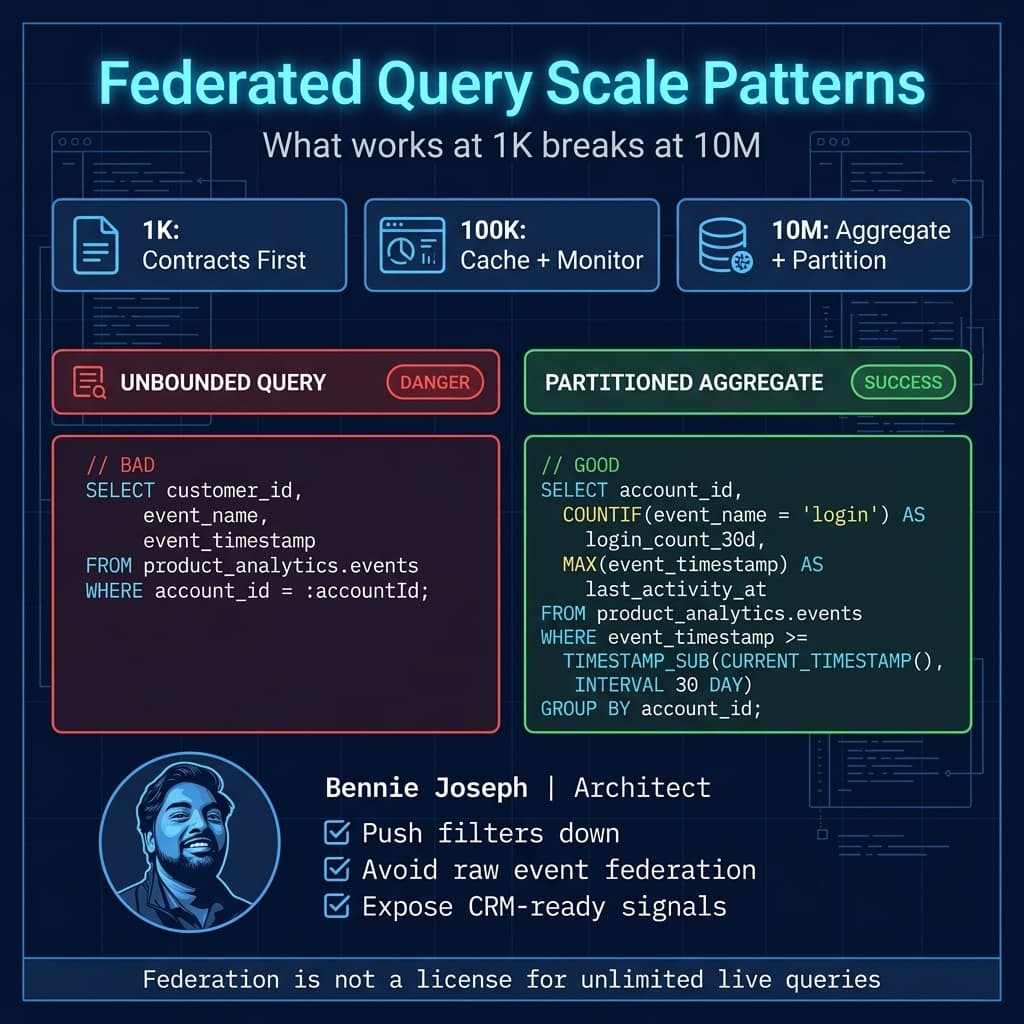
Scale: 1K, 100K, 10M
Zero Copy behaves differently depending on scale.
At 1K Records
At 1K customer records, almost anything works.
You can copy data nightly. You can federate. You can manually fix mapping issues. The architecture risk is low because volume hides bad decisions.
But this is where bad patterns are born.
If you connect raw tables, skip identity design, and let every team create their own “customer view,” the 1K-record pilot will look successful and the 10M-record rollout will fail.
At this scale, focus on:
- Data contracts.
- Naming conventions.
- Access model.
- Identity keys.
- Source freshness fields.
- Ownership.
At 100K Records
At 100K accounts or customers, latency and governance start to matter.
Common issues:
- Account pages become slow if every view triggers live federated calls.
- Segmentation jobs push expensive queries into Snowflake or BigQuery.
- Business users notice mismatches between CRM and warehouse definitions.
- Access exceptions increase.
- Monitoring becomes necessary.
At this scale, I introduce:
- Aggregated source views.
- Query pushdown review.
- Caching strategy.
- Data quality dashboards.
- Federation error logging.
- Contract testing for source views.
At 10M Records
At 10M+ customers, subscribers, devices, or users, Zero Copy is an enterprise architecture decision.
You cannot rely on “just query the warehouse.”
You need:
- Partition-aware BigQuery views.
- Snowflake clustering and secure view design.
- Strict field selection.
- Async access patterns.
- Precomputed aggregates.
- Data 360 segmentation strategy.
- Clear SLAs between Salesforce and data platform teams.
- Cost monitoring for federated queries.
- Regional data residency review.
- Retention and deletion alignment.
For high-volume digital events, I almost never federate raw events directly for CRM use. I federate or ingest aggregates: 7-day activity, 30-day usage, last login, feature adoption, risk signals.
Raw events belong in the analytics platform. CRM users need decisions, signals, and explainable summaries.
Security and Governance Design
Zero Copy changes the security conversation because data stays in Snowflake or BigQuery, but Salesforce users consume the outcome.
You need to answer these questions:
- Is access enforced in Snowflake/BigQuery, Data 360, Salesforce, or all three?
- Are row-level policies applied consistently?
- Can a Salesforce user see a derived metric if they cannot see the underlying rows?
- Is PII masked before federation?
- Is consent checked before activation?
- Are queries audited end-to-end?
- Who approves schema changes?
For regulated environments, I prefer defense in depth:
- Source policies restrict what federation identities can access.
- Governed views expose only approved fields.
- Data 360 mappings define business meaning and relationships.
- Salesforce permissions control who can see surfaced insights.
- Audit logs track connection usage and user-facing access.
- Data retention policies define what is queried, cached, or copied.
Zero Copy does not eliminate compliance work. It gives you a better chance of avoiding uncontrolled copies.
Integration Patterns Around Zero Copy
Zero Copy is not the only integration pattern in the architecture.
You may still need:
- MuleSoft for orchestration and API-led access.
- Conditional Composite API to reduce Salesforce API call volume when writing operational changes.
- GraphQL API v64.0 for client apps that need flexible Salesforce CRUD interactions.
- Retriever API for unstructured content in Data 360.
- MCP tooling through
@salesforce/mcpwhen building developer or agent workflows against Salesforce Headless 360. - Platform Events for operational notifications.
- Batch or streaming ingestion when physical copies are justified.
I separate three categories:
Read Federation
Use Zero Copy when Salesforce needs to read governed warehouse data without owning it.
Example:
- Customer tier from Snowflake.
- Product adoption score from BigQuery.
- Account hierarchy from enterprise master data.
Operational Writeback
Use Salesforce APIs or MuleSoft when the business process changes Salesforce-owned records.
Example:
- Create renewal task.
- Update account risk status.
- Create case escalation.
- Log seller action.
Do not write directly from warehouse logic into Salesforce objects without a clear ownership model.
Analytical Activation
Use Data 360 for segmentation, calculated insights, and activation when data crosses CRM and non-CRM systems.
Example:
- Segment customers with high ARR, declining usage, and open escalations.
- Activate a campaign only for contacts with valid consent.
- Ground Agentforce responses in both CRM and warehouse context.
Common Failure Modes
I have seen these patterns go wrong.
Failure Mode 1: Treating Zero Copy as No-Modeling
Teams connect tables and expect business users to figure it out.
That creates confusion fast.
Fix it with governed views, clear naming, mapped entities, and documented definitions.
Failure Mode 2: Federating Raw Events
Raw clickstream tables are not CRM features.
Fix it with aggregates, windows, and business signals.
Failure Mode 3: Ignoring Source Cost
Federated queries still run somewhere.
Snowflake credits and BigQuery query costs do not disappear because Salesforce initiated the access.
Fix it with query design, monitoring, partitions, materialized views where appropriate, and workload ownership.
Failure Mode 4: Weak Identity Resolution
If identity matching is wrong, every downstream insight is suspect.
Fix it with master IDs, match rules, confidence scoring, and exception handling.
Failure Mode 5: Confusing Visibility with Permission
Just because data can be queried does not mean every Salesforce user should see it.
Fix it with layered access controls and security reviews.
What I Would Document Before Go-Live
For an enterprise implementation, I would not approve a Zero Copy design without these artifacts:
- Source system inventory.
- Governed view definitions.
- Data contract owners.
- Field-level classification.
- Identity resolution strategy.
- Access control matrix.
- Query pattern review.
- Expected record volumes.
- Latency expectations.
- Cost ownership model.
- Monitoring and alerting plan.
- Data retention and deletion behavior.
- Fallback behavior when Snowflake or BigQuery is unavailable.
- Agentforce grounding policy if agents consume the data.
This maps closely to the architecture domain CTA-level thinking:
- Data Lifecycle — source ownership, retention, archival, deletion.
- Integration — federation, APIs, events, fallback patterns.
- Identity and Access — user visibility, source policies, consent.
- System Design — scale, latency, ownership, resilience.
I am using those domains because they force better design questions.
My Recommended Reference Architecture
If I were designing this today, I would use this pattern:
- Snowflake owns enterprise customer and financial master data.
- BigQuery owns digital product telemetry.
- Data teams publish secure, governed federation views.
- Data 360 connects using Zero Copy federation.
- Data 360 maps entities into a unified customer model.
- Identity resolution links Salesforce Account, Contact, enterprise customer ID, and digital user IDs.
- High-volume raw events stay in BigQuery.
- Aggregated customer signals are federated or ingested based on usage frequency.
- Salesforce pages show lightweight summaries.
- Agentforce 2.0 grounds customer insights through Data 360, not direct warehouse queries.
- Operational actions write back through Salesforce APIs, Flow, Apex, or MuleSoft.
- Monitoring tracks freshness, latency, errors, query cost, and access.
That is the balance I like.
Salesforce remains the system of engagement and workflow.
Snowflake and BigQuery remain systems of analytical truth.
Data 360 becomes the governed bridge.
Final Opinion
Zero Copy is not about avoiding ETL because ETL is bad.
ETL is still useful when the target needs local performance, repeated activation, transactional behavior, or historical snapshots.
Zero Copy is about avoiding unnecessary copies when the source platform should remain the owner.
The best enterprise architecture is usually hybrid:
- Federate what should stay in the warehouse.
- Ingest what needs Data 360-scale activation.
- Store in Salesforce what belongs to CRM operations.
- Summarize what humans need on record pages.
- Govern everything.
If your Salesforce Data 360 Zero Copy Snowflake BigQuery federation design starts with connectors instead of ownership, you are starting in the wrong place.
Start with the data contract. Then connect.
TL;DR
- Data 360 Zero Copy lets Salesforce federate Snowflake and BigQuery data without traditional ETL, but you still need governed views, identity design, and access controls.
- Use Zero Copy for warehouse-owned data, ingestion for repeated activation, and Salesforce storage for CRM-owned operational records.
- At 10M+ records, federate aggregates and business signals — not raw event tables.