Einstein 1 Platform vs Custom AI Stack: The Honest Comparison
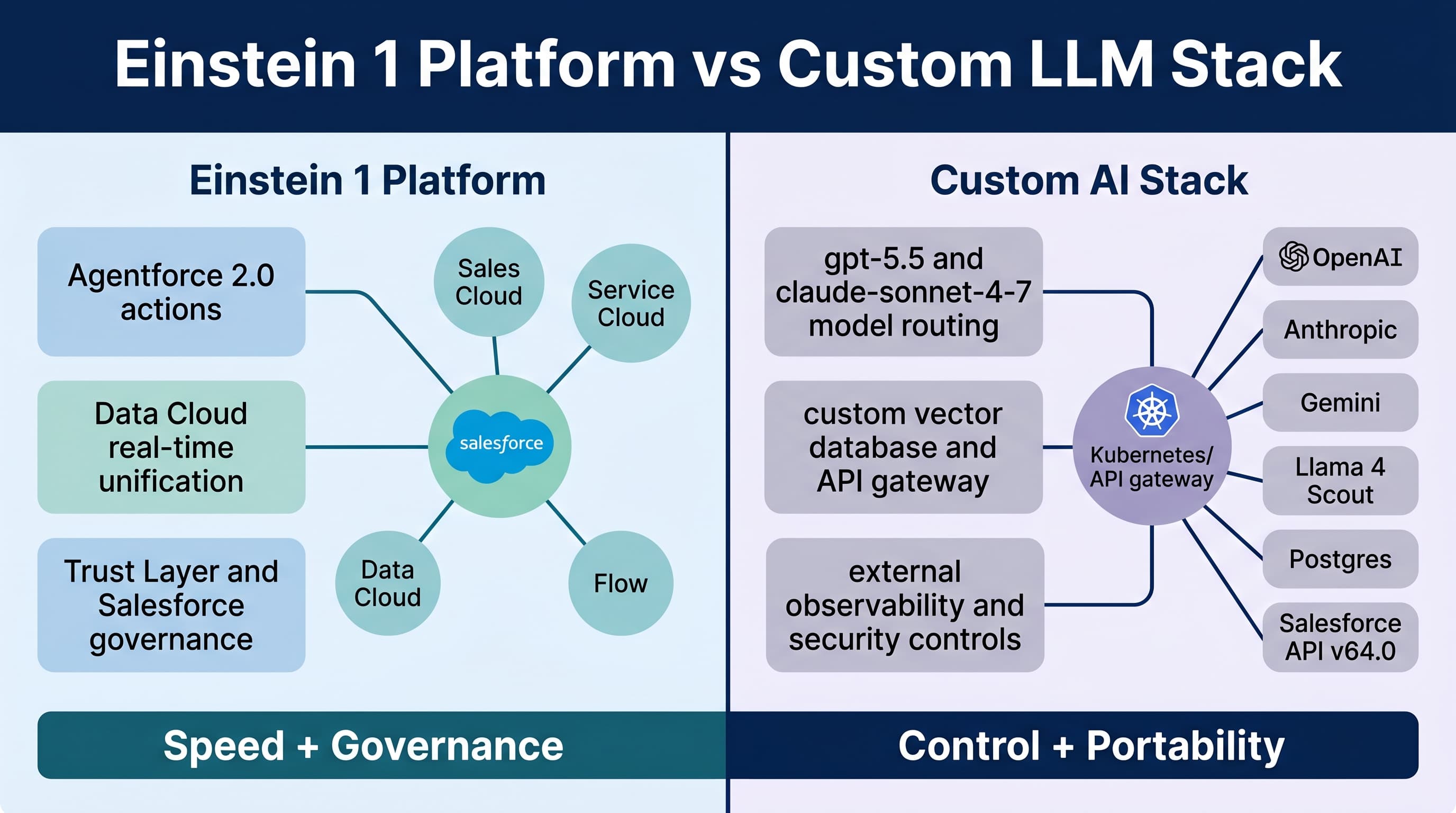
The phrase einstein 1 platform vs custom llm stack sounds like a clean architecture decision.
It is not.
It is usually a political, security, data, budget, and delivery-speed decision pretending to be an architecture decision.
I’ve built Salesforce-heavy enterprise systems where Einstein 1 Platform was the obvious answer. I’ve also built AI products where forcing everything through Salesforce would have been expensive, slow, and architecturally wrong.
Here’s the unpopular take: if your AI use case mostly lives inside Salesforce records, Salesforce permissions, Salesforce workflows, and Salesforce audit requirements, start with Einstein 1 Platform and Agentforce 2.0. If your use case is a cross-platform product capability, a high-volume AI workload, or a model experimentation engine, build a custom LLM stack and integrate Salesforce as one system of record.
Do not choose based on demo magic. Choose based on where the data lives, who owns the workflow, what compliance requires, and how much control you actually need.
What I Mean by Einstein 1 Platform
When I say Einstein 1 Platform, I’m not talking about a single chatbot bolted onto Salesforce.
I mean the Salesforce-native AI layer across:
- Einstein Copilot powered by Agentforce
- Agentforce 2.0 with multi-agent orchestration
- Atlas Reasoning Engine v2
- Prompt Builder
- Flow, Apex, and invocable actions
- Data Cloud real-time unification
- Native vector search in Data Cloud
- Salesforce Trust Layer
- Salesforce permissions, sharing, audit, and metadata model
- Salesforce API v64.0
- LWC with native state management in Summer ’26
The value is not just “Salesforce has AI.” The value is that AI can operate inside your Salesforce security and automation model without you rebuilding half the platform outside the platform.
That matters.
A custom stack can absolutely call Salesforce. But calling Salesforce is not the same as behaving like Salesforce.
What I Mean by a Custom LLM Stack
A custom LLM stack usually looks like this:
- Frontend in React, Next.js, LWC, or mobile
- API gateway in Node, Python, Java, or Go
- Model routing across gpt-5.5, claude-sonnet-4-7, claude-opus-4-7, gemini-3.1-pro, or local Llama 4 Scout
- Vector database or native Postgres vector extensions
- RAG pipelines
- Background workers
- Observability with traces, evals, token metrics, and cost controls
- Custom authorization layer
- Integration with Salesforce through REST, Bulk API, Pub/Sub API, Platform Events, or MuleSoft
This gives you control. It also gives you responsibility.
You own prompt injection controls. You own PII masking. You own row-level authorization. You own retries. You own model drift. You own hallucination review. You own incident response when the AI emails the wrong answer to a regulated customer.
That freedom is useful. It is not free.
The Real Decision Matrix
I use this decision rule on enterprise projects:
| Category | Einstein 1 Platform | Custom LLM Stack |
|---|---|---|
| Salesforce data access | Strong default | Must build carefully |
| Salesforce permissions | Native advantage | Easy to get wrong |
| Workflow automation | Flow, Apex, Agentforce actions | Custom orchestration |
| Model flexibility | Lower | High |
| Time to production | Usually faster | Usually slower |
| Cross-platform product AI | Limited | Strong |
| Governance | Strong Salesforce-native controls | Depends on your implementation |
| Cost control at massive scale | Can be limiting | More tunable |
| Admin maintainability | Strong | Weak unless you build tools |
| Developer control | Moderate | High |
If you need an AI assistant to summarize Opportunities, draft case replies, recommend next actions, create tasks, and respect Salesforce sharing rules, I would not start with a custom stack.
If you need an AI research engine that processes millions of product documents, routes between gpt-5.5 and claude-sonnet-4-7, runs offline evals, and serves multiple applications outside Salesforce, I would not force that into Einstein just because Salesforce is in the company.
Where Einstein 1 Platform Wins
Einstein wins when the AI must act inside the CRM.
Agentforce 2.0 is much better suited for enterprise Salesforce work than the older “chat over records” pattern. Multi-agent orchestration and custom reasoning steps make it possible to split work across specialized agents: account research, case triage, renewal risk, pricing guidance, and compliance review.
The big win is context. Not vague context. Governed context.
In Salesforce, context means:
- User permissions
- Role hierarchy
- Sharing rules
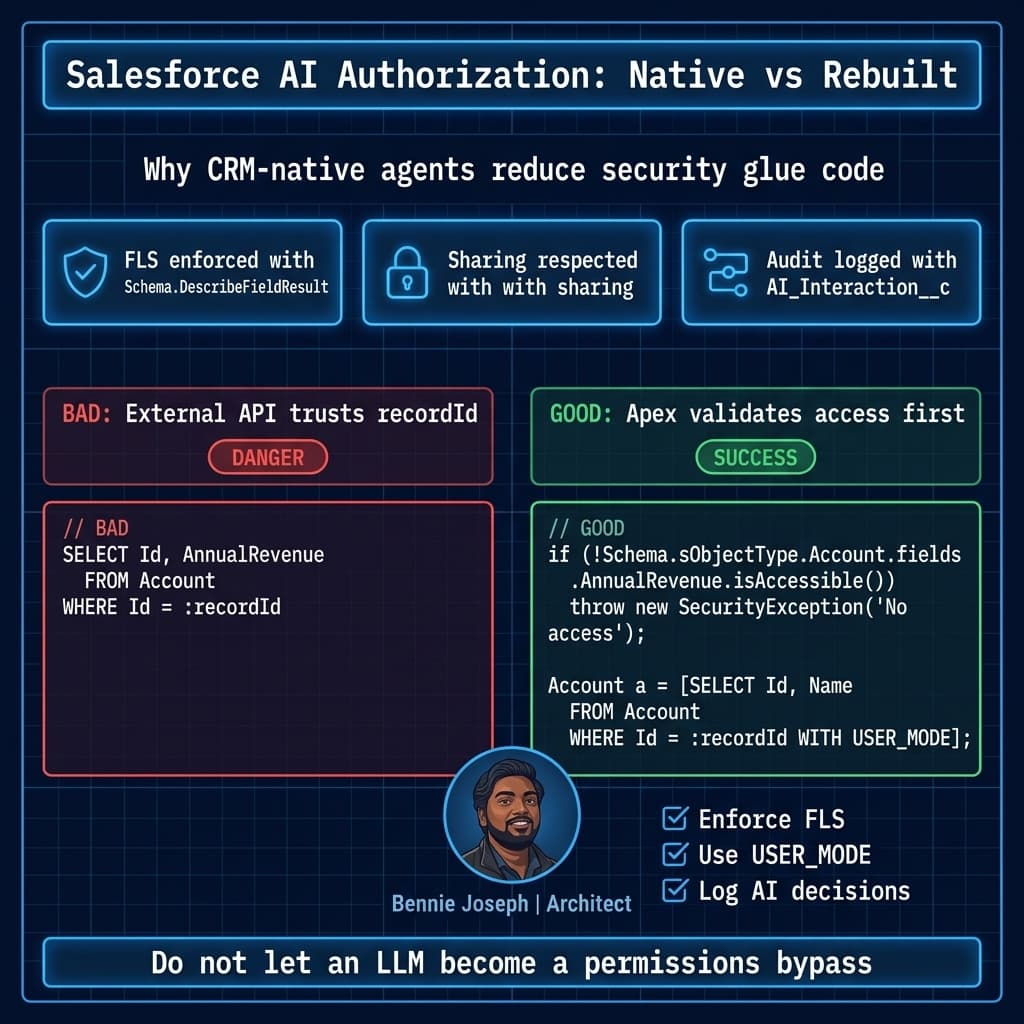
- Field-level security
- Record relationships
- Approval state
- Data Cloud profile unification
- Business process metadata
- Flow and Apex actions
That is painful to reproduce externally.
On a large Service Cloud program, we built an AI case resolution assistant for a regulated support team. The requirement was not “summarize the case.” That part was easy. The requirement was:
- Only use knowledge articles visible to the agent’s region and product group
- Never expose restricted warranty fields to contractors
- Draft replies using approved tone by customer segment
- Escalate medical-device language to a specialist queue
- Log every recommendation and source reference
- Let supervisors report on AI adoption by team
This was a Salesforce-native problem. Agentforce, Data Cloud, Flow, Apex, and Salesforce reporting gave us a faster and safer path than standing up a separate AI platform.
Could a custom stack do it? Yes.
Would I want to rebuild Salesforce security semantics outside Salesforce for that project? No.
Where Custom LLM Stacks Win
Custom stacks win when Salesforce is only one participant in the workflow.
I see this in SaaS products, multi-cloud enterprises, and companies with complex document intelligence needs.
A custom stack lets you:
- Route simple requests to gpt-5.5-mini or claude-haiku-4-7
- Route complex reasoning to o3, claude-opus-4-7, or gemini-3.1-ultra
- Run private workloads locally with Llama 4 Scout
- Build your own eval harness
- Tune caching and token spend
- Use specialized retrieval pipelines
- Support non-Salesforce users
- Deploy AI features across web, mobile, Slack, backend jobs, and Salesforce
That control matters when AI is part of your product, not just your CRM.
Here is a simplified TypeScript gateway pattern I’ve used for custom stacks. The important part is not the HTTP syntax. The important part is that model selection, audit logging, Salesforce context, and policy enforcement are explicit.
import express from "express";
import OpenAI from "openai";

const app = express();
app.use(express.json());

const openai = new OpenAI({
  apiKey: process.env.OPENAI_API_KEY
});

type AiRequest = {
  userId: string;
  orgId: string;
  salesforceRecordId?: string;
  task: "case_summary" | "contract_risk" | "product_research";
  input: string;
};

function selectModel(task: AiRequest["task"]) {
  if (task === "contract_risk") return "gpt-5.5";
  if (task === "product_research") return "gpt-5.5";
  return "gpt-5.5-mini";
}

function buildSystemPrompt(req: AiRequest) {
  return `
You are an enterprise AI assistant.
Follow these rules:
1. Do not reveal restricted Salesforce fields.
2. Cite source IDs when using retrieved context.
3. If confidence is low, return NEEDS_REVIEW.
4. Never make pricing, legal, or medical commitments.
Org: ${req.orgId}
User: ${req.userId}
Task: ${req.task}
`.trim();
}

app.post("/ai/run", async (req, res) => {
  const body = req.body as AiRequest;

  // In production, validate JWT, check tenant policy,
  // hydrate Salesforce context through API v64.0, and log request metadata.
  const model = selectModel(body.task);

  const response = await openai.responses.create({
    model,
    input: [
      {
        role: "system",
        content: buildSystemPrompt(body)
      },
      {
        role: "user",
        content: body.input
      }
    ],
    metadata: {
      orgId: body.orgId,
      userId: body.userId,
      salesforceRecordId: body.salesforceRecordId ?? "none",
      task: body.task
    }
  });

  res.json({
    model,
    output: response.output_text,
    audited: true
  });
});

app.listen(3000, () => {
  console.log("AI gateway listening on port 3000");
});
This is the part many Salesforce teams underestimate: the custom stack is not just “call gpt-5.5.” The stack is policy, retrieval, evals, tenant isolation, logging, retries, cost controls, and security reviews.
If you do not budget for those, your architecture diagram is fiction.
The Cost Conversation Nobody Likes
Einstein is often cheaper to deliver and more expensive to constrain.
Custom AI is often more expensive to deliver and cheaper to optimize later.
That sounds contradictory, but it is how enterprise economics work.
With Einstein 1 Platform, you pay for Salesforce-native acceleration. You get admin configuration, platform security, metadata awareness, Data Cloud integration, and Agentforce actions. You also accept Salesforce’s packaging, licensing, and platform boundaries.
With a custom stack, you pay engineering cost up front. You need platform engineers, AI engineers, security review, DevOps, observability, and ongoing maintenance. But if you process huge volumes, model routing and caching can materially reduce runtime cost.
On one enterprise sales operations project, leadership wanted a custom AI forecasting assistant because they assumed “API calls are cheaper than Salesforce AI.” The prototype proved the opposite for their use case.
Why?
The assistant needed Opportunity history, forecast category changes, manager overrides, territory hierarchy, quotes, and account signals from Data Cloud. A custom stack spent most of its complexity budget reconstructing Salesforce context. Einstein and Agentforce got us to a governed pilot faster, with less security debate and better admin visibility.
On a different SaaS project, the custom stack won. The AI feature analyzed uploaded customer documents, generated implementation plans, synced milestones into Salesforce, and served users who never logged into Salesforce. Einstein would have made Salesforce the center of a workflow that was not CRM-first. Wrong center of gravity.
Integration Pattern: Custom AI with Salesforce Guardrails
Sometimes the right answer is hybrid.
I like hybrid when:
- The user experience lives outside Salesforce
- Salesforce remains the customer/account/workflow system
- AI processing needs custom model routing
- Final actions must be committed through Salesforce rules
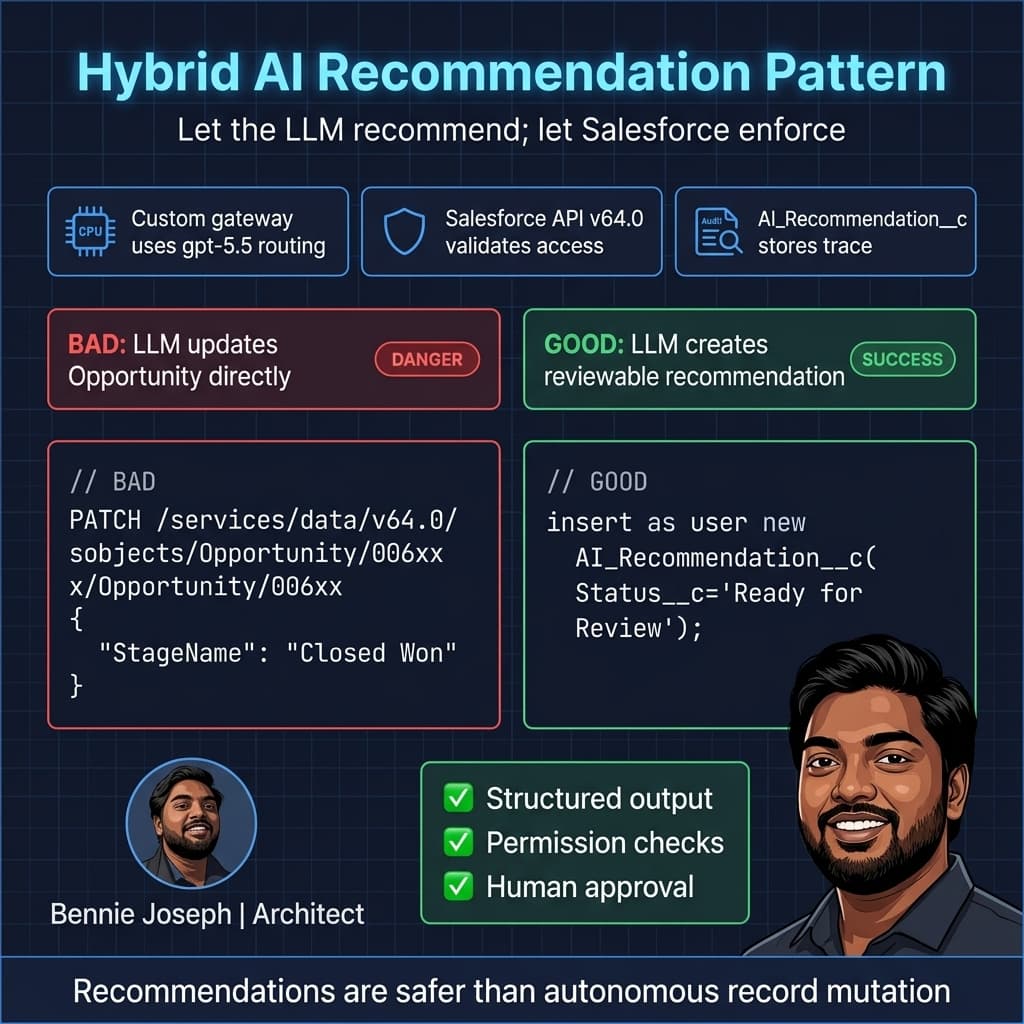
The pattern is simple:
- Custom AI stack performs retrieval and reasoning
- It returns a structured recommendation
- Salesforce validates permissions and business rules
- Apex or Flow executes the final action
- The recommendation and result are logged back to Salesforce
Here is a stripped-down Apex endpoint pattern for receiving a recommendation from a custom AI gateway. Notice I do not let the external service directly decide what gets updated.
@RestResource(urlMapping='/ai/recommendations/v1/*')
global with sharing class AiRecommendationResource {
    global class RecommendationRequest {
        public Id recordId;
        public String recommendationType;
        public String summary;
        public Decimal confidence;
        public String sourceTraceId;
    }

    @HttpPost
    global static void receiveRecommendation() {
        RestRequest req = RestContext.request;
        RecommendationRequest payload = (RecommendationRequest) JSON.deserialize(
            req.requestBody.toString(),
            RecommendationRequest.class
        );

        if (payload.recordId == null || String.isBlank(payload.summary)) {
            throw new AuraHandledException('Invalid AI recommendation payload.');
        }

        if (!Schema.sObjectType.AI_Recommendation__c.isCreateable()) {
            throw new SecurityException('User cannot create AI recommendations.');
        }

        AI_Recommendation__c rec = new AI_Recommendation__c();
        rec.Related_Record_Id__c = String.valueOf(payload.recordId);
        rec.Recommendation_Type__c = payload.recommendationType;
        rec.Summary__c = payload.summary.left(32000);
        rec.Confidence__c = payload.confidence;
        rec.Source_Trace_Id__c = payload.sourceTraceId;
        rec.Status__c = payload.confidence >= 0.85 ? 'Ready for Review' : 'Needs Human Review';

        insert as user rec;
    }
}
That pattern keeps the LLM out of the final authority path. The AI recommends. Salesforce enforces. Humans approve where required.
That is how I prefer to design enterprise AI. Not because I distrust models completely, but because I trust deterministic systems for deterministic responsibilities.
Data Cloud Changes the Argument
Data Cloud’s real-time unification and native vector search make Einstein 1 Platform more compelling in 2026 than it was in earlier platform generations.
A lot of custom RAG work exists because enterprise data is fragmented. If Data Cloud is already your customer data layer, and vector search is native, the argument for exporting CRM context into another retrieval platform gets weaker.
Not dead. Weaker.
For Salesforce-centered use cases, I prefer retrieval close to the governed data. That reduces synchronization problems, stale embeddings, duplicate permission models, and audit gaps.
But if your retrieval corpus includes engineering docs, product telemetry, public web data, SharePoint, Confluence, Zendesk, GitHub, and proprietary product content, Data Cloud may only be one source. In that case, a custom retrieval layer can still make sense.
The rule: put retrieval where the corpus naturally lives. Do not move everything into Salesforce just to make the architecture look tidy.
Model Quality Is Not the Only Variable
Teams love comparing gpt-5.5, claude-sonnet-4-7, claude-opus-4-7, gemini-3.1-pro, and o3 as if the best benchmark score automatically decides the architecture.
It does not.
Model quality matters, but enterprise success usually depends more on:
- Context quality
- Permission correctness
- Workflow fit
- Evaluation discipline
- Human review design
- Failure handling
- Cost governance
- Operational ownership
A mediocre prompt with correct data and permissions beats a brilliant model wired into a messy data layer.
I have seen teams spend weeks arguing over model selection while ignoring the fact that their “customer context” had duplicate accounts, stale contacts, missing entitlements, and broken product mappings.
That is not an LLM problem. That is enterprise data hygiene wearing an AI costume.
When I Choose Einstein 1 Platform
I choose Einstein 1 Platform when most of these are true:
- The primary users work in Salesforce
- The data is mostly Salesforce or Data Cloud
- Actions update Salesforce records
- Admins need to configure or monitor behavior
- Compliance wants Salesforce-native auditability
- Field-level security and sharing are non-negotiable
- Time to pilot matters
- Flow and Apex are already core to the process
Examples:
- Service case summarization and reply drafting
- Sales coaching on Opportunities
- Renewal risk recommendations
- Field service work order guidance
- Internal CRM assistant
- Agent-assist workflows
- Data Cloud customer profile summarization
In these cases, custom AI may still appear around the edges, but Salesforce should be the control plane.
When I Choose a Custom LLM Stack
I choose a custom stack when most of these are true:
- Users are not primarily in Salesforce
- AI is part of a SaaS product
- Workloads are high-volume or latency-sensitive
- Model routing is important
- You need deep eval automation
- Retrieval spans many non-Salesforce systems
- You need local/open-source model options like Llama 4 Scout
- You want provider portability across OpenAI, Anthropic, Google, and local models
Examples:
- AI product documentation assistant across many customer tenants
- Contract analysis engine with external legal workflows
- Research agent for product, market, and support data
- AI onboarding assistant embedded in a SaaS application
- Batch document intelligence over millions of files
In these cases, Salesforce should usually be integrated cleanly, not made the center of the universe.
The Honest Recommendation
If you are a Salesforce architect, do not frame this as “Salesforce AI vs real AI.”
That framing is lazy.
Einstein 1 Platform is real enterprise AI when the enterprise workflow lives in Salesforce. Custom LLM stacks are real enterprise AI when the workflow spans products, channels, documents, and systems beyond Salesforce.
My default recommendation:
- Start with Einstein 1 Platform for Salesforce-native workflows.
- Use custom AI for product-grade, cross-platform, or high-volume AI capabilities.
- Use hybrid patterns when AI reasoning belongs outside Salesforce but business authority belongs inside Salesforce.
The worst architecture is the middle mess: a custom AI stack that bypasses Salesforce security, writes directly to core records, has no audit trail, and cannot be maintained by admins or trusted by compliance.
I’ve seen that movie. It ends with a rollback, an executive escalation, and a new governance committee.
Design for where authority lives. In CRM workflows, authority usually lives in Salesforce. In AI products, authority usually lives in your product platform. Get that right, and the rest of the architecture becomes much easier.
TL;DR
- Use Einstein 1 Platform and Agentforce 2.0 when AI works inside Salesforce data, permissions, workflows, and audit requirements.
- Use a custom LLM stack when you need model control, cross-platform AI, high-volume processing, or product-grade AI outside Salesforce.
- The best enterprise pattern is often hybrid: custom reasoning, Salesforce enforcement, full auditability.