Event-Driven Architecture on Salesforce: Platform Events, CDC, and Pub/Sub API at Scale
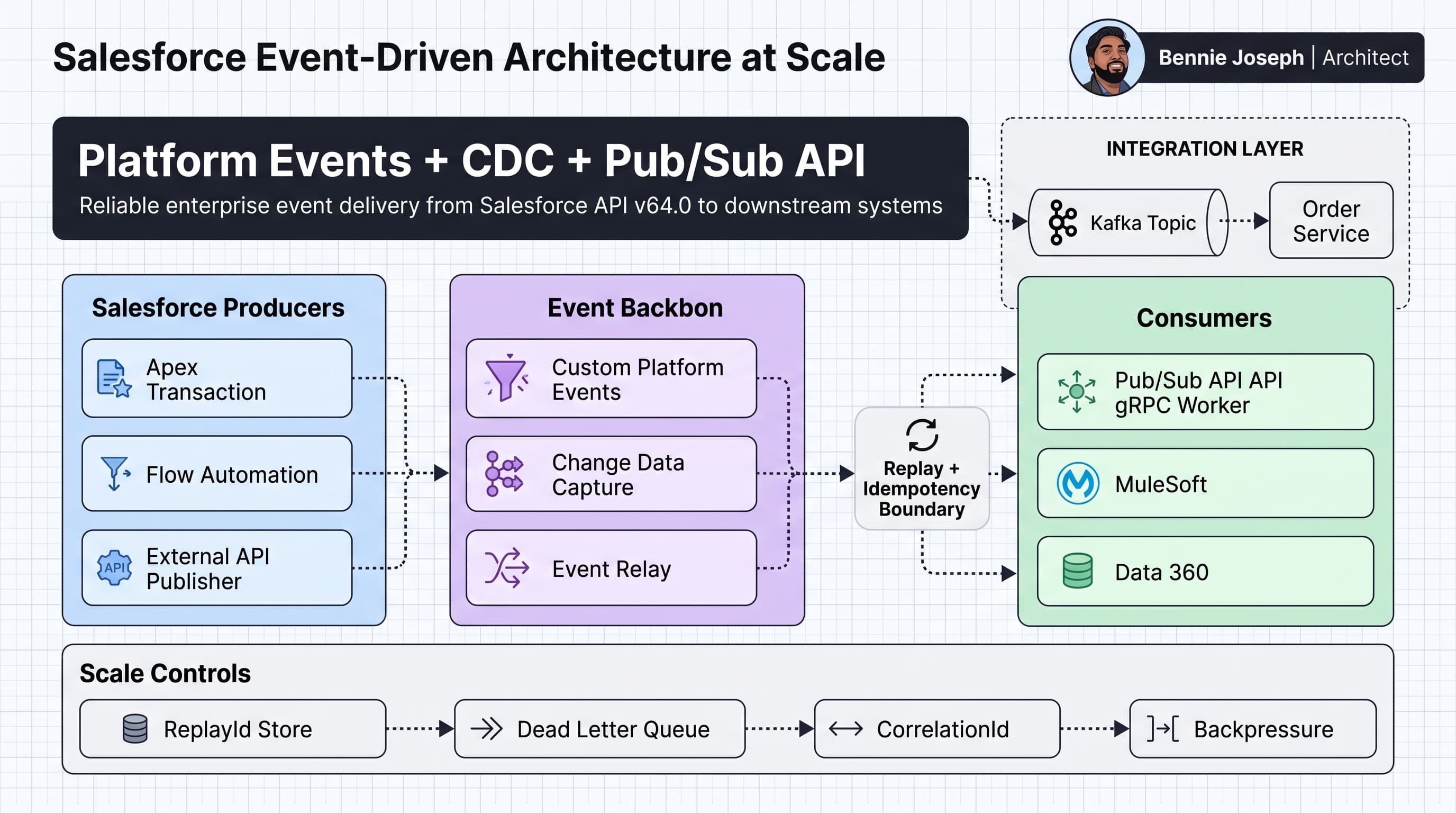
Event-driven architecture on Salesforce looks clean on a slide and gets messy fast in production.
The mistake I see often: teams treat Platform Events, Change Data Capture, and Pub/Sub API as interchangeable. They are not. They solve different problems, have different ownership models, and fail in different ways.
My working rule:
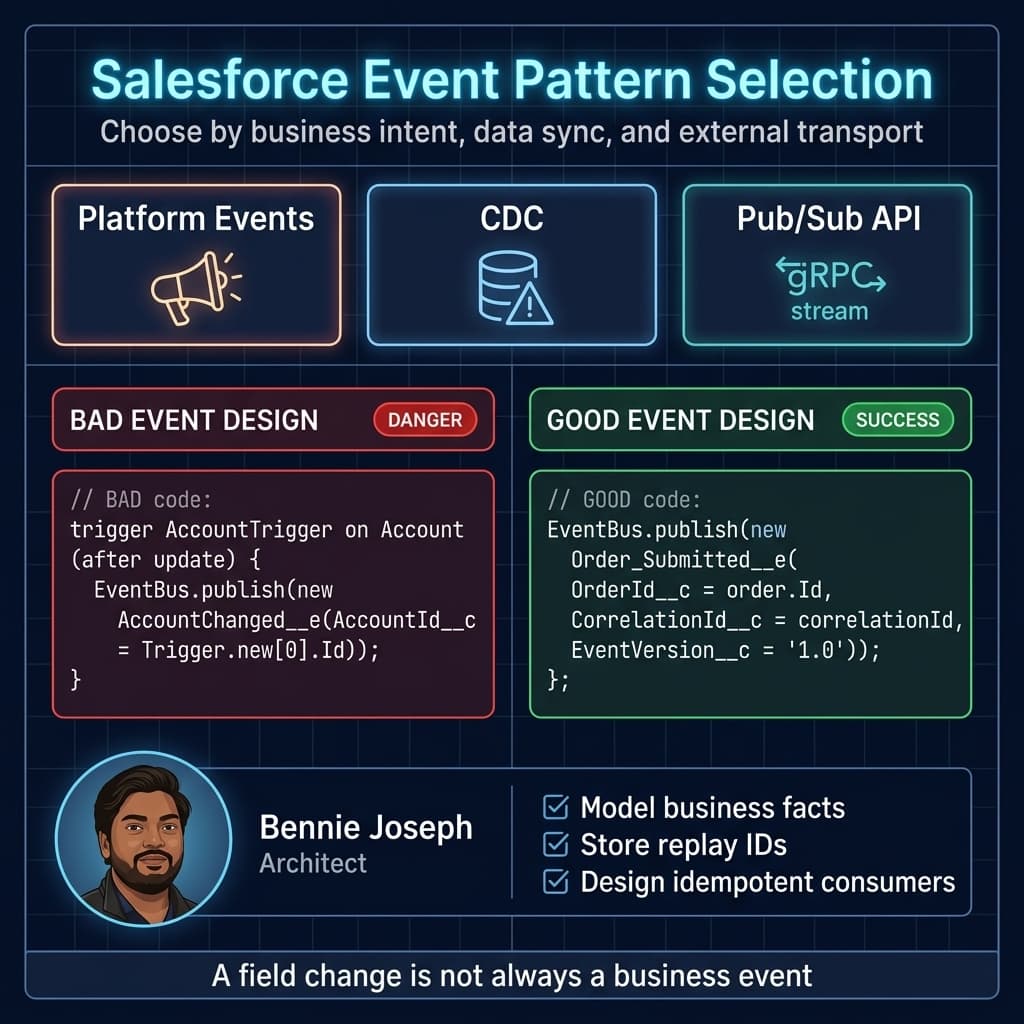
Platform Events are for business facts and commands. CDC is for data replication signals. Pub/Sub API is the enterprise-grade transport for external consumers.
That is the spine of a solid salesforce event driven architecture platform events cdc pub sub api design.
I’m writing this from a practitioner point of view. I’m actively studying CTA-level architecture concepts, and this topic sits directly across Integration, Data Lifecycle, System Design, and Identity/Access domains. The deeper I go, the more I believe event architecture is less about “async” and more about ownership, contracts, replay, and failure boundaries.
The real problem event-driven architecture solves
Most Salesforce integrations start as request/response:
- User clicks Save.
- Apex calls an external API.
- External API responds.
- Salesforce commits or fails.
That works until it doesn’t.
The external API slows down. The transaction hits callout timeout. The business wants the Salesforce save to succeed even if SAP is offline. Then someone adds retry logic in Apex. Then duplicate orders appear downstream. Then a nightly reconciliation job becomes the actual source of truth.
Event-driven architecture solves a different problem:
Salesforce should commit its transaction, publish a durable fact, and let downstream systems process that fact independently with replay and idempotency.
That separation is the value.
But the cost is real:
- Eventual consistency
- Duplicate delivery
- Replay management
- Schema versioning
- Monitoring gaps
- Ordering assumptions that break at scale
- Security context differences between the producer and subscriber
Here’s the unpopular take: if your team cannot explain replay IDs, idempotency keys, and dead-letter handling, you are not ready to run critical business processes on events.
Platform Events vs CDC vs Pub/Sub API
Let’s separate the tools.
Platform Events
Platform Events are custom event messages that you define in Salesforce.
Example:
Order_Submitted__ePayment_Authorized__eCustomer_Risk_Recalculated__eCase_Escalation_Requested__e
I use Platform Events when I want to model a domain-level event.
Not “Account changed.”
More like:
“A customer passed credit approval and is ready for fulfillment.”
That distinction matters. A field update is not always a business event.
Platform Events can be published from Apex, Flow, APIs, and external systems. They can be consumed by Apex triggers, Flow, Pub/Sub API clients, and middleware.
The schema is explicit. The business meaning is explicit. That is why I prefer them for process integration.
Change Data Capture
CDC publishes change events when records change.
Example channels:
/data/AccountChangeEvent/data/OpportunityChangeEvent/data/Order__ChangeEvent
CDC is excellent for replication, synchronization, cache invalidation, and audit-style downstream processing.
I use CDC when an external system needs to know:
- Which record changed
- Which fields changed
- Whether it was create, update, delete, or undelete
- Transaction metadata
- Commit timestamp
- Change origin
CDC is not my first choice for business process orchestration. Why? Because a database mutation does not always equal business intent.
An Opportunity.StageName update to Closed Won might mean “start provisioning.” Or it might be a correction by an admin. Or it might be a data load. If the consumer needs business meaning, publish a Platform Event.
Pub/Sub API
Pub/Sub API is the modern external consumption layer. It uses gRPC and Avro-based payloads. Compared with older CometD-style Streaming API consumers, Pub/Sub API is better aligned with high-throughput, enterprise-grade consumers.
I use Pub/Sub API when:
- An external service needs to consume Platform Events or CDC at scale
- I need replay control
- I want binary-efficient payloads
- I want proper backpressure behavior
- I’m building a worker service, middleware connector, or event bridge
In 2026 Salesforce architecture, Pub/Sub API is the default external event transport I reach for unless there is a specific reason not to.
Decision matrix: choosing the right event pattern
Architecture is tradeoff management. Here’s the matrix I use when I’m designing event-driven integrations on Salesforce.
| Approach | Best fit | Avoid when | Scale posture | Ordering | Replay strategy | Main risk |
|---|---|---|---|---|---|---|
| Platform Events | Business facts, process orchestration, decoupled commands | You only need raw record replication | Strong for enterprise async if schema and subscriber design are clean | Do not assume global ordering | Store replay ID externally; use correlation/idempotency keys | Poor event naming turns into async spaghetti |
| CDC | Data sync, external replicas, cache invalidation, audit pipelines | Consumer needs business intent | Strong for high-volume object change streams, but filter aggressively | Use transaction metadata; avoid global assumptions | Store replay ID per channel | Over-publishing noisy objects |
| Pub/Sub API | External gRPC consumers, middleware, high-throughput event ingestion | Tiny/simple browser use cases | Best external transport option for serious consumers | Consumer must handle duplicates and gaps | Durable checkpoint store | Weak operational ownership |
| Apex Platform Event Trigger | Internal async reaction inside Salesforce | Heavy integrations or long-running work | Good for local fan-out, limited by Apex governor model | Batch delivery, not strict business ordering | Salesforce manages trigger subscription position | Hidden failures if not monitored |
| Flow Subscriber | Admin-led light automation | High-volume or complex branching | Fine at low volume, risky for enterprise spikes | Same event caveats apply | Platform-managed | Debuggability and bulk behavior |
| Outbound Message | Legacy SOAP integration | New strategic architecture | Stable but dated | Limited | Retry built in | SOAP contract rigidity |
| Polling REST/Bulk API | Simple batch sync, low change rate | Near-real-time process requirements | Expensive and inefficient at high frequency | N/A | Timestamp checkpoint | Missed changes and API waste |
| MuleSoft/Event Relay/Kafka bridge | Enterprise event backbone | Team cannot operate broker semantics | Strongest for multi-system fan-out | Depends on broker/topic partitioning | Broker offsets + Salesforce replay IDs | Two checkpoint systems to reconcile |
If the event represents something the business would say out loud, I lean Platform Event.
If the event represents “this row changed,” I lean CDC.
If the consumer sits outside Salesforce and matters operationally, I lean Pub/Sub API.
Reference architecture I actually like
For enterprise Salesforce event-driven architecture, I usually design around four layers.
1. Producer layer
This is where the event originates.
Examples:
- Apex service publishes
Order_Submitted__e - Flow publishes
Case_Escalation_Requested__e - Salesforce CDC emits
AccountChangeEvent - External system publishes a Platform Event into Salesforce through API v64.0
The producer should not know every consumer.
That is the point.
But the producer does own the event contract. If the producer emits garbage, every consumer suffers.
2. Event contract layer
This is where schema discipline matters.
For Platform Events, I like fields such as:
CorrelationId__cEventVersion__cSourceSystem__cOccurredAt__cBusinessKey__cPayloadHash__cTenantKey__cwhen needed- Domain-specific fields like
OrderId__c,AccountId__c,Amount__c
Do not make every event a giant JSON blob. That is lazy schema design.
A small JSON payload field is fine for extensibility, but core routing and idempotency fields should be first-class fields.
3. Transport layer
This is where Pub/Sub API, Event Relay, MuleSoft, or another event backbone consumes the Salesforce stream and forwards it.
A mature design has:
- Replay ID checkpointing
- Backpressure
- Dead-letter handling
- Schema registry or schema validation
- Consumer group ownership
- Observability
- Alerting on replay lag and processing errors
4. Consumer layer
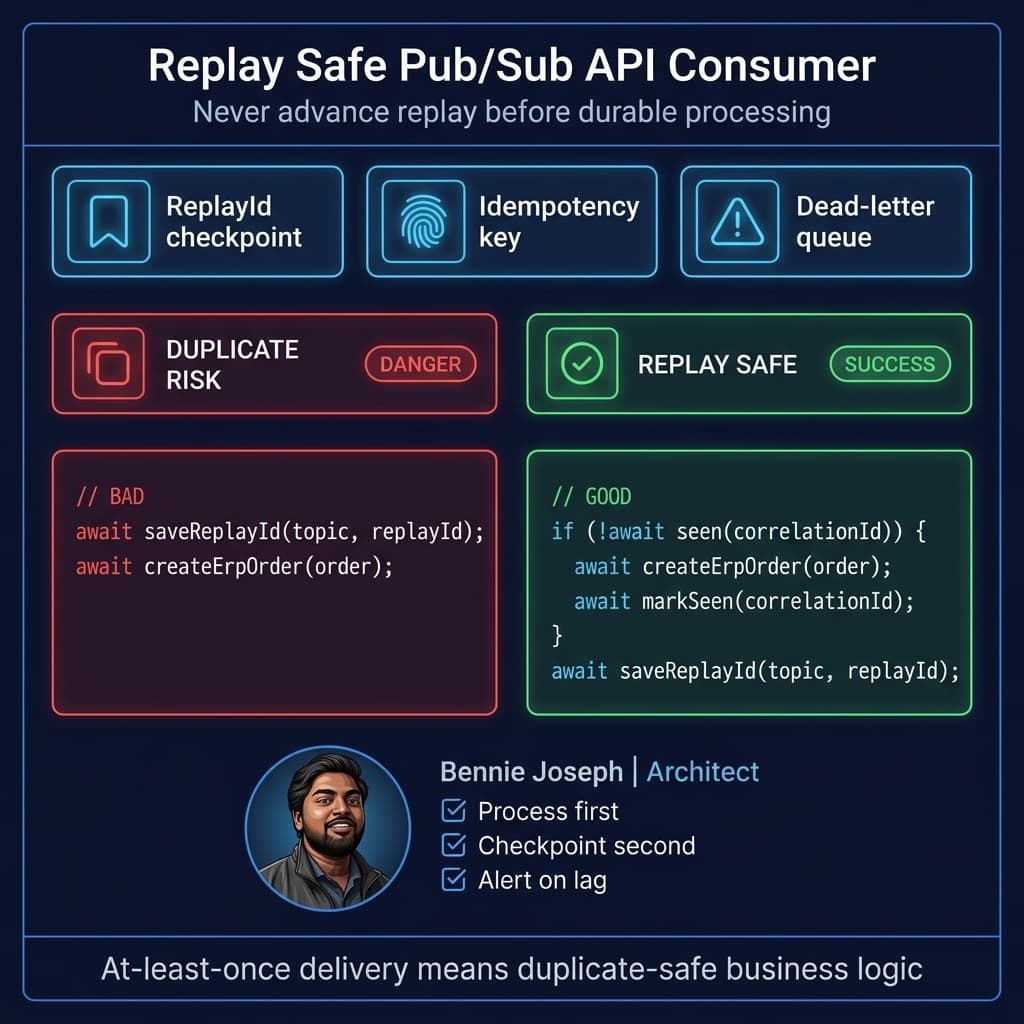
Consumers should be idempotent.
That means if they receive the same event twice, the outcome should not duplicate business work.
For example:
- Don’t create two ERP sales orders for one Salesforce order.
- Don’t send duplicate customer emails.
- Don’t create duplicate invoices.
- Don’t trigger Agentforce 2.0 workflows twice for the same business event.
Agentforce 2.0 with Atlas Reasoning Engine v2 is powerful for orchestrating knowledge work, but I would not use an agent as the primary delivery mechanism for transaction-critical event processing. I’d use events to create durable work items, then let the agent act on those items with clear guardrails.
Publishing a Platform Event from Apex
Here is a simple Apex example using an application service pattern.
The important part is not the EventBus.publish() call. The important part is the correlation ID, event version, and business key.
public with sharing class OrderEventPublisher {
    public class PublishResult {
        @AuraEnabled public Boolean success;
        @AuraEnabled public String correlationId;
        @AuraEnabled public String errorMessage;
    }

    public static PublishResult publishOrderSubmitted(Id orderId) {
        PublishResult response = new PublishResult();
        response.correlationId = Crypto.getRandomUUID();

        Order__c orderRecord = [
            SELECT Id, Name, Account__c, Total_Amount__c, Status__c
            FROM Order__c
            WHERE Id = :orderId
            WITH USER_MODE
            LIMIT 1
        ];

        if (orderRecord.Status__c != 'Submitted') {
            response.success = false;
            response.errorMessage = 'Order must be Submitted before publishing Order_Submitted__e.';
            return response;
        }

        Order_Submitted__e eventMessage = new Order_Submitted__e(
            OrderId__c = orderRecord.Id,
            AccountId__c = orderRecord.Account__c,
            Amount__c = orderRecord.Total_Amount__c,
            BusinessKey__c = orderRecord.Name,
            CorrelationId__c = response.correlationId,
            EventVersion__c = '1.0',
            SourceSystem__c = 'Salesforce',
            OccurredAt__c = System.now()
        );

        Database.SaveResult publishResult = EventBus.publish(eventMessage);

        response.success = publishResult.isSuccess();

        if (!publishResult.isSuccess()) {
            Database.Error error = publishResult.getErrors()[0];
            response.errorMessage = error.getStatusCode() + ': ' + error.getMessage();
        }

        return response;
    }
}
A few notes:
- I use
WITH USER_MODEfor the query. Salesforce API v64.0 supports user-mode operations, and v67.0 makes user mode defaults even more important. I do not design new code around removed patterns likeWITH SECURITY_ENFORCED. - I set
EventVersion__cfrom day one. You will need versioning later. - I set a correlation ID even when nobody asks for it. They will ask during the first incident.
- I prefer publishing business events after the transaction has passed validation. If your Platform Event is configured for publish-after-commit behavior, even better for business facts.
Consuming with an Apex Platform Event trigger
Apex subscribers are useful when Salesforce needs to react internally.
Example: when Order_Submitted__e fires, create a fulfillment work item.
The trigger must be bulk-safe and idempotent.
trigger OrderSubmittedEventTrigger on Order_Submitted__e (after insert) {
    Set<String> idempotencyKeys = new Set<String>();

    for (Order_Submitted__e eventMessage : Trigger.new) {
        idempotencyKeys.add(eventMessage.CorrelationId__c);
    }

    Map<String, Fulfillment_Request__c> existingByKey = new Map<String, Fulfillment_Request__c>();

    for (Fulfillment_Request__c existingRequest : [
        SELECT Id, IdempotencyKey__c
        FROM Fulfillment_Request__c
        WHERE IdempotencyKey__c IN :idempotencyKeys
        WITH USER_MODE
    ]) {
        existingByKey.put(existingRequest.IdempotencyKey__c, existingRequest);
    }

    List<Fulfillment_Request__c> requestsToInsert = new List<Fulfillment_Request__c>();

    for (Order_Submitted__e eventMessage : Trigger.new) {
        if (existingByKey.containsKey(eventMessage.CorrelationId__c)) {
            continue;
        }

        requestsToInsert.add(new Fulfillment_Request__c(
            Order__c = eventMessage.OrderId__c,
            Account__c = eventMessage.AccountId__c,
            Amount__c = eventMessage.Amount__c,
            Status__c = 'Queued',
            IdempotencyKey__c = eventMessage.CorrelationId__c,
            SourceEventVersion__c = eventMessage.EventVersion__c
        ));
    }

    if (!requestsToInsert.isEmpty()) {
        Database.insert(requestsToInsert, AccessLevel.USER_MODE);
    }
}
This is not fancy. It is intentionally boring.
Boring is good in event subscribers.
The idempotency field should be unique at the database level if the process is critical. Code checks help, but constraints are better.
Consuming CDC or Platform Events through Pub/Sub API
For external consumers, I prefer Pub/Sub API.
Below is a TypeScript worker pattern. The generated protobuf client depends on how your build pipeline compiles Salesforce Pub/Sub API proto definitions, so treat the imports as project-specific. The architecture pattern is the important part: OAuth, topic subscription, replay checkpoint, idempotency, and downstream processing.
import * as grpc from "@grpc/grpc-js";
import { PubSubClient } from "./generated/pubsub_grpc_pb";
import {
  FetchRequest,
  ReplayPreset
} from "./generated/pubsub_pb";
import { getSalesforceAccessToken } from "./oauth";
import { getReplayId, saveReplayId } from "./checkpointStore";
import { processAccountChange } from "./accountChangeHandler";
import { isAlreadyProcessed, markProcessed } from "./idempotencyStore";

const SALESFORCE_PUBSUB_ENDPOINT = "api.pubsub.salesforce.com:7443";
const TOPIC_NAME = "/data/AccountChangeEvent";

async function buildMetadata(): Promise<grpc.Metadata> {
  const token = await getSalesforceAccessToken();

  const metadata = new grpc.Metadata();
  metadata.add("accesstoken", token.accessToken);
  metadata.add("instanceurl", token.instanceUrl);
  metadata.add("tenantid", token.orgId);

  return metadata;
}

async function subscribeToAccountCdc(): Promise<void> {
  const credentials = grpc.credentials.createSsl();
  const client = new PubSubClient(SALESFORCE_PUBSUB_ENDPOINT, credentials);
  const metadata = await buildMetadata();

  const storedReplayId = await getReplayId(TOPIC_NAME);

  const request = new FetchRequest();
  request.setTopicName(TOPIC_NAME);
  request.setNumRequested(50);

  if (storedReplayId) {
    request.setReplayPreset(ReplayPreset.CUSTOM);
    request.setReplayId(storedReplayId);
  } else {
    request.setReplayPreset(ReplayPreset.LATEST);
  }

  const stream = client.subscribe(metadata);

  stream.write(request);

  stream.on("data", async (response) => {
    const events = response.getEventsList();

    for (const event of events) {
      const replayId = Buffer.from(event.getReplayId_asU8()).toString("base64");
      const payload = event.getEvent()?.getPayload_asU8();

      if (!payload) {
        continue;
      }

      const eventKey = `${TOPIC_NAME}:${replayId}`;

      if (await isAlreadyProcessed(eventKey)) {
        await saveReplayId(TOPIC_NAME, event.getReplayId_asU8());
        continue;
      }

      try {
        await processAccountChange(payload);
        await markProcessed(eventKey);
        await saveReplayId(TOPIC_NAME, event.getReplayId_asU8());
      } catch (error) {
        console.error("Failed processing CDC event", {
          topic: TOPIC_NAME,
          replayId,
          error
        });

        // Do not advance replay checkpoint on failure.
        // Let the worker retry or hand off to a dead-letter process.
        break;
      }
    }

    const nextRequest = new FetchRequest();
    nextRequest.setTopicName(TOPIC_NAME);
    nextRequest.setNumRequested(50);
    nextRequest.setReplayPreset(ReplayPreset.CUSTOM);

    const latestReplayId = await getReplayId(TOPIC_NAME);
    if (latestReplayId) {
      nextRequest.setReplayId(latestReplayId);
    }

    stream.write(nextRequest);
  });

  stream.on("error", (error) => {
    console.error("Pub/Sub API stream error", error);
    process.exitCode = 1;
  });

  stream.on("end", () => {
    console.warn("Pub/Sub API stream ended");
  });
}

subscribeToAccountCdc().catch((error) => {
  console.error("Subscriber failed to start", error);
  process.exit(1);
});
A few production notes:
- Replay IDs are opaque. Store them. Do not interpret them.
- Do not advance the checkpoint until processing succeeds.
- Use small batches first. Increase only after measuring downstream latency.
- Keep checkpoint storage outside the worker container. Redis, Postgres, DynamoDB, or another durable store is fine.
- Track replay lag as a first-class operational metric.
Real-world example: order fulfillment integration
A common enterprise scenario:
Salesforce is the CRM and order capture system. An ERP owns fulfillment and invoicing. A data platform handles analytics. A customer service console needs near-real-time fulfillment status.
The first implementation I saw in a similar enterprise project used synchronous callouts from Salesforce into middleware during order submission.
It failed in predictable ways:
- ERP maintenance windows blocked Salesforce users.
- Middleware latency caused save failures.
- Retried submissions created duplicate ERP orders.
- Support users saw inconsistent statuses.
- Nobody trusted the integration logs.
The redesign used events.
Final design
When an order reached Submitted, Salesforce published Order_Submitted__e.
Fields included:
OrderId__cBusinessKey__cAccountId__cAmount__cCorrelationId__cEventVersion__cSourceSystem__cOccurredAt__c
MuleSoft consumed the event through Pub/Sub API and forwarded it to the ERP. The ERP used BusinessKey__c as an idempotency key. Salesforce also had an Apex Platform Event trigger that created a Fulfillment_Request__c record for operational visibility.
Separately, CDC was enabled for Fulfillment_Status__c and selected account fields so analytics and support-side caches could stay synchronized.
That split was important:
- Platform Event for the business process: “Order submitted.”
- CDC for replication: “Fulfillment status record changed.”
- Pub/Sub API for reliable external consumption.
Why it worked
The user transaction no longer depended on ERP uptime.
If ERP was down, events accumulated and middleware replayed them. If MuleSoft restarted, it resumed from the stored replay ID. If the ERP received a duplicate event, it ignored the duplicate based on the idempotency key.
Support users could see the Fulfillment_Request__c state in Salesforce instead of asking integration teams to read logs.
That is the difference between an event demo and an event architecture.
Scale: what changes at 1K, 100K, and 10M events
Scale changes the architecture.
Not the diagram. The actual operating model.
At 1K events per day
At this level, most designs work.
You can use:
- Platform Events with Flow subscribers
- Apex triggers
- Basic Pub/Sub API workers
- Simple checkpoint table
- Email or Slack alerts for failures
The main risk at 1K is overengineering.
Do not introduce Kafka, five worker services, and a schema registry if the business process only emits a few hundred events daily.
But still design the event contract correctly. Bad names and missing correlation IDs hurt later.
At 100K events per hour
This is where weak designs start failing.
You need:
- Dedicated external consumers
- Pub/Sub API instead of browser-style or lightweight subscribers
- Durable replay checkpointing
- Dead-letter queue
- Idempotency store
- Monitoring dashboard
- Alerting on processing lag
- Clear ownership between Salesforce, middleware, and downstream teams
You also need to reduce noise.
For CDC, do not enable every object because “maybe analytics wants it.” That turns your event stream into a landfill.
For Platform Events, do not publish one event per tiny field change if the business only cares about a completed state transition.
At 100K/hour, bad event granularity becomes an infrastructure cost.
At 10M events per day
At this scale, Salesforce is part of the event ecosystem, not the whole ecosystem.
I would look at:
- Pub/Sub API consumers deployed as horizontally scalable workers
- External broker such as Kafka or an enterprise event mesh
- MuleSoft where transformation and governance are needed
- Event Relay patterns where appropriate
- Data 360 for downstream data activation, federation, and analytical use cases
- Strict topic ownership
- Contract testing in CI/CD
- Replay runbooks
- Load testing before production cutover
- Archival and retention strategy
At 10M/day, you need to answer hard questions:
- What is the acceptable replay lag?
- How long can the consumer be down before data loss risk appears?
- What happens if a downstream system rejects 5% of events?
- Who owns the dead-letter queue?
- Can you replay a single customer’s events?
- Can you replay without duplicating invoices?
- How do you pause one consumer without blocking others?
- What is the rollback plan for a bad event schema deployment?
This is where the CTA System Design and Integration study material becomes very relevant. Not because you need a certification to ask these questions, but because the architecture discipline forces you to reason through failure, ownership, and scale.
Ordering: the trap everyone underestimates
Teams love to say, “Events must be processed in order.”
Then I ask: ordered by what?
- Commit time?
- Record ID?
- Account?
- Transaction?
- Topic?
- Consumer?
- Downstream partition?
- Business process?
Global ordering is expensive and often unnecessary.
For CDC, use transaction metadata where relevant. CDC events include headers that help identify transaction boundaries and sequencing. That does not mean your entire enterprise has a single reliable business order.
For Platform Events, if the business needs ordering per aggregate, design for aggregate-level ordering.
Example:
- All events for one
Order__cshould be processed sequentially. - Events for different orders can process in parallel.
That is much easier to scale than global ordering.
If I need ordered processing by business key, I usually push events into an external broker partitioned by that key after consuming from Salesforce. Then downstream services process per partition.
Schema versioning
Event schemas are contracts. Treat them like APIs.
My rules:
- Additive changes are usually safe.
- Removing fields is a breaking change.
- Changing field meaning is a breaking change.
- Reusing a field for a different purpose is architectural vandalism.
- Every event should have
EventVersion__c.
For Platform Events, I prefer versioned event names only when the meaning changes significantly.
Example:
Order_Submitted__ewithEventVersion__c = '1.1'for additive changesOrder_Accepted__eas a new event if the business meaning changes
For CDC, the object schema is the contract. That means field changes on objects can affect event consumers. This is one reason governance matters. A Salesforce admin adding or renaming fields can have downstream integration consequences.
Security and identity
Events do not remove security requirements. They move them.
Questions I ask:
- Who can publish this Platform Event?
- Which connected app can subscribe?
- Is the Pub/Sub API consumer using least privilege?
- Are CDC channels restricted to appropriate objects?
- Are payloads exposing sensitive fields?
- Is encryption required?
- Are replay checkpoints protected?
- Can a sandbox consumer accidentally connect to production?
- Are event logs retained for audit?
For Apex queries and DML in modern Salesforce, I explicitly think about user mode versus system mode. Salesforce v64.0 already gives us the tools, and the v67.0 direction makes least-privilege data access even more central.
For external consumers, I want a dedicated integration user or connected app model with scoped permissions. Do not reuse an admin user because “it was easier during testing.”
That shortcut becomes an audit finding later.
Observability: what I want on the dashboard
If nobody can see the event system, nobody owns it.
Minimum dashboard:
- Events published per topic
- Events consumed per topic
- Replay lag by consumer
- Processing failures
- Dead-letter count
- Duplicate detection count
- Average processing latency
- Downstream API error rate
- Oldest unprocessed replay checkpoint
- Schema version distribution
- Salesforce publish failures
For Salesforce-native subscribers, monitor Apex trigger failures and platform event delivery errors. For Pub/Sub API consumers, monitor worker health and checkpoint freshness.
I also like adding a lightweight operational object in Salesforce for critical processes.
Example: Fulfillment_Request__c
That gives business users visibility without exposing middleware logs.
Where LWC and UI fit
I’m careful with browser event subscriptions.
LWC native state management in Summer ’26 is great for managing client-side state inside Salesforce apps. But I do not want thousands of browser tabs acting as direct consumers of high-volume enterprise events.
For UI updates, I prefer:
- Server-side process consumes the event
- Salesforce record state updates
- LWC reads the current state
- Native state management handles local UI transitions
Use events to update durable state. Let the UI observe state.
Do not make the browser your integration backbone.
Common anti-patterns
Anti-pattern 1: “CDC for everything”
CDC is easy to enable. That is the danger.
If every object emits every change, consumers drown in noise. Use CDC intentionally.
Anti-pattern 2: “One generic event”
I’ve seen events like this:
Generic_Event__e eventMessage = new Generic_Event__e(
    Type__c = 'OrderSubmitted',
    Payload__c = JSON.serialize(orderRecord)
);
This looks flexible. It becomes a dumping ground.
If the event matters, give it a real schema.
Anti-pattern 3: “No idempotency because Pub/Sub has replay”
Replay solves missed delivery. It does not solve duplicate business effects.
At-least-once delivery means your consumer must handle duplicates.
Anti-pattern 4: “Apex trigger does the whole integration”
Apex event triggers are not a replacement for a proper external integration layer. Use them for Salesforce-local reactions. For heavy transformation, retries, and downstream fan-out, use middleware or external workers.
Anti-pattern 5: “No owner for the dead-letter queue”
A dead-letter queue without an owner is just a graveyard.
Every failed event needs a triage path:
- Retry
- Fix data and replay
- Ignore with approval
- Escalate to source team
- Patch consumer logic
My practical design checklist
When I design Salesforce event-driven architecture, I use this checklist.
Event purpose
- Is this a business event or data change?
- Should it be Platform Event or CDC?
- Is the event name business-readable?
- Does it represent something that already happened?
Contract
- Are required fields explicit?
- Is there a correlation ID?
- Is there an idempotency key?
- Is there an event version?
- Is sensitive data excluded or protected?
Delivery
- Who subscribes?
- Is Pub/Sub API required?
- Where are replay IDs stored?
- What is the retry policy?
- What happens during consumer downtime?
Scale
- What is normal volume?
- What is peak volume?
- What is replay volume after outage?
- Can downstream systems absorb catch-up traffic?
- Do we need throttling?
Operations
- Who owns the consumer?
- Who owns failures?
- What alerts exist?
- How do we replay?
- How do we test schema changes?
If those questions are unanswered, the architecture is not done.
Final opinion
Salesforce event-driven architecture is not about sprinkling Platform Events into an org.
It is about designing reliable boundaries.
Platform Events give you business-level contracts. CDC gives you data-level change streams. Pub/Sub API gives you a scalable external transport. Used together, they can decouple Salesforce from downstream systems without losing control.
Used casually, they create asynchronous chaos.
The architecture decision is not “events or no events.”
The real decision is:
Which facts deserve to become durable contracts, who owns them, and how will every consumer recover when something fails?
That is the level I’m trying to design toward as I study deeper architecture concepts and apply them in real enterprise delivery.
TL;DR
- Use Platform Events for business facts, CDC for record-change replication, and Pub/Sub API for serious external consumers.
- At scale, replay checkpoints, idempotency, dead-letter ownership, and observability matter more than the event diagram.
- Do not confuse async with reliable; event-driven architecture needs contracts, governance, and failure design.