Flow vs Apex in 2026: When to Use Which
The salesforce flow vs apex 2026 debate is boring when people frame it as “admins vs developers.” That argument was stale five years ago.
In 2026, the real question is architectural:
Which automation surface gives me the safest, most maintainable, most observable solution under enterprise load?
Salesforce Flow is no longer a toy. Record-triggered flows, orchestration, error handling, reusable subflows, HTTP callouts, and tighter integration with Agentforce 2.0 make Flow a serious automation platform.
Apex is also not going anywhere. If anything, Apex matters more now because enterprises are pushing more AI-assisted, event-driven, multi-cloud, and high-volume processes into Salesforce. When your automation has complex branching, non-trivial transactions, strict test coverage, and performance constraints, Apex is still the sharper tool.
Here’s my rule: use Flow for orchestration and Apex for complexity.
That one sentence saves teams from a lot of pain.
The 2026 baseline: Flow got better, but limits still exist
As of Summer ’26, Salesforce API v64.0 gives us a much stronger platform than the one most legacy orgs were designed on. Flow Builder is more capable. Agentforce 2.0 can orchestrate multi-agent workflows with custom reasoning steps. Data Cloud has native vector search and real-time unification. LWC now supports native state management.
All of that changes the automation landscape.
But it does not remove the physics of the platform.
You still have governor limits. You still have transaction boundaries. You still have CPU time. You still have row locks. You still have bulk operations. You still have audit requirements. You still have production incidents caused by someone dragging one extra Get Records inside a loop.
Flow hides some complexity. It does not eliminate it.
That is why I do not ask, “Can Flow do this?”
I ask:
- Can Flow do this bulk-safe?
- Can Flow do this without turning into a 300-node maze?
- Can Flow do this with testable behavior and predictable failure handling?
- Can the support team debug this at 2 AM?
- Can this automation survive the next three releases?
If the answer is yes, use Flow. If the answer is no, use Apex. If the answer is “partly,” use both.
My decision matrix for Flow vs Apex
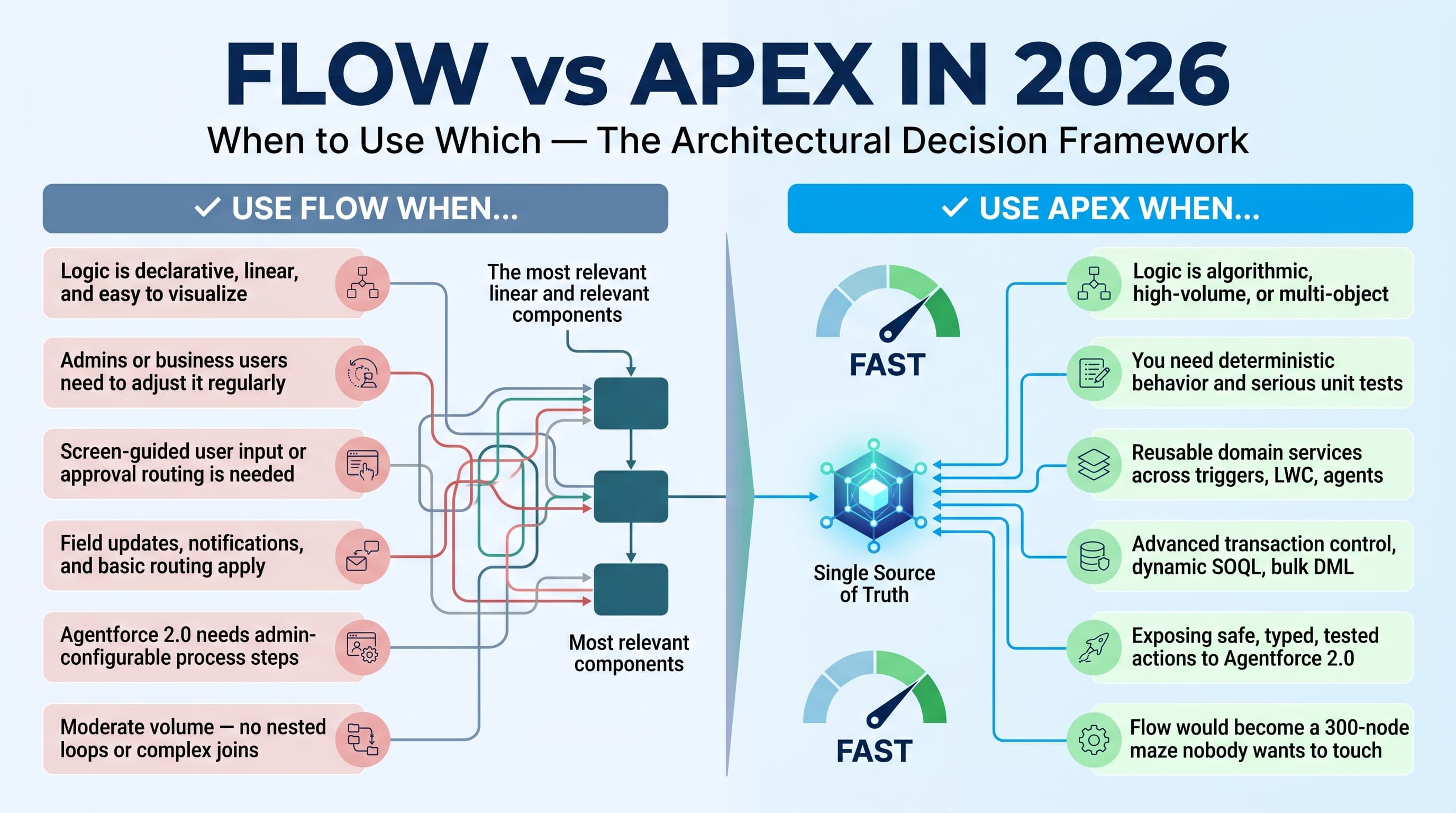
I use Flow when the business logic is declarative, visible, and mostly linear.
Good Flow use cases:
- Field updates
- Simple validations beyond validation rules
- Screen-guided user input
- Approval-style routing
- Basic record creation
- Simple callouts
- Notifications
- Assignment logic with small decision trees
- Orchestration across human tasks
- Agentforce 2.0 actions that need admin-configurable process steps
I use Apex when the logic needs engineering discipline.
Good Apex use cases:
- Complex calculations
- Large-volume data processing
- Multi-object transaction control
- Custom error handling
- Dynamic SOQL
- Advanced integrations
- Recursive logic prevention
- Batch, Queueable, and Scheduled processing
- Heavy data transformations
- Reusable domain services
- Logic requiring serious unit tests
- Performance-sensitive automation
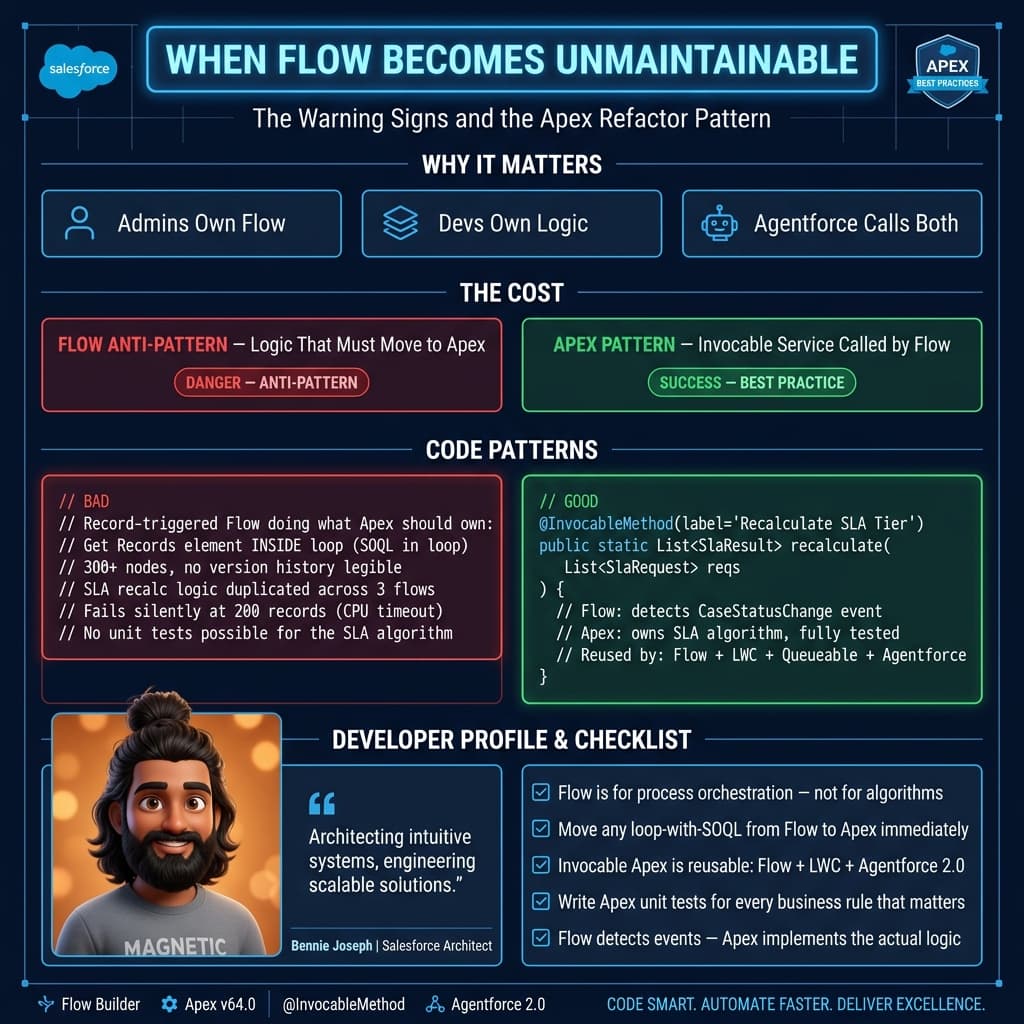
Here’s the unpopular take: a bad Flow is harder to maintain than average Apex.
Apex at least forces structure if your team has standards. Flow lets people build a production incident with colorful boxes.
Use Flow when business users need visibility
Flow shines when the process needs to be visible to admins, business analysts, and operations teams.
For example, if a sales operations team wants to change lead routing rules every quarter, I do not want that buried inside Apex unless the rules are complex enough to justify code.
A record-triggered flow can make sense for:
- If Lead Source equals Partner, assign to Partner Queue
- If Annual Revenue is above a threshold, create a task for Enterprise Sales
- If Country equals Germany, apply the DACH sales path
- If a checkbox is selected, send a Slack alert or email
That kind of logic changes often. Business teams understand it. Admins can maintain it. Flow is the right tool.
The same applies to Screen Flows. If users need a guided wizard to create a renewal opportunity, collect missing billing data, or walk through a service intake, Flow is usually my first choice.
In 2026, I also like Flow as the “human-friendly layer” around Agentforce 2.0. If an agent performs a structured business action, Flow can handle the approval, task assignment, escalation, and screen-based confirmation. The agent does not need to own the whole process.
Use Apex when logic becomes a system, not a workflow
Apex is the right choice when the automation becomes a system.
That usually means:
- Multiple objects are involved
- Data volume matters
- You need reusable services
- You need deterministic behavior
- You need proper unit tests
- You need graceful failure handling
- The process cannot be explained cleanly on one screen
A common mistake I see: teams start with Flow because the first requirement is simple. Six months later, that Flow has 14 subflows, duplicated assignment logic, nested decisions, and inconsistent error paths.
At that point, nobody wants to touch it.
Apex gives you better tools for separating concerns. You can create a domain service, write focused tests, mock integration behavior, and run the same logic from Flow, LWC, batch jobs, platform events, or Agentforce custom actions.
That flexibility matters in enterprise orgs.
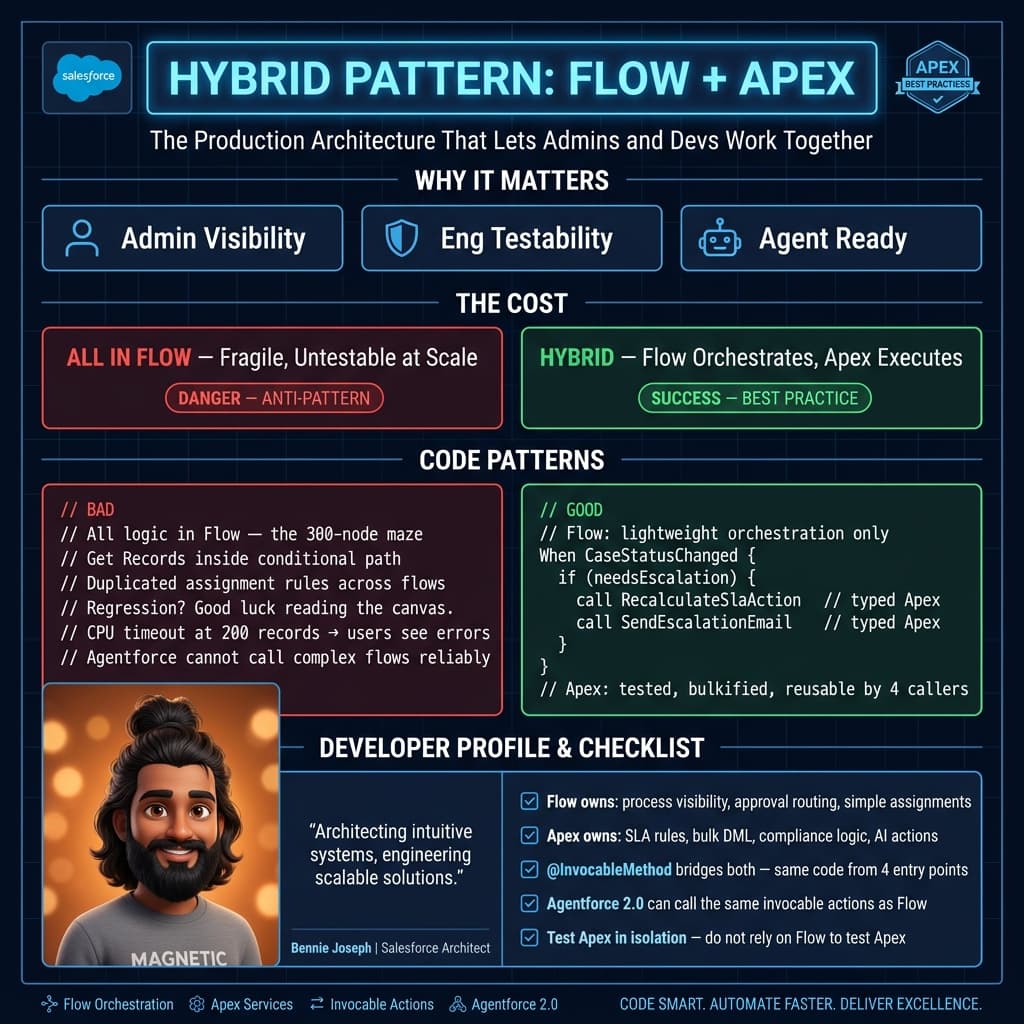
The hybrid pattern I use most
My preferred pattern is simple:
- Flow owns the business process
- Apex owns the complex operation
- Flow calls Apex through an invocable action
- Apex returns clean outputs and errors
- Tests cover the Apex behavior
This gives admins visibility without forcing them to maintain complex algorithms in Flow Builder.
Here is a simplified example from a real enterprise pattern: recalculating case entitlements after a support case changes severity. The Flow detects the business event. Apex calculates the outcome.
public with sharing class CaseEntitlementRecalculationAction {
    public class Request {
        @InvocableVariable(required=true)
        public Id caseId;

        @InvocableVariable(required=true)
        public String severity;

        @InvocableVariable
        public Boolean isPremiumCustomer;
    }

    public class Response {
        @InvocableVariable
        public Id caseId;

        @InvocableVariable
        public Integer targetResponseMinutes;

        @InvocableVariable
        public String escalationTier;

        @InvocableVariable
        public String message;
    }

    @InvocableMethod(
        label='Recalculate Case Entitlement'
        description='Calculates SLA response target and escalation tier for support cases.'
    )
    public static List<Response> recalculate(List<Request> requests) {
        if (requests == null || requests.isEmpty()) {
            return new List<Response>();
        }

        Set<Id> caseIds = new Set<Id>();
        for (Request request : requests) {
            if (request.caseId != null) {
                caseIds.add(request.caseId);
            }
        }

        Map<Id, Case> casesById = new Map<Id, Case>([
            SELECT Id, Priority, AccountId, Status
            FROM Case
            WHERE Id IN :caseIds
        ]);

        List<Response> responses = new List<Response>();

        for (Request request : requests) {
            Response response = new Response();
            response.caseId = request.caseId;

            Case supportCase = casesById.get(request.caseId);
            if (supportCase == null) {
                response.message = 'Case not found or user has no access.';
                responses.add(response);
                continue;
            }

            Boolean premium = request.isPremiumCustomer == true;
            String severity = String.isBlank(request.severity)
                ? 'Medium'
                : request.severity.trim();

            if (severity == 'Critical' && premium) {
                response.targetResponseMinutes = 15;
                response.escalationTier = 'Tier 3';
            } else if (severity == 'Critical') {
                response.targetResponseMinutes = 30;
                response.escalationTier = 'Tier 2';
            } else if (severity == 'High') {
                response.targetResponseMinutes = premium ? 60 : 120;
                response.escalationTier = 'Tier 1';
            } else {
                response.targetResponseMinutes = 240;
                response.escalationTier = 'Standard';
            }

            response.message = 'Entitlement recalculated successfully.';
            responses.add(response);
        }

        return responses;
    }
}
This is not fancy code. That is the point.
It is bulk-safe. It has one query outside the loop. It returns structured data to Flow. It does not make the Flow own the SLA algorithm. It can be tested. It can later be reused by an LWC, Queueable job, or Agentforce 2.0 custom action.
That is the kind of boring architecture I trust.
Real enterprise example: global support automation
I worked on a support transformation for a global enterprise where the service team wanted automated case routing, SLA recalculation, customer-tier-based escalation, and regional handoff rules.
The first version was built almost entirely in Flow.
It worked in testing.
Then production volume hit.
The org processed thousands of case updates per hour from Experience Cloud, email-to-case, integrations, and internal agents. The Flow had several Get Records elements inside conditional paths. It also had duplicated logic across case creation and case update flows.
The symptoms were predictable:
- Random CPU timeouts
- Inconsistent escalation values
- Hard-to-debug fault emails
- Admins afraid to change the automation
- Developers unable to write meaningful tests around the core rules
We refactored into a hybrid model.
Flow handled:
- Detecting meaningful field changes
- Calling the entitlement recalculation action
- Updating user-facing fields
- Sending notifications
- Launching manager approval steps for exceptions
Apex handled:
- SLA calculation
- Region and queue selection
- Premium customer checks
- Escalation tier logic
- Guardrails for closed and duplicate cases
- Bulk-safe data access
The result was not just better performance. The real win was ownership. Admins could still manage the process. Developers owned the logic that needed code discipline. Support leadership could change routing thresholds without waiting three sprints when the rule belonged in Flow. Engineering could protect complex calculations with tests when the rule belonged in Apex.
That is how mature Salesforce teams operate.
Where Agentforce 2.0 changes the decision
Agentforce 2.0 adds another layer to this conversation.
With the Atlas Reasoning Engine v2, multi-agent orchestration, and custom reasoning steps, more teams are connecting Salesforce automation to AI-driven workflows. That does not mean every business process should become an agent action.
I treat Agentforce like an intelligent participant, not a replacement for architecture.
Use Flow when the agent needs to trigger a controlled business process:
- Create a service follow-up
- Start a guided refund approval
- Route an exception to finance
- Collect missing customer data
- Invoke a structured Apex action
Use Apex when the agent needs a safe, deterministic backend operation:
- Calculate pricing eligibility
- Check entitlement rules
- Validate cross-object constraints
- Query and transform controlled datasets
- Write auditable records with strict transaction handling
If I am exposing an operation to an AI agent, I want the backend action to be boring, typed, tested, and permission-aware. Apex is often the best place for that.
The same thinking applies when I use external models like claude-sonnet-4-7, gpt-5.5, or gemini-3.1-pro in enterprise workflows. The model can reason, summarize, classify, or draft. It should not be trusted to enforce transactional business rules directly. Salesforce automation still needs deterministic guardrails.
Performance: Flow is not automatically slower, Apex is not automatically faster
People love lazy rules.
“Flow is slow.”
“Apex is faster.”
Both statements are incomplete.
A well-designed Flow can outperform bad Apex. A single record-triggered flow with clean entry criteria and no wasteful queries is perfectly fine. I have seen Apex triggers with recursive updates, unselective queries, and sloppy maps perform worse than declarative automation.
The issue is not the tool. The issue is control.
Apex gives me more control over:
- Query shape
- Data structures
- Loops
- Error handling
- Recursion prevention
- Async processing
- Test setup
- Logging strategy
Flow gives me speed of delivery and transparency, but less precision when logic grows.
My practical threshold: if I need more than a few decisions, multiple loops, or repeated data access, I stop and ask whether Apex should own that part.
Testing is where Apex wins hard
Flow testing has improved, and I use it. But Apex still wins when behavior is business-critical.
For critical automation, I want tests that prove:
- Bulk behavior works
- Edge cases are handled
- Nulls do not explode
- Permissions are respected
- Expected errors are returned
- Transaction behavior is stable
- Future refactors do not break production rules
You can test invocable Apex cleanly. You can create factories. You can run bulk scenarios with 200 records. You can validate every branch.
If a Flow is carrying logic that would require 20 test methods to trust, that logic probably belongs in Apex.
Maintainability: the org chart matters
Technical decisions are not just about technology. They are about who will maintain the thing.
If the operations team owns the process and changes it monthly, Flow is attractive. If the engineering team owns the logic and changes must go through CI/CD, Apex is attractive.
In stronger orgs, both go through source control anyway. Flow metadata belongs in version control just like Apex. I do not treat production Flow edits as harmless. A Flow change can break revenue operations as easily as a bad trigger.
My preference in enterprise environments:
- Build Flows in lower environments
- Store metadata in Git
- Promote through CI/CD
- Use naming conventions
- Keep entry criteria strict
- Keep subflows reusable
- Move complex rules into Apex services
- Log failures intentionally
If your team says, “It is just Flow, we can change it in production,” that is a governance problem.
My 2026 rulebook
Here is the rulebook I use on real projects.
Choose Flow when
- The process is easy to visualize
- Admins need to adjust it
- It involves user interaction
- It is mostly field updates and routing
- The volume is moderate
- The logic is not algorithmic
- The error path is simple
- The process benefits from declarative orchestration
Choose Apex when
- The logic is complex
- The process is high volume
- You need reusable domain services
- You need advanced transaction control
- You need strong test coverage
- You need dynamic queries
- You are integrating with external systems
- You are exposing safe actions to Agentforce 2.0
- Flow would become unreadable
Choose both when
- Flow can own the process, but not the algorithm
- Admins need visibility, but developers need control
- Agentforce needs to trigger a governed action
- A screen flow needs to call complex backend logic
- You want a low-code front end with a coded service layer
This hybrid approach is the default for most enterprise automation I design now.
The answer is not Flow or Apex. It is architecture.
The worst Salesforce implementations are full of tool loyalty.
The best ones are full of clear boundaries.
Flow is excellent when it keeps business process visible. Apex is excellent when it keeps complex logic controlled. Agentforce 2.0 is powerful when it works through governed actions instead of bypassing the platform’s safety model.
In 2026, I do not care whether a solution is “declarative” or “programmatic.” I care whether it is bulk-safe, observable, testable, secure, and maintainable.
That is the standard.
TL;DR
- Use Flow for visible orchestration, user-guided processes, and admin-owned business rules.
- Use Apex for complex, high-volume, reusable, testable, or transaction-sensitive logic.
- In enterprise Salesforce, the best answer is usually Flow plus Apex with clear boundaries.