LWC Native State Management in Summer 26: Kill Your Wire Adapters
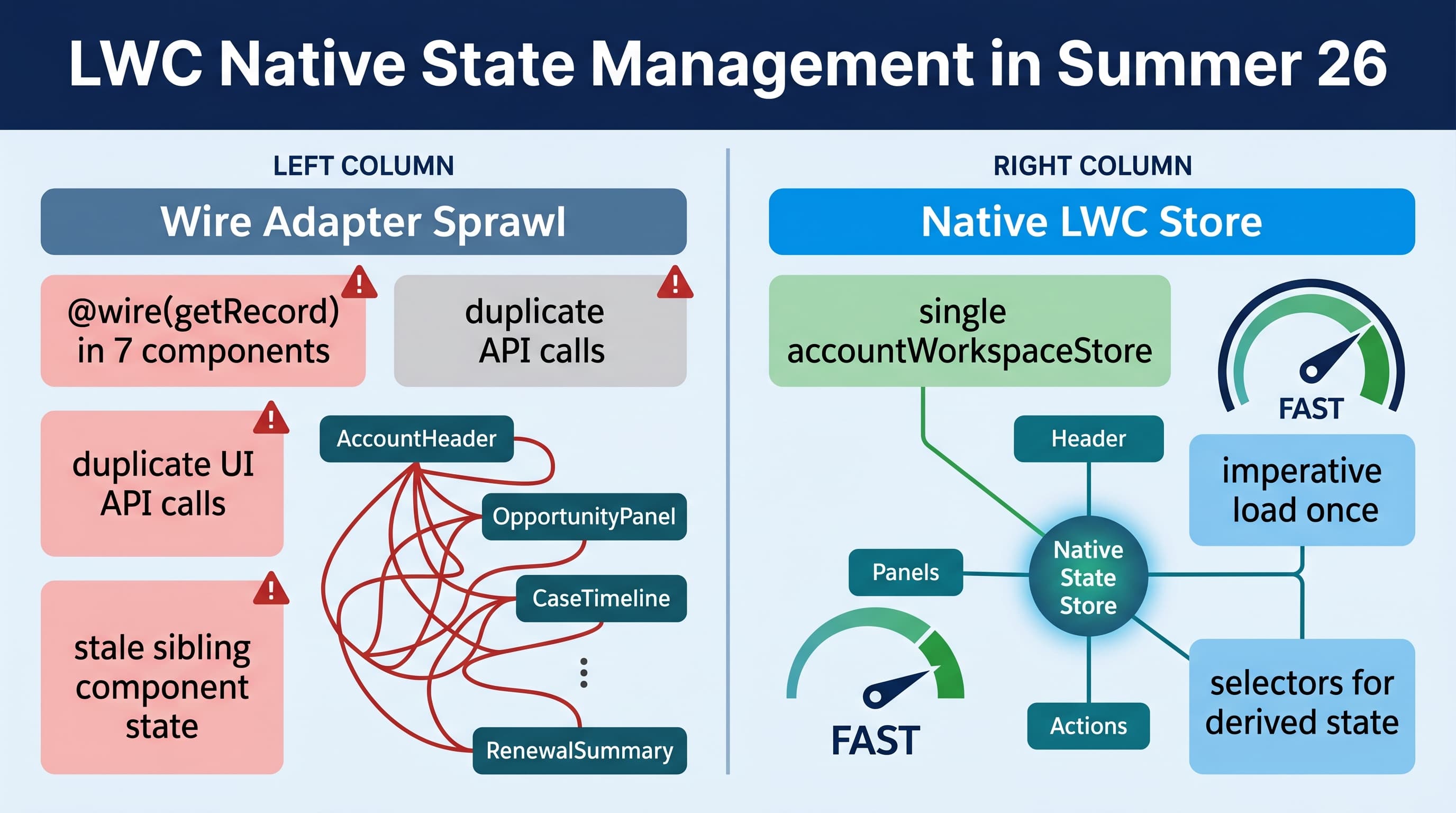
Summer ’26 changes how I build serious Lightning Web Components. The primary SEO phrase is lwc native state management summer 26, but the practical takeaway is simpler: stop treating wire adapters like a client-side state layer.
Here’s the unpopular take: most enterprise LWC performance problems I see are not caused by Apex being slow. They are caused by components independently asking Salesforce the same question from five different places, then each component pretending it owns the truth.
@wire is still useful. I am not deleting getRecord, getObjectInfo, or UI API adapters from the platform. But in Summer ’26, with native LWC state management available, I no longer use wire adapters as my default coordination mechanism across a page.
If a value needs to be shared, derived, refreshed, invalidated, or updated optimistically across multiple LWCs, it belongs in a store. Not in five separate wires.
The old pattern: wire adapters everywhere
This is the pattern I still find in large Salesforce orgs:
import { LightningElement, api, wire } from 'lwc';
import { getRecord, getFieldValue } from 'lightning/uiRecordApi';

import ACCOUNT_NAME from '@salesforce/schema/Account.Name';
import ACCOUNT_STATUS from '@salesforce/schema/Account.Customer_Status__c';

const FIELDS = [ACCOUNT_NAME, ACCOUNT_STATUS];

export default class AccountHeader extends LightningElement {
  @api recordId;

  @wire(getRecord, { recordId: '$recordId', fields: FIELDS })
  account;

  get name(): string {
    return getFieldValue(this.account.data, ACCOUNT_NAME) as string;
  }

  get status(): string {
    return getFieldValue(this.account.data, ACCOUNT_STATUS) as string;
  }
}
This looks clean in isolation. That is the trap.
Now add:
accountHeaderaccountHealthScorerenewalSummaryopenCasesPanelnextBestActionaccountRiskBanneragentforceRecommendationPanel
Each component wires its own data. Each component handles loading and error states. Each component refreshes independently. Each component has its own version of “is this account at risk?”
That is not architecture. That is distributed confusion.
I worked on a global manufacturing service console where the Account workspace had 11 LWCs. The page looked reasonable in Storybook-style demos. In production, reps complained that the header updated before the risk panel, the open case count lagged after case creation, and renewal warnings flickered when switching tabs.
The root issue was not one bad SOQL query. It was state ownership. Nobody owned the Account workspace state, so every component invented its own version.
What native LWC state changes in Summer ’26
With native state management in LWC, I can create a shared client-side store for a workspace, expose selectors, centralize refresh logic, and make components consume state instead of fetching state.
That gives me four things I care about:
- One owner for page state
- One refresh path
- Derived state without duplicated getters
- Better optimistic UI after mutations
The mental model is not “replace every wire adapter.” The model is:
- use wire adapters for simple, local, read-only component data
- use native state for page-level or workflow-level state
- use Apex or UI API imperatively when the store needs to load or mutate data
- use selectors instead of duplicating business logic in components
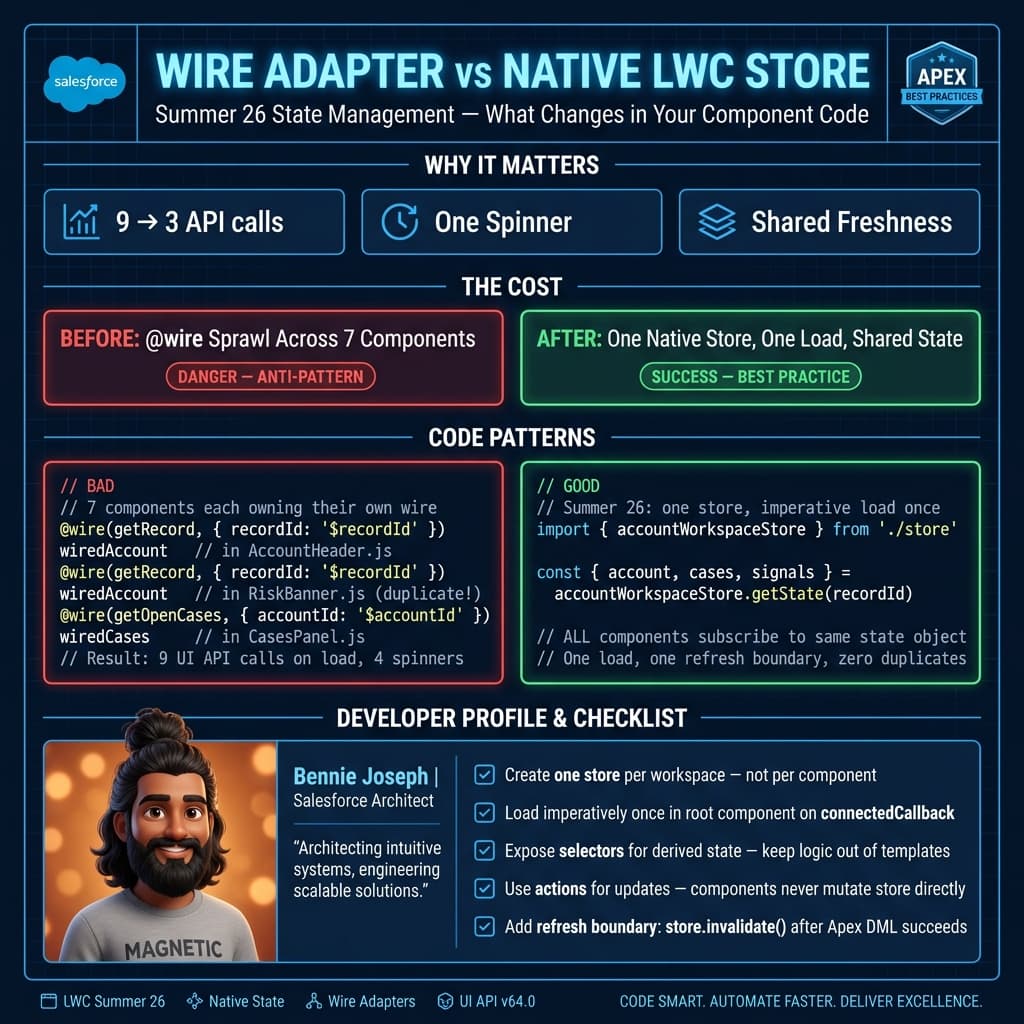
The better pattern: a native store owns the page
Here is the kind of pattern I use now. The exact shape of your store depends on your domain, but the important part is ownership.
// accountWorkspaceStore.ts
import { createStore } from 'lwc/state';
import loadWorkspace from '@salesforce/apex/AccountWorkspaceController.loadWorkspace';
import updateRiskStatus from '@salesforce/apex/AccountWorkspaceController.updateRiskStatus';

type AccountWorkspaceState = {
  accountId: string | null;
  loading: boolean;
  error: string | null;
  account: {
    id: string;
    name: string;
    customerStatus: string;
    annualRevenue: number;
  } | null;
  openCases: Array<{
    id: string;
    caseNumber: string;
    priority: string;
    subject: string;
  }>;
  renewal: {
    renewalDate: string;
    amount: number;
    stage: string;
  } | null;
  risk: {
    level: 'LOW' | 'MEDIUM' | 'HIGH';
    reasons: string[];
  } | null;
};

export const accountWorkspaceStore = createStore<AccountWorkspaceState>({
  key: 'accountWorkspace',

  state: {
    accountId: null,
    loading: false,
    error: null,
    account: null,
    openCases: [],
    renewal: null,
    risk: null
  },

  selectors: {
    isHighRisk(state) {
      return state.risk?.level === 'HIGH';
    },

    openCaseCount(state) {
      return state.openCases.length;
    },

    showRenewalWarning(state) {
      return Boolean(
        state.renewal &&
        state.renewal.stage !== 'Closed Won' &&
        state.risk?.level === 'HIGH'
      );
    }
  },

  actions: {
    async load({ patch }, accountId: string) {
      patch({
        accountId,
        loading: true,
        error: null
      });

      try {
        const workspace = await loadWorkspace({ accountId });

        patch({
          loading: false,
          account: workspace.account,
          openCases: workspace.openCases,
          renewal: workspace.renewal,
          risk: workspace.risk
        });
      } catch (error) {
        patch({
          loading: false,
          error: error instanceof Error ? error.message : 'Unable to load workspace'
        });
      }
    },

    async markRiskReviewed({ state, patch }, reviewedReason: string) {
      if (!state.accountId || !state.risk) {
        return;
      }

      const previousRisk = state.risk;

      patch({
        risk: {
          ...state.risk,
          level: 'LOW',
          reasons: [...state.risk.reasons, reviewedReason]
        }
      });

      try {
        await updateRiskStatus({
          accountId: state.accountId,
          reviewedReason
        });
      } catch (error) {
        patch({ risk: previousRisk });
        throw error;
      }
    }
  }
});
Now the component becomes boring. Boring components are a good sign.
// accountRiskBanner.ts
import { LightningElement, api } from 'lwc';
import { connectStore } from 'lwc/state';
import { accountWorkspaceStore } from 'c/accountWorkspaceStore';

export default class AccountRiskBanner extends connectStore(
  LightningElement,
  accountWorkspaceStore
) {
  @api recordId!: string;

  connectedCallback() {
    if (this.state.accountId !== this.recordId) {
      this.actions.load(this.recordId);
    }
  }

  get visible(): boolean {
    return this.selectors.isHighRisk;
  }

  get reasons(): string[] {
    return this.state.risk?.reasons ?? [];
  }

  async handleReviewed() {
    await this.actions.markRiskReviewed('Reviewed by account owner');
  }
}
And the template is just UI:
<template>
  <template lwc:if={visible}>
    <section class="risk-banner">
      <h2>High-risk account</h2>

      <ul>
        <template for:each={reasons} for:item="reason">
          <li key={reason}>{reason}</li>
        </template>
      </ul>

      <lightning-button
        label="Mark Reviewed"
        variant="brand"
        onclick={handleReviewed}>
      </lightning-button>
    </section>
  </template>
</template>
Notice what disappeared:
- no local
@wire - no duplicate field lists
- no component-specific refresh logic
- no sibling communication hacks
- no LMS event just to tell another component “reload yourself”
That is the point.
The Apex side should return a page DTO
When I use native state, I usually stop returning tiny fragments from Apex. I return a page-specific DTO. I want one intentional read model for the screen.
This is not the same as dumping every field into one god object. The DTO should match the use case.
public with sharing class AccountWorkspaceController {
    public class AccountDto {
        @AuraEnabled public Id id;
        @AuraEnabled public String name;
        @AuraEnabled public String customerStatus;
        @AuraEnabled public Decimal annualRevenue;
    }

    public class CaseDto {
        @AuraEnabled public Id id;
        @AuraEnabled public String caseNumber;
        @AuraEnabled public String priority;
        @AuraEnabled public String subject;
    }

    public class RenewalDto {
        @AuraEnabled public Date renewalDate;
        @AuraEnabled public Decimal amount;
        @AuraEnabled public String stage;
    }

    public class RiskDto {
        @AuraEnabled public String level;
        @AuraEnabled public List<String> reasons;
    }

    public class WorkspaceDto {
        @AuraEnabled public AccountDto account;
        @AuraEnabled public List<CaseDto> openCases;
        @AuraEnabled public RenewalDto renewal;
        @AuraEnabled public RiskDto risk;
    }

    @AuraEnabled(cacheable=true)
    public static WorkspaceDto loadWorkspace(Id accountId) {
        if (accountId == null) {
            throw new AuraHandledException('Account Id is required.');
        }

        Account accountRecord = [
            SELECT Id, Name, Customer_Status__c, AnnualRevenue
            FROM Account
            WHERE Id = :accountId
            WITH USER_MODE
            LIMIT 1
        ];

        List<Case> cases = [
            SELECT Id, CaseNumber, Priority, Subject
            FROM Case
            WHERE AccountId = :accountId
            AND IsClosed = false
            WITH USER_MODE
            ORDER BY CreatedDate DESC
            LIMIT 10
        ];

        Opportunity renewal = [
            SELECT Id, CloseDate, Amount, StageName
            FROM Opportunity
            WHERE AccountId = :accountId
            AND Type = 'Renewal'
            WITH USER_MODE
            ORDER BY CloseDate ASC
            LIMIT 1
        ];

        WorkspaceDto dto = new WorkspaceDto();

        dto.account = new AccountDto();
        dto.account.id = accountRecord.Id;
        dto.account.name = accountRecord.Name;
        dto.account.customerStatus = accountRecord.Customer_Status__c;
        dto.account.annualRevenue = accountRecord.AnnualRevenue;

        dto.openCases = new List<CaseDto>();
        for (Case c : cases) {
            CaseDto caseDto = new CaseDto();
            caseDto.id = c.Id;
            caseDto.caseNumber = c.CaseNumber;
            caseDto.priority = c.Priority;
            caseDto.subject = c.Subject;
            dto.openCases.add(caseDto);
        }

        dto.renewal = new RenewalDto();
        dto.renewal.renewalDate = renewal.CloseDate;
        dto.renewal.amount = renewal.Amount;
        dto.renewal.stage = renewal.StageName;

        dto.risk = calculateRisk(accountRecord, cases, renewal);

        return dto;
    }

    @AuraEnabled
    public static void updateRiskStatus(Id accountId, String reviewedReason) {
        if (accountId == null || String.isBlank(reviewedReason)) {
            throw new AuraHandledException('Account Id and reason are required.');
        }

        Account accountToUpdate = new Account(
            Id = accountId,
            Risk_Reviewed__c = true,
            Risk_Reviewed_Reason__c = reviewedReason
        );

        update as user accountToUpdate;
    }

    private static RiskDto calculateRisk(Account accountRecord, List<Case> cases, Opportunity renewal) {
        RiskDto risk = new RiskDto();
        risk.reasons = new List<String>();

        if (cases.size() >= 5) {
            risk.reasons.add('Five or more open cases');
        }

        if (renewal != null && renewal.StageName != 'Closed Won') {
            risk.reasons.add('Renewal not closed');
        }

        risk.level = risk.reasons.isEmpty()
            ? 'LOW'
            : risk.reasons.size() == 1 ? 'MEDIUM' : 'HIGH';

        return risk;
    }
}
In Salesforce API v64.0 orgs, I still prefer this kind of DTO when the UI needs a business view instead of a raw record view. UI API is excellent for metadata-aware forms. Apex DTOs are better when the page has opinionated business logic.
When I still use wire adapters
I do not want teams walking away with a childish rule like “wire bad, state good.”
Wire adapters are still my default for:
- simple record display
- metadata such as picklist values
- object info
- one-component forms
- pages where no sibling component needs the same state
- admin-composed pages where App Builder flexibility matters more than custom orchestration
For example, if a component only displays the Account name and industry, @wire(getRecord) is fine. I am not going to create a store for a two-field component.
But if the page has a workflow, a shared refresh boundary, optimistic updates, or multiple child components depending on the same data, I use native state.
That is the dividing line.
Real enterprise example: service console with Agentforce 2.0 recommendations
In a financial services implementation, we had a relationship manager console that combined Salesforce CRM data, Data Cloud signals, and an Agentforce 2.0 recommendation panel powered by the Atlas Reasoning Engine v2.
The initial LWC build had separate wires and Apex calls for:
- household summary
- open financial cases
- next renewal
- risk indicators from Data Cloud
- advisor tasks
- Agentforce recommendation context
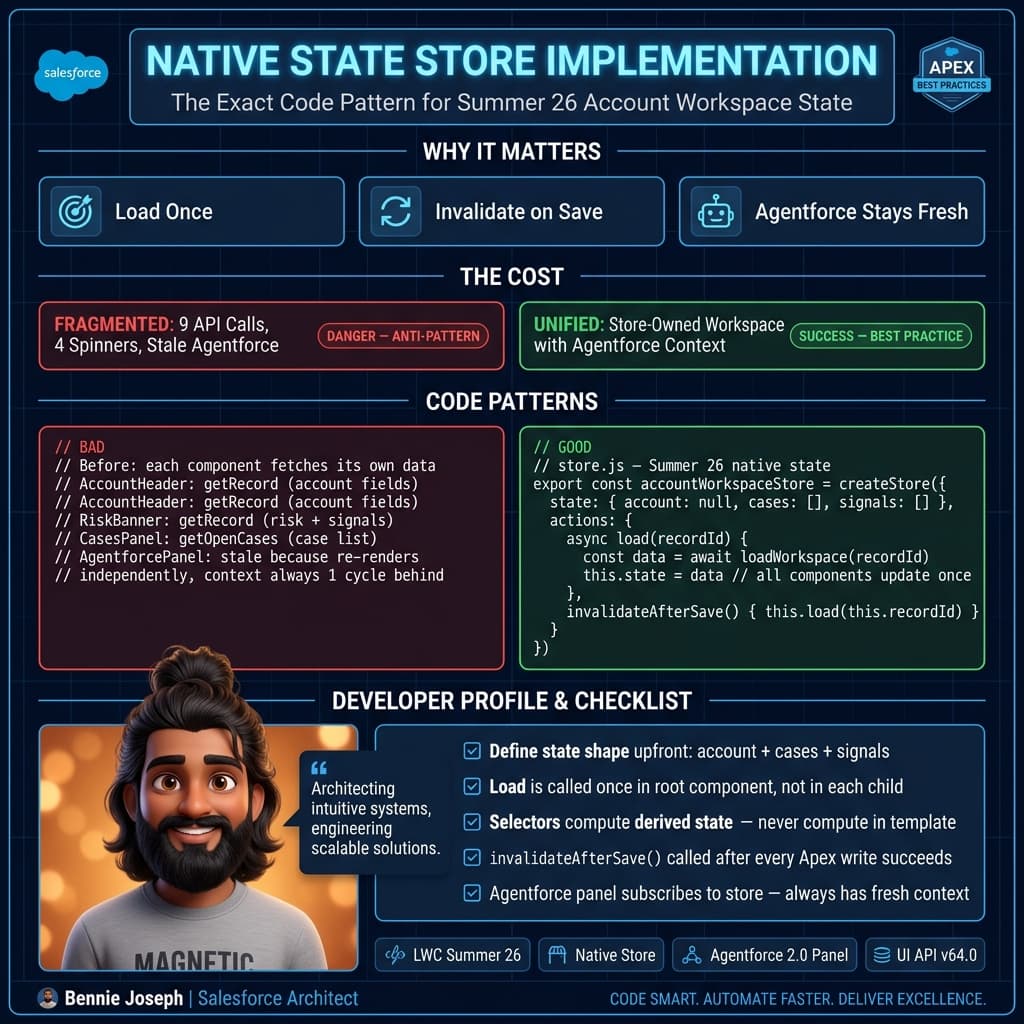
The Agentforce panel needed the same account and risk context that the human-facing components used. Because each component loaded data independently, the recommendation panel sometimes reasoned over stale risk values immediately after a user dismissed an alert.
That is unacceptable in enterprise UX. If the AI assistant says “high risk” while the banner says “reviewed,” users stop trusting both.
We moved the workspace to a native LWC state store. The store loaded the household context once, hydrated the visible panels, and passed a stable context object into the Agentforce action. After mutation, the store patched the local state first, then invalidated the recommendation context.
The visible win was performance. The bigger win was consistency.
Before:
- 9 client-triggered data calls on page load
- 4 different loading spinners
- duplicated risk logic in 3 LWCs
- Agentforce panel occasionally stale after user action
After:
- 3 client-triggered data calls on page load
- one workspace loading state
- risk logic centralized in one selector
- Agentforce context refreshed from the same store state
That is the reason I care about native state. Not because it is new. Because it fixes the actual failure mode.
Migration strategy I use
Do not rewrite everything. That is how teams turn a good platform feature into a six-month refactor nobody asked for.
I migrate in this order.
1. Find duplicate wires
Search for repeated getRecord, repeated Apex imports, and repeated field arrays across components.
If three components load the same record with overlapping fields, that is a candidate.
2. Identify the state owner
Ask one question: “What is the business object of this page?”
Examples:
- Account workspace
- Case resolution workspace
- Quote configuration workspace
- Partner onboarding workspace
Create one store per workspace. Do not create one global store for the whole org. That becomes a dumping ground.
3. Move derived logic into selectors
If you see getters like this in multiple components, move them:
get isEscalated(): boolean {
  return this.priority === 'High' && this.ageInHours > 24;
}
Selectors are where business UI logic should live:
selectors: {
  isEscalated(state) {
    return state.caseRecord?.priority === 'High' && state.caseRecord?.ageInHours > 24;
  }
}
Now the rule has one owner.
4. Keep mutations inside actions
Do not let random components patch state directly. Components should express intent. Stores should decide how state changes.
Bad:
this.state.risk.level = 'LOW';Better:
await this.actions.markRiskReviewed('Reviewed during renewal call');The second version gives you a place to handle optimistic UI, rollback, Apex errors, toast events, telemetry, and invalidation.
5. Delete wires last
I do not remove all wires upfront. I first create the store, connect one or two components, verify the state model, then remove duplicate adapters.
Refactoring state is like database migration: reduce risk by running old and new paths briefly, then cut over.
Testing native state without lying to yourself
The big testing mistake is only testing components. With native state, test selectors and actions directly.
import { accountWorkspaceStore } from 'c/accountWorkspaceStore';

describe('accountWorkspaceStore selectors', () => {
  it('shows renewal warning for high-risk open renewal', () => {
    const state = {
      accountId: '001000000000001AAA',
      loading: false,
      error: null,
      account: {
        id: '001000000000001AAA',
        name: 'Acme Manufacturing',
        customerStatus: 'Strategic',
        annualRevenue: 12000000
      },
      openCases: [],
      renewal: {
        renewalDate: '2026-09-30',
        amount: 850000,
        stage: 'Proposal'
      },
      risk: {
        level: 'HIGH',
        reasons: ['Renewal not closed']
      }
    };

    expect(accountWorkspaceStore.selectors.showRenewalWarning(state)).toBe(true);
  });
});
This is where native state pays off. Business UI rules become testable without rendering a DOM tree.
I still write component tests, but I keep them focused on rendering and user events. I do not want a component test suite carrying the full burden of business logic.
The mistakes I expect teams to make
The first mistake will be creating a global appStore and putting everything in it. Do not do that. Salesforce pages are contextual. Your state should be contextual too.
The second mistake will be duplicating server-side security assumptions in the client. Native state does not replace CRUD, FLS, sharing, or user-mode Apex. The store is a client cache, not a security boundary.
The third mistake will be using native state for static metadata that wire adapters already solve cleanly. Picklist values and object info still work well with UI API wire adapters.
The fourth mistake will be ignoring invalidation. If a record can change from another tab, Flow, integration, Agentforce action, or platform event, your store needs a refresh policy. “Loaded once” is not a strategy.
My rule of thumb
If an LWC owns only its own display, @wire is fine.
If a page owns a workflow, use native state.
That is the practical line I use in Summer ’26 projects. Native LWC state management is not about making React developers feel comfortable. It is about giving Salesforce teams a first-class way to model page state without abusing wire adapters, Lightning Message Service, or parent-child event chains.
Kill your wire adapters where they are pretending to be architecture. Keep them where they are doing simple data access.
That distinction will save you more production pain than any micro-optimization.
TL;DR
- lwc native state management summer 26 is best used for shared workspace state, not every tiny component.
- Keep wire adapters for simple local reads; use native stores for workflows, selectors, refresh, and optimistic updates.
- In enterprise consoles, one store-owned state model beats duplicated wires every time.