LWC to React: What Salesforce Devs Need to Know
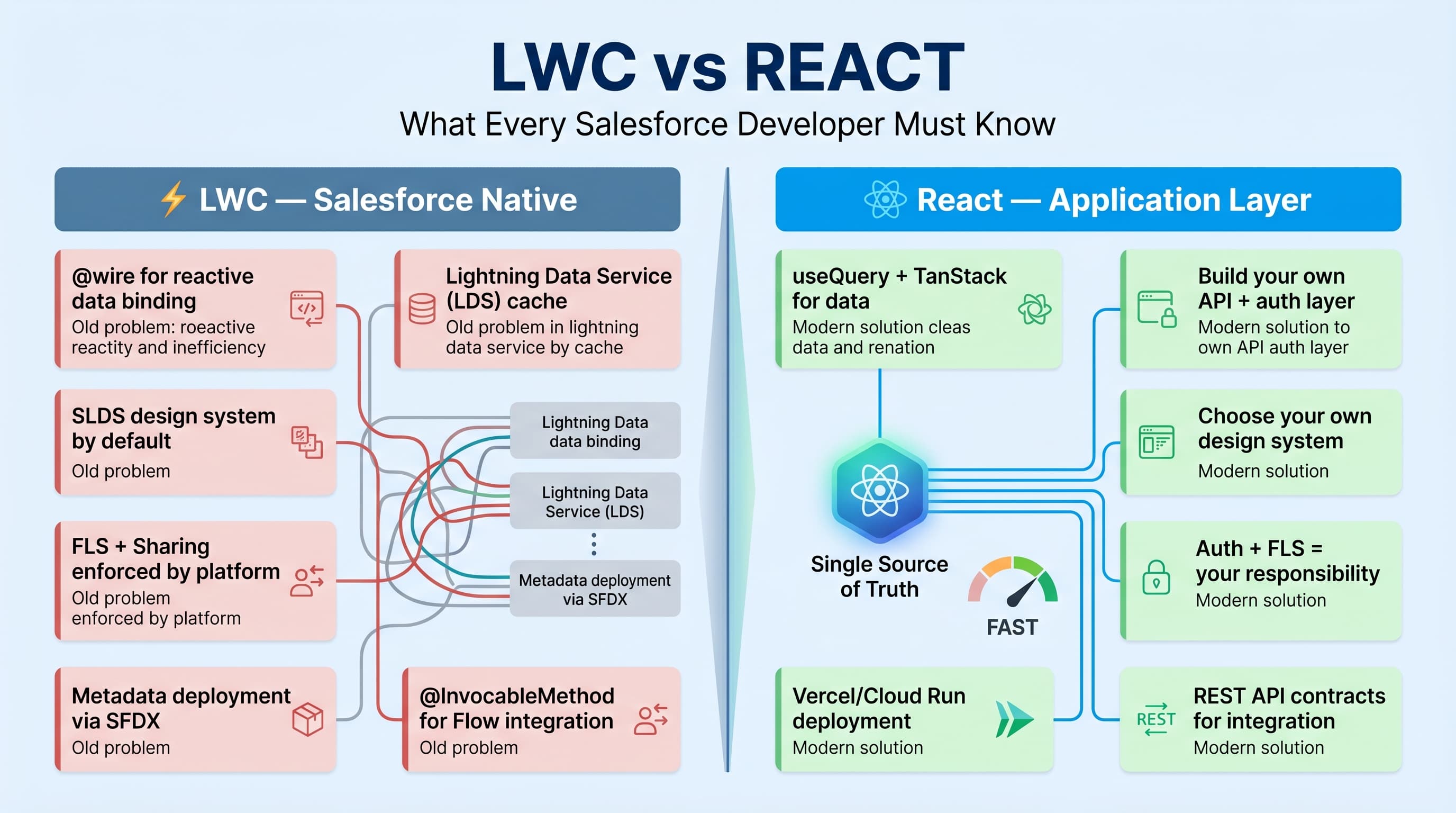
If you are a Salesforce developer moving from Lightning Web Components to React, the hardest part is not learning JSX.
The hard part is unlearning the platform assumptions you get for free in Salesforce.
In LWC, the platform gives you identity, permissions, record access, metadata, navigation, LDS, wire adapters, deployment constraints, packaging rules, and a runtime that mostly tells you what not to do.
In React, you get a library.
That is the core of lwc vs react for salesforce developers: LWC is a Salesforce-native component model inside a governed enterprise platform. React is a UI library that becomes whatever architecture your team builds around it.
I have built both in enterprise Salesforce programs. My rule is simple: use LWC when the user is working inside Salesforce. Use React when you are building a product experience outside Salesforce and Salesforce is one of the systems behind it.
The Mental Model Shift
LWC feels restrictive if you come from React. React feels dangerously open if you come from LWC.
In LWC, you think in terms of:
- decorators like
@api,@track, and@wire - Apex controllers
- Lightning Data Service
- platform events
- page layouts, object permissions, field-level security
- Salesforce deployment and packaging lifecycle
In React, you think in terms of:
- component props
- hooks
- client state
- server state
- routing
- bundling
- API contracts
- authentication strategy
- hosting and observability
Here’s the unpopular take: React is not “more modern” than LWC in a useful enterprise sense. React is more flexible. Flexibility is not automatically an advantage. It becomes an advantage only when your engineering team has the discipline to build the missing platform pieces.
Salesforce developers often underestimate this because LWC hides a lot of architecture.
For example, this simple LWC wire call is doing more than it looks like:
public with sharing class AccountSummaryController {
    @AuraEnabled(cacheable=true)
    public static List<AccountDTO> getHighValueAccounts() {
        List<Account> accounts = [
            SELECT Id, Name, AnnualRevenue, Owner.Name
            FROM Account
            WHERE AnnualRevenue > 1000000
            ORDER BY AnnualRevenue DESC
            LIMIT 25
        ];

        List<AccountDTO> results = new List<AccountDTO>();

        for (Account account : accounts) {
            results.add(new AccountDTO(
                account.Id,
                account.Name,
                account.AnnualRevenue,
                account.Owner.Name
            ));
        }

        return results;
    }

    public class AccountDTO {
        @AuraEnabled public Id id;
        @AuraEnabled public String name;
        @AuraEnabled public Decimal annualRevenue;
        @AuraEnabled public String ownerName;

        public AccountDTO(Id id, String name, Decimal annualRevenue, String ownerName) {
            this.id = id;
            this.name = name;
            this.annualRevenue = annualRevenue;
            this.ownerName = ownerName;
        }
    }
}
import { LightningElement, wire } from 'lwc';
import getHighValueAccounts from '@salesforce/apex/AccountSummaryController.getHighValueAccounts';
type AccountSummary = {
id: string;
name: string;
annualRevenue: number;
ownerName: string;
};
export default class HighValueAccounts extends LightningElement {
accounts: AccountSummary[] = [];
error?: unknown;
@wire(getHighValueAccounts)
wiredAccounts({ data, error }: { data?: AccountSummary[]; error?: unknown }) {
if (data) {
this.accounts = data;
this.error = undefined;
}
if (error) {
this.error = error;
this.accounts = [];
}
}
get hasAccounts(): boolean {
return this.accounts.length > 0;
}
}That Apex is running inside the same trust boundary as your org. Sharing rules are applied because I used with sharing. The LWC call is authenticated because it is running inside Salesforce. The cacheable method works with the platform’s client-side caching behavior. The deployment story is known.
Now build the same thing in React. You need to answer more questions:
- Where is the API hosted?
- How does React authenticate?
- Is the app using OAuth web server flow, PKCE, JWT bearer, or a backend-for-frontend?
- Where are permissions enforced?
- How are Salesforce API limits protected?
- How are schema changes handled?
- How are errors logged?
- How is the app deployed?
- How is session expiration handled?
React does not solve those. Your architecture does.
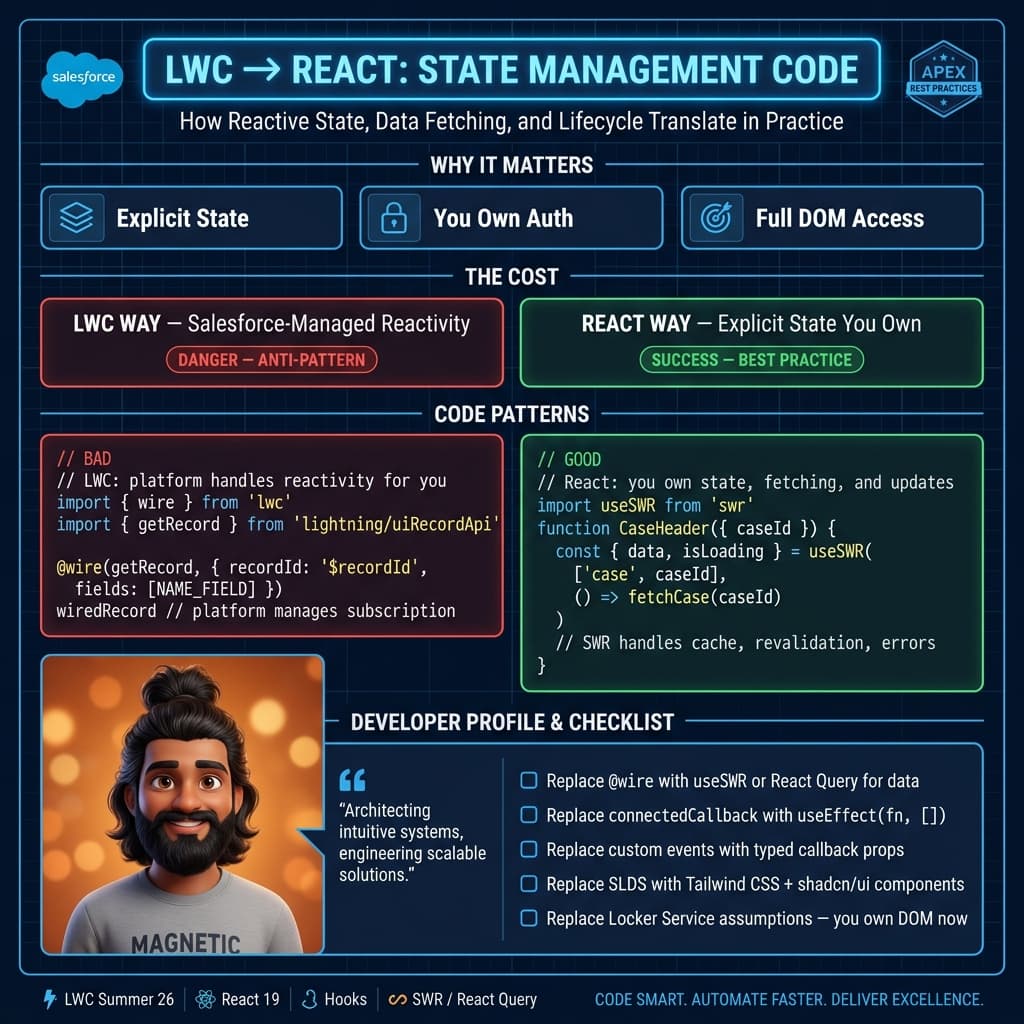
LWC → React concept mapping
If you are reading code or reviewing PRs for the first time, this table is your cheat sheet:
| LWC Concept | React Equivalent | Key Difference |
|---|---|---|
@api property | props | Props are read-only in both; LWC enforces it via decorator |
@track property | useState | React re-renders on any state change by default |
@wire adapter | useQuery (TanStack Query) | Wire is platform-aware; useQuery needs your cache config |
Lifecycle: connectedCallback | useEffect(() => {}, []) | React fires after render; LWC fires on DOM insert |
Lifecycle: disconnectedCallback | useEffect cleanup function | return () => cleanup() inside useEffect |
Lifecycle: renderedCallback | useEffect(() => {}, [dep]) | Runs after each render where dep changed |
dispatchEvent(new CustomEvent(...)) | onAction callback prop | React passes callbacks down; LWC bubbles events up |
template.querySelector | useRef | Same DOM handle concept; different wiring |
LightningDataService / getRecord | Custom fetch + TanStack Query | No auto-refresh in React — you manage cache invalidation |
Apex @AuraEnabled controller | REST API endpoint (Express / Next.js) | React has no concept of platform callouts |
with sharing in Apex | Server-side auth middleware | You must rebuild the permission boundary in your backend |
lightning-record-form | Build it with React Hook Form + Zod | SLDS components don't exist outside Salesforce |
NavigationMixin | useNavigate (React Router) | React Router handles routing; no Salesforce page ref |
jest.mock('@salesforce/apex/...') | vi.mock('./api') or msw handler | MSW is the idiomatic React testing approach |
The hardest thing to unlearn: in LWC, the platform handles auth, permissions, and data caching for you. In React, you build or buy every one of those layers.
Component Model: Similar Surface, Different Contract
LWC and React both push you toward component-based UI. That similarity is real but shallow.
An LWC component has a platform contract. It lives in Lightning Experience, Experience Cloud, Salesforce Mobile, Flow screens, utility bars, record pages, app pages, or managed packages. It follows Salesforce security constraints. It uses Shadow DOM patterns. It integrates with metadata.
A React component has an application contract. It lives wherever your app runs. The browser runtime, router, state library, API client, auth layer, design system, test framework, build pipeline, and deployment platform are all choices.
Here is a simple React version of the account list:
import { useEffect, useState } from 'react';

type AccountSummary = {
  id: string;
  name: string;
  annualRevenue: number;
  ownerName: string;
};

type ApiState =
  | { status: 'loading' }
  | { status: 'success'; accounts: AccountSummary[] }
  | { status: 'error'; message: string };

export function HighValueAccounts() {
  const [state, setState] = useState<ApiState>({ status: 'loading' });

  useEffect(() => {
    const controller = new AbortController();

    async function loadAccounts() {
      try {
        const response = await fetch('/api/salesforce/accounts/high-value', {
          method: 'GET',
          credentials: 'include',
          signal: controller.signal
        });

        if (!response.ok) {
          throw new Error(`Failed to load accounts: ${response.status}`);
        }

        const accounts = (await response.json()) as AccountSummary[];
        setState({ status: 'success', accounts });
      } catch (error) {
        if (!controller.signal.aborted) {
          setState({
            status: 'error',
            message: error instanceof Error ? error.message : 'Unknown error'
          });
        }
      }
    }

    loadAccounts();

    return () => controller.abort();
  }, []);

  if (state.status === 'loading') {
    return <div>Loading accounts...</div>;
  }

  if (state.status === 'error') {
    return <div role="alert">{state.message}</div>;
  }

  return (
    <section>
      <h2>High Value Accounts</h2>
      <ul>
        {state.accounts.map((account) => (
          <li key={account.id}>
            <strong>{account.name}</strong> — ${account.annualRevenue.toLocaleString()} owned by{' '}
            {account.ownerName}
          </li>
        ))}
      </ul>
    </section>
  );
}
This is normal React. It is also incomplete enterprise architecture.
In production, I would not let this component call Salesforce directly from the browser. I would put a backend-for-frontend between React and Salesforce. That layer owns token handling, API shaping, rate limiting, logging, retries, and permission checks that Salesforce alone may not cover for external users.
Salesforce developers moving to React should understand this immediately: Apex is not just “backend code.” Apex is backend code inside the Salesforce trust model. A Node, Python, Java, or .NET API serving React is backend code inside your trust model. That difference matters.
Data Access: Wire Adapters vs Server State
LWC gives you @wire. React gives you nothing built-in for server state.
Most React teams eventually use something like TanStack Query, SWR, Apollo Client, Redux Toolkit Query, or a custom API client. Do not use useEffect everywhere for serious enterprise data fetching. It becomes scattered error handling, duplicated loading states, inconsistent caching, and accidental race conditions.
In LWC, this pattern is normal:
import { LightningElement, api, wire } from 'lwc';
import { getRecord, getFieldValue } from 'lightning/uiRecordApi';
import ACCOUNT_NAME from '@salesforce/schema/Account.Name';
import ACCOUNT_REVENUE from '@salesforce/schema/Account.AnnualRevenue';

const FIELDS = [ACCOUNT_NAME, ACCOUNT_REVENUE];

export default class AccountHeader extends LightningElement {
  @api recordId!: string;

  @wire(getRecord, { recordId: '$recordId', fields: FIELDS })
  account?: unknown;

  get name(): string {
    return getFieldValue(this.account?.data, ACCOUNT_NAME) as string;
  }

  get revenue(): number {
    return getFieldValue(this.account?.data, ACCOUNT_REVENUE) as number;
  }
}
That is deeply Salesforce-aware. It respects object and field permissions. It understands record shape. It is tied to metadata.
In React, I prefer an explicit API contract:
import { useQuery } from '@tanstack/react-query';

type AccountHeaderResponse = {
  id: string;
  name: string;
  annualRevenue: number | null;
  canEdit: boolean;
};

async function getAccountHeader(accountId: string): Promise<AccountHeaderResponse> {
  const response = await fetch(`/api/accounts/${accountId}/header`, {
    credentials: 'include'
  });

  if (!response.ok) {
    throw new Error('Unable to load account header');
  }

  return response.json() as Promise<AccountHeaderResponse>;
}

export function useAccountHeader(accountId: string) {
  return useQuery({
    queryKey: ['account-header', accountId],
    queryFn: () => getAccountHeader(accountId),
    staleTime: 60_000
  });
}
This is the React approach I trust: define server state as server state. Cache it intentionally. Shape it intentionally. Do not leak raw Salesforce API responses directly into the UI unless you enjoy coupling your frontend to every Salesforce metadata change.
Enterprise Example: Where I Used Both
On one enterprise program, we had a large service transformation for a financial services client. The internal servicing team lived in Salesforce Service Console. External partners used a custom web portal.
The first proposal from the client’s digital team was to build everything in React and embed parts of it in Salesforce.
I pushed back.
For service agents, we built LWCs directly on record pages and console utilities. They needed case context, account context, Omni-Channel awareness, quick actions, field-level security, and console navigation. LWC was the right tool. React would have added hosting, authentication, cross-frame messaging, and support complexity for no real user value.
For partners, we built a React portal backed by an API layer that integrated with Salesforce, a document system, and a pricing engine. React was the right tool there. The users were not Salesforce users. The UX needed custom routing, multi-step onboarding, branded dashboards, file upload workflows, and analytics instrumentation that did not fit cleanly into Experience Cloud at the required level.
The important decision was not “LWC or React.” The decision was boundary placement.
Inside Salesforce: LWC.
Outside Salesforce: React plus a real integration layer.
Where teams get in trouble is the middle ground: React embedded inside Salesforce because “our frontend team knows React,” or LWC forced into an external product because “Salesforce has components.” Both are usually political decisions disguised as architecture.
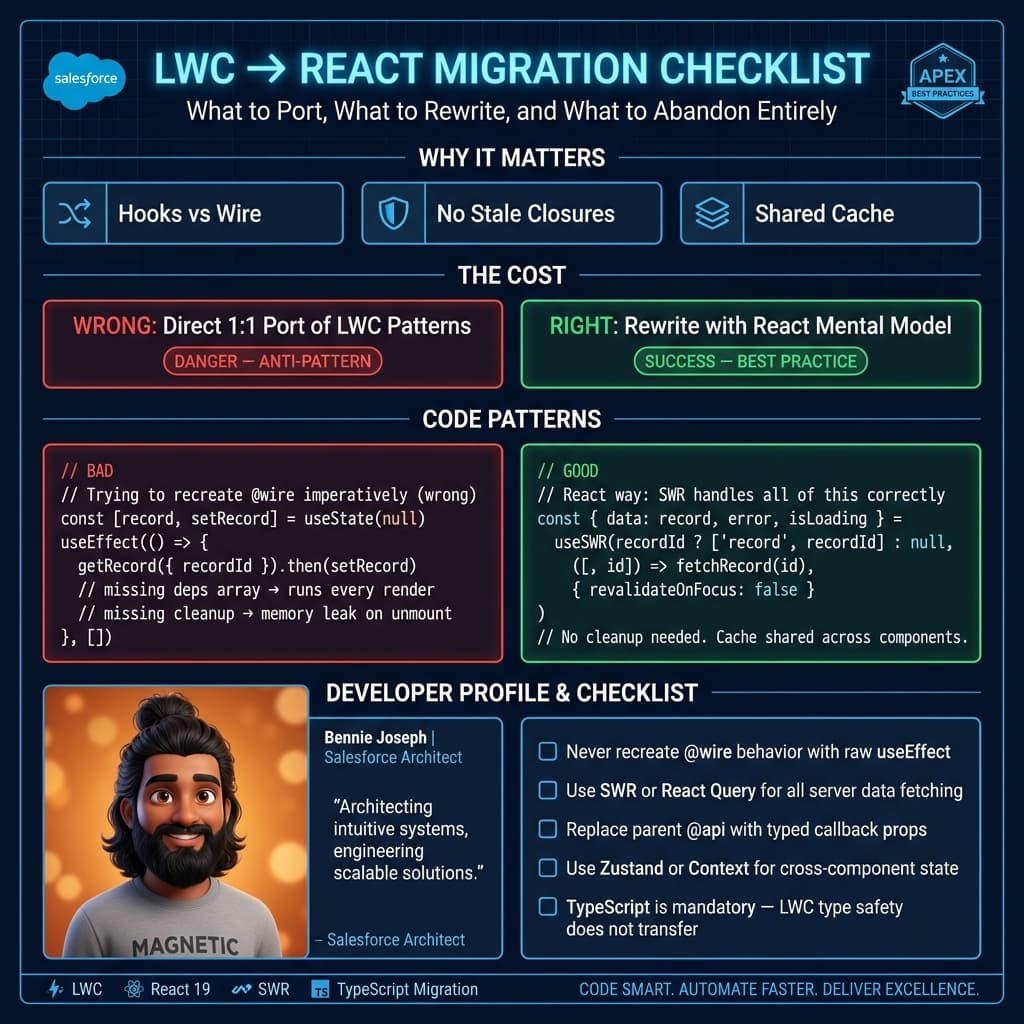
State Management: LWC Is Smaller by Design
LWC state tends to stay local unless you deliberately introduce shared state through Lightning Message Service, parent-child communication, custom events, or service modules.
That constraint is useful.
React state can sprawl fast. You can put state in local component state, Context, Redux, Zustand, Jotai, Recoil, URL params, server cache, browser storage, or a form library. React gives you options. Enterprise teams often turn those options into inconsistency.
My recommendation for Salesforce developers learning React:
- Use component state for UI-only state.
- Use URL state for navigation state.
- Use TanStack Query or equivalent for server state.
- Use a small global store only when state truly crosses unrelated parts of the app.
- Avoid Redux by default unless your team has a strong reason.
In LWC, a modal open flag is local state. In React, it should still be local state. Do not promote everything to global state because the tool makes it easy.
Security: Salesforce Spoils You
Salesforce developers are used to CRUD, FLS, sharing, profiles, permission sets, login policies, session controls, named credentials, CSP, Locker or Lightning Web Security, and audit trails.
React does not have equivalent concepts. It runs in the browser. Browser code is not trusted.
If your React app talks to Salesforce, never treat the React app as the security layer. The browser can hide buttons, but it cannot enforce authorization. Your backend must enforce access.
Here is a basic Node-style API handler pattern I would expect behind a React app:
type UserContext = {
  userId: string;
  partnerAccountIds: string[];
  permissions: string[];
};

type Request = {
  params: { accountId: string };
  user: UserContext;
};

type Response = {
  status: (code: number) => Response;
  json: (body: unknown) => void;
};

export async function getAccountHeaderHandler(req: Request, res: Response) {
  const { accountId } = req.params;

  if (!req.user.partnerAccountIds.includes(accountId)) {
    return res.status(403).json({
      error: 'You do not have access to this account'
    });
  }

  const account = await salesforceClient.getAccountHeader(accountId);

  return res.status(200).json({
    id: account.Id,
    name: account.Name,
    annualRevenue: account.AnnualRevenue,
    canEdit: req.user.permissions.includes('ACCOUNT_EDIT')
  });
}
That is the kind of code Salesforce developers need to become comfortable with when moving to React. You are no longer just building a component. You are participating in the application security architecture.
Styling and Design Systems
LWC gives you Salesforce Lightning Design System by default. You can fight it, but you usually should not. If your app is inside Salesforce, users expect it to feel like Salesforce.
React can use anything: Tailwind, Material UI, Chakra, custom CSS, CSS modules, styled-components, design tokens, or a private enterprise design system.
This matters more than people admit.
If you are rebuilding Salesforce screens in React, ask why. If the answer is “we want it to look different,” that is rarely enough. If the answer is “we need a product-grade external experience with custom flows and a reusable design system,” React makes sense.
For enterprise programs, the design system decision should happen before the first sprint. Otherwise every React feature team invents its own button, modal, table, toast, and form validation strategy.
Testing: Different Pain, Same Discipline
LWC testing usually means Jest for component tests, Apex tests for server logic, and Salesforce deployment validation. You also deal with org shape, metadata dependencies, and test data setup.
React testing usually means Vitest or Jest, React Testing Library, Playwright or Cypress, contract tests, API mocks, and CI pipeline gates.
The skill transfer is not syntax. It is discipline.
A Salesforce developer who writes good Apex tests can become good at React testing quickly because the core habit is the same: test behavior, not implementation details.
In LWC, I care that clicking a button dispatches the right event or calls the right Apex path. In React, I care that the user sees the right state and the API contract is honored.
Deployment and Ownership
LWC deployment is tied to Salesforce metadata. You deploy through source format, unlocked packages, managed packages, DevOps Center, Gearset, Copado, Salesforce CLI, or your own CI/CD pipeline.
React deployment depends on where the app lives: Vercel, Netlify, AWS, Azure, Kubernetes, Cloudflare, Heroku, or internal hosting. That means your team owns build artifacts, environment variables, CDN behavior, headers, monitoring, rollback strategy, and incident response.
Salesforce developers moving into React should learn these basics:
- how environment configuration works
- how frontend builds are versioned
- how API endpoints are injected
- how static assets are cached
- how logs and metrics are collected
- how feature flags are managed
- how rollbacks happen
This is not optional on enterprise projects. A React app without operational ownership is a future outage with nicer UI.
When I Choose LWC
I choose LWC when:
- the user is a Salesforce user
- the feature belongs on a record page, app page, console, Flow, or Experience Cloud site
- the app needs Salesforce metadata awareness
- CRUD, FLS, sharing, and LDS matter heavily
- the team needs fast delivery inside Salesforce governance
- the UI should look and behave like Salesforce
LWC is not a lesser framework. It is a specialized tool. For Salesforce-native workflows, specialization is power.
When I Choose React
I choose React when:
- the experience is external to Salesforce
- Salesforce is one backend among several
- the UX requires custom routing and product-level interaction design
- the team owns a broader frontend platform
- mobile-responsive behavior must be highly customized
- the app needs a non-Salesforce design system
- the release lifecycle should be independent from Salesforce metadata deployments
React is excellent when you need product engineering flexibility. But it comes with responsibility. If your team does not have backend, security, DevOps, and frontend architecture maturity, React can become an expensive way to recreate things Salesforce already gave you.
Practical migration checklist
If you are moving a real LWC app to React, or building a greenfield React app that replaces Salesforce pages, go through this before you write the first component:
Architecture decisions (do these first)
- Defined the authentication strategy: PKCE + OAuth, JWT Bearer, or backend-for-frontend?
- Chose a backend for Salesforce callouts (Next.js API routes, Express, Cloud Run, etc.)
- Decided how Salesforce API limits are protected (rate limiting at BFF layer)
- Confirmed FLS and record sharing enforcement happens in your backend, not the client
- Picked a state management strategy for server state (TanStack Query recommended)
Component migration
- Mapped all
@wireadapters to API endpoints - Replaced
@trackwithuseState/useReducer - Replaced
@apiwith typed props interfaces - Replaced
dispatchEvent+ event bubbling with callback props - Replaced
NavigationMixinwith React RouteruseNavigate - Replaced
lightning-record-formwith React Hook Form + Zod schema validation - Replaced
jest.mock('@salesforce/apex/...')with MSW API mocks
Security checklist (often missed)
- All Salesforce API calls go through a server layer (not directly from browser)
- CORS configured properly — Salesforce origin not open to all
- OAuth tokens stored in httpOnly cookies, not localStorage
- FLS-sensitive fields stripped server-side, not filtered in component
- Error messages don't expose internal Salesforce IDs or schema names
Deployment readiness
- Environment variables injected at build/runtime (not hardcoded)
- Feature flags in place for phased rollout
- Error boundary components added for Salesforce API failure states
- Loading and error states handled for all async operations
- Browser compatibility tested (Safari is often the edge case)
The Practical Learning Path
If you are an LWC developer learning React, do not start with Redux. Do not start with Next.js server components. Do not start with micro-frontends.
Start here:
- Learn JSX and component composition.
- Learn
useState,useEffect, and custom hooks. - Learn TypeScript properly — this is the biggest career unlock.
- Learn server-state management with TanStack Query.
- Learn routing with React Router or Next.js App Router.
- Learn form handling with React Hook Form + Zod.
- Learn authentication patterns (OAuth PKCE, httpOnly cookies, session management).
- Learn how a backend-for-frontend protects Salesforce API limits and credentials.
- Learn deployment, environment variables, and observability basics.
The biggest career unlock is TypeScript. LWC developers often write JavaScript with platform safety nets. React teams need stronger type discipline because the app boundary is wider and the failure modes are more varied.
Final Opinion
The debate around lwc vs react for salesforce developers is usually framed badly.
It is not about which framework is better. It is about where the application lives, who the users are, what security boundary you trust, and which team owns the runtime.
If you are inside Salesforce, LWC is usually the cleanest answer.
If you are building a standalone product experience, React is usually the better frontend choice.
If someone tells you to embed React inside Salesforce by default, ask them who owns authentication, deployment, browser compatibility, accessibility, telemetry, support, and API limits. If they cannot answer clearly, they are not making an architecture decision. They are expressing a framework preference.
TL;DR
- Use LWC for Salesforce-native workflows; use React for external product experiences backed by proper APIs.
- React gives flexibility, but you must own auth, security, state, deployment, and observability.
- The real decision is not LWC vs React. It is platform boundary and ownership.