Multi-Agent Workflows: Lessons from Building in Production
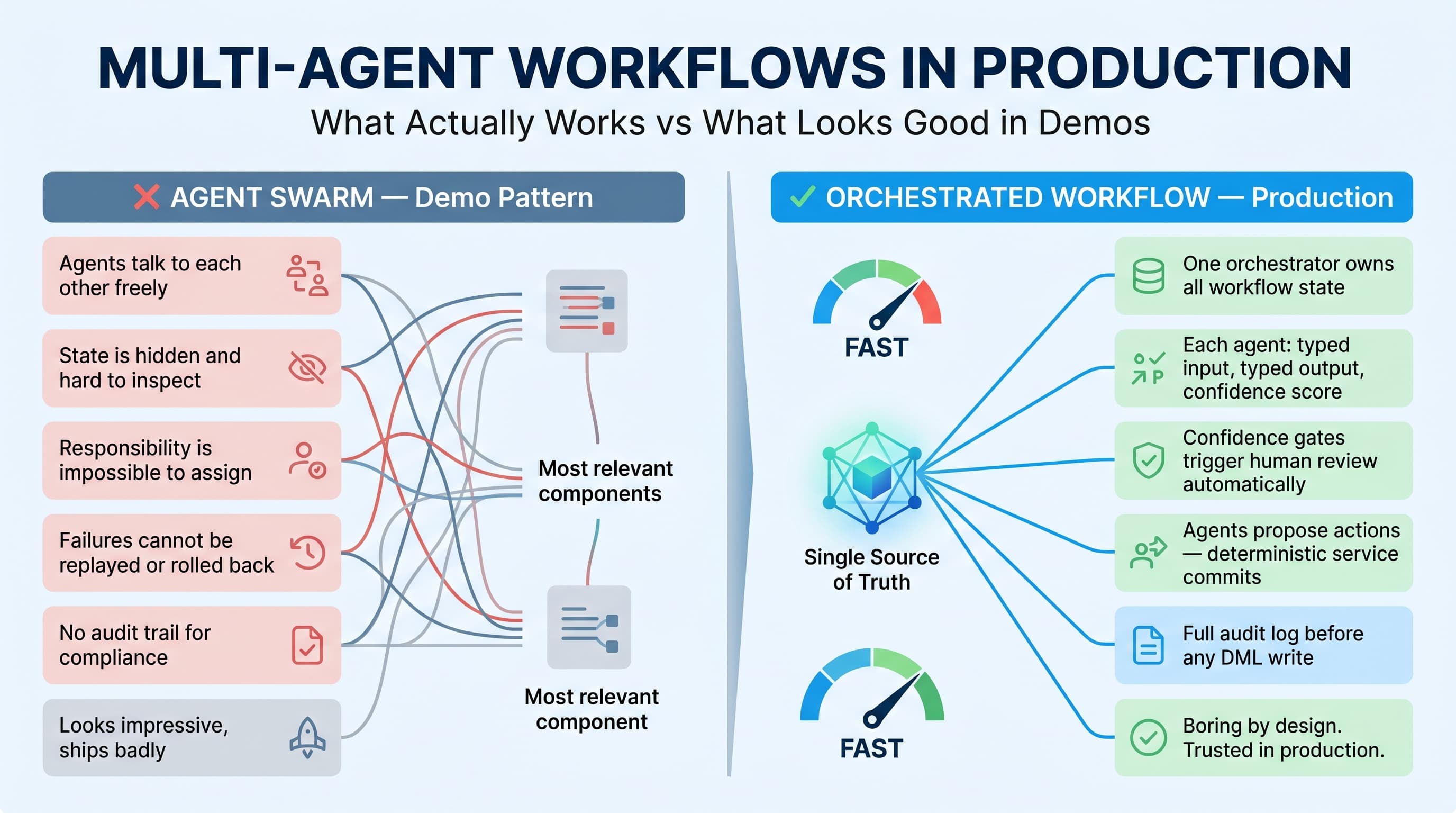
Most multi-agent demos are theater.
You see a “research agent” talking to a “writer agent” talking to a “critic agent,” and everyone claps because the terminal prints cute role names. Then you try to put the same pattern into a real enterprise workflow with Salesforce data, customer SLAs, approvals, compliance rules, and angry users — and the whole thing falls apart.
I’ve built agentic systems that looked great in prototypes and terrible in production. I’ve also shipped multi-agent workflows that saved real operational time because the design was boring, constrained, observable, and recoverable.
Here’s the unpopular take: good multi agent workflow design patterns are closer to enterprise integration architecture than sci-fi autonomy. You need contracts, ownership, retries, audit logs, state transitions, and kill switches. The agents are not the architecture. The workflow is.
The Production Scenario That Changed How I Design Agents
One enterprise project involved a support operations team running on Salesforce Service Cloud. The business had high-volume B2B cases from distributors, field technicians, and internal account teams. A single case could require:
- Classifying the issue
- Checking entitlement
- Reading knowledge articles
- Reviewing order history
- Drafting a customer response
- Updating Salesforce fields
- Escalating to a human queue when confidence was low
The first prototype had one “super agent” with access to everything: Salesforce case data, knowledge articles, customer history, policy documents, and update permissions.
It worked in demos.
It failed in production testing.
The agent mixed policies from different product lines, updated the wrong fields, generated confident but unsupported explanations, and retried failed Salesforce updates without understanding idempotency. The issue was not the model. The issue was the workflow design.
We rebuilt it as a constrained multi-agent workflow:
- Intake Agent: extracts structured facts from the case.
- Routing Agent: decides the workflow path.
- Knowledge Agent: retrieves approved articles and policy references.
- Entitlement Agent: validates warranty and contract status.
- Response Agent: drafts the customer-facing message.
- Salesforce Action Agent: proposes updates but does not commit unless validated.
- Review Agent: checks policy citations, confidence, and escalation criteria.
The key improvement was separation of responsibility. Each agent had a narrow job, a typed input, a typed output, and no authority outside its lane.
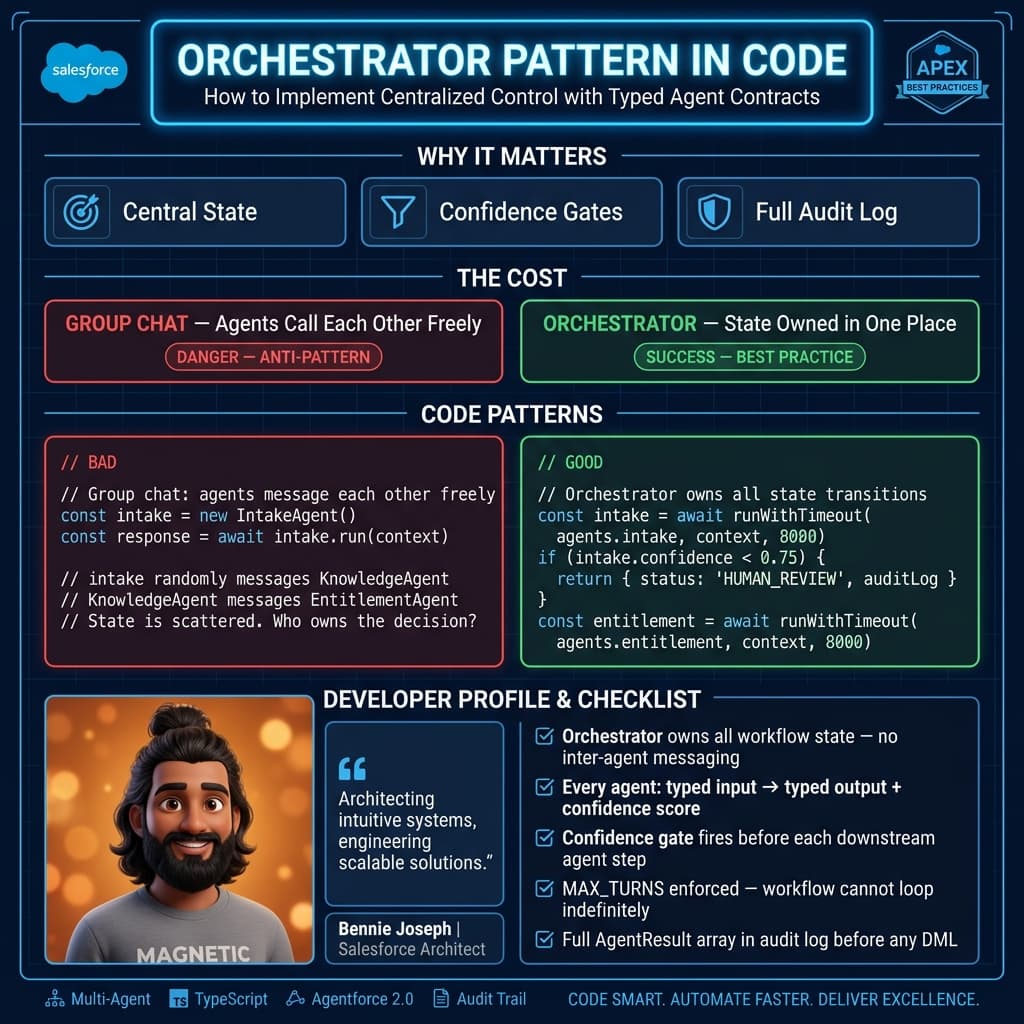
Pattern 1: Use an Orchestrator, Not a Group Chat
A lot of agent frameworks push the idea that agents should “talk” to each other. I avoid that in enterprise workflows unless there is a strong reason.
Agent-to-agent freeform conversation creates three problems:
- State becomes hard to inspect.
- Responsibility becomes hard to assign.
- Failures become hard to replay.
In production, I prefer an orchestrator that controls the workflow. Agents do not randomly message each other. They receive structured input and return structured output. The orchestrator decides what happens next.
This is one of the most important multi agent workflow design patterns: centralized orchestration with decentralized reasoning.
The agents can reason independently. But the workflow state belongs to the orchestrator.
Here is a simplified TypeScript version of the pattern I use:
type CaseContext = {
  caseId: string;
  subject: string;
  description: string;
  accountId: string;
  productCode?: string;
};

type AgentResult<T> = {
  agent: string;
  confidence: number;
  output: T;
  citations?: string[];
  errors?: string[];
};

type IntakeOutput = {
  issueType: "warranty" | "technical" | "billing" | "returns" | "unknown";
  urgency: "low" | "medium" | "high";
  extractedProductCode?: string;
  customerIntent: string;
};

type EntitlementOutput = {
  isEntitled: boolean;
  entitlementSource: "contract" | "warranty" | "manual_review";
  reason: string;
};

type DraftResponseOutput = {
  subject: string;
  body: string;
  requiredHumanApproval: boolean;
};

interface Agent<I, O> {
  name: string;
  run(input: I): Promise<AgentResult<O>>;
}

async function runWithTimeout<I, O>(
  agent: Agent<I, O>,
  input: I,
  timeoutMs: number
): Promise<AgentResult<O>> {
  return await Promise.race([
    agent.run(input),
    new Promise<AgentResult<O>>((resolve) =>
      setTimeout(
        () =>
          resolve({
            agent: agent.name,
            confidence: 0,
            output: null as O,
            errors: [`${agent.name} timed out after ${timeoutMs}ms`],
          }),
        timeoutMs
      )
    ),
  ]);
}

export async function processSupportCase(
  context: CaseContext,
  agents: {
    intake: Agent<CaseContext, IntakeOutput>;
    entitlement: Agent<CaseContext, EntitlementOutput>;
    response: Agent<{
      context: CaseContext;
      intake: IntakeOutput;
      entitlement: EntitlementOutput;
    }, DraftResponseOutput>;
  }
) {
  const auditLog: AgentResult<unknown>[] = [];

  const intake = await runWithTimeout(agents.intake, context, 8000);
  auditLog.push(intake);

  if (intake.confidence < 0.75 || intake.output.issueType === "unknown") {
    return {
      status: "HUMAN_REVIEW",
      reason: "Low intake confidence or unknown issue type",
      auditLog,
    };
  }

  const entitlement = await runWithTimeout(agents.entitlement, context, 8000);
  auditLog.push(entitlement);

  if (entitlement.confidence < 0.8) {
    return {
      status: "HUMAN_REVIEW",
      reason: "Entitlement confidence below threshold",
      auditLog,
    };
  }

  const response = await runWithTimeout(
    agents.response,
    {
      context,
      intake: intake.output,
      entitlement: entitlement.output,
    },
    10000
  );
  auditLog.push(response);

  if (
    response.confidence < 0.85 ||
    response.output.requiredHumanApproval ||
    !response.citations?.length
  ) {
    return {
      status: "HUMAN_REVIEW",
      reason: "Draft response requires approval",
      draft: response.output,
      auditLog,
    };
  }

  return {
    status: "READY_FOR_APPROVAL",
    draft: response.output,
    auditLog,
  };
}
This is not glamorous code. That is the point.
It gives me timeouts, auditability, confidence gates, and deterministic routing. If a customer asks why an AI-generated draft was created, I can show the exact agent outputs that led to it.
Pattern 2: Give Every Agent a Contract
If an agent returns prose, your workflow is fragile.
I want structured outputs. JSON schemas, typed interfaces, validation, enum values, confidence scores, citations, and explicit errors. Anything else becomes expensive when the system grows.
For the Service Cloud project, the Knowledge Agent was not allowed to say, “Based on the policy, this customer might qualify.” That kind of language is useless for automation.
It had to return:
- Article IDs
- Policy section references
- Applicability score
- Contradictions found
- Whether the content was approved for customer-facing use
That contract prevented a real production risk: using internal-only troubleshooting notes in a customer email. Without an explicit customerFacingAllowed flag, the Response Agent could easily quote something it should not.
Contracts are not just for code. They are for operational safety.
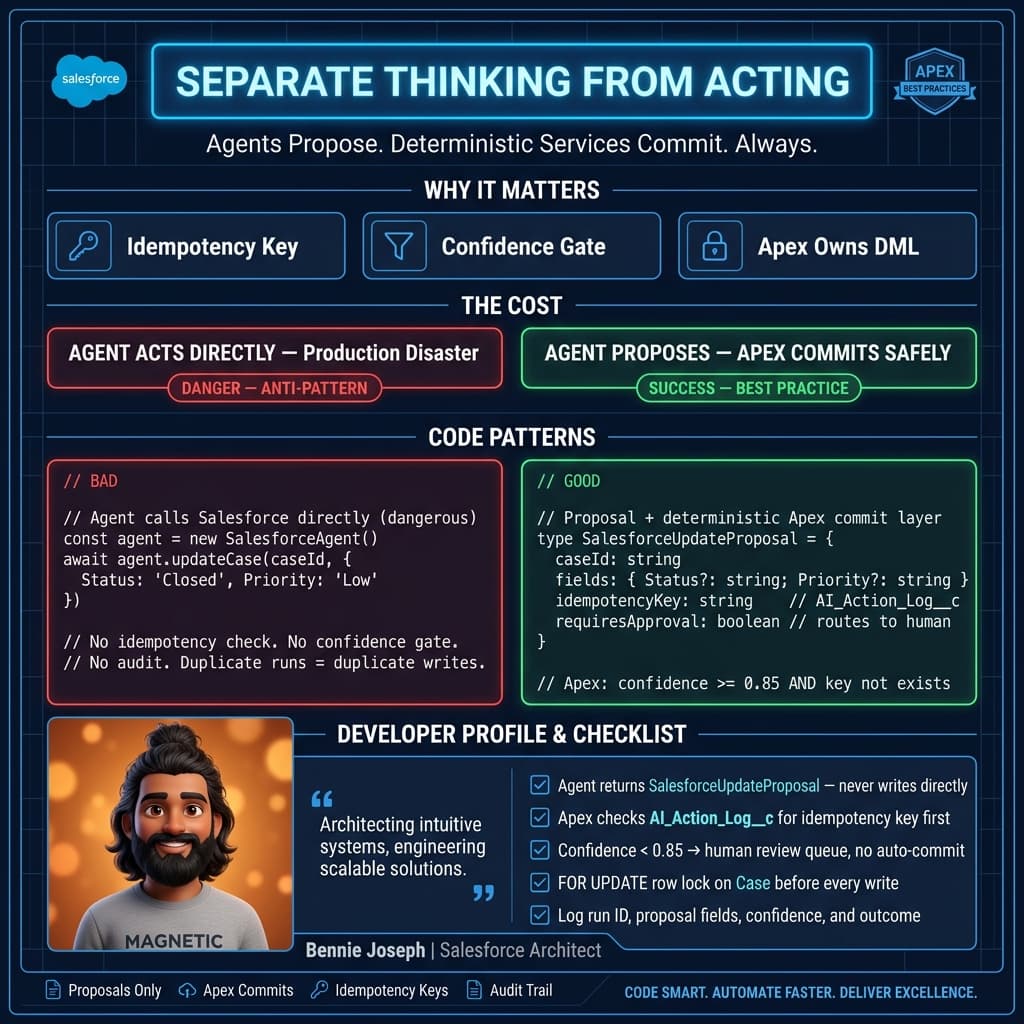
Pattern 3: Separate Thinking from Acting
This is where I see teams make dangerous mistakes.
They give an agent permission to reason and act in the same step. The agent reads the case, decides what happened, updates Salesforce, sends an email, and closes the case.
No.
In enterprise systems, actions need review, idempotency, and rollback strategy. The agent can propose actions. The workflow decides whether actions execute.
For Salesforce, I often separate the “proposal” from the “commit.” The Salesforce Action Agent might return this:
type SalesforceUpdateProposal = {
  caseId: string;
  fields: {
    Status?: "New" | "Working" | "Escalated" | "Closed";
    Priority?: "Low" | "Medium" | "High";
    AI_Recommendation__c?: string;
    AI_Confidence__c?: number;
  };
  reason: string;
  idempotencyKey: string;
  requiresApproval: boolean;
};
Then a deterministic service applies the update only if policy gates pass.
In Salesforce Apex, that commit layer can enforce idempotency and field-level control:
public with sharing class AiCaseUpdateService {
    public class UpdateRequest {
        @AuraEnabled public Id caseId;
        @AuraEnabled public String status;
        @AuraEnabled public String priority;
        @AuraEnabled public String recommendation;
        @AuraEnabled public Decimal confidence;
        @AuraEnabled public String idempotencyKey;
    }

    public static void applyRecommendation(UpdateRequest request) {
        if (request == null || request.caseId == null) {
            throw new AuraHandledException('Missing caseId');
        }

        List<AI_Action_Log__c> existingLogs = [
            SELECT Id
            FROM AI_Action_Log__c
            WHERE Idempotency_Key__c = :request.idempotencyKey
            LIMIT 1
        ];

        if (!existingLogs.isEmpty()) {
            return;
        }

        Case c = [
            SELECT Id, Status, Priority
            FROM Case
            WHERE Id = :request.caseId
            LIMIT 1
            FOR UPDATE
        ];

        if (request.confidence == null || request.confidence < 0.85) {
            throw new AuraHandledException('AI confidence below commit threshold');
        }

        c.Status = request.status;
        c.Priority = request.priority;
        c.AI_Recommendation__c = request.recommendation;
        c.AI_Confidence__c = request.confidence;

        update c;

        insert new AI_Action_Log__c(
            Case__c = c.Id,
            Idempotency_Key__c = request.idempotencyKey,
            Action_Type__c = 'CASE_RECOMMENDATION_APPLIED'
        );
    }
}
Notice what this does not do: it does not trust the agent blindly.
It treats the agent as an input source. Salesforce still owns the transaction rules.
Pattern 4: Design for Disagreement
A multi-agent workflow is useful when agents can disagree safely.
In the support workflow, the Entitlement Agent could say the customer was covered under warranty. The Knowledge Agent could find a policy exception that excluded the product line. The Response Agent could draft a polite denial. The Review Agent could flag the conflict and route to a human.
That disagreement is a feature, not a bug.
A pattern I like is critic-as-gatekeeper, but only when the critic has clear evaluation criteria. A vague “critic agent” that reviews quality is not enough. The critic needs rules:
- Does the answer cite approved sources?
- Does the entitlement conclusion match contract data?
- Is the confidence above threshold?
- Are there contradictions between agents?
- Is the proposed action reversible?
- Is the content safe for external communication?
When the critic agent flags a problem, the workflow should not loop forever. It should either retry with bounded attempts or escalate.
Here’s the rule I use: one retry for recoverable errors, zero retries for policy conflicts.
If the Knowledge Agent fails because retrieval timed out, retry once. If the Knowledge Agent and Entitlement Agent disagree on policy eligibility, send it to a human.
Pattern 5: Keep Memory Boring
Agent memory is overhyped and often implemented badly.
For production workflows, I do not want mysterious long-term memory influencing business decisions without traceability. I want boring memory:
- Workflow state
- Agent outputs
- Source citations
- User approvals
- Rejected recommendations
- Final actions taken
In Salesforce-heavy architectures, this often means storing AI interaction records in custom objects or an external audit store. The important part is not where you store it. The important part is that you can answer:
- What did the agent know?
- What sources did it use?
- What did it recommend?
- Who approved it?
- What changed in the system?
In the Service Cloud project, this mattered during UAT. A support manager challenged an AI recommendation on a warranty case. Because every agent output was logged, we found the issue quickly: the Knowledge Agent retrieved an outdated article version. That led us to add article version filtering and published-status validation.
Without audit logs, the team would have blamed the model. The actual bug was retrieval governance.
Pattern 6: Use Human Review as a Product Feature
A lot of AI builders treat human review like a failure state. I don’t.
In enterprise workflows, human review is part of the product. It builds trust, catches edge cases, and creates training data for future improvements.
The trick is to avoid dumping raw AI output on users. Give reviewers a decision screen:
- Recommended action
- Confidence score
- Supporting citations
- Field changes
- Reason for escalation
- Accept / edit / reject buttons
For Salesforce users, this can be a Lightning Web Component embedded on the Case record page. The user should not care that six agents ran behind the scenes. They should see a clean recommendation with evidence.
The best compliment I’ve heard from an operations manager was: “This feels like a junior analyst prepared the case for me.”
That is the right mental model. Agents should prepare work. Humans should decide when the decision carries business risk.
Pattern 7: Measure the Workflow, Not the Model
Teams obsess over model accuracy. That matters, but it is not enough.
For multi-agent systems, I track workflow metrics:
- Percentage of cases routed to human review
- Average agent latency per step
- Retrieval miss rate
- Citation coverage
- Action approval rate
- Rejection reasons
- Cost per completed workflow
- Rollback or correction rate
On the Service Cloud workflow, model quality looked decent early. But the workflow metrics told a different story. Human review was triggered too often because the entitlement step had low confidence for older contracts. The fix was not prompt engineering. The fix was improving contract data normalization and adding a deterministic lookup before the agent ran.
This is why I say agentic architecture is still architecture. If the data is messy, the workflow will be messy. Agents do not magically compensate for poor system design.
The Patterns I Actually Recommend
If I were designing a production multi-agent workflow today, I would start with these patterns:
Coordinator-router
Use one orchestrator to route work between specialized agents. Best for enterprise workflows where state and auditability matter.
Planner-executor-reviewer
Let one agent create a plan, another execute controlled steps, and a reviewer validate the result. Best for research, document generation, and guided operations.
Blackboard pattern
Agents write findings to a shared structured state object. The orchestrator decides when enough evidence exists to proceed. Best when multiple agents contribute partial evidence.
Human approval checkpoint
Insert approval before irreversible or externally visible actions. Best for Salesforce updates, customer emails, refunds, escalations, and compliance-sensitive work.
Deterministic tool boundary
Agents can recommend tool calls, but deterministic services execute them. Best for APIs, CRM updates, billing systems, and anything with financial or customer impact.
The anti-pattern is the autonomous swarm: agents talking freely, calling tools freely, and deciding when they are done. That may be fun for a demo. I would not put it near an enterprise customer record.
Final Advice
Start smaller than your ambition.
Do not build five agents because it sounds advanced. Build one workflow step with one agent, one typed output, one confidence threshold, one audit log, and one human review path. Then add agents only when separation of responsibility creates a real benefit.
A multi-agent workflow should reduce complexity for the user, not create complexity for the engineering team. If your architecture diagram needs a therapist, simplify it.
The best production systems I’ve seen are not the most autonomous. They are the most controlled. They let AI handle ambiguity, but they make the workflow own accountability.
That is the difference between an impressive demo and a system people trust in production.
TL;DR
- Strong multi agent workflow design patterns use orchestration, typed contracts, audit logs, and bounded autonomy.
- Separate reasoning from action; let agents propose, but deterministic services commit.
- Human review is not failure. In enterprise workflows, it is a trust and control layer.