RAG for Salesforce Orgs: Index Your Knowledge Base
Most Salesforce AI demos pretend your org is a clean wiki.
It is not.
Your Salesforce Knowledge Base has draft articles, published articles, archived versions, multiple languages, data categories, internal-only content, partner-visible content, and years of HTML copied from Word documents. If you point an agent at it without a real indexing strategy, you are not building RAG. You are building a confident hallucination machine with a Salesforce logo.
When I build rag salesforce knowledge base systems, I do not start with the chatbot. I start with the index.
The index decides what the agent can know, what it can cite, what it must ignore, and whether the answer is safe for the current user. The LLM is the easy part. The hard part is getting Salesforce Knowledge into a retrieval layer without losing versioning, visibility, language, or trust.
Here’s the practitioner version.
RAG for Salesforce Is Not “Search Plus GPT”
Retrieval-augmented generation sounds simple:
- User asks a question.
- Retrieve relevant documents.
- Send those documents to an LLM.
- Return an answer with citations.
That flow is fine for a public documentation site. It is not enough for Salesforce.
In Salesforce, the same question can have different valid answers depending on:
- Whether the user is internal, partner, or customer
- Which product line they support
- Which region they operate in
- Which article language they prefer
- Whether an article is published, draft, archived, or superseded
- Whether an entitlement or data category limits visibility
- Whether the content is approved for agent-assisted responses
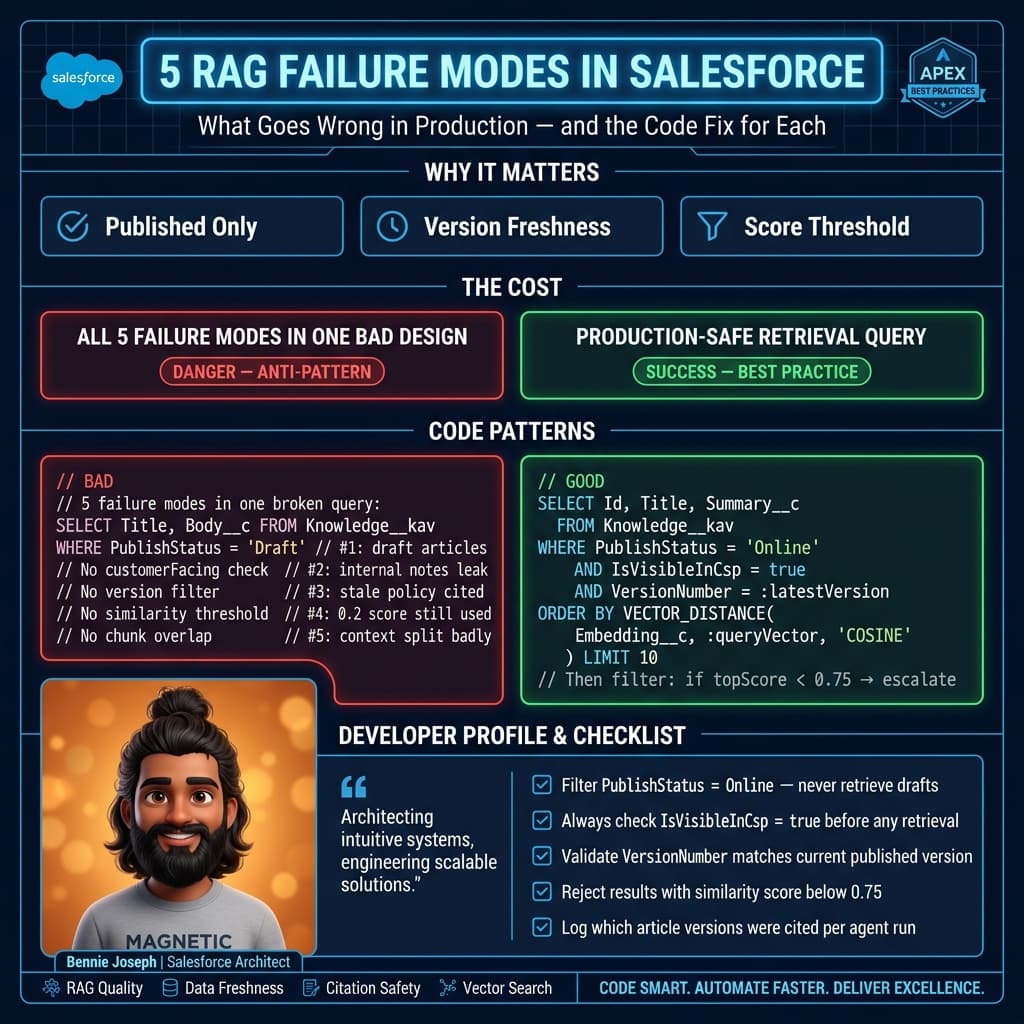
Here’s the unpopular take: if your RAG system cannot explain why a specific article chunk was eligible for retrieval, it should not be answering customer-facing questions.
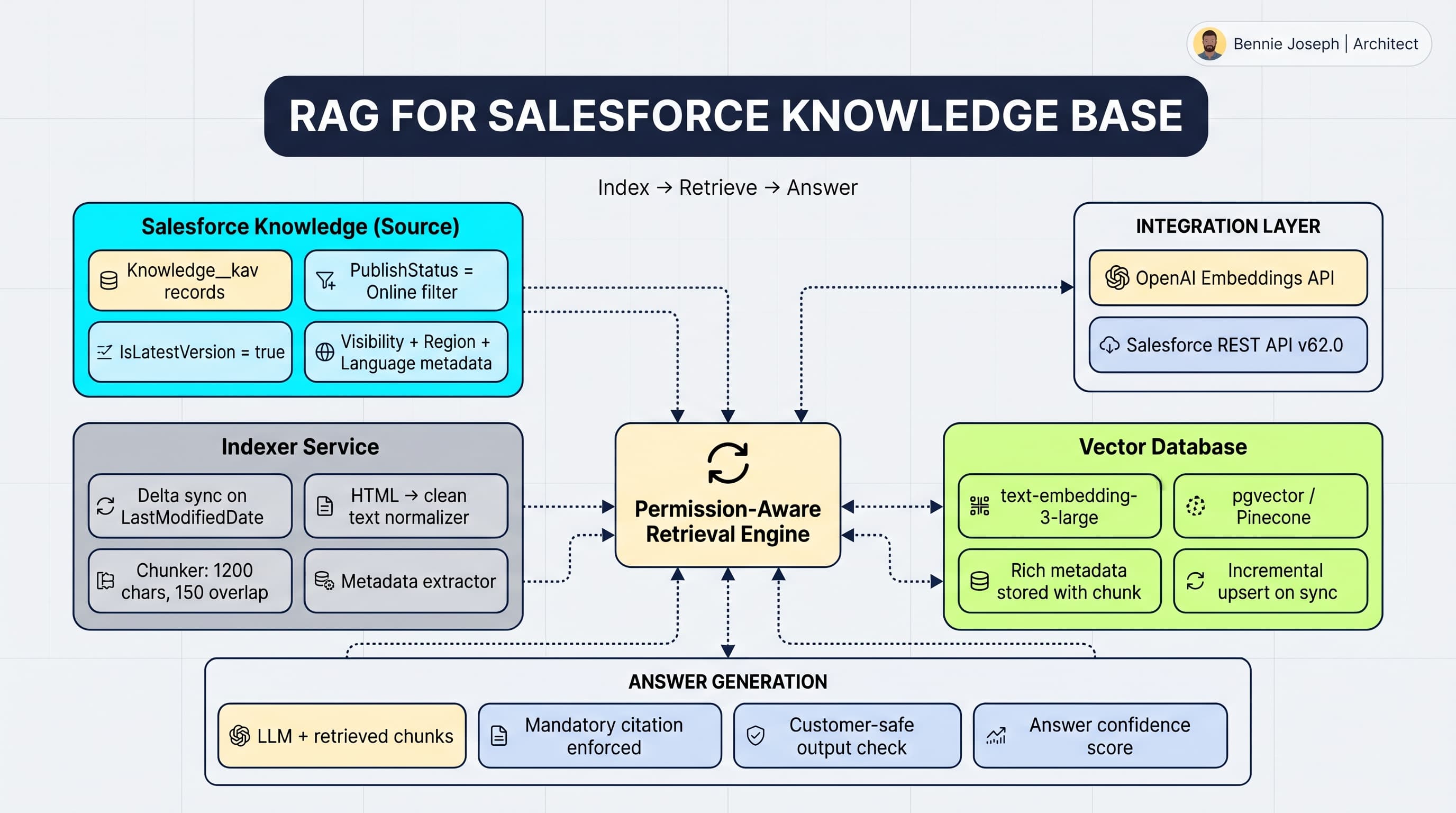
I usually design the system as five layers:
- Extraction from Salesforce Knowledge
- Normalization of article fields, HTML, metadata, and versions
- Chunking and embedding
- Permission-aware retrieval
- Grounded answer generation with citations
The biggest mistake I see is skipping layer two and four. Teams embed raw HTML, ignore visibility, then wonder why support agents get outdated policy answers.
The Core Architecture I Use
For enterprise Salesforce orgs, I prefer a separate retrieval service instead of trying to run the whole RAG pipeline inside Apex.
Apex is great for orchestration, permissions, and transactional business logic. It is not the right place to chunk thousands of articles, generate embeddings, manage vector indexes, or run semantic search. Use Salesforce as the system of record. Use an external service for indexing and retrieval.
A practical setup looks like this:
- Salesforce Knowledge stores approved articles.
- A scheduled indexer pulls changed
Knowledge__kavrecords. - The indexer normalizes article body fields into plain text.
- Chunks are embedded using an embedding model.
- Chunks are stored in a vector database with Salesforce metadata.
- The agent retrieval API receives the user context and question.
- Retrieval filters chunks by visibility metadata before semantic ranking.
- The LLM receives only eligible chunks and must cite article URLs.
I have used variations of this architecture for enterprise service teams where agents handled thousands of cases per week. In one implementation, the Knowledge Base had product support content across North America, EMEA, and APAC. The first prototype retrieved the right article but the wrong regional policy. That was enough to fail user acceptance testing. The fix was not prompt engineering. The fix was indexing region, language, channel, and data category metadata alongside every vector.
What to Extract from Salesforce Knowledge
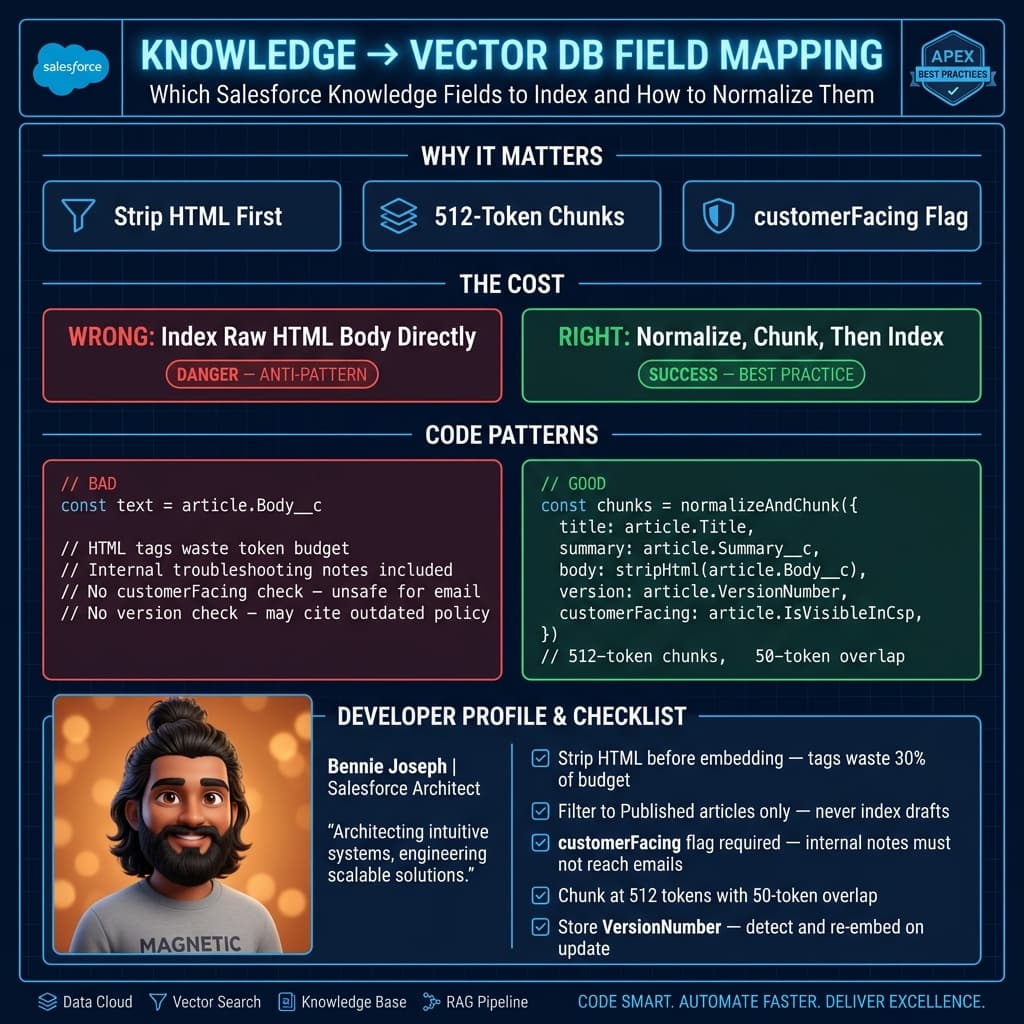
Do not only extract Title and article body.
At minimum, I index:
IdKnowledgeArticleIdArticleNumberTitleSummaryUrlNameLanguagePublishStatusIsLatestVersionLastModifiedDateLastPublishedDate- Article body fields
- Product or taxonomy fields
- Data category selections
- Channel or audience flags
- Any custom compliance fields
- Source org and environment
The distinction between Id and KnowledgeArticleId matters. Id identifies a specific article version. KnowledgeArticleId groups versions of the same logical article. If you only track KnowledgeArticleId, you can accidentally mix draft and published content. If you only track Id, you can fail to replace older chunks when a new version becomes latest.
My rule: retrieval chunks should point to the exact published article version, but sync logic should understand the article family.
A Minimal Python Indexer
This is a stripped-down version of the pattern I use. Production code needs retries, auth refresh, observability, batching, and dead-letter handling. But the shape is real.
This example:
- Pulls published latest Knowledge articles from Salesforce
- Removes HTML
- Chunks the article
- Creates embeddings
- Upserts chunks into Postgres with
pgvector - Stores Salesforce metadata for filtering later
import os
import re
import html
import requests
import psycopg
from bs4 import BeautifulSoup
from openai import OpenAI

SF_INSTANCE_URL = os.environ["SF_INSTANCE_URL"]
SF_ACCESS_TOKEN = os.environ["SF_ACCESS_TOKEN"]
DATABASE_URL = os.environ["DATABASE_URL"]

client = OpenAI(api_key=os.environ["OPENAI_API_KEY"])

ARTICLE_FIELDS = [
    "Id",
    "KnowledgeArticleId",
    "ArticleNumber",
    "Title",
    "Summary",
    "UrlName",
    "Language",
    "PublishStatus",
    "IsLatestVersion",
    "LastModifiedDate",
    "LastPublishedDate",
    "Answer__c",
    "Product__c",
    "Region__c",
    "Audience__c",
]

def salesforce_query(soql: str) -> list[dict]:
    url = f"{SF_INSTANCE_URL}/services/data/v64.0/query"
    headers = {"Authorization": f"Bearer {SF_ACCESS_TOKEN}"}
    records = []

    while url:
        response = requests.get(url, headers=headers, params={"q": soql} if "query" in url else None)
        response.raise_for_status()
        payload = response.json()

        records.extend(payload["records"])
        next_url = payload.get("nextRecordsUrl")
        url = f"{SF_INSTANCE_URL}{next_url}" if next_url else None

    return records

def clean_html(value: str | None) -> str:
    if not value:
        return ""

    soup = BeautifulSoup(value, "html.parser")

    for tag in soup(["script", "style"]):
        tag.decompose()

    text = soup.get_text(separator=" ")
    text = html.unescape(text)
    text = re.sub(r"\s+", " ", text).strip()
    return text

def chunk_text(text: str, max_chars: int = 1200, overlap: int = 150) -> list[str]:
    if len(text) <= max_chars:
        return [text]

    chunks = []
    start = 0

    while start < len(text):
        end = min(start + max_chars, len(text))
        chunk = text[start:end].strip()

        if chunk:
            chunks.append(chunk)

        if end == len(text):
            break

        start = end - overlap

    return chunks

def embed(texts: list[str]) -> list[list[float]]:
    response = client.embeddings.create(
        model="text-embedding-3-small",
        input=texts,
    )
    return [item.embedding for item in response.data]

def article_url(article: dict) -> str:
    return f"{SF_INSTANCE_URL}/lightning/r/Knowledge__kav/{article['Id']}/view"

def build_article_text(article: dict) -> str:
    title = article.get("Title") or ""
    summary = article.get("Summary") or ""
    answer = clean_html(article.get("Answer__c"))

    return f"""
Title: {title}
Summary: {summary}
Answer:
{answer}
""".strip()

def upsert_chunks(article: dict, chunks: list[str], vectors: list[list[float]]) -> None:
    metadata = {
        "sf_id": article["Id"],
        "knowledge_article_id": article["KnowledgeArticleId"],
        "article_number": article["ArticleNumber"],
        "language": article["Language"],
        "publish_status": article["PublishStatus"],
        "is_latest_version": article["IsLatestVersion"],
        "product": article.get("Product__c"),
        "region": article.get("Region__c"),
        "audience": article.get("Audience__c"),
        "url": article_url(article),
        "last_modified_date": article["LastModifiedDate"],
    }

    with psycopg.connect(DATABASE_URL) as conn:
        with conn.cursor() as cur:
            cur.execute(
                "DELETE FROM knowledge_chunks WHERE sf_article_version_id = %s",
                (article["Id"],),
            )

            for index, (chunk, vector) in enumerate(zip(chunks, vectors)):
                cur.execute(
                    """
                    INSERT INTO knowledge_chunks (
                        sf_article_version_id,
                        knowledge_article_id,
                        chunk_index,
                        title,
                        content,
                        embedding,
                        metadata
                    )
                    VALUES (%s, %s, %s, %s, %s, %s, %s)
                    """,
                    (
                        article["Id"],
                        article["KnowledgeArticleId"],
                        index,
                        article["Title"],
                        chunk,
                        vector,
                        psycopg.types.json.Jsonb(metadata),
                    ),
                )

def run_index(last_modified_after: str) -> None:
    soql = f"""
        SELECT {", ".join(ARTICLE_FIELDS)}
        FROM Knowledge__kav
        WHERE PublishStatus = 'Online'
        AND IsLatestVersion = true
        AND LastModifiedDate >= {last_modified_after}
        ORDER BY LastModifiedDate ASC
    """

    articles = salesforce_query(soql)

    for article in articles:
        text = build_article_text(article)

        if len(text) < 80:
            continue

        chunks = chunk_text(text)
        vectors = embed(chunks)
        upsert_chunks(article, chunks, vectors)

        print(f"Indexed {article['ArticleNumber']} with {len(chunks)} chunks")

if __name__ == "__main__":
    run_index("2026-05-01T00:00:00Z")
The key thing is not the embedding model. Models change. Your metadata model is harder to fix later.
If you do not store language, article version, audience, product, and URL at chunk level, you will eventually need to re-index everything. I have seen teams treat metadata as an afterthought and spend weeks rebuilding their vector store after compliance review.
Chunking Strategy: Do Not Split Like a Maniac
Chunking is where many RAG systems quietly degrade.
If chunks are too large, retrieval returns broad content that wastes context. If chunks are too small, the LLM loses the surrounding policy or procedure. Salesforce Knowledge articles often contain step-by-step instructions, warnings, tables, and conditional logic. Splitting every 300 characters can destroy the answer.
My default starting point:
- 800–1,500 characters per chunk
- 100–200 character overlap
- Keep title and summary attached to every chunk
- Preserve headings when possible
- Avoid splitting numbered procedures mid-step
- Store
chunk_indexfor citation debugging
For highly procedural content, I prefer structure-aware chunking. Parse headings, then split sections. If an article has “Symptoms,” “Cause,” and “Resolution,” those sections should not be blended unless the article is short.
In one service cloud project, support reps asked questions like “How do I reset device pairing for Product X after firmware update?” The relevant article had a short warning between two long procedures. Naive chunking retrieved only the procedure and missed the warning: “Do not reset pairing for devices under active warranty replacement.” That was a business risk. We changed chunking to keep warning blocks attached to the following procedure. Retrieval quality improved immediately.
Permission-Aware Retrieval Is Non-Negotiable
This is the part most demos skip.
A vector database does not understand Salesforce sharing unless you teach it. Once content leaves Salesforce and enters your retrieval index, Salesforce is no longer automatically enforcing visibility. That becomes your job.
There are three common patterns.
Pattern 1: Filter by Indexed Visibility Metadata
This is the most common approach.
Every chunk stores fields like:
audience = internal | partner | customerregion = NA | EMEA | APAClanguage = en_USproduct = product_family_adata_categories = [...]
At retrieval time, you apply filters before or during vector search.
This works well when visibility rules are coarse and stable. It fails when visibility depends on complex user, account, entitlement, or case-specific logic.
Pattern 2: Ask Salesforce Before Answering
In this pattern, the retrieval service finds candidate chunks, then calls Salesforce to verify whether the current user can access the underlying article.
This is safer but slower. You also need to avoid leaking titles or snippets before the permission check completes.
I use this when content visibility is dynamic or regulated.
Pattern 3: Build User-Specific or Audience-Specific Indexes
This can work for customer communities or partner portals where audiences are cleanly separated. For example, one index for internal users, one for partners, one for customers.
I do not like this pattern when permissions are highly granular. Index duplication gets expensive and operationally annoying.
Here’s my usual recommendation: start with metadata filtering, then add Salesforce verification for sensitive article groups.
Retrieval Query Design
A good retrieval request should include more than the question.
For an internal support agent, I want context like:
- User Id
- Profile or permission set group
- Business unit
- Region
- Language
- Current case product
- Current case reason
- Account segment
- Channel
- Whether customer-facing response is allowed
The retrieval service should not guess these from the prompt. Pass them explicitly.
A practical retrieval API request might look like this:
type RetrievalRequest = {
  question: string;
  userId: string;
  language: "en_US" | "fr" | "de" | "es";
  region: "NA" | "EMEA" | "APAC";
  audience: "internal" | "partner" | "customer";
  caseContext?: {
    caseId: string;
    productFamily?: string;
    reason?: string;
    entitlementLevel?: string;
  };
};

type RetrievedChunk = {
  articleId: string;
  articleNumber: string;
  title: string;
  url: string;
  chunkIndex: number;
  content: string;
  score: number;
};
Then your retrieval logic applies filters before constructing the final LLM context.
The agent prompt should also be strict:
- Answer only from retrieved chunks.
- Cite article numbers or URLs.
- Say when the Knowledge Base does not contain the answer.
- Do not merge conflicting regional policies.
- Do not expose internal-only content in customer-facing drafts.
I prefer boring prompts with strong retrieval over clever prompts with sloppy retrieval.
Sync Strategy: Freshness Beats Fancy
Knowledge articles change. Sometimes urgently.
If your RAG index updates once per week, it is not trustworthy for support operations. I usually implement incremental sync using LastModifiedDate or SystemModstamp, depending on the object and integration constraints.
The sync process needs to handle:
- New published articles
- Updated published articles
- Articles moved from draft to online
- Articles archived or removed
- Language variants
- Field changes that affect visibility
- Category changes
- Failed indexing jobs
When an article version changes, delete old chunks for that version and insert new chunks. When a new latest version supersedes an old one, make sure the old version is no longer retrieved unless you intentionally support historical lookup.
For enterprise projects, I also keep an index_runs table with:
- Start time
- End time
- Watermark
- Records processed
- Records failed
- Error payload
- Model version
- Index version
This sounds boring because it is. Boring is what lets you debug why an agent cited an outdated article during a production incident.
Real-World Example: Service Console Agent Assist
In a large Service Cloud implementation, we built an agent assist experience inside the console. The support team had thousands of Knowledge articles across multiple products. Reps were spending too much time searching, opening five tabs, and pasting partial answers into case comments.
The first business request was “Can GPT just summarize the right article?”
The real requirement was harder:
- Retrieve only published articles.
- Prefer the customer’s language.
- Respect regional product rules.
- Avoid internal escalation notes in customer replies.
- Cite the article used.
- Let agents inspect the source before sending.
- Update the index within minutes of article publication.
We indexed Knowledge articles into a vector store with metadata filters for product, region, language, and audience. In the Lightning console, the agent could ask a question from the case page. The retrieval service received case context and user context. The LLM generated a draft response with article citations, but the agent had to review before sending.
The biggest win was not automation. It was reducing search friction. Reps stopped guessing search keywords and started asking operational questions. Average handle time improved, but more importantly, answer consistency improved across regions.
The biggest lesson: the agent was only as good as the indexed Knowledge governance. Poorly written articles produced poor answers. RAG exposes content debt fast.
Operational Metrics I Actually Care About
Do not stop at “the chatbot answered.”
Track retrieval and answer quality separately.
For retrieval:
- Top-k article hit rate
- Zero-result rate
- Permission-filter rejection rate
- Average chunk score
- Duplicate article rate in top results
- Freshness lag from Salesforce publish to index availability
For generation:
- Citation coverage
- Unsupported claim rate
- Escalation rate
- User thumbs-up/down
- Agent edit distance before sending
- Cases where no answer should have been generated
I especially like tracking agent edit distance. If the AI draft is always heavily edited, either retrieval is weak, articles are poor, or the prompt is too loose.
My Baseline Recommendation
If you are starting a RAG initiative for Salesforce Knowledge, do this:
- Index only
Onlineand latest Knowledge articles first. - Store rich metadata at chunk level.
- Implement language, audience, product, and region filters.
- Add citations from day one.
- Track freshness and retrieval quality.
- Keep humans in the loop for customer-facing responses until evaluation proves reliability.
Do not start by buying a vector database and dumping content into it. Start by modeling the rules that decide whether content is eligible.
That is the difference between a demo and an enterprise-grade RAG system.
TL;DR
- A reliable rag salesforce knowledge base system starts with indexing, metadata, permissions, and freshness—not the chatbot UI.
- Store article version, language, audience, product, region, and citation data with every chunk.
- Treat Salesforce visibility as part of retrieval architecture, or your agent will eventually leak or cite the wrong content.