Salesforce Data Cloud Vector Search: Build a Semantic Case Router
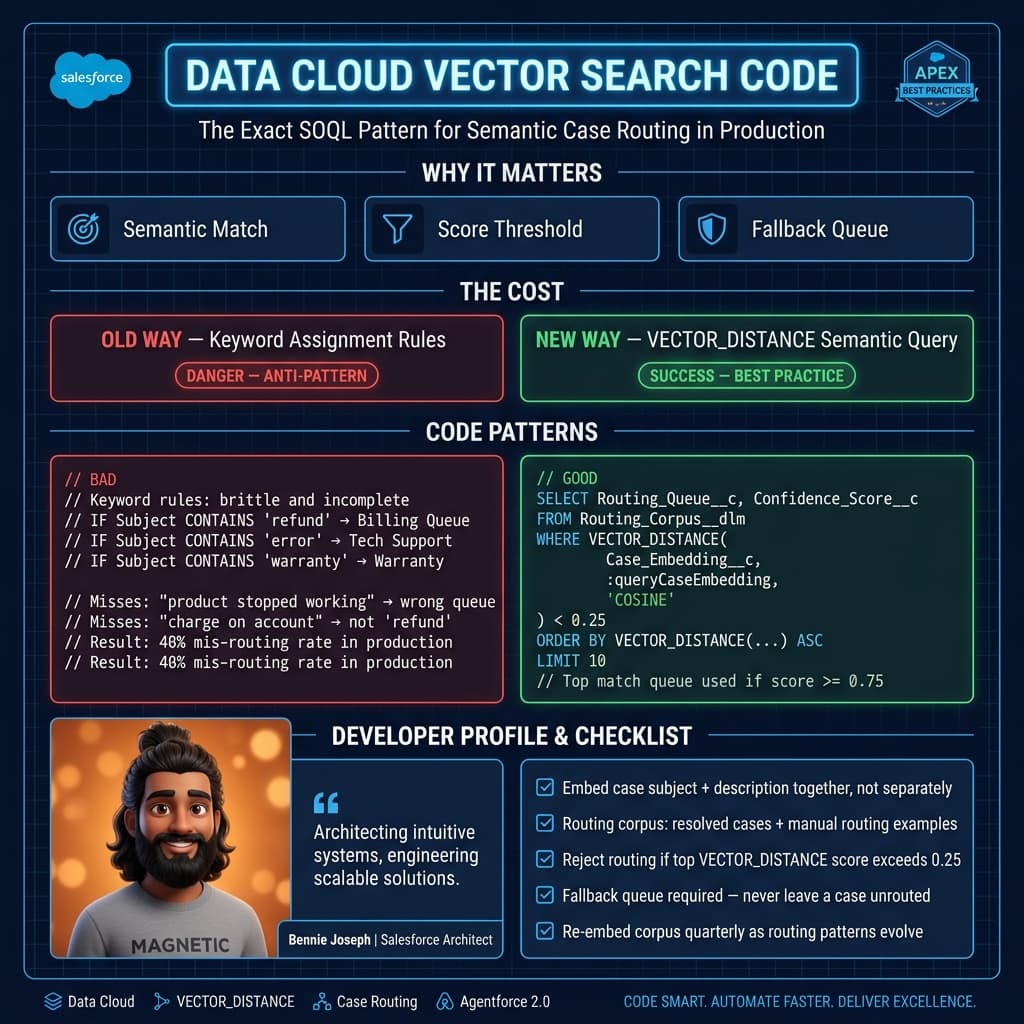
Most Salesforce case routing implementations are still glorified keyword matching.
If the subject contains “refund,” route to Billing. If the description contains “password,” route to Support Tier 1. If the product family is “Enterprise,” route to Premium Support. That works until customers write like humans instead of dropdown menus.
A customer says:
“The handheld scanner keeps dropping connection after the latest warehouse firmware update.”
Keyword routing sees “connection” and sends it to Network Support.
A good semantic router knows this belongs to the Warehouse Devices firmware queue because it resembles thousands of prior cases about scanner firmware regressions, Bluetooth instability, and warehouse device rollbacks.
That is where Salesforce Data Cloud vector search 2026 actually earns its keep. Not as a demo chatbot. Not as a slideware “AI transformation” story. As a boring, measurable routing system that reduces misroutes, lowers handle time, and gives Agentforce 2.0 better context before an agent ever opens the case.
Here’s how I build it.
The routing problem is not classification first
Here’s the unpopular take: I don’t start semantic routing with an LLM classifier.
I start with retrieval.
A classifier asks, “Which label should this case get?”
Vector search asks, “Which historical resolved cases, knowledge articles, and routing examples does this new case resemble?”
That distinction matters in enterprise Salesforce orgs because your labels are usually political. Queue names change. Teams merge. Product ownership moves. One queue handles billing for North America but not EMEA. Another queue handles hardware returns only for partner accounts.
So I prefer this pattern:
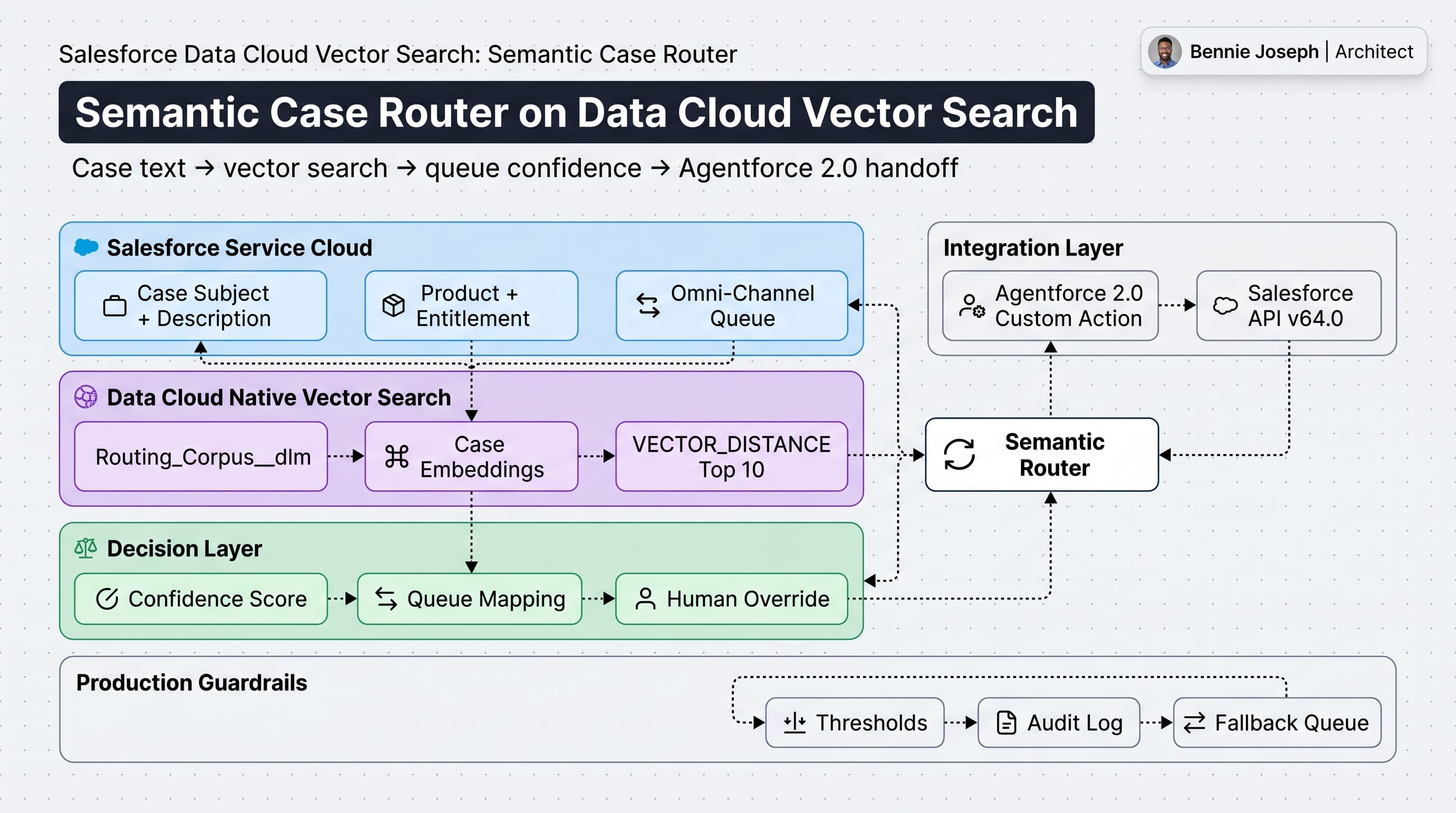
- Convert the new Case text into a semantic query.
- Search Data Cloud vector indexes against historical resolved cases and curated routing examples.
- Return the top matching examples with similarity scores.
- Map those examples to the current queue model.
- Apply confidence thresholds and business rules.
- Let Agentforce 2.0 explain or escalate the decision when confidence is low.
That gives me deterministic control where I need it and AI assistance where it helps.
Reference architecture
The architecture is simple, but the data discipline is not.
I usually create a routing corpus in Data Cloud with records from three sources:
| Source | Why it matters |
|---|---|
| Resolved Cases | Shows how real issues were handled successfully |
| Knowledge Articles | Adds product and troubleshooting language |
| Curated Routing Examples | Fixes gaps where historical routing was wrong |
The target Data Cloud object is usually something like Routing_Corpus__dlm.
Core fields:
| Field | Purpose |
|---|---|
SourceRecordId__c | Case Id, Knowledge Id, or curated example Id |
SourceType__c | Case, Knowledge, ManualExample |
RoutingText__c | Normalized text used for embedding |
QueueDeveloperName__c | Current target queue |
ProductFamily__c | Product scoping |
Language__c | Language scoping |
Region__c | Compliance and operating model scoping |
Embedding__c | Native vector field |
LastValidatedDate__c | Prevents stale routing examples |
I do not embed raw case descriptions blindly. I build a routing text field like this:
Subject: Barcode scanner disconnecting after firmware update
Product: Warehouse Handheld Scanner X9
Symptoms: Bluetooth disconnects every 5 minutes, started after firmware 8.2
Entitlement: Premium Hardware Support
Resolution Summary: Roll back firmware to 8.1 and re-pair scanner fleet
Final Queue: Warehouse_Device_Firmware_L2
That text carries the semantic signal. A raw case comment thread full of “please advise” and email signatures does not.
Apex action for Agentforce 2.0 and Flow
In production, I expose routing as an Apex invocable action.
That lets me call it from:
- Agentforce 2.0 custom actions
- Record-triggered Flow
- Omni-Channel pre-routing logic
- An admin LWC console using native state in Summer ’26
- Integration tests and backfill jobs
Below is a trimmed version of the pattern. It calls the Data Cloud Query API through a Named Credential and returns the recommended queue plus confidence.
public with sharing class SemanticCaseRouterAction {
    public class Request {
        @InvocableVariable(required=true)
        public Id caseId;
    }

    public class Response {
        @InvocableVariable
        public Id caseId;

        @InvocableVariable
        public String recommendedQueueDeveloperName;

        @InvocableVariable
        public Decimal confidence;

        @InvocableVariable
        public String explanation;

        @InvocableVariable
        public Boolean shouldAutoRoute;
    }

    private class DataCloudRow {
        public String SourceRecordId__c;
        public String QueueDeveloperName__c;
        public String SourceType__c;
        public Decimal similarity_score;
    }

    @InvocableMethod(
        label='Route Case with Data Cloud Vector Search'
        description='Uses Salesforce Data Cloud vector search to recommend a support queue.'
    )
    public static List<Response> routeCases(List<Request> requests) {
        Set<Id> caseIds = new Set<Id>();
        for (Request req : requests) {
            if (req != null && req.caseId != null) {
                caseIds.add(req.caseId);
            }
        }

        Map<Id, Case> casesById = new Map<Id, Case>([
            SELECT Id, Subject, Description, Product_Family__c, SuppliedEmail,
                   Account.Region__c, Entitlement.Name
            FROM Case
            WHERE Id IN :caseIds
        ]);

        List<Response> output = new List<Response>();

        for (Request req : requests) {
            Case c = casesById.get(req.caseId);
            Response res = new Response();
            res.caseId = req.caseId;

            if (c == null) {
                res.explanation = 'Case not found.';
                res.shouldAutoRoute = false;
                output.add(res);
                continue;
            }

            String routingText = buildRoutingText(c);
            List<DataCloudRow> matches = searchRoutingCorpus(
                routingText,
                c.Product_Family__c,
                c.Account == null ? null : c.Account.Region__c
            );

            RouteDecision decision = score(matches);

            res.recommendedQueueDeveloperName = decision.queueDeveloperName;
            res.confidence = decision.confidence;
            res.shouldAutoRoute = decision.confidence >= 0.82;
            res.explanation = decision.explanation;

            output.add(res);
        }

        return output;
    }

    private static String buildRoutingText(Case c) {
        List<String> parts = new List<String>{
            'Subject: ' + nullToBlank(c.Subject),
            'Description: ' + nullToBlank(c.Description),
            'Product: ' + nullToBlank(c.Product_Family__c),
            'Entitlement: ' + (c.Entitlement == null ? '' : nullToBlank(c.Entitlement.Name))
        };

        return String.join(parts, '\n').left(12000);
    }

    private static List<DataCloudRow> searchRoutingCorpus(
        String routingText,
        String productFamily,
        String region
    ) {
        String safeText = escapeSqlLiteral(routingText);
        String safeProduct = escapeSqlLiteral(productFamily);
        String safeRegion = escapeSqlLiteral(region);

        String sql =
            'SELECT SourceRecordId__c, QueueDeveloperName__c, SourceType__c, ' +
            '       VECTOR_SIMILARITY(Embedding__c, VECTOR_EMBED(\'' + safeText + '\')) similarity_score ' +
            'FROM Routing_Corpus__dlm ' +
            'WHERE ProductFamily__c = \'' + safeProduct + '\' ' +
            'AND Region__c = \'' + safeRegion + '\' ' +
            'ORDER BY similarity_score DESC ' +
            'LIMIT 10';

        HttpRequest req = new HttpRequest();
        req.setEndpoint('callout:DataCloud/services/data/v64.0/ssot/query-sql');
        req.setMethod('POST');
        req.setHeader('Content-Type', 'application/json');
        req.setBody(JSON.serialize(new Map<String, Object>{
            'sql' => sql
        }));

        Http http = new Http();
        HttpResponse response = http.send(req);

        if (response.getStatusCode() >= 300) {
            throw new CalloutException(
                'Data Cloud vector search failed: ' +
                response.getStatusCode() + ' ' + response.getBody()
            );
        }

        Map<String, Object> payload =
            (Map<String, Object>) JSON.deserializeUntyped(response.getBody());

        List<Object> rows = (List<Object>) payload.get('data');
        List<DataCloudRow> results = new List<DataCloudRow>();

        if (rows == null) {
            return results;
        }

        for (Object rowObj : rows) {
            Map<String, Object> row = (Map<String, Object>) rowObj;

            DataCloudRow item = new DataCloudRow();
            item.SourceRecordId__c = (String) row.get('SourceRecordId__c');
            item.QueueDeveloperName__c = (String) row.get('QueueDeveloperName__c');
            item.SourceType__c = (String) row.get('SourceType__c');
            item.similarity_score = Decimal.valueOf(String.valueOf(row.get('similarity_score')));

            results.add(item);
        }

        return results;
    }

    private class RouteDecision {
        String queueDeveloperName;
        Decimal confidence;
        String explanation;
    }

    private static RouteDecision score(List<DataCloudRow> matches) {
        RouteDecision decision = new RouteDecision();

        if (matches.isEmpty()) {
            decision.queueDeveloperName = 'General_Support_Triage';
            decision.confidence = 0;
            decision.explanation = 'No semantic matches found. Routed to fallback triage.';
            return decision;
        }

        Map<String, Decimal> queueScores = new Map<String, Decimal>();

        for (DataCloudRow match : matches) {
            Decimal existing = queueScores.containsKey(match.QueueDeveloperName__c)
                ? queueScores.get(match.QueueDeveloperName__c)
                : 0;

            Decimal sourceWeight = match.SourceType__c == 'ManualExample' ? 1.15 : 1;
            queueScores.put(
                match.QueueDeveloperName__c,
                existing + (match.similarity_score * sourceWeight)
            );
        }

        String bestQueue;
        Decimal bestScore = -1;
        Decimal totalScore = 0;

        for (String queueName : queueScores.keySet()) {
            Decimal score = queueScores.get(queueName);
            totalScore += score;

            if (score > bestScore) {
                bestScore = score;
                bestQueue = queueName;
            }
        }

        decision.queueDeveloperName = bestQueue;
        decision.confidence = totalScore == 0 ? 0 : (bestScore / totalScore).setScale(3);
        decision.explanation =
            'Recommended ' + bestQueue +
            ' from ' + matches.size() +
            ' semantic matches. Confidence=' + String.valueOf(decision.confidence);

        return decision;
    }

    private static String nullToBlank(String value) {
        return value == null ? '' : value;
    }

    private static String escapeSqlLiteral(String value) {
        return String.escapeSingleQuotes(value == null ? '' : value);
    }
}
A few notes from hard-earned experience:
- Use a Named Credential. Do not hardcode tokens.
- Keep the generated routing text short enough to be meaningful.
- Filter before vector ranking when possible: region, product family, language, support tier.
- Do not auto-route at 51% confidence because an executive saw a cool demo.
- Store the decision, scores, and top matches for audit.
The exact vector SQL functions may vary based on how your Data Cloud vector index and query layer are configured, but the production shape is the same: normalized text in, nearest routing examples out, queue confidence calculated in Salesforce.
Why Data Cloud is the right place for this
I’ve seen teams build this outside Salesforce with a separate vector database, a Python API, and a nightly ETL job.
That can work. I’ve built that too.
But for Salesforce-native service operations, Data Cloud has a few advantages in 2026:
Real-time unification matters
Routing is not just about the case description.
The correct queue may depend on:
- Account segment
- Product entitlement
- Installed asset
- Region
- Recent purchases
- Known incidents
- Contract language
- Partner ownership
Data Cloud’s real-time unification means I can bring those signals into the routing decision without building another fragile replication layer.
Native vector search reduces integration drag
The fewer moving parts, the better.
A semantic router is operational infrastructure. If it fails, cases pile up in triage. Keeping the vector corpus, identity resolution, segmentation, and retrieval inside the Salesforce ecosystem reduces the amount of custom plumbing I have to defend later.
Agentforce 2.0 gets better grounding
Agentforce 2.0, with Atlas Reasoning Engine v2, is much more useful when it receives retrieved evidence instead of vague instructions.
Bad instruction:
“Route this case to the best queue.”
Better instruction:
“Here are the top 10 similar resolved cases, their final queues, product families, and confidence scores. Decide whether to accept the recommendation or escalate to triage.”
That is the difference between AI theater and operational AI.
Real enterprise example
On one enterprise project, the client had a global hardware support operation with roughly 1.8 million historical cases, 42 active support queues, and several regional routing exceptions.
Their old routing model was a stack of assignment rules, Flow decisions, and queue-specific keyword checks. Nobody fully owned it. Everyone complained about it.
The biggest pain points:
- Firmware cases went to general hardware support.
- Return authorization cases went to billing.
- Partner-submitted cases bypassed premium support rules.
- Spanish and Portuguese cases were routed inconsistently.
- Agents manually transferred cases multiple times before work started.
We built a semantic routing corpus from:
- 24 months of closed cases with successful resolution codes
- Knowledge articles with high helpfulness scores
- Manually curated examples from senior support leads
- Queue mapping metadata maintained by operations admins
We did not use every historical case. That would have been lazy. We filtered out cases with more than two transfers, missing resolution summaries, or low customer satisfaction after closure.
The first pilot covered 9 queues in the hardware support domain.
Results after stabilization:
| Metric | Before | After |
|---|---|---|
| First-touch misroute rate | 18.7% | 6.4% |
| Median time to assignment | 42 minutes | 11 minutes |
| Manual queue transfers per 1,000 cases | 213 | 77 |
| Agent trust score from survey | 5.9/10 | 8.1/10 |
The biggest win was not the model. It was the feedback loop.
Every time an agent changed the queue, we captured:
- Original recommendation
- Similarity score
- Final queue
- Agent reason
- Whether the case was later transferred again
That feedback became curated routing examples in Data Cloud after review. The router got better because operations owned the corpus, not because a model magically learned from production chaos.
Thresholds are where architects earn their money
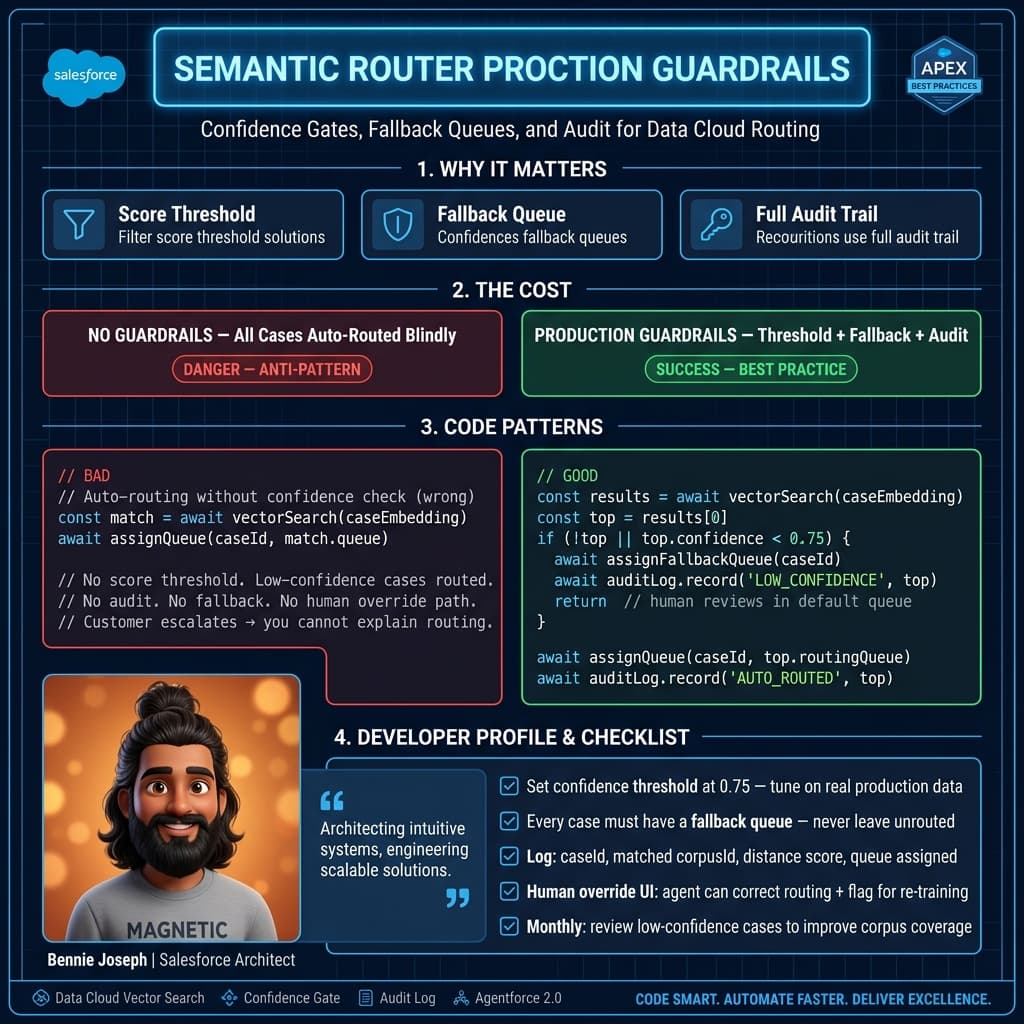
The vector search part is easy compared with deciding when to trust it.
I usually use three bands:
| Confidence | Action |
|---|---|
>= 0.82 | Auto-route |
0.60 - 0.819 | Recommend route, require human or Agentforce confirmation |
< 0.60 | Send to triage |
Do not copy those numbers blindly. Measure your own distribution.
Also, confidence should not be just the top similarity score. I care about agreement across the top results.
If the top 10 matches all point to the same queue, I trust that more.
If match 1 says Firmware, match 2 says Billing, match 3 says Returns, and match 4 says Network Support, the case is ambiguous even if match 1 has a high score.
That’s why the Apex example aggregates scores by queue instead of taking the first result.
Where Agentforce 2.0 fits
I would not let an LLM own the routing decision by default.
I use Agentforce 2.0 for the reasoning step around the retrieved evidence.
Good use cases:
- Explain why a case was routed to a queue.
- Detect missing fields before routing.
- Ask a clarifying question in a self-service channel.
- Escalate ambiguous cases to triage.
- Summarize the top matching historical cases for the agent.
Poor use cases:
- Free-form queue selection without retrieved examples.
- Ignoring entitlement and region rules.
- Replacing queue metadata with prompt instructions.
- Making irreversible routing decisions with no audit trail.
If I need model-based summarization or classification outside Salesforce, I use current models: claude-sonnet-4-7, gpt-5.5, or gemini-3.1-pro, depending on latency, cost, and data boundary requirements. But for routing inside Salesforce, I prefer retrieval plus deterministic scoring first.
Operational checklist
Before shipping this to production, I want these controls in place:
1. Routing decision object
Create a custom object like Case_Routing_Decision__c.
Store:
- Case
- Recommended queue
- Confidence
- Top match IDs
- Auto-routed flag
- Final queue
- Override reason
- Router version
If you cannot audit it, you cannot improve it.
2. Queue mapping metadata
Do not hardcode queue names in Apex.
Use custom metadata:
Routing_Queue_Map__mdt
- SemanticLabel__c
- QueueDeveloperName__c
- ProductFamily__c
- Region__c
- IsActive__c
- MinimumConfidence__c
Support operations should be able to change queue mappings without a deployment.
3. Corpus quality review
Bad historical cases create bad routing.
Exclude:
- Cases with multiple transfers
- Cases reopened after closure
- Cases with vague resolution summaries
- Cases closed by automation without validation
- Outlier queues with fewer than a minimum number of examples
4. Fallback path
Every semantic router needs a boring fallback.
Mine is usually:
- Product-specific triage queue if product is known.
- Region-specific triage queue if region is known.
- Global support triage if nothing else is reliable.
Never fail closed. A case should still get assigned if vector search is unavailable.
5. Admin visibility
I like a small LWC admin console that shows:
- Case text used for routing
- Top semantic matches
- Score by queue
- Final decision
- Override history
With LWC native state support in Summer ’26, this kind of console is less painful than it used to be. Keep it simple. Admins do not need a vector database UI. They need to know why a case went to the wrong team and how to fix the corpus.
The pattern scales beyond cases
Once this works for Case routing, the same pattern applies to:
- Lead routing by semantic buying intent
- Partner request classification
- Field service work order dispatch
- Knowledge article recommendation
- Complaint categorization
- Internal IT ticket routing
The implementation details change, but the architecture stays consistent:
Retrieve similar examples. Score the business outcome. Apply deterministic rules. Use Agentforce 2.0 for explanation and ambiguous decisions.
That is the practical way to use Salesforce Data Cloud vector search in 2026.
Not as a magic brain.
As a searchable memory layer for enterprise operations.
TL;DR
- Use Data Cloud vector search to retrieve similar resolved cases and curated examples before deciding a queue.
- Keep routing deterministic: confidence thresholds, metadata mappings, audit records, and fallback queues.
- Let Agentforce 2.0 explain and handle ambiguity, not blindly own production case routing.