Salesforce Headless 360: The Entire Platform Is Now an API
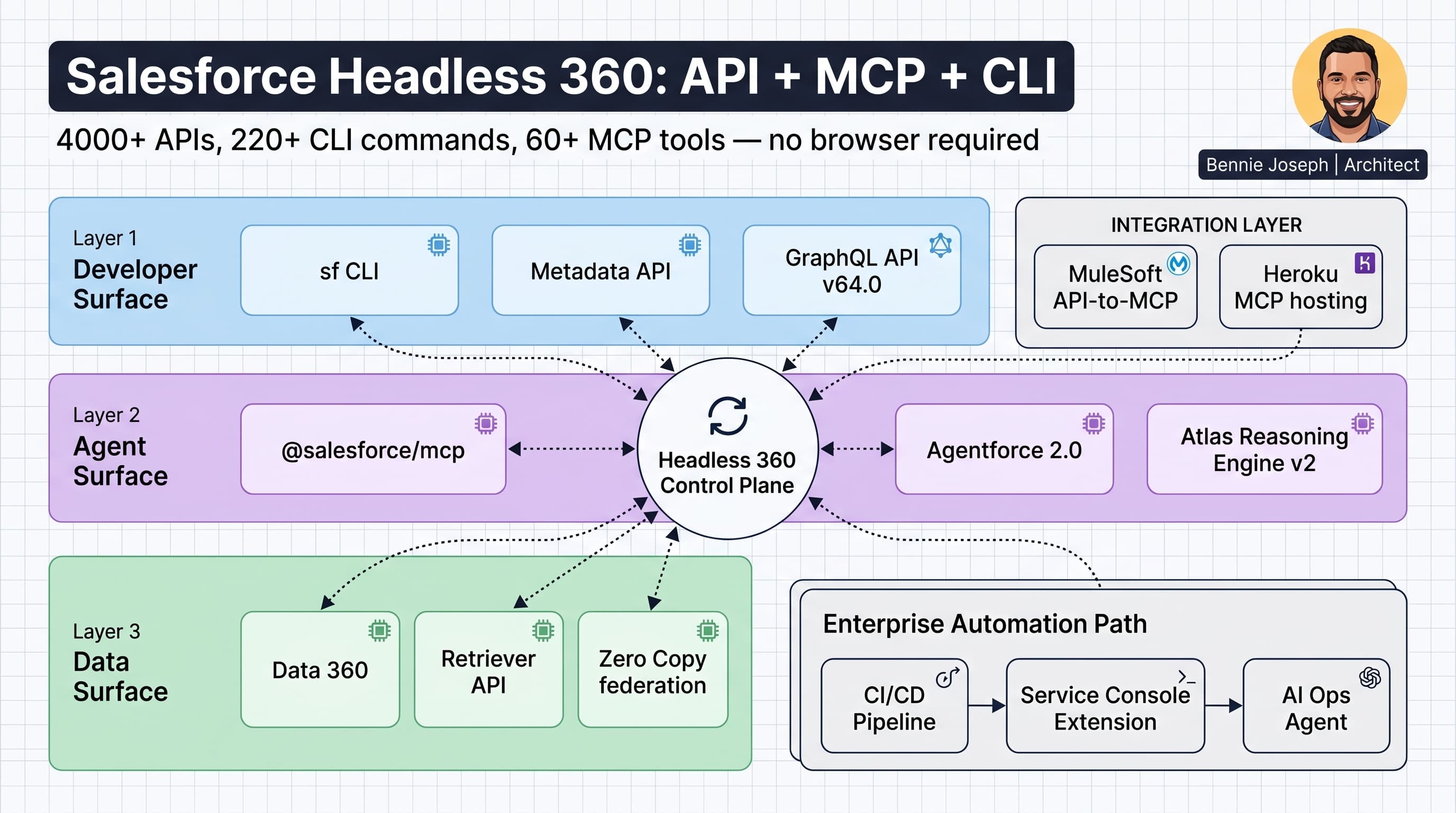
Salesforce Headless 360 is the cleanest signal Salesforce has given architects in years: the browser is no longer the primary interface to the platform.
That does not mean the UI is dead. It means the UI is now one client among many.
The platform is becoming a programmable control plane: API, MCP, CLI, metadata, agents, retrievers, GraphQL, Data 360, and CI/CD. If your delivery model still depends on humans clicking through Setup as the source of truth, you are building on the wrong abstraction.
The keyword phrase is ugly, but the concept is not: salesforce headless 360 api mcp cli is the new operating model for enterprise Salesforce.
I care about this because I have spent too many enterprise programs watching teams automate around Salesforce instead of through Salesforce. Selenium scripts clicking Setup. Release managers manually validating profiles. Integration teams building brittle ETL jobs because nobody exposed a proper API boundary. Admins copying agent instructions between sandboxes. That model does not survive Agentforce 2.0, Data 360 federation, or serious enterprise AI.
Headless 360 changes the default question from:
“Where do I click?”
to:
“What API, MCP tool, CLI command, or metadata artifact owns this capability?”
That is a better question.
What Salesforce Headless 360 Actually Means
Headless 360, announced at TDX April 2026, is Salesforce positioning the entire platform as API + MCP + CLI.
The headline numbers matter:
- 4000+ platform APIs
- 220+ Salesforce CLI commands
- 60+ MCP tools through
@salesforce/mcp - Agentforce DX support for agent generation, preview, sessions, and teardown
- MuleSoft API-to-MCP for exposing enterprise APIs as agent tools
- Heroku MCP hosting
- AgentExchange MCP marketplace
Here’s the practical translation:
| Layer | Headless Surface | What I Use It For |
|---|---|---|
| Data | REST, GraphQL API v64.0, Bulk API, Conditional Composite API | CRUD, query, write, high-volume sync |
| Metadata | Metadata API, Source Tracking, sf CLI | deployments, org shape, CI/CD |
| AI agents | Agentforce 2.0, Agent Script, AiAuthoringBundle, MCP | agent build, test, orchestration |
| External systems | MuleSoft API-to-MCP, External Services, Named Credentials | controlled tool access |
| Data 360 | Retriever API, vector search, Federated Grounding, Zero Copy | grounding, retrieval, unified data access |
| DevOps | sf CLI, GitHub Actions, scratch orgs, package automation | repeatable delivery |
| Custom apps | LWC, Apex REST, GraphQL, Platform Events | composable user and system experiences |
The unpopular take: this is not “just more APIs.” Salesforce has had APIs forever. Headless 360 is different because Salesforce is packaging API, CLI, and MCP as first-class platform surfaces, not escape hatches.
That matters for AI agents.
Agents cannot click around Setup reliably. They need typed tools, scoped permissions, metadata-aware operations, retrievers, and auditable execution. MCP gives agents a way to interact with Salesforce capabilities as tools. CLI gives delivery teams a repeatable automation surface. APIs give external systems a stable contract.
That combination is the architecture shift.
The Four Headless Surfaces I Actually Care About
I split Headless 360 into four surfaces when I’m designing enterprise Salesforce architecture.
1. API Surface
This is the traditional but expanded layer: REST, GraphQL API v64.0, Composite, Bulk, Pub/Sub, Tooling, Metadata, and domain-specific APIs.
GraphQL matters more now because it is GA with full CRUD support in Summer ’26. I’m using it where the client needs shaped data and fewer round trips. I still use REST and Composite when the integration contract needs explicit transaction steps.
Conditional Composite API is also underrated. On large integration programs, reducing API call volume by 40–60% is not a nice-to-have. It is the difference between clean scale and limit-driven firefighting.
2. CLI Surface
The sf CLI is no longer just a developer convenience. It is an enterprise automation interface.
I use it for:
- environment provisioning
- source deploys
- package operations
- org validation
- test execution
- Agentforce DX commands
- metadata inspection
- CI/CD automation
Summer ’26 also includes the Salesforce CLI credential security overhaul. Credentials are redacted in outputs, and separate commands are required to view sensitive details. That breaks some sloppy pipelines, and I’m fine with that. If your pipeline depended on credentials leaking into logs, the pipeline was already broken.
3. MCP Surface
The Salesforce MCP package, @salesforce/mcp, is where things get interesting.
MCP turns platform capabilities into discoverable tools for agents and developer assistants. Salesforce now has 60+ MCP tools and 30+ coding skills available for Enterprise Edition and above.
For me, MCP is not a toy for chatbots. It is a controlled execution layer.
A developer assistant can inspect metadata. An Agentforce 2.0 agent can call approved tools. A support operations agent can query cases, inspect entitlement data, and generate recommended actions without being given broad database access.
MCP is the bridge between AI reasoning and Salesforce execution.
4. Agentforce Surface
Agentforce 2.0 with Atlas Reasoning Engine v2 is the agent runtime layer. The new Agentforce Builder uses Agent Script language with .agent files and the AiAuthoringBundle metadata type.
This is where Headless 360 becomes real for delivery teams. Agents should be versioned, reviewed, linted, tested, deployed, and rolled back like everything else.
If agent behavior only exists in a browser configuration screen, you do not have enterprise governance. You have vibes with admin permissions.
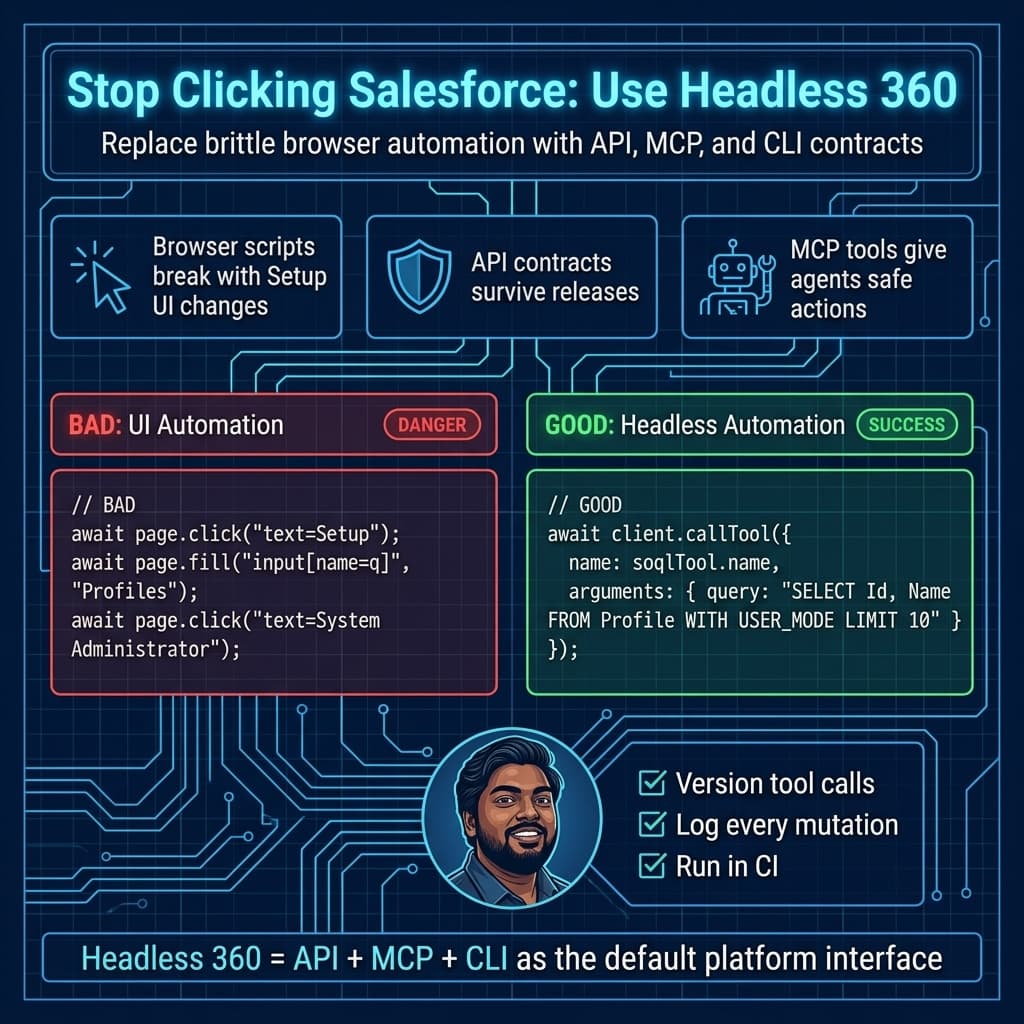
A Real Enterprise Example: Replacing ClickOps With Headless Delivery
On a large enterprise service transformation program, we had a familiar mess.
The client had multiple Salesforce orgs, a heavy Service Cloud implementation, middleware integrations, external entitlement systems, and separate teams managing release operations. Admins were still doing too much by hand:
- validating queue configuration in Setup
- checking profile and permission set assignments manually
- moving configuration between sandboxes through a mix of change sets and scripts
- testing case routing by creating records in the UI
- manually inspecting integration payload failures
The result was predictable: release weekends were stressful, knowledge lived in people’s heads, and nobody trusted the lower environments.
The fix was not “build a giant framework.” The fix was turning Salesforce into a headless platform.
We moved key operational workflows into:
sfCLI-based deployment validation- metadata-backed permission set management
- Apex REST endpoints for controlled internal operations
- GraphQL API reads for support dashboards
- Platform Events for integration observability
- MCP tools for developer and support assistant workflows
- Agentforce 2.0 for guided support actions, grounded in Data 360 where needed
The biggest win was psychological. Teams stopped asking admins to “check Salesforce” and started asking for repeatable commands, APIs, and tool contracts.
That is the Headless 360 mindset.
A TypeScript Example: Discover Salesforce MCP Tools and Query Safely
I do not hardcode MCP tool names unless the package version and contract are pinned. Tool names can vary as packages evolve, so I prefer discovery and explicit selection.
Here is a simple TypeScript script that connects to Salesforce MCP through stdio, discovers a SOQL-capable tool, and runs a user-mode query.
import { Client } from "@modelcontextprotocol/sdk/client/index.js";
import { StdioClientTransport } from "@modelcontextprotocol/sdk/client/stdio.js";

type McpTool = {
  name: string;
  description?: string;
};

const ORG_ALIAS = process.env.SF_ORG_ALIAS ?? "uat-service";
const QUERY = `
  SELECT Id, CaseNumber, Subject, Status, Priority
  FROM Case
  WHERE Status != 'Closed'
  WITH USER_MODE
  LIMIT 25
`;

async function main() {
  const transport = new StdioClientTransport({
    command: "npx",
    args: ["-y", "@salesforce/mcp", "--org-alias", ORG_ALIAS]
  });

  const client = new Client(
    {
      name: "headless-360-case-audit",
      version: "1.0.0"
    },
    {
      capabilities: {}
    }
  );

  await client.connect(transport);

  const toolResponse = await client.listTools();
  const tools = toolResponse.tools as McpTool[];

  const soqlTool = tools.find((tool) =>
    /soql|query/i.test(`${tool.name} ${tool.description ?? ""}`)
  );

  if (!soqlTool) {
    throw new Error(
      `No SOQL-capable MCP tool found for org alias ${ORG_ALIAS}. ` +
      `Available tools: ${tools.map((tool) => tool.name).join(", ")}`
    );
  }

  const result = await client.callTool({
    name: soqlTool.name,
    arguments: {
      query: QUERY
    }
  });

  console.log(JSON.stringify(result, null, 2));

  await client.close();
}

main().catch((error) => {
  console.error(error);
  process.exit(1);
});
This pattern is boring on purpose.
I want the agent or automation process to discover tools, select a tool based on capability, execute a scoped operation, and log the output. I do not want a magical autonomous agent with broad org access improvising against production.
Notice the WITH USER_MODE clause. Salesforce API v64.0 is current in Summer ’26, and v67.0 is next with stronger user-mode defaults across SOQL, DML, and Database methods. I still prefer being explicit in code I expect humans to maintain.
Apex Still Matters in a Headless World
Headless does not mean “no Apex.”
It means Apex becomes a clean domain boundary. I use Apex when Salesforce needs to enforce business rules close to the data, expose controlled operations, or wrap multi-step platform behavior behind an intentional API.
Here is an Apex REST endpoint I would actually ship as part of a headless service operations layer. It escalates a Case while respecting sharing and user-mode data access.
@RestResource(urlMapping='/headless/v1/case-escalations/*')
global with sharing class CaseEscalationApi {
    global class EscalationRequest {
        public Id caseId;
        public String reason;
    }

    global class EscalationResponse {
        public Id caseId;
        public String status;
        public String priority;
        public String message;
    }

    @HttpPost
    global static EscalationResponse escalate() {
        RestRequest request = RestContext.request;

        EscalationRequest payload = (EscalationRequest) JSON.deserialize(
            request.requestBody.toString(),
            EscalationRequest.class
        );

        if (payload == null || payload.caseId == null) {
            throw new RestException('caseId is required.');
        }

        Case targetCase = [
            SELECT Id, Status, Priority, Escalation_Reason__c
            FROM Case
            WHERE Id = :payload.caseId
            WITH USER_MODE
            LIMIT 1
        ];

        if (targetCase.Status == 'Closed') {
            throw new RestException('Closed cases cannot be escalated.');
        }

        targetCase.Priority = 'High';
        targetCase.Escalation_Reason__c = payload.reason;

        Database.update(targetCase, AccessLevel.USER_MODE);

        EscalationResponse response = new EscalationResponse();
        response.caseId = targetCase.Id;
        response.status = targetCase.Status;
        response.priority = targetCase.Priority;
        response.message = 'Case escalation accepted.';

        return response;
    }

    global class RestException extends Exception {}
}
This is the kind of Apex I like: small, intentional, permission-aware, and easy to call from an integration, an Agentforce action, an internal tool, or a test harness.
Do not expose raw object operations everywhere and call that architecture. Headless does not mean careless.
Security Is the Architecture, Not a Checkbox
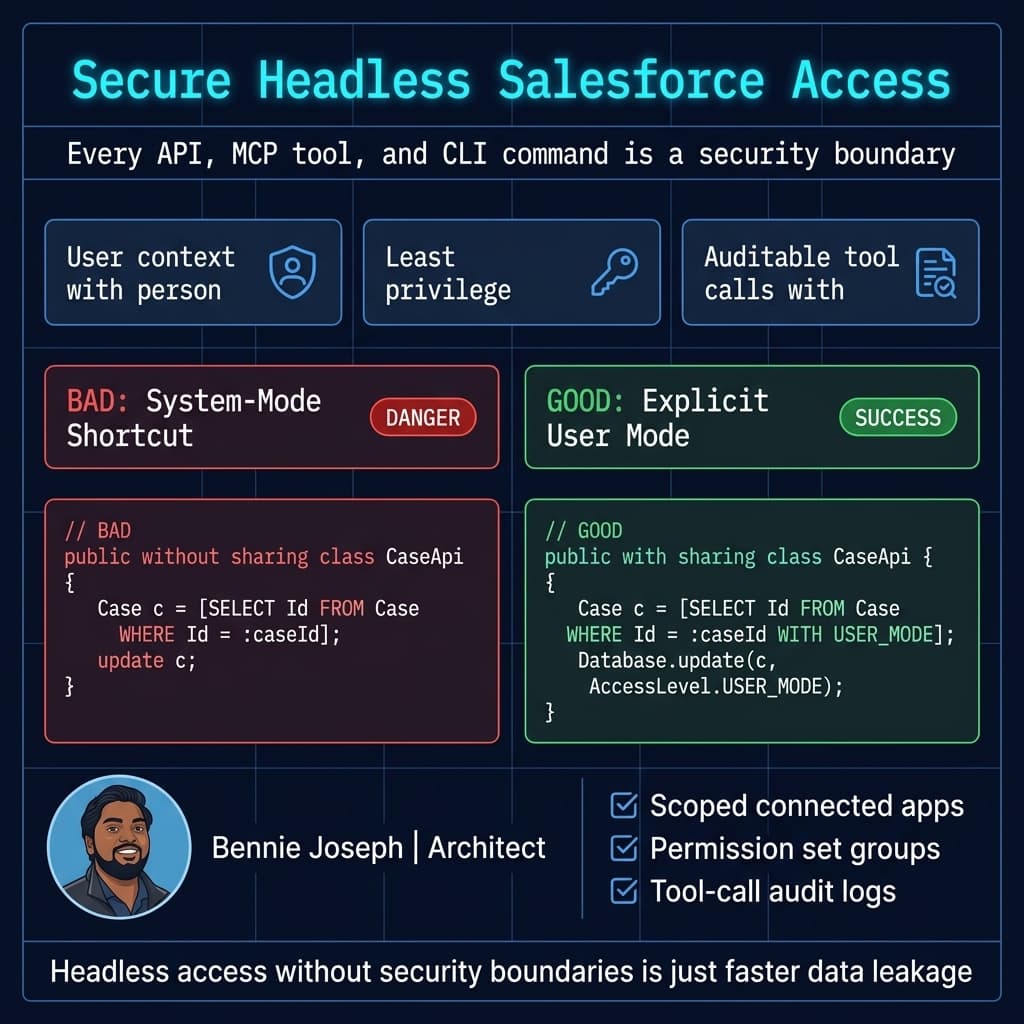
Headless 360 makes security more important, not less.
When the UI is not the only access point, every surface becomes part of your threat model:
- REST API access
- GraphQL API access
- MCP tools
- CLI auth
- connected apps
- named credentials
- agent actions
- external retrievers
- Data 360 grounding
- event streams
- CI/CD secrets
Here’s my baseline:
Use least-privilege connected apps
Do not give one integration user god-mode access to the org. Create scoped connected apps and permission sets based on the operation.
Prefer permission sets over profile sprawl
Profiles should not be your main entitlement model. Permission sets and permission set groups are easier to version, review, and reason about.
Treat MCP tools like production APIs
If an MCP tool can mutate Salesforce data, it needs the same governance as an API endpoint: authentication, authorization, logging, versioning, monitoring, and rollback strategy.
Log agent tool calls
Agentforce 2.0 is powerful, but I want observability around tool selection, input payloads, output payloads, failed reasoning paths, and user context.
Use user mode deliberately
WITH USER_MODE and Database.update(record, AccessLevel.USER_MODE) are not decorative. They tell future maintainers that this code is designed to respect user permissions.
Where GraphQL Fits
GraphQL API v64.0 is now one of my preferred options for client-driven Salesforce experiences.
I use it when:
- the client needs multiple related records
- over-fetching is becoming a performance problem
- the UI is not standard Salesforce UI
- a mobile or partner app needs shaped payloads
- a dashboard needs flexible reads
- CRUD through GraphQL simplifies integration code
I do not use GraphQL everywhere. If an integration is command-oriented, I prefer a REST endpoint or Composite flow. If I need high-volume data loading, Bulk API still wins. If I need event-driven integration, Pub/Sub API or Platform Events are a better fit.
Good architecture is not “GraphQL everything.” It is choosing the right headless surface for the job.
Where LWC Native State Fits
LWC native state management being GA in Summer ’26 matters because headless does not remove the need for great UI. It changes how UI gets its data.
A modern LWC should not become a dumping ground for business logic. I want LWC components consuming clean API contracts, GraphQL queries, Apex facades, and event streams.
With native state management, I can keep client state predictable without dragging in unnecessary patterns. For internal Salesforce apps, that is a big win.
The model I like:
- Apex or GraphQL owns data access
- LWC owns presentation and client interaction
- Platform Events own async updates
- Agentforce owns guided reasoning and action recommendations
- Data 360 owns unified grounding where external and Salesforce data meet
That separation is what makes headless maintainable.
How Agentforce 2.0 Changes the Delivery Model
Agentforce 2.0 is not just another automation feature. It changes how Salesforce teams package business behavior.
With Agent Script language and .agent files, agents can move closer to source-driven development. The AiAuthoringBundle metadata type makes agent configuration part of the deployment conversation.
That is exactly where it belongs.
I want agent changes to go through:
- Git pull requests
- environment promotion
- automated validation
- test sessions
- security review
- production monitoring
Agentforce DX gives us CLI commands for generating specs, previewing agents, running sessions, and ending sessions. Combined with MCP, this means agents can be built and tested in a headless workflow instead of treated like a mysterious UI artifact.
Here’s the unpopular take: if your agent cannot be tested outside a polished demo path, it is not production-ready.
Data 360 and Headless Grounding
Data 360 is the grounding layer for many enterprise AI use cases.
The important pieces:
- Zero Copy federation with Snowflake and BigQuery
- Federated Grounding
- native vector search
- Unified Catalog
- Retriever API for unstructured data
This matters because agents need context, but copying every enterprise dataset into Salesforce is not always the right answer.
In one enterprise support architecture, we had Salesforce Cases, entitlement data from an external contract platform, product telemetry in a warehouse, and policy PDFs in a document repository. The answer was not to jam all of that into custom objects.
The better model was:
- Salesforce remained the system of engagement
- Data 360 provided unified access and grounding
- Retriever API handled unstructured support content
- Agentforce 2.0 handled guided support workflows
- MCP tools exposed controlled actions
- Apex REST handled sensitive domain operations
That is a Headless 360 architecture: composable, governed, and API-first.
What I Would Not Do
Headless 360 will also create bad architecture if teams get lazy.
I would not:
- expose every object directly to every system
- let agents mutate production data without tool governance
- use one integration user for everything
- replace all Apex with middleware
- replace all middleware with Apex
- assume GraphQL is always better than REST
- let CLI scripts become undocumented tribal knowledge
- allow MCP tools with broad permissions and no audit trail
- treat Data 360 grounding as a substitute for data governance
The browser was never the only problem. The real problem was unowned boundaries.
Headless 360 gives us better surfaces. Architects still need to design the contracts.
My Reference Architecture for Headless 360
For a serious enterprise Salesforce implementation, I’d structure the platform like this:
Experience Layer
- Salesforce UI
- LWC applications
- mobile apps
- partner portals
- internal admin tools
- AI assistant interfaces
API and Tool Layer
- GraphQL API v64.0 for shaped data
- REST and Composite APIs for command flows
- Apex REST for domain-specific operations
- MCP tools for agent and developer access
- Pub/Sub API and Platform Events for eventing
Automation Layer
- Flow where admins need transparent business automation
- Apex where logic needs tests, scale, transactions, or domain boundaries
- Agentforce 2.0 where reasoning and guided action are required
- MuleSoft where cross-system orchestration belongs outside Salesforce
Data Layer
- Salesforce core objects
- Data 360 unified profiles and federation
- Retriever API for unstructured knowledge
- vector search for semantic retrieval
- external systems through Zero Copy where appropriate
Delivery Layer
- Git
sfCLI- unlocked packages where they make sense
- CI/CD validation
- Agentforce DX
- MCP-assisted developer workflows
- environment-specific secret management
That is the architecture I trust.
Not because it is trendy. Because it gives every capability an owner, a contract, a deployment path, and an audit trail.
Final Thought
Salesforce Headless 360 is not about removing humans from Salesforce.
It is about removing unnecessary clicking from enterprise delivery.
Humans should design business processes, approve changes, review security, and handle exceptions. They should not be the integration layer. They should not be the deployment engine. They should not be the only way to validate configuration.
The platform is now API, MCP, and CLI first.
If you are a Salesforce architect, developer, admin, or technical lead, this is the shift to internalize now: stop treating Salesforce as a place you go, and start treating it as a platform you compose.
TL;DR
- Salesforce Headless 360 makes API, MCP, and CLI first-class platform surfaces across Salesforce.
- Use GraphQL, Apex REST, MCP, Agentforce 2.0, Data 360, and
sfCLI as governed contracts — not random automation tricks. - The winning architecture is headless, secure, source-driven, observable, and boring enough to run in production.