sf agent CLI: The Developer Guide to Headless Agentforce Automation
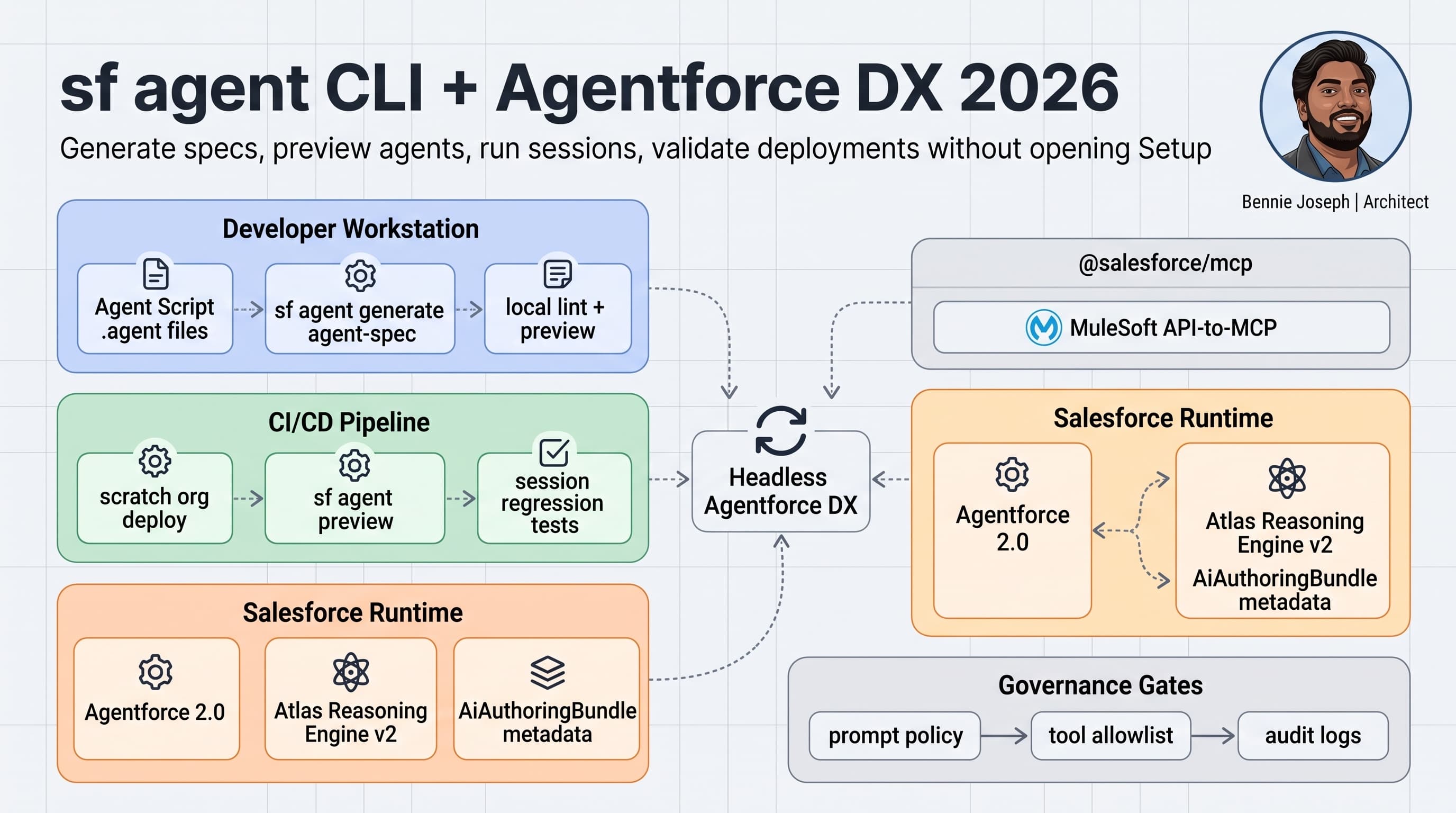
Salesforce agent development finally feels like real software engineering.
That is the practical reason I care about the sf agent CLI. Not because CLI tooling is trendy. Not because everyone wants to say "headless" in architecture diagrams. I care because production Agentforce work needs repeatability, source control, validation, and rollback.
Clicking through a browser builder does not scale when you have five squads, three sandboxes, regulated approval gates, and a release manager asking why the production agent behaved differently from UAT.
Agentforce 2.0 changes the game because the platform is no longer just "configure an assistant." With multi-agent orchestration, custom reasoning steps, Atlas Reasoning Engine v2, Agent Script .agent files, AiAuthoringBundle metadata, @salesforce/mcp, and the sf agent CLI, the agent lifecycle is moving into the same DevOps lane as Apex, LWC, Flow, metadata, and integration configuration.
Here is my practitioner guide to using sf agent CLI commands for headless Agentforce DX in 2026.
Why headless Agentforce matters
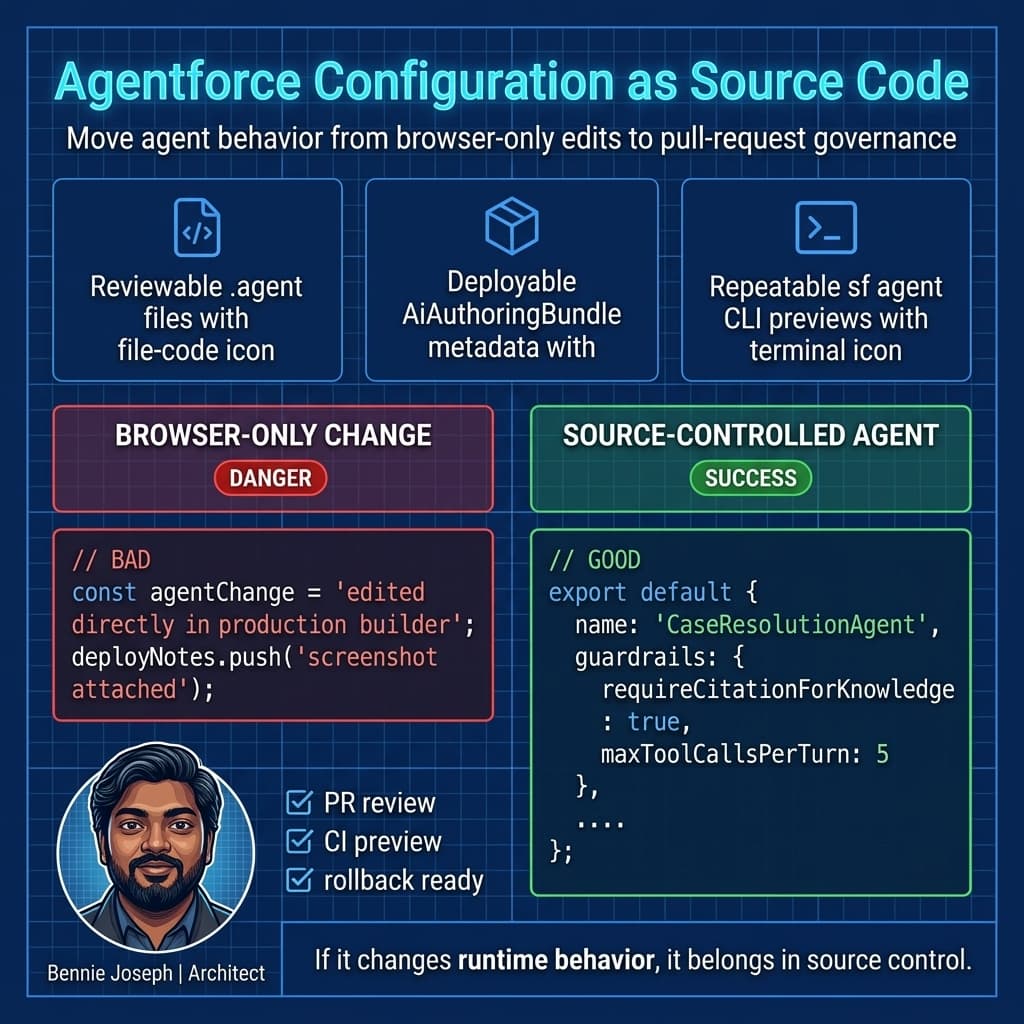
Here’s the unpopular take: if your Agentforce implementation cannot be recreated from source control, it is not enterprise-ready.
A production agent is not just a friendly chat interface. It is a runtime that can:
- read customer data,
- invoke tools,
- trigger workflows,
- hand off to humans,
- call APIs,
- summarize regulated interactions,
- make recommendations,
- and expose poor governance instantly if you let it.
That puts it squarely in the same architecture conversation as integration, data lifecycle, identity/access, and system design.
The sf agent CLI gives teams a path to manage agents like deployable assets instead of screenshots in a Confluence page.
A basic workflow looks like this:
sf org login web --alias agent-dev

sf agent generate agent-spec \
  --name "CaseResolutionAgent" \
  --output-dir force-app/main/default/agents

sf project deploy start \
  --source-dir force-app/main/default \
  --target-org agent-dev

sf agent preview \
  --agent CaseResolutionAgent \
  --target-org agent-dev

sf agent sessions start \
  --agent CaseResolutionAgent \
  --target-org agent-dev \
  --input-file test-data/case-resolution-session.json

sf agent sessions end \
  --session-id 0AGxx000000001BGAQ \
  --target-org agent-dev
That is the mental shift: agents become source-controlled, previewable, testable, and pipeline-friendly.
The moving parts: Agent Script, AiAuthoringBundle, and CLI
The new Agentforce Builder is GA, and the old builder is deprecated in July 2026. That matters because the metadata story is now cleaner.
The main pieces I care about:
| Component | What it does | Why developers should care |
|---|---|---|
Agent Script .agent files | Declarative agent definition language | Reviewable in PRs, lintable, versionable |
AiAuthoringBundle metadata | Metadata container for authored agent assets | Deployable through normal Salesforce DX patterns |
sf agent CLI | Developer commands for generation, preview, sessions | Enables headless workflows and CI checks |
@salesforce/mcp | MCP tools and coding skills for Salesforce | Lets agents and dev tools interact with Salesforce capabilities |
| Agentforce 2.0 runtime | Multi-agent orchestration and Atlas Reasoning Engine v2 | Runtime behavior needs testing, not just configuration |
A simplified .agent file might look like this:
// force-app/main/default/agents/CaseResolutionAgent.agent
export default {
  name: "CaseResolutionAgent",
  description: "Assists support reps with case triage, entitlement checks, and response drafting.",
  runtime: {
    engine: "atlas-reasoning-engine-v2",
    orchestration: "multi-agent"
  },
  topics: [
    {
      name: "TriageCase",
      instructions: [
        "Classify the case priority using Case fields and recent customer history.",
        "Do not expose internal SLA policy text directly to the customer.",
        "Escalate when entitlement status is expired or ambiguous."
      ],
      tools: [
        "getCaseContext",
        "checkEntitlement",
        "draftCustomerReply"
      ]
    }
  ],
  guardrails: {
    requireCitationForKnowledge: true,
    blockPIIInExternalReplies: true,
    maxToolCallsPerTurn: 5
  }
};
I like this pattern because the agent definition is readable in code review. A senior admin, developer, architect, and security reviewer can all inspect the same artifact.
That is not a minor improvement. It changes governance.
My baseline folder structure
I prefer keeping agent assets close to metadata, but isolated enough that CI can target them.
Example:
force-app/
  main/
    default/
      agents/
        CaseResolutionAgent.agent
        RenewalAssistant.agent
      aiAuthoringBundles/
        CaseResolutionAgent/
        RenewalAssistant/
      classes/
        AgentCaseContextService.cls
        AgentCaseContextServiceTest.cls
test-data/
  agent-sessions/
    case-triage-happy-path.json
    case-expired-entitlement.json
    case-no-knowledge-match.json
scripts/
  agent/
    run-agent-regression.ts
The key is separating three concerns:
- Agent definition.
- Salesforce tool/action implementation.
- Regression prompts and expected behavior.
Do not bury test prompts inside random pipeline YAML. Treat them as test assets.
A real enterprise example: support case triage
On one enterprise service project, the business wanted an AI assistant to help agents triage high-volume support cases. The initial design was simple: classify the case, summarize context, suggest a response.
The production reality was not simple.
We had:
- multiple support regions,
- product-specific entitlements,
- customer-specific SLA exceptions,
- sensitive internal notes,
- escalations to engineering,
- and knowledge content with mixed quality.
A browser-only Agentforce setup worked for a demo. It did not work for a release train.
The fix was to treat the agent like a deployable system component:
- Agent instructions lived in
.agentsource. - Tool access was explicit and reviewed.
- Apex services enforced user access.
- Test sessions ran in CI.
- UAT sign-off used deterministic input files.
- Production deployment used metadata promotion, not manual recreation.
The Apex service behind one tool looked like this:
public with sharing class AgentCaseContextService {
    public class CaseContextRequest {
        @InvocableVariable(required=true)
        public Id caseId;
    }

    public class CaseContextResponse {
        @InvocableVariable
        public String caseNumber;

        @InvocableVariable
        public String priority;

        @InvocableVariable
        public String entitlementStatus;

        @InvocableVariable
        public String safeSummary;
    }

    @InvocableMethod(
        label='Get Case Context for Agent'
        description='Returns sanitized case context for Agentforce case triage.'
    )
    public static List<CaseContextResponse> getCaseContext(List<CaseContextRequest> requests) {
        Set<Id> caseIds = new Set<Id>();

        for (CaseContextRequest request : requests) {
            if (request != null && request.caseId != null) {
                caseIds.add(request.caseId);
            }
        }

        Map<Id, Case> casesById = new Map<Id, Case>([
            SELECT Id, CaseNumber, Priority, Subject, Description, Entitlement.Status
            FROM Case
            WHERE Id IN :caseIds
            WITH USER_MODE
        ]);

        List<CaseContextResponse> responses = new List<CaseContextResponse>();

        for (CaseContextRequest request : requests) {
            Case c = casesById.get(request.caseId);

            CaseContextResponse response = new CaseContextResponse();

            if (c != null) {
                response.caseNumber = c.CaseNumber;
                response.priority = c.Priority;
                response.entitlementStatus = c.Entitlement == null
                    ? 'No entitlement found'
                    : c.Entitlement.Status;

                response.safeSummary = buildSafeSummary(c.Subject, c.Description);
            }

            responses.add(response);
        }

        return responses;
    }

    private static String buildSafeSummary(String subject, String description) {
        String rawText = String.join(new List<String>{
            subject == null ? '' : subject,
            description == null ? '' : description
        }, ' - ');

        if (rawText.length() > 500) {
            rawText = rawText.substring(0, 500);
        }

        return rawText.replaceAll('[\\r\\n]+', ' ').trim();
    }
}
Notice the WITH USER_MODE. For Salesforce API v64.0 today, I’m already coding toward the v67.0 security direction where user-mode data access becomes the default for SOQL/DML/Database methods and classes without explicit sharing declaration default to with sharing.
I do not want agents accidentally bypassing access controls because I was lazy with Apex.
The commands I actually use
The exact command surface will keep expanding, but the core workflow is already clear.
1. Generate an agent spec
I use this when bootstrapping an agent or creating a testable specification from an existing design.
sf agent generate agent-spec \
  --name "RenewalRiskAgent" \
  --description "Assists account teams with renewal risk analysis" \
  --output-dir force-app/main/default/agents \
  --target-org agent-dev
My rule: the generated spec is a starting point, not the architecture.
I still review:
- tool scope,
- reasoning steps,
- escalation behavior,
- data access,
- prompt injection risk,
- audit requirements,
- and deployment ownership.
2. Preview before deploying broadly
sf agent preview \
  --agent RenewalRiskAgent \
  --target-org agent-uat \
  --input "Summarize renewal risk for Acme Corp without exposing internal-only notes."
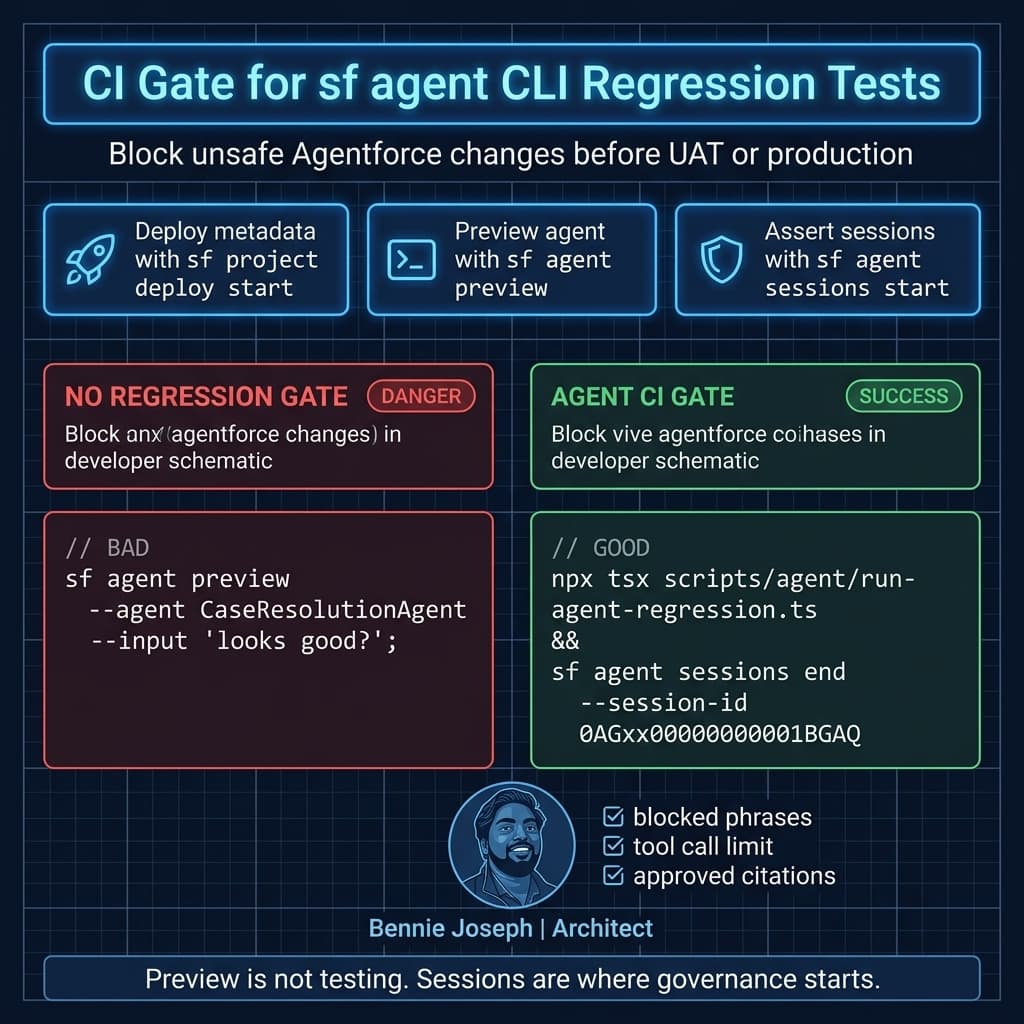
Preview is useful for fast feedback, but I do not treat preview as testing. It is a smoke check.
Testing needs repeatable session files.
3. Start session-based tests
sf agent sessions start \
  --agent CaseResolutionAgent \
  --target-org agent-uat \
  --input-file test-data/agent-sessions/case-expired-entitlement.json \
  --output-file test-results/case-expired-entitlement.json
A session input file might look like this:
{
  "user": {
    "profile": "Support Agent",
    "region": "EMEA"
  },
  "conversation": [
    {
      "role": "user",
      "content": "Review case 500xx000004TpnQAAS and draft a customer response."
    }
  ],
  "assertions": {
    "mustInclude": [
      "entitlement has expired",
      "recommend escalation"
    ],
    "mustNotInclude": [
      "internal SLA exception",
      "engineering-only note"
    ],
    "maxToolCalls": 5
  }
}
4. End sessions aggressively
sf agent sessions end \
  --session-id 0AGxx000000001BGAQ \
  --target-org agent-uat
Do not leave test sessions lying around forever. They become noise in logs, analytics, and audit reviews.
Add regression checks with TypeScript
For CI, I like wrapping CLI calls in a thin TypeScript runner. It keeps the pipeline readable and lets me add custom assertions.
// scripts/agent/run-agent-regression.ts
import { execFileSync } from "node:child_process";
import { readFileSync, writeFileSync } from "node:fs";

type AgentScenario = {
  name: string;
  inputFile: string;
  mustInclude: string[];
  mustNotInclude: string[];
};

const targetOrg = process.env.SF_TARGET_ORG ?? "agent-uat";
const agentName = process.env.AGENT_NAME ?? "CaseResolutionAgent";

const scenarios: AgentScenario[] = [
  {
    name: "expired-entitlement",
    inputFile: "test-data/agent-sessions/case-expired-entitlement.json",
    mustInclude: ["entitlement has expired", "recommend escalation"],
    mustNotInclude: ["internal SLA exception", "engineering-only note"]
  },
  {
    name: "no-knowledge-match",
    inputFile: "test-data/agent-sessions/case-no-knowledge-match.json",
    mustInclude: ["I could not find an approved knowledge article"],
    mustNotInclude: ["guess", "probably"]
  }
];

function runSf(args: string[]): string {
  return execFileSync("sf", args, {
    encoding: "utf8",
    stdio: ["ignore", "pipe", "pipe"]
  });
}

for (const scenario of scenarios) {
  const outputFile = `test-results/${scenario.name}.json`;

  runSf([
    "agent",
    "sessions",
    "start",
    "--agent",
    agentName,
    "--target-org",
    targetOrg,
    "--input-file",
    scenario.inputFile,
    "--output-file",
    outputFile
  ]);

  const result = readFileSync(outputFile, "utf8");

  for (const phrase of scenario.mustInclude) {
    if (!result.includes(phrase)) {
      throw new Error(`[${scenario.name}] Missing required phrase: ${phrase}`);
    }
  }

  for (const phrase of scenario.mustNotInclude) {
    if (result.includes(phrase)) {
      throw new Error(`[${scenario.name}] Found blocked phrase: ${phrase}`);
    }
  }

  writeFileSync(`test-results/${scenario.name}.passed`, "ok");
  console.log(`Agent scenario passed: ${scenario.name}`);
}
This is intentionally boring. Boring automation wins.
Could you use a model-based evaluator with gpt-5.5, claude-sonnet-4-7, or gemini-3.1-pro? Yes. For nuanced answer quality, that can help. But for enterprise guardrails, I start with deterministic assertions:
- Did the agent leak blocked text?
- Did it call too many tools?
- Did it cite approved knowledge?
- Did it escalate correctly?
- Did it respect user access?
Then I layer semantic evaluation later.
CI pipeline example
A minimal GitHub Actions flow might look like this:
name: Agentforce DX Validation

on:
  pull_request:
    paths:
      - "force-app/main/default/agents/**"
      - "force-app/main/default/aiAuthoringBundles/**"
      - "force-app/main/default/classes/Agent*.cls"
      - "test-data/agent-sessions/**"
      - "scripts/agent/**"

jobs:
  validate-agent:
    runs-on: ubuntu-latest

    steps:
      - uses: actions/checkout@v4

      - name: Install Salesforce CLI
        run: npm install --global @salesforce/cli

      - name: Authenticate to Salesforce
        run: |
          echo "${{ secrets.SFDX_AUTH_URL }}" > ./auth-url.txt
          sf org login sfdx-url --sfdx-url-file ./auth-url.txt --alias agent-ci

      - name: Deploy metadata to validation org
        run: |
          sf project deploy start \
            --source-dir force-app/main/default \
            --target-org agent-ci \
            --test-level RunLocalTests \
            --wait 30

      - name: Preview agent
        run: |
          sf agent preview \
            --agent CaseResolutionAgent \
            --target-org agent-ci \
            --input "Smoke test: summarize a support case safely."

      - name: Run agent regression scenarios
        run: |
          npm ci
          npx tsx scripts/agent/run-agent-regression.ts
        env:
          SF_TARGET_ORG: agent-ci
          AGENT_NAME: CaseResolutionAgent
One important 2026 CI/CD note: Salesforce CLI credential handling has a security overhaul. Credentials are redacted in command output, and separate commands are needed to view credentials. If your old pipeline scraped CLI output for secrets or auth details, fix it now. That pattern should never have existed anyway.
Decision matrix: browser builder vs headless CLI
I do not think every team needs maximum automation on day one. But I do think teams should be honest about the tradeoff.
| Approach | Best for | Strengths | Weaknesses | My recommendation |
|---|---|---|---|---|
| Browser-only builder | Prototypes, demos, early discovery | Fast, visual, admin-friendly | Hard to diff, hard to review, hard to recreate | Fine for discovery, risky for production |
| Builder plus manual deployment notes | Small teams with low change volume | Simple process, low tooling overhead | Still depends on human accuracy | Temporary bridge only |
Source-controlled .agent files + CLI preview | Product teams owning agent behavior | PR review, repeatable deploys, local-ish validation | Requires developer discipline | Minimum bar for serious delivery |
Full CI regression with sf agent sessions | Enterprise, regulated, multi-team programs | Repeatable tests, audit trail, deployment gates | More setup and maintenance | Best long-term pattern |
| Headless 360 + MCP automation | Platform engineering teams | Browserless ops, API/MCP/CLI orchestration | Requires mature governance | Powerful, but do not skip controls |
The decision usually comes down to blast radius.
If the agent only answers internal FAQ questions, browser-first may be acceptable for a while.
If the agent can touch customer records, trigger workflows, produce external communication, or call APIs, I want CLI-driven governance.
Scale: what breaks at 1K, 100K, and 10M
Agentforce architecture has a scaling profile that is different from normal CRUD apps.
At 1K sessions
At 1K sessions, most teams are still fighting correctness:
- Are the instructions clear?
- Are tools scoped correctly?
- Are users getting useful answers?
- Are hallucinations controlled?
- Are responses auditable?
The sf agent CLI helps by making prompt and session regression part of normal delivery.
At this scale, a few JSON session tests may be enough.
At 100K sessions
At 100K sessions, operational concerns show up:
- session logs need retention rules,
- tool call volume affects API limits,
- bad knowledge articles create repeated bad answers,
- latency becomes visible,
- and small prompt changes can affect many users.
This is where I want dashboards around:
- average tool calls per session,
- escalation rate,
- fallback rate,
- knowledge citation rate,
- blocked response count,
- and session duration.
I also start testing multiple personas: support rep, supervisor, partner user, and integration user. Identity/access becomes a first-class design concern.
At 10M sessions
At 10M sessions, you are designing a platform capability, not a feature.
Now you care about:
- partitioned monitoring,
- regional compliance,
- zero-copy data access through Data 360 where appropriate,
- Retriever API usage for unstructured content,
- native vector search governance,
- MCP tool lifecycle management,
- and release trains for agent behavior.
You also need to think about cost and latency per agent turn. A tiny inefficiency multiplied by 10M sessions becomes a budget conversation.
This is where Headless 360 becomes interesting: API + MCP + CLI access across the platform means platform teams can build repeatable automation without relying on browser workflows.
Guardrails I will not compromise on
For production Agentforce, I want these in place:
-
Explicit tool allowlists
Agents should only call approved tools. No accidental broad action access. -
User-mode data access
Apex, SOQL, and tool execution must respect the user. I useWITH USER_MODEnow and design toward v67.0 defaults. -
Session regression tests
Every risky behavior needs a test case. Especially data leakage, escalation, and external messaging. -
Metadata promotion
Build in dev, validate in CI, promote through environments. No production-only edits. -
Auditability
I want to know which agent version answered, which tools it called, and what data boundaries applied. -
Fallback design
A safe "I cannot answer this" is better than a confident bad answer.
Where MCP fits
The Salesforce MCP package, @salesforce/mcp, is part of why this whole space is getting more interesting.
Salesforce MCP gives teams access to 60+ MCP tools and coding skills. MuleSoft API-to-MCP can expose governed APIs as MCP tools. Heroku can host MCP servers. AgentExchange adds marketplace distribution.
That is powerful, but it increases the need for governance.
My current mental model:
- Use
sf agentCLI for agent lifecycle automation. - Use
.agentfiles andAiAuthoringBundlemetadata for source control. - Use MCP for controlled tool ecosystems.
- Use Salesforce permissions, Apex sharing, and user-mode access to enforce boundaries.
- Use CI sessions to prove the agent behaves before deployment.
Do not connect every tool because it is technically possible. Tool sprawl is the new integration sprawl.
Practical command checklist
For a new Agentforce delivery stream, I would start with this checklist:
# 1. Authenticate
sf org login web --alias agent-dev

# 2. Generate initial agent spec
sf agent generate agent-spec \
  --name "CaseResolutionAgent" \
  --output-dir force-app/main/default/agents \
  --target-org agent-dev

# 3. Deploy metadata
sf project deploy start \
  --source-dir force-app/main/default \
  --target-org agent-dev \
  --test-level RunLocalTests

# 4. Preview smoke behavior
sf agent preview \
  --agent CaseResolutionAgent \
  --target-org agent-dev \
  --input "Summarize a case and identify escalation risk."

# 5. Run repeatable session test
sf agent sessions start \
  --agent CaseResolutionAgent \
  --target-org agent-dev \
  --input-file test-data/agent-sessions/case-triage-happy-path.json \
  --output-file test-results/case-triage-happy-path.json

# 6. End session when done
sf agent sessions end \
  --session-id 0AGxx000000001BGAQ \
  --target-org agent-dev
This is not the final enterprise pattern. It is the starting line.
The mature version adds:
- package strategy,
- scratch org automation,
- validation orgs,
- security scans,
- prompt policy checks,
- MCP tool inventory,
- Data 360 grounding validation,
- and release approval gates.
Final thought
Agentforce 2.0 is pushing Salesforce teams toward a more engineering-driven model for AI automation.
That is a good thing.
The teams that win will not be the ones with the fanciest demo agent. They will be the ones that can answer boring production questions:
- What changed?
- Who approved it?
- Can we roll it back?
- Did it pass regression?
- What data can it access?
- Which tools can it call?
- How does it behave at scale?
The sf agent CLI is not just another command namespace. It is part of the shift from "AI configuration" to "AI delivery lifecycle."
That is the shift I’m betting on.
TL;DR
- Use
sf agentCLI commands to generate specs, preview behavior, run sessions, and automate headless Agentforce DX workflows. - Treat
.agentfiles andAiAuthoringBundlemetadata like production code: source control, PR review, CI validation, rollback. - Preview is not enough. Use repeatable
sf agent sessionstests for governance, scale, and enterprise release confidence.