SOQL Optimization: The Missing Guide
Most SOQL performance advice stops at “bulkify your queries” and “avoid SOQL in loops.”
That advice is correct. It is also incomplete.
The real production problems I see are different: queries that work fine in a sandbox with 200k records and then collapse in production with 80 million rows. Agentforce 2.0 actions timing out because an Apex invocable method performs a non-selective Case lookup. LWC pages with native state management that still feel slow because the Apex controller returns 40 fields nobody renders. Batch jobs that technically stay under governor limits but burn CPU because the query shape is lazy.
This is the missing guide I wish more Salesforce teams had before their first LDV incident.
I’m going to focus on practical soql query optimization tips that matter in enterprise orgs: selectivity, indexes, query plans, relationship queries, bulk Apex, and the tradeoffs that architects actually make.
The Performance Rule Nobody Wants to Hear
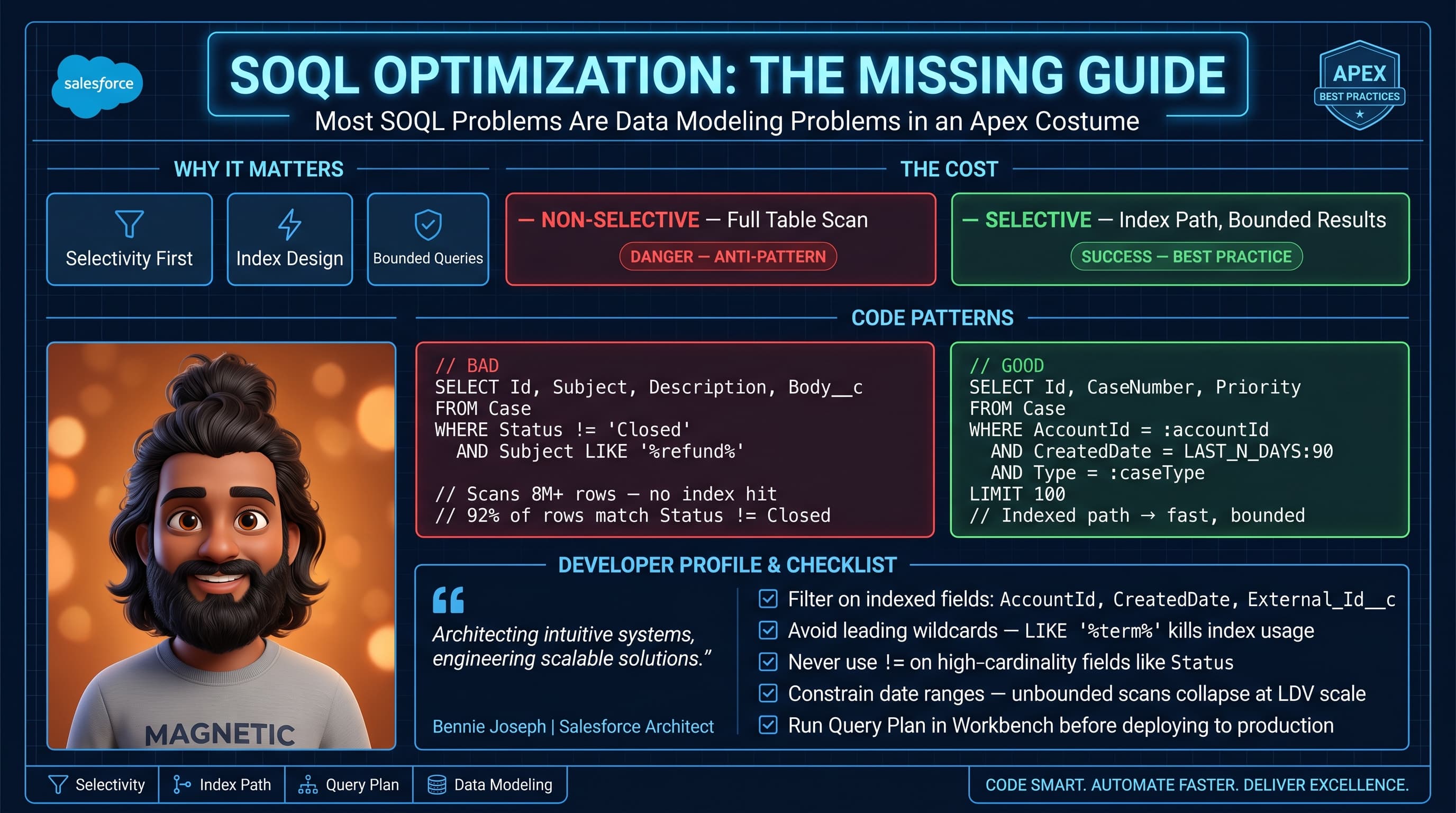
Here’s the unpopular take: most SOQL issues are data modeling issues wearing an Apex costume.
If your object has 60 million records and every useful filter is either a formula, a long text field, a multi-select picklist, or a nullable lookup, Apex cannot save you. You need better filter fields, better indexes, better archival strategy, or a different access pattern.
SOQL is fast when Salesforce can narrow the candidate rows early. SOQL is painful when the database has to scan too much data before it knows what you want.
Bad SOQL usually looks innocent:
List<Case> cases = [
    SELECT Id, CaseNumber, Subject, Status, Priority, CreatedDate
    FROM Case
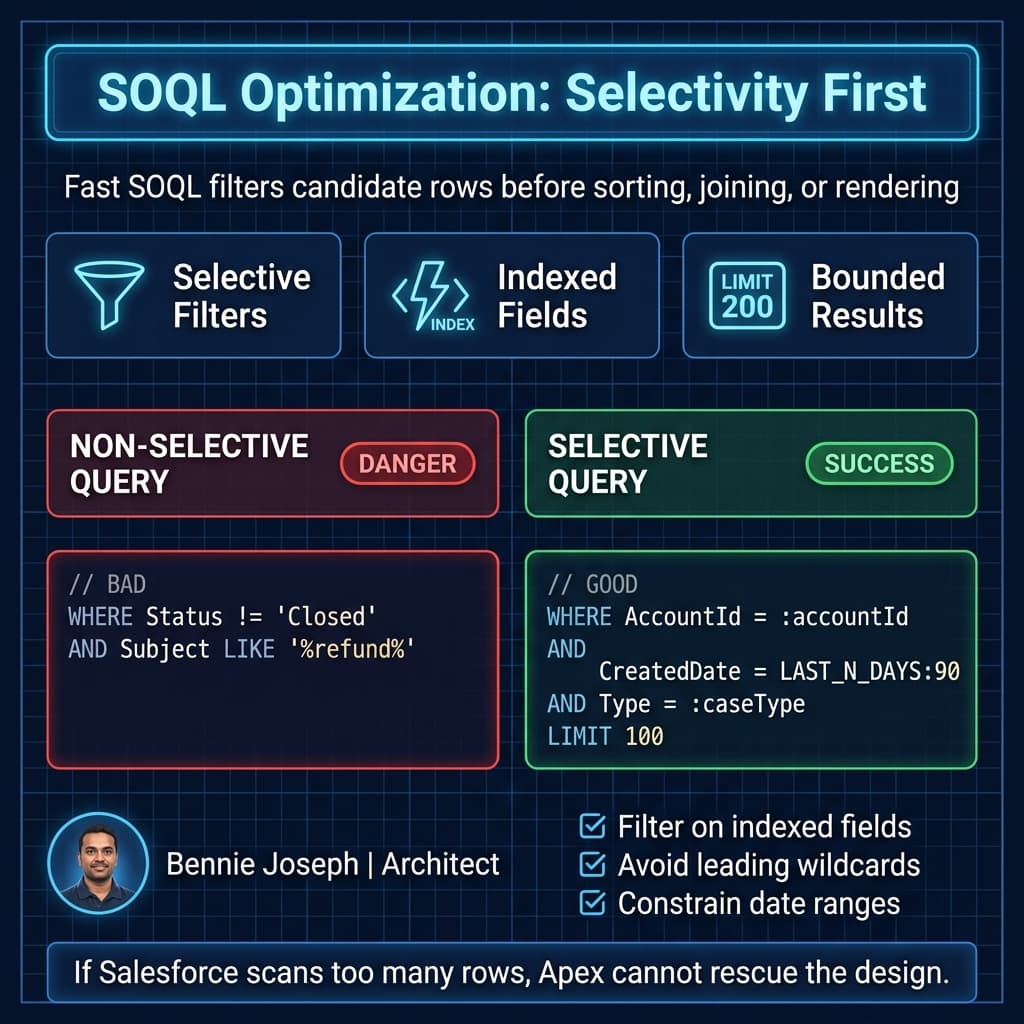
    WHERE Status != 'Closed'
    AND Subject LIKE :('%' + searchTerm + '%')
    ORDER BY CreatedDate DESC
    LIMIT 100
];
This query has three classic problems:
Status != 'Closed'is usually not selective in active service orgs.LIKE '%term%'prevents normal index usage because of the leading wildcard.ORDER BY CreatedDate DESCcan become expensive if the filter does not reduce the result set first.
It may pass every unit test. It may pass UAT. It may even run fine for months. Then your Case table crosses a threshold, support imports a historical archive, or Agentforce starts calling it 20,000 times a day, and suddenly it is your incident.
Start With Selectivity, Not Syntax
A selective query narrows the result set enough that Salesforce can use an index efficiently.
As a rule of thumb, standard indexed fields and custom indexed fields are your friends. These often include:
IdNameon some objectsCreatedDateLastModifiedDate- External ID fields
- Unique fields
- Lookup fields
- Master-detail fields
- Some standard picklists
- Custom fields with a Salesforce-supported index
But “indexed” does not automatically mean “fast.” If a field has low cardinality, the index may not help much.
Example: Status__c = 'Active' on an object where 92% of records are active is not selective. The database still has to consider almost everything.
A better pattern is to combine filters so the leading filter reduces the candidate set meaningfully:
public with sharing class CaseSearchService {
    public class SearchRequest {
        @AuraEnabled public Id accountId;
        @AuraEnabled public String caseType;
        @AuraEnabled public Date startDate;
        @AuraEnabled public Date endDate;
        @AuraEnabled public Integer limitSize;
    }

    @AuraEnabled(cacheable=true)
    public static List<Case> searchCases(SearchRequest request) {
        if (request == null || request.accountId == null) {
            throw new AuraHandledException('accountId is required for case search.');
        }

        Integer safeLimit = request.limitSize == null
            ? 50
            : Math.min(Math.max(request.limitSize, 1), 200);

        Date safeStart = request.startDate == null
            ? Date.today().addDays(-90)
            : request.startDate;

        Date safeEnd = request.endDate == null
            ? Date.today()
            : request.endDate;

        return [
            SELECT Id, CaseNumber, Subject, Status, Priority, CreatedDate
            FROM Case
            WHERE AccountId = :request.accountId
            AND CreatedDate >= :safeStart
            AND CreatedDate <= :safeEnd
            AND Type = :request.caseType
            ORDER BY CreatedDate DESC
            LIMIT :safeLimit
        ];
    }
}
This version forces the caller to provide AccountId, constrains the date range, caps the limit, and avoids substring search. It is not as “flexible.” Good. Flexible queries are often slow queries with better branding.
Use Query Plan Like An Architect
If you are optimizing SOQL without checking Query Plan, you are guessing.
In Developer Console or VS Code tooling, Query Plan shows whether Salesforce expects to use an index, the estimated cardinality, and the relative cost. The exact numbers vary by org, data distribution, sharing model, and seasonal optimizer behavior, but the principle is stable: lower cost and lower cardinality are better.
What I look for:
- Does the query use an index?
- What is the leading operation type?
- How many rows does Salesforce expect to inspect?
- Is the cost low enough for the object size?
- Did adding another condition actually improve the plan?
- Is sharing recalculation or ownership skew making this worse?
One trap: developers add more filters and assume the query is faster. Not always. Adding a non-selective filter does not guarantee a better plan. Sometimes it makes the optimizer choose a worse path.
I usually test variants:
// Variant A: weak filter, often non-selective
SELECT Id
FROM Case
WHERE Status = 'New'

// Variant B: better because AccountId is typically indexed and selective
SELECT Id
FROM Case
WHERE AccountId = '001000000000001AAA'
AND Status = 'New'

// Variant C: better for operational screens with recent data access
SELECT Id
FROM Case
WHERE AccountId = '001000000000001AAA'
AND CreatedDate = LAST_N_DAYS:90
AND Status = 'New'
For enterprise work, I document the chosen query plan in the technical design. Not every query needs a dissertation, but critical LDV queries do. If a query powers a customer portal, an Agentforce 2.0 action, a nightly integration, or a revenue process, I want proof that it has been tested against production-like volume.
My Enterprise Example: Claims Search at Scale
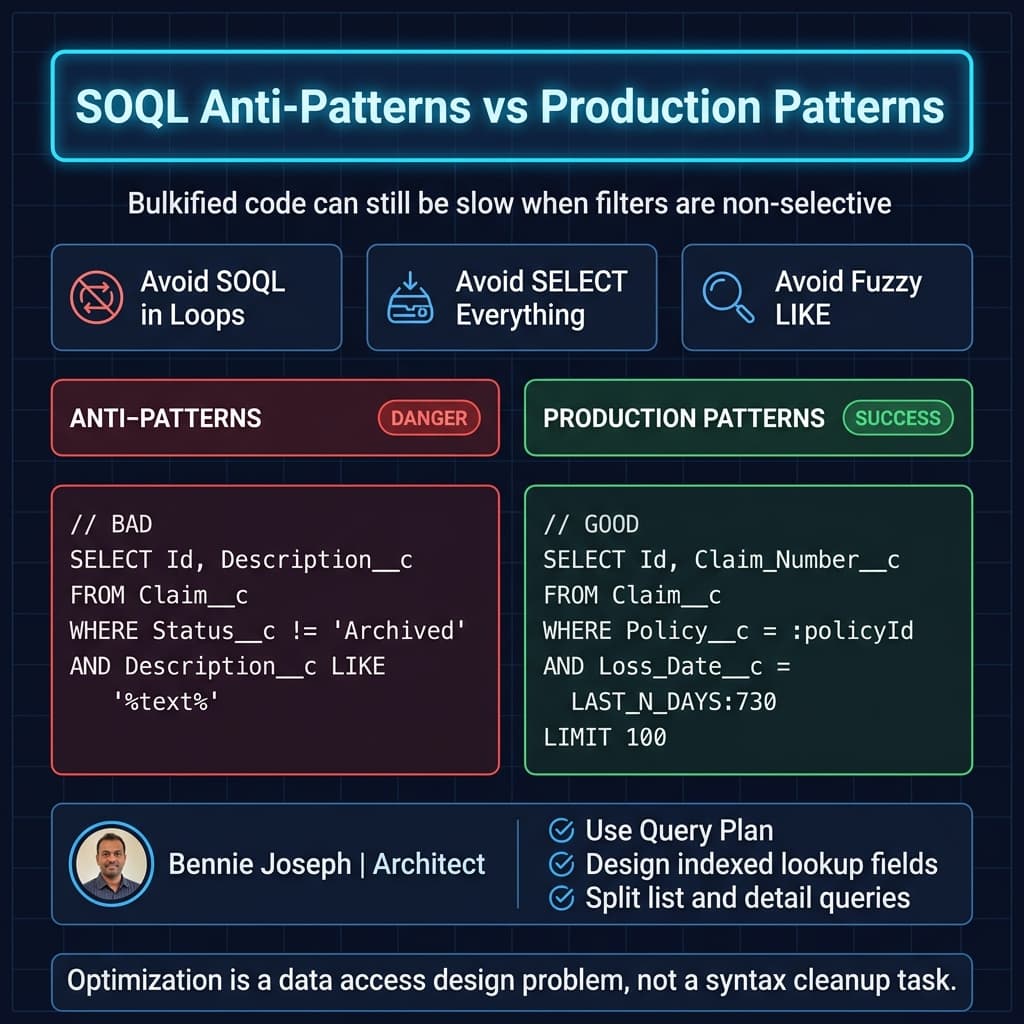
One insurance client had a claims service console backed by Salesforce Case and several custom claim objects. Production had roughly 90 million Case records and 30 million Claim__c records. The service team needed fast search by customer, policy, claim type, and date. They were also rolling out Einstein Copilot powered by Agentforce, with Agentforce 2.0 actions that retrieved recent claim context before generating a recommended next step.
The original query looked like this:
List<Claim__c> claims = [
    SELECT Id, Name, Claim_Number__c, Status__c, Loss_Date__c,
           Policy__c, Customer__c, Description__c
    FROM Claim__c
    WHERE Status__c != 'Archived'
    AND Description__c LIKE :('%' + searchText + '%')
    ORDER BY Loss_Date__c DESC
    LIMIT 100
];
It was convenient. It was also a production liability.
The Agentforce action timed out during peak hours because many prompts triggered this retrieval step. The LWC page was not the real problem. Native state management in LWC helped reduce client-side complexity, but the server query was still bad.
We changed the access pattern:
- Required
Customer__corPolicy__c. - Added an External ID field for
Claim_Number__c. - Added a custom indexed normalized search key for exact operational lookups.
- Moved broad semantic search to Data Cloud vector search native, then used returned record IDs to hydrate Salesforce records.
- Capped operational queries to recent date windows unless a specific claim number was provided.
- Split “find records” from “load record detail.”
The optimized Apex pattern looked like this:
public with sharing class ClaimLookupService {
    public class ClaimLookupRequest {
        @AuraEnabled public Id customerId;
        @AuraEnabled public Id policyId;
        @AuraEnabled public String claimNumber;
        @AuraEnabled public Date lossStartDate;
        @AuraEnabled public Date lossEndDate;
    }

    @AuraEnabled(cacheable=true)
    public static List<Claim__c> findClaims(ClaimLookupRequest request) {
        if (request == null) {
            throw new AuraHandledException('Request is required.');
        }

        if (String.isNotBlank(request.claimNumber)) {
            return [
                SELECT Id, Name, Claim_Number__c, Status__c, Loss_Date__c
                FROM Claim__c
                WHERE Claim_Number__c = :request.claimNumber
                LIMIT 1
            ];
        }

        if (request.customerId == null && request.policyId == null) {
            throw new AuraHandledException('Provide customerId or policyId.');
        }

        Date startDate = request.lossStartDate == null
            ? Date.today().addYears(-2)
            : request.lossStartDate;

        Date endDate = request.lossEndDate == null
            ? Date.today()
            : request.lossEndDate;

        if (request.policyId != null) {
            return [
                SELECT Id, Name, Claim_Number__c, Status__c, Loss_Date__c
                FROM Claim__c
                WHERE Policy__c = :request.policyId
                AND Loss_Date__c >= :startDate
                AND Loss_Date__c <= :endDate
                ORDER BY Loss_Date__c DESC
                LIMIT 100
            ];
        }

        return [
            SELECT Id, Name, Claim_Number__c, Status__c, Loss_Date__c
            FROM Claim__c
            WHERE Customer__c = :request.customerId
            AND Loss_Date__c >= :startDate
            AND Loss_Date__c <= :endDate
            ORDER BY Loss_Date__c DESC
            LIMIT 100
        ];
    }
}
Result: the main claims search dropped from frequent multi-second timeouts to sub-second responses for normal operational paths. The Agentforce action became predictable because it retrieved bounded, relevant records instead of asking Salesforce to scan descriptive text across a massive object.
That is the pattern I trust: use SOQL for precise, indexed record retrieval. Use Data Cloud vector search native for semantic retrieval when the user intent is fuzzy. Do not force LIKE '%something%' to become your search engine.
Do Not Select Fields “Just In Case”
Field count matters.
Every selected field has cost: database retrieval, serialization, network transfer, heap, CPU, and client rendering. This is especially obvious when Apex returns records to LWC or Agentforce custom actions.
Bad:
SELECT Id, Name, Description__c, Long_Notes__c, Internal_JSON__c,
       CreatedBy.Name, LastModifiedBy.Name, Owner.Name,
       Field_A__c, Field_B__c, Field_C__c, Field_D__c
FROM Work_Order__c
WHERE Account__c = :accountId
LIMIT 200
Better:
SELECT Id, Name, Status__c, Scheduled_Date__c
FROM Work_Order__c
WHERE Account__c = :accountId
ORDER BY Scheduled_Date__c DESC
LIMIT 50
Then load detail when the user opens a row.
This is basic API design, but Salesforce teams violate it constantly. They build one “universal query” for list views, modals, exports, and automation. That universal query becomes universally slow.
Relationship Queries Can Quietly Hurt You
Parent-to-child subqueries are useful, but they can explode your result size.
List<Account> accounts = [
    SELECT Id, Name,
        (SELECT Id, Subject, Status, CreatedDate FROM Cases)
    FROM Account
    WHERE Id IN :accountIds
];
This looks bulkified. It can still be dangerous.
If one enterprise account has 80,000 Cases, your transaction is in trouble. You may hit row limits, heap limits, CPU limits, or just return a payload the UI cannot use.
I prefer explicit child queries with limits and filters:
Map<Id, List<Case>> casesByAccountId = new Map<Id, List<Case>>();

for (Case c : [
    SELECT Id, AccountId, Subject, Status, CreatedDate
    FROM Case
    WHERE AccountId IN :accountIds
    AND CreatedDate = LAST_N_DAYS:180
    ORDER BY CreatedDate DESC
    LIMIT 1000
]) {
    if (!casesByAccountId.containsKey(c.AccountId)) {
        casesByAccountId.put(c.AccountId, new List<Case>());
    }
    casesByAccountId.get(c.AccountId).add(c);
}
This still needs care because LIMIT 1000 is global, not per account. If you need “top 5 cases per account,” do not pretend a parent-child subquery is always the cleanest answer. Sometimes you need a denormalized summary object, a scheduled rollup, a custom index strategy, or a separate service pattern.
Bulkification Is The Floor, Not The Ceiling
The standard advice is “don’t put SOQL in loops.” Correct. But bulkification alone does not guarantee good performance.
This is bulkified and still bad:
Set<String> emails = new Set<String>();

for (Lead leadRecord : Trigger.new) {
    emails.add(leadRecord.Email);
}

List<Contact> contacts = [
    SELECT Id, Email, AccountId
    FROM Contact
    WHERE Email IN :emails
];
Why can this be bad? Because email may not be selective in your org, may contain nulls, may have duplicate distribution problems, and may return too many records if the input is messy.
A stronger pattern validates inputs, removes blanks, and limits query intent:
public class LeadContactMatcher {
    public static Map<String, Contact> findContactsByEmail(List<Lead> leads) {
        Set<String> normalizedEmails = new Set<String>();

        for (Lead leadRecord : leads) {
            if (String.isBlank(leadRecord.Email)) {
                continue;
            }

            normalizedEmails.add(leadRecord.Email.trim().toLowerCase());
        }

        if (normalizedEmails.isEmpty()) {
            return new Map<String, Contact>();
        }

        Map<String, Contact> contactByEmail = new Map<String, Contact>();

        for (Contact contactRecord : [
            SELECT Id, Email, AccountId
            FROM Contact
            WHERE Normalized_Email__c IN :normalizedEmails
            AND IsDeleted = false
            LIMIT 10000
        ]) {
            contactByEmail.put(contactRecord.Email.toLowerCase(), contactRecord);
        }

        return contactByEmail;
    }
}
The important bit is Normalized_Email__c. In high-scale orgs, I do not rely on inconsistent user-entered email values for matching. I create deterministic matching fields, index them where appropriate, and make the query boring.
Boring queries are fast queries.
Be Careful With Formula Fields
Formula fields are convenient until they become filters in large queries.
Some formula fields can be indexed under specific conditions, but many cannot. Cross-object formulas, dynamic formulas, and formulas referencing non-indexable fields can become performance problems.
If a value is critical for filtering at scale, I usually prefer a persisted field maintained by automation or Apex. Yes, denormalization has a cost. But a persisted indexed field often beats a beautiful formula that forces runtime evaluation across millions of records.
Example:
// Risky at LDV if Eligibility_Status__c is a complex formula
SELECT Id
FROM Subscription__c
WHERE Eligibility_Status__c = 'Eligible'
AND Renewal_Date__c = NEXT_N_DAYS:30
Better:
// Eligibility_Key__c is a persisted, indexed operational filter
SELECT Id
FROM Subscription__c
WHERE Eligibility_Key__c = 'ELIGIBLE'
AND Renewal_Date__c = NEXT_N_DAYS:30
LIMIT 5000
I have used this pattern in telecom, insurance, and SaaS billing orgs. Persist the operational state you query often. Do not recompute it every time a user opens a screen or an agent action runs.
Dynamic SOQL Needs Guardrails
Dynamic SOQL is not evil. Uncontrolled dynamic SOQL is.
If you let users sort by any field, filter by any field, and search across any text, you are building a slow query generator. You are also increasing security risk if you do not bind variables and validate field names.
A safer pattern is allowlisting:
public with sharing class AccountQueryBuilder {
    private static final Set<String> ALLOWED_SORT_FIELDS = new Set<String>{
        'Name',
        'CreatedDate',
        'LastModifiedDate'
    };

    @AuraEnabled(cacheable=true)
    public static List<Account> searchAccounts(String industry, String sortField) {
        String safeSortField = ALLOWED_SORT_FIELDS.contains(sortField)
            ? sortField
            : 'Name';

        String queryText =
            'SELECT Id, Name, Industry, CreatedDate ' +
            'FROM Account ' +
            'WHERE Industry = :industry ' +
            'ORDER BY ' + safeSortField + ' ASC ' +
            'LIMIT 100';

        return Database.query(queryText);
    }
}
Notice I bind industry and only concatenate the validated sort field. That is the line between useful dynamic SOQL and future incident report.
In Salesforce API v64.0 projects, I still see teams expose flexible query endpoints to LWC, middleware, or AI agents. Don’t. Agentforce 2.0 is powerful, especially with custom reasoning steps, but it should call designed actions with bounded data access. It should not assemble arbitrary SOQL like a junior admin in a hurry.
Indexes Are Not Magic
Custom indexes help, but they are not a substitute for good query design.
Before requesting an index from Salesforce Support or designing an External ID field, ask:
- Is the field used in high-frequency filters?
- Is the value distribution selective?
- Are nulls common?
- Will the query combine this field with date or ownership filters?
- Does the field support the business access pattern long term?
- Will archival reduce the need for the index?
Indexing a field where 80% of rows have the same value is rarely the win people expect. Indexing Region__c with five possible values will not fix your query. Indexing Policy_Number__c, Customer_Key__c, or Integration_Correlation_Id__c probably will.
Also watch ownership and sharing. In private sharing models, query performance can be affected by sharing checks. Large role hierarchies, account data skew, and ownership skew can make otherwise reasonable queries slower. If one integration user owns 20 million records, do not act surprised when everything involving ownership gets weird.
OFFSET Is Usually A Smell
OFFSET is convenient for pagination. It is not my default choice for large datasets.
SELECT Id, Name
FROM Account
ORDER BY CreatedDate DESC
LIMIT 50
OFFSET 5000
The deeper the offset, the more wasteful the pattern becomes. For large lists, use keyset pagination:
@AuraEnabled(cacheable=true)
public static List<Account> getNextAccounts(Datetime lastCreatedDate, Id lastId) {
    if (lastCreatedDate == null || lastId == null) {
        return [
            SELECT Id, Name, CreatedDate
            FROM Account
            ORDER BY CreatedDate DESC, Id DESC
            LIMIT 50
        ];
    }

    return [
        SELECT Id, Name, CreatedDate
        FROM Account
        WHERE CreatedDate < :lastCreatedDate
           OR (CreatedDate = :lastCreatedDate AND Id < :lastId)
        ORDER BY CreatedDate DESC, Id DESC
        LIMIT 50
    ];
}
This approach uses the last record from the previous page as the cursor. It scales better and behaves more predictably.
My SOQL Optimization Checklist
When I review production SOQL, I use this checklist:
- Does the query have at least one selective filter?
- Is the leading filter indexed or indexable?
- Is the result bounded by date, parent, owner, or business key?
- Are we avoiding
!=,NOT IN, and leading wildcardLIKEwhere possible? - Are we selecting only fields needed for this use case?
- Are relationship queries bounded?
- Have we checked Query Plan against production-like data?
- Is this query called by automation, LWC, integration, batch, or Agentforce?
- Is the query stable under data growth for the next 24 months?
- Should semantic search live in Data Cloud vector search instead of SOQL?
That last question matters more in 2026. Salesforce now gives architects better primitives: Data Cloud real-time unification, native vector search, Agentforce 2.0 multi-agent orchestration, and custom reasoning steps. Use the right tool. SOQL is excellent for structured retrieval. It is not a vector database, a full-text search engine, or a reporting warehouse.
Final Opinion
SOQL optimization is not about memorizing governor limits. It is about designing predictable data access.
The best Salesforce teams I work with do not wait for non-selective query errors. They design indexed lookup paths. They split list queries from detail queries. They archive aggressively. They use Query Plan before go-live. They treat Agentforce actions like production APIs, not magical shortcuts around platform limits.
If you remember one thing, remember this: Salesforce performance problems usually show up in code, but they are often created in data design.
TL;DR
- The best soql query optimization tips start with selective filters, indexed fields, bounded date ranges, and Query Plan validation.
- Avoid leading wildcard
LIKE, universal “SELECT everything” queries, uncontrolled dynamic SOQL, and unbounded relationship subqueries. - For enterprise scale, use SOQL for precise structured retrieval and Data Cloud vector search for fuzzy semantic retrieval.